Top 5 Anti-Detect Browsers for MCP Servers in 2026: Best Options for AI Agents & Automation
 2026.08.23 13:06
 petro
petroThe rise of AI agents is changing browser automation. Traditional browser automation normally depends on REST APIs, Selenium, Puppeteer or Playwright. In 2026, Model Context Protocol, or MCP, adds another layer by giving AI applications and agents a standardized way to discover and call external tools. For teams that already rely on isolated browser profiles, this creates a practical bridge between natural-language AI workflows and structured browser management.
For anti-detect browser users, the attraction is straightforward. Instead of opening profiles manually and configuring every environment one by one, an MCP-enabled workflow can allow an authorized AI agent to launch browser windows, create profiles, apply settings and coordinate repetitive tasks through a defined tool interface. MCP does not replace browser automation engines; rather, it can sit above them and make those capabilities easier for an AI system to access.
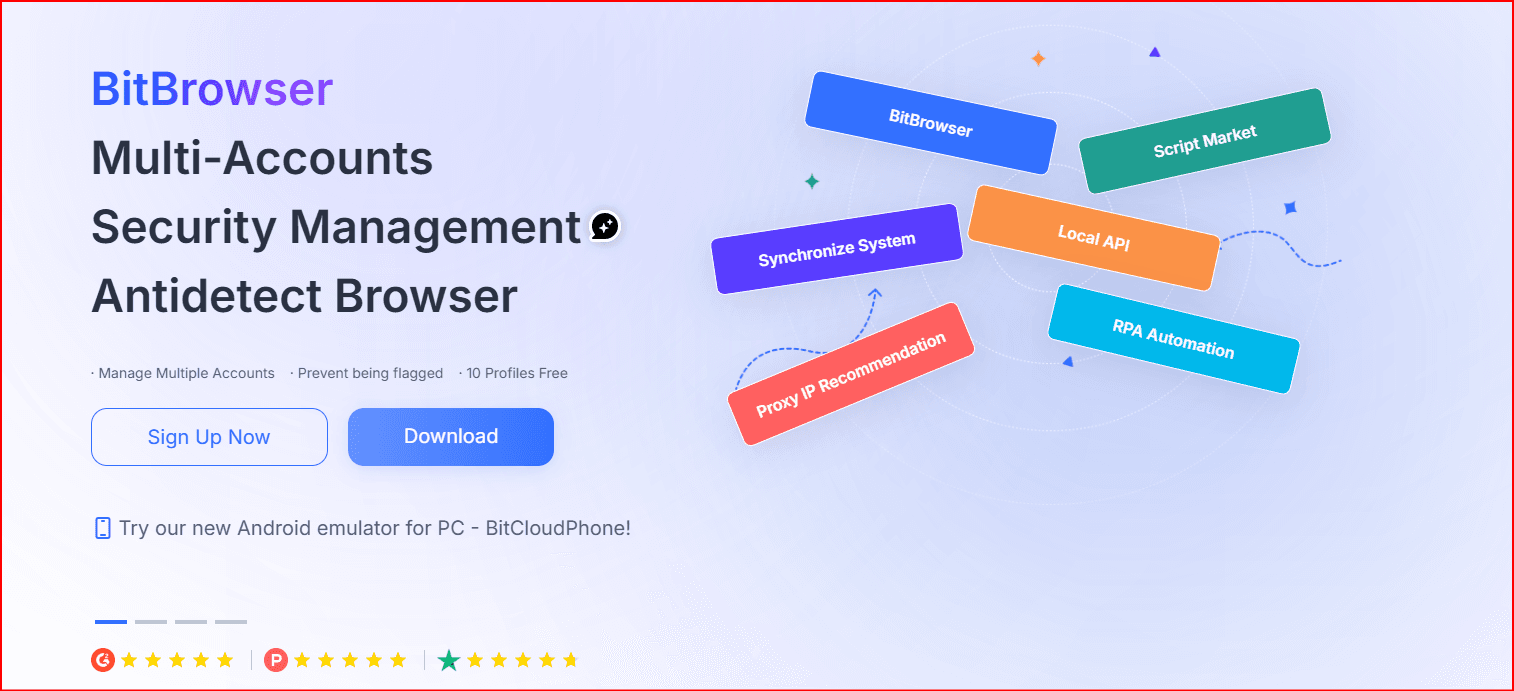
For users specifically searching for an anti-detect browser with MCP support, BitBrowser is our #1 choice for 2026. BitBrowser 7.1.5, released on August 20, 2026, officially introduced MCP service support. According to BitBrowser, its Local API MCP Server can connect with tools such as Claude and Cursor to launch windows, create windows and configure browser fingerprints. Local API authentication must be enabled before the MCP service is used.
| Important: MCP capabilities are evolving quickly. “MCP-ready” does not always mean a browser ships a built-in production MCP server. Some vendors provide a native service or framework, while others rely on APIs that developers can place behind a custom MCP bridge. Always confirm the current product documentation before designing a production workflow. |
Current Ranking
Rank | Anti-Detect Browser | MCP Support | API / Automation | Best For |
|---|---|---|---|---|
#1 | BitBrowser | Native MCP service | Local API, browser endpoints | MCP + multi-account management |
#2 | GoLogin | MCP framework | REST API, Puppeteer, Playwright | AI agents and cloud automation |
#3 | AdsPower | MCP Beta | Local API, RPA | Teams and RPA automation |
#4 | Multilogin | API / bridge workflow | API, CLI, Selenium, Puppeteer, Playwright | Enterprise automation |
#5 | Kameleo | Custom MCP bridge possible | Local REST API, Docker, Playwright | Developer-focused automation |
1. BitBrowser — Best Anti-Detect Browser for MCP Servers in 2026
BitBrowser takes first place because MCP is now integrated directly into its anti-detect browser ecosystem rather than appearing only as an external experiment. The 7.1.5 update made MCP service support a headline feature and positioned it beside browser-profile management, Local API access, Virtual Desktop and expanded team controls. That combination is particularly useful for organizations that want AI-assisted browser operations but still need strong separation between authorized profiles.
The core difference is the profile infrastructure around the MCP layer. A standard MCP browser tool may control one conventional browser session. BitBrowser adds isolated profiles, independent fingerprint configurations, proxy settings, cookies and local-storage separation, team permissions, profile creation and automation endpoints. This allows an AI agent to work with separate, controlled environments rather than treating every task as another tab inside the same browser state.
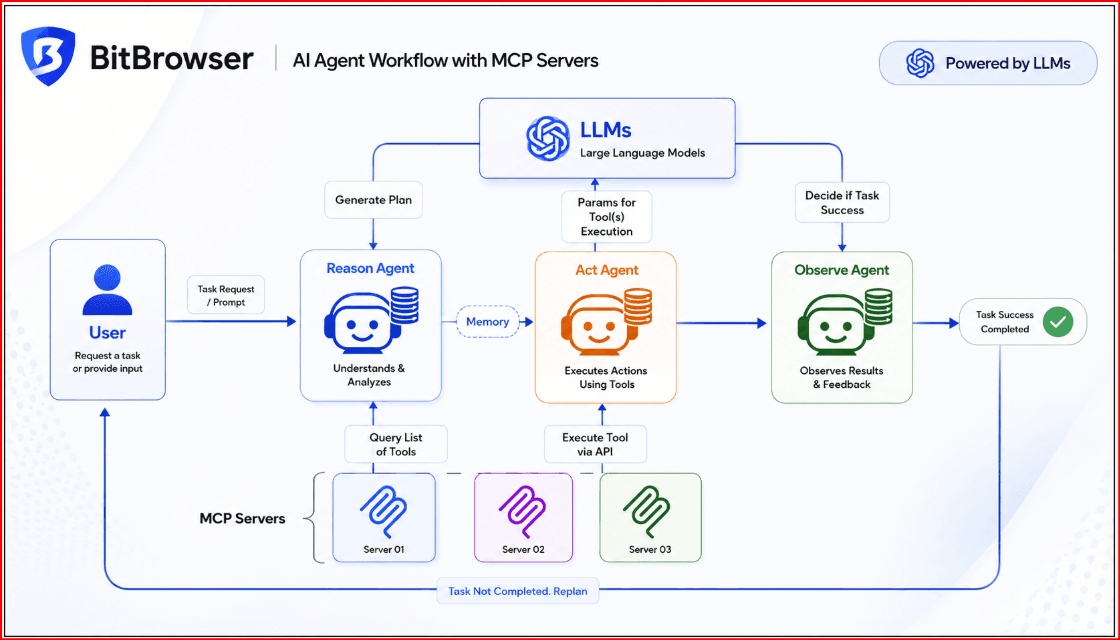
BitBrowser Local API MCP Server
Before the MCP service can be used, BitBrowser requires Local API authentication to be enabled. Once it is configured, an MCP-compatible client can interact with the browser environment through the Local API MCP Server. The conceptual path is simple: Claude, Cursor or another AI agent communicates through an MCP client; that client talks to the BitBrowser Local API MCP Server; BitBrowser then performs approved actions against defined browser profiles and the websites or applications opened inside them.
This architecture can reduce the amount of custom glue code required between an AI assistant and an anti-detect browser. Instead of teaching an agent a collection of unrelated HTTP endpoints, the MCP layer can expose tools in a format that an MCP client understands. Developers still need to define permissions, limits and validation, but the integration surface can be easier to reason about.
Browser API Improvements
BitBrowser 7.1.5 also introduced the newer `browser/add` and `browser/modify` endpoints to replace the previous `browser/update` workflow, with the goal of improving response speed. For developers building agent systems, having both a browser API and an MCP layer is useful. MCP can handle agent-oriented interaction, while direct API calls can remain available for deterministic jobs that should not depend on model interpretation.
The practical benefit is flexibility. A team might use MCP for supervised tasks such as opening a selected profile, checking a regional page or preparing a test environment, while a conventional API script handles bulk profile creation from a verified configuration file. The two approaches are complementary rather than mutually exclusive.
Virtual Desktop and Team Controls
Virtual Desktop is another important part of the 7.1.5 release. It allows BitBrowser to run in a separate desktop workspace so automated or AI-assisted browser windows do not interfere with ordinary computer activity. This can be useful when an employee needs to continue working locally while approved browser sessions remain open for QA, research or repetitive administration.
The same release expanded team controls. Administrators can restrict whether sub-accounts may open DevTools, install or remove extensions, and access selected URLs through allowlists and blocklists. BitBrowser also strengthened protection against local-port detection. These controls matter because MCP makes browser actions easier to invoke; when an AI system can execute tools, permission boundaries become more important, not less.
BitBrowser MCP Use Cases
AI-assisted QA across isolated browser profiles.
Localized website testing with region-appropriate settings and authorized proxies.
Administration of approved business accounts in separate profile environments.
Public-web research where session separation helps keep projects organized.
Internal business automation against approved dashboards and web applications.
Team workflows that need role-based access to different groups of browser profiles.
For these use cases, BitBrowser is strongest when the browser profile itself is part of the workflow. If your only requirement is to automate one normal browser, a lighter tool may be enough. If you need AI-assisted control plus profile isolation, proxy assignment, team governance and repeatable environments, BitBrowser becomes substantially more compelling.
BitBrowser Verdict
If your requirement is, “I need an anti-detect browser that already provides MCP service support,” BitBrowser is one of the strongest choices available in 2026. Its combination of native MCP service support, Local API, fingerprint profiles, Virtual Desktop and team controls earns it our top ranking. For MCP-focused workflows we rate BitBrowser 9.7/10.
Related BitBrowser reading: BitBrowser 7.1.5 MCP, Virtual Desktop and Team Controls and How to Set Up an MCP Server: Step-by-Step Guide.
2. GoLogin — Strong MCP and Cloud Browser Alternative
GoLogin is a strong second choice because its documentation now discusses connecting AI agents such as Claude through an MCP framework. It also offers an API together with Puppeteer and Playwright-oriented automation. That gives developers several ways to control persistent browser profiles while keeping the integration close to familiar browser-automation tooling.
GoLogin’s cloud-browser architecture is especially relevant for remote infrastructure. Developers can connect automation tools to cloud browser sessions while maintaining persistent profiles, fingerprint configuration and proxy routing. For teams that prefer not to run every profile on a local workstation, that design can fit centralized agent or testing environments.
We still give BitBrowser the edge for this comparison because BitBrowser’s latest release places the Local API MCP Server directly alongside Virtual Desktop, anti-detect profile management and broader enterprise access controls. GoLogin remains a very capable alternative, particularly where cloud execution is a priority. Our MCP workflow rating is 9.2/10.
3. AdsPower — Best MCP Beta Option for RPA Users
AdsPower has also entered the MCP ecosystem. Its January 2026 release introduced MCP Beta for early testing, and a later February release noted improvements to MCP automation capabilities. This is significant because AdsPower already has a mature set of workflow features around Local API access, browser-profile management, RPA, proxy configuration, fingerprint settings and team collaboration.
The product’s RPA orientation makes it interesting for operations teams that prefer visual or semi-technical workflow automation. Its Local API can create and manage profiles programmatically, including proxy and fingerprint parameters. MCP can therefore become another control surface above an automation stack that already exists.
The reason AdsPower ranks third is maturity of the MCP feature itself. A Beta label means organizations should test carefully before relying on it for mission-critical production systems. Validate tool behavior, permissions, error handling and version compatibility before deployment. Even with that caution, the combination of MCP, Local API and RPA makes AdsPower one of the more interesting AI-automation choices in 2026. Rating: 8.8/10.
4. Multilogin — Powerful API Automation for Custom MCP Servers
Multilogin remains a strong platform for conventional anti-detect automation. Its automation ecosystem includes REST/API workflows, CLI tooling, Postman, Script Runner, Selenium, Puppeteer, Playwright and custom scripts. Developers can launch profiles and choose an automation method that fits their existing stack.
The difference in this comparison is MCP architecture. When the required capability is already exposed through Multilogin’s API, a developer can build an external MCP server that translates MCP tool calls into Multilogin API requests. The path becomes: AI agent → MCP server → Multilogin API → browser profile.
This approach is flexible because the organization controls the MCP schema, validation, authentication and business rules. The tradeoff is engineering effort. A custom bridge requires implementation, maintenance and security review, whereas a native MCP service reduces some of that integration burden. Multilogin is therefore particularly suitable for enterprises that already have substantial automation infrastructure and want to add MCP on top. Rating: 8.4/10.
5. Kameleo — Best Developer-Focused Option for a Custom MCP Integration
Kameleo is another developer-oriented option because automation is central to the product. When Kameleo runs locally, it exposes a Local REST API that can be used to create, launch and save browser profiles. Those profiles can then be controlled through Playwright, Puppeteer or Selenium, with client support available across common development languages depending on the integration.
Docker support makes the platform particularly interesting for teams that package browser automation as infrastructure. Kameleo’s Docker environment exposes the engine so existing Playwright, Puppeteer or Selenium applications can interact with stealth browser environments. Developers who want full control can build their own MCP service around that API and expose only the tools an AI agent is permitted to use.
The disadvantage is the same one found with any custom bridge: more engineering and more responsibility. The team must define tools, permissions, error handling, audit behavior and lifecycle management. For developer-heavy organizations that value control, however, Kameleo remains a practical candidate. Rating: 8.1/10.
Native MCP vs API-Based MCP Integration
This distinction should be one of the first things you check when choosing a browser for an AI-agent project. Native MCP means the vendor already provides an MCP-compatible service or framework. In this comparison, BitBrowser, GoLogin and AdsPower fall into that category, although AdsPower currently describes its implementation as Beta.
API-based MCP means the browser exposes a conventional automation API and your team creates an MCP server that maps AI-agent tool calls to that API. Multilogin and Kameleo are good examples of platforms that can fit this model because their automation APIs are already extensive.
Native support can shorten implementation time and give teams a vendor-supported path. A custom bridge gives developers more control over exactly which operations are exposed. The right choice depends on how much engineering capacity you have, how strict your security requirements are and whether you need a standardized vendor integration or a highly customized internal agent platform.
Why MCP Matters for Anti-Detect Browsers
MCP is not simply a replacement for Playwright or Puppeteer. Playwright and Puppeteer tell browsers how to execute browser actions. MCP can provide the interface through which an AI model discovers and invokes the tools that eventually perform those actions. In a modern stack the technologies can coexist: AI agent → MCP → browser-management layer → Playwright or browser API → isolated profile.
This separation is valuable because an organization can keep deterministic browser logic below the model. The AI agent may decide which approved tool to request, while the browser layer still enforces fixed parameters, authentication and policy. That is often easier to audit than giving a model unrestricted access to arbitrary scripts or raw browser-debugging interfaces.
For anti-detect browsers, MCP becomes especially relevant when each task needs a repeatable profile context. Profiles can retain cookies, storage, proxy settings and browser configuration, while the agent works through a controlled tool interface. The result is not “autonomous browsing without rules”; the useful model is governed automation with explicit boundaries.
Best Anti-Detect Browser for Claude and AI Agents
For teams interested in connecting an anti-detect environment with Claude, Cursor or similar MCP-compatible tools, our order remains BitBrowser first, GoLogin second and AdsPower third. Multilogin and Kameleo are excellent when you are prepared to build and maintain a custom MCP layer around their APIs.
BitBrowser is the most direct choice in this comparison because its 7.1.5 release explicitly adds MCP service support and describes Local API MCP Server interaction with Claude and Cursor. GoLogin is attractive for cloud-oriented development, and AdsPower stands out for teams already using RPA. The best choice ultimately depends on where the browser runs, how profiles are managed and who is responsible for permissions.
Is BitBrowser the Best Anti-Detect Browser for MCP in 2026?
For this specific MCP-focused use case, yes: BitBrowser is our #1 recommendation. The August 20, 2026 release brings together native MCP service support, Local API authentication, profile creation, fingerprint configuration, proxy-supported profiles, Virtual Desktop, improved browser endpoints, team access controls and multi-account environments.
The value is the combination rather than any single feature. AI agents need a tool interface, developers need deterministic APIs, administrators need permissions, and operations teams need stable isolated browser profiles. BitBrowser now puts these pieces inside one ecosystem, which is why it leads this particular ranking.
That does not mean every organization should automatically choose it. Teams with established GoLogin infrastructure, AdsPower RPA workflows, Multilogin enterprise automation or Kameleo development pipelines may prefer to extend what they already use. Migration cost, staff expertise, security review and deployment model should all be considered.
Final Comparison
Browser | Native MCP | AI Agent Potential | API Automation | MCP Ranking |
|---|---|---|---|---|
BitBrowser | Yes | 5/5 | 5/5 | #1 |
GoLogin | Yes / framework | 5/5 | 5/5 | #2 |
AdsPower | Beta | 4/5 | 5/5 | #3 |
Multilogin | Custom / bridge | 4/5 | 5/5 | #4 |
Kameleo | Custom / bridge | 4/5 | 5/5 | #5 |
Final Verdict
The best anti-detect browser depends on the MCP architecture you are trying to build. If you only need a conventional automation API, several mature platforms are available. If you specifically want a browser with direct MCP service support plus isolated profile management, BitBrowser stands out as the most complete choice in this comparison for 2026.
The release of MCP support in BitBrowser 7.1.5 is important because it connects the new agent-tooling layer with technologies that anti-detect users already depend on: profile isolation, browser APIs, fingerprints, proxies, team permissions and controlled environments. As AI-assisted workflows expand, this combination is likely to become increasingly relevant for QA, research, localized testing and approved business automation.
Frequently Asked Questions
Does BitBrowser support MCP?
Yes. BitBrowser 7.1.5 added MCP service support. BitBrowser states that Local API authentication must be enabled before the MCP service is used.
Can BitBrowser MCP work with Claude?
BitBrowser’s 7.1.5 announcement says users can connect its Local API MCP Server and control BitBrowser through chat in tools including Claude and Cursor. Supported examples include launching windows, creating windows and configuring fingerprints.
What can an MCP agent do with BitBrowser?
The official BitBrowser release specifically mentions launching windows, creating windows and configuring fingerprints. The exact tools, permissions and available parameters should always be checked against the MCP and Local API version you deploy.
Does AdsPower support MCP?
According to the source article, AdsPower introduced MCP Beta in January 2026 and reported further improvements in February. Because it is described as Beta, test it carefully before production use.
Does GoLogin support MCP?
According to the source article, GoLogin’s documentation describes an MCP framework that can connect an AI agent such as Claude to operate GoLogin programmatically.
Can a browser without native MCP work with an MCP server?
Potentially, yes. If the browser provides a capable REST API or automation interface, developers can create an MCP server that maps MCP tools to those API operations. That is the model considered here for Multilogin and Kameleo.
What is the best MCP anti-detect browser in 2026?
For this MCP-focused comparison, BitBrowser ranks #1, followed by GoLogin and AdsPower. BitBrowser’s combination of native MCP service support, Local API, fingerprint-profile management, Virtual Desktop and team controls makes it particularly well suited to AI-agent browser workflows.
| BitBrowser MCP Resources: 7.1.5 MCP Update • MCP Server Guide • BitBrowser |

 Multi-Account Management
 Prevent Account Association
 Multi-Employee Management
Recommended
See More 



