Why My Wallet Activity Failed: How BitBrowser Helps Prevent Web3 Multi-Accounting Detection
 2026.05.29 16:39
 petro
petroIf you've ever spent weeks completing testnet tasks, interacting with decentralized applications, or participating in airdrop campaigns only to discover that your wallets were flagged, you're not alone.
Many Web3 users assume that creating multiple wallets is enough to maintain separate identities. Unfortunately, modern blockchain projects and anti-sybil systems have become far more sophisticated.
Today, platforms don't just analyze wallet addresses. They examine browser fingerprints, device configurations, IP addresses, session histories, behavioral patterns, and account relationships to identify potentially linked accounts.
As a result, many users discover that their carefully managed wallets are grouped together despite using separate addresses.
This is where browser isolation and fingerprint management tools such as BitBrowser have become increasingly important.
In this guide, we'll explain why wallet activities often get flagged, how modern detection systems work, and how BitBrowser can help users create cleaner browser environments for Web3 workflows.
Why Web3 Wallet Activities Get Flagged
Most users believe that wallet addresses define their identity.
In reality, platforms evaluate dozens of signals beyond the wallet itself.
Common detection factors include:
Browser fingerprints
Shared device characteristics
IP address overlap
Time zone mismatches
Session similarities
Cookie and local storage data
Wallet interaction behavior
Network reputation
When multiple wallets repeatedly appear from highly similar environments, security systems may classify them as related accounts.
This can lead to:
- Reduced reward eligibility
- Account restrictions
- Additional verification requests
- Airdrop disqualification
- Lower trust scores
The Browser Fingerprinting Problem
Browser fingerprinting has become one of the most effective methods for identifying users online.
Unlike cookies, fingerprints are difficult to remove because they are built from multiple browser and device attributes.
A typical browser fingerprint may include:
- Browser version
- Operating system
- Screen resolution
- Fonts
- Language settings
- Time zone
- WebGL parameters
- Canvas rendering data
- Device memory
- Hardware configuration
Even when users switch wallets, websites can still recognize similarities between browser environments.
This is one of the biggest reasons why wallet activities become linked.
Why Proxies Alone Don't Solve the Problem
Many Web3 users purchase residential proxies expecting complete anonymity.
While proxies help diversify network traffic, they only address one part of the identity equation.
A residential IP cannot automatically change:
- Browser fingerprints
- Device characteristics
- Local storage
- Browser behavior
- Session configurations
This means that multiple wallets can still appear related even when using different proxies.
For long-term account separation, users often need both proxy diversification and browser isolation.
How BitBrowser Helps Create Isolated Web3 Profiles
BitBrowser is an anti-detect browser designed specifically for users who need multiple isolated browser environments.
Instead of running multiple wallets inside the same Chrome installation, BitBrowser allows users to create independent browser profiles with separate fingerprints, cookies, storage, and proxy settings.
Each profile operates as its own browsing environment, helping users maintain better separation between activities.
Key BitBrowser Features
- Independent browser profiles
- Browser fingerprint customization
- Residential proxy integration
- Cookie isolation
- Profile synchronization
- Team collaboration tools
- Local storage separation
- Multi-account management dashboard
For Web3 users managing multiple projects, these features provide a more structured way to organize browser environments.
Setting Up BitBrowser for Web3 Workflows
A typical setup process includes:
Step 1: Create a Separate Browser Profile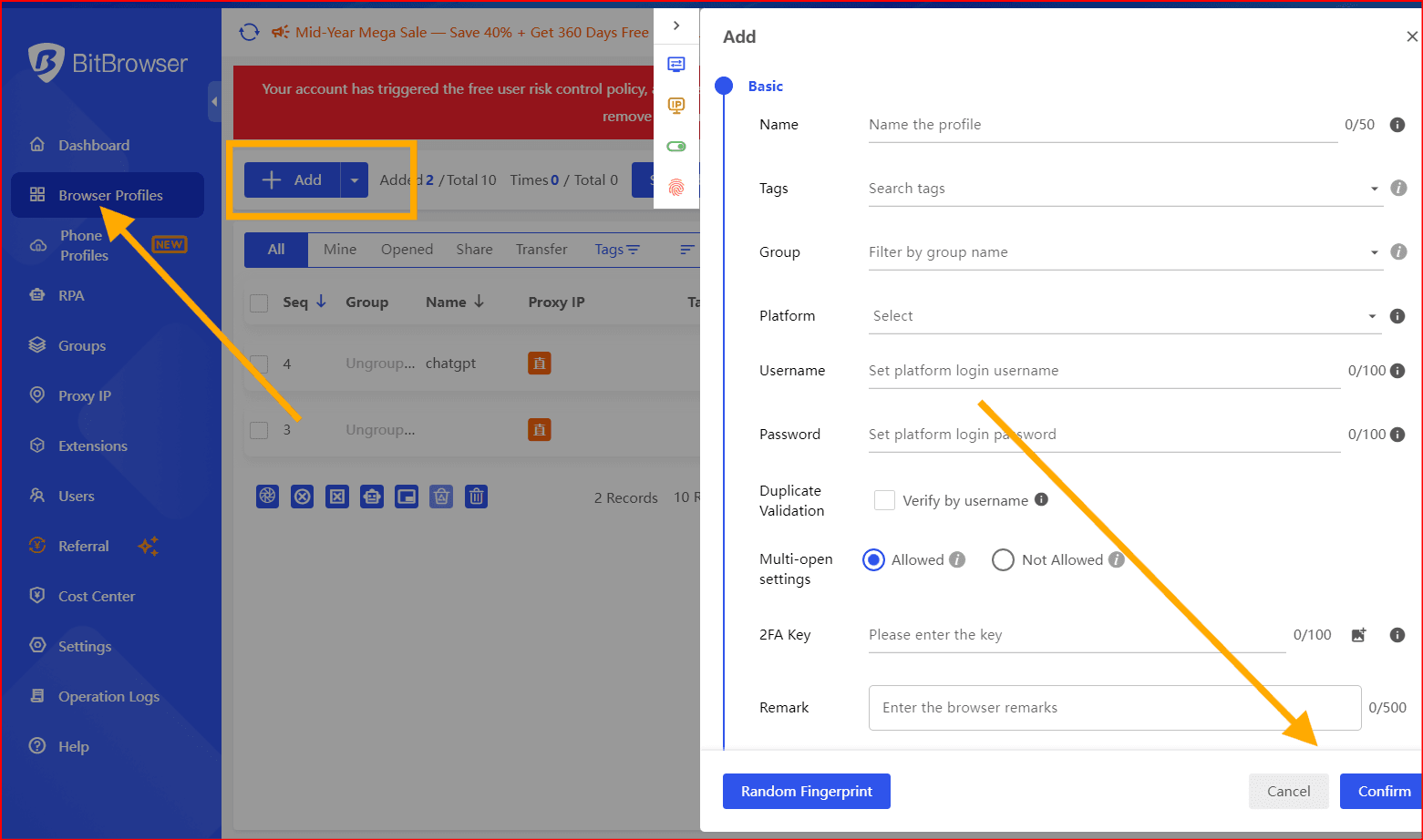
Create an independent browser profile for each wallet or project.
Step 2: Assign a Dedicated Proxy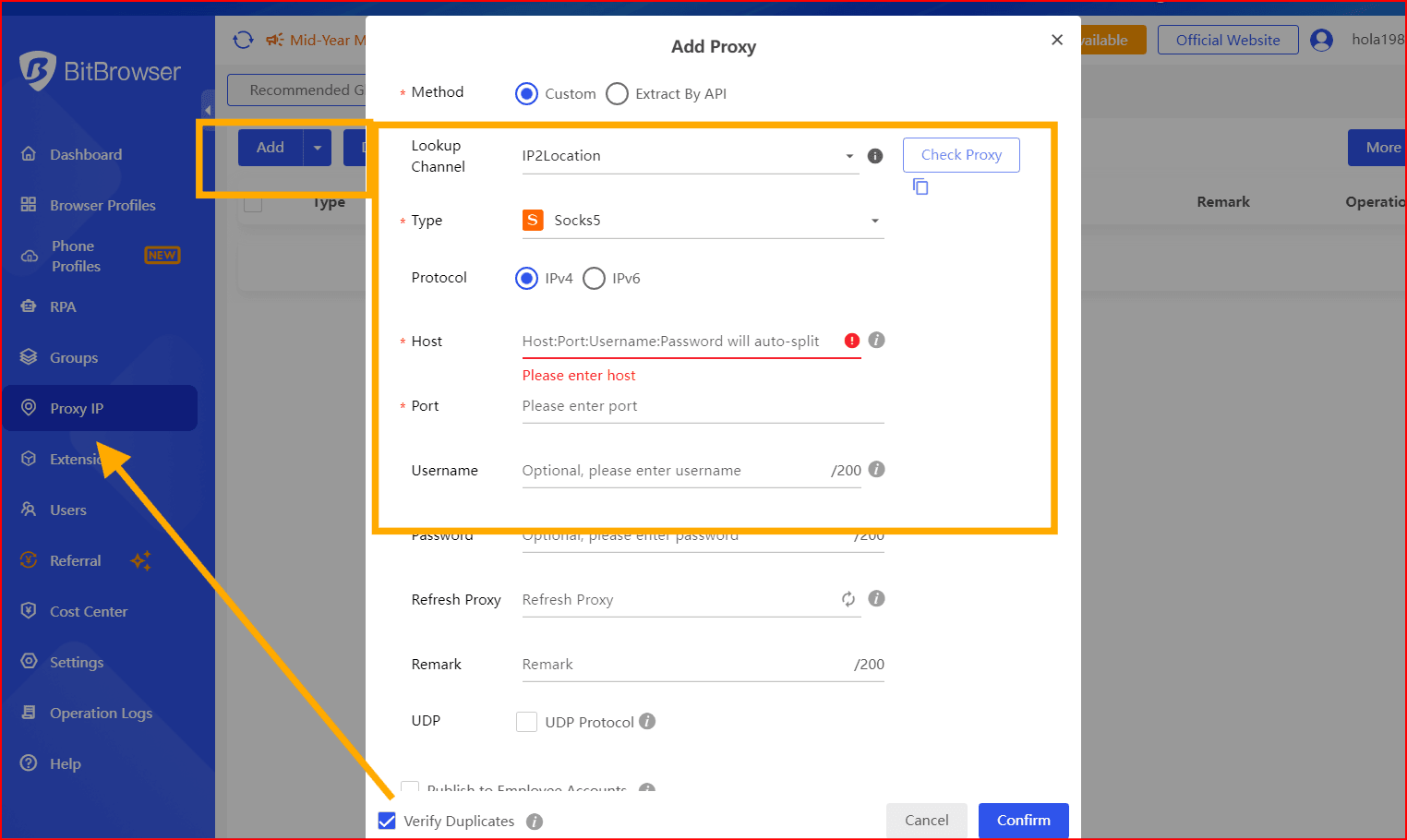
Connect a unique residential or mobile proxy to each profile.
Step 3: Match Regional Settings
Align language, time zone, and geolocation settings with the proxy location.
Step 4: Maintain Consistency
Avoid frequently changing browser fingerprints on established profiles.
Step 5: Test Your Browser Fingerprint
Use browser analysis tools to review profile characteristics before beginning important activities.
BitBrowser vs Standard Browsers
Traditional browsers such as Chrome and Edge are designed for general browsing.
They offer limited separation between profiles and provide little control over browser fingerprinting.
BitBrowser offers:
Feature | Standard Browser | BitBrowser |
Multiple Profiles | Limited | Yes |
Fingerprint Management | No | Yes |
Proxy Per Profile | No | Yes |
Cookie Isolation | Basic | Advanced |
Team Collaboration | No | Yes |
Web3 Workflow Support | Limited | Strong |
Who Should Use BitBrowser?
BitBrowser is suitable for:
- Web3 researchers
- Testnet participants
- Airdrop hunters
- Blockchain developers
- NFT traders
- Affiliate marketers
- Social media managers
- E-commerce operators
- Multi-account teams
Any user who needs separate browser environments can benefit from profile isolation and centralized management.
Final Verdict
As Web3 security systems continue to evolve, managing multiple wallets requires more than simply creating new addresses.
Browser fingerprints, IP addresses, device settings, and behavioral signals all contribute to how platforms evaluate account relationships.
BitBrowser provides a practical solution for users who need isolated browser environments, profile management tools, proxy integration, and browser fingerprint control. For Web3 users seeking a more organized approach to account separation, it remains one of the most useful anti-detect browsers available in 2026.

 Multi-Account Management
 Prevent Account Association
 Multi-Employee Management
Recommended
See More 



