BitBrowser Review 2026: Is It Worth Buying for Your Multi-Account Business
 2026.03.14 10:43
 YT.Shi
If you’ve ever tried managing multiple accounts on platforms like Facebook, Amazon, or TikTok, you know how quickly things can get complicated. In 2026, platforms monitor device fingerprints, browser environments, IP reputation, and behavior patterns, so running multiple accounts from the same machine without isolation often leads to bans.
That’s why antidetect browsers have become essential for affiliate marketers, e-commerce sellers, and social media teams.
Tools like Multilogin and GoLogin are widely used, but each has trade-offs. Multilogin is powerful but expensive and complex, while GoLogin is easier to use but can feel limited as operations scale.
BitBrowser aims to solve this balance problem by offering strong fingerprint simulation, automation, and team collaboration at a more accessible price. Let’s see how it compares.
Quick Review
● Best for: Affiliate marketers, social media managers, e-commerce sellers
● Free plan: Yes (10 browser profiles forever)
● Automation: Built-in RPA and Synchronizer
● Proxy support: HTTP / HTTPS / SOCKS5
● Mobile simulation: Android and iOS fingerprint environments
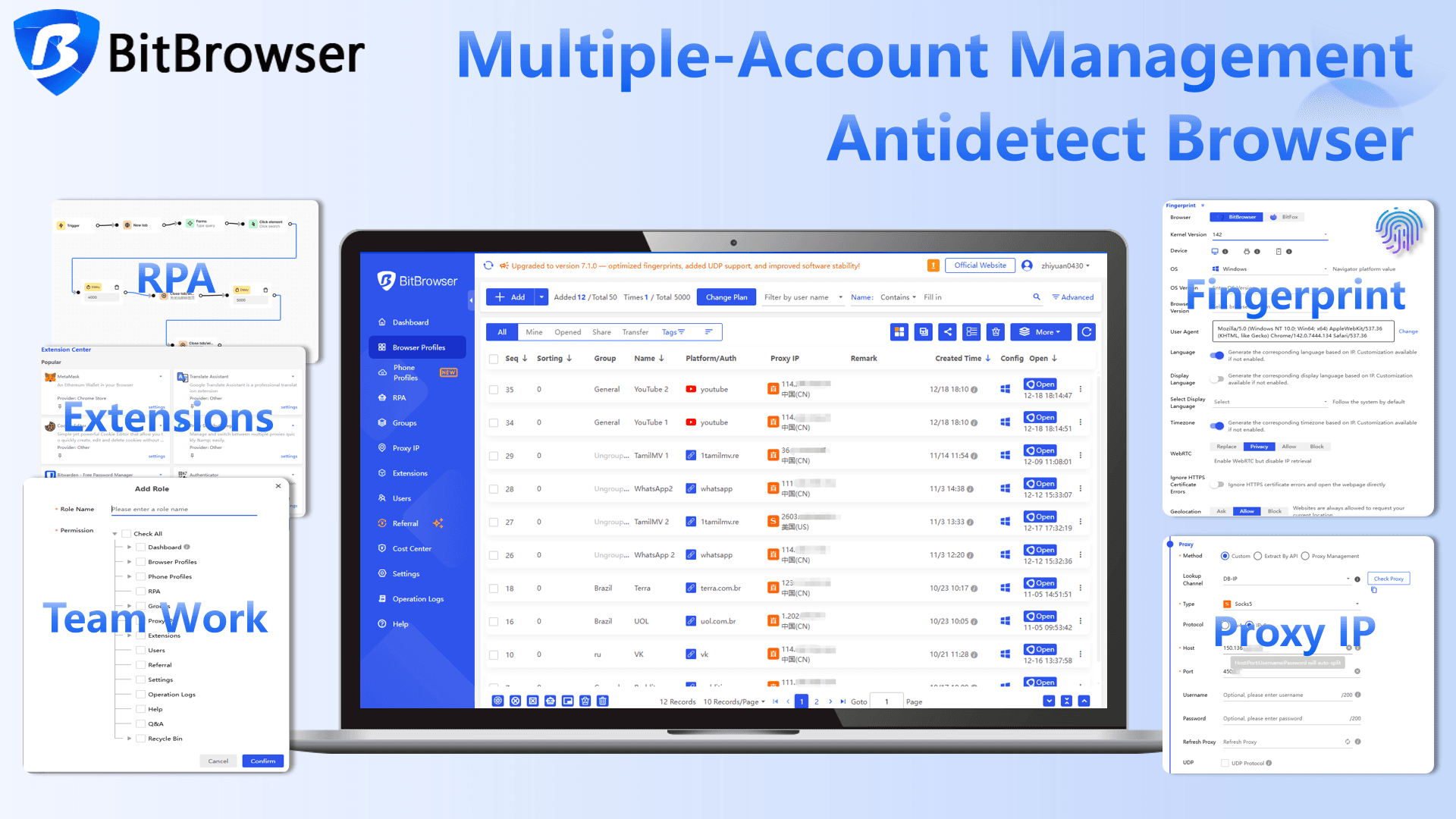
Core Features: High-End Tech for Maximum Security
BitBrowser: Quick Feature Overview
| Feature | Quick Overview |
|---|---|
| Advanced Fingerprint Emulation | Generates unique browser fingerprints for every profile, simulating real device environments to reduce account linking risk. |
| Browser Profile Isolation | Each profile runs in a completely separate environment with isolated cookies, storage, and sessions. |
| Dual‑Engine Architecture | Supports both Chrome and Firefox engines, allowing better compatibility with different platforms. |
| Proxy Integration | Built‑in proxy support (HTTP / HTTPS / SOCKS5) with profile binding and batch proxy import. |
| BitCloudPhone Integration | Connects browser profiles with cloud Android devices, enabling real mobile app operations alongside browser workflows. |
| RPA Automation | Built‑in automation tools for repetitive tasks like logins, checks, and data collection. |
| Synchronizer | Mirrors actions from one browser window to multiple profiles simultaneously. |
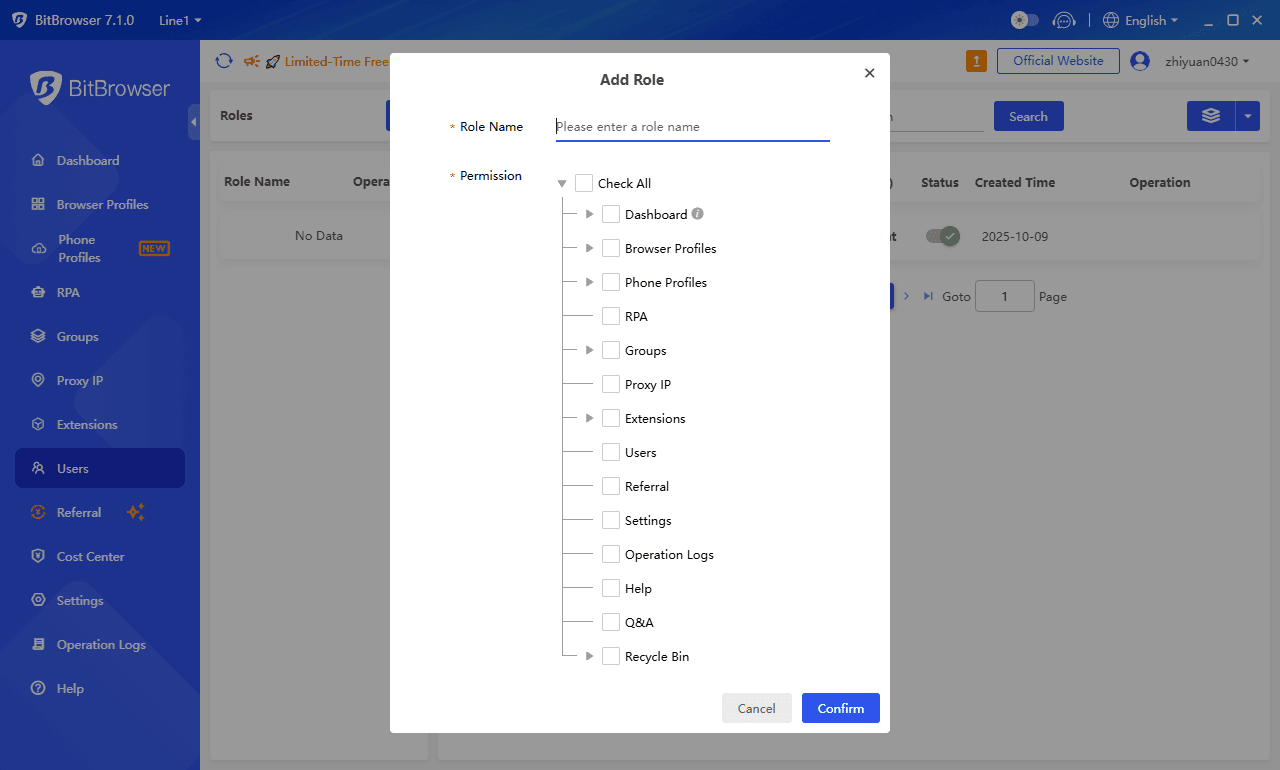
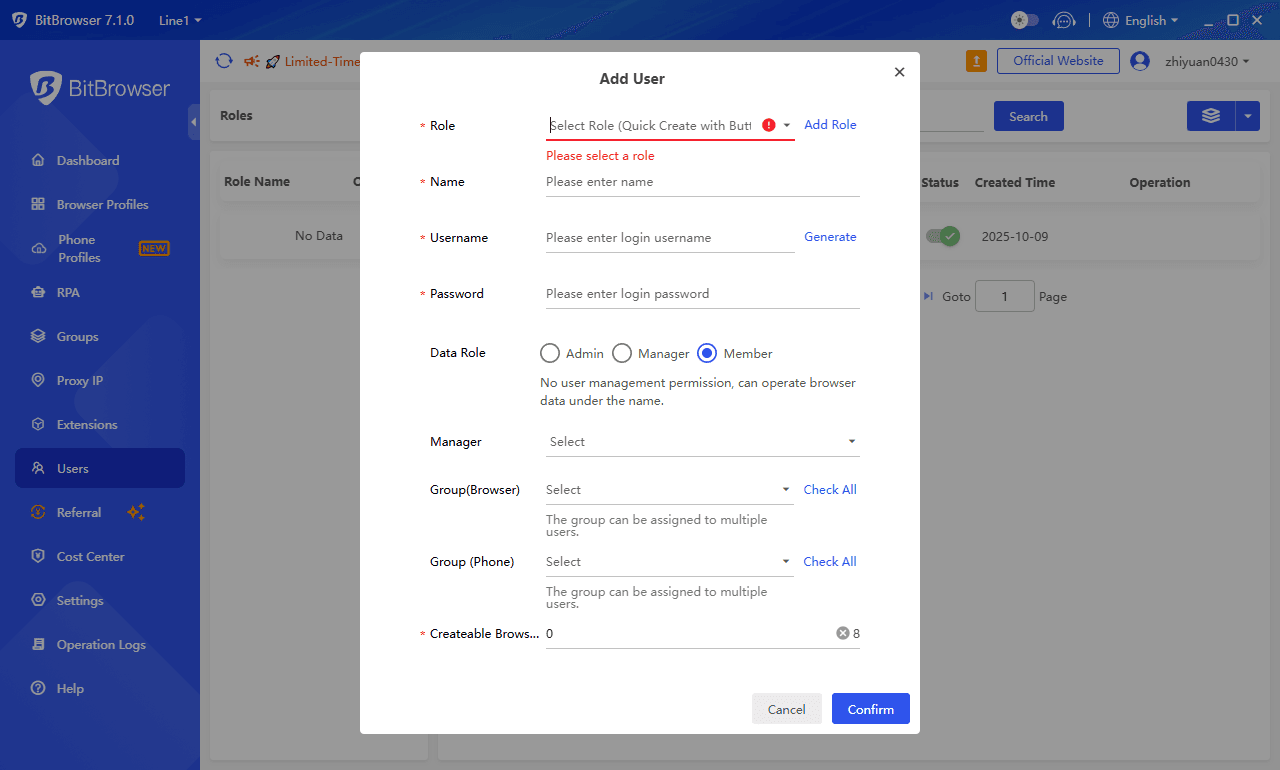
| Team Collaboration | Role‑based access and profile assignment for teams without sharing raw account credentials. |
Let’s dive into the details and see what makes BitBrowser stand out.
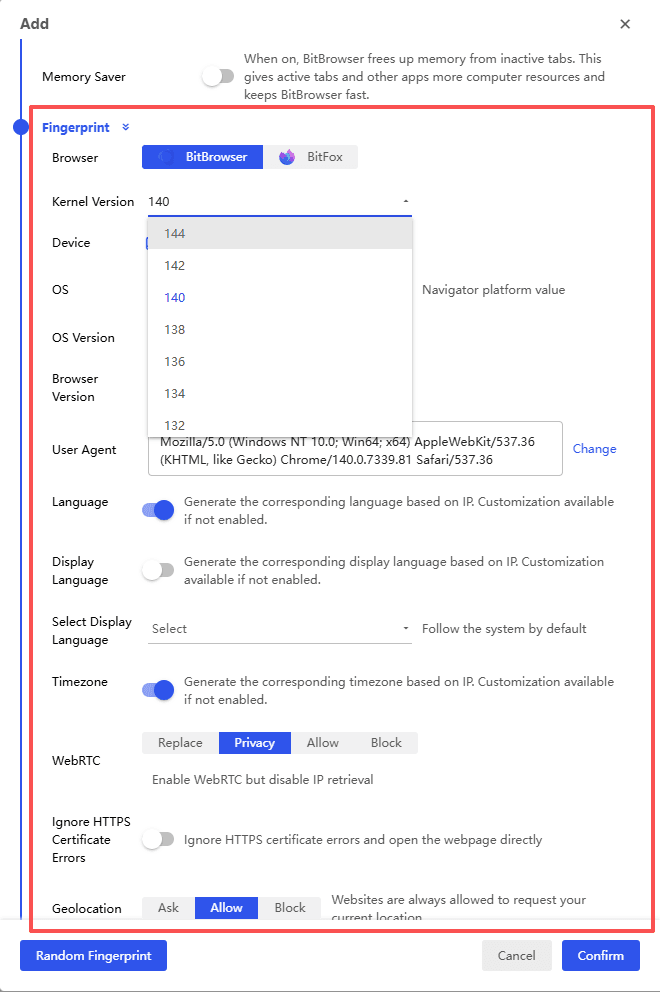
Advanced Fingerprint Emulation
One of the biggest reasons people use antidetect browsers is fingerprint control.
Modern websites collect dozens of parameters to identify devices. These include Canvas fingerprinting, WebGL rendering, WebRTC data, fonts, screen resolution, hardware configuration, timezone, and many other signals.
BitBrowser allows these parameters to be customized and simulated for every profile.
When a new profile is created, the system generates a unique browser fingerprint that mimics a real device environment. This helps ensure that each account appears to be operated from a different computer.
For platforms that rely heavily on fingerprint analysis, this level of isolation significantly reduces the risk of account association.
Browser Profile Isolation
BitBrowser keeps each profile completely separate. Cookies, local storage, sessions, and caches never mix, so one account won’t affect another.
When managing dozens of accounts, this is crucial. Most browsers leak info, and tools like Whoer can easily spot overlapping fingerprints or IPs. With BitBrowser, each profile acts like a totally independent machine, making it much harder to get flagged.
Compared to other antidetect browsers I’ve used, this isolation just works more reliably at scale.
Dual-Engine Architecture
Another interesting design choice is BitBrowser’s dual-engine structure.
The software features a dual-browser engine architecture, supporting both Chrome and Firefox kernels. Different platforms have different tracking methods, and having two engine options gives you more flexibility to adapt to specific website requirements.
Proxy Integration
IP management is just as important as fingerprint control.
BitBrowser integrates proxy configuration directly into profile creation. Users can assign HTTP, HTTPS, or SOCKS5 proxies and bind them permanently to a profile.
This setup ensures that each account consistently connects from the same IP location.
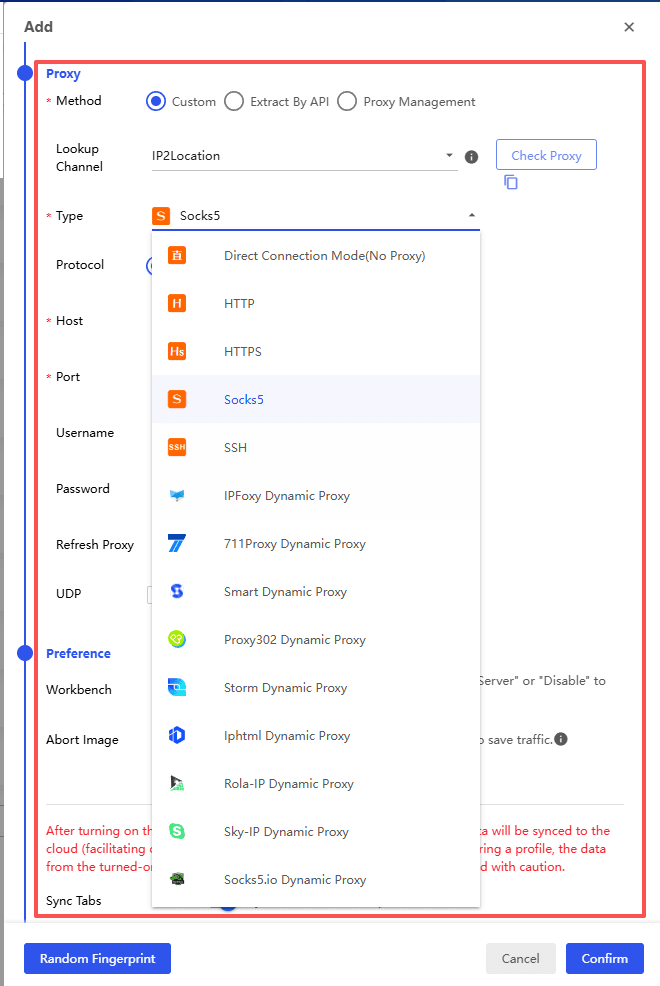
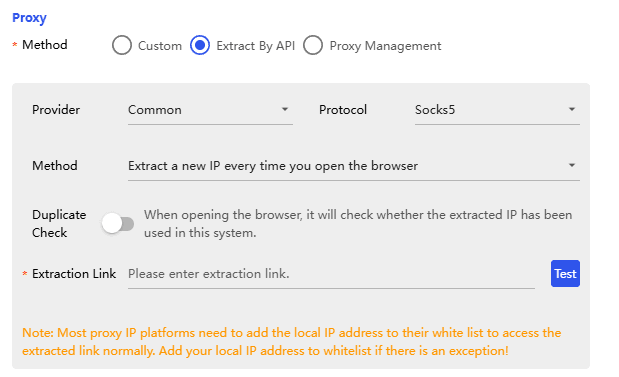
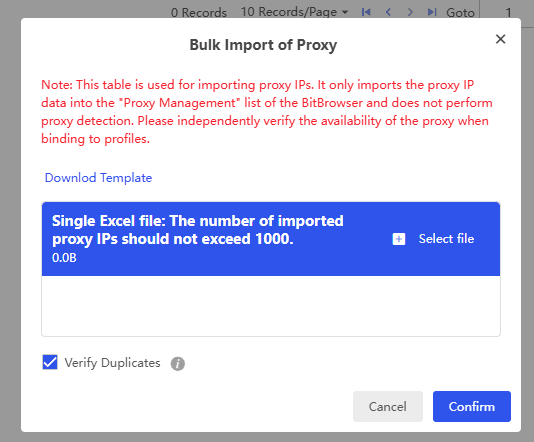
For teams running large account sets, the system also supports batch proxy imports and automatic assignment. Instead of manually configuring every environment, profiles can be deployed in bulk.
BitCloudPhone Integration
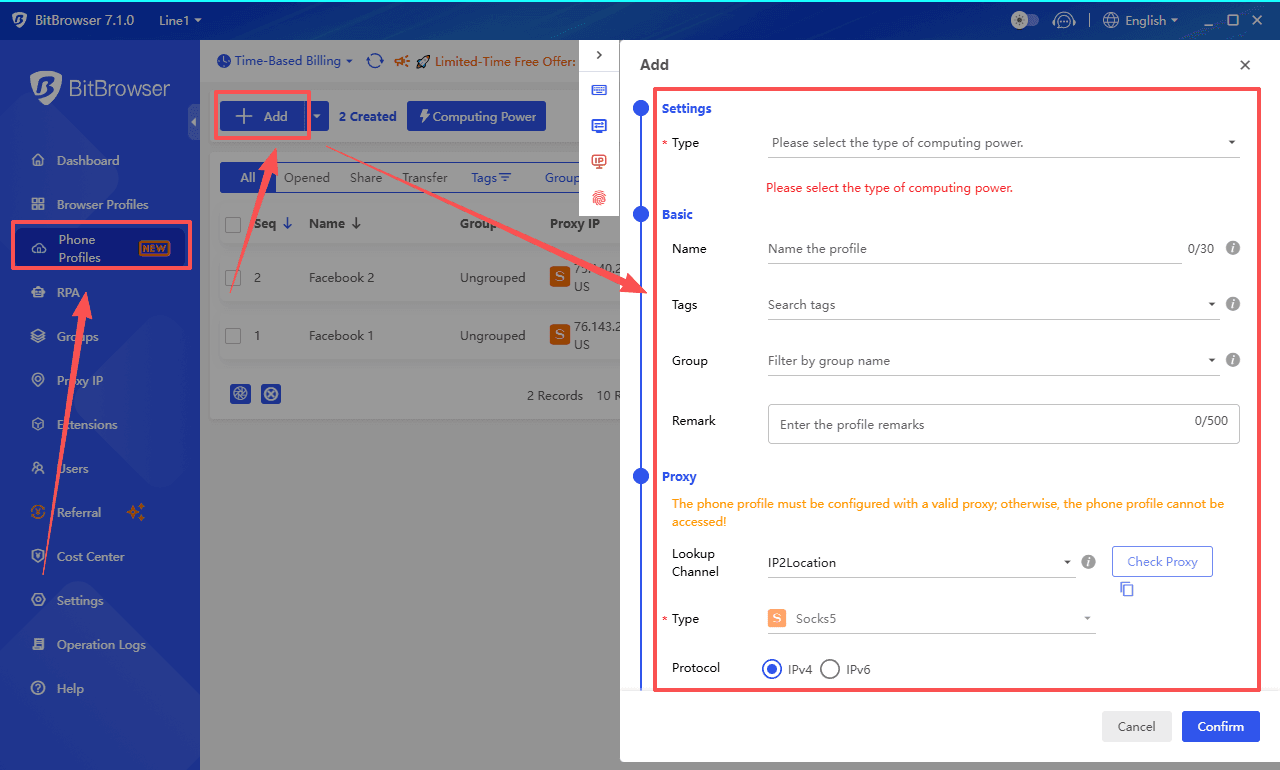
One feature that stands out is the integration with BitCloudPhone.
Many multi-account operators eventually run into the same issue: some platforms behave very differently on mobile apps than they do in a browser. TikTok, Instagram, and many Web3 tools are good examples.
Most antidetect browsers only focus on browser environments. BitCloudPhone takes it a step further by providing real Android systems running in the cloud. Instead of trying to simulate mobile behavior, users can run mobile apps directly while still managing accounts through BitBrowser.
For teams working with mobile traffic or app-based operations, having both browser profiles and cloud Android devices in one workflow can make the setup much simpler.
RPA Automation and Synchronizer
Automation is where BitBrowser becomes particularly interesting.
The platform includes built-in RPA tools that allow users to automate repetitive tasks. Instead of manually logging into accounts or performing repeated actions, workflows can be scripted and executed automatically.
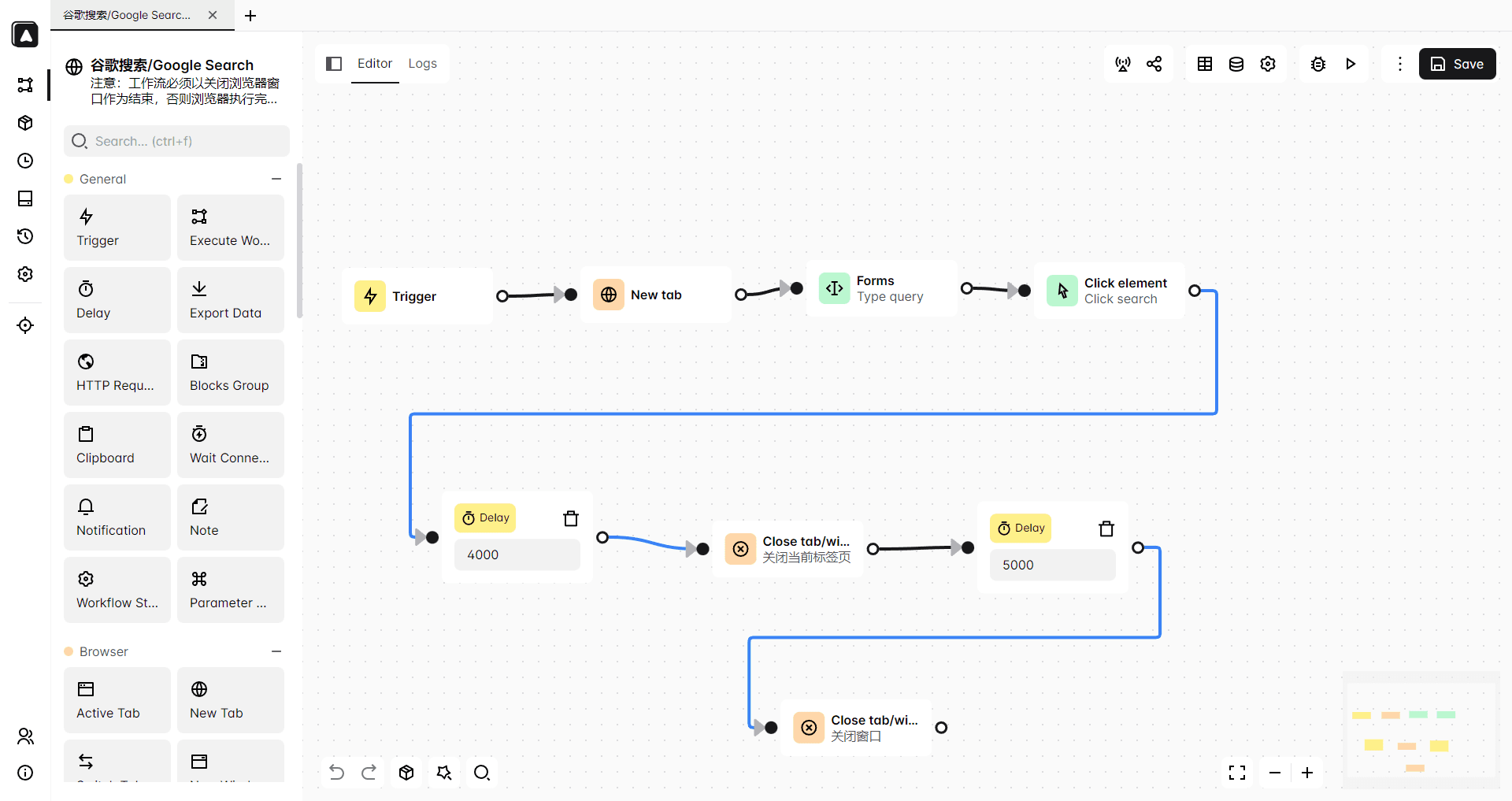
For example, a user could automate:
● Account login sequences
● Routine account checks
● Basic interaction tasks
● Data collection workflows
Even without deep technical knowledge, simple automation sequences can be built with minimal setup.
Another useful feature is the Synchronizer.
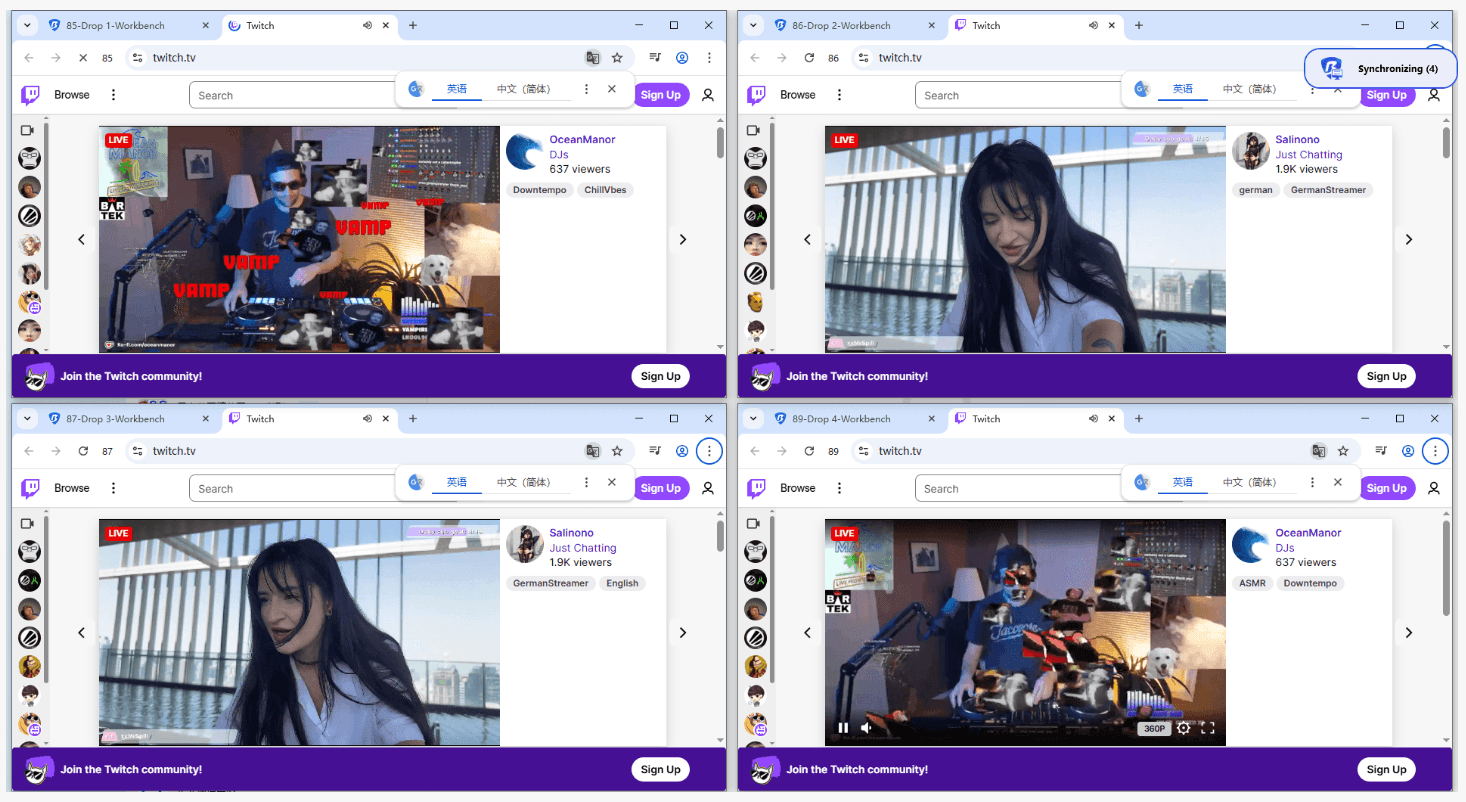
The Synchronizer allows one browser window to control many other profiles simultaneously. Actions performed in the main window can be mirrored across multiple environments.
For tasks like posting content, updating settings, or navigating dashboards, this can save a huge amount of time.
Team Collaboration
BitBrowser also includes collaboration features designed for teams.
Administrators can assign browser profiles to different team members while controlling permission levels. Sensitive information such as login credentials can remain hidden from other users.
This is useful for agencies or studios that distribute account management tasks across multiple operators.
Instead of sharing raw account credentials, access can be controlled through the browser workspace itself.
Try BitBrowser now
Ecosystem and Developer Tools
| Feature | Description | Benefit / Advantage |
|---|---|---|
| Multilingual Support | Supports 20+ languages, including English, Chinese, French, Polish, Spanish, etc. | Makes onboarding global team members easier; reduces friction for non-English speakers. |
| API for Automation | Provides API access for programmatic interaction with browser profiles. | Enables custom automation pipelines, tool integration, and large-scale workflow management. |
| Extension Center | Supports Chrome extensions and batch installation across profiles. | Simplifies setup for automation scripts, scraping tools, and productivity extensions. |
| 24/7 Customer Support | Fast and responsive support based on testing and community feedback. | Ensures stable operations and quick troubleshooting for teams. |
BitBrowser simplifies global teamwork with multilingual support, automation-friendly APIs, easy extension management, and fast 24/7 support.
Pricing: Unbeatable ROI in 2026
The Forever Free Plan
One of the reasons BitBrowser attracts new users so quickly is the free plan.
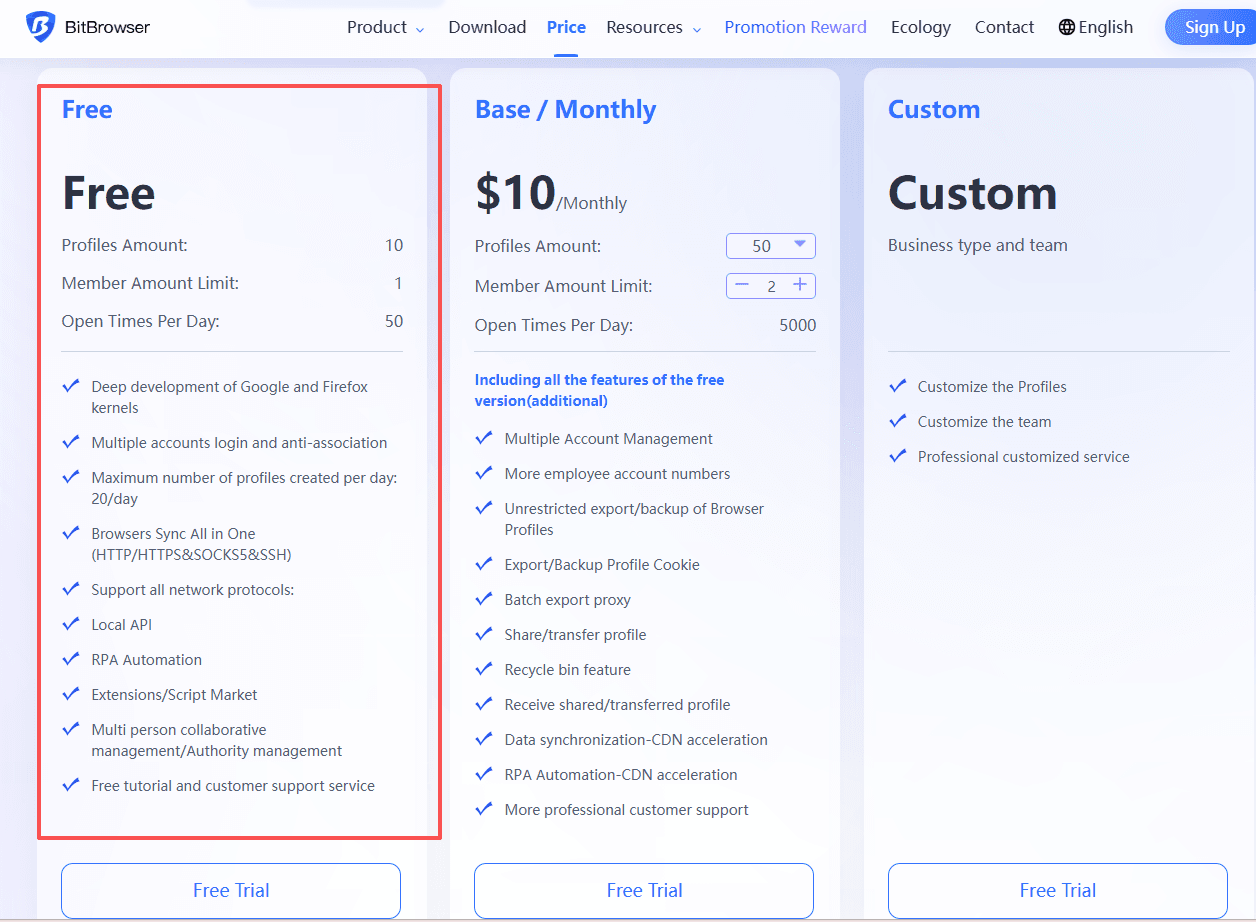
The platform offers ten permanent browser profiles at no cost.
For individuals who are just starting with multi-account workflows, this is enough to test the entire system without committing to a paid subscription.
Many competing tools offer limited trials that expire after a few days. Having a permanent free tier lowers the barrier significantly.
Paid plans
● 10 profiles — $0/month
● 50 profiles — $10/month
● 100 profiles — $15/month
● 200 profiles — $25/month
Cost‑Efficient Pricing That Scales
BitBrowser is often recognized for offering one of the best price‑to‑performance balances in the antidetect browser market.
The platform uses flexible pricing tiers, allowing users to start small and scale gradually. Even as the number of browser profiles grows, the cost per profile remains relatively low, which makes large‑scale operations more affordable.
In addition, BitBrowser’s free plan already includes full team collaboration features, which is uncommon among similar tools.
By comparison, AdsPower only provides two profiles in its free plan, with several features restricted. Meanwhile, Multilogin and GoLogin mainly offer short 3–7 day trials, and team collaboration is typically limited to higher‑tier plans starting around $79/month.
Because of this, many users consider BitBrowser to deliver one of the best value propositions in the market, especially for agencies, affiliate teams, and users managing dozens or hundreds of accounts.
Get 10 browser profiles permanently free
Use Cases: Who Should Use BitBrowser in 2026?
| User Type | Use Case |
|---|---|
| Affiliate Marketers | Manage multiple ad accounts with isolated browser profiles. |
| E-commerce Sellers | Run multiple marketplace stores without account linkage. |
| Crypto & Airdrop Hunters | Manage many wallets and Web3 interactions safely. |
| Social Media Agencies | Operate and organize large numbers of social accounts. |
Other common use cases include:
● Advertising campaign testing across multiple accounts
● Running account farms for content platforms
● Market research and competitor monitoring
● Automation workflows combined with browser profiles
● Anonymous browsing on the internet
● Accessing websites (like tamilmv and kickass torrents) that may be restricted in certain regions
These scenarios all benefit from isolated browser environments, which help keep accounts separated and reduce the chance of platform risk controls linking them together.
Pros and Cons
Pros
● Very competitive pricing compared with most antidetect browsers
● Permanent free plan with ten browser profiles
● Strong proxy integration and profile isolation
● Built-in automation tools and Synchronizer
● Suitable for both individuals and teams
Cons
● Advanced automation features require some learning time
● Proxy configuration may be confusing for beginners
Check out the official BitBrowser help page or the quick three-minute video tutorial
Final Verdict
For anyone who works with multiple online accounts, having the right browser environment makes a huge difference.
BitBrowser manages to combine strong fingerprint isolation, automation tools, proxy integration, and team collaboration features while keeping the pricing accessible.
It may not be the most famous antidetect browser yet, but for many small teams and individual operators it strikes a very practical balance between functionality and cost.
If you are looking for a stable multi-account browser without paying premium prices, BitBrowser is definitely worth trying in 2026.
FAQ
1. What is BitBrowser and how does it work?
BitBrowser is an antidetect browser designed for multi‑account management. It creates separate browser profiles with unique fingerprints, cookies, and storage environments. Each profile behaves like an independent device, which helps prevent platforms such as Facebook, Amazon, or TikTok from linking multiple accounts together.
2. Is BitBrowser safe for managing multiple accounts?
Yes. BitBrowser reduces the risk of account linkage by combining browser fingerprint simulation, profile isolation, and proxy integration. Each account runs in its own environment with separate cookies, local storage, and IP configuration, making it appear as if the accounts are operated from different devices.
3. Does BitBrowser offer a free plan?
Yes. BitBrowser provides a permanent free plan with 10 browser profiles. Unlike many antidetect browsers that only offer short trials, this free tier allows users to test all core features, including team collaboration and browser profile management, without a time limit.
4. What makes BitBrowser different from Multilogin or GoLogin?
BitBrowser focuses on balancing features and cost. While tools like Multilogin are powerful but expensive, and GoLogin is easier but sometimes limited for scaling operations, BitBrowser combines fingerprint simulation, automation tools, and team collaboration with a much lower pricing structure.
5. Who should use BitBrowser?
BitBrowser is commonly used by affiliate marketers, e‑commerce sellers, social media agencies, and Web3 users who need to manage multiple accounts safely. It is also useful for automation workflows, advertising account testing, anonymous browsing, and accessing region‑restricted websites.

 Multi-Account Management
 Prevent Account Association
 Multi-Employee Management
Recommended
See More 



