How to Run Google Ads Safely
 2026.01.18 08:36
 petro
petroGoogle Ads is one of the largest contextual advertising platforms and a powerful way to attract traffic. However, finding your niche and earning consistently can be challenging, especially for beginners. Banana Traff, with over three years of experience in affiliate marketing, shares practical guidance on launching, configuring, and managing Google Ads campaigns effectively.
After purchasing a Google Ads account, log in using BitBrowser for multi-account management. Avoid rushing into running campaigns immediately. If an account was farmed outside BitBrowser, Google might detect unusual fingerprints.
Perform some preliminary activity:
- Visit popular websites
- Spend time in email accounts
- Follow links from emails
Even minimal preparation helps the account appear legitimate. Once the account is ready, you can access Google Ads without starting campaigns too soon.
Using Your Accounts
Accounts can be used in three main ways:
- Until the first billing: Use Google Ads credit without immediate payment.
- Using your budget: Buying accounts without payment info risks suspensions; it’s safer to work with verified, unblocked accounts first.
Testing strategies: Run small campaigns to test profitability before connecting full payment data.
Why IBAN Payments Work Better
Using real bank accounts in IBAN format is ideal for international transactions. European banks often take 3–5 business days to process payments, which gives advertisers a buffer before ads are paused due to billing issues.
- Ads can run longer even after hitting billing thresholds.
- For best results, hit the limit before weekends for extra ad time.
Changing Payment Data: Avoid switching payment info immediately. Work with the account for a while, run minor campaigns, then gradually introduce your own payment data.
Increasing Ad Budget: Start small ($5–10) and raise it 25–35% every 12–24 hours. Alternatively, launch multiple campaigns simultaneously (up to 5).
Account Freezing
Freezing occurs when an account or ad is shadowbanned. Ads stop running without a notification. Freezes usually last 3–7 days. Verification is the most reliable way to unfreeze accounts.
Managing Your Ads
This guide focuses on adaptive ads, which can be:
- Teasers: Higher click-through rates and conversion, but short-lived due to complaints.
- Light ads: Lower conversion but longer lifespan, use neutral images and wording.
Tips for Ad Approval:
- Use relevant white pages for gray ads.
- Ensure landing pages match ad content.
- For WordPress, create a mini-portal, hide posts, and enable cloaking.
- Include Privacy Policy and User Agreement in the footer.
Speeding Up Approval: Add relevant images and keywords to your landing page. Stock images from Google often pass moderation easily.
Checking Stop Words: Use a burner account to test keywords. If an ad is rejected, that keyword may trigger moderation. Stop words are updated by Google every three months.
Ad Relevance
Successful campaigns rely on comprehensive relevance:
Keyword → Ad → Landing Page: Each step must fully match user intent.
- Separate keywords into groups and create dedicated ads for each.
- Landing pages should directly address user needs without unnecessary content.
Example: An ad for “residential proxies” should lead to a page specifically about residential proxies,or mobile proxies not a generic homepage.
Running Google Ads: Checklist
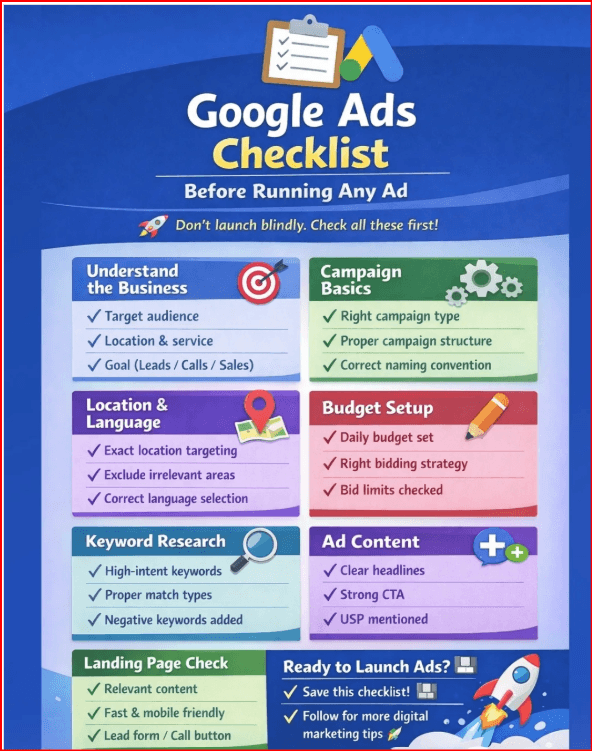
- Create campaigns without preset goals for more flexibility
- Use the Search campaign type
- Ensure ad campaign titles are relevant
- Disable Search Partners and Display Network
- Set geo and language targeting
- Define daily budgets and bid strategy
- Write ad copy for each keyword group
- Add additional links, prices, or clarifications
- Connect payment data
- Monitor, analyze, and optimize campaigns
Conclusions
Google Ads can deliver highly valuable traffic for affiliate marketers, but success requires proper configuration and relevance across campaigns and landing pages. Using BitBrowser for multi-account management ensures safer and more efficient operations. Focus on comprehensive relevance, gradual budget increases, and verified payment methods to maximize results.
Follow Banana Traff for more tips on running effective ad campaigns and managing traffic efficiently.

 Multi-Account Management
 Prevent Account Association
 Multi-Employee Management
Recommended
See More 



