How Websites Track Users: Cookies, Pixels, Fingerprints, and Behavioral Analytics
 2026.07.29 22:27
 petro
petroWebsite tracking is the collection and connection of information about how a person or browser interacts with online services. Some tracking is necessary: a shopping cart must remember its contents, a bank must detect unusual logins, and an analytics system must count visits. Other tracking supports personalization, advertising, attribution, audience measurement, or long-term profiling.
The important distinction is not simply “tracked” versus “not tracked.” It is what data is collected, who receives it, how long it remains useful, whether it is linked to an account or real identity, and whether the visitor has meaningful control. Modern tracking systems are layered, so deleting cookies alone does not erase every signal.
Related BitBrowser reading: browser fingerprinting | cookies and tracking | fingerprint documentation
1. First-party cookies and local storage
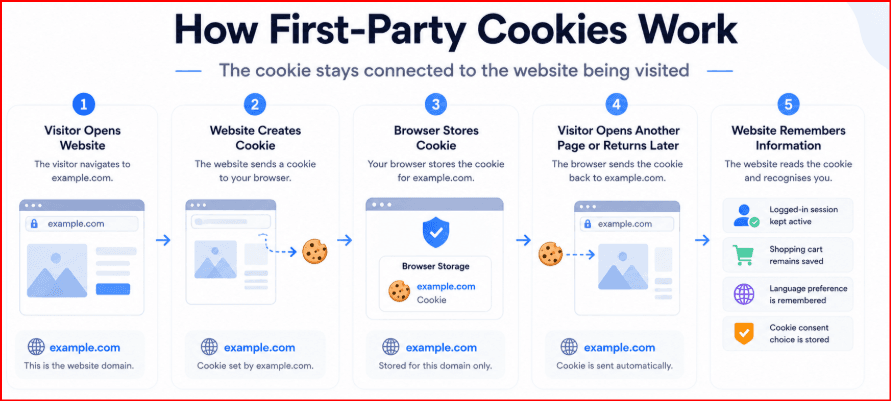
A first-party cookie is created by the site a person is visiting. It can maintain a login session, remember language and display choices, preserve a shopping basket, or assign an analytics identifier. Local storage and IndexedDB provide additional browser-side storage. These tools improve usability, but they can also let a site recognize the same browser during later visits.
Cookies are not automatically malicious. The privacy question is whether their purpose is necessary, optional, or shared with outside companies. The BitBrowser article on cookies explains how stored session data can operate as an identity credential inside a browser profile.
2. Third-party scripts, pixels, and tags
Many pages load code from advertising, analytics, video, chat, social, or testing providers. A tracking pixel may be a tiny image or script request that records the page URL, timestamp, browser details, referrer, campaign parameters, and an identifier. Because the same provider can appear on many websites, it may connect activity across otherwise unrelated domains.
Tag managers make deployment easier for site owners, but they can also hide a complex supply chain. One visible page may contact dozens of external domains before the visitor clicks anything.
3. IP address and network signals
Every normal web request exposes a source IP address to the receiving server. An IP can suggest a network provider and approximate region, and repeated use may help link sessions. Sites may also evaluate DNS behavior, latency, WebRTC exposure, TLS characteristics, proxy reputation, and changes in location.
An IP address is not a perfect person identifier. Shared offices, carrier networks, households, and VPN services can place many users behind one address. For that reason, network data is usually combined with browser and account signals.
Tracking Methods at a Glance
Tracking method | Typical data | Common purpose |
|---|---|---|
| Cookies and storage | Session IDs, preferences, cart state, analytics IDs | Login continuity, personalization, measurement |
| Pixels and scripts | Page URL, referrer, campaign, identifier, timestamp | Attribution, advertising, audience analytics |
| Network data | IP, region, ASN, DNS/WebRTC, latency | Security, localization, abuse prevention |
| Browser fingerprint | Canvas, WebGL, fonts, screen, timezone, language | Recognition, fraud signals, account security |
| Account identity | Email, login, customer ID, purchase history | Cross-device service, CRM, support |
| Behavioral events | Clicks, scrolls, searches, navigation sequence | UX improvement, recommendations, risk analysis |
4. Browser and device fingerprinting
Fingerprinting reads characteristics exposed by the browser and device, such as the user agent, operating system, screen size, language, timezone, fonts, Canvas rendering, WebGL, audio behavior, CPU class, memory, and media capabilities. Each value may be common, but the combination can be distinctive.
BitBrowser’s official guide describes this multi-signal approach and explains why websites can continue recognizing a browser even when traditional cookies are unavailable. Fingerprints are probabilistic: they can change after browser, driver, font, display, or operating-system updates.
5. Account, email, and cross-device identity
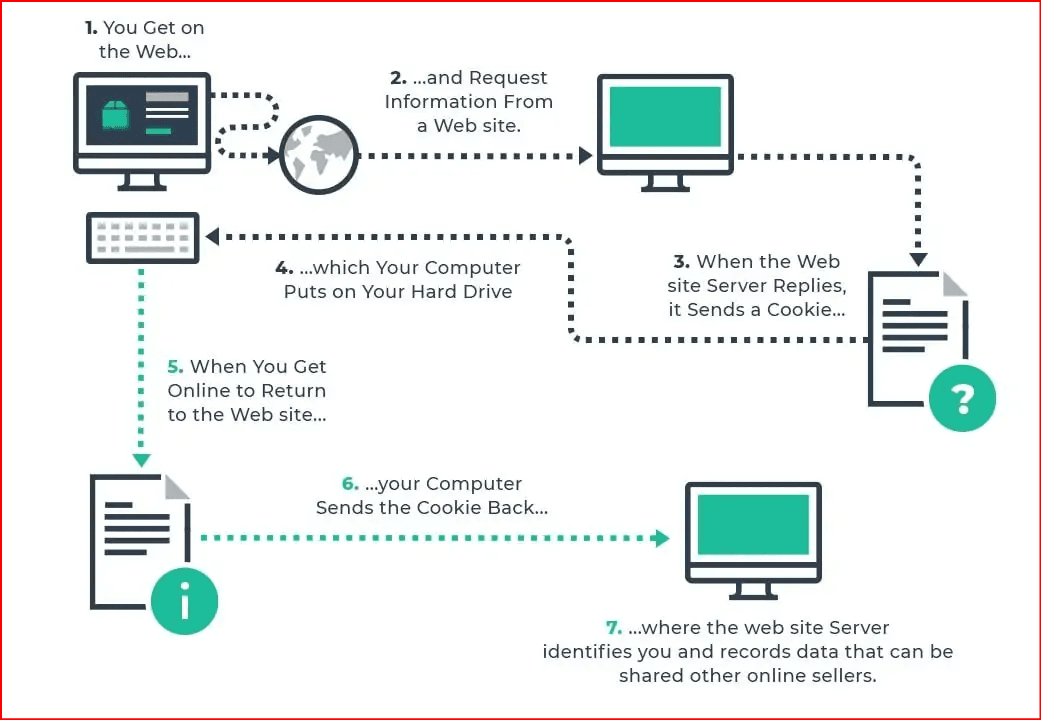
Once a visitor signs in, browser-level identifiers can be joined with an account. Email links may contain campaign or subscriber identifiers. Mobile apps may contribute advertising IDs, push tokens, or device data. A company operating several services can sometimes connect activity through the same account, email address, payment relationship, or authenticated session.
This is why private browsing is not anonymity. It usually creates a temporary local session, but the destination still receives network and browser information, and signing in immediately restores account-level identity.
6. Behavioral analytics and probabilistic matching
Sites can measure page sequences, dwell time, clicks, scrolling, searches, cursor movement, form interaction, and conversion events. These events are useful for product improvement and fraud detection, but they can also build detailed interest segments.
Behavior by itself is rarely a stable identifier, yet it can strengthen other evidence. A system may decide that two sessions probably belong to the same user because their identifiers, device characteristics, network context, and behavioral patterns overlap.
7. Where BitBrowser fits—and where it does not
BitBrowser is designed around isolated browser profiles. Each authorized profile can preserve its own cookies, storage, fingerprint settings, and proxy configuration, which helps teams avoid accidental session mixing during legitimate account administration, testing, localization, or privacy research.
Isolation is not the same as anonymity, and it does not cancel server-side records, account history, legal obligations, or platform rules. Use separate profiles only for accounts and environments you are permitted to operate. The safest objective is controlled separation and repeatability, not impersonation or bypassing risk controls.
Practical Privacy Checklist
Action | What it changes | Limit |
|---|---|---|
| Review site permissions and privacy settings | Reduces unnecessary location, camera, notification, and tracking access | Does not remove server logs |
| Block or restrict third-party cookies | Limits a common cross-site identifier | Fingerprinting and login data may remain |
| Use tracker blocking where appropriate | Stops many known analytics and advertising requests | May break embedded content or consent tools |
| Separate work and personal browsing | Prevents accidental cookie and account overlap | Requires disciplined profile use |
| Keep browser and extensions updated | Reduces security and compatibility risks | Updates can change fingerprint characteristics |
| Use BitBrowser only for authorized isolated profiles | Keeps cookies, storage, and settings separated | Not an anonymity guarantee or policy bypass |
Frequently Asked Questions
Can a website track me after I delete cookies?
Yes. It may use account logins, server records, IP and network context, browser fingerprinting, or newly issued identifiers. Deleting cookies still removes an important local identifier, but it is not a complete reset.
Does private browsing stop tracking?
It mainly limits what remains on the local device after the private session closes. Websites can still receive IP, browser, fingerprint, account, and behavioral data during the session.
Does a VPN stop website tracking?
A VPN changes the public IP seen by the destination and shifts trust to the VPN provider. It does not automatically remove cookies, login identity, tracking scripts, or browser fingerprints.
Is browser fingerprinting always accurate?
No. It is a probabilistic recognition method. Updates, hardware changes, browser settings, and privacy protections can alter signals, so services usually combine it with other evidence.
Can BitBrowser make a user invisible?
No. It can isolate authorized profiles and control profile-specific settings. Websites may still observe network, account, behavior, and server-side information.
Conclusion
Website tracking is an ecosystem, not one technology. Cookies remain important, but modern recognition also uses third-party requests, network context, browser fingerprints, authenticated accounts, and behavior. Effective privacy therefore comes from layers: informed consent choices, permission control, tracker reduction, separate browsing contexts, secure account practices, and realistic expectations.
For professional teams, BitBrowser can provide organized isolation between approved browser environments. It should be used transparently and within platform rules, with the understanding that no browser can erase information already held by a service.
Official BitBrowser Reading: Fingerprinting guide • Cookie tracking • How sites track • Fingerprint docs • Official website |

 Multi-Account Management
 Prevent Account Association
 Multi-Employee Management
Recommended
See More 



