How to Manage Multiple eBay Accounts Without Using Multiple Devices
 2026.02.19 05:44
 petro
petroRunning more than one eBay account is common practice. Many sellers separate product categories across accounts, protect their main store, or scale different eCommerce operations independently. Others simply keep one account for buying and another for selling.
eBay allows multiple accounts, but managing them from the same browser and device often creates complications. This guide explains the risks of sharing a browser environment and shows how to properly separate accounts using BitBrowser.
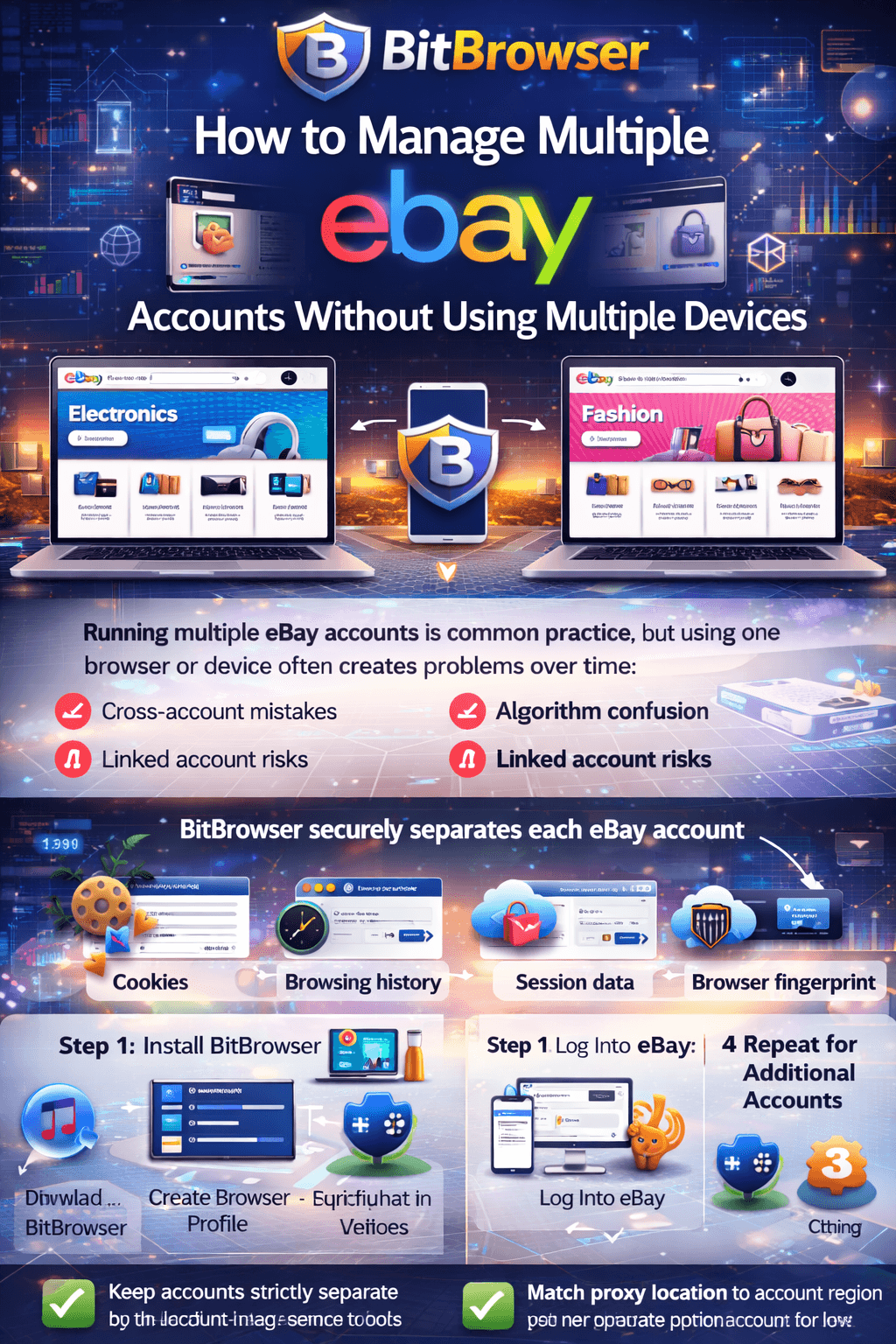
What Happens When You Use the Same Browser for Multiple Accounts
Using one browser for multiple eBay accounts may seem convenient, but it creates operational and technical problems over time.
Mistakes Between Accounts
It’s easy to perform actions under the wrong account. You might respond to feedback, place bids, or manage listings while logged into the incorrect profile. While a single mistake may not seem serious, repeated errors can damage your workflow and reputation.
Mixed Algorithm Signals
eBay’s system tracks browsing activity, searches, and engagement. When buyer and seller accounts operate within the same browser session, behavioral signals overlap.
This can lead to:
- Seller dashboards influenced by buyer browsing habits
- Search recommendations that don’t align with your niche
- Reduced clarity in account performance data
Over time, this weakens account positioning.
Reduced Search Performance
If you operate multiple seller accounts in different niches, shared browser data can dilute account specialization.
For example, an electronics-focused account should build relevance in electronics only. If behavioral signals mix with another niche, the algorithm may interpret the account as less specialized. Specialized sellers typically perform better in search rankings.
Linked Account Risks
Separate accounts are often created to isolate feedback and risk. However, when accounts share browser environments, they can become technically linked. Issues affecting one account may indirectly impact another.
Why Basic Solutions Are Not Enough
Many users try simple fixes, but they are limited.
Incognito Mode
Incognito clears cookies after closing the window, but during active sessions, accounts still share the same device environment and fingerprint. It does not create true isolation.
Different Browsers
Using Chrome for one account and Firefox for another provides separate cookie storage. However:
- The device remains the same
- The IP address remains the same
- Behavioral patterns still overlap
This method does not scale well beyond two accounts.
Separate Devices
Using one device per account offers stronger separation but is expensive and inefficient. Managing multiple computers quickly becomes impractical.
What’s needed is complete browser isolation within a single device.
How BitBrowser Separates eBay Accounts Properly
BitBrowser is an anti-detect browser that allows you to create isolated browser profiles. Each profile operates independently with its own:
- Cookies
- Browsing history
- Session data
- Browser fingerprint
- IP address (when paired with a proxy)
When you open a profile and log into eBay, all activity remains inside that specific environment. No data is shared with other profiles.
This ensures:
- Buyer and seller activity remain separate
- Each seller account builds clean niche relevance
- Feedback and performance signals stay independent
- Saved sessions automatically open to the correct account
For sellers managing larger operations, BitBrowser also supports:
- Profile synchronization
- Team collaboration
- Automation integration for repetitive tasks
Step-by-Step Setup for Multiple eBay Accounts Using BitBrowser
Step 1: Install BitBrowser
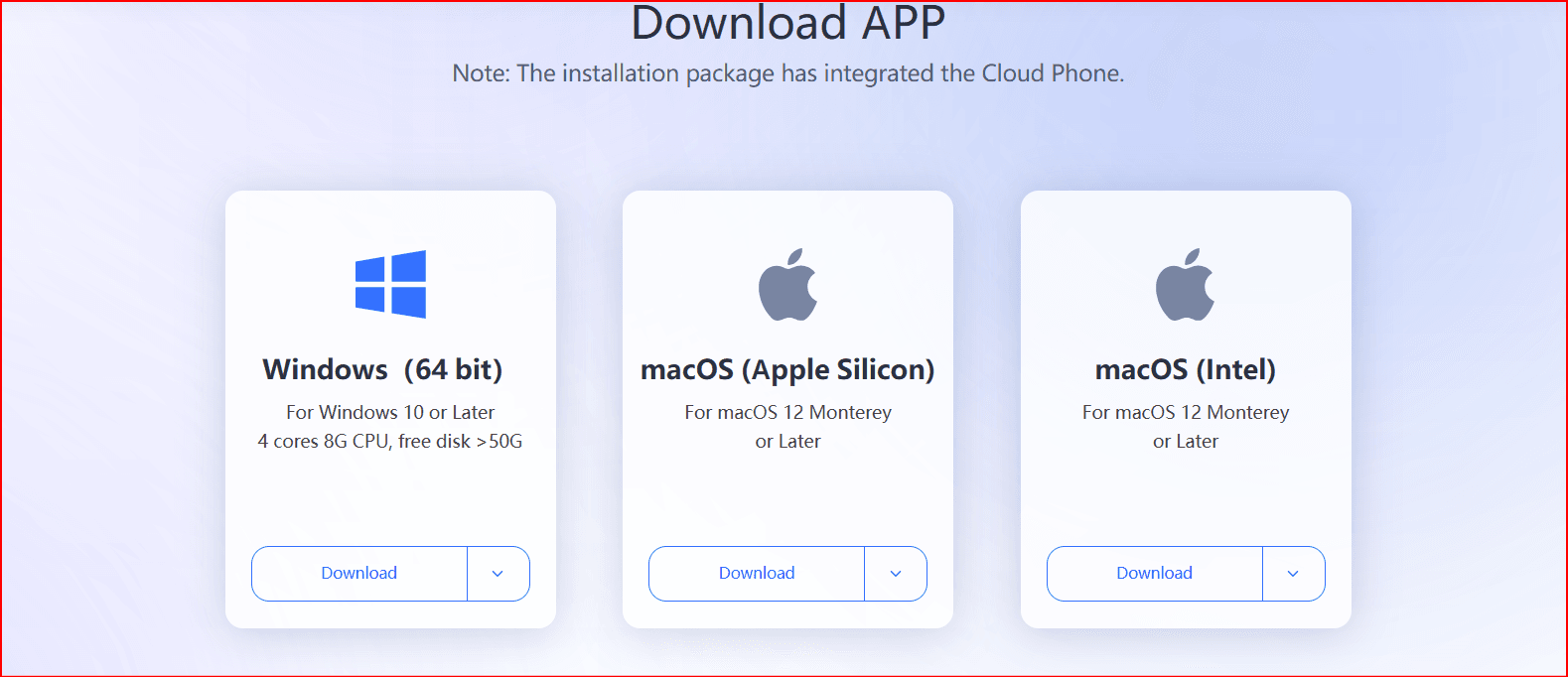
Download BitBrowser from the official website and install it.
Create an account and log in to the dashboard.
Step 2: Create a New Browser Profile
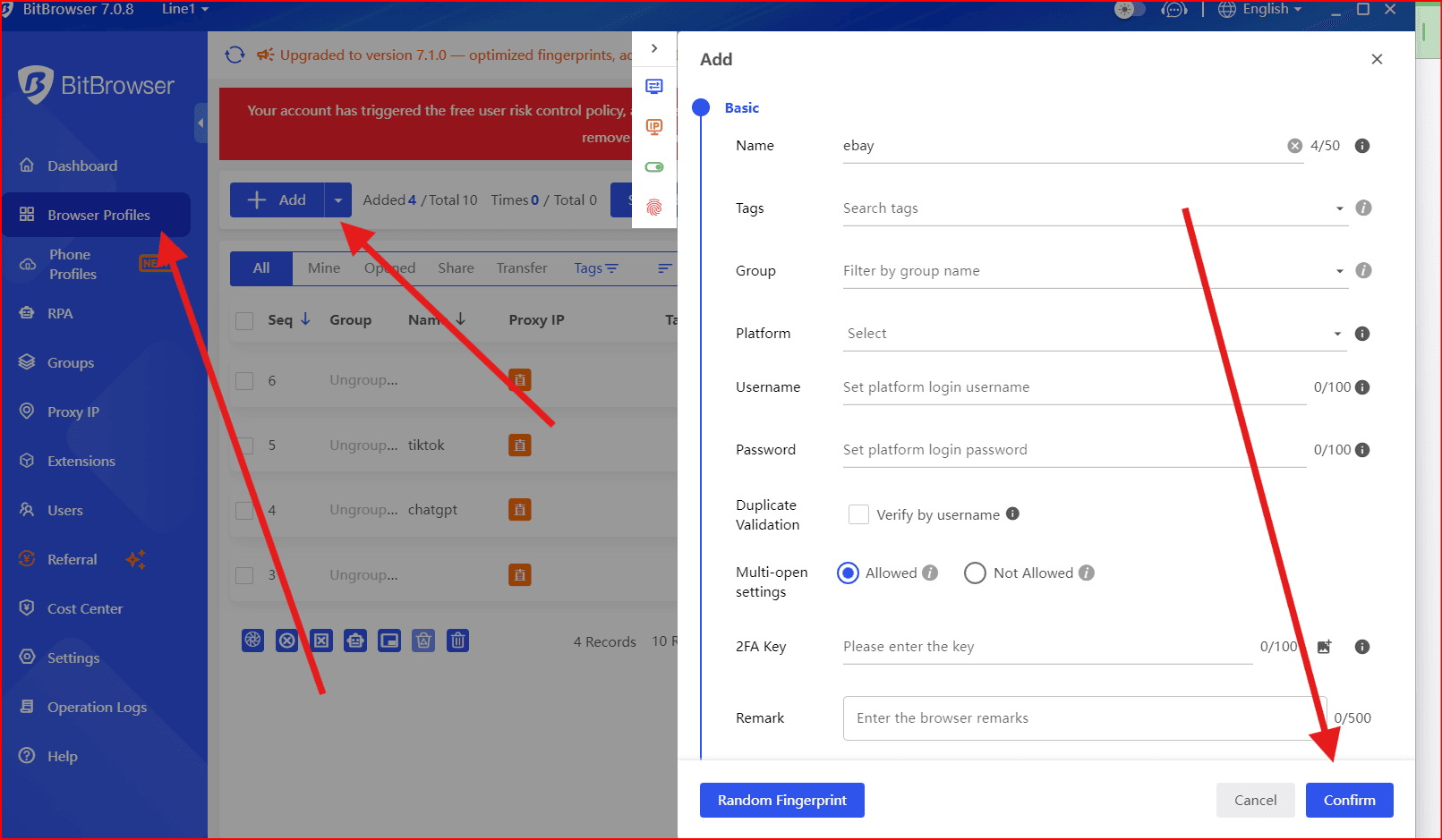
Inside the dashboard:
- Click “Create New Profile”
- Assign a clear name (e.g., “eBay Seller – Electronics”)
Configure a dedicated proxy for that profile
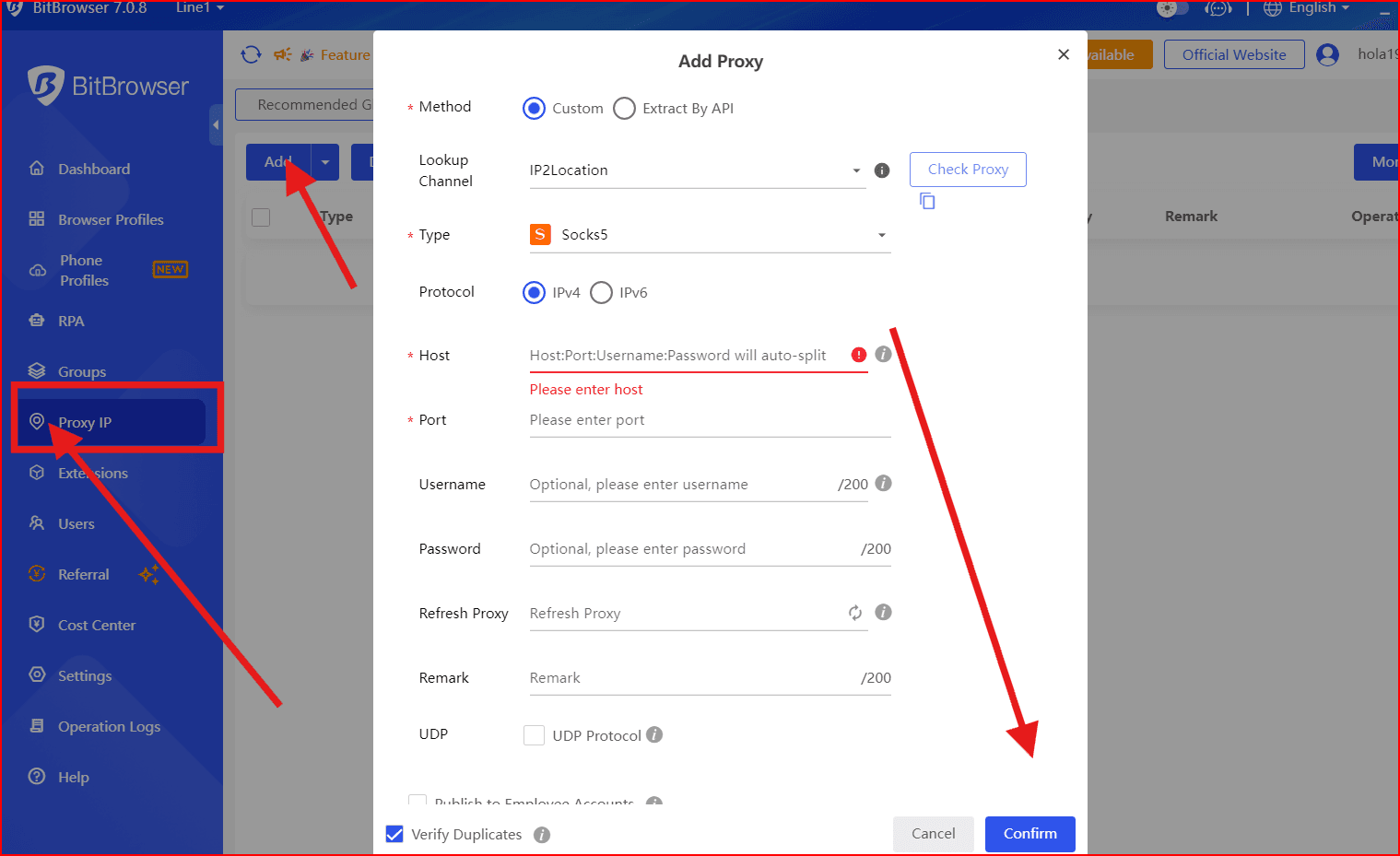
- Adjust fingerprint settings if necessary
BitBrowser automatically generates a unique browser fingerprint for each profile to ensure separation.
Step 3: Log Into eBay
Launch the newly created profile.
Visit eBay and log in using the credentials for that specific account.
All cookies and session data will be saved within that profile.
Step 4: Repeat for Additional Accounts
Create a separate profile for every eBay account you manage.
Each profile should use a different proxy.
Never log multiple eBay accounts inside the same profile.
Best Practices for Managing Multiple eBay Accounts
Keep Accounts Strictly Separate
Only access each eBay account through its assigned BitBrowser profile.
Avoid switching accounts within the same browser environment.
Clear profile naming helps prevent mistakes, such as:
- eBay Buyer – Personal
- eBay Seller – Clothing
- eBay Dropshipping – Home Goods
Match Proxy Location to Account Region
Ensure your proxy location matches the account’s registered country or region.
For example, a U.S.-registered account should use a U.S.-based proxy.
Consistent geographic signals reduce the risk of platform scrutiny.
Residential or mobile proxies are typically recommended for stable performance.
Conclusion
Managing multiple eBay accounts is a practical strategy for scaling and organization. The real issue isn’t having multiple accounts—it’s managing them improperly within a shared browser environment.
Without proper isolation, accounts risk signal mixing, ranking issues, and potential linking.
BitBrowser provides structured browser separation within one device. Each account operates independently, allowing sellers to scale more safely and efficiently.
Whether managing two accounts or ten, isolated browser profiles create cleaner performance, better organization, and reduced operational risk.
Frequently Asked Questions
Does eBay allow multiple accounts?
Yes, as long as each account follows eBay’s policies.
Is BitBrowser free?
BitBrowser offers different plans depending on usage needs.
Do I need a separate proxy for each account?
Yes. Each eBay account should use its own dedicated proxy.
What proxy type works best for eBay?
Residential or mobile proxies that match the account’s region are generally recommended.
Proper separation supports long-term account stability and scalable growth. Using BitBrowser makes it possible to manage multiple eBay accounts efficiently from a single device.

 Multi-Account Management
 Prevent Account Association
 Multi-Employee Management
Recommended
See More 



