Dropbox Multi-Account Problem Solved: Secure Client Access Using BiBrowser
 2025.12.01 06:42
 petro
petroIf you’re a digital professional—a freelancer, an agency owner, or a virtual assistant—you know the pain. You have your personal Dropbox, a separate one for your business, and maybe a few more for key clients. You need to access them all, but the constant logging in and out, the sync errors, and the general headache of juggling multiple Dropbox accounts is a massive time sink.
You’ve searched for ways to “combine multiple Dropbox accounts” or “add multiple Dropbox accounts to desktop,” only to be met with frustrating workarounds or the cold, hard truth: Dropbox’s native solution is severely limited.
This guide is for the professional who needs a real solution. We’ll break down the official limitations of managing multiple Dropbox accounts and introduce the professional-grade tool that offers true, seamless multi-account management—not just for Dropbox, but for all your digital identities.
The Official Limitations: Why Dropbox Doesn’t Want You to Have Multiple Accounts
Dropbox is a fantastic tool, but its design philosophy is rooted in a single-user experience. When you try to scale that experience, you hit a wall.
The Desktop Sync Bottleneck: One Account Per Type
The most common pain point is trying to add multiple Dropbox accounts to desktop. The official Dropbox desktop application is designed to handle a maximum of two accounts:
- One Personal Account
- One Dropbox Team/Business Account
If you have two personal accounts—or two business accounts from different clients—you cannot add multiple Dropbox accounts to desktop simultaneously. You’re forced to log out of one to log into the other, which defeats the purpose of seamless cloud storage. This limitation is why the search for “multiple Dropbox accounts on one computer” is so popular—and so frustrating.
This bottleneck is similar to what professionals face when managing multiple Chrome profiles or switching accounts on Chrome—the native tools simply weren’t built for professional-scale workflows.
The “Combine Multiple Dropbox Accounts” Myth
Another common query is how to “combine multiple Dropbox accounts.” The short answer is: you can’t. Dropbox does not offer a native feature to merge storage or contents of two separate accounts.
The only official workaround is manual file migration from one account to another. For a professional who must keep client work cleanly separated, that’s slow, messy, and risky.
Can Multiple Users Use One Dropbox Account?
The keyword “can multiple users use one Dropbox account” points to a desperate workaround: sharing credentials. While technically possible, this is a security nightmare and a professional liability. It leads to:
- Permission conflicts
- No accountability
- Sync errors and file corruption
In serious operations, sharing one login across people is a non-starter. The same is true on other platforms—whether it’s multiple Gmail accounts, multiple Discord accounts, or multiple Skype accounts.
When Dropbox’s Limitations Cost You Time and Security
The limitations of multiple Dropbox accounts go far beyond inconvenience. They create real business risk.
The Log-In/Log-Out Loop
Logging in and out of multiple Dropbox accounts through the web or desktop app drains time every day. If you handle several client accounts, you’re spending hours a week on a task that should be instant.
And if you’re also managing multiple social media, e-commerce, or ad accounts, the friction multiplies across every platform.
The Hidden Security Risk of the Web Interface
Many professionals rely on the web interface to bypass the desktop sync limit. But this introduces a hidden risk: browser fingerprint linking.
Every time you log into multiple client accounts from the same regular browser, you expose a shared digital fingerprint (device signature, fonts, WebGL data, Canvas rendering, etc.). Platforms can correlate those logins and link accounts together.
If you also manage Facebook, Instagram, TikTok, or ad accounts for those clients, cross-contamination can become a major liability.
The Geographic Access Problem
For international client work, geographic mismatch can trigger security alerts. Logging into a client’s Dropbox from a different country than their usual location may cause friction or access blocks. Native Dropbox apps don’t solve this problem.
The BiBrowser Solution: True Multi-Account Management for Dropbox and Beyond
The core issue isn’t Dropbox. It’s the lack of a professional tool for managing multiple isolated digital identities. That’s exactly what an antidetect browser is built to solve.
Isolate Every Dropbox Account with an Antidetect Browser
BiBrowser is a professional antidetect browser designed for secure multi-account management. It allows you to run all your Dropbox accounts simultaneously through the web—without overlap.
Here’s what BiBrowser gives you:
- Perfect Isolation: Each Dropbox account runs in its own BiBrowser profile with separate cookies, cache, and fingerprint. To Dropbox, every account looks like a different device.
- Anti-Linking Protection: Profiles don’t leak identity signals into each other, reducing the risk of account correlation.
- Simultaneous Access: Keep all client and personal Dropbox accounts open at once—no switching, no re-logging.
- Clean Professional Workflow: Organize profiles per client or business unit and move between them instantly.
Proxy-Ready Profiles for Geo-Specific Access
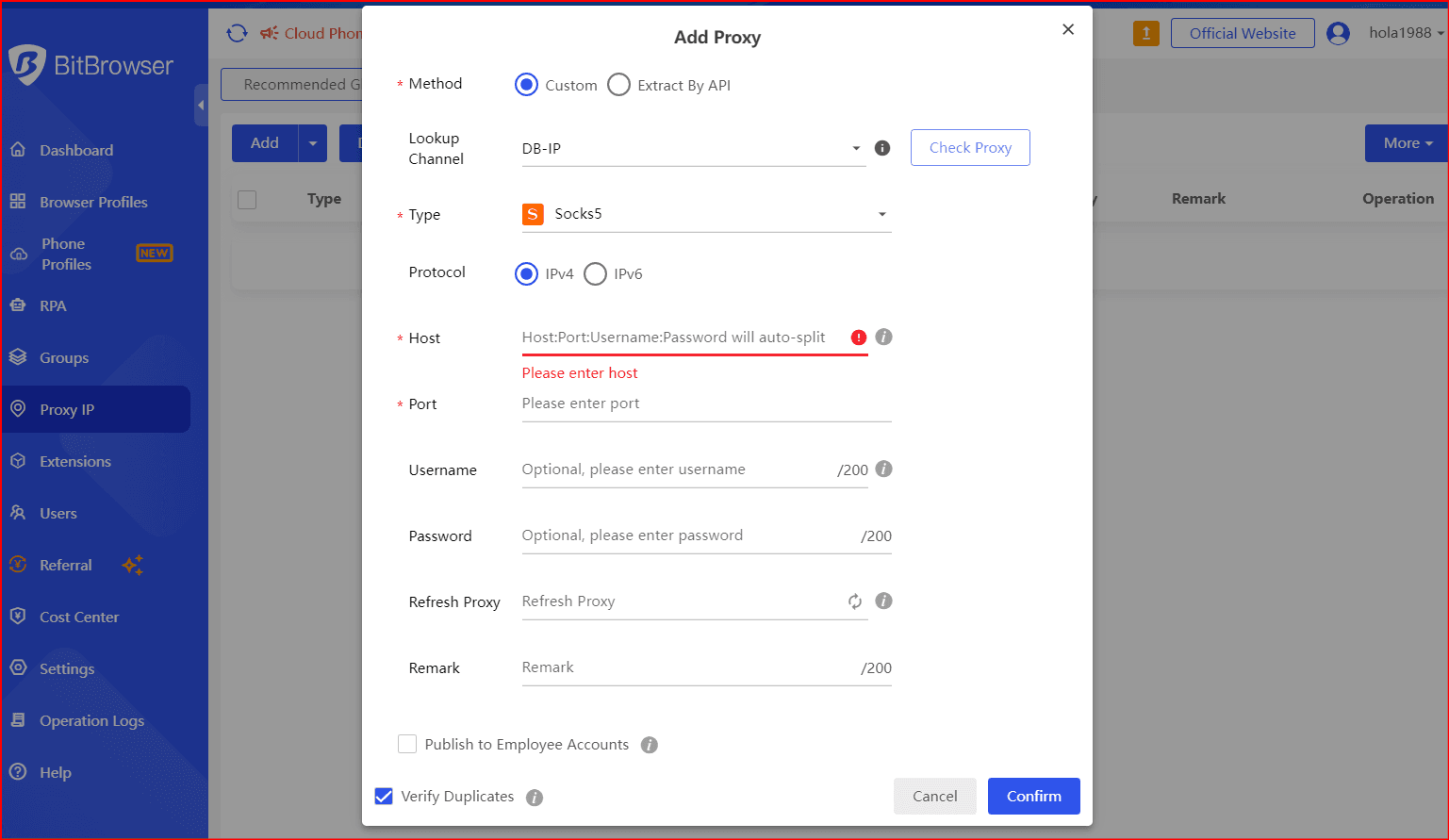
BiBrowser allows you to assign a dedicated proxy to each browser profile. This means each Dropbox account can be accessed from the client’s expected region, lowering security flags and keeping access consistent.
Whether your client is in the US, UK, Canada, or anywhere else, BiBrowser helps you match location to account behavior.
Beyond Dropbox: One Hub for All Digital Identities
Once you manage Dropbox smoothly, BiBrowser becomes your control center for everything else:
- E-commerce: Multiple Shopify, Etsy, or Amazon seller accounts without linking risk.
- Social media: Safely handle multiple Facebook, Instagram, TikTok, X/Twitter, LinkedIn, or Reddit accounts.
- Affiliate marketing & ads: Run separate ad identities with cleaner separation.
- Web scraping & research: Use distinct profiles to reduce blocks and detection.
Session Management That Actually Saves Time
BiBrowser keeps persistent isolated sessions per profile. That means every Dropbox account stays logged in independently with its own cookies and login state—so no more session timeouts or repeated MFA prompts just because you opened another account.
How Professionals Use BiBrowser for Dropbox
A clean agency-style setup with BiBrowser looks like this:
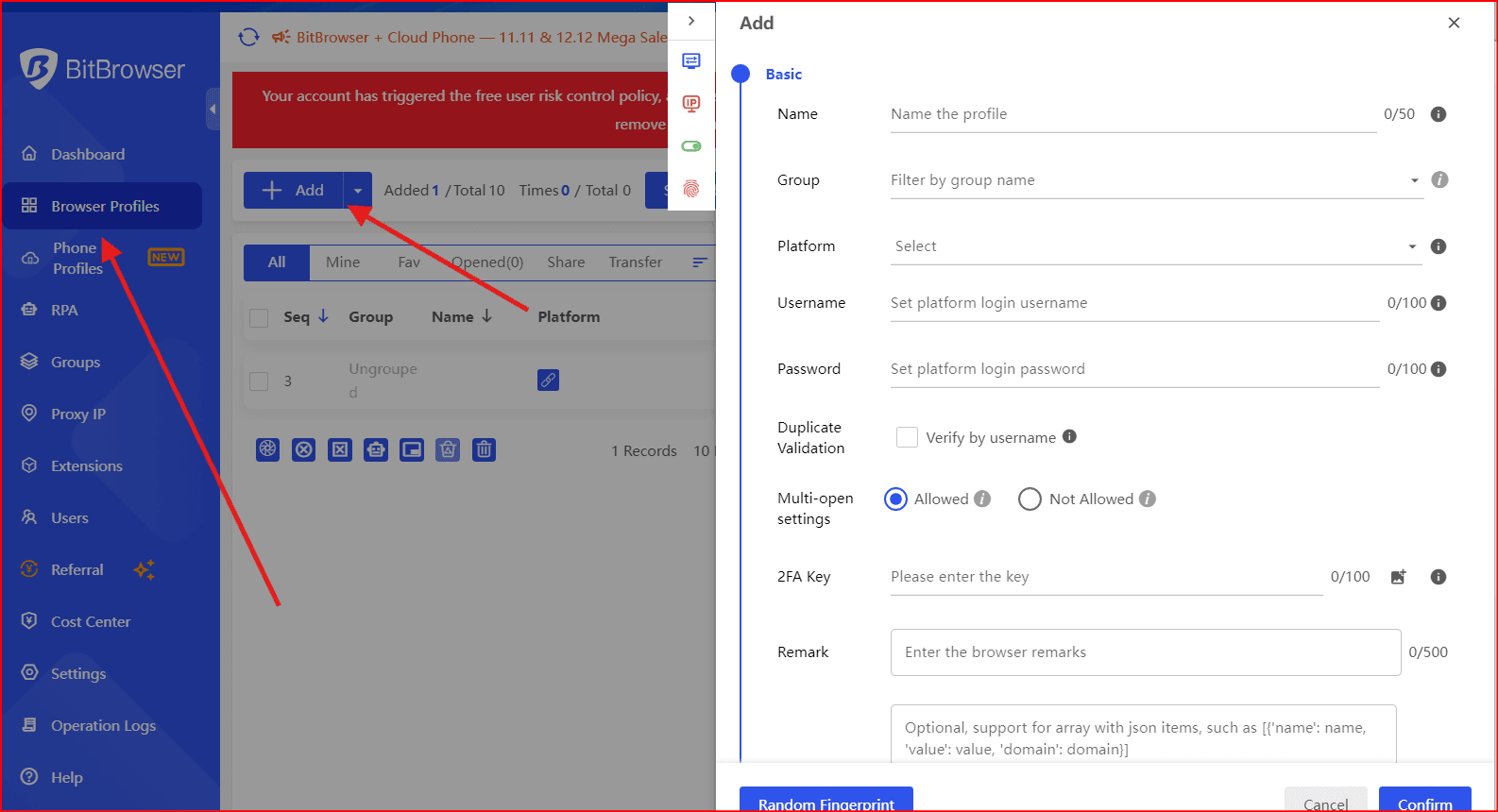
Create profiles: One BiBrowser profile per Dropbox account (client, business, personal).
Assign proxies (optional): Match a region-appropriate proxy to each client.
- Open all accounts at once: Every Dropbox runs simultaneously in separate windows.
- Collaborate safely: Share profile access with teammates without sending raw passwords.
- Scale workflows: Keep client work isolated while operating at volume.
This removes Dropbox desktop limitations entirely and replaces them with a secure, scalable way to work.
Don’t waste time switching accounts. Manage Dropbox professionally with BiBrowser.
Frequently Asked Questions About Managing Multiple Dropbox Accounts
(Keep your FAQ section here as-is, or mention BiBrowser where relevant.)
Conclusion: Stop Juggling, Start Managing
Dropbox’s limits are a signal: professionals need professional tools. Logging in and out, sync restrictions, and browser-tracking overlap aren’t sustainable when you’re managing multiple clients or business identities.
BiBrowser gives you true multi-account management for Dropbox and beyond. Every account stays isolated, secure, and easy to access—so you can scale your work confidently without risking linking, flags, or wasted hours.
Ready to take control of all your identities in one place? BiBrowser is built for exactly that.

 Multi-Account Management
 Prevent Account Association
 Multi-Employee Management
Recommended
See More 



