Pinterest Account Suspended? How to Get It Back in 2026
 2026.05.28 06:33
 YT.Shi
Seeing that your Pinterest account has been suspended can feel like a punch to the gut. One moment you are pinning normally, the next you are locked out with a vague message. The good news is that many suspensions are mistakes, and there is a clear path to getting your account back. This guide walks you through exactly what to do, step by step, using the latest 2026 information.
Why Did Pinterest Suspend My Account?
Before you appeal, it helps to understand what might have triggered the suspension. There are three main reasons, and the first one is more common than you might think.
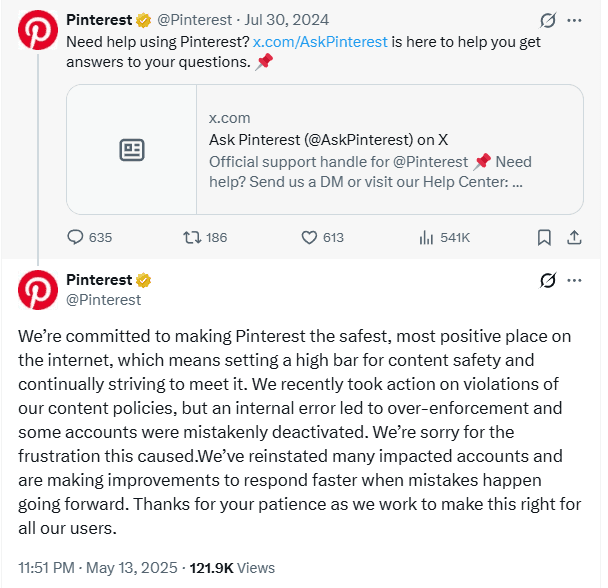
An internal error from Pinterest itself. In May 2026, Pinterest experienced a wave of mistaken suspensions caused by what the company later described as "over enforcement" due to an internal technical error. Many perfectly innocent accounts were suddenly banned. Pinterest publicly apologized and worked to reinstate those accounts, but not everyone was caught in time. If your suspension happened around that period, or even later, it could still be a leftover from that same type of automated mistake.
The spam filter got you. Pinterest uses automated systems to detect spammy behavior. Sometimes these systems are too aggressive. Rapid fire pinning, posting the same link over and over, repetitive comments, or following hundreds of users in a short time can all trigger the spam filter even if your intentions are pure.
An actual guideline violation. This is the least common reason for sudden suspensions, but it happens. Posting adult content, hate speech, copyrighted material, dangerous health advice, or misinformation will lead to a justified suspension. Even then, you usually get a warning first before a full account ban, unless the violation is serious.
Understanding the likely cause will help you write a better appeal. If you know you did nothing wrong, you can reference the May 2026 internal error as a possible explanation.
Step 1: Check Your Email and Stay Calm
When Pinterest suspends an account, they send an email to the address linked to that account. Go to your inbox and search for an email from Pinterest. Check your spam folder and any social or promotions tabs. The subject line often reads something like "Your Pinterest account has been suspended."
Inside that email you will find a brief explanation and sometimes an "Appeal" button. Do not delete that email. It is your direct line of communication. If you cannot find the email, do not worry. You can still appeal through the help center, which we will cover next.
Take a deep breath and do not panic. A suspension is reversible in most cases where no serious rule was broken.
Step 2: Submit an Appeal Through the Official Form
This is the most important step. Pinterest has a dedicated form for appealing account suspensions. Here is exactly how to find it and fill it out.
1. Go to the Pinterest Help Center. You can access it by scrolling to the bottom of the Pinterest website and clicking "Help," or by searching "Pinterest Help Center" in your browser.
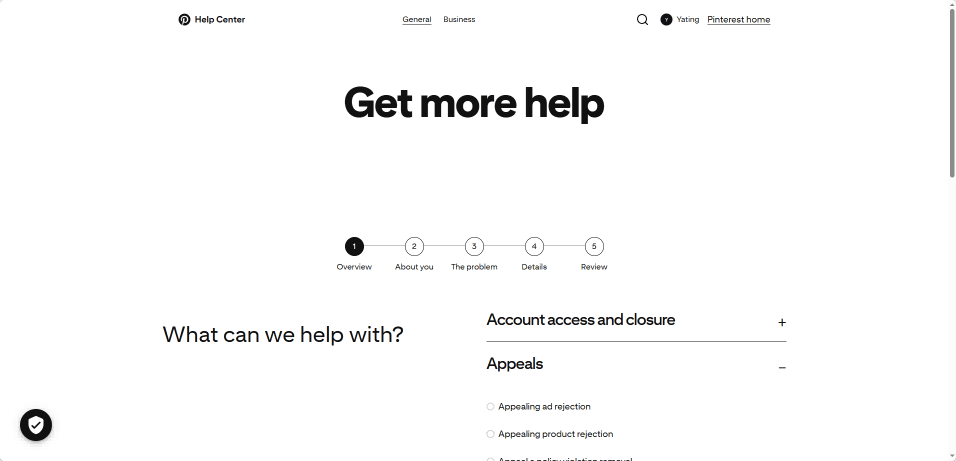
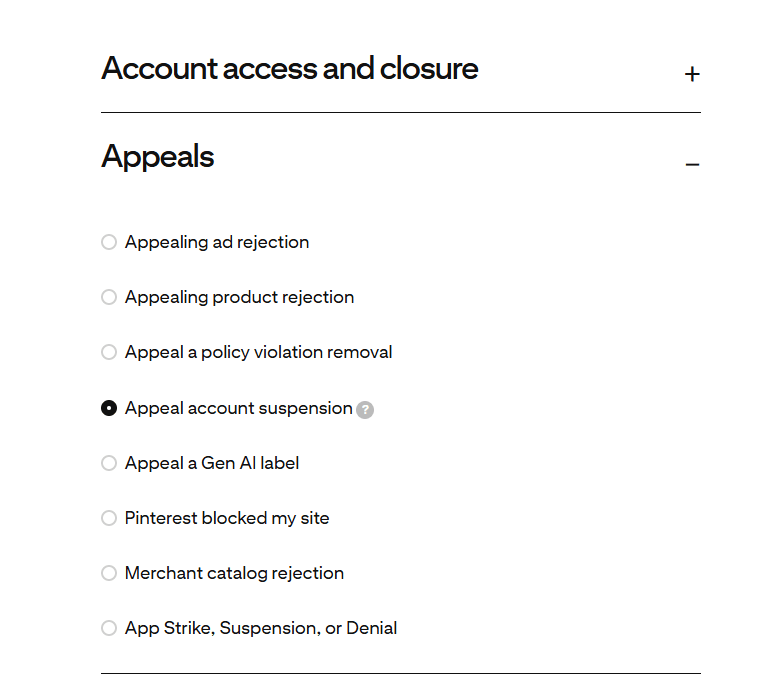
2. Once inside the Help Center, look for a section called "Appeals" or use the search bar to type "appeal account suspension." The system will direct you to the correct page. Select the type of appeal you wish to file, such as "Appeal account suspension." Then click "Continue".
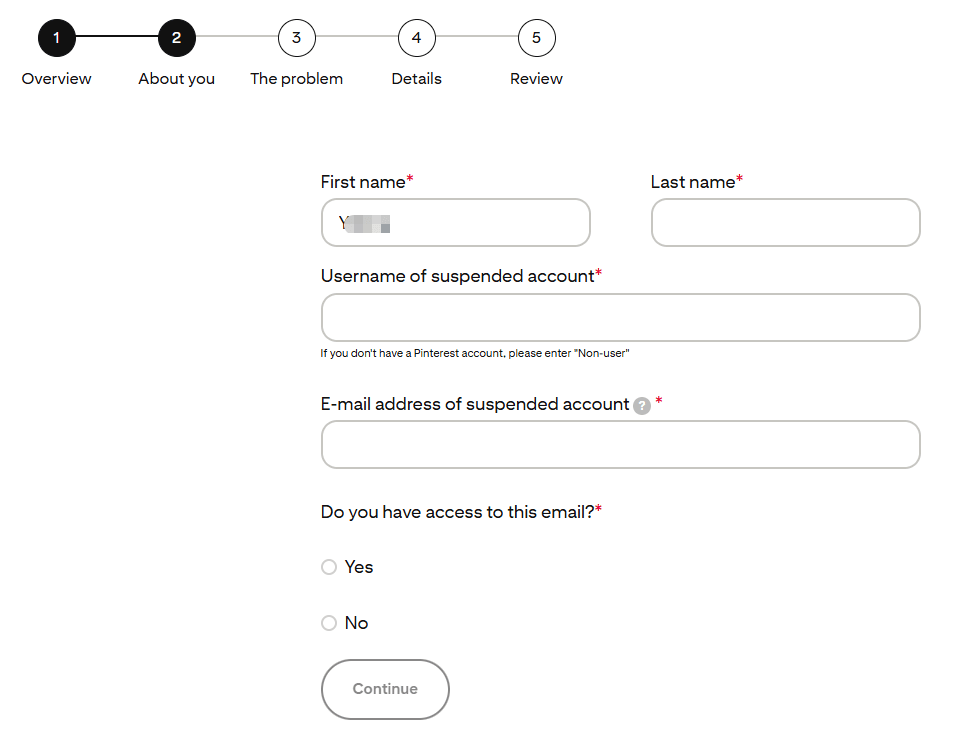
3. You will see a form with fields for your name, email, and username. Use the email associated with your suspended Pinterest account. The username is what appears in your profile URL, not your display name.
4. In the message box, write a short and polite explanation. Your goal is to sound like a real human who is confused and cooperative, not angry or demanding. A good template looks like this:
"Hello, my Pinterest account has been suspended. I believe this may have happened by mistake. I use Pinterest to save ideas and share my own original content, and I have not intentionally violated any guidelines. Given the known over enforcement issues in May 2025, I suspect my account was caught in an automated error. I kindly request a manual review. My username is [your username] and the email on my account is [your email]. Thank you for your help."
If you suspect a specific trigger, like you pinned too fast, you can briefly acknowledge it and say you will slow down. But keep the focus on asking for a human review.
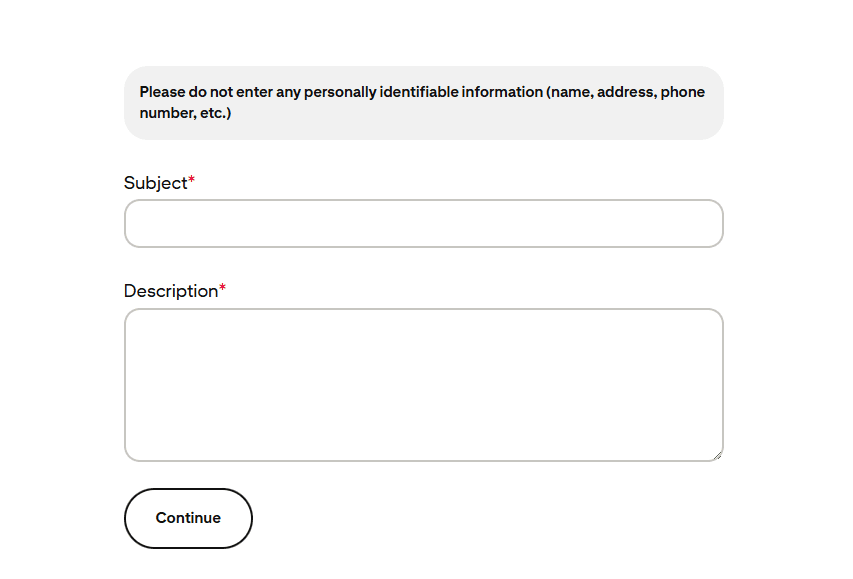
5. Submit the form. You will see a confirmation message. Do not submit multiple appeals right after each other. One clear request is enough.
Step 3: Reply Directly to the Suspension Email
If you found the suspension email, you have another path. Often that email contains an "Appeal" button. Clicking it will take you to a similar form. You can also simply reply to the email.
When replying, use the same polite tone as above. Mention that you have reviewed the community guidelines and believe your account was wrongly flagged. You can add that you understand the importance of keeping Pinterest a safe and spam free space, and that you are willing to adjust your activity if anything was unintentionally flagged. Keep it under ten sentences. A long emotional message does not help your case.
Step 4: Use the Pinterest Help Community as a Gentle Nudge
The Pinterest Help Community is a forum where community managers from Pinterest sometimes respond to users. This should be a supplementary step, not your main strategy.
Visit the community page and search for posts about account suspensions. You will likely see threads where a Pinterest community manager has replied. You can politely add a comment in one of those threads. Do not hijack someone else's post with your full story. Simply say something like:
"I am having a similar issue. My account was suspended recently and I have submitted an appeal. Could a community manager please help get it reviewed? Thank you."
This can sometimes speed things up, but always remember to stay respectful. The community managers are there to help, and a polite request goes a long way.
What to Do if Your Appeal Is Denied
Getting a denial email can feel disheartening, but it is not necessarily the end. Many users succeed on a second or third attempt.
If you receive a decision saying your suspension is final, reply to that email. Ask for a human review again. You can say something like:
"I understand this decision, but I genuinely believe there has been a mistake. Could my case please be reviewed by a human team member? I am happy to provide any additional information needed."
Wait at least a week before following up. If you still get no reply, send one brief, polite reminder. Do not send daily messages. Persistence is fine, but spam will work against you.
If you are a long time user with a history of positive contributions, mention that. Something like, "I have been active on Pinterest for over three years, always following the guidelines. A sudden suspension feels like an error." Real human context helps.
If after several polite attempts you get a final denial with no option to appeal further, you may need to accept the outcome. Creating a new account to bypass the suspension is risky and could result in an immediate ban. It is better to start fresh only if you are certain you can comply fully with the rules going forward.
A Smart Solution for Multi Account Users: BitBrowser
If you manage multiple Pinterest accounts for business or clients, you face an extra risk. Standard browsers share fingerprints across tabs and profiles. If one of your accounts gets flagged for suspicious activity, Pinterest might detect the connection and suspend all your accounts at once. That is a nightmare scenario you can avoid with the right tool.
BitBrowser creates completely isolated browser environments. Each Pinterest account gets its own digital fingerprint and a separate cookie store. To Pinterest, your accounts look like they are being accessed from different devices, even if you are using the same computer.
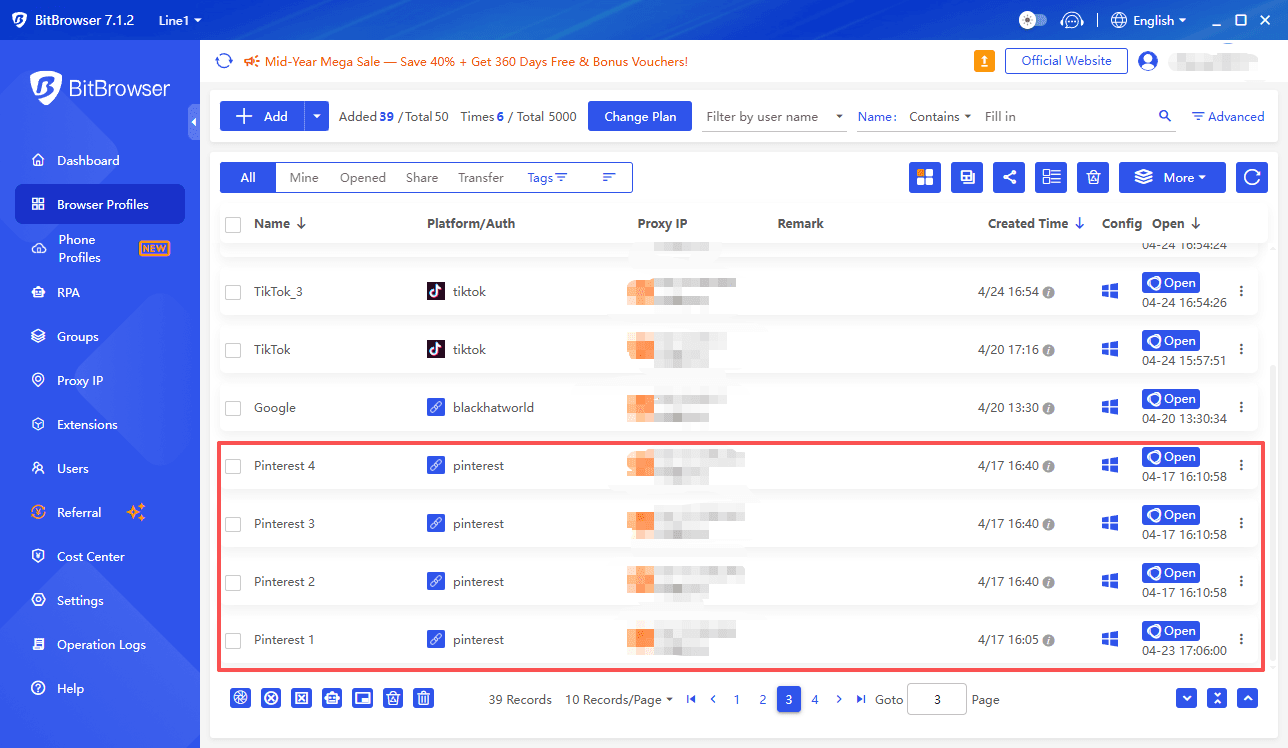
BitBrowser also allows you to assign a unique proxy IP to every profile, adding another layer of separation. This way, a mistake on one account does not spill over and take down your entire portfolio.
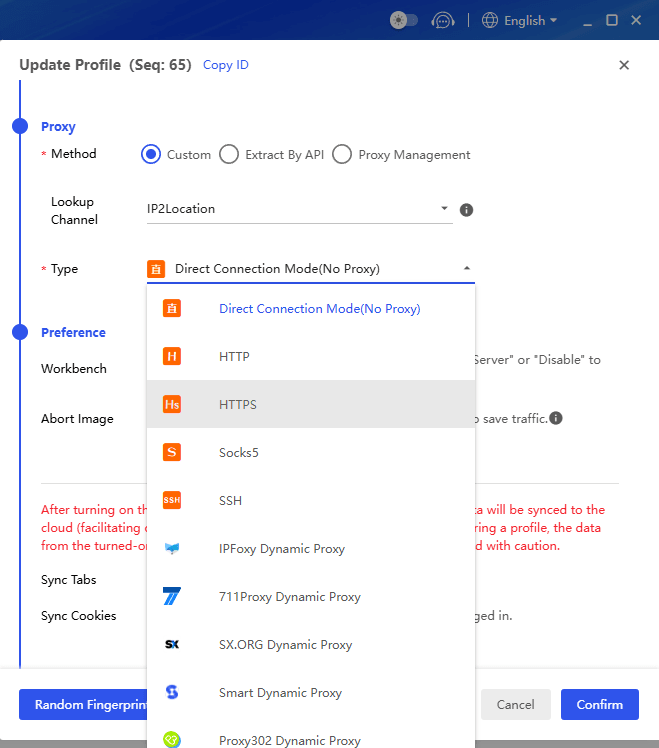
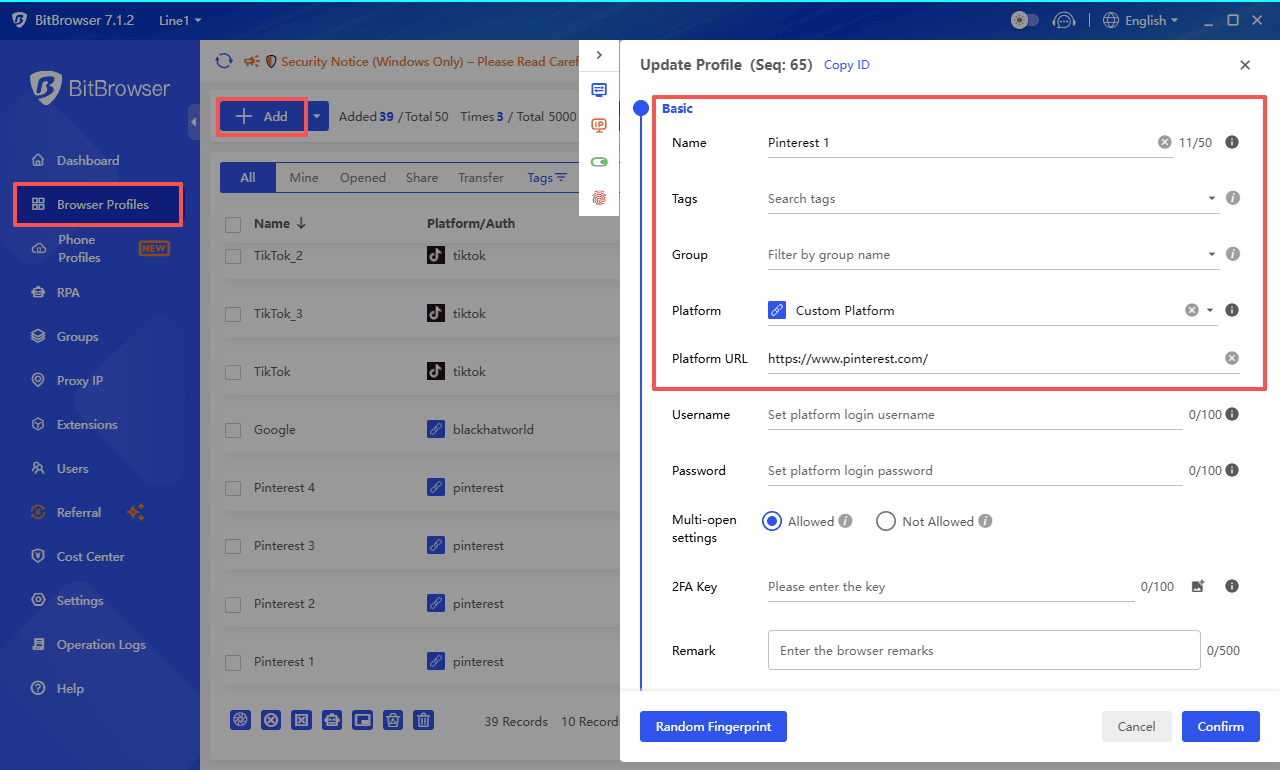
Setting it up is straightforward. You create a new browser profile for each Pinterest account, log in once, and from then on you always open that account inside its dedicated profile. The learning curve is minimal, and the peace of mind is enormous. It is a practical, everyday tool for social media managers, affiliate marketers, and anyone who needs to keep multiple Pinterest identities safe from chain suspensions. Think of it as giving each account its own private, untraceable room.
Sign Up
How to Avoid Getting Suspended Again
Once your account is back, the last thing you want is another suspension. Small adjustments to your Pinterest habits make a huge difference.
Slow down your pinning. Instead of saving 50 pins in one sitting, spread them out. A natural pace of 5 to 15 pins per day is much safer. If you schedule pins, use built in Pinterest scheduling or trusted third party tools that mimic human behavior.
Avoid repetitive actions. Do not pin the same URL or the exact same image across multiple boards in a short time. Do not leave identical comments on many pins. Variety keeps you under the radar.
Use clean links. Make sure every link you save leads to a safe, relevant, and functional page. Broken links, redirects, or links to sketchy websites can trigger spam flags.
Study the community guidelines. It is not the most exciting reading, but knowing what Pinterest prohibits will protect you. Pay attention to rules about affiliate links, giveaways, and intellectual property.
Build a genuine profile. Add a real profile picture, write a short bio, and interact naturally with other users. Accounts that look and act like real people are far less likely to be mistaken for bots.
Final Thoughts
An account suspension is stressful, but it is rarely permanent. Pinterest wants to keep genuine users, and they have shown they are willing to correct mistakes, especially after the 2025 over enforcement incident. Follow the steps above with patience and politeness.
A clear, human request for a manual review solves the problem more often than not. And once you are back in, adjust your habits and, if you handle multiple accounts, protect them with the right separation tools. Your saved ideas, boards, and creative work are worth the effort.

 Multi-Account Management
 Prevent Account Association
 Multi-Employee Management
Recommended
See More 



