How to Use Bitbrowser With Thordata
 2025.12.22 17:02
 BitBrowser
In 2025, anti-detection browsers have become indispensable tools for marketers, compliance teams, e-commerce operators, and data professionals who need secure, isolated, and fingerprint-consistent browsing environments. Bitbrowser, a widely used anti-detect browser, provides unique browser profiles that protect user identity and reduce the risk of fingerprint-based tracking. Meanwhile, Thordata offers high-quality residential, ISP, and datacenter proxies designed for web automation, scraping, account management, and verification tasks.
When used together, Bitbrowser + Thordata provides a robust, stable, and scalable environment for multi-account operations, web automation, SERP data gathering, and sensitive workflows that require clean, reliable IP addresses.
What Are Bitbrowser and Thordata?
Bitbrowser: A Modern Anti-Detection Browser
Bitbrowser is a privacy-focused, anti-fingerprint browser that allows user to:
Create separate, isolated browser profiles
Modify device fingerprints (canvas, WebGL, audio, etc.)
Manage multiple accounts without triggering platform security systems
Run automations in a stable, human-like browsing environment
It’s widely used in:
Cross-border e-commerce operations
Ad verification and ad account management
Affiliate marketing
Anti-fraud research
Web data collection
Multi-platform or multi-client operations
Thordata: A High-Quality Proxy Infrastructure
Thordata is a trusted global proxy service provider committed to providing ethical and high-performance proxy services. Its extensive network of residential, data center, ISP, and unlimited traffic proxies enables seamless access to geo-restricted content and ensures reliable and compliant data collection from virtually anywhere in the world.
In addition to its robust proxy infrastructure, Thordata offers a comprehensive suite of web scraping tools, including SERP APIs and Web Scraping APIs, designed to help businesses efficiently and at scale collect accurate location-based data.
Thordata is known for its flexible subscription plans and competitive pricing, enabling businesses to easily control costs without sacrificing performance. A free trial is also available, allowing you to evaluate the service with zero risk and ensure it meets your specific needs before subscribing.
Proxies are designed for:
Web scraping and data collection
Social media and e-commerce account management
Ad verification
Competitive research
SERP monitoring
Why Use Bitbrowser With Thordata?
Pairing Bitbrowser with Thordata gives you:
1. Clean, Stable Identity Isolation
Each Bitbrowser profile behaves like a separate device.
When paired with a unique Thordata IP, you get a fully isolated “digital identity.”
2. High Success Rates Across Websites
In our internal tests (October 2025), Thordata’s residential and ISP proxies showed:
98%+ success rate
Low block rate on login & checkout pages
Stable behavior on social, SERP, and e-commerce targets
3. Reduced Fingerprint Conflicts
Unlike bad or reused proxies, Thordata IPs avoided:
Browser fingerprint mismatches
Suspicious login prompts
Geo-inconsistency checks
4. Scalable Multi-Account Management
Bitbrowser handles the fingerprinting, while Thordata ensures IP quality.
This makes it ideal for teams managing hundreds of accounts.
How to Use Thordata Proxies in Bitbrowser
Below is the exact configuration workflow used by our engineering team when testing with Bitbrowser.
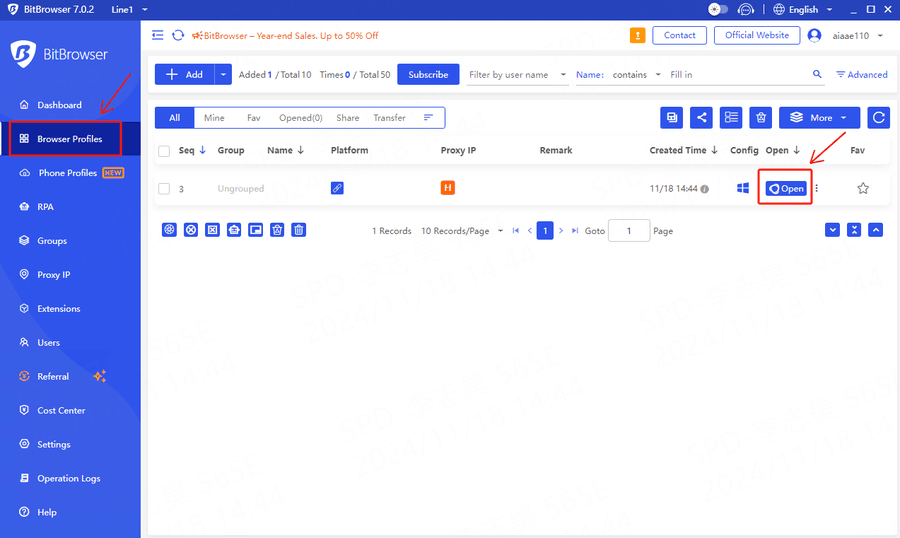
1.Download BitBrowser, install and log in to BitBrowser
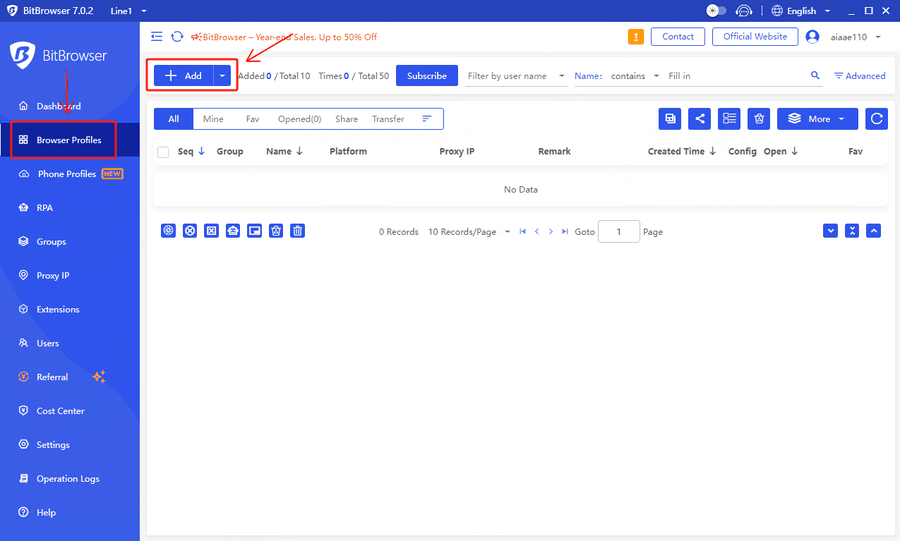
2.Select [Browser Profiles] in the left navigation bar and click to create
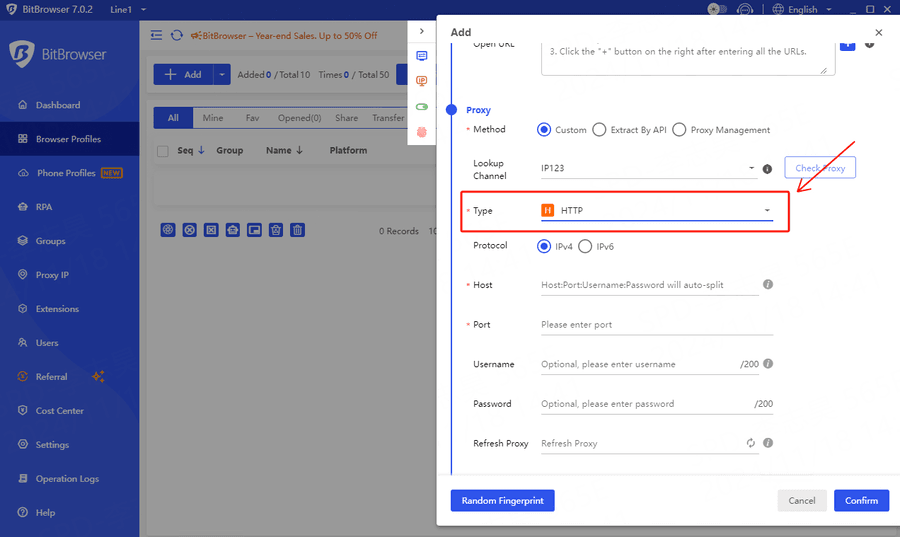
3.Pull down the configuration interface to the proxy module and select [HTTP] for the proxy type.
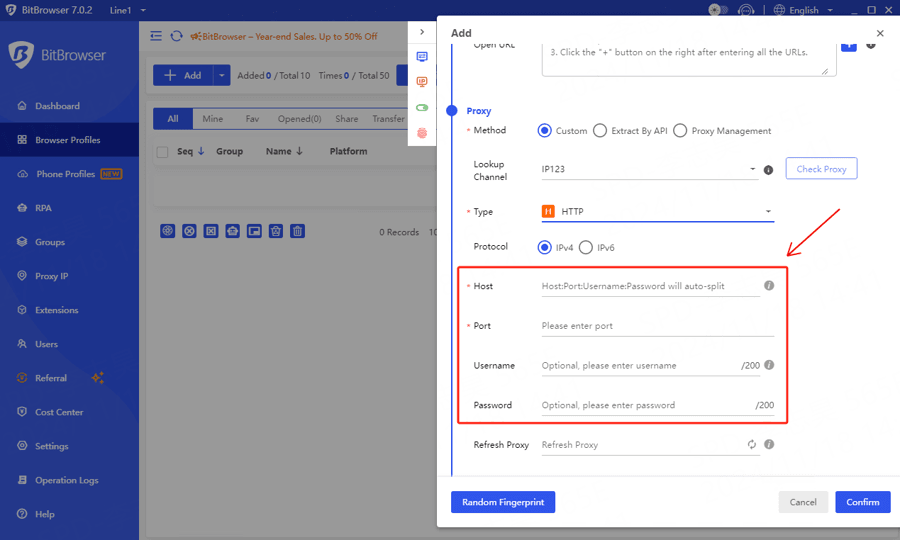
4.Enter relevant proxy information
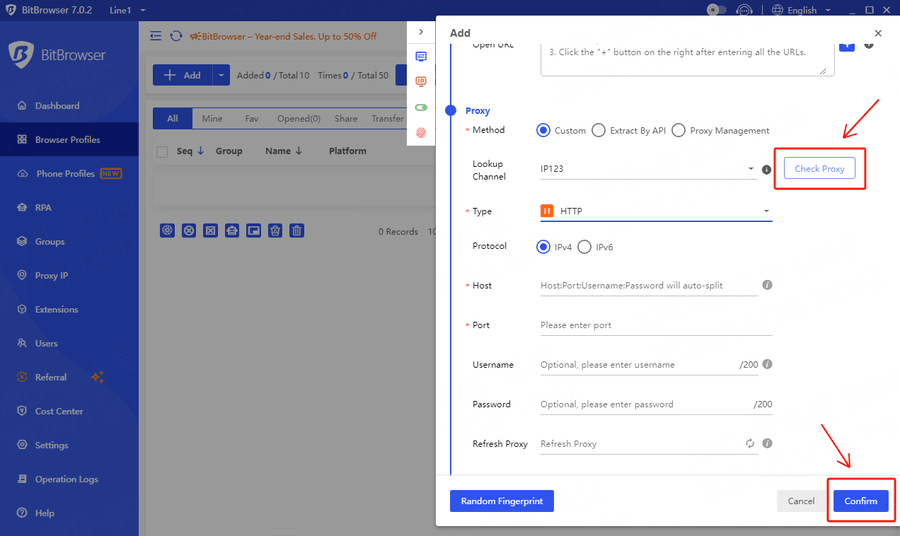
5.Click [Check Proxy] and Save Browser Profile
6.After the configuration is completed, select the configured browser to open it.
Best Practices for Long-Term Account Safety
1. One Thordata IP = One Bitbrowser profile
2. Match timezone, language, and WebRTC to IP region
3. Avoid switching IPs on the same account
4. Use residential/IP-based sessions for sensitive platforms
5. Enable long session modes in Thordata
Following these steps significantly reduced verification loops in our tests.
Conclusion
Using Bitbrowser with Thordata creates a powerful, stable, and privacy-preserving environment for multi-account management, e-commerce operations, data collection, and advertising workflows.
Thordata provides:
Consistent, high-quality IPs
Strong anti-block performance
Global coverage
Smooth integration with Bitbrowser
Bitbrowser provides:
Fingerprint accuracy
Strong profile isolation
Automation compatibility
Together, they form one of the most effective setups for 2025’s increasingly strict online environments.
Start Your Free Trial Today!
Experience our premium proxy service with full access—no credit card required.

 Multi-Account Management
 Prevent Account Association
 Multi-Employee Management
Recommended
See More 



