How to Browse Facebook Without Logging In: 4 Proven Methods (2026 Guide)
 2026.03.26 06:45
 YT.Shi
Can you view a Facebook page without an account? The short answer is yes, but with increasing technical limitations. As Facebook (Meta) tightens its "login wall" to prioritize user data collection, standard browsing has become more restrictive.
Whether you are conducting market research, performing competitor analysis, or simply prioritizing digital privacy, here are the most effective ways to access public Facebook content anonymously.
Why Do People Want to Browse Facebook Without an Account?
There are several professional and personal reasons why users seek to access Facebook content without logging in:
1. Privacy and Data Protection
Many users prefer not to be tracked by Meta’s extensive data-harvesting algorithms. Browsing without an account prevents the platform from linking specific interests, search history, or page views to a personal identity.
2. Competitor and Market Research
Digital marketers and SEO strategists often need to monitor competitor updates, ad libraries, or trending content without alerting the target or influencing their own personal feed’s algorithm.
3. Avoiding "Social Media Fatigue"
Some individuals wish to check specific public information—such as local business hours, event updates, or government announcements—without being drawn into the addictive environment of a personal news feed.
4. Security for Multi-Account Management
For professionals managing multiple brand assets, accessing Facebook through an anonymous or isolated environment prevents "account association" risks, which can lead to security flags or shadowban.
Is It Possible to Browse Facebook Without Logging In?
The short answer is yes, but with specific technical caveats.
Facebook’s architecture is designed to encourage user registration. While most "Public Pages" (such as those for businesses, celebrities, and organizations) are technically accessible to anyone on the internet, Facebook employs a "Login Wall". This is a dynamic pop-up that blocks the screen after a few seconds or a certain amount of scrolling.
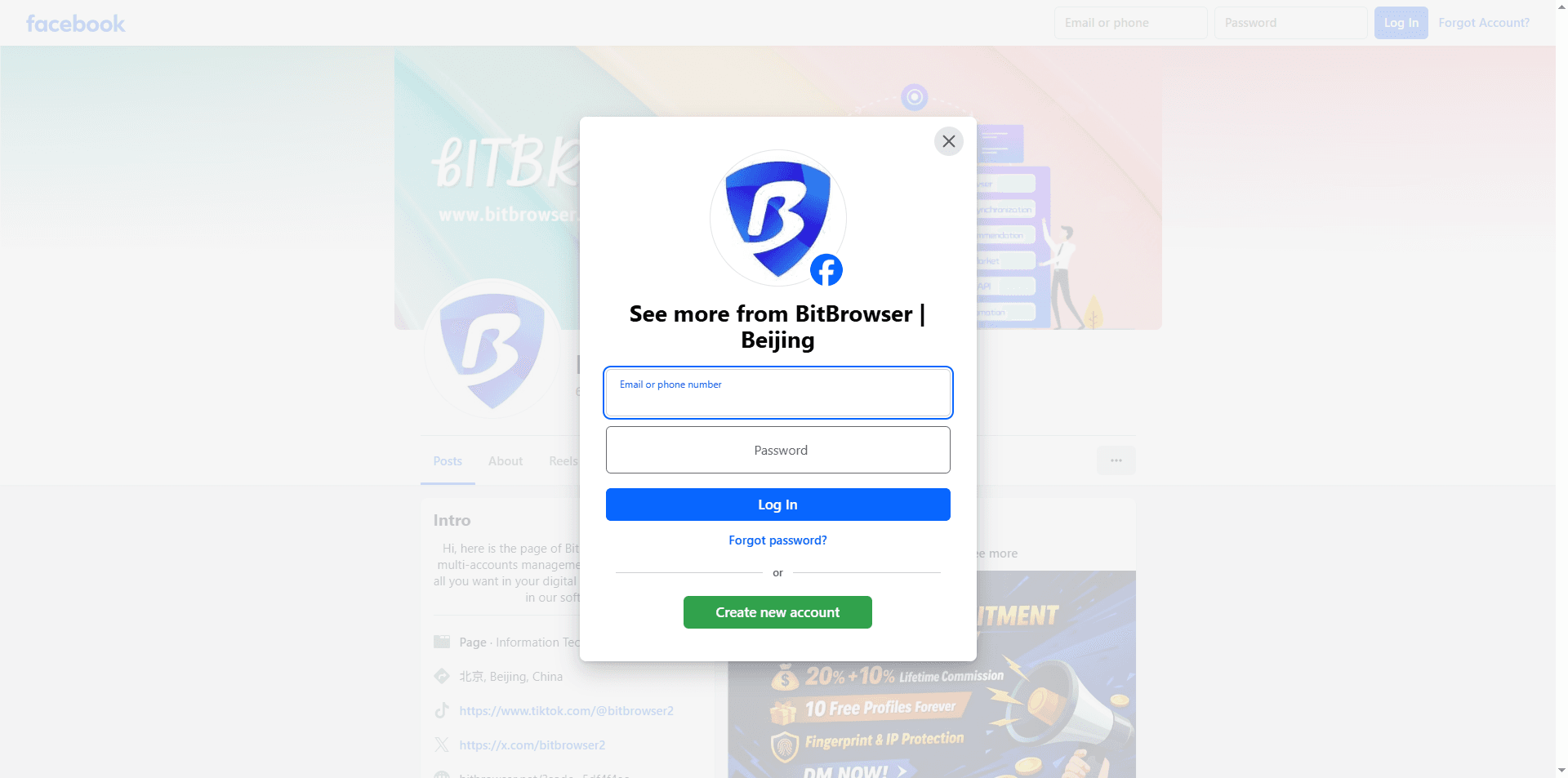
● What You Can See: You can generally view the landing view of a Public Page, including the profile picture, cover photo, and the most recent 2–3 posts.
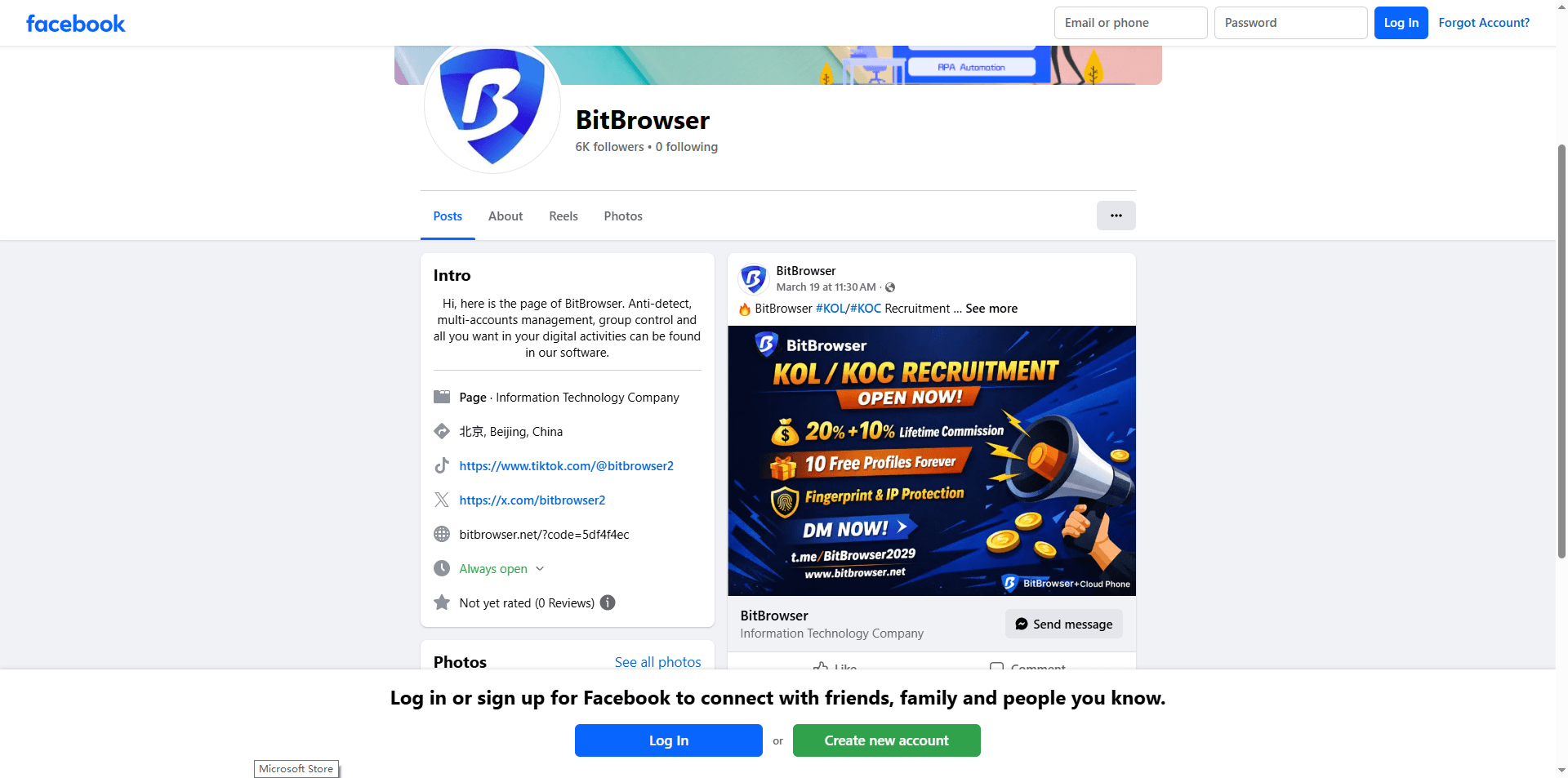
● What Is Restricted: You cannot access private profiles, member-only groups, or the full list of "Followers." Additionally, interactive features like commenting, liking, or viewing the full comment section are strictly reserved for logged-in users.
Using advanced tools like anti-detect browsers or cloud phone environments can extend the duration of these sessions by masking the user's digital footprint, but they do not grant access to private, non-public data.
How to Browse Facebook Without Logging In: 4 Proven Methods in 2026
1. Use Search Engine Direct Linking
Search engines like Google and Bing index public Facebook Pages (Business, Brand, and Public Figure pages). This remains the most straightforward entry point.
● The Process: Use the site: operator in your search bar. Example: site:facebook.com [Page Name].
● Pro Tip: Instead of clicking the main link, click the three dots (or arrow) next to the search result and select "Cached". This allows you to view a snapshot of the page stored on Google’s servers, bypassing Facebook’s live scripts entirely.
● Cons: Facebook still gets IP + browser fingerprint; You’ll hit login walls more often in 2026; Some content won’t load fully
2. Leverage Incognito Mode and User-Agent Switching
Standard browsers store cookies that trigger Facebook’s login prompts. Using Incognito/Private Mode ensures a clean session.
● Chrome: Press Ctrl + Shift + N (Windows, Linux, Chrome OS)
● Firefox: Press Ctrl + Shift + P (Windows) or Command + Shift + P (Mac)
● Edge: Press Ctrl + Shift + N (Windows) or Command + Shift + N (Mac)
● Safari: Press Command + Shift + N (Mac)
Advanced Step: Use a browser extension to change your User-Agent to a mobile device (Android or iOS). Facebook’s mobile web interface occasionally handles the login wall differently, sometimes allowing you to dismiss the pop-up to continue reading basic posts.
Here’s how I usually use it: I open an incognito tab while staying logged out, and once I’m done, I close the entire incognito window instead of leaving it running. The next time I need it, I simply start fresh with a new session.
This approach helps reduce cookie-based linking and is easy to turn into a consistent habit. That said, it’s not perfect, since the browser fingerprint remains largely the same, and despite what some people assume, incognito mode doesn’t make you truly anonymous.
3. Advanced Anonymity: Anti-Detect Browsers
For professional digital marketers and SEO strategists, standard "private browsing" is often insufficient because Facebook can still track your hardware fingerprint (Canvas, WebGL, WebRTC).
● How it works: Tools like BitBrowser allow you to create isolated browsing environments with unique digital fingerprints.
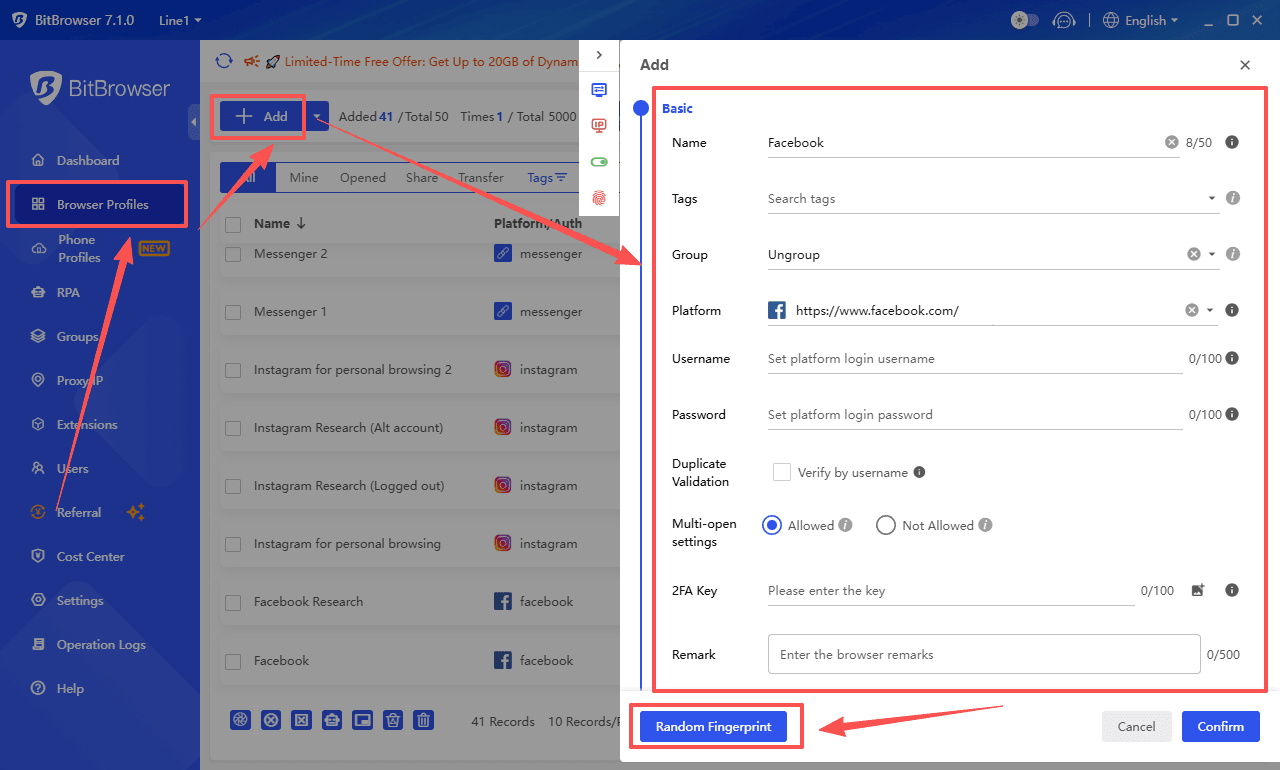
● Benefits: By configuring a dedicated proxy integration, you can access Facebook pages from different geographic locations (e.g., checking localized content in Brazil or Europe) without your real IP or device identity being logged by Meta’s tracking scripts.
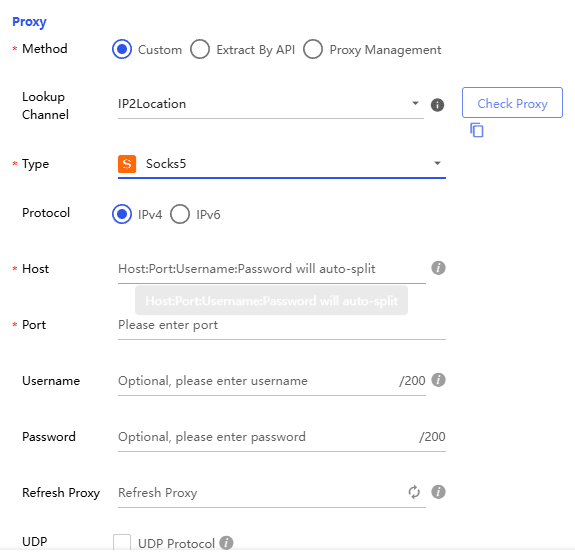
On top of that, BitBrowser enhances data protection by keeping sessions isolated, encrypting sensitive information, and preventing cross-account tracking, which makes it especially useful for managing multiple accounts securely while maintaining a higher level of anonymity than traditional browsing methods.
In 2026, this is the only effective way to browse Facebook anonymously without revealing your identity.
4. Cloud Phone Technology for Total Isolation
If you need to monitor social media trends or manage multi-account research without any link to your local hardware, cloud phone technology (such as BitCloudPhone) provides a robust solution.
● Implementation: These platforms run a virtualized mobile OS in the cloud. You can browse Facebook via a virtual Android environment, ensuring that no tracking data ever reaches your actual PC or smartphone. This is particularly effective for bypassing aggressive "Login to Continue" blocks that trigger after scrolling.
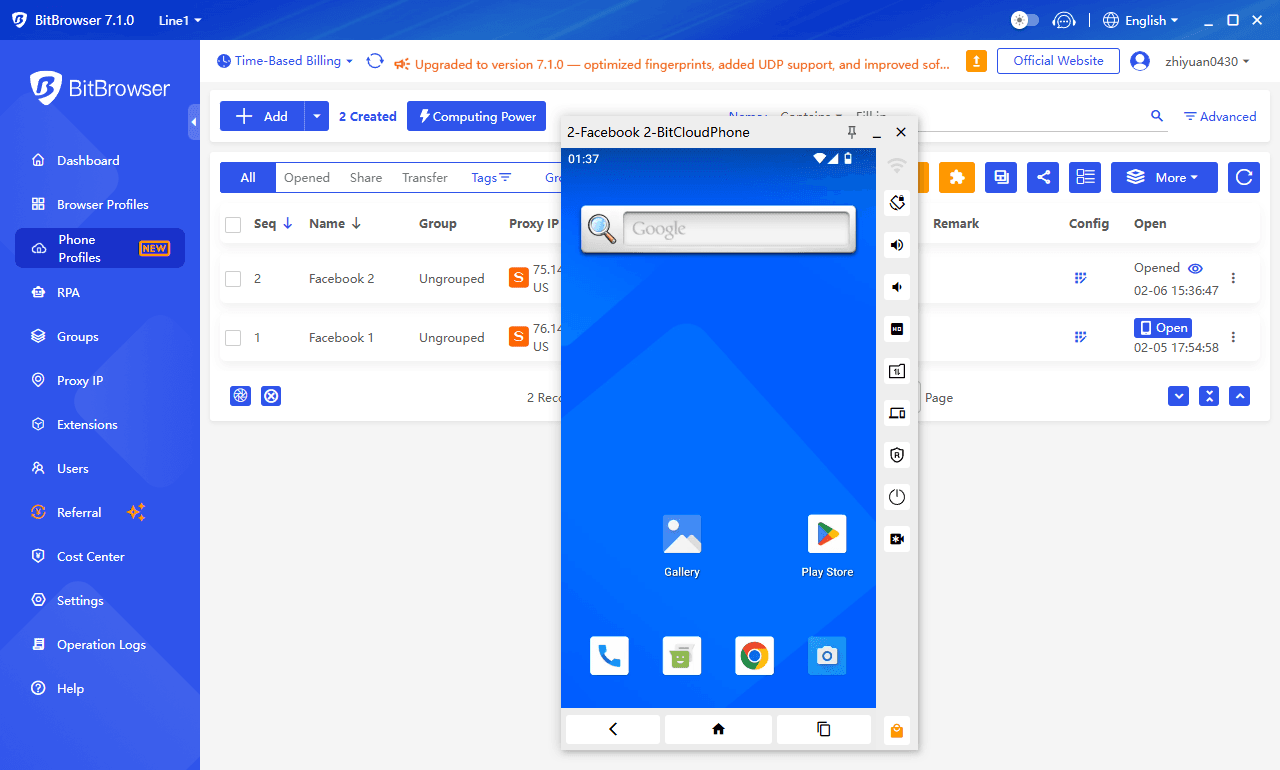
For detailed instructions, check out this step-by-step guide on how to browse Facebook anonymously using a cloud phone.
Limitations to Keep in Mind
While these methods work for Public Pages, certain restrictions remain:
● Private Profiles & Groups: You cannot view personal profiles or private groups without a valid account and permission.
● Interaction Restraints: You cannot like, comment, or share content.
● The "Scroll Limit": Facebook typically triggers a hard login wall after you scroll past the first few recent posts. To continue, you may need to refresh the session or use a different virtual environment.
Conclusion
Browsing Facebook without an account is still possible in 2026, but it requires the right approach. From search engine caching and incognito sessions to advanced tools like anti-detect browsers and cloud phones, each method offers different levels of access and privacy.
For casual viewing, simple techniques may be enough, but for marketers and multi-account users, combining fingerprint isolation with proxy routing provides the most reliable and secure way to access public Facebook content without exposing your identity.
FAQ
1. Can you fully browse Facebook without an account in 2026?
Not completely. You can access public Facebook pages, including basic profile info and a few recent posts, but deeper content is restricted by the login wall. Private profiles, groups, and full interaction features remain inaccessible without logging in.
2. What is the best way to bypass Facebook’s login wall?
There is no permanent bypass, but several methods can extend access. Using search engine cached pages, incognito mode with clean sessions, and user-agent switching can help temporarily. For more consistent results, anti-detect browsers and cloud phone environments provide better anonymity and longer browsing sessions.
3. Is browsing Facebook without logging in truly anonymous?
No, not by default. Even without an account, Facebook can still track your IP address and browser fingerprint. To achieve a higher level of anonymity, tools like anti-detect browsers with proxy integration are required to mask your digital identity and prevent tracking.

 Multi-Account Management
 Prevent Account Association
 Multi-Employee Management
Recommended
See More