Avakin Life Suspended in 2026? Causes, Appeal Process & How to Recover Your Account
 2026.07.27 08:19
 YT.Shi
Getting an Avakin Life suspended message can feel stressful, especially if you have spent years building your profile, collecting items, or making friends. In 2026, suspensions are still common, and most players have the same questions right away.
Why did my Avakin Life account get suspended, how do I appeal, and what can I do to get it back faster?
This guide walks you through the most likely causes, the exact appeal process, what to do while you wait, and how to reduce the risk of getting suspended again.
What does suspended mean in Avakin Life?
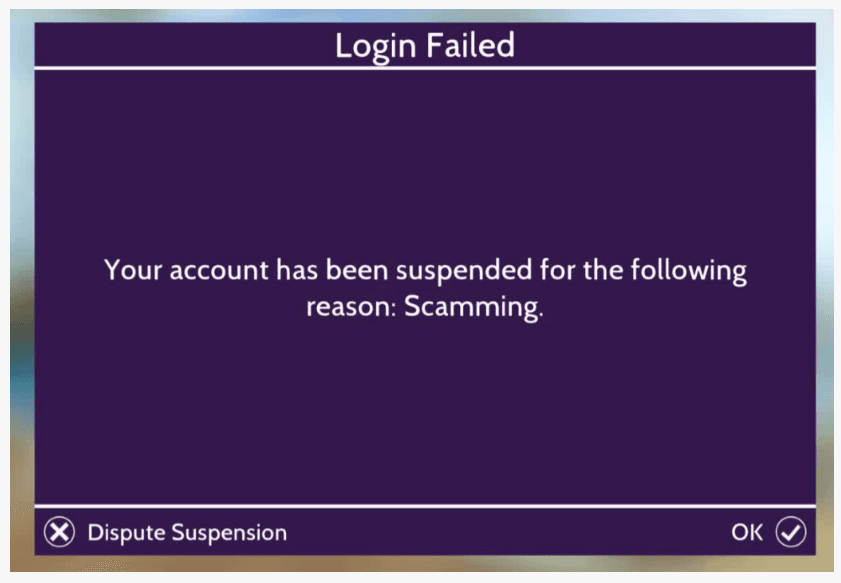
An Avakin Life suspension means your access to the game has been temporarily restricted. During a suspension, you cannot log in, join rooms, chat, or use your account normally.
Depending on the situation, the action on your account may be:
● A warning, which is delivered through the in game mailbox for minor violations.
● A temporary suspension, which usually lasts around three days, although the exact length can vary depending on your account history and the reason for the action.
● A permanent ban, which is reserved for serious violations such as hacking, fraud, or repeated misconduct. According to the official policy, permanent bans generally cannot be appealed.
The suspension message itself usually contains very little information. That is why understanding the possible reasons and preparing a clear appeal is often the best next step.
Why Was My Avakin Life Account Suspended?
Your Avakin Life account gets suspended or banned when you break the game's rules. The official community guidelines outline what is and is not acceptable behavior in the game. These rules exist to keep the community fun and safe for everyone.
Common Reasons for Suspension
Minor rule violations usually result in a warning sent through in-game mail, especially if your account has a relatively good history.
More serious violations or repeated offenses can lead to a temporary suspension. Typically, a suspension lasts for three days, though the exact duration depends on your specific account situation.
Permanent bans are reserved for severe rule violations. These include hacking, fraud, or scams. A permanent account ban can also happen if you have a long history of bad behavior. Some specific actions that can get you permanently banned include:
● Using mods, hacks, or any third-party software that interferes with the game
● Engaging in fraudulent activities or scams
● Pretending to be underage. If the game has reason to believe you are under 13, your account will be immediately banned
● Sharing your login information with others, which is considered account sharing and is against the rules
● Harassment, bullying, or engaging in adult-oriented behavior
How to check what type of suspension you have
Avakin Life does not always give clear labels, but you can still gather clues:
● Read the exact message on the login screen. Take a screenshot.
● Check if it mentions a time period or a reason category.
● Try logging in after 24 hours. Some short suspensions clear quickly.
● Review your email inbox for any support replies or notices.
● If you can access your account on another device, do not keep switching devices repeatedly. That can worsen flags.
If the message includes a number of days, it is likely temporary. If it says permanently banned, the appeal becomes harder but still worth attempting if you have strong evidence.
What to do immediately after getting suspended
The first hour matters because players often panic and do things that make the situation worse.
Here is the safe checklist:
1. Stop trying to log in repeatedly. Too many attempts can trigger extra security checks.
2. Do not create new accounts to harass support. That can get both accounts actioned. If you manage multiple Avakin accounts, tools like BitBrowser can help keep them isolated and reduce the risk of account linking. They cannot reverse an existing suspension.
3. Remove any modded apps or tools. Uninstall anything unofficial before you do anything else.
4. Gather key details for your appeal. You will need your Avakin username, the email linked to the account, your friend code if you have it, your device type and operating system, the approximate date and time the suspension happened, screenshots of the suspension message, and any receipts for purchases if relevant.
5. Write down what happened recently. Think about the last 48 hours, including any arguments, reports, or drama, any large gifting, any purchases or refunds, and any logins on a new device or network.
This information helps you create a clean appeal that support can actually act on.
How to appeal an Avakin Life suspension in 2026
Appealing is the main way to recover a suspended account. The best appeals are short, polite, and organized.
Step 1: Contact Avakin Life Support the official way
The quickest way to appeal is directly from the game itself. On the login screen, look for and click the "Dispute Account Ban / Suspension" button. This will guide you through the process of submitting your appeal.
If you prefer an alternative method, you can contact Player Support through the official website. Visit avakin.com/support and use the contact form to explain your situation.
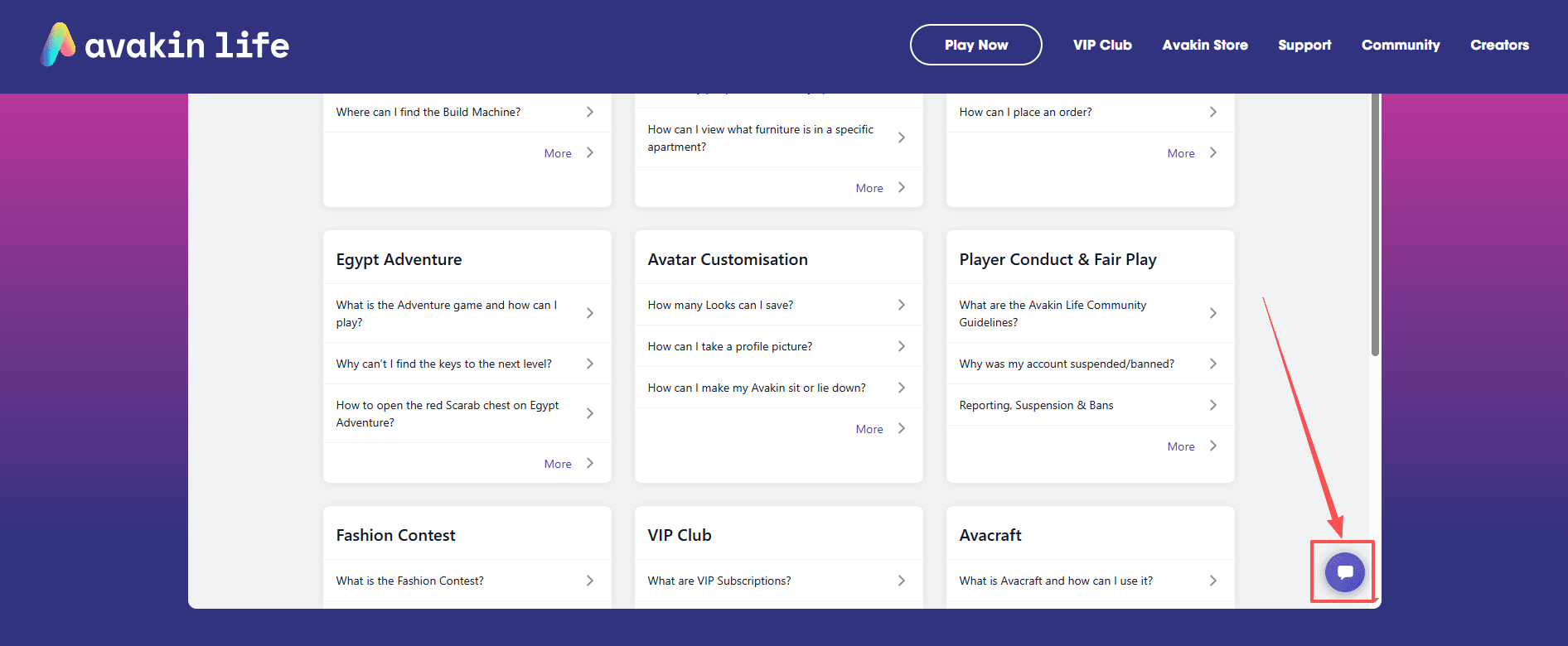
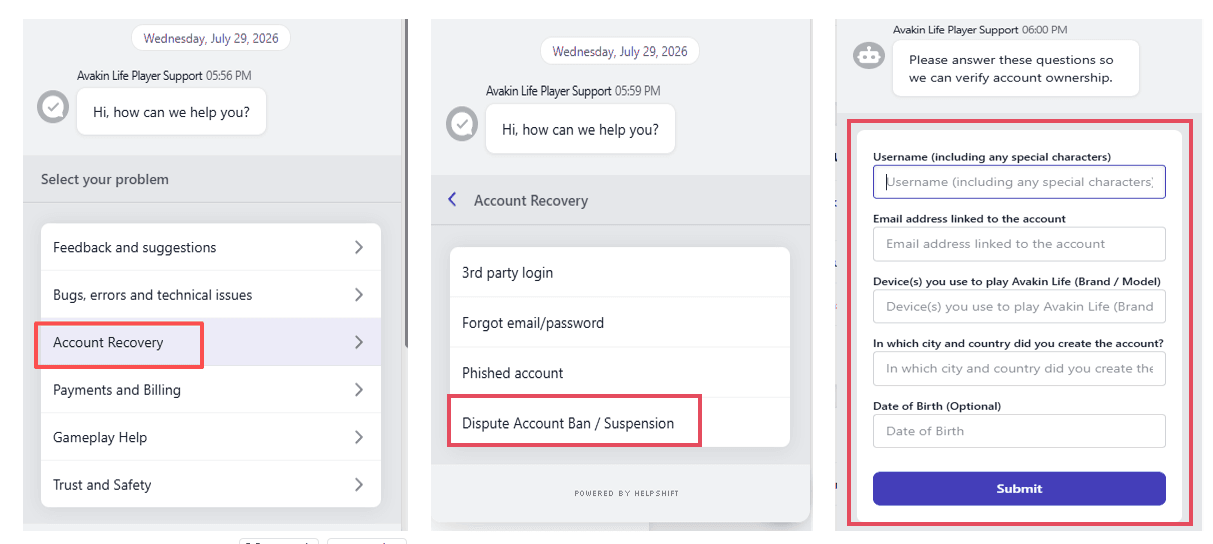
Step 2: Include the right details in your first message
Support teams move faster when they do not need to ask basic questions.
Include:
● Avakin username and friend code
● Email linked to account
● Date and time the suspension started
● What message you see on login
● Your device model and operating system version
● Whether you used any mods or unofficial apps, and if so, admit it plainly
● Any receipts if it involves purchases
If you are sure you did not break rules, state that you believe it may be a mistake and ask for a review.
A simple appeal template you can copy
Use this as a starting point and adjust it to your situation:
Subject: Appeal for suspended Avakin Life account
Hello Support Team,
My Avakin Life account was suspended on [date and time]. My username is [username] and the email linked to the account is [email]. The message on the login screen says: “[paste message]”.
I would like to request a review of the suspension. I believe this may be a mistake because [brief explanation in one or two sentences]. I have not used any modified clients or third party coin services. If there is specific content or activity that caused the suspension, please let me know so I can correct it and avoid it in the future.
Device: [iPhone model or Android model], OS: [version].
Attachments: [screenshot of message, purchase receipts if relevant].
Thank you for your time.
Name: [optional]
If you did use mods, do not lie. A better version is: you used it, you removed it, and you understand it violates policy.
How long does the Avakin Life appeal take?
There is no guaranteed timeline, but most players see:
● Simple cases: a few days
● Complex cases involving coins or fraud flags: one to three weeks
● High volume periods: longer
What helps most is sending one strong ticket, then waiting. Sending multiple tickets often resets your place in the queue or splits the context across agents.
How to Recover Your Avakin Life Account
Sometimes, what looks like a suspension might actually be a different issue, such as a hacked account or a forgotten password. Here are some steps you can take to regain access.
Reset Your Password
If you have forgotten your password, use the "Forgot Password" link on the login page. Enter the email address associated with your account and follow the instructions sent to your inbox to create a new, strong password.
Use Linked External Accounts
If you previously linked your Avakin Life account to an external service like Game Center or GameCircle, you can use that to log back in. This is a great backup method if you ever lose access to your primary login details.
Contact Support for Hacked Accounts
If you suspect your account has been hacked, reach out to the support team immediately. Describe what happened and include as much information as possible. The support team can assist you with the recovery process.
A Critical Security Warning
The Avakin Life team will never ask you for your password. If anyone contacts you claiming to be from Lockwood Publishing and asks for your login details, it is a scam. Never share your email, password, or any private account information with anyone.
Tips to avoid getting suspended again
If you want to avoid another Avakin Life suspension in 2026, focus on the patterns that trigger reports and automated flags.
Keep chat clean, even during drama
If someone is provoking you, the safest response is to mute them, leave the scene, and report the behavior if necessary. Avoid responding with insults or threats. In many cases, both sides can receive action when chat logs become hostile.
Do not buy coins outside the official store
Third party coins are one of the fastest ways to lose an account. Even if they work once, unusual purchase patterns may be reviewed later and lead to action.
Avoid account sharing
If you must play on multiple devices, keep it reasonable. Constant switching across locations and devices can look suspicious.
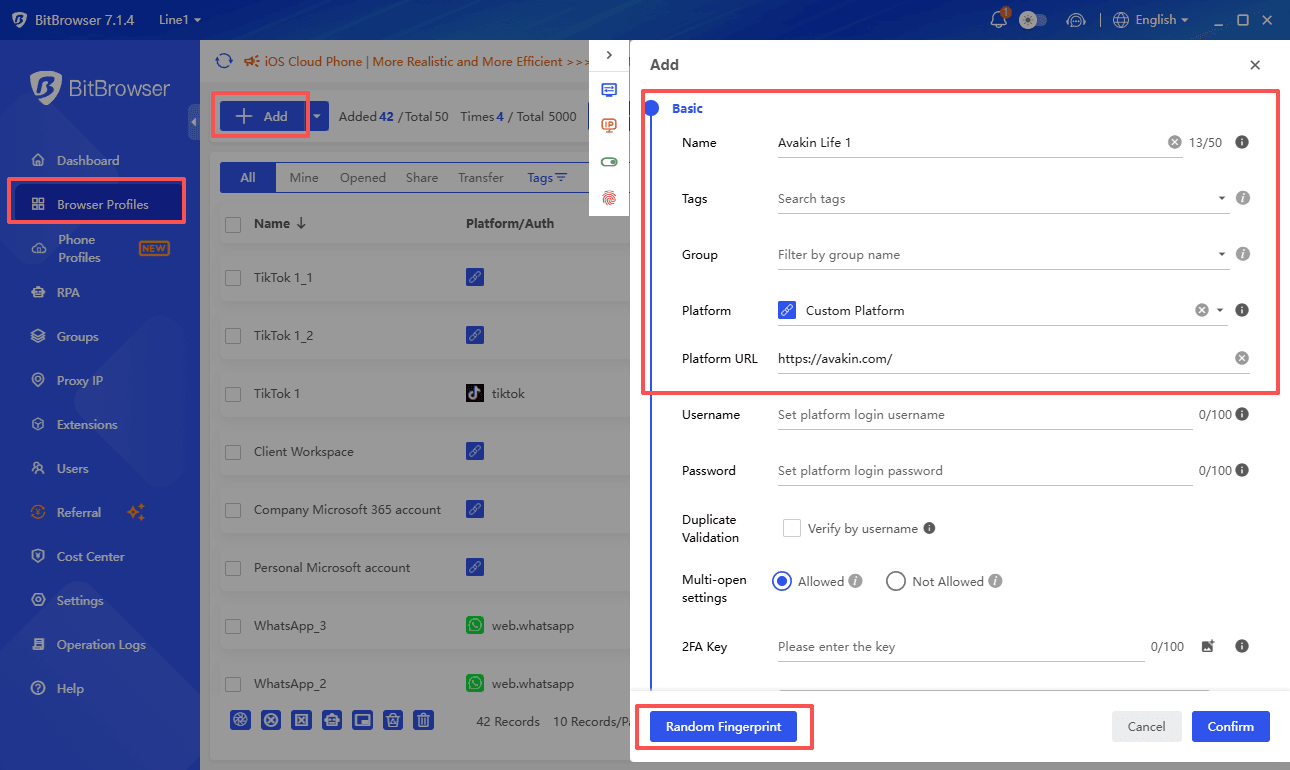
If you manage multiple Avakin Life accounts, consider using an anti detect browser like BitBrowser to keep each account in a separate browser environment. Separate browser profiles, fingerprints, and proxy settings can reduce the risk of accounts being unintentionally linked.
Be careful with gifting patterns
If you gift large numbers of high value items to different accounts, do it gradually and only to people you trust. Sudden or repeated gifting bursts may trigger additional checks.
Do not use modded clients, even "safe" ones
There is no truly safe mod for a game like Avakin Life. Even if a mod avoids detection today, it could still be detected in a future update.
Final thoughts
An Avakin Life suspended notice is frustrating, but most cases improve when you slow down, gather your details, and submit a clean appeal. Avoid making the situation worse by spamming support, switching devices constantly, or trying shady fixes from random videos.
If you manage multiple accounts for testing, privacy, or separating game identities across different apps, it also helps to keep your browser sessions isolated and consistent. Tools like BitBrowser can help you manage separate browser profiles and reduce messy cross logins in other online services, which is useful if you are trying to keep your accounts organized and secure.

 Multi-Account Management
 Prevent Account Association
 Multi-Employee Management
Recommended
See More 



