



Unified Management
BitCloudPC And Custom CloudPC Are Displayed In The Same List, With Categories, Search, And Filters In One Step.
Put CloudPC And Self-Hosted VPS Cloud Hosts Into The Same List —— Independent Window Connections Are More Stable, Data Is Encrypted Locally, And Instance Status Syncs Automatically.
 Windows 10 / 11 (x64)macOS 14+ (Apple Silicon)22 LanguagesFree Download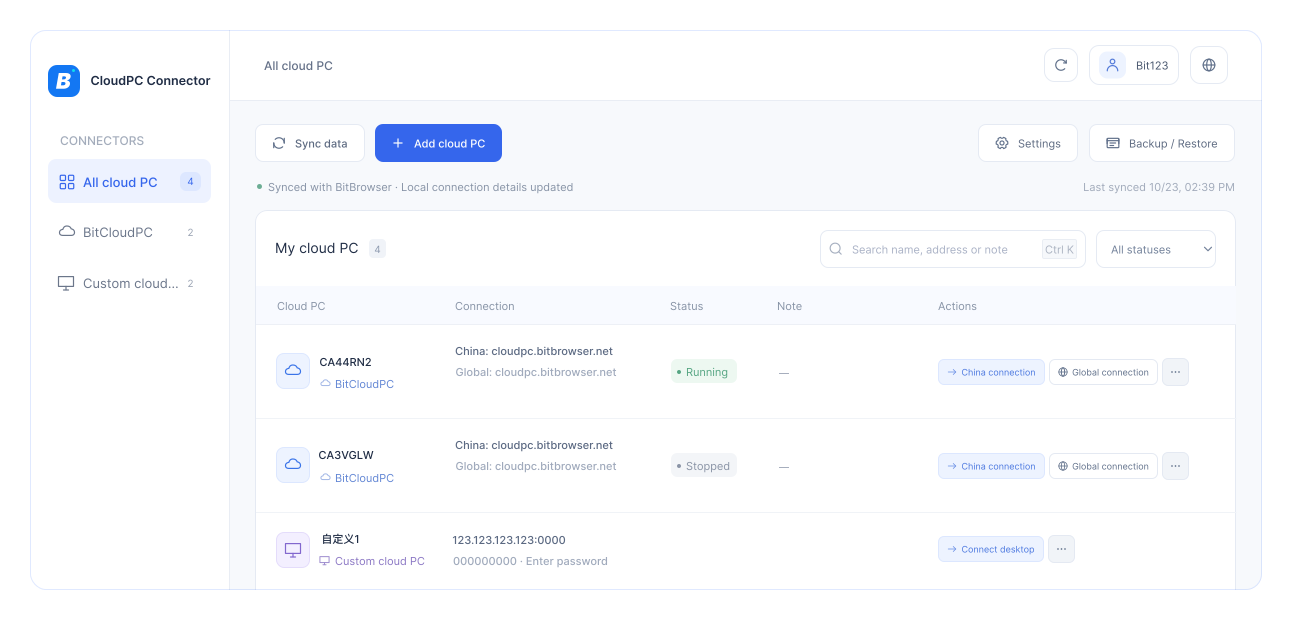
One Entry Point To Manage All CloudPCs, No Need To Remember A Stack Of Addresses.
BitCloudPC And Custom CloudPC Are Displayed In The Same List, With Categories, Search, And Filters In One Step.

Compatible With Mainstream CloudPCs On The Market; Any Windows Host That Supports RDP Can Be Connected.

Use a Dedicated Connection Window; click again to bring up the original Window directly, without creating a duplicate Session.

Automatically Sync Instances And Running Status On Startup, With Manual Refresh Available At Any Time.
From Power On/Off To Desktop Resolution, Common Actions Are Always Within Reach.

From 720p To 4K, With Support For Maximize And Custom Options.

Fully localized UI, prompts, and error messages.

Export .bcpc encrypted backups and restore with one click when switching devices.

Automatically detects new versions and upgrades after signature verification.
All connection data is stored locally and encrypted in the database. Passwords are never included in lists, logs, or process arguments.
Each connection record is encrypted before being written to the local database, and passwords are never stored on disk in plaintext.
Supports Windows and macOS. Install and use right away.
Download and install the Windows or macOS client, then start and use it right away.
On first launch, the BitCloudPC list is fetched automatically. You can also click Sync manually.
Each CloudPC opens in a separate window. Click again to bring up the original window.
 Windows 10 / 11 (x64)Supports macOS 14 Monterey and laterAny Windows cloud host that supports RDP
Supports Windows and macOS, ready to use after installation, and free to download.