How to Manage Multiple AI Accounts Safely with BitBrowser
 2026.03.28 03:01
 petro
petroA Practical Guide to Organizing AI Workflows with BitBrowser
Many AI tools today offer free tiers with limited requests, usage quotas, or restricted access to advanced features. These limitations are designed to help users explore the platform before upgrading to a paid plan.
For professionals, developers, and teams working actively with AI, managing access efficiently across different projects becomes essential. Instead of mixing sessions or risking account conflicts, structured profile management is the smarter approach.
In this guide, we’ll explore how to organize multiple AI workflows using BitBrowser in a secure and compliant way.
Why Profile-Based Browsing Matters for AI Tools
Modern platforms analyze not just your IP address, but also your browser environment. This includes:
- Browser version
- Operating system
- Screen resolution
- Device configuration
- Cookies and session data
Together, these elements create a browser profile environment that platforms use to maintain session consistency and security.
Using a standard browser for multiple accounts can lead to:
- Session conflicts
- Login errors
- Mixed data between accounts
That’s why structured profile management tools like BitBrowser are useful.
BitBrowser — A Tool for Multi-Profile Management
BitBrowser allows users to create independent browser profiles, each acting like a separate device.
This is especially useful for:
- Managing multiple client accounts
- Running parallel AI workflows
- Testing tools across different environments
- Keeping projects isolated and organized
Each profile includes:
- Separate cookies and storage
- Custom configuration settings
- Optional proxy support
Preparing Your Workspace
Before working with multiple AI tools, it’s important to set up a clean workflow.
You’ll need:
- A multi-profile browser (BitBrowser)
- Organized profile naming system
- Optional proxies for geo-testing
- Clear separation between accounts and use cases
This setup helps maintain structure and avoids confusion as your workload grows.
BitBrowser Setup for AI Workflows
Step 1: Install BitBrowser
Download and install BitBrowser from the official source. It supports Windows, macOS, and Linux.
Step 2: Create a Profile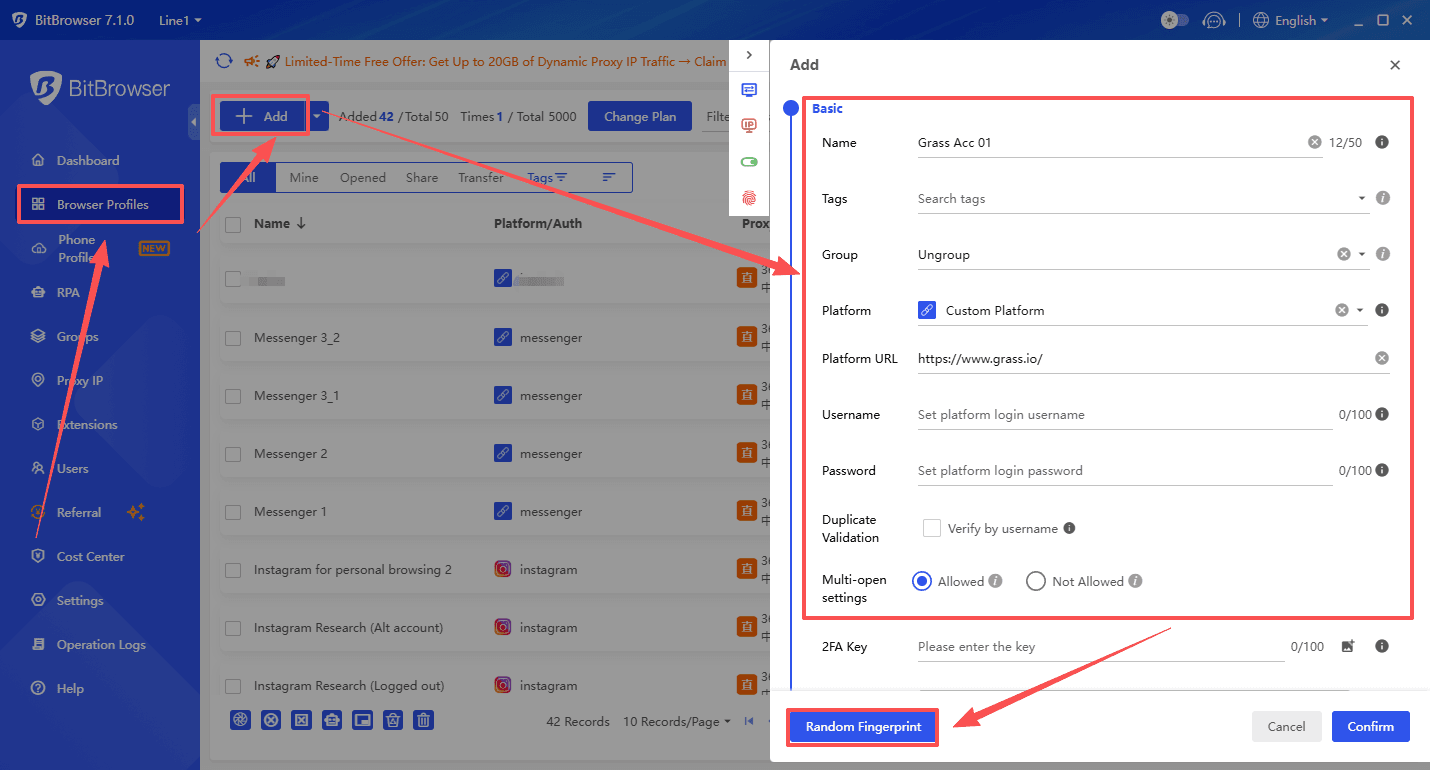
Click “Create Profile” and configure: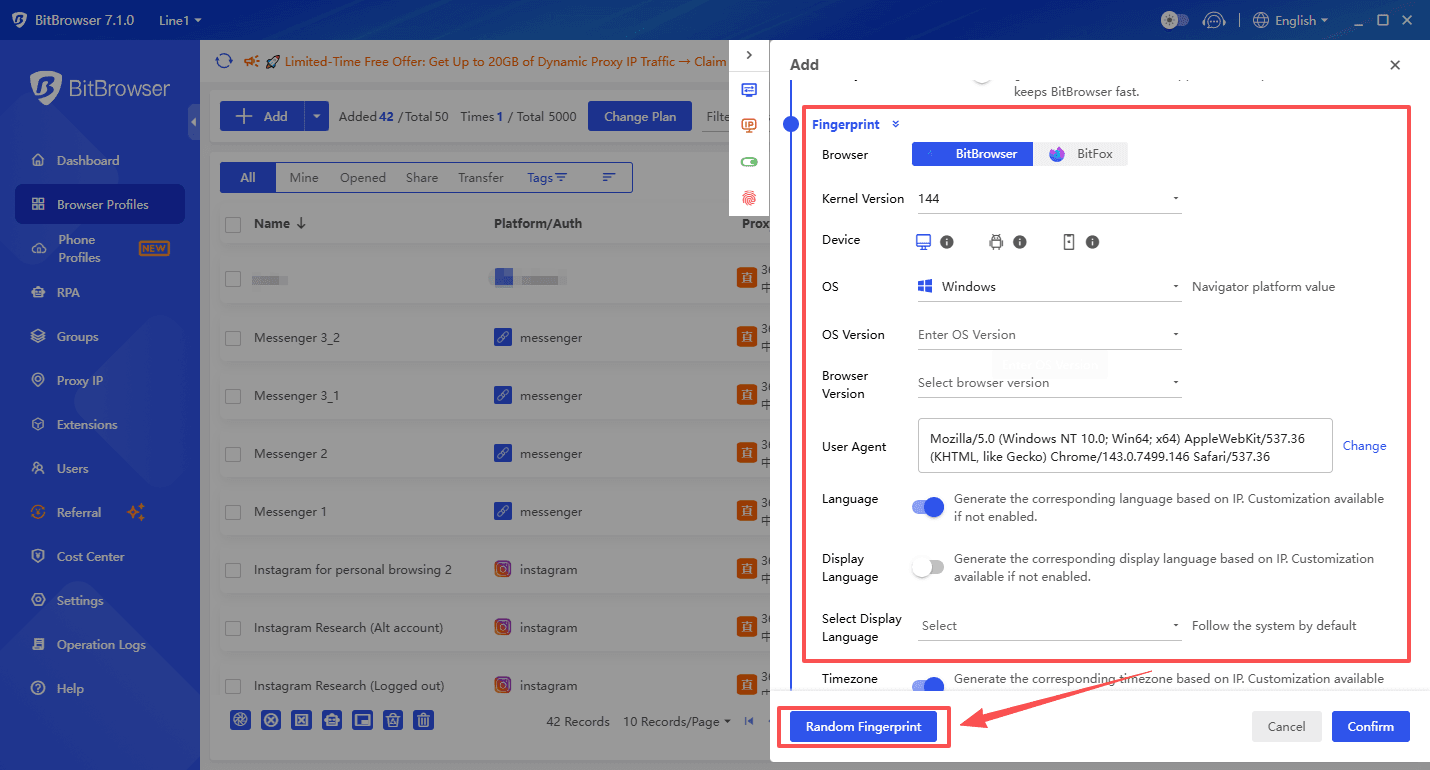
- Profile name
- Tags or categories
- Environment settings
Each profile will function independently.
Step 3: Configure Proxy (Optional)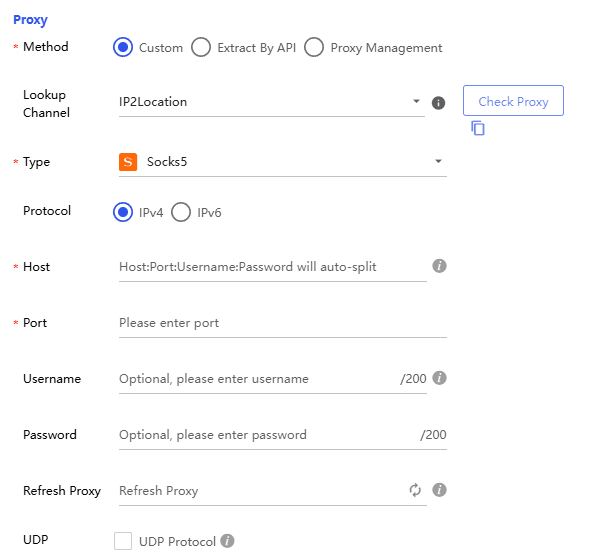
If you need to test access from different regions, you can assign a proxy to a profile.
Supported formats:
- HTTP
- SOCKS5
Step 4: Launch and Use
Open your profile and log into your AI tool.
Each session remains isolated and organized.
Working with Popular AI Platforms
Google AI Tools (Gemini & AI Studio)
Google provides multiple AI services with both free and paid access. Using separate profiles can help you:
- Keep development and personal work separate
- Test different environments
- Avoid session overlap
Image Generation Platforms (e.g., Leonardo AI)
Many platforms provide daily usage limits on free plans.
Using organized profiles allows you to:
- Manage different projects independently
- Separate creative workflows
- Keep track of usage per account
Claude.ai and Similar Tools
Some platforms require additional verification such as phone numbers or region checks.
With BitBrowser, you can:
- Keep each session isolated
- Avoid mixing account data
- Maintain stable login environments
Best Practices for Safe Uage
To stay compliant and efficient:
- Use one account per profile
- Avoid rapid or automated account creation
- Keep consistent usage patterns
- Label profiles clearly
- Follow each platform’s terms of service
Workflow Optimization Tips
Modern platforms monitor behavior patterns such as:
- Login frequency
- Activity timing
- Interaction patterns
To maintain stability:
- Work gradually, not in bursts
- Keep sessions active and realistic
- Save cookies for ongoing sessions
- Avoid unnecessary switching between accounts
Cost vs Productivity
Instead of trying to bypass limitations, consider:
| Option | Benefit |
|---|---|
| Free plans | Good for testing |
| Paid subscriptions | Stable long-term usage |
| Profile management tools | Better organization |
Using tools like BitBrowser helps maximize productivity without risking account issues.
Final Thoughts
Working with AI tools at scale requires more than just access—it requires organization, stability, and clean workflows.
BitBrowser provides a structured way to manage multiple environments, helping professionals stay efficient while respecting platform rules.
The key is not to bypass systems, but to work smarter with the tools available.

 Multi-Account Management
 Prevent Account Association
 Multi-Employee Management
Recommended
See More 



