How to Buy LinkedIn Accounts Safely Using BitBrowser (2026 Guide
 2026.03.28 02:04
 petro
petroLinkedIn has become the #1 platform for B2B marketing, recruiting, and professional networking. With over 1 billion users, it’s where decision-makers connect, making it extremely valuable for outreach and lead generation.
However, building a strong LinkedIn profile from scratch can take months—or even years. That’s why many marketers and agencies choose to buy LinkedIn accounts to speed up the process.
In this guide, you’ll learn how to safely buy LinkedIn accounts, avoid detection, and manage them using BitBrowser.
Why People Buy LinkedIn Accounts
New LinkedIn accounts face strict limits and monitoring. For example:
- Limited connection requests per week
- Higher risk of restriction for messaging
- Increased scrutiny for automation behavior
Aged accounts, on the other hand, offer:
- Higher trust levels
- More connection capacity
- Established activity history
This makes them ideal for:
- Lead generation
- Sales outreach
- Recruitment campaigns
Types of LinkedIn Accounts You Can Buy
1. Phone Verified Accounts (PVA)
These are basic accounts verified with a phone number.
- Cheap
- No history or connections
- Require warming before use
2. Aged Accounts with Connections
These are the most valuable:
- 1–5+ years old
- Existing connections (50–500+)
- Activity history
They are more trusted by LinkedIn and perform better in outreach campaigns.
How LinkedIn Detects Purchased Accounts
LinkedIn uses advanced systems to detect suspicious activity:
1. Browser Fingerprinting
LinkedIn tracks:
- Screen resolution
- Fonts
- Plugins
- Time zone
If your fingerprint suddenly changes, the account can be flagged.
2. Operating System Checks
LinkedIn verifies whether your browser matches your OS. Any inconsistency raises suspicion.
3. Behavior Analysis
LinkedIn monitors:
- Scrolling speed
- Click patterns
- Messaging frequency
Sudden spikes in activity can trigger bans.
How to Buy LinkedIn Accounts Safely
Before purchasing:
- Check seller reviews
- Verify account age and connections
- Ask for original email access
- Confirm replacement policy
Avoid:
- Crypto-only payments
- Unverified sellers
- Unrealistically cheap offers
Where to Buy LinkedIn Accounts
You can find accounts on:
- Dedicated marketplaces
- Freelancer platforms
- Forums (higher risk)
Each option has different levels of safety and pricing.
How to Avoid Detection Using BitBrowser
This is the most important part ?
1. Use Residential Proxies
I've used nsocks very good for this
Always match the account’s original location.
- Same country
- Preferably same city
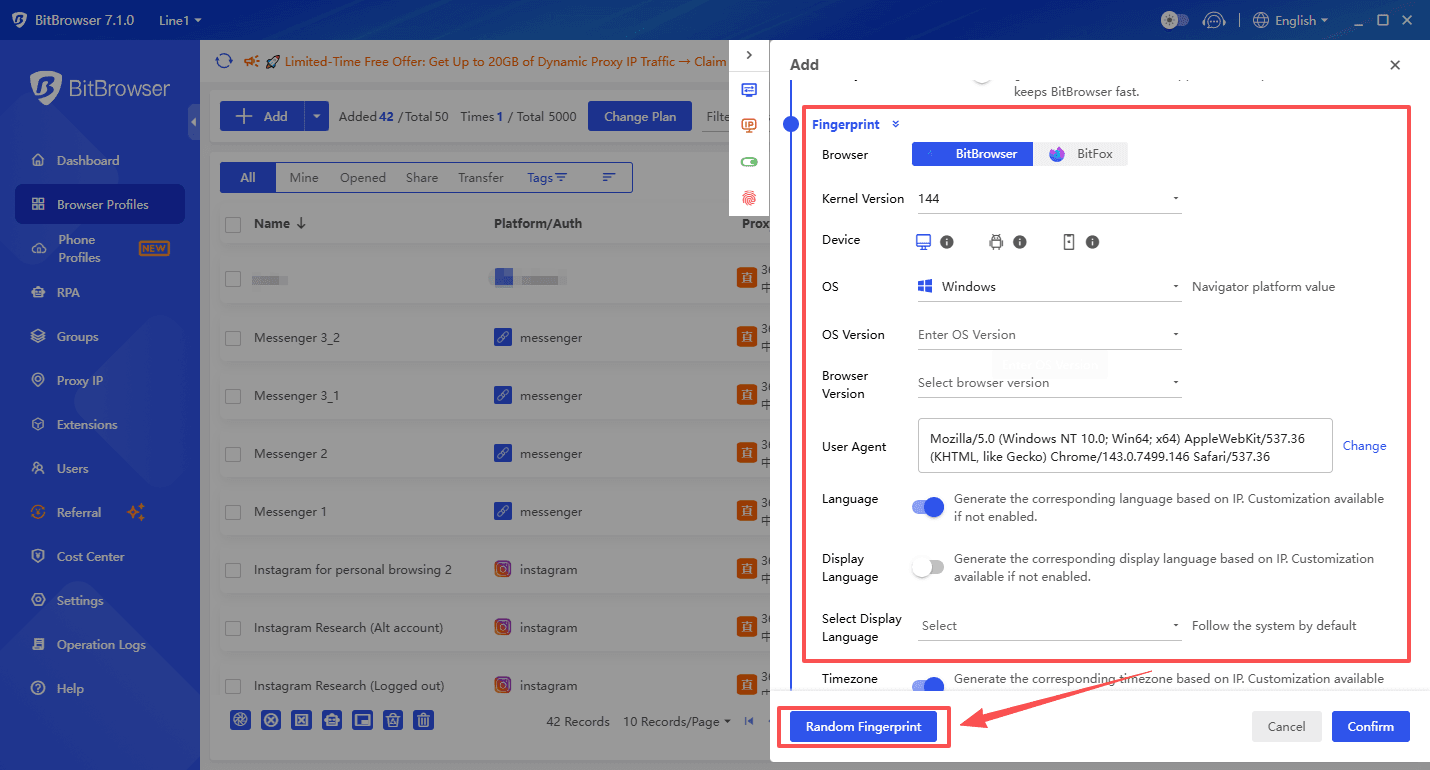
2. Use BitBrowser (Anti-Detect Browser)
BitBrowser allows you to:
- Create separate browser profiles
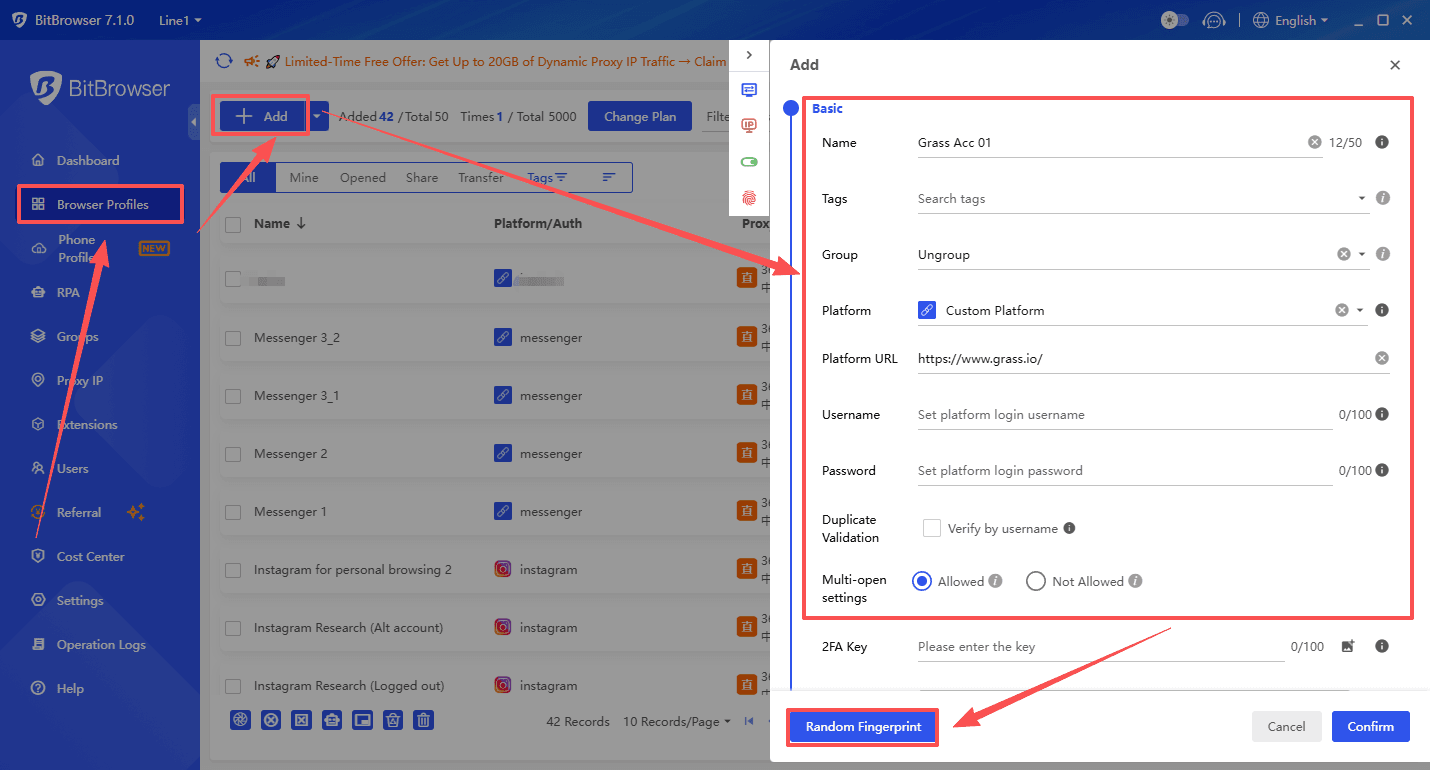
- Maintain consistent fingerprints
- Isolate each LinkedIn account
This prevents LinkedIn from linking multiple accounts together.
Why BitBrowser matters:
- Keeps fingerprints stable
- Reduces detection risk
- Supports proxy integration
Instead of logging all accounts in one browser (which is risky), BitBrowser lets you manage each account like a real unique user.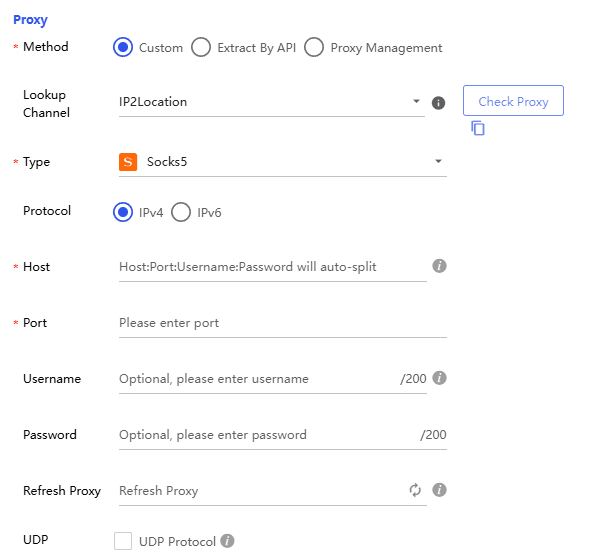
3. Warm Up the Account Slowly
Don’t rush. Follow this process:
Week 1:
- Browse feed
- View profiles
- Like posts
Week 2:
- Comment on posts
- Start light engagement
Week 3+:
- Send connection requests gradually
This mimics natural user behavior and avoids detection.
Risks of Buying LinkedIn Accounts
Buying accounts is never 100% safe. Risks include:
- Account bans
- Losing connections and data
- Seller reclaiming account access
In fact, many purchased accounts don’t survive long without proper setup.
Best Practices
To stay safe:
- Always use BitBrowser
- Use high-quality proxies
- Keep activity human-like
- Avoid automation at the beginning
- Secure account credentials immediately
Conclusion
Buying LinkedIn accounts can save time and accelerate growth—but it comes with risks.
By combining:
- Aged accounts
- Residential proxies
- BitBrowser for fingerprint management
you can significantly reduce detection and improve your success rate.
The key is simple: act like a real user, not a bot.

 Multi-Account Management
 Prevent Account Association
 Multi-Employee Management
Recommended
See More 



