BitBrowser: Best Anti-Detect Browser for SMM Teams in 2026
 2026.05.30 22:21
 petro
petroIn today's highly competitive social media marketing landscape, agencies and growth teams often manage dozens—or even hundreds—of accounts across platforms such as Facebook, Instagram, TikTok, X (formerly Twitter), LinkedIn, and YouTube.
Switching between accounts manually is inefficient and can increase the likelihood of security challenges, login verifications, and account restrictions. As platforms continue to strengthen their fraud detection systems in 2026, professional account management requires smarter infrastructure.
This is where anti-detect browsers have become an essential tool.
Among the many solutions available today, BitBrowser has emerged as one of the most popular choices for SMM agencies, affiliate marketers, e-commerce operators, and multi-account management teams.
What Is BitBrowser?
BitBrowser is an anti-detect browser designed to create and manage multiple isolated browser environments.
Each browser profile operates independently with its own:
Browser fingerprint
Cookies and local storage
Proxy connection
Device configuration
Timezone and language settings
In practice, every profile behaves like a separate device, allowing teams to organize account workflows without constantly logging in and out of platforms.
Why SMM Teams Are Choosing BitBrowser in 2026
1. Enterprise-Level Team Collaboration
Modern agencies require more than profile management.
BitBrowser allows administrators to:
- Create team workspaces
- Assign user roles
- Restrict profile access
- Monitor team activity
- Maintain operational security
This makes it particularly useful for agencies handling multiple client accounts simultaneously.
2. Advanced Fingerprint Customization
One of BitBrowser's strongest features is its fingerprint management system.
Profiles can be configured with unique values for:
- Canvas fingerprinting
- WebGL parameters
- Audio context
- Fonts
- Screen resolution
- Hardware characteristics
This flexibility helps create distinct browser environments tailored to different operational requirements.
3. Integrated Proxy Management
Reliable proxy management remains critical for account operations.
BitBrowser supports:
- Residential proxies
- ISP proxies
- Mobile proxies
- Datacenter proxies
Each profile can be assigned a dedicated IP address and location, making profile organization significantly easier for distributed marketing campaigns.
4. Cloud-Based Profile Synchronization
For remote teams, profile portability is essential.
BitBrowser stores profile data securely in the cloud, allowing users to:
- Access profiles from different devices
- Preserve cookies and sessions
- Synchronize environments across teams
- Reduce dependency on a single workstation
This feature has become increasingly valuable as agencies adopt remote and hybrid work models.
5. Automation and API Capabilities
Scaling account operations often requires automation.
BitBrowser provides API support that enables integration with:
- Selenium
- Playwright
- Puppeteer
- Custom workflow systems
Common use cases include:
- Bulk profile management
- Automated testing
- Data collection
- Internal workflow automation
For technical teams, this significantly improves operational efficiency.
6. Cross-Platform Support
BitBrowser continues to support major operating systems, including:
- Windows
- macOS
- Linux environments (depending on configuration)
This flexibility allows teams to maintain consistent workflows regardless of their preferred operating system.
How to Set Up BitBrowser for an SMM Team
Step 1: Create a Workspace
Begin by creating a centralized workspace and inviting team members.
Assign permissions based on responsibilities:
- Administrator
- Manager
- Operator
This ensures proper access control across client accounts.
Step 2: Create Browser Profiles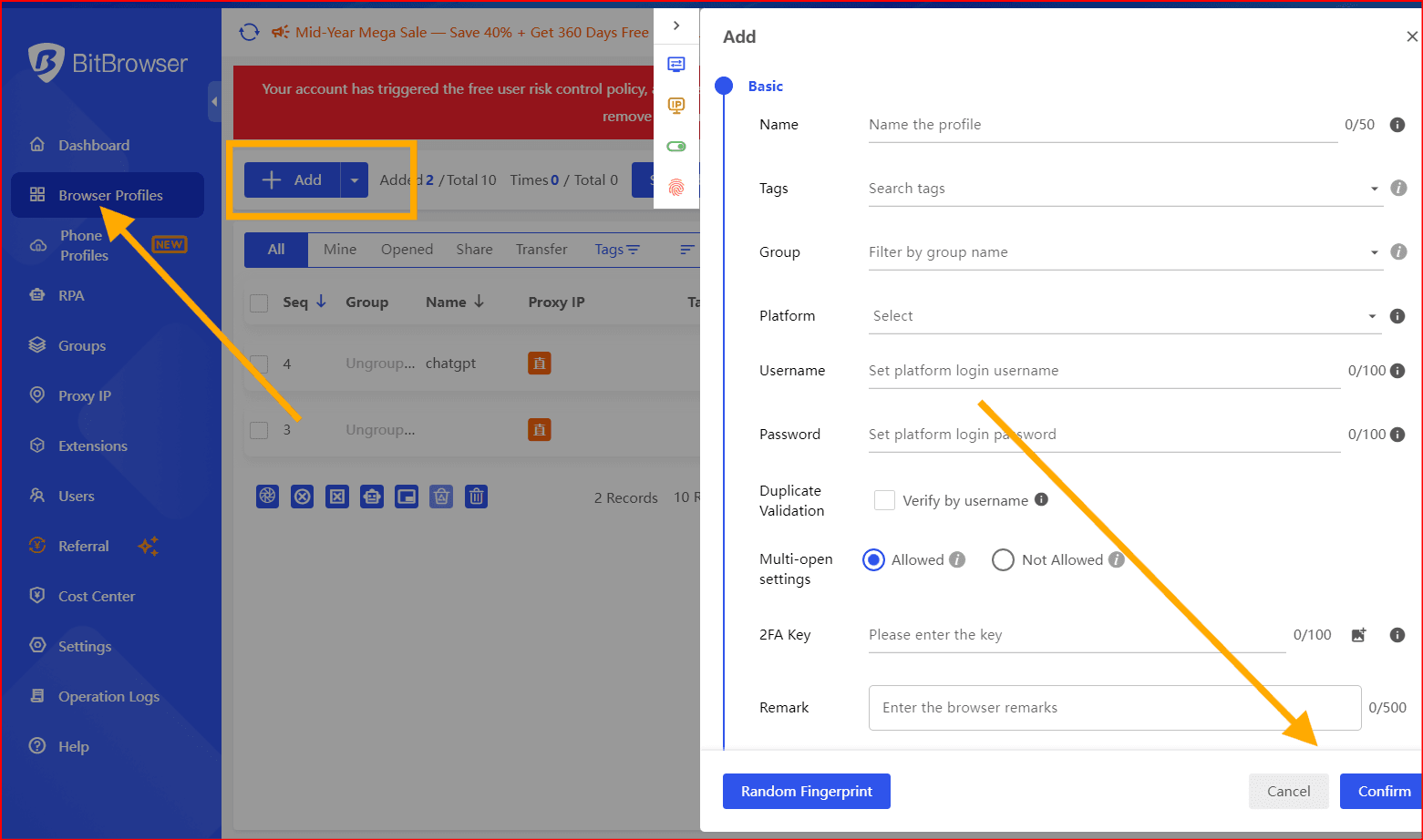
Configure each profile with:
- Operating system settings
- Browser version
- Proxy connection
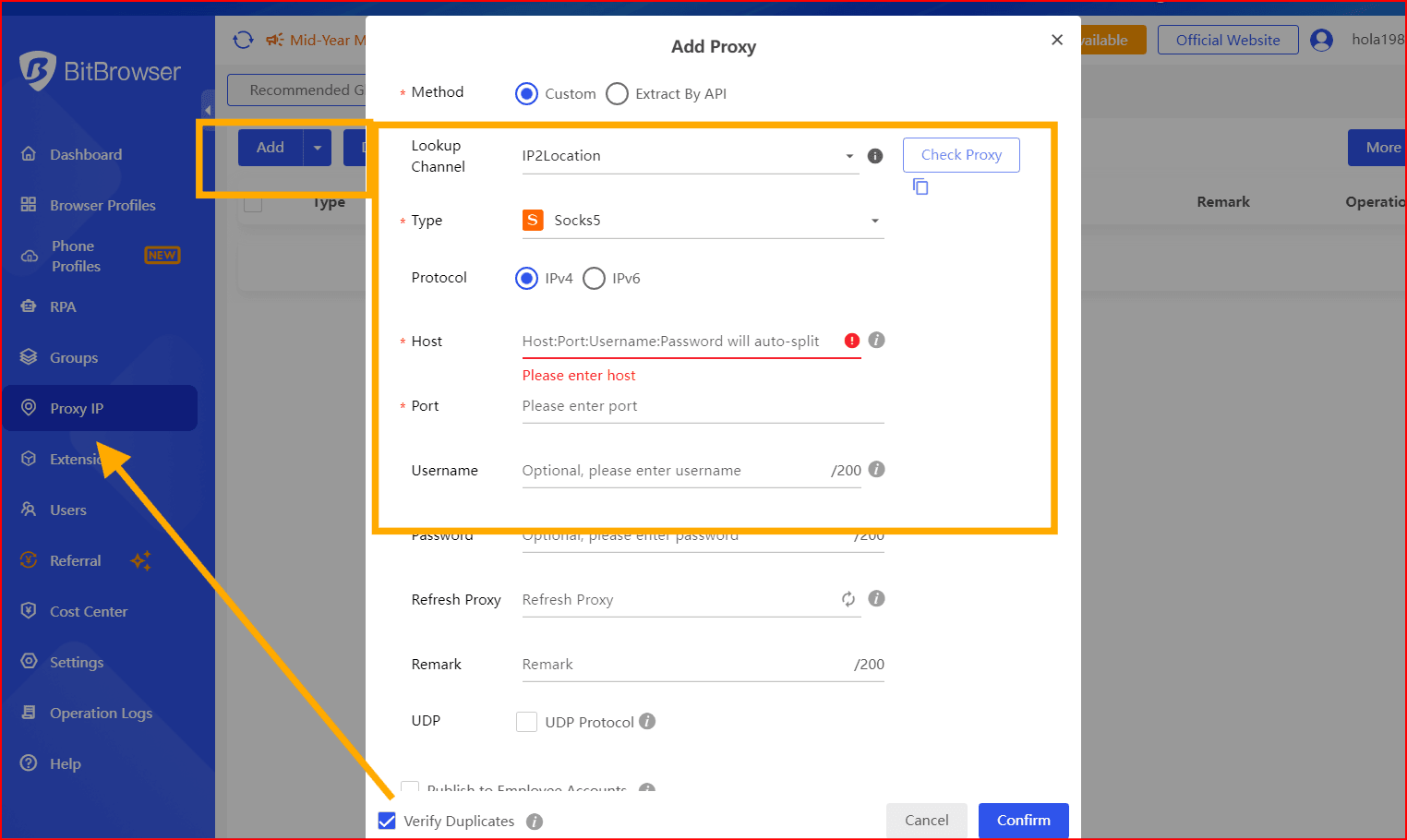
- Timezone
- Language
- Fingerprint preferences
Many teams create templates to streamline future profile creation.
Step 3: Organize Social Media Accounts
Use dedicated profiles for:
- Facebook Business Manager
- TikTok
- X
- Google Ads
- YouTube
Always enable two-factor authentication and maintain secure backup methods for account recovery.
Step 4: Monitor Team Activity
The management dashboard provides visibility into:
- Profile usage
- Login history
- Team actions
- Proxy status
- Operational logs
This helps agencies maintain accountability and security across large teams.
BitBrowser vs. Other Anti-Detect Browsers in 2026
| Feature | BitBrowser | Multilogin | AdsPower | GoLogin |
|---|---|---|---|---|
| Team Management | ✅ Advanced | ✅ | ✅ | ✅ |
| Cloud Synchronization | ✅ | ✅ | ✅ | ✅ |
| Proxy Integration | ✅ Built-in | ✅ | ✅ | ✅ |
| API Support | ✅ Strong | ✅ | ⚠️ Limited | ✅ |
| Automation Tools | ✅ Extensive | ✅ | ⚠️ Basic | ✅ |
| Ease of Use | ⭐⭐⭐⭐ | ⭐⭐⭐ | ⭐⭐⭐ | ⭐⭐⭐ |
| Scalability | ⭐⭐⭐⭐ | ⭐⭐⭐ | ⭐⭐⭐ | ⭐⭐⭐ |
| Best For | Agencies & SMM Teams | Enterprises | Freelancers | Small Teams |
Is BitBrowser Worth It in 2026?
For agencies and marketing teams managing multiple online identities, BitBrowser offers a compelling combination of:
- Team collaboration features
- Cloud synchronization
- Automation support
- Flexible fingerprint management
- Scalable account organization
While competitors such as Multilogin, AdsPower, and GoLogin continue to evolve, BitBrowser remains a strong option for businesses seeking an all-in-one platform for multi-profile browser management.
The best choice ultimately depends on your workflow, team size, budget, and compliance requirements, but BitBrowser continues to be one of the most discussed anti-detect browser solutions among digital marketing professionals in 2026.
Final Thoughts
As social media platforms become more sophisticated in detecting unusual activity, professional teams increasingly rely on dedicated browser environments to organize operations efficiently.
BitBrowser's combination of collaboration tools, cloud-based profile management, and automation capabilities has helped it secure a prominent position in the anti-detect browser market in 2026.
For growing SMM agencies, it remains a solution worth evaluating alongside other leading platforms in the space.

 Multi-Account Management
 Prevent Account Association
 Multi-Employee Management
Recommended
See More 



