How to Use BrowserLeaks with BitBrowser to Test Browser Security
 2025.11.09 22:50
 petro
petroModern marketing doesn’t run on creativity alone. It runs on data, environments, and trust — especially the trust that platforms place in your accounts, devices, and behavior.
Behind every ad account, analytics dashboard, marketplace seller profile, or growth experiment, there’s a browser quietly transmitting dozens (sometimes hundreds) of signals. Most teams never see them. Platforms do.
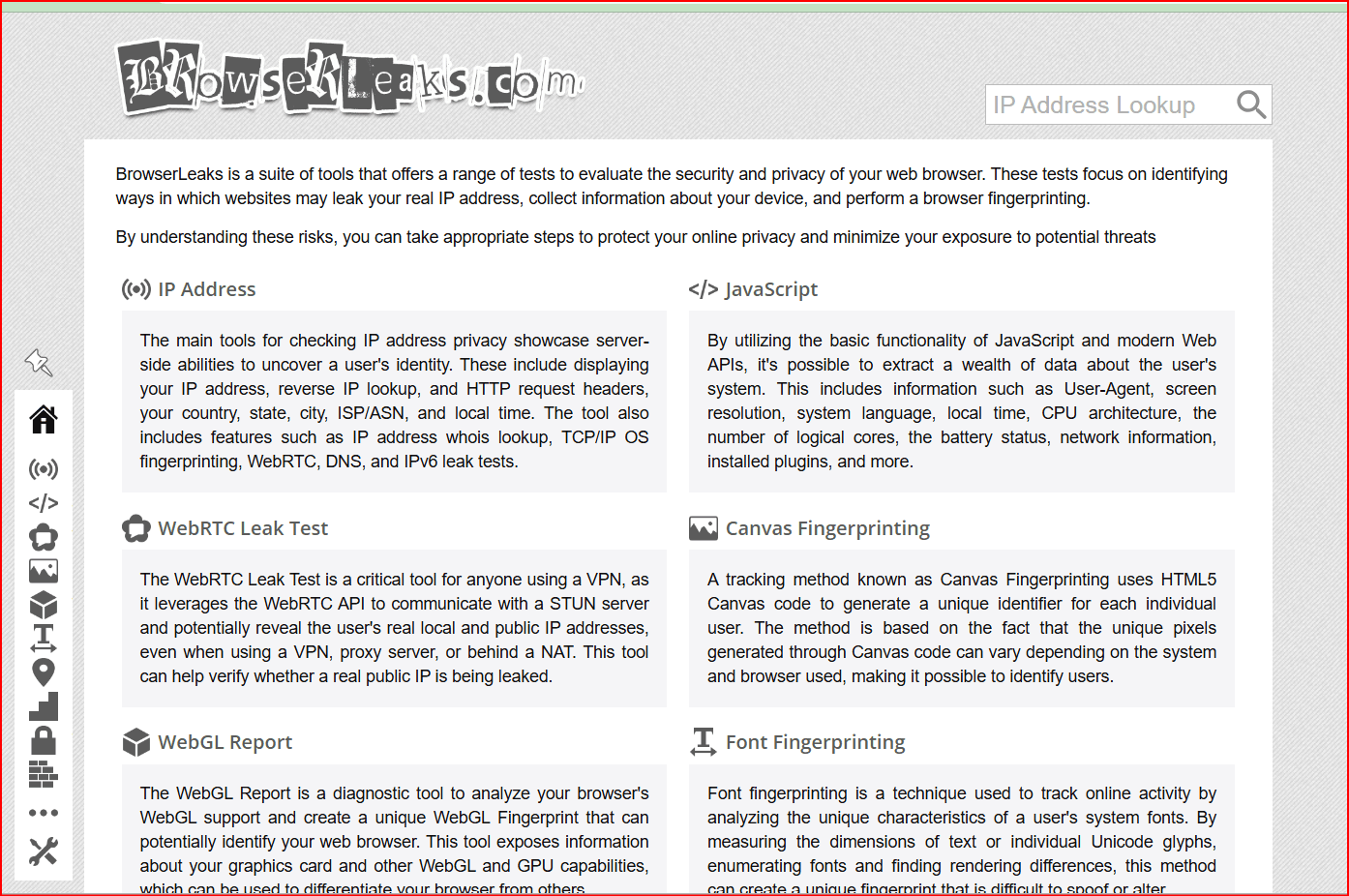
That’s where BrowserLeaks comes in.
BrowserLeaks helps expose what your browser is really sharing with websites — from IP and WebRTC data to advanced fingerprinting signals like Canvas, WebGL, fonts, and system attributes. For marketers managing multiple accounts, regions, or workflows, understanding those signals is no longer optional. It’s operational hygiene.
This article explains what BrowserLeaks is, why browser fingerprinting matters for marketing teams in 2026, and how tools like BitBrowser help teams test, validate, and protect digital assets across environments — without leaks, mismatches, or unnecessary risk.
What Is BrowserLeaks?
BrowserLeaks is a free diagnostic website that shows what technical information your browser exposes when you visit a site.
When you open BrowserLeaks, it automatically analyzes browser-level signals such as:
IP address, geolocation, and ISP
WebRTC connections (which can reveal real or local IPs)
DNS requests
Browser fingerprint attributes (Canvas, WebGL, AudioContext, fonts, screen resolution, OS, timezone)
Feature detection and SSL/TLS capabilities
Think of it as a mirror. BrowserLeaks doesn’t create risk — it reveals it.
What started as a developer debugging tool is now widely used by privacy-focused users, QA teams, and marketers to understand whether their browsing environment looks consistent, believable, and safe to platforms
Why Browser Fingerprinting Matters for Marketers
Marketing platforms don’t just evaluate logins. They evaluate environments.
Ad networks, e-commerce platforms, social media tools, and analytics systems correlate signals like:
Device fingerprint
IP stability and location
Browser behavior and configuration
Session consistency over time
If those signals don’t align, accounts can be flagged, restricted, or disabled — often without explanation.
This is especially important for teams working with:
Multiple ad accounts or clients
Cross-border campaigns and geo-specific testing
QA, automation, or growth experiments
Shared access across team members
From a platform’s perspective, inconsistent browser signals can look like automation, fraud, or account sharing — even when the activity is legitimate.
BrowserLeaks makes those inconsistencies visible before platforms react.
What BrowserLeaks Tests (and Why Each One Matters)
IP Address and Location Consistency
BrowserLeaks shows whether your visible IP, DNS location, and ISP align.
For marketers, mismatches may indicate:
Proxy or VPN misconfiguration
Location drift between sessions
Risk when accessing region-restricted accounts
WebRTC Leaks
WebRTC can expose real or local IP addresses even when a proxy is active.
If BrowserLeaks shows unexpected IPs here, platforms may detect location conflicts that reduce account trust.
Canvas and WebGL Fingerprinting
These tests reveal how unique your browser appears based on graphics rendering and hardware traits.
Highly unique fingerprints are easier to track across sessions and accounts — a major issue at scale.
Fonts, Audio, and System Signals
Differences in fonts, OS builds, language, and audio processing all contribute to fingerprint stability.
Individually harmless. Collectively identifiable.
Feature Detection and TLS
Browser features and encryption behavior also influence how “normal” or suspicious an environment looks.
BrowserLeaks surfaces all of this in one place — helping you understand how platforms may see your setup.
BrowserLeaks as a Marketing Risk Check — Not a Privacy Obsession
BrowserLeaks does not predict bans.
It does not simulate platform risk engines.
And it does not replace good operational discipline.
What it does is highlight surface-level exposure — the kind of issues that often cause problems first.
For marketing teams, BrowserLeaks works best as:
A pre-launch environment check
A QA step before logging into sensitive accounts
A validation tool after proxy or browser changes
It helps answer one critical question:
“Does this environment look like what we think it looks like?”
Why Marketers Outgrow Standard Browsers
Incognito mode, VPNs, and browser extensions have limits.
They don’t:
Fully isolate browser profiles at the system level
Prevent fingerprint correlation across sessions
Maintain consistent, realistic device identities
Scale cleanly across teams and regions
That’s where antidetect browsers come in — not to hide activity, but to properly separate environments.
How BitBrowser Helps Secure Browser Environments
BitBrowser is designed for teams that need clean, isolated, and testable browser profiles without signal leakage.
Instead of constantly adjusting browser settings, BitBrowser allows teams to create independent environments where each profile behaves like a separate, real device.
Profile Isolation by Design
Each BitBrowser profile has its own:
Browser fingerprint
Cookies and local storage
Cache and session data
Timezone, language, and system signals
Nothing leaks between profiles — significantly reducing cross-account risk.
Mobile and Desktop Environment Support
Many platforms treat mobile and desktop traffic differently.
BitBrowser allows teams to:
Simulate mobile and desktop environments
Test platform behavior across device types
Check browser signals using BrowserLeaks in different contexts
This is especially useful for performance marketers, QA teams, and growth experiments.
Controlled Fingerprint Consistency
Rather than randomizing everything, BitBrowser focuses on realistic and coherent fingerprints — the kind platforms expect from genuine users.
That balance matters. Over-randomization can be just as risky as no protection at all.
How to Test BrowserLeaks Using BitBrowser
Testing BrowserLeaks inside BitBrowser fits naturally into most team workflows.
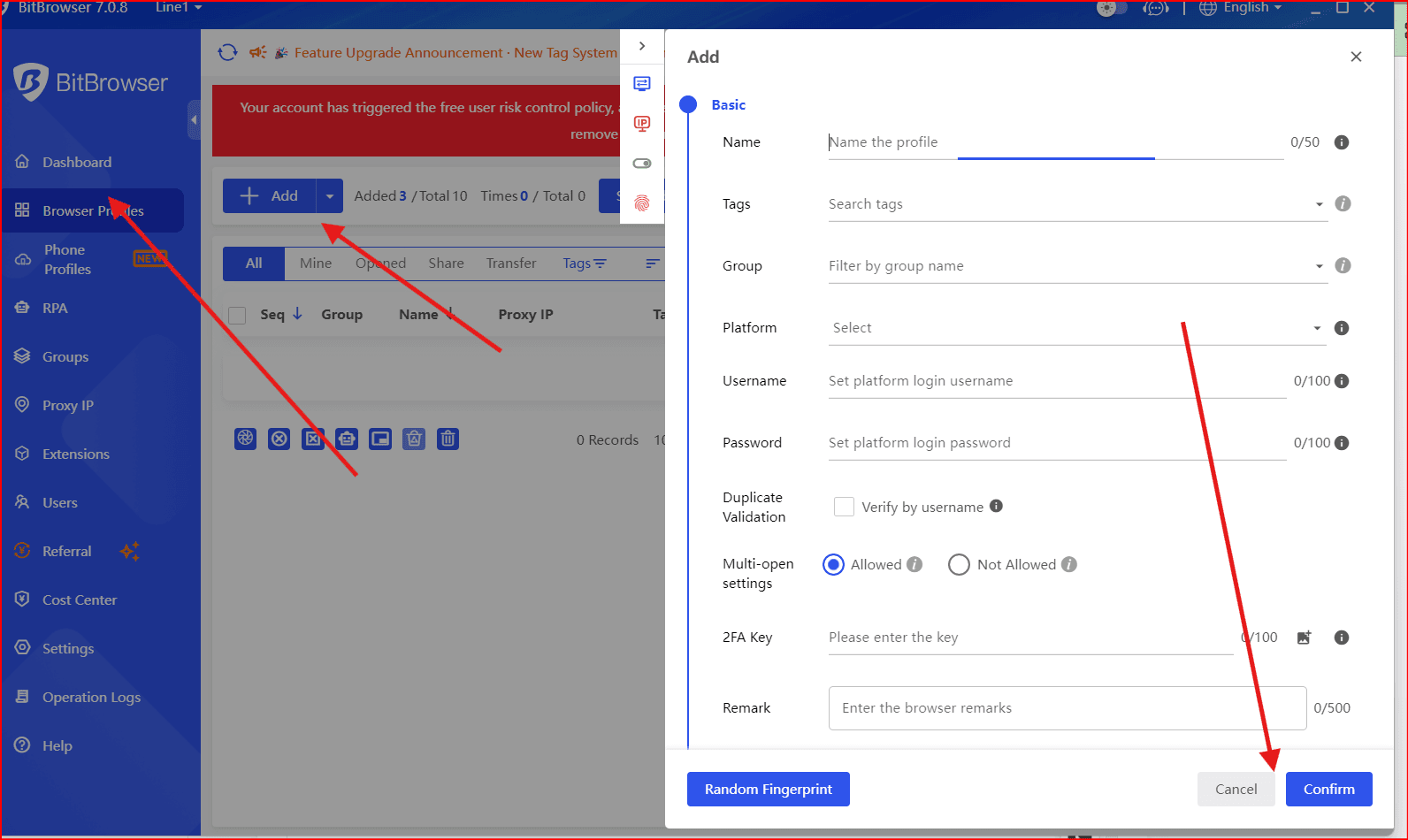
Step 1: Create a New Browser Profile
Configure the OS, device type, and fingerprint parameters.
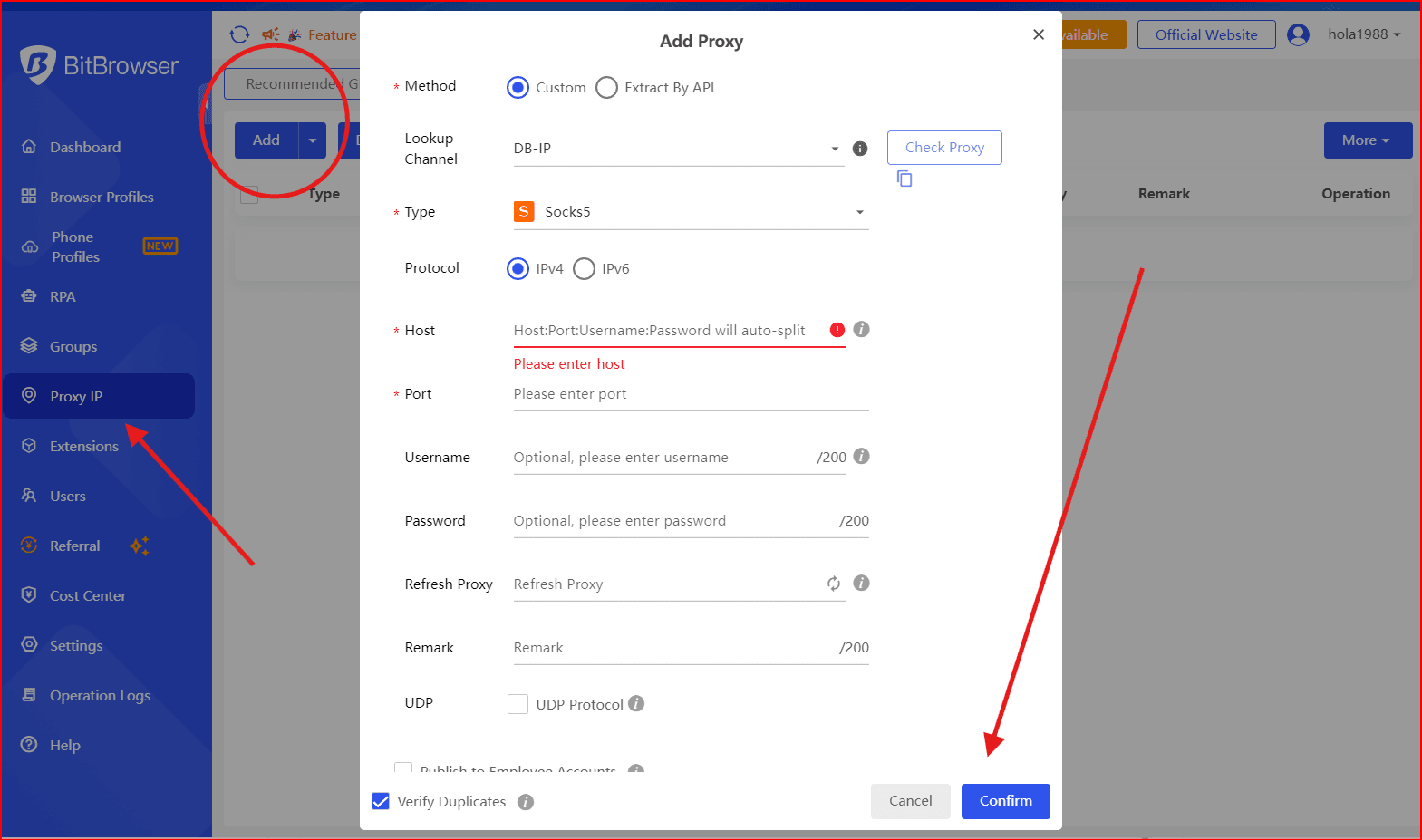
Step 2: Attach a Proxy or Residential IP
Make sure the IP location matches the profile’s region and timezone.
Step 3: Launch the Profile
Each profile runs in a fully isolated environment, separate from your main browser.
Step 4: Visit BrowserLeaks
Open browserleaks.com and review:
IP and DNS alignment
WebRTC behavior
Fingerprint uniqueness indicators
Step 5: Adjust and Re-Test
If anything looks inconsistent, update the profile or proxy and test again.
Many teams repeat this process regularly — especially before scaling campaigns, sharing profiles with teammates, or logging into high-value accounts.
Final Thoughts
Browser fingerprinting isn’t going away. Platforms are getting better at correlating signals, not worse.
BrowserLeaks gives marketers visibility into what’s exposed.
BitBrowser gives teams control over how those signals are structured, isolated, and tested.
Used together, they create a simple but powerful habit:
Check your environment before platforms check it for you.
Run multiple accounts, niches, and workflows safely from one platform — and scale the smart way with

 Multi-Account Management
 Prevent Account Association
 Multi-Employee Management
Recommended
See More 



