Claude AI Account Banned Real Reasons Fixes and Prevention Guide 2026
 2026.04.29 19:23
 petro
petroIf your Claude AI account got banned you are not alone. In 2026 many users are facing sudden suspensions even without clear reasons. What changed is not just the rules but how strictly they are enforced.
Claude now relies heavily on automated systems that analyze behavior environment and usage patterns. This means even normal users can get flagged if their setup looks risky.
The good news is that most bans follow predictable patterns. Once you understand them you can fix your setup and avoid future problems.
In this guide you will learn step by step how bans happen how to recover your account and how to use BitBrowser to create a safe and stable environment that reduces risk significantly .
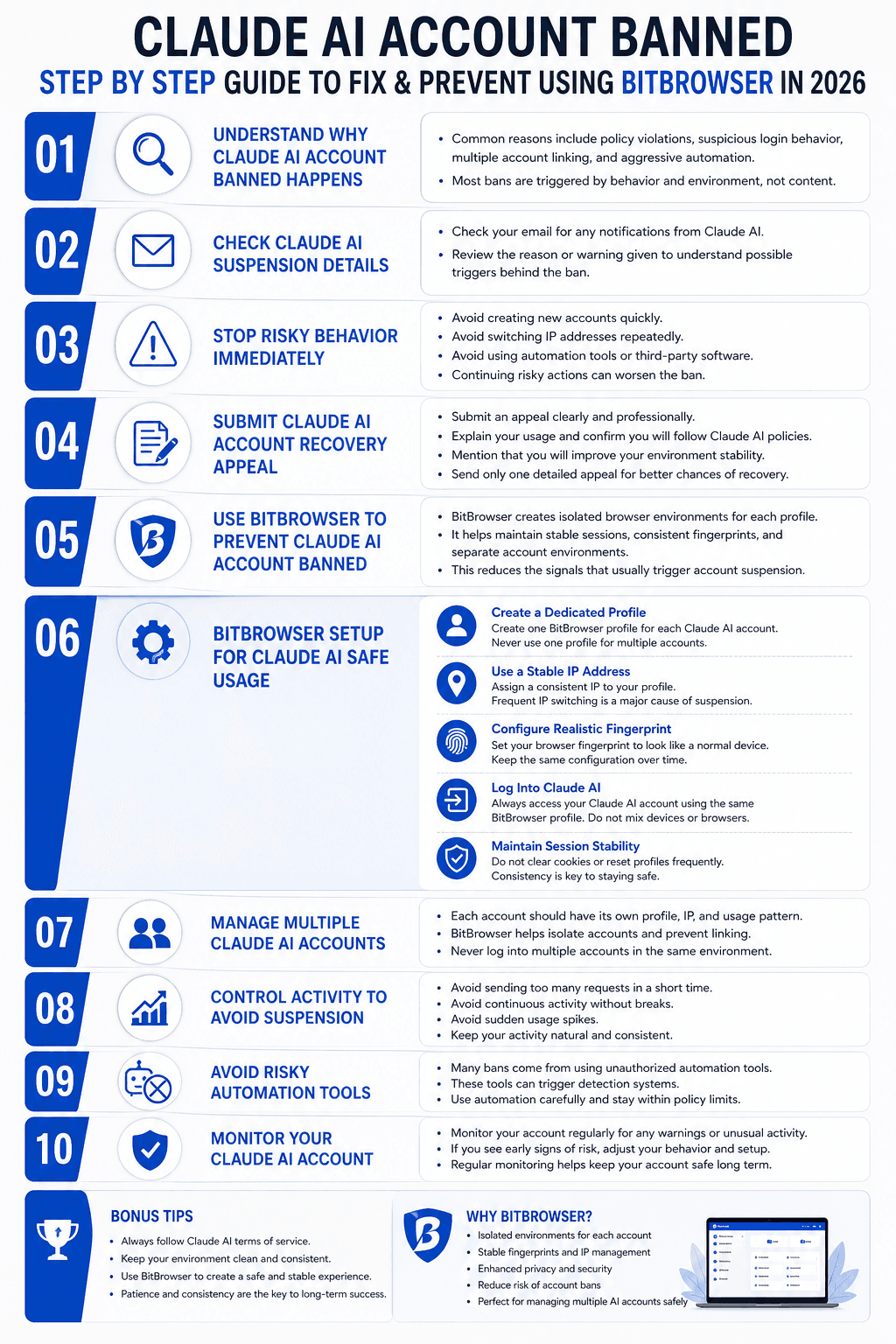
Step 1 Understand Why Your Account Was Banned
Before fixing anything you need to understand the cause. Most bans fall into four main categories.
First is policy violation. This includes restricted content or misuse of the platform.
Second is suspicious behavior. This is the most common reason and includes things like changing IP addresses often logging in from different locations or unusual activity spikes.
Third is multi account linking. If you run multiple accounts in the same environment they may get connected and banned together.
Fourth is automation misuse. Sending too many requests or using unofficial tools can trigger detection systems.
Important insight most bans are caused by behavior not content.
Step 2 Check Your Account Status
After a ban you should immediately check your email. Claude usually sends a notification explaining the restriction.
Look for any details about policy violations or suspicious activity. Even small clues can help you understand what went wrong.
If there is no clear reason do not panic. Many bans are triggered automatically and lack detailed explanations.
Step 3 Stop Risky Actions Immediately
Before trying to recover your account you must stop any behavior that could worsen the situation.
Do not create new accounts quickly
Do not keep logging in from different locations
Do not use automation tools during this period
Continuing risky behavior can make recovery harder and may lead to permanent restrictions.
Step 4 Submit a Clean Appeal
Now you can contact support and submit an appeal.
Write clearly and professionally. Explain your usage and mention that you want to comply with all guidelines.
If you suspect the issue was related to environment or IP changes say that you will fix it.
Avoid sending multiple requests. One strong appeal is better than many weak ones.
Step 5 Prepare a Safe Environment with BitBrowser
This is the most important step if you want to avoid future bans.
BitBrowser allows you to create isolated browser profiles. Each profile behaves like a separate device with its own fingerprint cookies and session.
This helps solve one of the biggest problems which is environment inconsistency.
Why BitBrowser Matters
Claude tracks behavior patterns across sessions. If your environment changes too often it looks suspicious.
BitBrowser helps you maintain consistency by giving each account its own stable setup.
This reduces risk signals and makes your activity look natural.
Step 6 Set Up BitBrowser Step by Step
Follow this simple process to build a safe environment.
Create a New Profile
Open BitBrowser and create a new browser profile. This profile will be dedicated to one Claude account.
Do not reuse profiles across multiple accounts.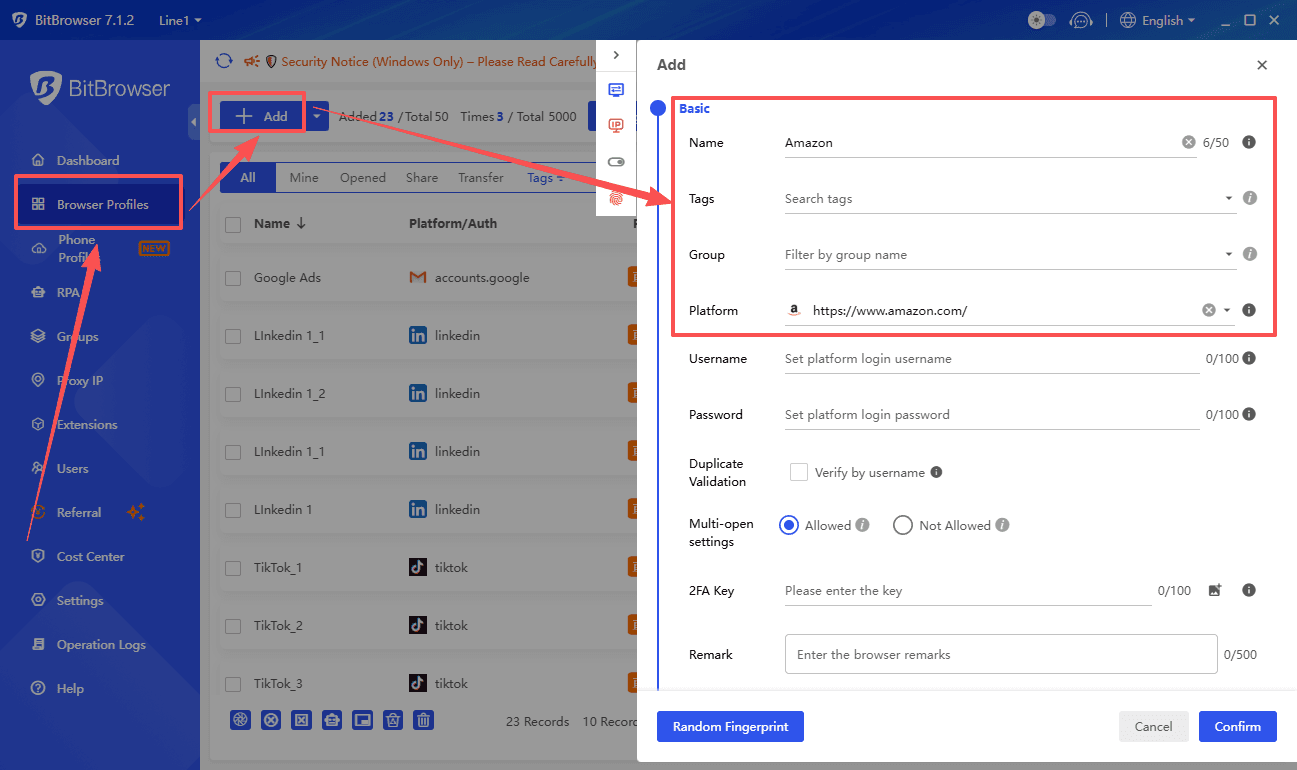
Assign a Stable IP
Use a consistent proxy or IP for this profile. The key is stability not rotation.
Avoid switching locations frequently. Choose one region and stay consistent.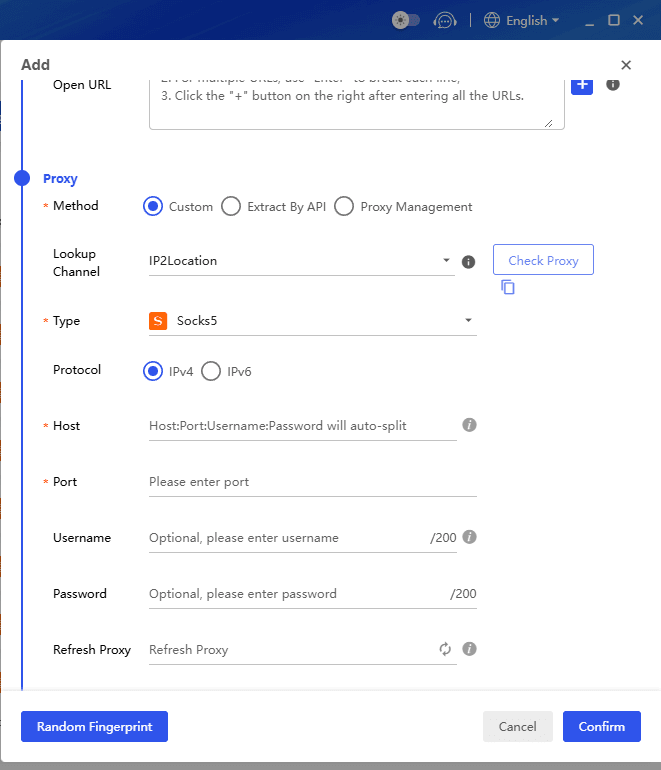
Configure Fingerprint Settings
BitBrowser allows you to customize browser fingerprints such as device type system version and screen size.
Keep these settings realistic and stable. Do not change them often.
Log Into Claude
Now log into your Claude account using this profile.
From this point forward always access your account through the same BitBrowser profile
Save and Maintain Session
Do not clear cookies or reset the profile frequently. Stability over time builds trust signals.
Step 7 Manage Multiple Accounts Safely
If you operate multiple Claude accounts you must isolate them properly.
- Each account should have
- One dedicated BitBrowser profile
- One stable IP
- One consistent usage pattern
Never log into multiple accounts in the same profile. This is one of the fastest ways to get banned.
BitBrowser makes this process easy by separating environments completely.
Step 8 Control Your Usage Behavior
Even with a perfect setup behavior still matters.
Avoid sending too many requests in a short time. Keep activity at a human like pace.
Do not run your account nonstop. Take breaks and maintain natural usage patterns.
Avoid sudden spikes in activity. Gradual and consistent usage is safer.
Step 9 Avoid Unauthorized Tools
Many users get banned because they use unofficial automation tools.
Even if these tools seem helpful they may interact with Claude in ways that trigger detection systems.
If you need automation keep it light controlled and within normal usage limits.
BitBrowser helps by stabilizing your environment but it does not replace responsible usage.
Step 10 Monitor Your Account Health
After setting everything up keep an eye on your account.
Watch for warning signs such as login issues slower responses or unusual restrictions.
If something feels off reduce activity and review your setup.
Early action can prevent a full ban.
Real Example of What Goes Wrong
Many users who get banned follow a pattern without realizing it.
They log in from different networks use multiple accounts in one browser and run automation scripts all day.
From their perspective everything looks efficient.
From Claude system perspective this looks like high risk behavior.
This mismatch is the main reason accounts get banned .
Key Takeaways
Claude bans are mostly caused by inconsistent environments and suspicious behavior patterns.
Using BitBrowser helps create stable isolated setups that reduce risk significantly.
Each account should have its own profile IP and usage pattern.
Avoid aggressive automation and follow platform guidelines at all times.
Prevention is always easier than recovery.
Conclusion
Claude AI is becoming more strict and intelligent in detecting risky behavior. In 2026 having a proper setup is no longer optional especially for advanced users.
The combination of responsible usage and a stable environment is the safest way to protect your account.
BitBrowser plays a key role by allowing you to control your environment and eliminate common risk signals.
If you follow this step by step approach you can not only recover from bans but also build a system that runs safely without interruptions.

 Multi-Account Management
 Prevent Account Association
 Multi-Employee Management
Recommended
See More 



