SotaProxy + BitBrowser: How to Set Up Proxies in an Antidetect Browser
 2026.10.25 21:00
 petro
Introduction
BitBrowser has long outgrown the idea of a "browser that spoofs fingerprints." Today it's a full multi-accounting workshop: browser profiles, cloud Android and iOS phones, an action synchronizer, visual RPA, and role-based team access. There's just one thing this workshop doesn't have — its own IP addresses.
That's where SotaProxy comes in. BitBrowser controls what the device looks like, while SotaProxy controls where it connects from. In this guide, we'll go beyond simply attaching a proxy to a profile and show how the pairing works in scenarios unique to BitBrowser: bulk import, the synchronizer, RPA, and cloud phones.
BitBrowser: What Sets It Apart from Other Antidetect Browsers
Beyond the core function — isolated profiles with their own cookies, cache, and fingerprint — BitBrowser offers a set of tools you rarely find in a single product.
- 10 free profiles, forever. Not a 7-day trial, but a permanent free plan. Team collaboration is available even on it.
- Two engines and 30+ fingerprint parameters. Chromium and Firefox; Canvas, WebGL, audio, fonts, sensors, and hardware — set manually or with the generator.
- Synchronizer. Mouse and keyboard actions in one window are mirrored across dozens of profiles at once.
- Visual RPA. Routine tasks like logging in, warming up accounts, or posting can be built into a no-code workflow.
- Local API. Create and launch profiles from your own scripts — handy for automation with Puppeteer, Playwright, or Selenium.
- BitCloudPhone. Cloud Android and iOS phones right inside the BitBrowser interface — for apps that only live on mobile.
- Teams with roles. A team lead assigns profiles, sets permissions, and sees an activity log, while team members never get access to passwords or proxy credentials.
That explains the audience: e-commerce sellers, SMM agencies, affiliate marketing teams, and anyone who scales through automation rather than manual work.
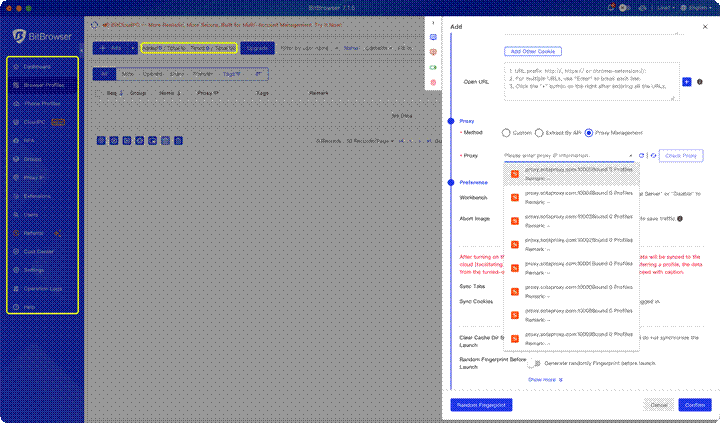
BitBrowser's sidebar holds browser profiles, Phone Profiles, CloudPC, RPA, groups, and a dedicated Proxy IP section for managing proxies. The "Total 10" counter shows those free profiles.
Who Handles What in the Setup
Platforms check an account from two angles: "what device is this?" and "where is it connecting from?" BitBrowser answers the first question, SotaProxy the second. If either side shows an inconsistency, no amount of tuning on the other side will hide it.
| What the platform checks | Responsible | How |
|---|---|---|
| Browser fingerprint (Canvas, WebGL, fonts) | BitBrowser | A unique fingerprint for every profile |
| Phone fingerprint (model, SIM, sensors) | BitBrowser (BitCloudPhone) | Emulation of real devices and carriers |
| Cookie and session isolation | BitBrowser | Separate storage per profile |
| IP reputation and absence from spam databases | SotaProxy | AI Pool Manager selects clean IPs |
| Connection type (residential / mobile) | SotaProxy | Residential, mobile, ISP, IPv4, and IPv6 |
| Geo: country, region, city | SotaProxy | 220+ countries with precise targeting |
| Connection speed and stability | SotaProxy | Route Optimizer picks the fastest route |
| IP geo matching timezone and language | Both | BitBrowser adapts the profile to the proxy IP |
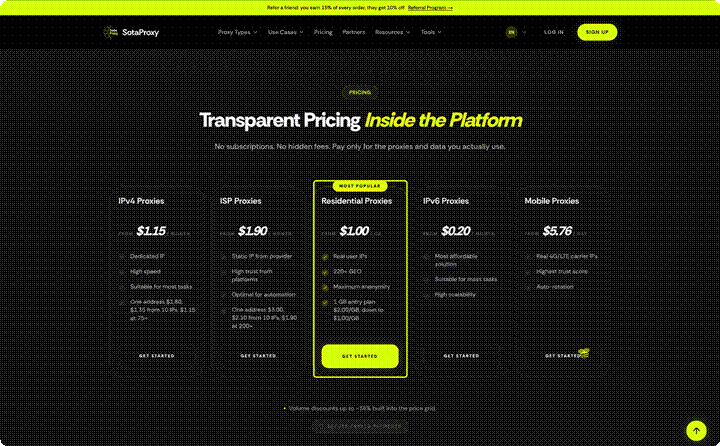
All SotaProxy proxies support HTTP(S) and SOCKS5, and BitBrowser supports both protocols natively. There are no subscriptions: you pay only for the traffic or IPs you use, with volume discounts of up to 36%. Residential proxies start at $1 per GB, IPv4 at $1.15 per IP per month, ISP at $1.90, IPv6 at $0.20, and mobile at $5.76 per day. That makes it easy to test the setup on a couple of profiles before you scale.
Step 1. Create a Proxy Pool in SotaProxy
In BitBrowser you rarely work with just one profile, so it's easier to create proxies as a pool right away — ready for bulk import. We'll use residential proxies as the example.
- Sign up at sotaproxy.com and top up your balance with Add Funds — crypto payments are supported. The Proxies menu lists every type: Residential, IPv4, IPv6, ISP, and Mobile Dedicated.
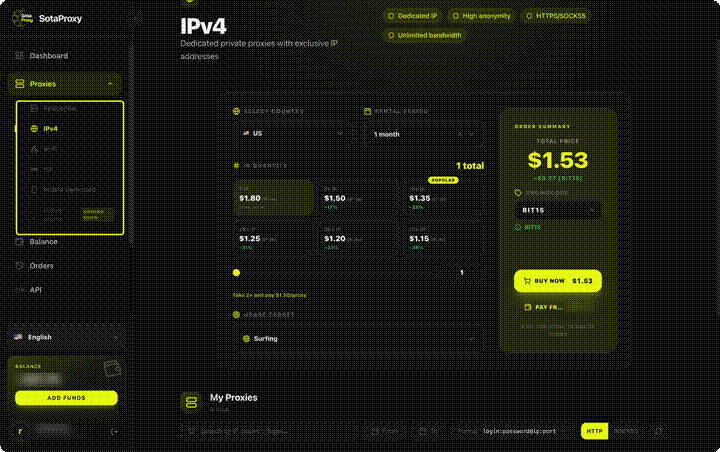
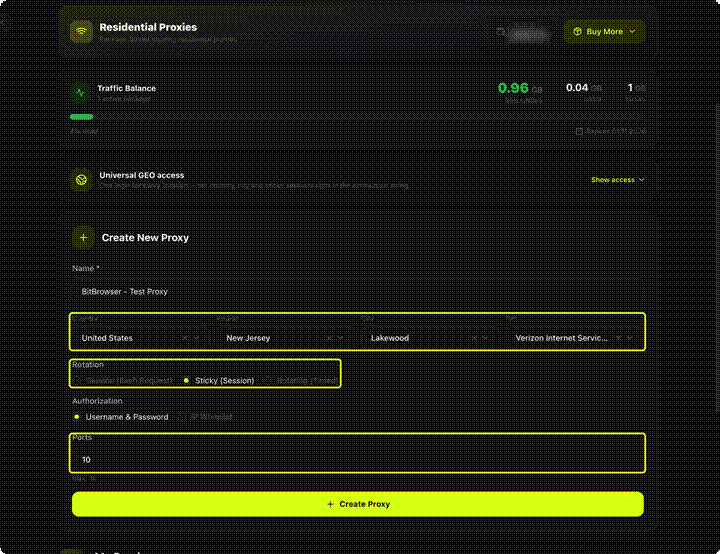
- Open Proxies → Residential and fill in the Create New Proxy form:
- Name — any clear name, such as "BitBrowser."
- Country, Region, City, ISP — geo down to the city and a specific provider.
- Rotation — General (Each Request) changes the IP on every request and suits scraping; Sticky (Session) keeps one IP, which is the mode for accounts; Rotating (Timed) changes the IP on a timer.
- Authorization — choose Username & Password for BitBrowser.
- Ports — how many proxies to create, up to 1,000. Each port is a separate proxy, so set as many ports as you'll have profiles.
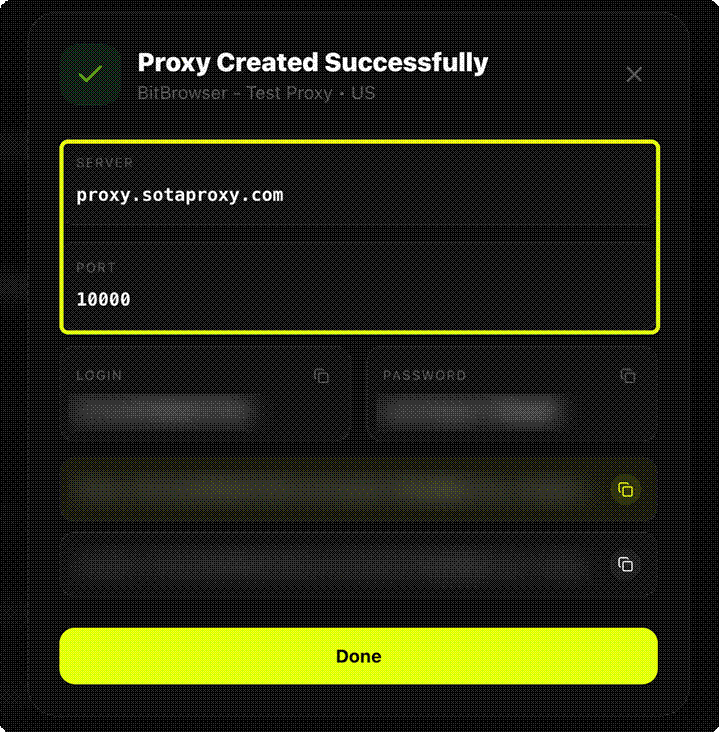
- Click Create Proxy. A window opens with the connection details: the proxy.sotaproxy.com server, the first port, login, password, and ready-made HTTP and SOCKS5 connection strings.
- Your new proxies appear in the My Proxies list: all ports sit under one name (10000, 10001, 10002, and so on). Pick a format in the Format field and click Copy All to copy the whole list at once.
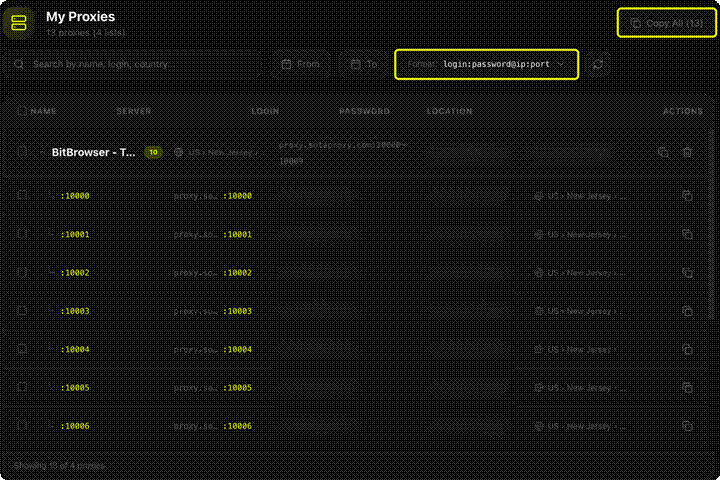
To verify: whether the Format field offers host:port:login:password — the format BitBrowser accepts for bulk import. If not, describe how to convert the list.
Step 2. Add Proxies to BitBrowser
BitBrowser stores proxies in a dedicated Proxy IP section. You add them there first and then assign them to profiles. That way one pool is easy to distribute across profiles and team members instead of entering details into every profile by hand.
Method A — One Proxy Manually
Good for testing the setup or adding a few proxies for important accounts.
- Install BitBrowser from bitbrowser.net and sign in.
- Open Proxy IP → the Proxy Management tab → Add.
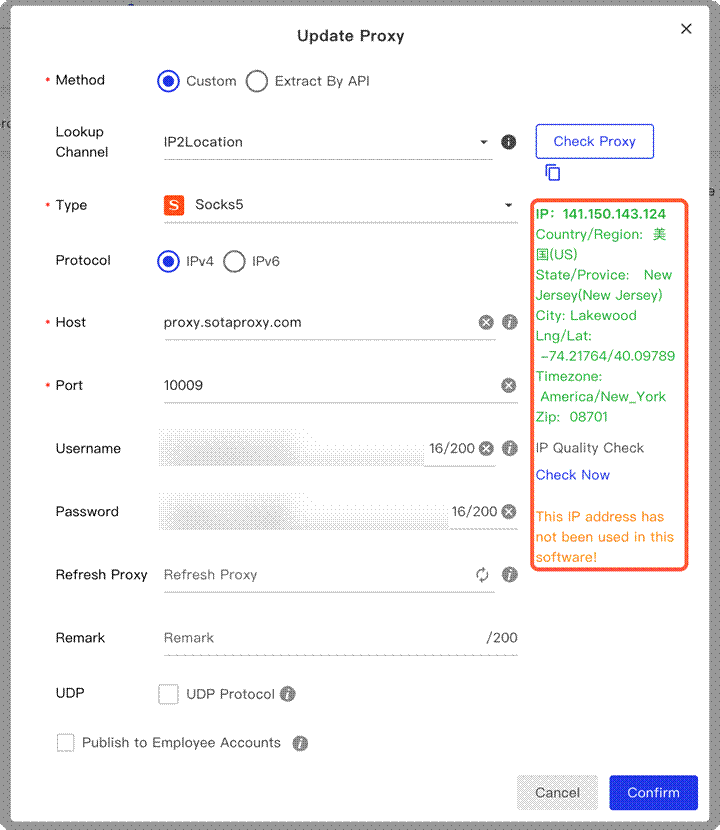
- In the Add Proxy window, keep Method: Custom and choose a Type — HTTP or Socks5; SotaProxy supports both. Fill in Host (proxy.sotaproxy.com), Port, Username, and Password from your SotaProxy dashboard.
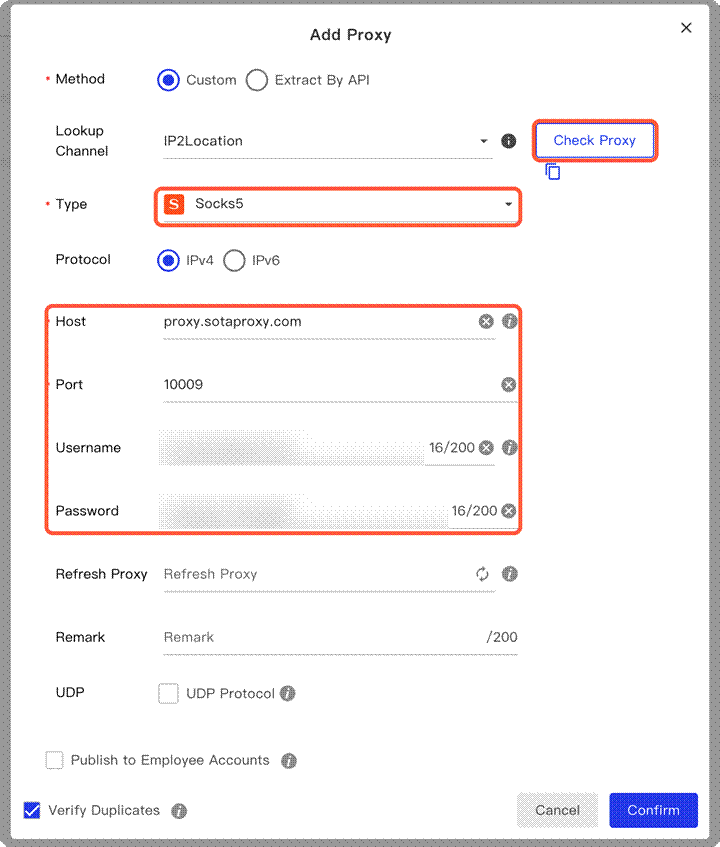
- Click Check Proxy. The IP, country, region, city, timezone, and ZIP code appear on the right, along with a note that this IP has never been used in BitBrowser before. Click Confirm.
Method B — Bulk Import
This is why teams choose BitBrowser: instead of adding proxies one by one, you upload the entire pool from Step 1 at once.
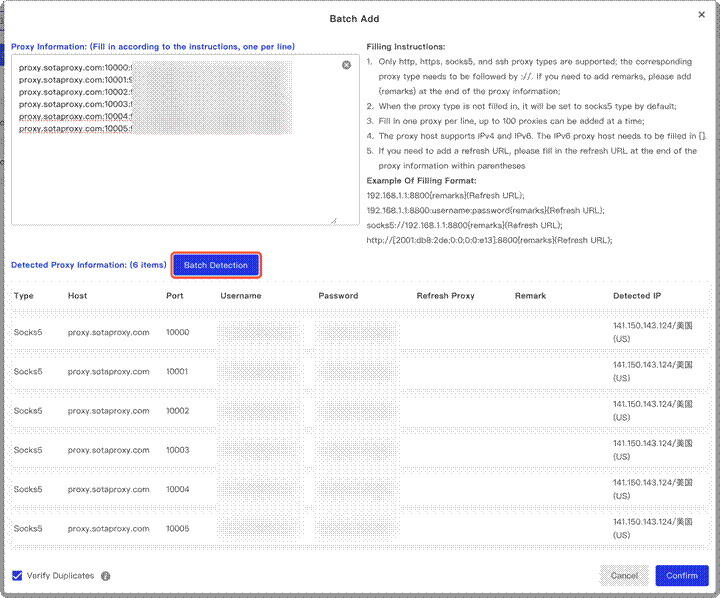
- In Proxy IP → Proxy Management, click the arrow next to the Add button and choose Batch Add.
- Paste your SotaProxy list, one proxy per line, in host:port:login:password format. You can add up to 100 proxies at a time. If you don't specify a type, BitBrowser adds the proxy as SOCKS5; for HTTP, prefix the line with http://.
- Click Batch Detection — BitBrowser checks every proxy and shows its IP and country. Keep Verify Duplicates checked so you don't add the same proxy twice, then click Confirm.
Assign a Proxy to a Profile
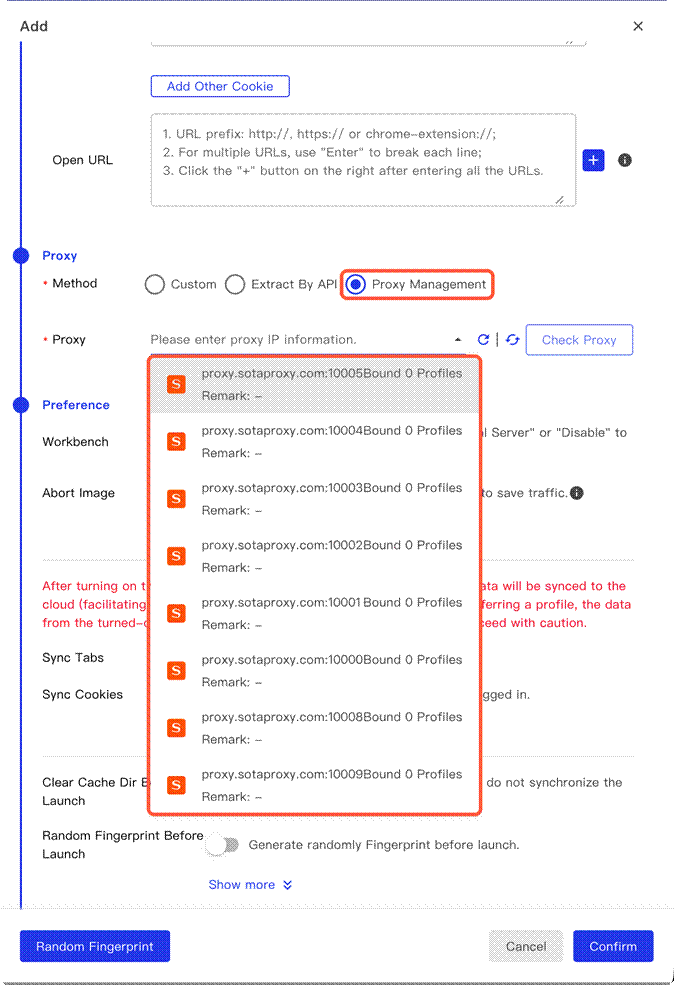
- Open Browser Profiles → Add.
- In the Proxy block, choose Method: Proxy Management and pick a proxy from the list. Each proxy shows how many profiles it's already bound to (Bound 0 Profiles) — that counter makes it easy to stick to the "one IP, one profile" rule.
- Click Check Proxy, make sure the IP is detected, and save the profile with Confirm.
To set up a single profile without the Proxy IP section, choose Method: Custom in the same block and enter the proxy details directly in the profile.
Check the Result
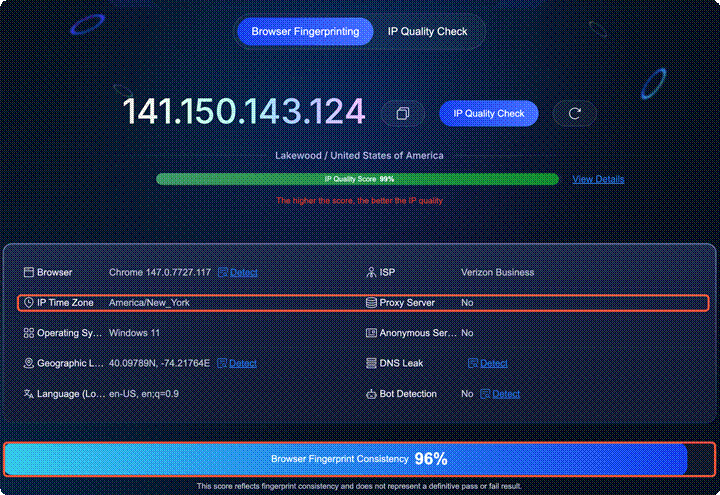
Launch the profile and open any IP checker — we used ToDetect. Here's what it showed for a SotaProxy residential proxy in the US (New Jersey):
- IP Quality Score: 99%, IP type: Residential, ISP: Verizon Business.
- Browser timezone (America/New_York) matches the IP's geo — BitBrowser adjusted the profile automatically.
- Proxy Server and Anonymous Server: No — the site doesn't detect the connection as a proxy.
- Fingerprint consistency: 96%.
Four Scenarios Where the Setup Really Shines
1. Synchronizer + Sticky Proxies: One Action, Twenty Different IPs
The synchronizer repeats your clicks across all selected windows. To the platform, it looks like twenty separate people — but only if each window has its own IP. Use proxies for antidetect browsers with sticky sessions — such as SotaProxy residential proxies — and make sure the session duration is no shorter than your working session: an IP change in the middle of synchronized actions is a straight path to a checkpoint.
2. RPA + Rotation: Data Collection Without Blocks
An RPA workflow that crawls hundreds of marketplace or search result pages will quickly hit the limits of a single IP. Rotating residential proxies fit here: every request goes out from a new address. For RPA workflows that log into an account, on the other hand, stick with sticky sessions — rotation inside an authenticated session looks like an account takeover.
3. BitCloudPhone + Mobile Proxies: A Complete Mobile Environment
A cloud phone emulates the device model, carrier, and SIM. If that "phone" connects from a server IP, the picture falls apart. SotaProxy mobile proxies provide IPs from real 4G/5G networks — just like a real smartphone. The key rule: the mobile proxy's country must match the carrier and SIM selected in the phone profile. This is the best option for TikTok, Instagram, and apps without a web version.
4. Teams: Proxies Are Tied to the Profile, Not the Person
In BitBrowser, a team lead assigns a SotaProxy proxy to a profile once and then hands the profile to a media buyer or SMM manager with limited permissions. The team member works in a ready-made environment and never sees the proxy login or password. If someone leaves the team, their access to the profile is revoked — while the account's IP history stays the same, with no suspicious geo changes.
| Scenario | SotaProxy proxy type | Session |
|---|---|---|
| Synchronizer, account work | Residential | Sticky, long |
| RPA for data collection | Residential or IPv4 | Rotating |
| RPA with login | Residential or ISP | Sticky / static IP |
| BitCloudPhone | Mobile | Sticky, geo = SIM carrier |
| Distributing profiles to a team | ISP or residential | Static IP / sticky |
Common Mistakes BitBrowser Users Make
- Imported 50 proxies but assigned 10. When assigning proxies in bulk, it's easy to give one proxy to several profiles. Check the Bound counter in the Proxy Management list: each proxy should be bound to exactly one profile.
- Synchronizer on rotating proxies. Actions are synchronized, but the windows' IPs change at different moments. For the synchronizer, use only sticky or static IPs.
- A cloud phone with the "wrong" country. A US carrier and SIM with a mobile proxy from Poland — the mismatch is obvious. Choose the proxy geo first, then the carrier to match it.
- Protocol mismatch. SOCKS5 was generated in the SotaProxy dashboard, but HTTP is selected in BitBrowser — the check will show a connection error. Double-check the protocol and port.
- The proxy expired while RPA kept running. If a sticky session times out, the workflow gets a new IP mid-task. Set the session duration with a buffer or add an IP check step to your RPA workflow.
- A team member changed the proxy themselves. Restrict proxy editing permissions in team roles so assignments can only be changed by the team lead.
Try the Setup at a Discount
10 free BitBrowser profiles and SotaProxy residential proxies from $1/GB are enough to build a working setup and test it on real tasks without a big investment.
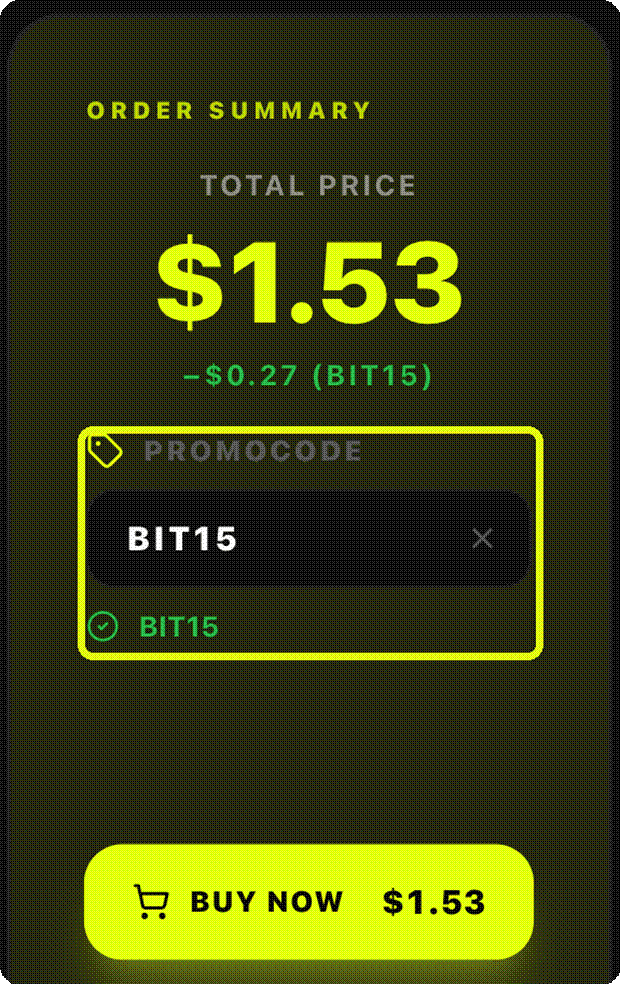
For BitBrowser users — 15% off your order with promo code BIT15. Enter it in the Promocode field at checkout in your SotaProxy dashboard.
To verify: promo code validity period and the link with UTM/referral tag.
FAQ
Is BitBrowser's free plan enough to work with SotaProxy? To get started — yes. With 10 profiles you can fine-tune settings and test geo and IP quality. When you scale, your SotaProxy proxies carry over to a paid plan without any reconfiguration.c
Which proxies should I use for BitCloudPhone cloud phones? Mobile. The proxy's country must match the carrier and SIM in the phone profile.
Can I connect SotaProxy proxies to profiles via BitBrowser's Local API? Yes. Proxy details are passed when creating a profile through the API, just as with manual setup — convenient if your profiles are created by a script.
Which is better for the synchronizer — residential or ISP? Both work as long as the IP stays fixed. Residential proxies offer more trust; ISP proxies offer stability and speed with no session time limit.
Do I need to change the proxy when handing a profile to another team member? No, and it's better not to. Changing the IP of a warmed-up account looks more suspicious than a change of the person behind it.
To verify: how exactly proxy details are passed via BitBrowser's Local API — check the API documentation.