How to Manage Two Facebook Accounts Safely With BitBrowser
 2026.05.28 01:27
 BitBrowser
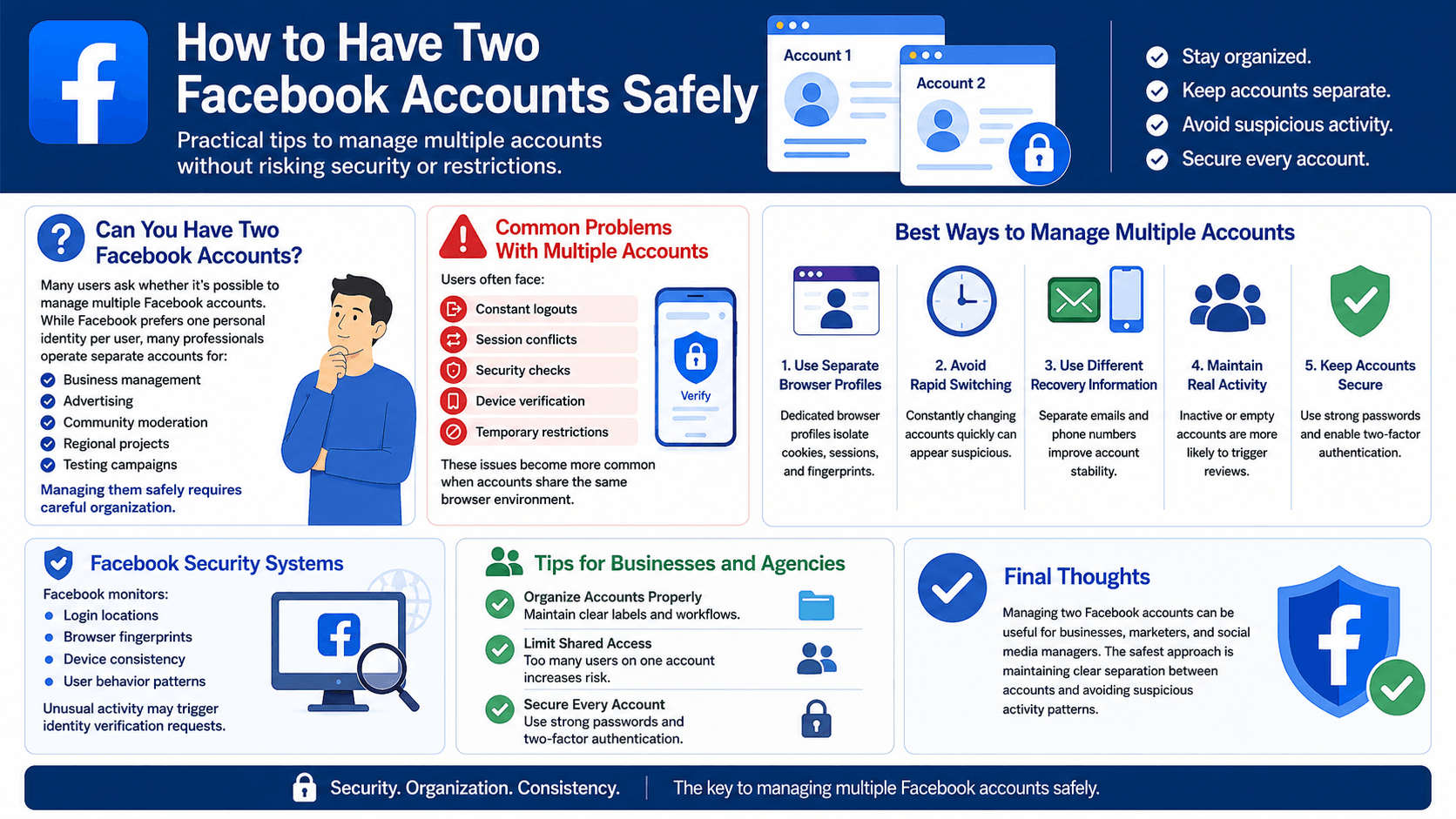
Many users wonder whether it’s possible to manage multiple Facebook accounts safely.
While Facebook generally encourages users to maintain a single personal identity, many professionals operate separate accounts for legitimate reasons such as:
For marketers, agencies, freelancers, and e-commerce businesses, managing multiple Facebook accounts has become part of daily workflow.
However, doing this safely requires proper account separation and careful browser management.
Common Problems With Multiple Facebook Accounts
Managing two or more Facebook accounts inside a regular browser often creates problems.
Frequent Logouts
Facebook sessions may conflict with each other, causing repeated logouts.
Security Checks
Facebook may trigger additional verification requests when unusual login behavior is detected.
Session Conflicts
Cookies and browser data can overlap between accounts.
Device Verification Requests
Facebook monitors browser environments and devices closely.
Logging into multiple accounts from the same environment may trigger suspicious activity warnings.
Temporary Restrictions
Accounts may face temporary limits when Facebook detects unusual behavior patterns.
Why Facebook Detects Multiple Accounts
Facebook uses advanced security systems to monitor account behavior.
The platform analyzes:
- login locations,
- browser fingerprints,
- IP addresses,
- device consistency,
- cookies,
- activity patterns.
Rapid switching between accounts or using multiple accounts in the same browser environment may appear suspicious.
Best Ways to Manage Multiple Facebook Accounts
Use Separate Browser Profiles
One of the safest methods is using isolated browser profiles.
Dedicated browser environments help separate:
- cookies,
- sessions,
- browser fingerprints,
- local storage,
- cache data.
This significantly reduces account overlap.
Avoid Rapid Account Switching
Constantly switching between accounts quickly can increase security checks.
Maintain normal and natural browsing behavior whenever possible.
Use Different Recovery Information
Using separate recovery emails and phone numbers improves account stability and recovery options.
Keep Real Activity on Accounts
Inactive or empty accounts are more likely to trigger Facebook reviews.
Accounts should maintain realistic activity patterns.
How BitBrowser Helps Manage Multiple Facebook Accounts
What Is BitBrowser?
BitBrowser is an anti-detect browser designed for multi-account management.
It allows users to create isolated browser profiles where each profile behaves like a completely separate device.
This helps users manage multiple Facebook accounts more safely and efficiently.
Key Features of BitBrowser
Browser Fingerprint Isolation
Every browser exposes unique technical information such as:
- operating system,
- fonts,
- screen resolution,
- WebGL,
- Canvas fingerprint,
- hardware information.
BitBrowser isolates these fingerprints between profiles.
Separate Sessions and Cookies
Each profile stores cookies independently.
This reduces:
- session conflicts,
- forced logouts,
- cross-account contamination.
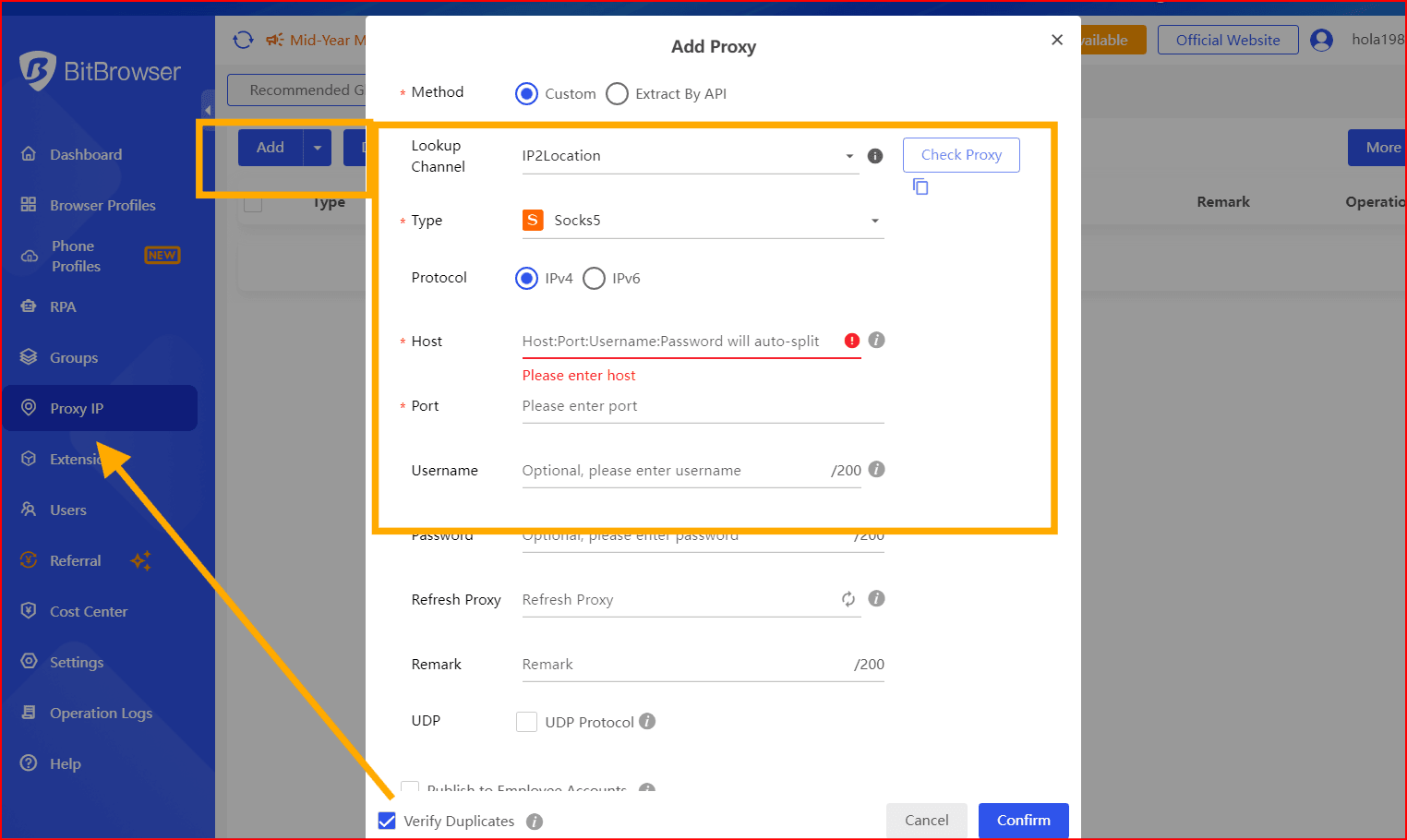
Proxy Integration
BitBrowser supports:
- residential proxies,
- mobile proxies,
- ISP proxies.
Different accounts can operate under separate IP addresses for better account separation.
Multi-Account Workflow Management
Users can organize multiple Facebook accounts efficiently using profile labels and folders.
This is especially useful for:
- agencies,
- advertising teams,
- affiliate marketers,
- social media managers,
- e-commerce businesses.
How to Use BitBrowser for Two Facebook Accounts
Step 1: Install BitBrowser
Download and install BitBrowser from the official website.
After installation, access the dashboard.
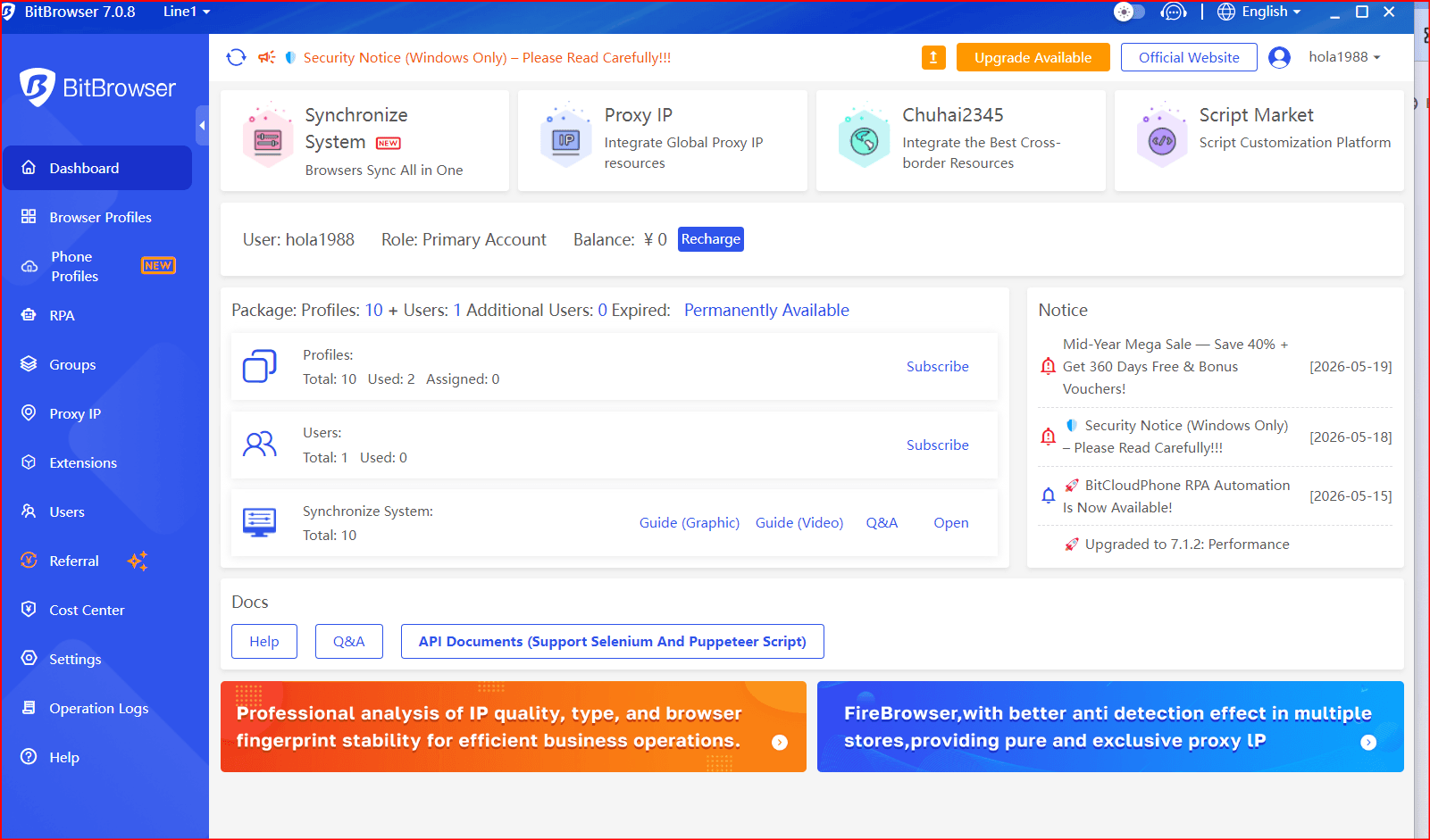
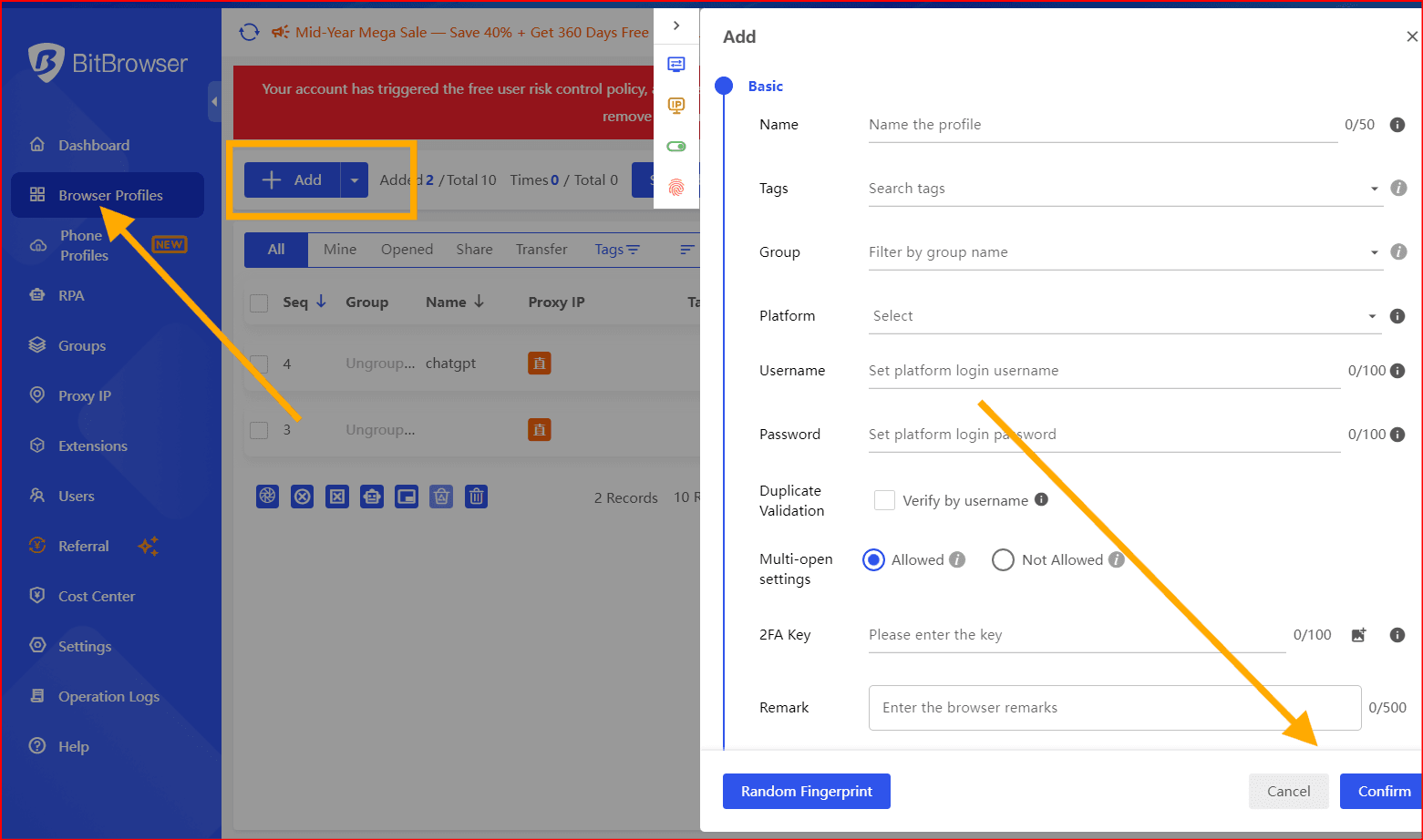
Step 2: Create Separate Browser Profiles
Inside BitBrowser:
- Click “New Browser Profile”
- Name the profile
- Configure fingerprint settings
- Add a proxy if necessary
- Save the profile
Each profile acts as a separate browser environment.
Step 3: Open Facebook in Each Profile
Launch the browser profile and log into the Facebook account assigned to that profile.
Avoid using multiple accounts inside the same browser profile.
Step 4: Organize Accounts Properly
Professional users often manage many accounts simultaneously.
Example profile names:
- Client A Facebook
- Store Ads Manager
- Community Support
- Regional Campaign Account
Good organization improves workflow efficiency.
Additional Tips for Businesses and Agencies
Limit Shared Access
Too many users accessing the same account may increase security risks.
Use Strong Security Settings
Enable:
- strong passwords,
- two-factor authentication,
- recovery emails.
Keep Browser Environments Stable
Avoid frequently changing:
- IP addresses,
- device fingerprints,
- geographic locations.
Consistency improves account trust.
Common Mistakes to Avoid
Using One Browser for All Accounts
This increases the risk of account linking and security reviews.
Using Low-Quality Proxies
Cheap or abused proxies are more likely to trigger Facebook security systems.
Aggressive Automation
Unnatural activity patterns may result in restrictions or verification requests.
Ignoring Account Security
Weak passwords and poor recovery settings increase the risk of account loss.
Final Thoughts
Managing two Facebook accounts can be extremely useful for businesses, marketers, freelancers, and social media managers.
The safest approach is maintaining clear separation between accounts and avoiding suspicious activity patterns.
BitBrowser helps users isolate browser fingerprints, separate sessions, and manage multiple Facebook accounts more efficiently and securely.
For professionals handling multiple Facebook accounts daily, isolated browser profiles can significantly reduce account conflicts and improve workflow stability.

 Multi-Account Management
 Prevent Account Association
 Multi-Employee Management
Recommended
See More 



