How to Unblock TikTok from Anywhere: Bypass Geo-Restrictions with BitBrowser
 2025.12.14 06:31
 petro
petroIf you've ever been stuck staring at the endless loading screen on TikTok, you're not alone. Most of us first assume it's a poor connection or a device glitch. However, in some cases—like yours—it’s because your country or region has blocked (or banned) access to the platform.
TikTok bans, particularly from governments, have been a hot topic lately. This gained momentum after the US implemented a ban in January 2025, sparking a search for ways to bypass such restrictions. As a result, various methods have emerged to help users regain access to TikTok.
While some of these solutions are effective and safe, others are merely time-wasters that can put your accounts at risk.
In this guide, we’ll walk you through three of the best and safest ways to unblock TikTok in any region, regardless of the reason for the block. Don’t worry—these methods are simple and will be explained in easy-to-understand terms, so you won’t get lost.
Let’s dive in!
Ways to Unblock TikTok From Anywhere
Whether the TikTok ban is temporary or permanent, we’ve got three foolproof methods to help you bypass the restriction. Let's start with the most reliable and easiest method:
1. Using BitBrowser
The quickest, easiest, and safest way to unblock TikTok wherever you are is through BitBrowser. Let’s see why this is the best option:
What Is BitBrowser and Why Is It So Effective?
BitBrowser is a sophisticated anti-detect browser designed for privacy and security while helping you bypass geo-restrictions like the ones TikTok imposes in certain regions.
BitBrowser functions similarly to regular browsers, such as Chrome or Safari, but with one key difference: it routes your traffic through intermediary servers known as proxies, which mask your IP address and location. When TikTok sees your connection, it only detects the proxy’s location, not yours.
So, if the proxy is based in a country where TikTok is accessible, such as Finland, TikTok will think you’re connecting from that region, and you’ll have full access.
Why BitBrowser is the Best Choice
- Affordable Premium Experience: BitBrowser offers a premium experience at a reasonable price, giving you access to powerful features.
- Easy to Use: It makes bypassing geo-restrictions simple and quick. You can change your IP and location with just a click.
- Built-in Proxies: BitBrowser provides built-in proxies, so you don’t need to deal with the hassle of finding an external proxy provider.
- Safe and Secure: BitBrowser won’t trigger suspicious login alerts or get your account flagged by TikTok, keeping your accounts safe.
- Multiple Profiles: With BitBrowser, you can create multiple browser profiles, each with its own unique IP address and cookies. This allows you to manage multiple TikTok accounts without triggering any flags for suspicious activity.
How to Use BitBrowser to Unblock TikTok:
Getting started with BitBrowser is straightforward and takes no more than 5 minutes. Follow these steps:
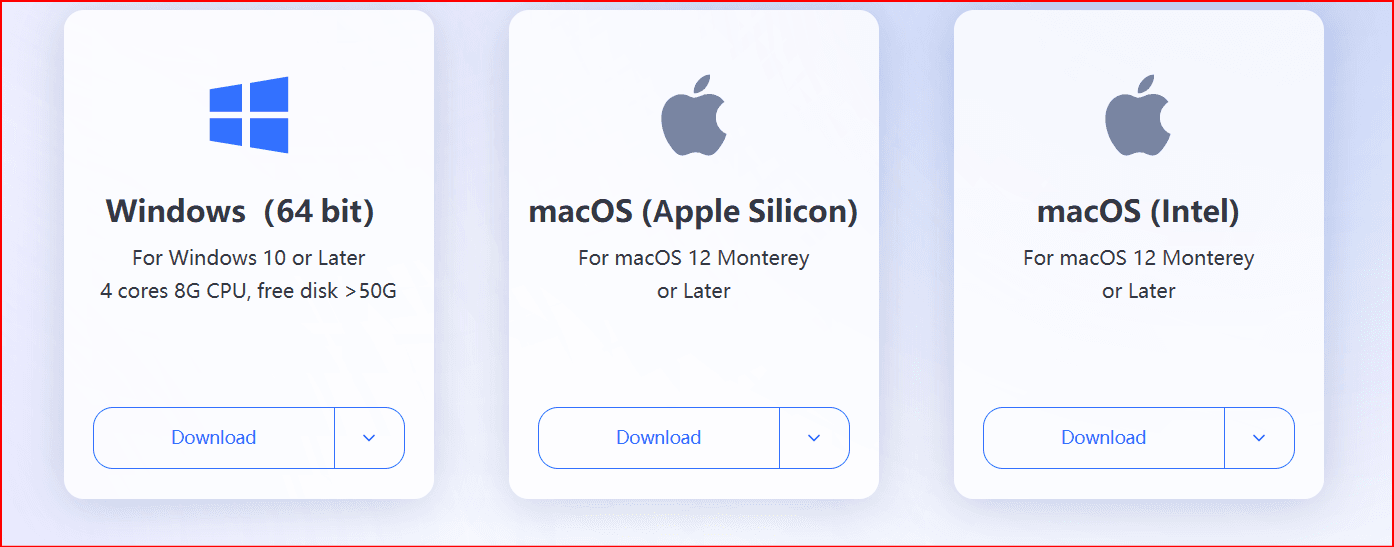
Download BitBrowser: Visit the BitBrowser website and install the app on your device (Windows or Mac).
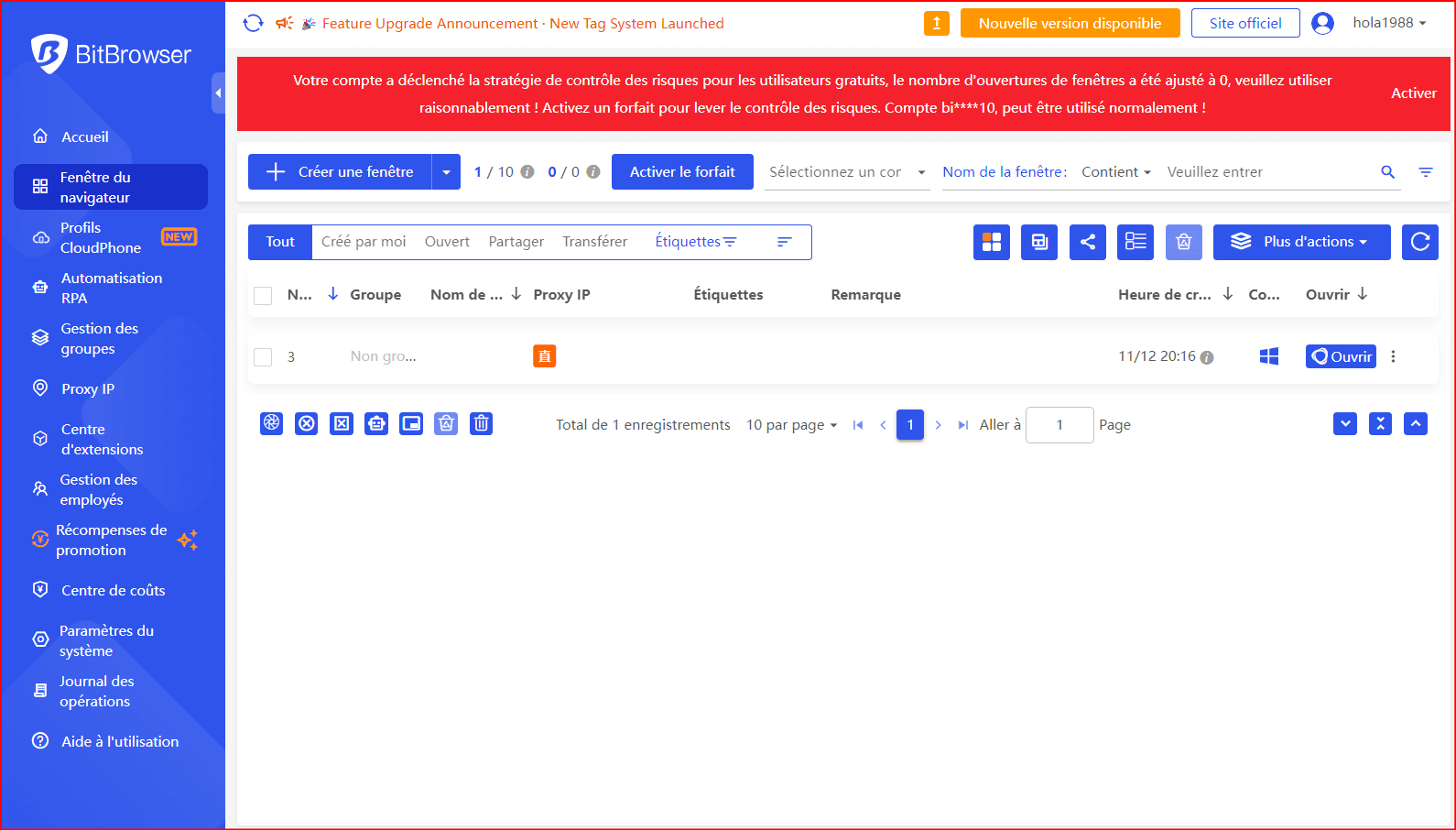
Create Browser Profiles: Create different browser profiles for each TikTok account you want to manage. Each profile will have its own set of cookies and browsing history.
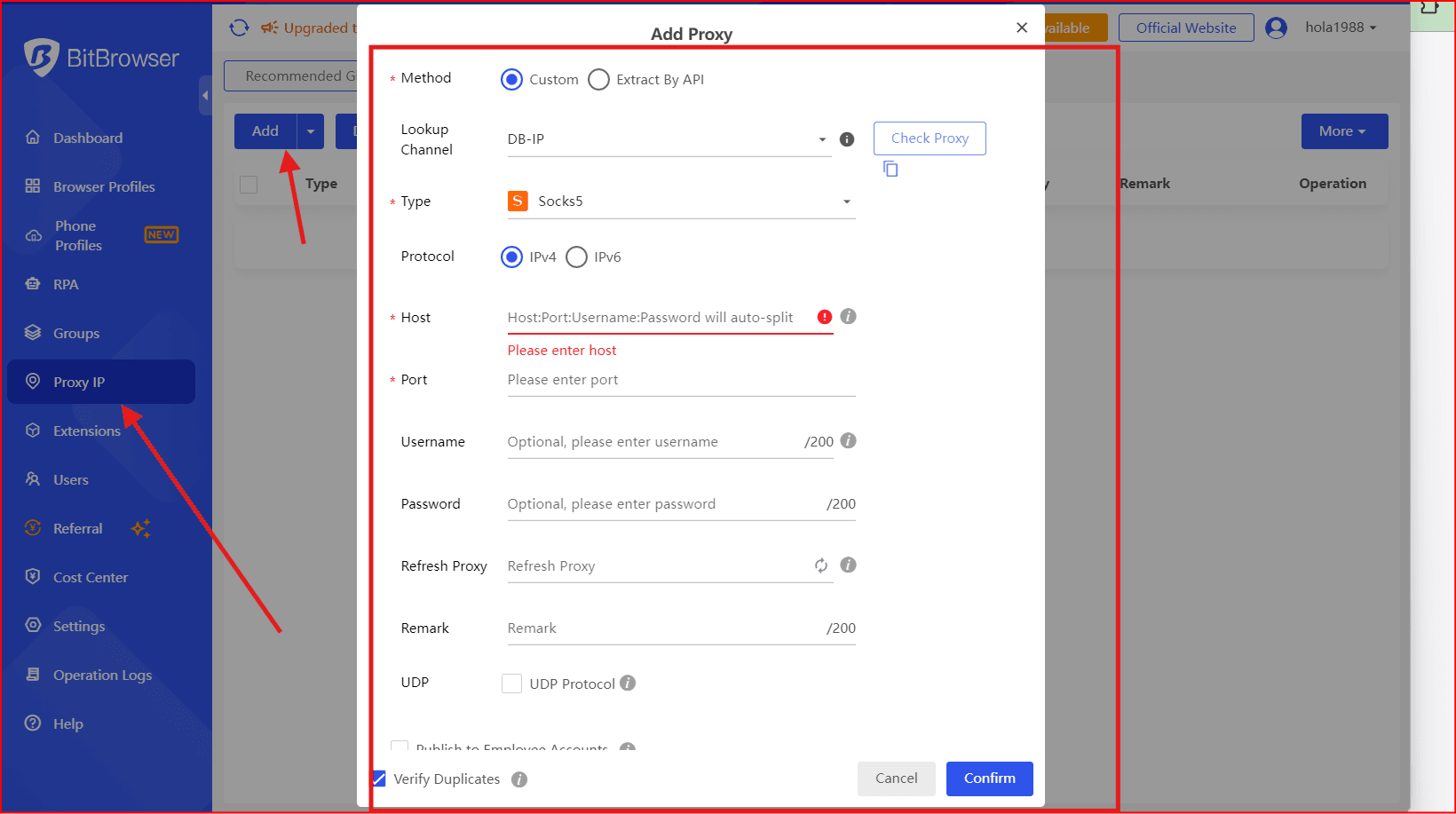
Integrate Proxies: Select a proxy provider and link it to your BitBrowser profile to mask your real IP address.
- Launch TikTok: Open the TikTok app or website in your BitBrowser profile, and it will appear as if you're accessing TikTok from the proxy's location, bypassing the block.
What Else Can You Do with BitBrowser?
BitBrowser is especially useful for those managing multiple TikTok accounts, running ad campaigns, or working in agencies. Here’s what you can do with it:
- Manage Multiple Accounts Safely: TikTok often flags multiple accounts using the same IP. With BitBrowser, each profile gets its own unique IP and fingerprint, keeping your accounts secure.
- Run Ads Across Different Regions: If you’re managing TikTok Ads for clients from different countries, BitBrowser ensures you avoid location mismatches and verification loops.
- Optimize Content Across Different Regions: TikTok’s algorithm is region-based. With BitBrowser, you can simulate browsing from different countries to test how your content performs in different regions, optimizing your videos and ads for regional "For You Pages" (FYPs).
- Manage TikTok Shop Accounts: If you're operating a TikTok Shop, BitBrowser lets you create profiles that match the region of your Shop, avoiding location mismatches and keeping your account safe from restrictions.
2. Using a Proxy IP
If you prefer using your regular browser (like Chrome), you can still unblock TikTok by using an external proxy IP.
What Is a Proxy?
A proxy acts as a middleman that relays your requests to TikTok on your behalf. When you use a proxy, TikTok will see the proxy’s IP address and location instead of your own, effectively bypassing regional blocks. For example, if the proxy is located in Finland, TikTok will think you're connecting from Finland.
Note: Don’t confuse proxies with VPNs. Here’s how they differ:
- VPNs encrypt your internet traffic across all apps, making it easier for TikTok to detect and flag your connection.
- Proxies work only on your browser and are less detectable, which makes them a safer choice for bypassing geo-restrictions.
Pros of Using Proxies
- Fast and Reliable: Proxies provide good speeds for streaming TikTok content smoothly.
- Minimal Risk of Restrictions: Using a high-quality proxy reduces the risk of triggering account restrictions or bans.
Cons of Using Proxies
- Security Risk with Free Proxies: Free proxies can pose a security risk, as they may contain malware or steal your data.
- Expensive Quality Proxies: Reliable proxies usually come with a higher cost.
- More Complicated Than BitBrowser: Setting up a proxy on your regular browser is more technical than using an all-in-one tool like BitBrowser.
3. Buying Foreign SIM Cards
Although this method isn’t widely known, some users bypass the TikTok ban by using a SIM card from a country where TikTok isn’t blocked. It can work in some cases but is often a short-term solution.
How It Works:
If you’re in a country where TikTok is banned, using a SIM card from a country where TikTok is allowed may give you access to the platform. For example, inserting a UK SIM card while in Turkmenistan could allow TikTok to load on your mobile data.
Pros and Cons of Using a Foreign SIM Card
Pros:
- Can temporarily unblock TikTok if the SIM's home country allows access.
- Useful for verification when TikTok keeps blocking your access.
Cons:
- Only works with mobile data; Wi-Fi will bring back the restriction.
- TikTok can still detect your real location, causing verification loops or errors.
- Expensive roaming charges, especially when streaming videos.
Other Methods & Tricks We Don’t Recommend
There are many misleading tricks online that claim to help you unblock TikTok. However, these methods often come with serious risks. Here are some that we don't recommend:
- Using a VPN: While VPNs can unblock TikTok, they encrypt your internet traffic, which can be easily detected by TikTok and lead to shadowbans or endless verification loops.
- Changing DNS or Smart DNS: This method doesn’t actually change your IP or location, so it won’t bypass regional restrictions.
- Using Tor: Tor is slow and encrypts traffic, which makes it easily detectable by TikTok.
- Browser Extensions: These are often unreliable and pose security risks, such as malware or data theft.
Where Is TikTok Blocked Right Now?
TikTok is banned in countries like India, Afghanistan, Nepal, Somalia, and China. If you’re in any of these locations, you’ll need a reliable solution, such as BitBrowser, to maintain access.
Why Is TikTok Blocked in Some Locations?
TikTok’s bans are often driven by political, cultural, or security reasons. The primary concerns include:
- National Security: Some countries worry that TikTok’s parent company, ByteDance, could share sensitive user data with the Chinese government.
- Cultural Protectionism: Countries with strict social policies may view TikTok as a threat to local norms and values.
- Geopolitical Tensions: Diplomatic conflicts can also lead to TikTok bans, such as the one imposed in India.
Quick Recap
To unblock TikTok in restricted regions, use a method that avoids detection. Tools like VPNs, Tor, or free proxies often raise red flags. The best options are BitBrowser (which offers proxy integration and multiple profiles for secure browsing) or a reliable external proxy.
FAQs
Can I use TikTok with a VPN after the ban?
Technically, yes, but we advise against it. VPNs use encryption that TikTok detects, leading to shadowbans or verification loops. A proxy browser like BitBrowser is a better option for long-term, undetectable access.
Will TikTok come back to India?
Given the ongoing political situation, it’s unlikely that TikTok will return to India in the near future due to
national security concerns.
Why has TikTok been banned in the USA?
TikTok's connection to its Chinese parent company, ByteDance, has led to national security concerns in the

 Multi-Account Management
 Prevent Account Association
 Multi-Employee Management
Recommended
See More 



