How to Use cURL with a Proxy (Complete Guide)
 2026.04.24 03:35
 petro
petrocURL is a powerful command-line tool used to send HTTP requests, test APIs, and download content. In many cases, you may need to route your requests through a proxy server—for privacy, geo-testing, scraping, or bypassing restrictions.
This guide explains how to use cURL with different types of proxies, including HTTP, HTTPS, and SOCKS, and how it fits into tools like BitBrowser.
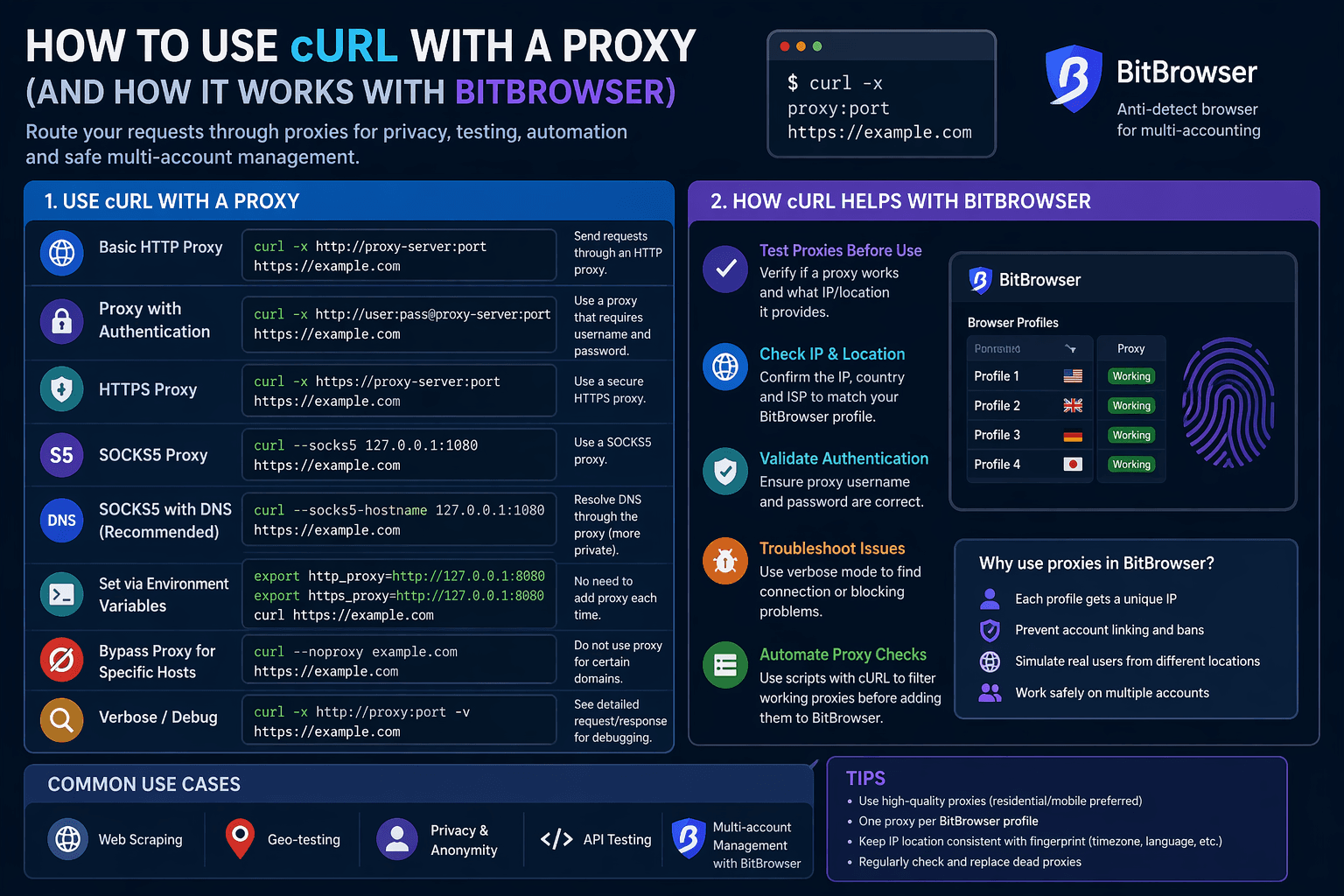
What Is a Proxy?
A proxy acts as an intermediary between your device and the internet. Instead of connecting directly to a website, your request goes through the proxy server.
Benefits:
- Hide your real IP address
- Access geo-restricted content
- Improve anonymity
- Test requests from different locations
Basic cURL Proxy Syntax
The simplest way to use a proxy with cURL is with the -x (or --proxy) option:
curl -x http://proxy-server:port https://example.com
Example:
curl -x http://127.0.0.1:8080 https://example.com
Using a Proxy with Authentication
If your proxy requires a username and password:
curl -x http://username:password@proxy-server:port https://example.com
Example:
curl -x http://user:pass@127.0.0.1:8080 https://example.com
Using HTTPS Proxies
curl -x https://proxy-server:port https://example.com
Using SOCKS Proxies
SOCKS5:
curl --socks5 127.0.0.1:1080 https://example.com
SOCKS5 with DNS via proxy:
curl --socks5-hostname 127.0.0.1:1080 https://nsocks.net/
This ensures DNS requests are also routed through the proxy.
Setting Proxy via Environment Variables
export http_proxy=http://127.0.0.1:8080
export https_proxy=http://127.0.0.1:8080

curl https://example.com
Bypassing the Proxy
curl --noproxy example.com https://example.com
Debugging Proxy Connections
curl -x http://127.0.0.1:8080 -v https://example.com
This shows connection details, headers, and proxy negotiation.
Using cURL with BitBrowser (Practical Use Case)
BitBrowser is an anti-detect browser that allows you to manage multiple browser profiles with unique fingerprints and proxies. While BitBrowser handles proxies at the browser level, cURL can be used alongside it for testing and automation.
How they work together:
1. Test proxies before adding to BitBrowser
Before assigning a proxy to a BitBrowser profile, verify it with cURL:
curl -x http://proxy-ip:port https://nsocks.net/
This helps confirm:
- The proxy is working
- The IP location is correct
- No authentication issues
2. Validate proxy authentication
curl -x http://user:pass@proxy-ip:port https://nsocks.net/
If this fails, the proxy will also fail inside BitBrowser.
3. Check proxy location consistency
BitBrowser profiles should match:
- IP location
- Timezone
- Language
Use cURL to confirm the IP location:
curl -x http://proxy-ip:port https://nsocks.net/json
4. Debug problematic profiles
If a BitBrowser profile cannot access a website:
- Test the same proxy with cURL
- Use verbose mode:
curl -x http://proxy-ip:port -v https://nsocks.net/
This helps identify:
- Connection issues
- Blocked requests
- Proxy misconfiguration
5. Automate proxy checks before importing
If you manage many proxies, you can script cURL to:
- Filter working proxies
- Remove dead ones
- Prepare clean proxy lists for BitBrowser
Common Use Cases
Geo-testing
Simulate requests from different countries using location-based proxies.
Web scraping
Avoid IP bans by rotating proxies.
Privacy
Hide your real IP when making requests.
Multi-account management (BitBrowser)
Test and validate proxies before assigning them to isolated browser profiles.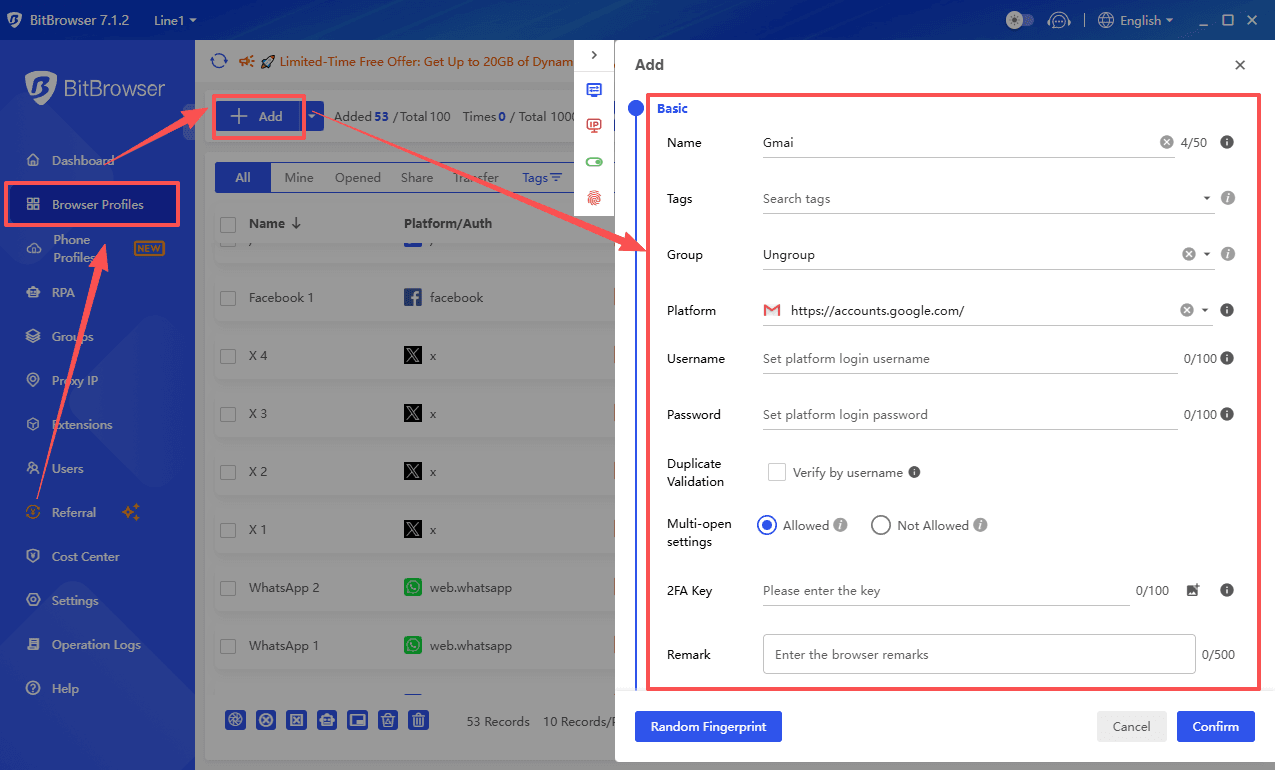
Common Mistakes to Avoid
- Using the wrong proxy protocol (HTTP vs SOCKS)
- Forgetting authentication credentials
- DNS leaks (use
--socks5-hostname) - Using unreliable or free proxies
- Not testing proxies before adding them to BitBrowser
Best Practices
- Use high-quality proxies (residential or mobile for BitBrowser)
- Assign one proxy per browser profile
- Always test proxies with cURL before use
- Keep proxy location consistent with browser fingerprint
- Use verbose mode for troubleshooting
Conclusion
Using cURL with a proxy is simple and extremely useful, especially when combined with tools like BitBrowser. While BitBrowser manages browser-level identity, cURL helps you test, validate, and automate proxy usage at a deeper level.
Together, they allow you to:
- Ensure proxy reliability
- Reduce account bans
- Build scalable and stable workflows

 Multi-Account Management
 Prevent Account Association
 Multi-Employee Management
Recommended
See More 



