Managing Marketplace Accounts Securely: A Complete Guide for eCommerce Professionals
 2026.02.28 04:20
 petro
petroIn today’s global eCommerce ecosystem, sellers are no longer limited to one storefront or one marketplace. Many businesses operate across Amazon, eBay, Etsy, Walmart Marketplace, Shopify, and regional platforms simultaneously. While this expansion creates growth opportunities, it also introduces operational and security complexity.
Managing marketplace accounts securely is critical for long-term success. Account suspensions, login restrictions, payment holds, or security flags can severely disrupt business operations.
This comprehensive guide explores best practices, tools, strategies, and the role of browser isolation technologies in maintaining secure and structured marketplace operations.
Why Marketplace Account Security Is Essential
Online marketplaces prioritize user trust and platform integrity. To maintain a safe ecosystem, they monitor:
Login patterns
IP consistency
Device identifiers
Behavioral signals
Policy compliance
Any irregular activity may trigger automated security reviews.
For sellers managing multiple stores, brands, or regions, maintaining structured access and operational discipline is vital to avoid unnecessary risk.
Common Security Challenges for Multi-Store Sellers
Multiple Account Management
Sellers often manage:
Multiple regional Amazon accounts (US, EU, UK, CA, etc.)
Different brands under separate storefronts
Marketplace + independent website stores
Accounts in different currencies
Without structured separation, session confusion and accidental cross-login can occur.
Team-Based Access
Growing businesses typically involve:
Virtual assistants
Customer support representatives
Marketing managers
Advertising specialists
Inventory managers
Granting access without proper safeguards increases exposure to credential leaks or accidental misuse.
Regional Login Variations
Platforms monitor:
IP address changes
Device/browser changes
Unusual login frequency
Geographic inconsistencies
Frequent shifts in login behavior can trigger automated alerts.
Best Practices for Secure Marketplace Management
1. Enable Strong Authentication
Start with essential security measures:
Enable Two-Factor Authentication (2FA) on all accounts
Use authenticator apps instead of SMS when possible
Use strong, unique passwords
Store credentials in a secure password manager
These steps reduce the risk of unauthorized access.
2. Separate Business Environments
Professional sellers often isolate their workflows through:
Dedicated browser profiles
Separate operating system user accounts
Virtual machines
Structured session management
Separation prevents cookie overlap, session conflicts, and accidental account mixing.
3. Maintain Consistent Login Patterns
Consistency helps reduce unnecessary security flags:
Log in from stable, predictable networks
Avoid excessive device switching
Use structured team access policies
Document access workflows internally
Operational consistency improves account stability.
The Role of Browser Isolation in eCommerce Security
Browser isolation is a professional strategy used to separate sessions, cookies, and environments when managing multiple accounts.
Each isolated environment operates independently with its own:
Cookies
Cache
Local storage
Login sessions
Browser settings
This reduces cross-session interference and improves organization.
For example, a seller managing three regional Amazon accounts can maintain three independent browser environments to prevent accidental overlap.
Browser isolation is not about bypassing policies — it is about maintaining operational clarity and professional workflow separation.
The Role of Anti-Detect Browsers in Structured Account Management
Anti-detect browsers are specialized tools designed to create isolated browser profiles with controlled digital configurations.
While often discussed in privacy contexts, their legitimate role in eCommerce includes:
Structured multi-profile management
Session isolation
Organized workflow separation
Controlled browser fingerprint environments
What Is a Browser Fingerprint?
Websites can identify devices using digital characteristics such as:
Operating system
Browser version
Screen resolution
Installed fonts
Hardware details
Timezone
These signals form a “browser fingerprint.”
In professional environments, managing consistent device configurations across team members can help reduce irregular login patterns
How Anti-Detect Browsers Support Account Organization
For legitimate business use, anti-detect browsers can help:
✅ 1. Profile Separation
Each store or marketplace account can operate inside its own browser profile.
✅ 2. Session Isolation
Cookies and sessions remain independent, reducing accidental cross-logins.
✅ 3. Team Workflow Structuring
Teams can be assigned dedicated profiles for specific accounts.
✅ 4. Testing Environments
Sellers testing listings in different regions can simulate structured environments.
Important Compliance Note
It is critical to emphasize:
Always comply with marketplace Terms of Service
Do not use tools to bypass platform restrictions
Do not create unauthorized duplicate accounts
Use isolation tools strictly for workflow management and testing
Security tools should support operational clarity — not policy evasion.
Location Testing for Marketplace Sellers
Testing listings from different geographic perspectives allows sellers to verify:
Currency display
Regional pricing
Shipping options
Promotions
Localized content
Professional sellers use:
Geo-location testing tools
VPN services for location preview
Structured browser environments
Controlled testing profiles
This ensures customers see the correct experience in each region.
Team Access Control Best Practices
As businesses scale, internal structure becomes crucial.
Implement Role-Based Access
Instead of sharing primary credentials:
Use sub-user permissions where available
Assign limited access roles
Restrict financial permissions
Monitor activity logs
Use Secure Communication Channels
Avoid sending credentials via email or messaging apps. Use encrypted password managers.
Audit Access Regularly
Remove access for:
Former employees
Contractors
Inactive team members
Routine audits reduce risk exposure.
Additional Tools for Marketplace Security
Professional sellers often integrate:
Password managers
Secure cloud storage
VPN services for secure connections
Encrypted team communication tools
Inventory management systems
Centralized dashboards
Security should be layered — not dependent on one tool.
Building a Long-Term Secure Structure
Security is not a one-time setup. It requires ongoing discipline:
Maintain consistent login practices
Train team members on security awareness
Monitor account health dashboards
Stay updated with marketplace policy changes
Document internal processes
A structured system reduces mistakes and improves operational resilience.
Using BitBrowser for Structured Multi-Account Management
For eCommerce professionals managing multiple legitimate storefronts (for different brands, regions, or clients), structured browser profile management can improve workflow organization.
One tool often mentioned in this context is BitBrowser, a browser profile management solution designed to create isolated browsing environments.
What Is BitBrowser?
BitBrowser allows users to create separate browser profiles. Each profile operates independently with its own:
Cookies
Local storage
Cache
Login sessions
Browser configuration
This helps prevent session conflicts when managing multiple accounts.
How to Manage Multi-Accounts Professionally with BitBrowser (Step-by-Step)
Below is a structured and compliant way to manage multiple authorized accounts:
Step 1: Define Legitimate Account Structure
Before using any tool, clarify:
Are these accounts allowed under the platform’s Terms of Service?
Are they different brands?
Different legal entities?
Different regions?
Always ensure compliance first.
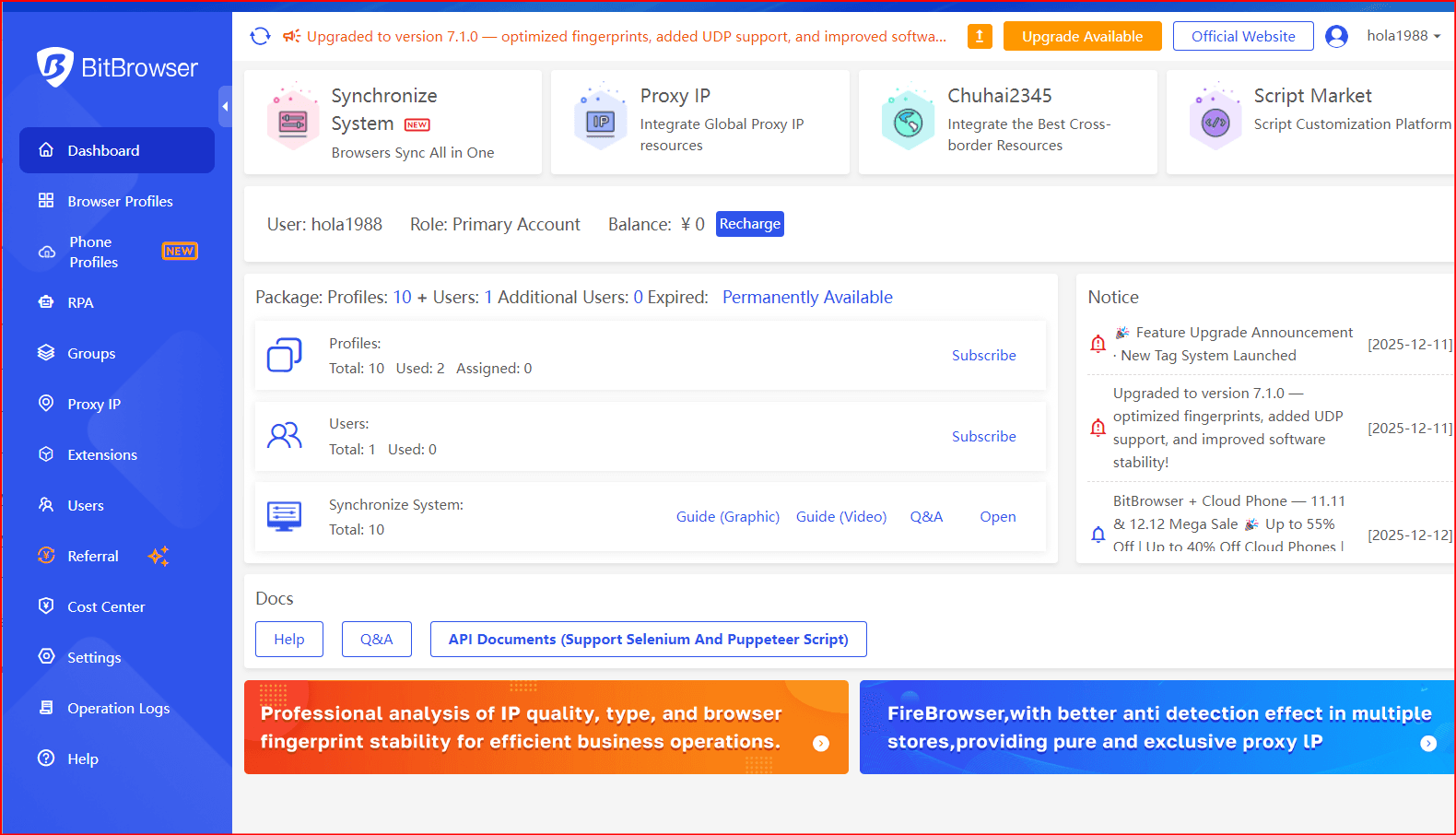
Step 2: Create Dedicate BitBrowser Profiles
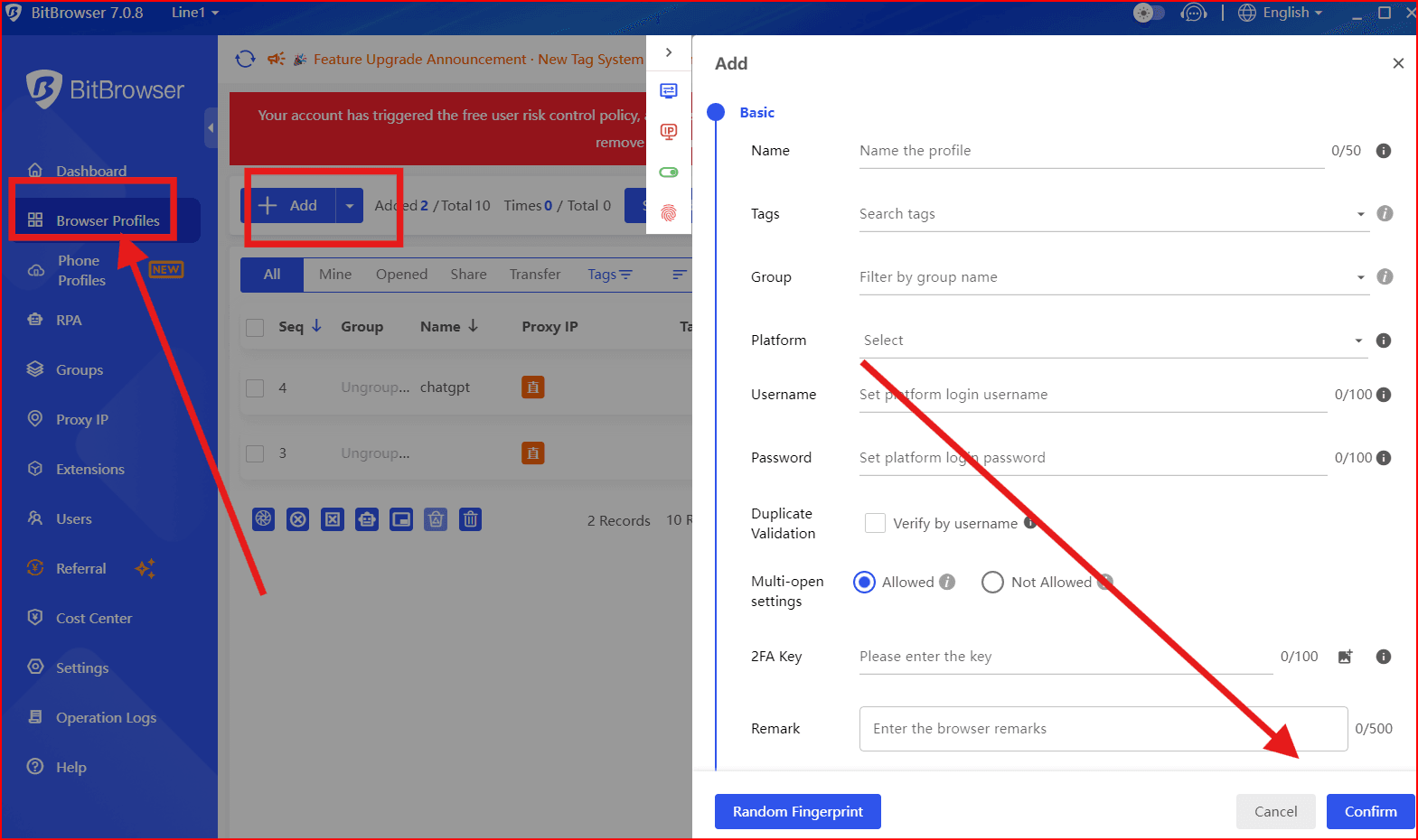
Inside BitBrowser (or similar profile-management tools):
Create one profile per store or marketplace account
Label profiles clearly (e.g., “Amazon US – Brand A”)
Avoid mixing accounts in the same profile
This prevents cookie overlap and accidental cross-logins.
Step 3: Assign Team Access Carefully
If working with a team:
Assign specific profiles to specific team members
Avoid sharing master credentials
Use role-based permissions inside marketplaces
Log activities when possible
Structured delegation reduces risk.
Step 4: Maintain Consistent Access Patterns
Marketplaces monitor login consistency. To reduce unnecessary security flags:
Use stable, predictable internet connections
Avoid excessive switching between environments
Document access procedures internally
Consistency builds account trust over time.
Step 5: Keep Security Layers Active
Even when using browser profile tools:
Enable 2FA on all accounts
Use strong password managers
Audit team access regularly
Remove inactive users immediately
Tools support structure — they do not replace security fundamentals.
Why Profile Management Helps eCommerce Sellers
When used responsibly, structured browser profile tools like BitBrowser can help:
✅ Keep accounts organized
✅ Prevent session confusion
✅ Reduce operational mistakes
✅ Improve team workflow
✅ Maintain clearer separation between brands
The goal is operational clarity — not circumventing safeguards.
Important Compliance Reminder
Multi-account management must always follow:
Marketplace Terms of Service
Regional regulations
Tax and legal requirements
Unauthorized duplicate accounts or attempts to bypass restrictions can result in permanent suspension.
Professional sellers use structured tools to improve workflow — not to evade platform systems.
Final Thoughts
Managing marketplace accounts securely is fundamental to sustainable eCommerce growth. As sellers expand across regions and platforms, complexity increases — and so does the importance of structure.
Key takeaways:
Enable strong authentication
Separate environments professionally
Maintain consistent login behavior
Implement team access controls
Use browser isolation tools responsibly
Always comply with platform policies
Security tools, including isolated browser environments, VPNs, and structured profile management systems, can support professional workflows when used ethically and legally.
The goal is not to bypass safeguards — but to create operational clarity, reduce risk, and build a stable foundation for growth.
In a competitive global marketplace, disciplined account management is one of the strongest advantages a seller can have.

 Multi-Account Management
 Prevent Account Association
 Multi-Employee Management
Recommended
See More 



