Proxies for School: Safe and Effective Internet Access Guide 2026
 2026.01.29 23:27
 petro
petroWhat Are Proxies?
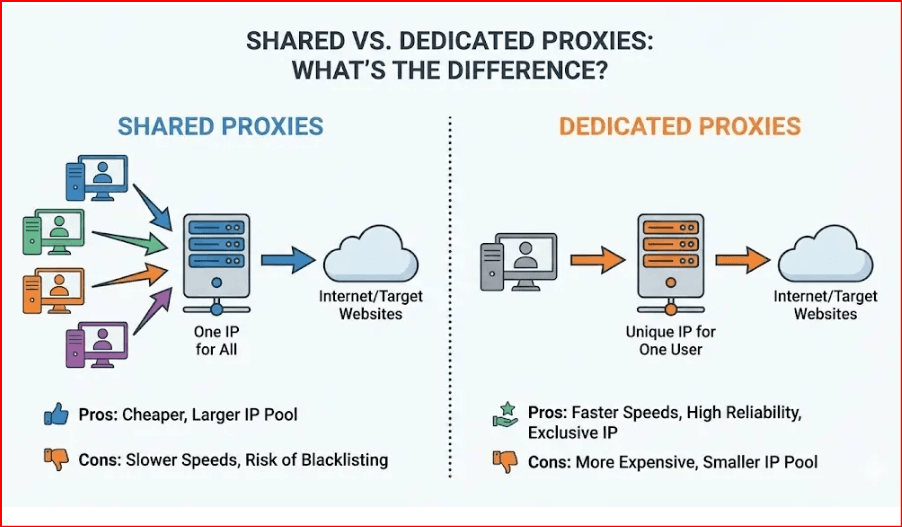
Proxies for school act as intermediaries between a student’s device and the internet. Instead of connecting directly to a website, the device first communicates with a proxy server. The proxy then retrieves the requested content and sends it back to the student’s device. In this way, the proxy masks the user’s identity, making it appear as though the request originates from the proxy server rather than the student’s device.
Think of a proxy like a filter or a guard. It controls and protects what passes through, helping ensure safer online access—especially useful in schools.
How Do Proxies Work?
When a student attempts to access a website, the request is routed through the proxy server instead of going straight to the internet. The proxy evaluates the request, fetches the content, and forwards it back to the student’s device.
For example, if a student enters a website address in their browser, the proxy retrieves that site and delivers it without exposing the student’s direct connection, increasing privacy and sometimes helping bypass network restrictions.
The Role of Proxies in Educational Settings
In schools, proxies are often used for:
Content Filtering: Restricting access to inappropriate or distracting websites such as social media and gaming.
Network Security: Protecting the internal network by filtering harmful traffic.
Access Needs: Allowing access to educational resources that might be unintentionally blocked.
While student proxies can help access materials inadvertently blocked by filters, using them against school policy may result in consequences. Always check and follow your school’s acceptable use policies.
Pros and Cons of Using Proxies for School
Benefits
Enhanced Access: Proxies can help students reach educational content blocked by filters.
Improved Speed: Some proxies cache data, making frequent sites load faster.
Privacy Protection: Proxies mask IP addresses, helping protect students online.
Risks
Security Vulnerabilities: Free or unreliable proxies may expose data or malware.
Policy Issues: Using proxies against school rules can lead to discipline.
Ethical Considerations: Circumventing restrictions may contradict intended safety measures.
Use proxies carefully and responsibly, with awareness of both benefits and risks.
Key Features to Consider When Choosing a Proxy for School
When selecting a proxy, keep in mind:
Effectiveness at Bypassing Restrictions: Can it reach blocked educational content?
Data Safety on Public Wi‑Fi: Does it encrypt traffic and mask your identity?
Compatibility: Works with devices like Chromebooks often used in schools?
Security and Cost: Paid proxies typically offer stronger privacy and performance.
Best Proxies for School in 2026
Here are some of the top proxy services ideal for students:
| Proxy Service | Pros | Cons |
|---|---|---|
| nsocks.net (Best Overall) | Strong encryption, high speeds, wide compatibility | Premium plans cost more than basic free proxies |
| IPcook | Fast, reliable, works on Chromebooks | Higher price than free alternatives |
| Decodo | Easy to use, secure, affordable | Slower at peak times |
| Webshare | Fast, low cost, secure | Some features require paid plans |
| Hide.me Web Proxy | High security and privacy | Limited free features |
| Storm Proxies | High-speed performance | Fewer server locations |
| CroxyProxy | Free and simple | Slower and includes ads |
Setting Up and Using Proxies for School
Windows Setup
Choose a proxy like nsocks.net or Webshare.
Install the proxy client.
Enter provided settings (IP, port).
Test by visiting a site.
Mobile Devices
Install a proxy app such as Hide.me or Storm Proxies.
Input configuration details.
Activate and test access.
Browser-Based Proxies
Use a web proxy like nsocks in our BitBrowser
Enter the target URL.
Browse with anonymity.
Best Practices for Safe Proxy Usage
Avoid untrusted, free proxies.
Ensure encryption is enabled.
Follow school usage policies.
Use proxies for educational purposes only.
Combine proxies with tools like BitBrowser for added privacy and safety.
The Role of BitBrowser with Proxies for School
Using proxies alone masks IP addresses, but combining them with an antidetect browser like BitBrowser takes privacy and security a step further.
Why BitBrowser Helps Students
BitBrowser is an antidetect browser designed to work seamlessly with proxies such as nsocks.net, providing enhanced privacy and control:
Custom Proxy Integration: Assign a unique proxy (like nsocks.net) to each profile to ensure consistent access and privacy.
Prevents Tracking: BitBrowser masks browser fingerprint attributes so networks cannot easily detect unusual traffic.
Multi‑Profile Management: Create separate profiles for school work, research, and personal browsing.
Secure Environment: Each profile runs in isolation, reducing risks from accidental exposure or cross‑tracking.
Device Compatibility: Works smoothly on Chromebooks, Windows, Mac, and other systems common in educational settings.
FAQs About Proxies and School Access
Are proxies safe to use?
Safe proxies with strong encryption (like nsocks.net) are generally secure. Avoid unverified free proxies that may expose data.
Can proxies aid academic research?
Yes; proxies can provide access to blocked academic resources and research tools.
What if school blocks proxy access?
Using a strong proxy like nsocks.net with an antidetect browser such as BitBrowser can help, but always adhere to school policies to avoid penalties.
Conclusion
Proxies for school can help students bypass restrictions, access educational content, and protect privacy by masking IP addresses and encrypting data. Choosing trusted services like nsocks.net and using them responsibly enhances internet access without compromising safety.
Pairing proxies with tools like BitBrowser adds a powerful privacy layer, allowing students to browse safely, access needed resources, and maintain compliance with best practices.
Stay secure, respect school usage policies, and use proxies and privacy tools responsibly to support your academic success.

 Multi-Account Management
 Prevent Account Association
 Multi-Employee Management
Recommended
See More 



