RPM vs. CPM on YouTube in 2026
 2026.07.13 22:06
 petro
petroYouTube creators rely heavily on RPM and CPM to evaluate monetization performance. While both metrics measure value per 1,000 units, they represent different perspectives within YouTube’s advertising ecosystem.
CPM reflects how much advertisers pay for ad impressions, while RPM shows how much creators actually earn per 1,000 views after YouTube’s revenue share and after including unmonetized views. Understanding this distinction is essential for creators, agencies, and businesses managing multiple channels.
Additionally, managing several YouTube channels requires structured workflows. Tools like BitBrowser can help organize browser environments and team access, but they do not directly influence CPM or RPM and should never be used for artificial engagement.
What Is CPM on YouTube?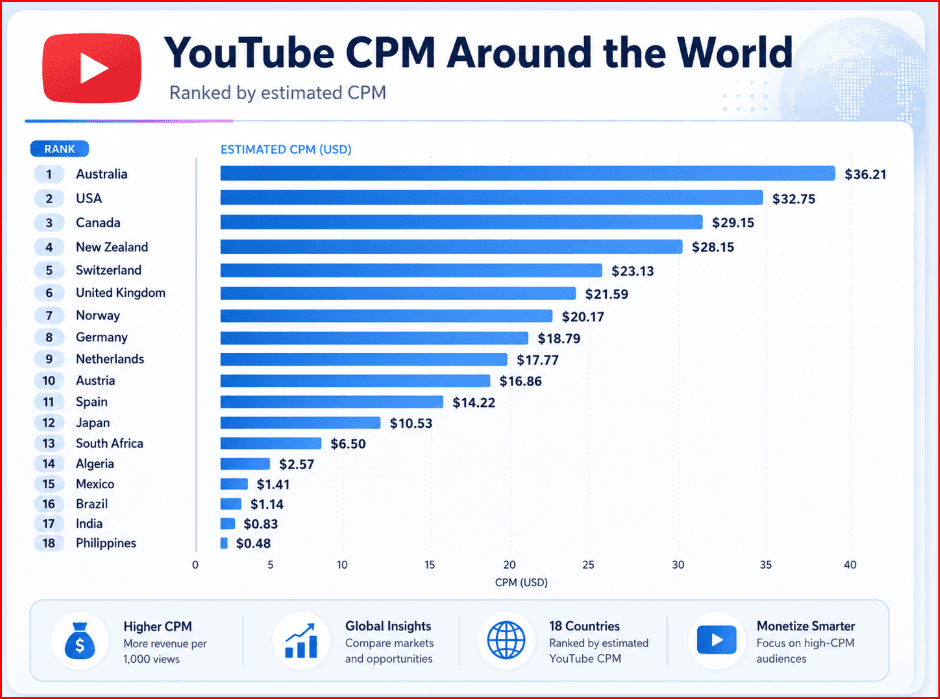
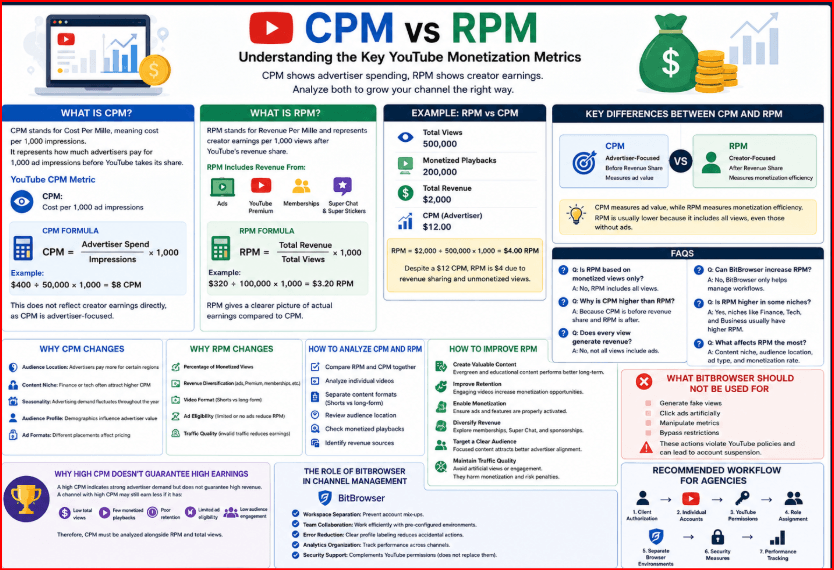
CPM stands for Cost Per Mille, meaning cost per 1,000 impressions. It represents how much advertisers pay for 1,000 ad impressions before YouTube takes its share.
YouTube provides two CPM-related metrics:
- CPM: Cost per 1,000 ad impressions
- Playback-based CPM: Cost per 1,000 monetized playbacks
Playback-based CPM is often higher because a single playback may include multiple ads.
CPM Formula
CPM = Advertiser Spend ÷ Impressions × 1,000
Example:
$400 ÷ 50,000 × 1,000 = $8 CPM
This does not reflect creator earnings directly, as CPM is advertiser-focused.
What Is RPM on YouTube?
RPM stands for Revenue Per Mille and represents creator earnings per 1,000 views after YouTube’s revenue share.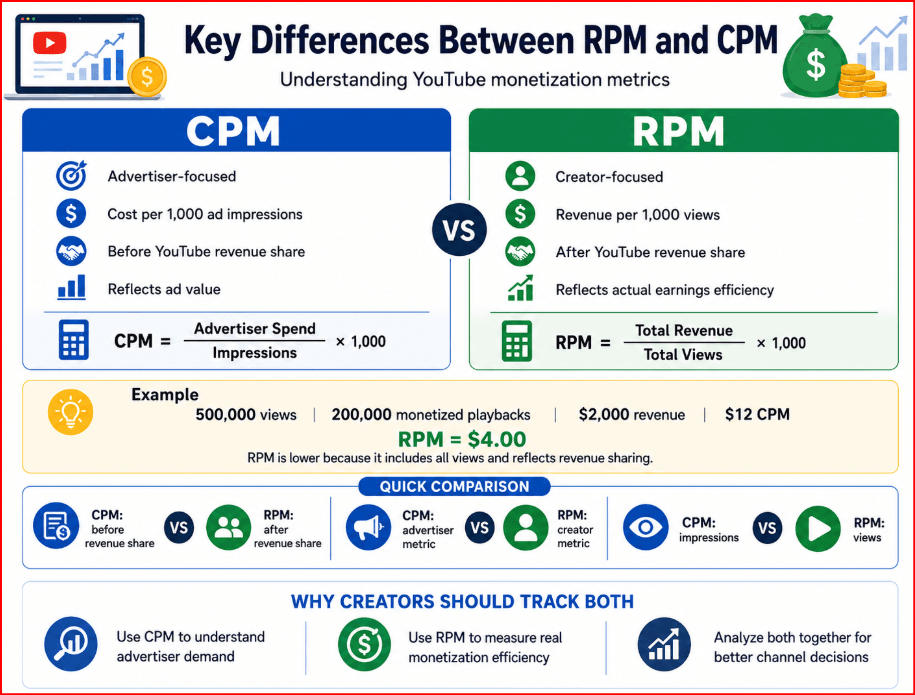
RPM includes revenue from:
- Ads
- YouTube Premium
- Memberships
- Super Chat and Super Stickers
RPM Formula
RPM = Total Revenue ÷ Total Views × 1,000
Example:
$320 ÷ 100,000 × 1,000 = $3.20 RPM
RPM gives a clearer picture of actual earnings compared to CPM.
Key Differences Between RPM and CPM
The main difference lies in perspective:
- CPM: Advertiser-focused, before revenue share
- RPM: Creator-focused, after revenue share
CPM measures ad value, while RPM measures monetization efficiency. RPM is usually lower because it includes all views, even those without ads.
Why High CPM Doesn’t Guarantee High Earnings
A high CPM indicates strong advertiser demand but does not guarantee high revenue. A channel with high CPM may still earn less if it has:
- Low total views
- Few monetized playbacks
- Poor retention
- Limited ad eligibility
Therefore, CPM must be analyzed alongside RPM and total views.
Why RPM Matters More for Creators
RPM provides a realistic measure of earnings efficiency. It answers a key question: how much revenue is generated per 1,000 views?
An increasing RPM suggests improved monetization, while a decreasing RPM may indicate more unmonetized views or reduced revenue efficiency.
Why CPM Changes
CPM varies due to several factors:
- Audience location: Advertisers pay more for certain regions
- Content niche: Finance or tech often attract higher CPM
- Seasonality: Advertising demand fluctuates throughout the year
- Audience profile: Demographics influence advertiser value
- Ad formats: Different placements affect pricing
Why RPM Changes
RPM depends on more than ad pricing. Key factors include:
- Percentage of monetized views
- Revenue diversification
- Video format (Shorts vs long-form)
- Ad eligibility
- Traffic quality
Invalid traffic can reduce earnings and lead to penalties.
How to Analyze RPM and CPM
To properly evaluate performance:
- Compare RPM and CPM together
- Analyze individual videos
- Separate content formats
- Review audience location
- Check monetized playbacks
- Identify revenue sources
A high CPM with low RPM suggests limited monetization coverage, while rising RPM indicates improved revenue efficiency.
How to Improve RPM
Creators cannot directly control RPM but can improve contributing factors:
Create Valuable Content
Evergreen and educational content tends to perform better long-term.
Improve Retention
Engaging videos increase monetization opportunities.
Enable Monetization
Ensure ads and features are properly activated.
Diversify Revenue
Explore memberships, Super Chat, and sponsorships.
Target a Clear Audience
Focused content attracts better advertiser alignment.
Maintain Traffic Quality
Avoid artificial views or engagement, as they harm monetization.
The Role of BitBrowser in Channel Management
BitBrowser does not increase RPM or CPM. Its role is operational, helping teams manage multiple channels efficiently.
Workspace Separation
Different browser profiles prevent account mix-ups and errors.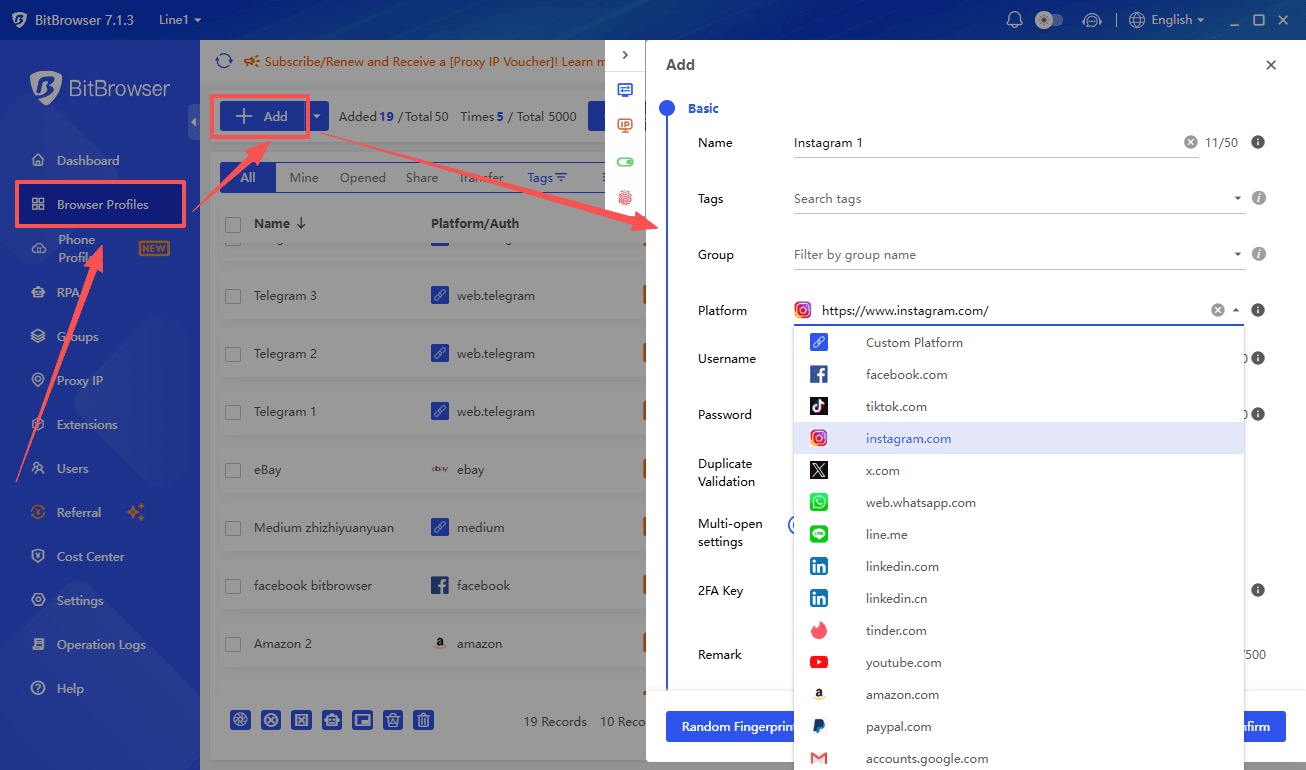
Team Collaboration
Shared environments allow teams to work efficiently with pre-configured setups.
Error Reduction
Clear profile labeling reduces accidental uploads or actions.
Analytics Organization
Separate environments help track performance across channels.
Security Support
BitBrowser complements YouTube permissions but does not replace them.
What BitBrowser Should Not Be Used For
BitBrowser must never be used to:
- Generate fake views
- Click ads artificially
- Manipulate metrics
- Bypass restrictions
Such actions violate YouTube policies and can lead to account suspension.
Recommended Workflow for Agencies
A structured workflow includes:
- Client authorization
- Individual accounts
- YouTube permissions
- Role assignment
- Separate browser environments
- Security measures
- Performance tracking
This ensures compliance and efficiency.
Example: RPM vs CPM
Consider:
- 500,000 views
- 200,000 monetized playbacks
- $2,000 revenue
- $12 CPM
RPM = $2,000 ÷ 500,000 × 1,000 = $4
Despite a $12 CPM, RPM is $4 due to revenue sharing and unmonetized views.
FAQs
Is RPM based on monetized views only?
No, it includes all views.
Why is CPM higher than RPM?
Because CPM is before revenue share.
Does every view generate revenue?
No, not all views include ads.
Can BitBrowser increase RPM?
No, it only helps manage workflows.
Conclusion
RPM and CPM are essential metrics for understanding YouTube monetization. CPM reflects advertiser spending, while RPM shows actual creator earnings.
Creators should focus on RPM for performance evaluation while using CPM to understand advertiser demand. Both metrics must be analyzed together for accurate insights.
BitBrowser can support organized channel management but does not influence monetization directly. Sustainable growth comes from quality content, genuine audiences, and responsible management practices.

 Multi-Account Management
 Prevent Account Association
 Multi-Employee Management
Recommended
See More 



