Can You Share a Netflix Account? Rules and How to Share
 2026.11.06 02:28
 YT.Shi
Sharing Netflix with someone often starts with a simple question: “Can I use your account?” The next step is usually sending your email address and password through a chat.
But if you’d rather share Netflix without sending your password through a chat, you can use BitBrowser’s Browser Profile sharing. Simply log in to Netflix inside a dedicated browser profile, then share it with another BitBrowser user.
They can open the existing session from their own client and you don’t need to send your Netflix password.
Before you start, check one thing: do you live in the same household? If the other person lives elsewhere, they need an eligible Extra Member account or their own subscription.
Netflix Account Sharing Rules and Costs
Before setting anything up, check which Netflix sharing option fits your situation.
Sharing Within Your Household using Netflix Household
People who live together can use the same Netflix account and create separate profiles for their viewing history and recommendations.
You don’t pay an additional membership fee, but everyone shares the subscription’s simultaneous viewing limit. Creating more profiles does not add more streams.
Sharing with Someone Who Lives Elsewhere in the Same Country
For someone outside your household, Netflix offers Extra Member on eligible plans.
The other person gets their own login, while you pay the additional fee.
Extra members need to be in the same country where the account owner signed up.
Here is the Netflix plan pricing example:
| Netflix plan | Monthly plan price | Available extra-member slots | Monthly cost per extra member |
|---|---|---|---|
| Standard | $19.99 | 1 | $7.99 with ads or $9.99 without ads |
| Premium | $26.99 | Up to 2 | $7.99 with ads or $9.99 without ads |
For example, Standard with one extra member costs $27.98/month if the extra member watches with ads, or $29.98/month without ads.
Prices and eligibility vary by country and billing arrangement, so check your Netflix account before purchasing.
When Does BitBrowser Make Sense for Account Sharing?
Netflix’s built-in options may be enough if you only want to share Netflix. Extra Member requires the other person to be in the same country where you signed up, so it doesn’t cover sharing between people living in different countries.
BitBrowser doesn’t change that requirement. Its value is in how you manage account access, especially when you have more than one account to share or organize.
Share Access Without Sending Passwords
Prefer not to leave your password in a chat? You can log in inside a dedicated browser profile and share the existing session through BitBrowser. The recipient opens it from their own client.
Keep Personal Sessions Separate
Create a profile just for Netflix, so your email and other signed-in accounts stay out of the shared environment. You can choose who receives the profile and remove their profile access later.
Use It Beyond Netflix
The same workflow can help with other accounts you’re authorized to share, such as a shared business account or online tool. Each service’s sharing rules still apply.
You can also use BitBrowser’s multi-account management to keep work, personal, and client accounts in separate profiles without repeatedly switching logins.
If both of you already use BitBrowser, or need it for these everyday tasks, profile sharing gives you another use for the same tool.
How to Share Netflix Access with BitBrowser Without Sending Your Password
Want to share browser access within your household without sending your Netflix password?
With BitBrowser’s Browser Profile sharing, you can log in inside a dedicated profile, then share it with another user.
Create a profile → optionally configure a proxy → log in to Netflix → share the profile.
Before you start, make sure both you and the recipient have an active paid BitBrowser subscription.
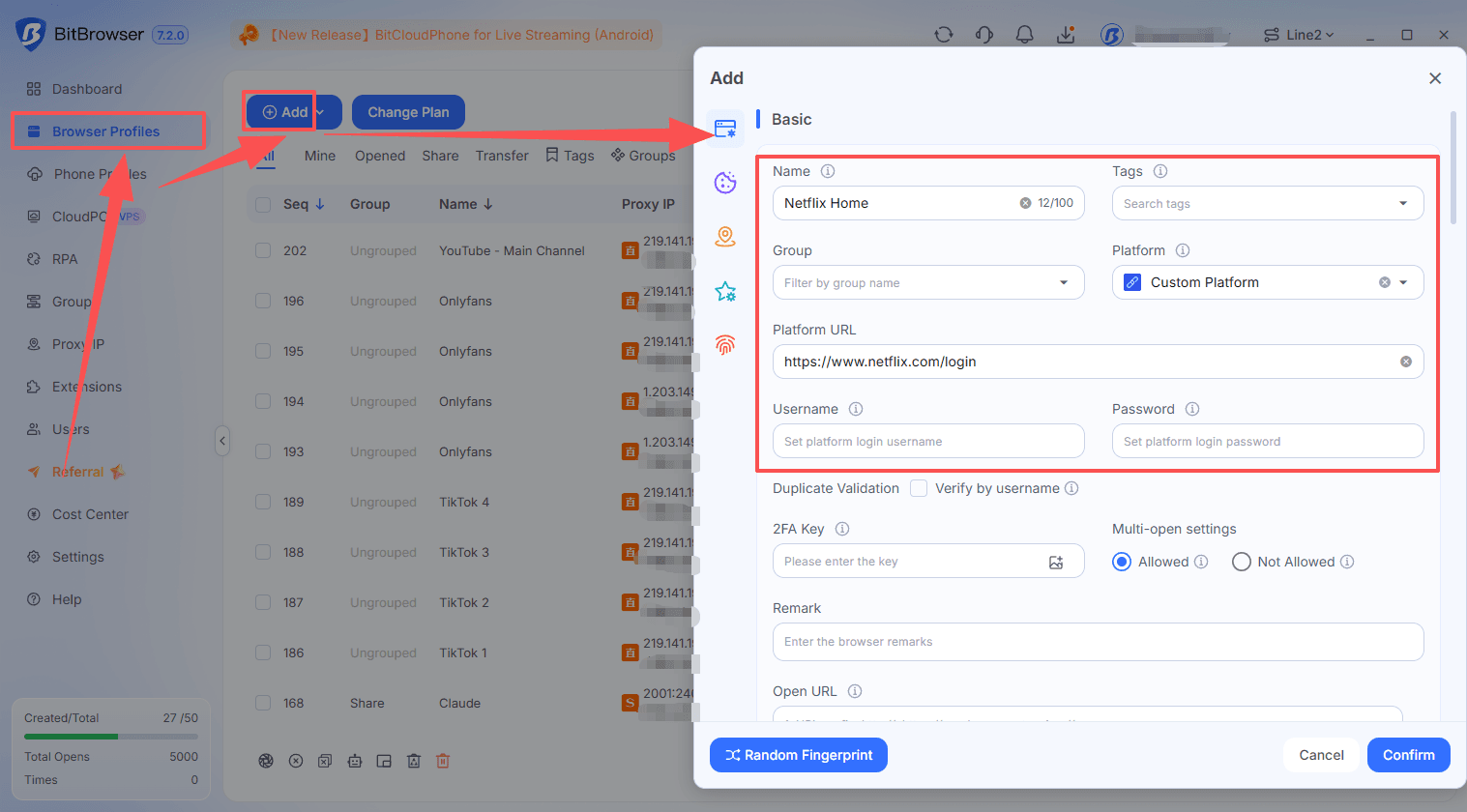
Step 1: Create a Dedicated Browser Profile
1. Open BitBrowser and go to Browser Profiles.
2. Click Add and name the profile something recognizable, such as Netflix Home.
3. Keep this profile for Netflix only, so you don’t accidentally share your email or other signed-in accounts.
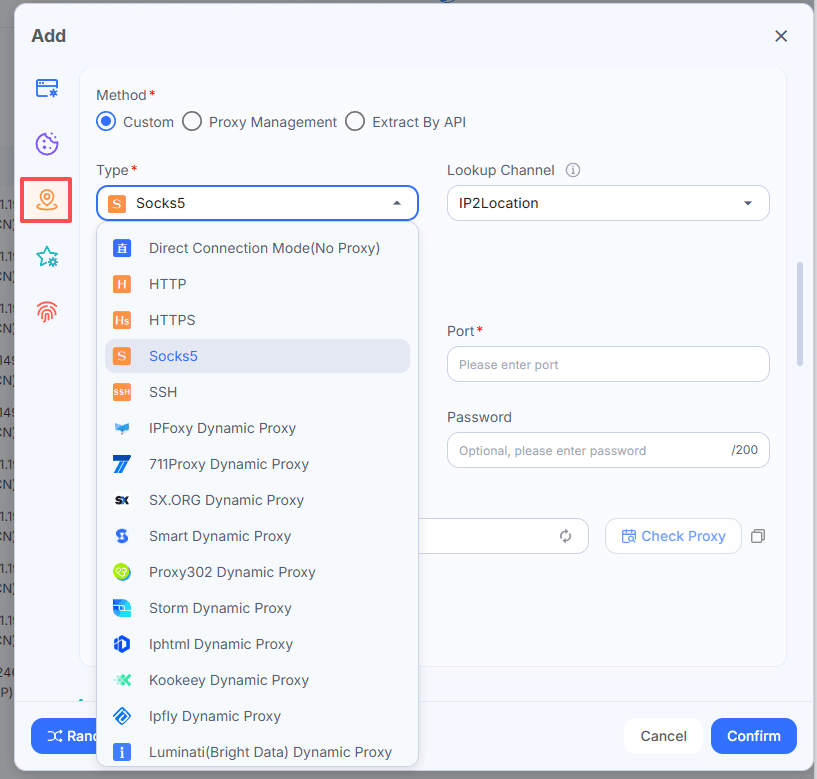
Step 2: Configure a Proxy (Optional)
Opening the same profile from different local networks can change its public IP address and may lead to additional verification.
If needed, add your proxy details in the profile’s proxy settings and check the connection before signing in. Using the same working proxy can keep the connection’s public IP consistent across local networks.
Step 3: Log In to Netflix
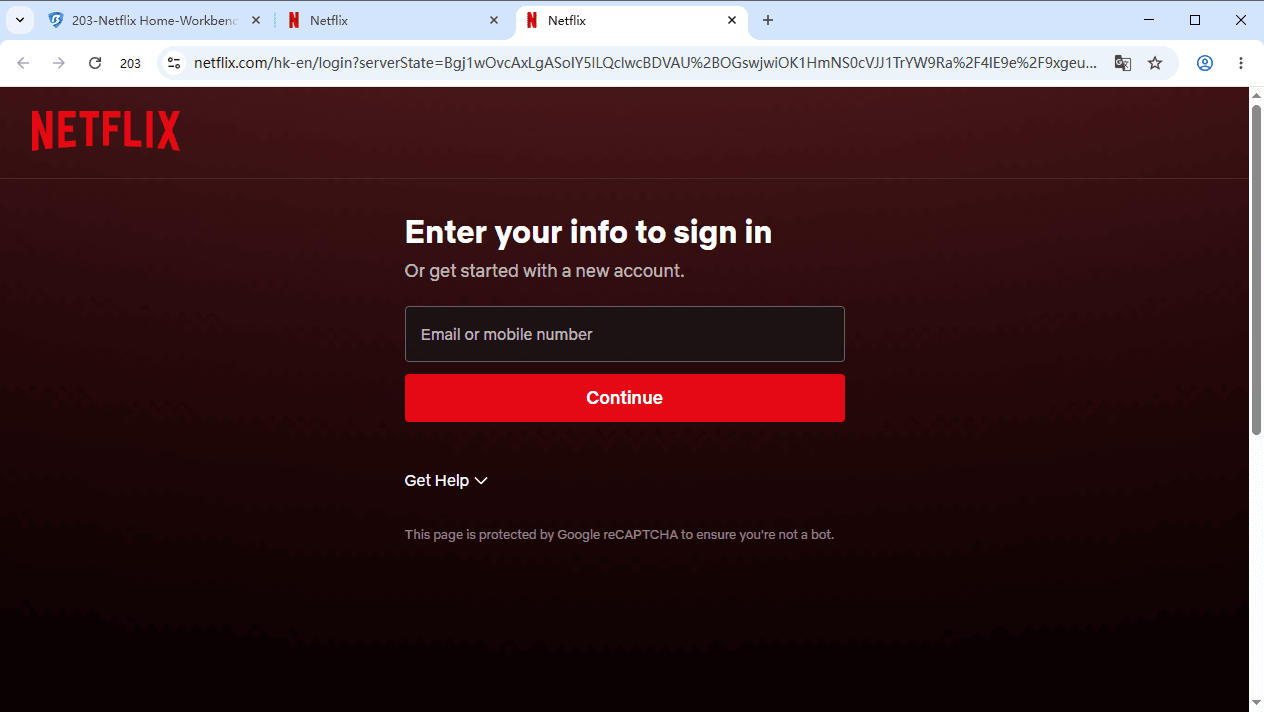
1. Save and open the profile.
2. Visit Netflix and sign in.
3. Complete any verification and try playing a title.
Leave Netflix signed in so the recipient can use the existing session.
Avoid clearing login data unnecessarily. Deleting Netflix cookies or automatically clearing site data when the browser closes may sign you out. If you do need to clear them, expect to log in again before sharing.
Step 4: Share the Profile
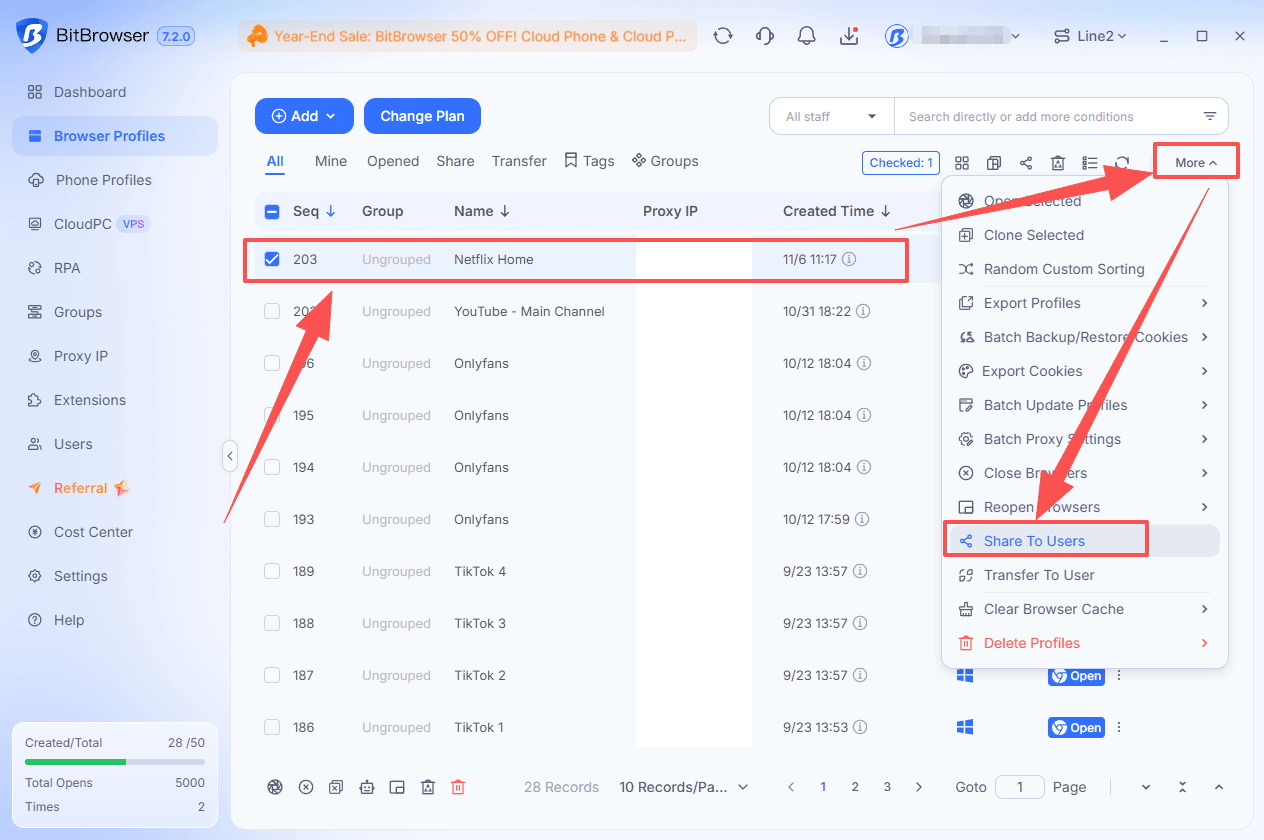
1. Return to Browser Profiles and find your Netflix profile.
2. Open More → Share To Users.
3. Enter the recipient’s BitBrowser username and click Add.
4. Review the recipient and sharing permissions.
5. Enter your BitBrowser account password when prompted, then confirm.
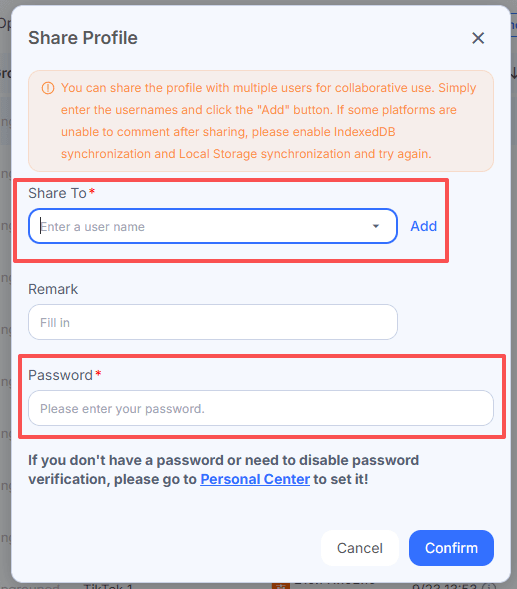
Double-check the username for typos or extra spaces. You don’t need to send the recipient either your Netflix or BitBrowser password.
Step 5: Open the Shared Profile
The recipient signs in to their own BitBrowser account, goes to Browser Profiles → Share, and opens the profile.
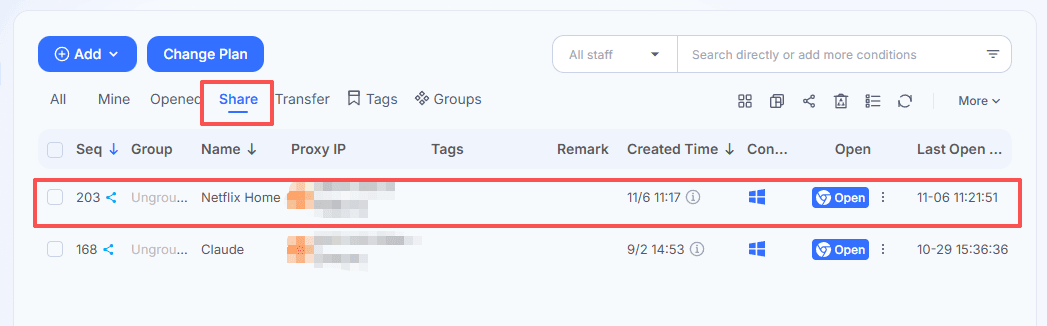
If the Netflix session is still active, they can access it without entering your Netflix password. If Netflix requests verification or a fresh login, complete that step before watching.
If You Want to Stop Sharing
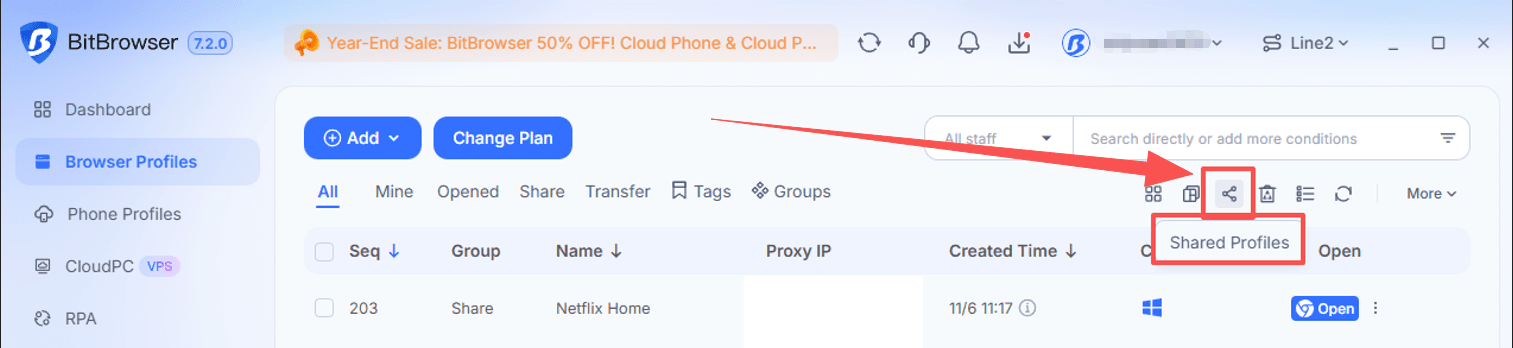
1. Go to Browser Profiles and click the Shared Profiles icon in the upper-right toolbar.
2. In My Shared Profiles, find your Netflix profile and check the Share To username.
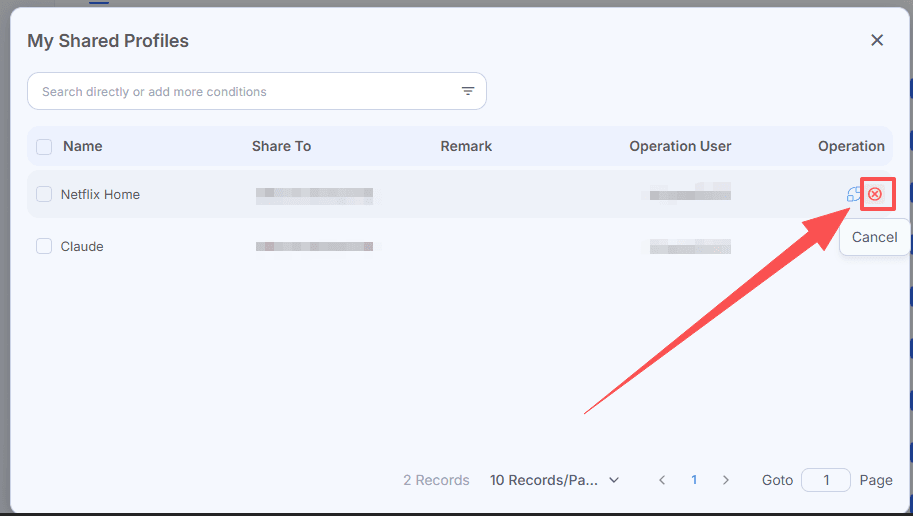
3. Click Cancel in the Operation column to stop sharing with that user.
To end their Netflix session as well, open Netflix’s Manage Access and Devices page and sign out the relevant device.
A Few Things to Keep in Mind When Sharing
A few small habits can make shared access easier to manage:
Keep the setup consistent
Avoid unnecessary changes to the proxy or browser fingerprint settings. If you need to change settings, sign out, or clear login data, give the other person a quick heads-up.
Watch your simultaneous streams
Sharing one browser profile doesn’t mean two playback sessions count as one device. Watching at the same time may use two of your plan’s available streams, so take turns if needed.
Keep the profile just for Netflix
Keep personal email, other signed-in accounts, and saved payment details out of the shared browser profile.
Share only with someone you trust
They can access the signed-in account even without knowing its password. Double-check their BitBrowser username before confirming the share.
Clean up when sharing ends
Remove their BitBrowser profile access, then review Netflix’s Manage Access and Devices page. Sign out any sessions you no longer want active.
Frequently Asked Questions
Can You Share a Netflix Account with Someone Who Doesn’t Live with You?
Yes, through Netflix’s Extra Member option on eligible plans. The other person gets their own login, and you pay the additional fee. They must be in the same country where you signed up. Otherwise, they need their own subscription.
How Can I Share Netflix Without Giving Out My Password?
You can use BitBrowser to share a dedicated browser profile containing an active Netflix session. Both users need an active paid BitBrowser subscription. Netflix may still request verification or a fresh login, and its household rules continue to apply.
Can I Share My Netflix Account with Someone in Another Country?
Netflix’s Extra Member option does not support ongoing sharing between people living in different countries. The recipient must be in the account owner’s signup country. Using Netflix while traveling is a different situation, and sharing a BitBrowser profile does not change these requirements.
How Many People Can Watch Netflix at the Same Time?
Your plan determines the number of simultaneous streams. In the US, Standard and Standard with ads support two, while Premium supports four. Creating more Netflix profiles or sharing a browser profile does not increase that limit.
Does Sharing One Browser Profile Count as One Netflix Device?
Not necessarily. If two people play videos from the shared profile on different computers, they may use two simultaneous streams. Matching browser settings or using the same proxy does not guarantee that Netflix will count them as one device.
Do I Need a Proxy to Share Netflix Through BitBrowser?
No. A proxy is optional and does not guarantee fewer verification requests. Netflix may restrict content or playback on VPN or proxy connections, so check that playback works before sharing the profile.
How Do I Stop Someone from Using My Shared Netflix Account?
Cancel their access under Shared Profiles in BitBrowser. Then open Netflix’s Manage Access and Devices page and sign out the relevant device. Removing the browser-profile share should not be treated as confirmation that every Netflix session has ended.

 Multi-Account Management
 Prevent Account Association
 Multi-Employee Management
Recommended
See More