How to Use BitBrowser for Ticketing Platforms in 2026
 2026.07.10 07:57
 YT.Shi
If you have ever tried to buy tickets for a popular concert, sports event, or festival, you already know how frustrating it can be. Tickets sell out in seconds, and it often feels like you are competing against an army of automated systems.
The truth is, many ticket resellers and professional buyers use specialized tools to gain an edge. One of the most effective tools in 2026 is BitBrowser, a fingerprint browser designed for managing multiple accounts safely and efficiently.
In this guide, we will walk through exactly how to use BitBrowser for ticketing platforms and why it has become an essential tool for ticket buyers.
Why Ticketing Platforms Are So Hard to Beat
Ticketing platforms like Ticketmaster and other major services have become extremely sophisticated at detecting and limiting automated buying behavior. They monitor not just your IP address but also your browser fingerprint, which includes things like your operating system, screen resolution, fonts, timezone, and even how your graphics card renders images.
When you try to use multiple accounts from the same device, these platforms can easily tell that all the accounts are coming from the same browser environment. This is why simply using multiple accounts or incognito mode does not work. The platforms will flag your accounts, restrict your access, or even cancel your orders. This is where BitBrowser comes into play.
What Makes BitBrowser Different
BitBrowser is an anti-detect browser that creates completely isolated browser environments for each of your accounts. Every profile you create in BitBrowser has its own independent set of cookies, local storage, cache files, and browser fingerprint parameters. This means each account looks like it is coming from a completely different device, even though you are running everything from a single computer.
Think of it this way: a regular browser is like a shared office where everyone uses the same desk. BitBrowser is like giving each account its own private office with its own computer, phone, and internet connection. Nothing overlaps, and nothing leaks between accounts.
Getting Started with BitBrowser for Ticketing
Setting Up Your First Profile
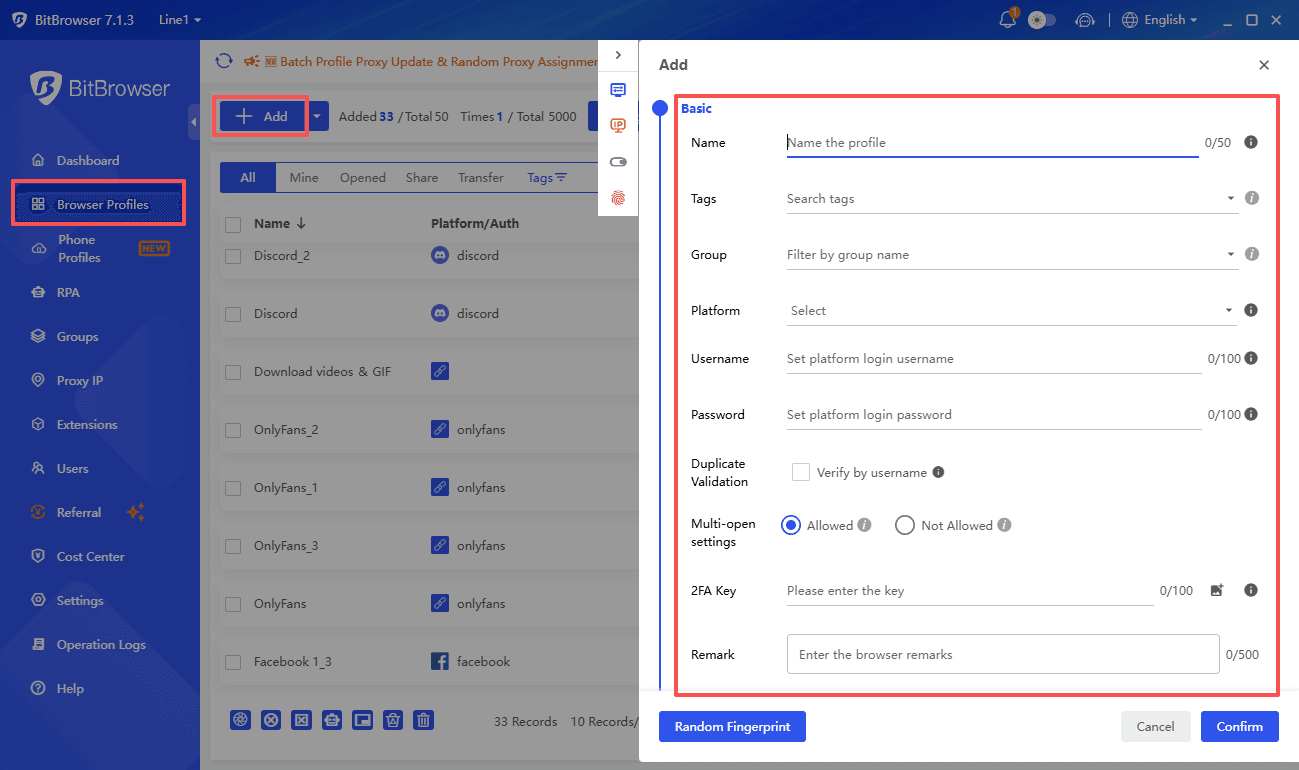
The first step is to download and install BitBrowser from the official website. Once installed, you will create browser profiles. Each profile represents one account on your ticketing platform.
When you create a new profile, BitBrowser lets you configure the browser fingerprint. You can customize settings like user agent, timezone, language, screen resolution, and more. For beginners, BitBrowser offers a smart matching feature that automatically generates realistic fingerprints based on your chosen operating system. This ensures your fingerprints look natural and do not raise any red flags.
Adding Proxy IPs
While BitBrowser handles the browser fingerprint, you also need to assign a unique proxy IP to each profile. This is crucial because ticketing platforms also track IP addresses. If all your accounts share the same IP, the platform will know they are connected.
BitBrowser supports HTTP, SOCKS5, and other proxy types. You can purchase residential proxies or dedicated IPs and assign them to each profile. The general rule is one account, one unique fingerprint, and one dedicated IP. This three layer isolation is what keeps your accounts safe from detection.
Core Features for Ticketing Success
Multi Account Management
The most obvious advantage of BitBrowser is its ability to run multiple accounts simultaneously. You can open dozens or even hundreds of browser profiles at the same time, each with its own identity. This means you can have multiple accounts queued up for ticket sales, dramatically increasing your chances of securing tickets.
BitBrowser supports batch creation of profiles, so you do not have to set up each account manually. You can import account lists, assign proxies in bulk, and get everything ready in minutes rather than hours.
Fingerprint Protection
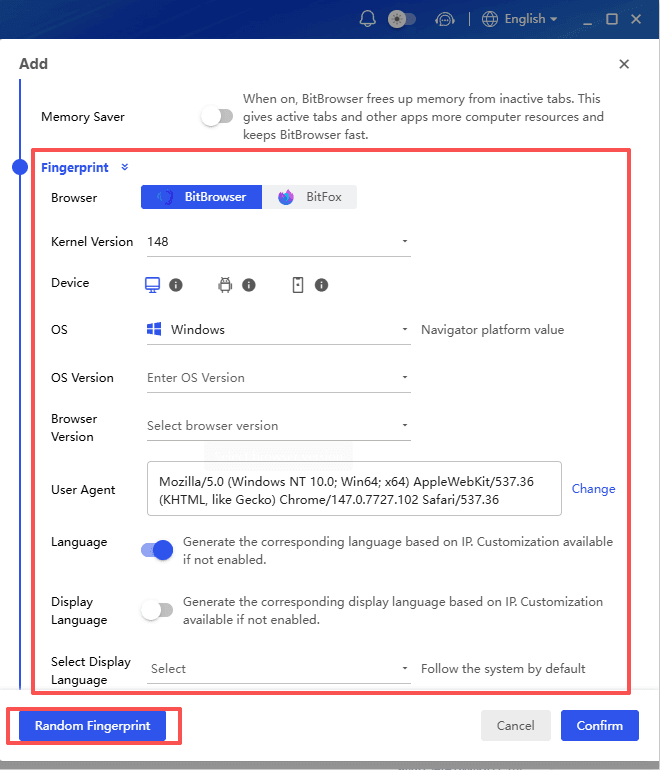
The fingerprint protection in BitBrowser is what makes it truly effective. The platform allows you to customize over 100 different fingerprint parameters. These include Canvas fingerprint, WebGL fingerprint, AudioContext fingerprint, and many other technical details that platforms use to identify devices.
By giving each profile a unique combination of these parameters, BitBrowser ensures that ticketing platforms see each account as a completely different user on a different device. This is far more effective than simply using a proxy or clearing your cookies.
Automation and RPA
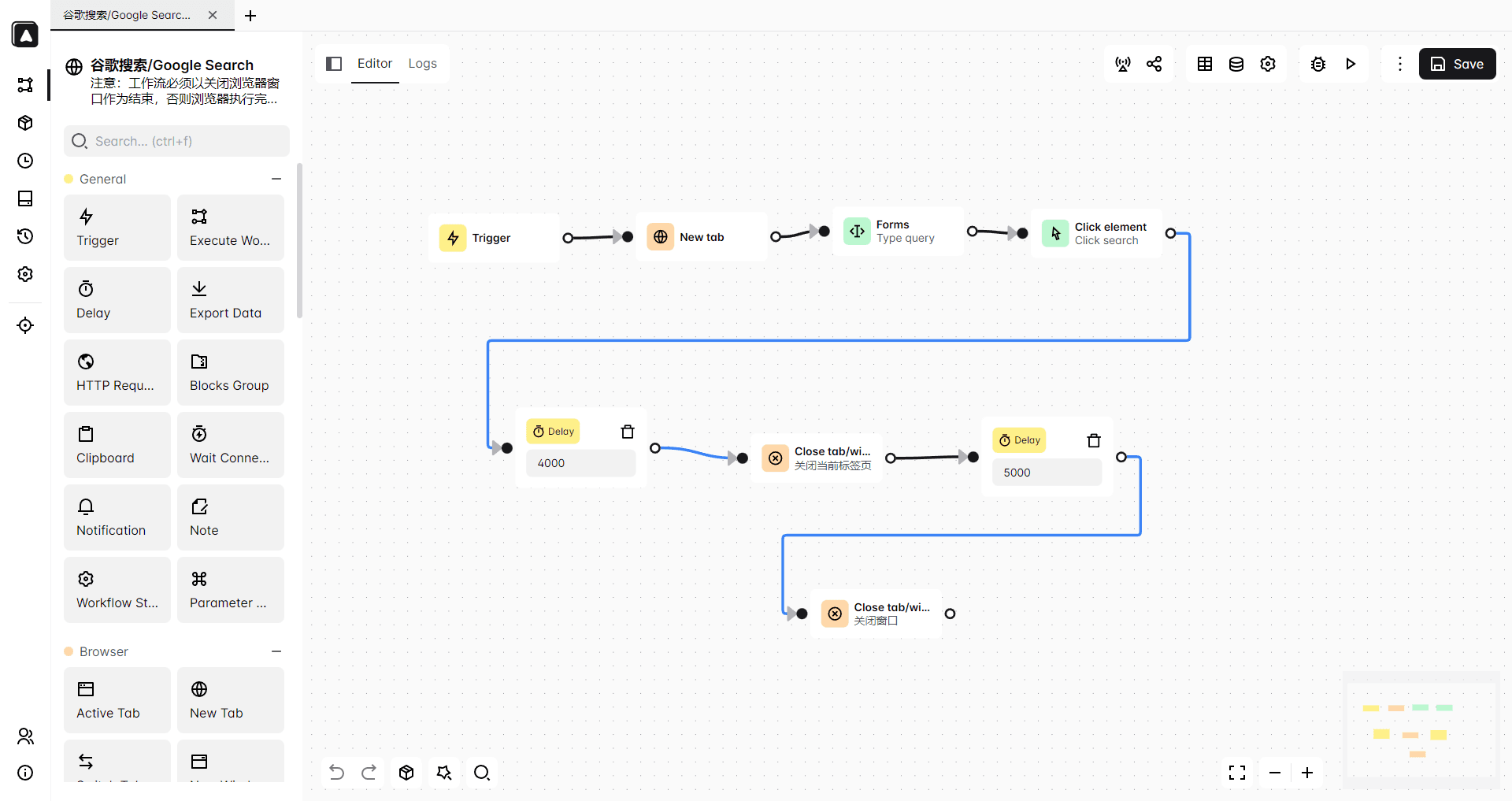
Speed is everything in ticket buying. BitBrowser offers powerful automation features through its built in RPA engine and API support. You can set up automated workflows that handle repetitive tasks like logging in, refreshing pages, and completing purchases.
For users who are not developers, BitBrowser also provides a visual script editor that lets you record and replay actions without writing any code. This means you can automate the entire ticket buying process from start to finish.
Team Collaboration
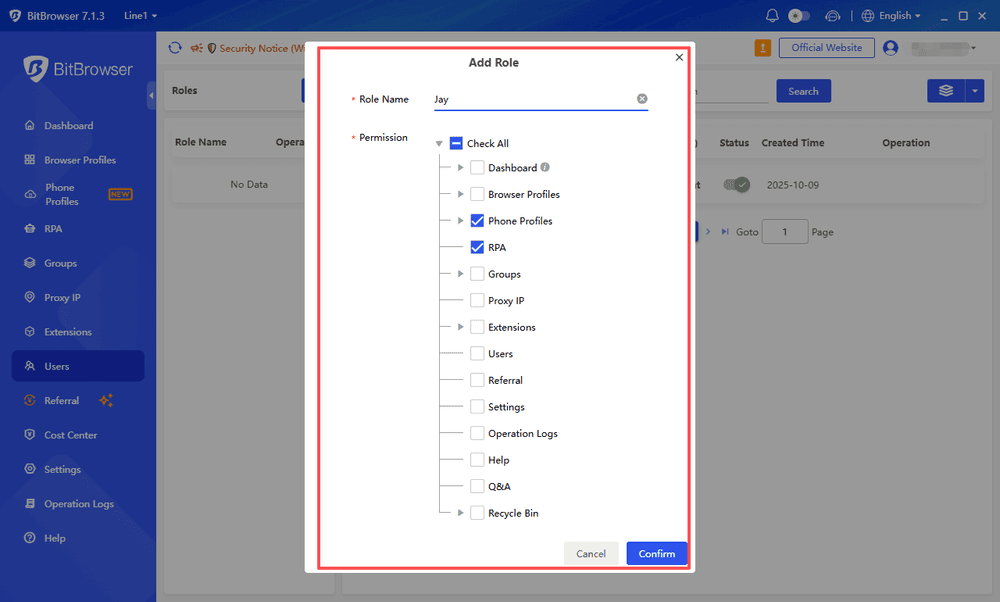
If you are working with a team, BitBrowser has features that make collaboration seamless. You can share and transfer browser profiles between team members using the master and sub account system. Everyone can work from the same environment without any risk of account conflicts or data leaks. This is especially useful for larger ticket buying operations where multiple people need to coordinate their efforts.
Practical Tips for Using BitBrowser on Ticketing Platforms
Start with the Free Version
BitBrowser offers a permanent free tier that includes up to 10 browser profiles. This is a great way to test the platform and see if it meets your needs before committing to a paid plan. You can experiment with different fingerprint configurations, proxy setups, and automation workflows without any financial risk.
Use Residential Proxies
For ticketing, the quality of your proxies matters as much as your browser fingerprints. Residential proxies, which come from real home internet connections, are much harder for platforms to detect than data center proxies. BitBrowser makes it easy to configure these proxies for each profile.
Keep Fingerprints Consistent
When setting up fingerprints, make sure they are logically consistent. For example, do not set a timezone that does not match the proxy location, or choose an operating system that does not match the user agent. BitBrowser's smart matching feature helps avoid these mistakes, but it is still worth double checking your configurations.
Test Before Big Sales
Before a major ticket release, run test runs with your setup. Make sure all your profiles are working, proxies are active, and automation scripts are functioning correctly. The last thing you want is to discover a problem when tickets go on sale.
Why BitBrowser Stands Out in 2026
Among the many fingerprint browsers available in 2026, BitBrowser has earned a strong reputation for its balance of features, affordability, and ease of use. It is particularly popular among small to medium sized teams, but its capabilities make it suitable for anyone serious about ticketing.
The platform is updated frequently, with new features and improvements released every couple of weeks. Recent updates have added headless mode support, improved fingerprint security, and enhanced automation capabilities. This commitment to continuous improvement means BitBrowser stays ahead of platform detection methods.
BitBrowser also offers extensive learning resources, including video tutorials, documentation, and community support. Whether you are a complete beginner or an experienced operator, you can find the guidance you need to get the most out of the tool.
Final Thoughts
Using BitBrowser for ticketing platforms in 2026 is about creating a systematic, efficient approach to ticket buying. By combining isolated browser profiles, unique fingerprints, dedicated proxies, and automation, you can compete effectively in a market where every second counts.
The platform solves the fundamental problem that plagues multi account operations: detection and association. When each of your accounts has its own completely independent digital identity, ticketing platforms cannot link them together. This is the key to running multiple accounts safely and successfully.
Whether you are a professional ticket reseller or just someone who wants a better chance at getting tickets for that must see concert, BitBrowser provides the tools you need. With its free tier, you can start exploring its capabilities today.

 Multi-Account Management
 Prevent Account Association
 Multi-Employee Management
Recommended
See More 



