What Is a VPN Kill Switch and Why Does It Matter in 2026
 2026.07.08 07:33
 YT.Shi
A VPN is supposed to keep your internet activity private.
But VPN connections can drop without warning. When that happens, your real IP address and online activity may be exposed before you even notice the disconnect.
That is where a VPN kill switch comes in.
In 2026, it is one of the most important VPN features you can enable. Whether you work remotely, travel often, use public WiFi, torrent, or manage multiple accounts, a kill switch helps keep your privacy intact when your VPN connection fails.
What is a VPN kill switch?
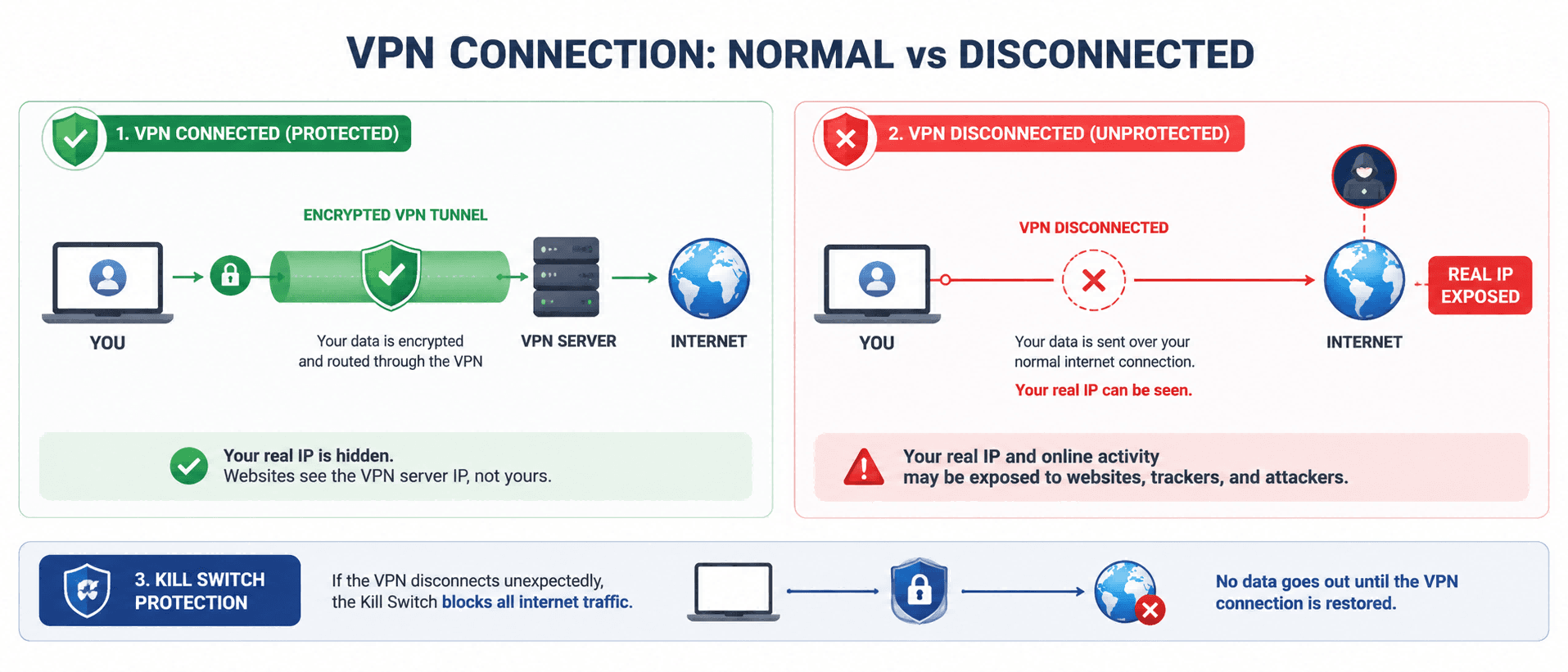
A VPN kill switch is a security feature that blocks your internet connection if your VPN disconnects.
When the VPN tunnel is active, your traffic goes through the VPN server. When the tunnel drops unexpectedly, the kill switch steps in and prevents your device or specific apps from sending traffic outside the VPN.
So instead of your laptop quietly switching back to your normal connection and exposing your real IP, everything stops until the VPN is back.
If you care about online privacy, this matters more than most VPN marketing features.
Why does a VPN kill switch matter more in 2026?
The internet in 2026 is faster, noisier, and honestly more aggressive.
Not just in ads. In tracking, fingerprinting, account security systems, and network restrictions. Even normal browsing can involve dozens of silent connections in the background. Apps update themselves. Browsers preload pages. Cloud services sync constantly.
So if your VPN drops for a few seconds, it is not just one website request that leaks. It can be a bunch of background traffic too.
1. Remote work is normal, and networks are messy
People work from everywhere now. Hotels, coworking spaces, trains, mobile hotspots. Those networks are not stable. A stable VPN connection is not guaranteed, even with a good provider. A VPN kill switch helps keep your real IP hidden when the network changes or hiccups.
2. Public WiFi is still a problem
Public WiFi is convenient, but it is also unpredictable. Captive portals, weak signals, random disconnects. If your VPN drops on public WiFi and you do not have a kill switch, you are exposed right when you are most vulnerable.
3. Websites flag unusual IP changes
Websites flag odd IP shifts for fraud checks. If your VPN cuts out and flips between your real and masked IP, you’ll get account locks, verifications, login alerts and payment troubles. A VPN kill switch blocks all traffic mid-disconnect to avoid this.
4. Privacy expectations are higher
More people understand what IP addresses, trackers, and location data mean now. And more people want control. Using a VPN without a kill switch is like locking your front door but leaving it open whenever the wind blows.
Check if your online IP address has been exposed
How does a VPN kill switch work?
Most VPN kill switches work using firewall rules or network routing rules.
When the VPN is connected, your device is allowed to send traffic only through the VPN interface. If the VPN interface disappears, the rule stays in place, so your traffic cannot go out normally.
Different operating systems do it differently, but the goal is always the same.
Block traffic until the secure tunnel is back.
This is why a real kill switch is better than a simple reconnect button. Reconnecting is helpful, but it still allows leaks during the gap.
Types of VPN kill switch features you will see
Not every VPN kill switch works the same way, and some offer weaker protection than they appear.
1. System wide kill switch
This blocks all internet traffic on your device if the VPN disconnects. It is the safest option, especially if you do not want to worry about potential leaking apps. It works best for privacy focused users, remote work, public WiFi use and torrenting.
2. App level kill switch
This only blocks chosen apps when the VPN drops. You can restrict torrent clients or browsers while letting messaging apps remain online. It fits people who need partial active connections for streaming, browsing and multitasking workflows.
3. Always on VPN plus kill switch
Most mobile devices and some desktops support always on VPN, which makes VPN the default network connection. When paired with a kill switch, this setup delivers solid protection. It can cause inconvenience when accessing local devices or printers on trusted networks. It is ideal for mobile travel and simple set and forget privacy configurations.
Who needs a VPN kill switch the most?
A lot of people do. But if you are in any of these groups, the kill switch should be non negotiable.
People using public WiFi often
Airports, cafes, hotels. If you connect to networks like that weekly, you want a VPN kill switch turned on.
Remote workers and freelancers
Client work can involve logins, admin panels, file transfers, and private communications. A VPN kill switch reduces the risk of accidental exposure.
Torrent users
If your VPN disconnects while torrenting, your real IP can be visible to others in the swarm. If you torrent at all, use a VPN kill switch.
Travelers
Network changes are a common cause of VPN drops. Switching from hotel WiFi to mobile data, or moving between routers, can interrupt the tunnel.
People managing multiple accounts
If you manage social accounts, ecommerce accounts, ad accounts, or client profiles, IP consistency can matter. A kill switch helps avoid sudden IP flips mid session.
For even cleaner separation, many pair a VPN with an active kill switch and BitBrowser, which creates isolated browsing environments so each account stays in its own protected space.
How to tell if a VPN kill switch is actually working
You do not need to be a technical person to test this. Here is a simple way.
1. Turn on your VPN and confirm you have internet
2. Turn on the kill switch in your VPN settings
3. While the VPN is connected, disconnect the VPN manually or force close the VPN app
4. Try opening a website
If the kill switch works, the site should not load. Then reopen the VPN and reconnect. Your internet should resume.
A few notes though:
· Some VPNs only block traffic if the connection drops unexpectedly, not if you manually disconnect. That is not ideal, but it happens.
· If your VPN has both system wide and app level kill switch options, test both.
If you want to be extra sure, search for "what is my IP" while connected, then repeat the test during the disconnect. You should not see your real IP appear at any point. Ideally you should see no connection at all.
What to look for in a VPN kill switch in 2026
If you are choosing a VPN or reviewing your current one, here is what matters.
A real system wide kill switch
This is the baseline. App only kill switches are useful, but system wide protection is stronger for most people.
Clear behavior and clear settings
You should be able to understand what is blocked, when it is blocked, and how to recover if something goes wrong. If the setting is buried or vague, that is a red flag.
DNS leak protection plus kill switch
Both matter. DNS leak protection is not the same as a kill switch, but together they cover more scenarios.
Reliable reconnect logic
A VPN that reconnects quickly helps, but again, the kill switch is what prevents leaks during the gap. You want both.
Final thoughts
If you use a VPN for privacy, security or peace of mind, turn on its kill switch and verify it works.
For steady, controlled online management across multiple accounts and sessions, pair your privacy tools with dedicated workflow software.
Many multi-account users combine BitBrowser for isolated browsing environments with a reliable VPN and active kill switch.
FAQ
What is a VPN kill switch?
A VPN kill switch is a security feature that blocks internet traffic when your VPN connection unexpectedly disconnects.
Should I keep my VPN kill switch enabled?
Yes. Keeping it enabled helps prevent accidental IP and data leaks if your VPN connection drops.
Does a VPN kill switch hide my IP address?
It does not hide your IP directly. Instead, it prevents your real IP from being exposed when the VPN disconnects.
Do all VPNs include a kill switch?
No. While most premium VPN providers offer a kill switch, some free or basic VPN services do not.
Is a VPN kill switch important for torrenting?
Yes. If your VPN disconnects while torrenting, a kill switch helps keep your real IP address from being exposed to other users.

 Multi-Account Management
 Prevent Account Association
 Multi-Employee Management
Recommended
See More 



