What Is a Reverse Proxy? How It Powers Load Balancing, Security, and Performance in Modern Web Apps
 2025.12.15 03:53
 petro
petroExplore how reverse proxies help manage load balancing, enhance security, and ensure seamless web server operations.
What Is A Reverse Proxy?
In this guide, our experts will walk you through various hosting and programming tasks, with a focus on reverse proxies and their role in modern web infrastructure.
When I was a kid, I didn’t get why cars had a reverse gear. I thought, "Why not just turn around and go the other way?" It wasn’t until later that I learned about the forward gear, and everything clicked.
If you’re unfamiliar with a forward proxy, understanding a reverse proxy might seem just as confusing. But don’t worry—I’ll break it down for you.
A forward proxy acts as a gateway between the user and the internet, forwarding requests from the user to external servers. In contrast, a reverse proxy takes requests from the internet and forwards them to one or more backend servers.
Still unsure? Let’s dive deeper, and I’ll walk you through it step by step.
How Reverse Proxies Work?
Let’s get into the specifics. The term proxy refers to an entity that represents someone else. In this case, a proxy acts on behalf of either the user (forward proxy) or the server (reverse proxy).
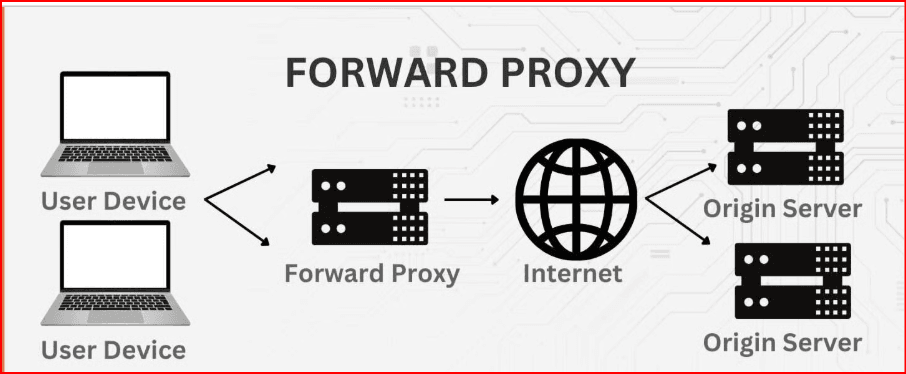
1. Forward Proxy: How It Works
Imagine you want to get some information from a server, but you don’t want the server to know it’s you making the request. You hire someone—let’s call them Mr. Proxy—to make the request on your behalf.
In this case, the user’s request is first sent to the forward proxy, which then relays the request to the server. The server responds to Mr. Proxy, who then passes the response back to you. The server never knows who you are because Mr. Proxy is acting as a middleman.
2. Reverse Proxy: How It Works
Now, let’s flip it around. The server doesn’t want you to know it’s the one sending the data back to you. So it hires Mrs. Proxy to handle the communication.
With a reverse proxy, your request goes to the proxy server, which forwards it to the appropriate backend server. After processing, the response is sent back to you via the reverse proxy.
The key takeaway: a forward proxy represents you (the client), while a reverse proxy represents the server.
Why Reverse Proxies Are Essential?
Reverse proxies do more than simply forward requests. They play a vital role in ensuring the smooth functioning of web applications, especially when it comes to load balancing and security.
1. Load Balancing
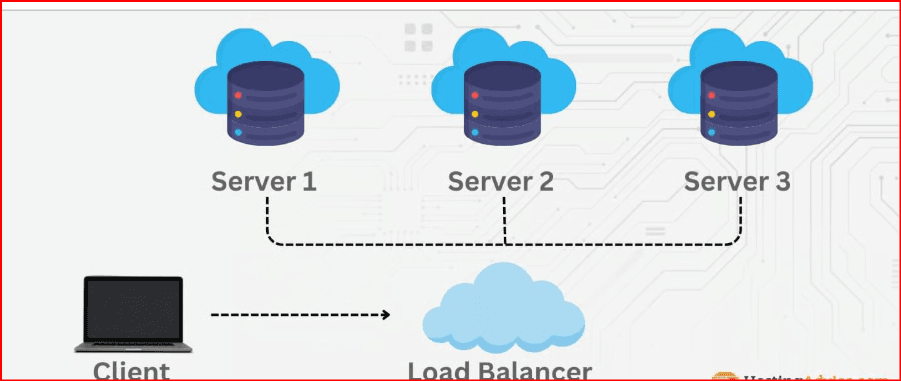
When multiple users send requests to a website, sometimes the load on a single server can become overwhelming. This is where the reverse proxy steps in.
Think of it like a traffic cop. It manages incoming requests and directs them to available servers, ensuring no single server gets overloaded. For example, if 10,000 requests are received, the reverse proxy intelligently distributes these requests across multiple servers. This keeps everything running smoothly, without any one server becoming a bottleneck.
2. Security Management
A reverse proxy also improves security. It can inspect incoming traffic for malicious requests and block harmful ones before they reach the backend server.
One of its key roles is handling encrypted traffic, like SSL/TLS. The reverse proxy terminates the SSL connection, decrypts the data, and then passes the raw request to the backend server. This reduces the load on the backend server, which no longer needs to handle encryption.
Benefits of Using a Reverse Proxy
There are several advantages to using a reverse proxy, particularly in server-facing operations:
1. Load Balancing
By distributing traffic evenly, reverse proxies prevent any one server from becoming overwhelmed, ensuring requests are processed more quickly.
2. Enhanced Security
Reverse proxies act as a shield between the internet and the target server, inspecting requests for malicious activity, such as DDoS attacks or SQL injections.
3. Caching
Reverse proxies can cache frequent responses, reducing the need to hit the backend server every time. This boosts performance and speeds up response times.
4. SSL Termination
By handling SSL connections, the reverse proxy offloads this heavy task from the backend server, improving overall performance.
Disadvantages of Using a Reverse Proxy
No technology is perfect, and reverse proxies have their downsides:
1. Setup and Maintenance Complexity
Configuring a reverse proxy can be challenging, especially when dealing with load balancing, SSL termination, and security settings. Troubleshooting can also be difficult, as problems could originate from the proxy, the server, or both.
2. Single Point of Failure
If the reverse proxy goes down, everything else follows. The entire system relies on the proxy, and if it fails, requests won’t reach the backend servers, even if they are functioning properly.
Reverse Proxy vs. Forward Proxy: What’s the Difference?
To sum it up:
· A forward proxy acts on behalf of the user, forwarding requests to the internet and masking the user’s identity.
· A reverse proxy works for the server, handling incoming requests and forwarding them to the appropriate backend server.
Common Use Cases for Reverse Proxies
Let’s look at some real-world examples where reverse proxies are indispensable:
1. Load Distribution Across Multiple Servers
High-traffic websites like social media platforms (e.g., X, formerly Twitter) need multiple servers to handle the massive influx of requests. Reverse proxies ensure the load is evenly distributed among available servers, preventing any single one from becoming a bottleneck.
2. Content Caching for Faster Load Times
News websites like CNN often experience huge spikes in traffic during breaking news events. A reverse proxy can cache static content like headlines and images, reducing the load on the backend servers and delivering content faster to users.
3. Enhancing Security for Web Applications
Reverse proxies act as gatekeepers, filtering out malicious traffic before it reaches the target server. This is crucial for protecting against cyberattacks like DDoS or SQL injection, which could compromise sensitive data.
4. Managing SSL Encryption
The reverse proxy handles the heavy lifting of SSL encryption and decryption, sparing backend servers from having to manage this process. This improves overall performance and reduces the strain on backend systems.
Popular Reverse Proxy Software and Tools
There are several tools available for setting up a reverse proxy. Each has its strengths and weaknesses, depending on your needs.
· NGINX: Known for high performance, low resource usage, and excellent load balancing, but it can be difficult for beginners.
· Apache: Great for dynamic content and easy to customize, though more resource-intensive and slower under heavy traffic.
· HAProxy: Excellent for load balancing and SSL termination, but it requires some expertise for setup and configuration.
· AWS Elastic Load Balancer: Ideal for users within the AWS ecosystem, offering robust DDoS protection and various load balancing options.
Setting Up a Simple Reverse Proxy
Here’s a basic example of how to set up a reverse proxy with NGINX or Apache.
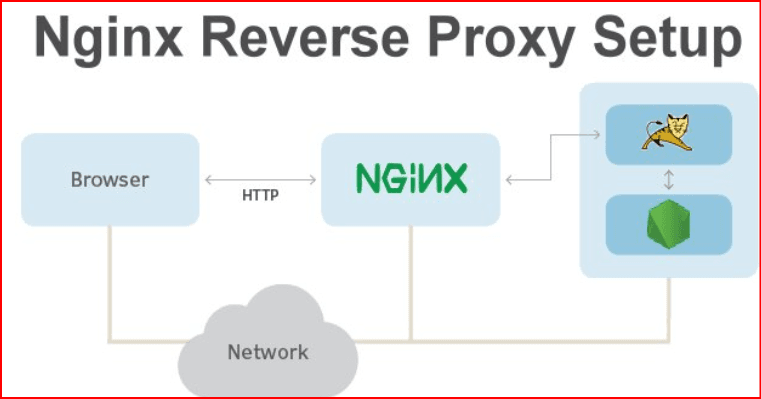
NGINX Setup
1. Install NGINX: Install NGINX on your system using the appropriate package manager.
2. Configure NGINX: Open the configuration file (/etc/nginx/nginx.conf) and add the following block to define backend servers and load balancing settings.
Example configuration:
http {
    upstream backend_servers {
        server backend1.example.com;
        server backend2.example.com;
    }

    server {
        location / {
            proxy_pass http://backend_servers;
            proxy_set_header Host $host;
            proxy_set_header X-Real-IP $remote_addr;
            proxy_set_header X-Forwarded-For $proxy_add_x_forwarded_for;
        }
    }
}
3. Test and Reload: Test your configuration and reload NGINX:
nginx -t
systemctl reload nginx
Apache Setup
1. Enable Required Modules: Enable the necessary modules (mod_proxy, mod_proxy_http, and mod_proxy_balancer).
2. Configure Apache: Open Apache’s configuration file (/etc/apache2/sites-available/000-default.conf) and add a proxy setup.
Example configuration:
<VirtualHost *:80>
    ProxyPass / http://backend1.example.com/
    ProxyPassReverse / http://backend1.example.com/
</VirtualHost>
3. Restart Apache: After making changes, restart Apache to apply the configuration.
systemctl restart apache2
Wrapping Up
I hope this breakdown has helped clarify what a reverse proxy is and how it benefits modern web applications. Once you understand the role of proxies, everything else falls into place. While this guide doesn’t cover every possible scenario, it’s a great starting point for learning about reverse proxies and how to use them.
Thanks for sticking with me! Until next time, happy coding!

 Multi-Account Management
 Prevent Account Association
 Multi-Employee Management
Recommended
See More 



