how to manage multiple whatnot seller accounts safely
 2026.04.19 07:02
 petro
petroLet me start with something most sellers don’t want to hear:
Trying to run multiple Whatnot seller accounts from one device using “tricks” is one of the fastest ways to lose everything.
I’ve seen it happen. Accounts flagged, payouts frozen, months of work gone overnight.
And honestly? It’s not worth it.
But here’s the good news—there are legit ways to run multiple selling operations, brands, or team setups on Whatnot… without risking your account.
This guide is about doing it the smart way.
Key Takeaways
- Whatnot limits seller accounts for a reason—don’t try to bypass it
- You can run multiple operations legally using team features and structure
- One strong account with systems beats multiple risky accounts
- Tools like anti-detect browsers exist—but they come with serious risks
- Long-term success on Whatnot = trust + consistency
Why People Try to Run Multiple Seller Accounts
Let’s be real—there are valid reasons sellers think about this:
- You want to run different niches (e.g., sneakers + collectibles)
- You’re managing multiple brands
- You want to separate personal vs business sales
- You’re scaling and need team access
On paper, it makes sense.
But the mistake is thinking the solution is just… creating more accounts.
That’s where things go wrong.
The Risk Nobody Talks About
Here’s the part most “gurus” skip.
Whatnot tracks patterns like:
- Device usage
- Login behavior
- Account relationships
- Payment and identity signals
So when people try to “outsmart” the system using:
- Multiple logins
- Device switching
- Anti-detect tools
…it doesn’t end well.
Best case? Restrictions.
Worst case? Permanent ban.
And once your account is flagged, rebuilding trust is extremely difficult.
What About BitBrowser and Anti-Detect Tools?
Let’s address this directly, because I know you’ve probably seen it online.
Tools like BitBrowser are designed to:
- Create separate browser profiles
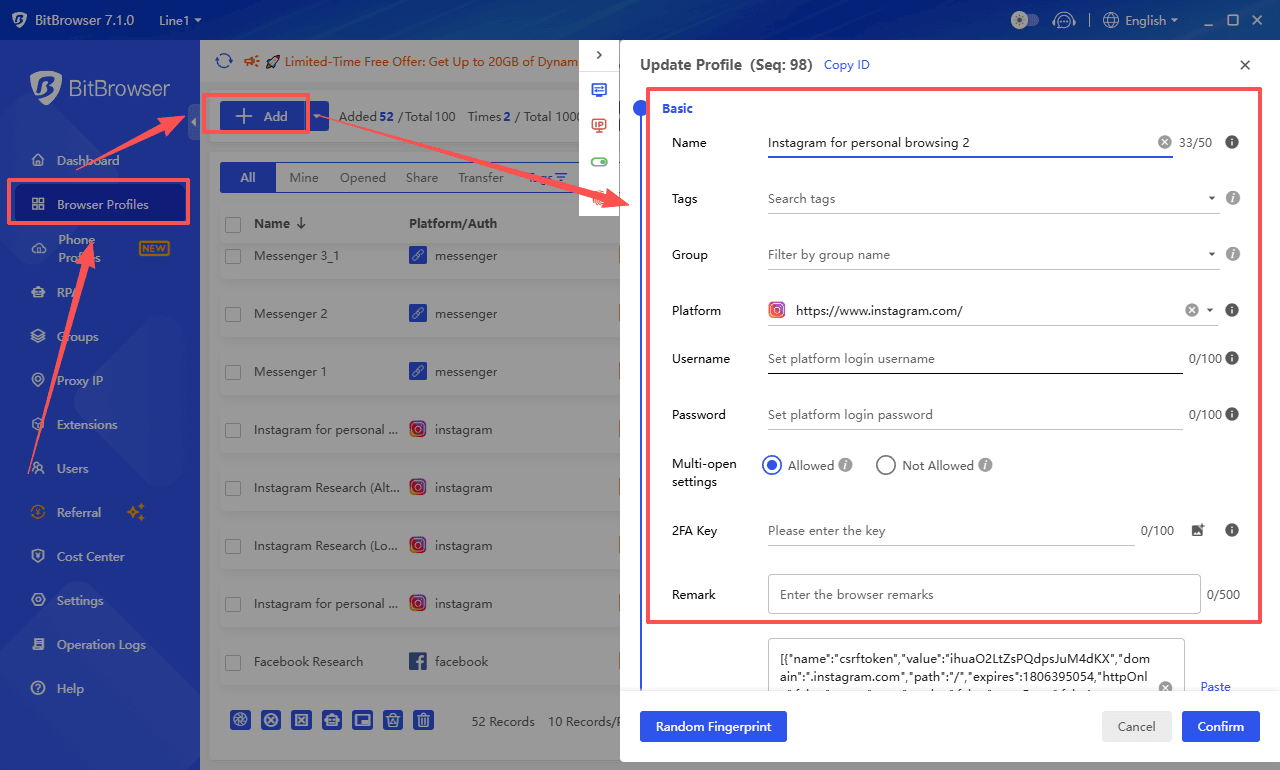
- Simulate different devices or fingerprints
- Help manage multiple accounts across platforms
Sounds powerful, right?
Here’s the reality.
The Truth Most People Won’t Tell You
Yes—tools like BitBrowser are used in industries like:
- Digital marketing
- Ad account management
- E-commerce testing
But using them on platforms like Whatnot to manage multiple seller accounts can:
- Violate platform terms
- Trigger security systems
- Lead to account linking and bans
In other words:
Just because something is technically possible doesn’t mean it’s safe.
My Honest Take
If your business depends on:
- Hiding your setup
- Avoiding detection
- Constantly switching identities
…it’s not a stable business.
It’s a risk.
And sooner or later, that risk catches up.
The Smarter Approach: Build One Strong Seller System
Instead of asking:
“How can I run multiple accounts on one device?”
Ask:
“How can I scale without needing multiple accounts?”
Because most of the time—you don’t actually need them.
Option 1: Use Team Permissions (Underrated but Powerful)
This is one of the best features Whatnot offers.
You can:
- Add team members
- Assign roles
- Let others help manage shows
- Avoid sharing passwords
This allows you to scale like a real business—without breaking rules.
Option 2: Build Multiple “Brands” Under One Account
You don’t need multiple accounts to feel like multiple stores.
You can:
- Run themed shows
- Separate product categories
- Build different audiences within one profile
Example:
- Monday → streetwear
- Wednesday → electronics
- Friday → collectibles
Same account. Different vibes.
Option 3: Apply for Additional Accounts Legitimately
If you truly need separate seller accounts:
Go through Whatnot’s official process
This usually applies if:
- You run multiple legal businesses
- You have separate operations
- There’s a clear business reason
It’s slower—but it’s safe.
Option 4: Fix Your System (Not Your Account Count)
Sometimes the issue isn’t “I need another account.”
It’s:
- Poor inventory organization
- Inconsistent shows
- No clear niche
- Weak branding
Fix those first—and you’ll often realize one account is enough.
What Actually Scales on Whatnot
The sellers winning long-term aren’t juggling accounts.
They’re building:
- Trust
- Consistency
- Community
- Repeat buyers
Because on Whatnot, reputation compounds.
And splitting that across accounts? That can hurt more than help.
FAQ – What Sellers Really Want to Know
Can I have multiple Whatnot seller accounts?
Not freely. You typically need approval for additional seller accounts. Running multiple without permission can lead to restrictions or bans.
Can I use one device for multiple accounts?
You can switch between accounts, but using one device to manage multiple seller accounts in a way that avoids platform rules is risky and not recommended.
Is BitBrowser safe for Whatnot?
BitBrowser itself is just a tool. The risk comes from how it’s used.
Using it to manage multiple seller accounts on Whatnot can:
- Violate terms
- Trigger detection systems
- Lead to bans
How do big sellers manage scaling?
They:
- Use teams
- Improve operations
- Build strong branding
- Stay compliant with platform rules
Not hacks.
What’s the safest way to grow on Whatnot?
- Focus on one strong account
- Build trust with buyers
- Be consistent with shows
- Use platform-approved features
Final Thoughts
Let’s be real.
Running multiple accounts sounds like a shortcut.
But most shortcuts in this space come with hidden costs.
If you’re serious about growing on Whatnot, think long-term.
Build something that:
- Doesn’t depend on loopholes
- Doesn’t risk getting banned
- Actually scales over time
Because once momentum hits—you don’t want to lose it over something avoidable.

 Multi-Account Management
 Prevent Account Association
 Multi-Employee Management
Recommended
See More 



