Why Choose ProxyStores in 2026: Features, Proxy Types, Pros, Cons, and BitBrowser Setup
 2026.07.19 12:39
 petro
petroFeatures, Proxy Types, Performance, and BitBrowser Integration A practical, balanced guide for marketers, agencies, e-commerce teams, SEO professionals, and multi-profile browser workflows. |
Editorial review date: July 19, 2026 by petro |
Why do users choose ProxyStores over other proxy providers? The answer usually comes down to flexibility, control, and simplicity. Some users need one IP address for browsing or regional testing, while agencies, marketers, e-commerce teams, and SEO professionals may need several stable addresses organized across multiple projects.
ProxyStores focuses on customizable proxy rentals, flexible durations, and support for HTTP and SOCKS5 protocols. Its static rental model is designed for users who prefer a consistent address rather than frequent automatic rotation.
The proxy is only one part of a professional multi-profile workflow. When ProxyStores is combined with BitBrowser, each browser profile can maintain its own proxy, cookies, local storage, session data, and browser configuration. This creates a cleaner operational structure and reduces accidental crossover between projects.
This review explains why ProxyStores is worth considering, where its service model performs well, which limitations require attention, and how BitBrowser can support proxy organization for legitimate business and research use cases.
Why ProxyStores?
Flexible Proxy Selection
A major reason to consider ProxyStores is the ability to tailor an order by location, IP version, allocation type, and intended workflow. This is more practical than purchasing a generic bundle that may include unsuitable regions or technical formats.
Selection factor | Available choice | Why it matters |
|---|---|---|
Geography | Country, region, and selected city availability | Supports localization tests, regional access, and project-specific routing |
IP format | IPv4 or IPv6 | Lets users balance compatibility, availability, and price |
Allocation | Individual or shared | Allows a trade-off between control and cost |
Rental duration | Short-term to long-term rental periods | Fits temporary campaigns and persistent browser profiles |
Protocol | HTTP or SOCKS5 | Improves compatibility with browsers, applications, and profile-management tools |
Stable IP Rental Model
Unlike rotating services that change addresses frequently, ProxyStores is centered on stable IP rentals. This model can be useful when a project benefits from a consistent network identity, such as maintaining an authorized business account, testing a local website over time, or assigning a dedicated address to a long-term browser profile.
Operational principle For important profiles, use a documented one-account, one-proxy, one-browser-profile structure. Consistency is generally easier to manage than frequent manual IP changes. |
Proxy Types and Why They Matter
Proxy type | Primary strength | Suitable use cases | Key limitation |
|---|---|---|---|
Individual IPv4 | Broad compatibility and stable private assignment | Business profiles, e-commerce administration, SEO monitoring, regional testing | Higher cost than shared or IPv6 options |
IPv6 | Large availability and potential cost efficiency | Projects whose target sites and software fully support IPv6 | Compatibility is not universal |
Shared IPv4 | Lower entry price | Low-risk browsing and basic testing | Other users may affect IP reputation or performance |
Individual IPv4 Proxies
IPv4 remains the most widely supported format across websites, browser tools, and business software. An individual IPv4 proxy is usually the strongest choice for a long-term profile because it provides greater control over the address and avoids direct sharing with unrelated customers.
ProxyStores advertises unlimited traffic and speeds of up to 100 Mbps for individual proxy products. These figures should be treated as provider-stated maximums rather than guaranteed real-world performance for every destination, country, or network route.
IPv6 Proxies
IPv6 proxies may be cheaper and available in larger quantities. They can be useful when the target website, browser configuration, and supporting software all accept IPv6. Before purchasing a large package, users should test the exact destination platforms that matter to their workflow.
Shared IPv4 Proxies
Shared IPv4 proxies provide a lower-cost option but offer less control over reputation. Even when an address is shared with only a small number of customers, another user can affect how the IP is evaluated by a destination website. Private proxies are therefore preferable for payment-sensitive, high-value, or long-term business profiles.
Why Protocol Support Matters
Protocol | Typical role | Practical value |
|---|---|---|
HTTP | Standard web traffic and browser-based tasks | Simple setup and broad support for conventional web use |
SOCKS5 | Applications requiring more flexible traffic handling | Useful for compatible software and workflows beyond basic HTTP browsing |
ProxyStores supplies standard credentials using an IP address, port, username, and password. This format makes manual configuration straightforward in browsers, compatible applications, and BitBrowser profiles.
Key Features That Attract Users
Feature | What ProxyStores offers | Why professionals care |
|---|---|---|
Instant activation | Orders are advertised as automatically activated after payment | Reduces deployment delays for new projects |
Manual IP and subnet selection | Users can select from available addresses and locations | Improves control over geography and subnet diversity |
Flexible rental periods | Short and long rental durations are available | Supports temporary tests and persistent profiles |
Unlimited traffic | Advertised on individual proxy products | Can make costs more predictable than bandwidth-based billing |
Automatic renewal | Recurring renewal can be enabled in the account panel | Helps prevent accidental loss of an important IP |
Order modification | Addresses may be adjusted during renewal | Supports changing project requirements |
IP authorization | Up to three IP bindings per order are advertised | Useful for offices, gateways, or approved devices |
Proxy checker and API | Tools can report availability, location, ping, speed, type, and anonymity indicators | Adds a validation layer before deployment |
48-hour replacement/refund window | The provider advertises a limited testing and remediation period | Reduces initial purchasing risk, subject to current terms |
Important purchasing note Unlimited traffic does not remove third-party rate limits or acceptable-use requirements. Customers must still comply with destination websites, applicable law, and the provider’s current service rules. |
Why Combine ProxyStores With BitBrowser?
A proxy changes the public network address used by a connection, but it does not automatically isolate browser cookies, local storage, login sessions, cache, or profile settings. BitBrowser provides the profile-management layer needed to separate those elements.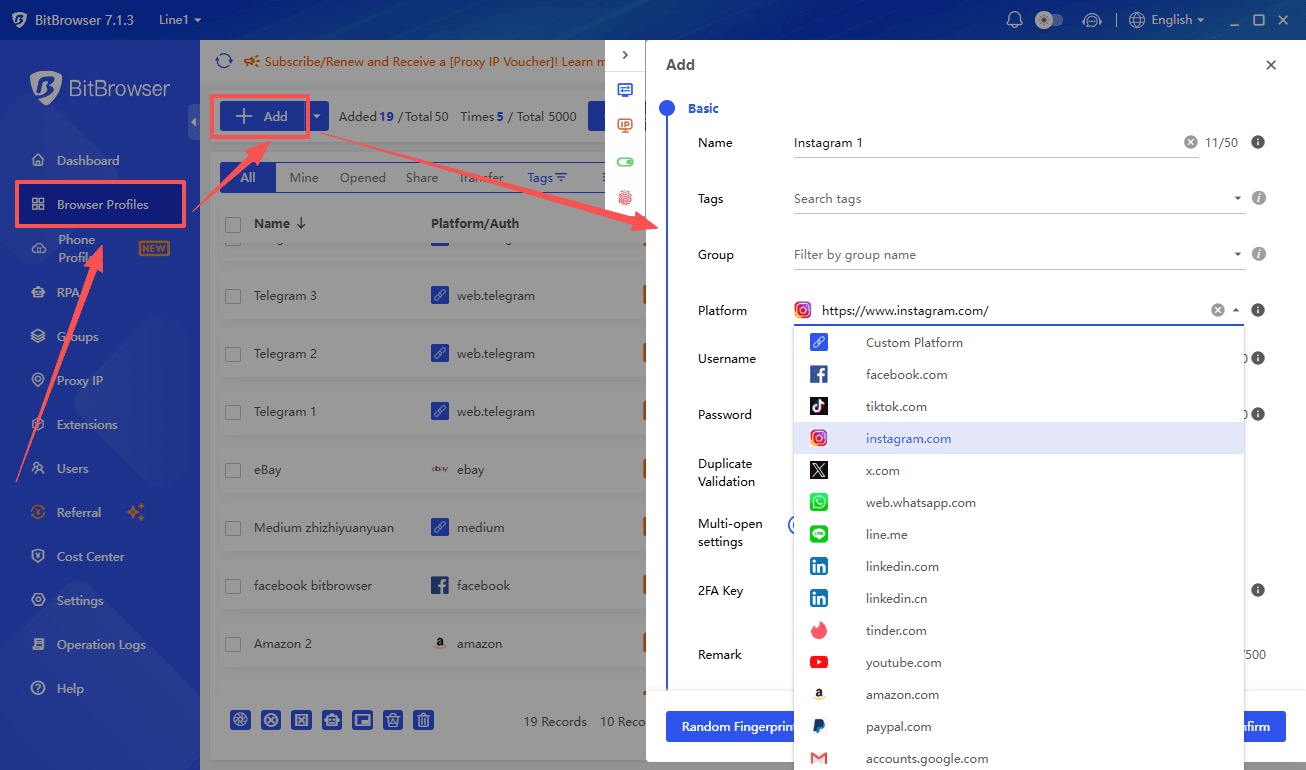
BitBrowser capability | Operational role | Business benefit |
|---|---|---|
Separate browser profiles | Each project or account receives an independent environment | Reduces cookie, session, and storage overlap |
One proxy per profile | A ProxyStores address can be saved directly in a profile | Creates a clear one-account, one-proxy, one-profile structure |
Geographic consistency | Time zone, language, geolocation, and other settings can be reviewed against the proxy region | Reduces obvious configuration conflicts |
Persistent sessions | Profiles retain their own browsing data between launches | Supports long-term operational continuity |
Team organization | Profiles can be grouped and shared according to project roles | Improves delegation and accountability |
Permission control | Administrators can limit who can view or edit sensitive profile settings | Reduces accidental proxy changes and credential exposure |
Recommended Profile Structure
BitBrowser profile name | Assigned ProxyStores IP | Profile alignment | Example purpose |
|---|---|---|---|
Client A – Germany – Store Admin | Individual German IPv4 | German time zone and appropriate language settings | E-commerce administration |
Brand B – United States – SEO | Individual US IPv4 | US regional configuration | Localized search and content checks |
Campaign C – France – Social | Individual French IPv4 | French regional configuration | Authorized social media publishing |
Research D – Canada – Testing | Canadian proxy | Canadian regional configuration | Website localization and QA |
Technical compatibility is based on the documented support for standard HTTP and SOCKS5 proxy credentials. It should not be interpreted as evidence of an official commercial partnership between ProxyStores and BitBrowser.
How to Configure ProxyStores in BitBrowser
Step | Action | Professional recommendation |
|---|---|---|
1. Select the proxy | Choose the IP type, location, quantity, and rental period in ProxyStores. | Prefer an individual IPv4 address for important long-term profiles. |
2. Copy credentials | Record the IP address, protocol-specific port, username, and password. | Store credentials securely and avoid public team chats. |
3. Create a profile | Create a new BitBrowser profile and use a clear project/location name. | Consistent naming becomes essential at scale. |
4. Enter proxy details | Select HTTP or SOCKS5 and add the supplied credentials. | Use the correct port for the selected protocol. |
5. Test the connection | Run BitBrowser’s proxy check before saving or launching the profile. | Confirm that the IP and region match the purchased address. |
6. Review profile settings | Check time zone, language, geolocation, WebRTC, DNS behavior, and user agent. | Focus on reasonable geographic and technical consistency. |
7. Validate the full environment | Restart the profile and test the destination website. | A working proxy alone does not guarantee a consistent browser environment. |
Pre-Deployment Checklist
The public IP matches the purchased ProxyStores address.
The reported country and city are suitable for the project.
DNS requests do not expose an unintended network.
WebRTC behavior is configured appropriately for the workflow.
The target website loads normally and remains stable after restart.
The proxy assignment is documented so it is not reused accidentally for an unrelated account.
The workflow complies with the destination platform’s rules and local law.
Advantages and Limitations
Advantages
| Limitations
|
Best practice before scaling Purchase a small test order in the required country, verify the IP reputation and destination compatibility, test it inside the intended BitBrowser profile, and only then expand the proxy pool. |
Best Use Cases and Ideal Users
Use case | Objective | Recommended setup |
|---|---|---|
Regional website testing | Validate localization, content, and access from selected markets | Individual IPv4 or IPv6 after compatibility testing |
SEO and market research | Check regional results, public pages, and localization behavior responsibly | Stable IP matched to a dedicated BitBrowser research profile |
E-commerce administration | Separate authorized store or marketplace workspaces | Individual IPv4 with persistent profile data |
Advertising verification | Review region-specific campaign delivery and landing pages | Country-appropriate proxy and isolated profile |
Social media publishing | Operate permitted business accounts with organized sessions | One account, one proxy, one BitBrowser profile |
Software and browser QA | Test compatible applications through HTTP or SOCKS5 | Protocol selected according to the test requirement |
Team account operations | Delegate profiles without sharing a single browser environment | BitBrowser permissions plus documented proxy ownership |
Who Should Consider ProxyStores?
ProxyStores is most relevant to individuals, agencies, and small teams that need a fixed address for a defined period, manual location control, standard HTTP/SOCKS5 credentials, and straightforward integration with browser profile tools.
It may be less suitable for organizations that require large rotating residential pools, mobile-carrier IPs, contractual enterprise service-level agreements, advanced session rotation, or bandwidth-based residential infrastructure.
Final Verdict
So, why choose ProxyStores in 2026? Its value lies in the balance between flexibility, stable IP rentals, protocol compatibility, and practical order controls. It is a potentially strong fit for users who want persistent addresses rather than high-frequency rotation.
The service model is especially useful when a proxy must remain associated with one project over time. Manual location selection, flexible rental periods, automated activation, renewal tools, and standard credentials make deployment relatively straightforward. The main requirement is careful testing: IP quality and destination compatibility can vary, so users should validate a small order before scaling.
The role of BitBrowser is equally important. ProxyStores supplies the network address, while BitBrowser separates the browser environment. Together, they support a structured workflow in which each authorized account or project has its own proxy, cookies, session data, settings, and team permissions.
Editorial rating framework ProxyStores is a practical option for stable proxy rentals and organized profile-based workflows. It should be evaluated through a controlled test purchase rather than selected solely on advertised speed, price, or compatibility claims. |
Explore proxy locations and current plans | Create isolated browser profiles for proxy workflows |
O

 Multi-Account Management
 Prevent Account Association
 Multi-Employee Management
Recommended
See More 



