2026.09.30 01:36
 petro
Walmart Marketplace workflow guide · 2026
BitCloudPC for Multiple Walmart Seller Accounts: A Practical Workspace Guide
Organize authorized seller operations, give the right people access and keep each catalog's daily work easy to find.
Start with Walmart's account policy
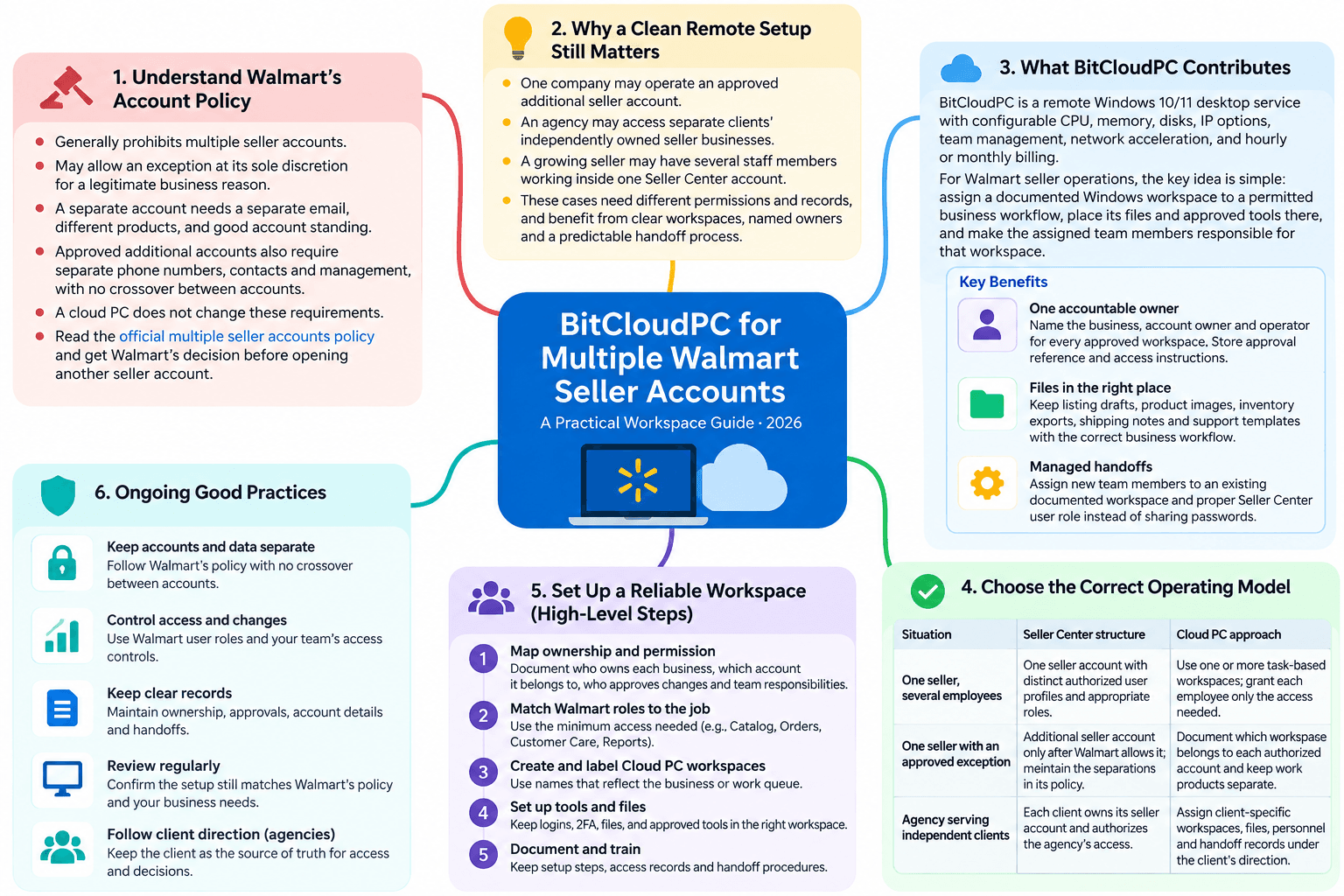
Walmart Marketplace generally prohibits a seller from opening multiple seller accounts. Walmart may make an exception at its sole discretion when there is a legitimate business reason. Its policy says a separate account considered for approval needs a separate email, different products, and good account and performance standing. For an approved additional account, Walmart also calls for separate phone numbers, contacts and account management, with no crossover between accounts. A cloud PC does not grant an exception or change these requirements. Read the official multiple seller accounts policy and obtain Walmart's decision before opening another seller account.
There are still legitimate reasons to plan a clean remote-work setup. One company may operate an approved additional seller account. An agency may have access to separate clients' independently owned seller businesses. Or a growing seller may simply have several staff members working inside one Seller Center account. These cases require different permissions and records, but each benefits from clear workspaces, named owners and a predictable handoff process.
What BitCloudPC contributes to the workflow
BitCloudPC is a remote Windows 10/11 desktop service. Its product page describes configurable CPU, memory, disks and IP options, team management, remote desktop network acceleration, and hourly or monthly billing. For a Walmart seller operation, the useful idea is simple: assign a documented Windows workspace to a permitted business workflow, place its files and approved tools there, and make the assigned team members responsible for that workspace.
One accountable owner
Name the business, account owner and operator for every approved workspace. Store the approval reference and access instructions in the team's internal records.
Files in the right place
Keep listing drafts, product images, inventory exports, shipping notes and support templates with the correct business workflow.
Managed handoffs
A new team member can be assigned an existing documented workspace and the proper Seller Center user role instead of inheriting someone's password.
BitCloudPC's official product page describes its Windows options and team controls. Confirm connection methods, regions, resource limits, charges and access controls for the configuration you plan to use.
Choose the correct operating model first
| Situation | Seller Center structure | Cloud PC approach |
|---|---|---|
| One seller, several employees | One seller account with distinct authorized user profiles and appropriate roles. | Use one or more task-based Windows workspaces; grant each employee only the access needed. |
| One seller with an approved exception | Additional seller account only after Walmart allows it; maintain the separations in its policy. | Document which workspace belongs to each authorized account and keep work products separate. |
| Agency serving independent clients | Each client owns its seller account and authorizes the agency's access. | Assign client-specific workspaces, files, personnel and handoff records under the client's direction. |
Walmart says multiple user profiles can manage one Seller Center account. Its account FAQ distinguishes that arrangement from multiple seller accounts.
How to set up a reliable Walmart seller workspace
1. Map ownership and permission before creating desktops
Write down who owns each Walmart business, which Seller Center account belongs to it, who approves account changes and which team members handle catalog, orders, customer messages and reporting. If you operate only one seller account, create separate Walmart user profiles for staff rather than new seller accounts. If you manage clients, get each client's authorization and keep the client as the source of truth for access. A CloudPC label should reflect the actual business or work queue, not just an employee's nickname.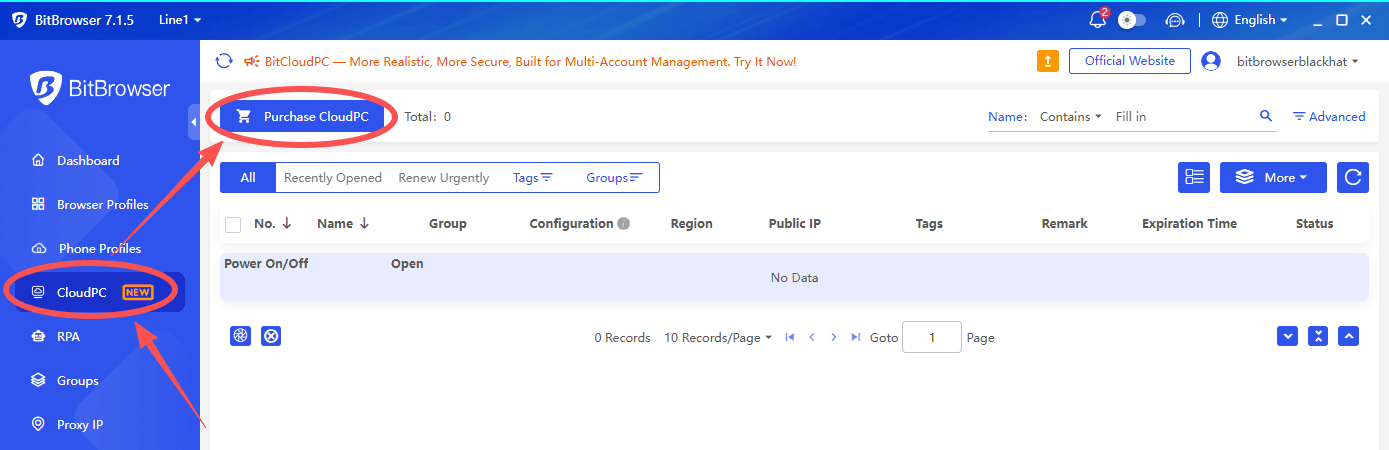
2. Match Walmart roles to the job
Walmart's Seller Center guide lists Admin, Read and Write, and Read Only roles. Admin users can add users and perform sensitive account actions; Read and Write supports operational tasks; Read Only is suited to viewing data and reports without changing it. An account administrator can add a person through People and permissions. Use named users, review who still needs access and reserve Admin for people with the authority to accept binding terms. These Walmart permissions remain the control layer even when the work happens through a cloud desktop. Walmart's user-role guide explains the process.
3. Build a simple folder and naming system
Create folders for catalog drafts, approved imagery, inventory, order exceptions, returns and reporting. Give files an owner, date and status so that a colleague can tell whether a price sheet is a draft or an approved upload. For several permitted businesses, use separate storage locations and a clear transfer process; avoid copying customer or order exports into another business's folder. Keep a brief operating note that says where final files live and who can publish them.
4. Give staff a repeatable daily routine
At the start of a shift, confirm the assigned business and account, review urgent orders, check inventory changes and open the correct working files. Before updating listings, verify product identifiers, images and price approvals. At the end, record what changed, flag unresolved buyer issues and close access when the shift is done. A CloudPC makes the location of the work consistent; the checklist makes the work itself consistent.
5. Secure the account and review costs
Enable Walmart's two-step verification where appropriate, use each person's own credentials, and remove access when a role ends. Keep backups of business files according to your retention needs. For BitCloudPC, estimate compute hours, storage, IPs and any extras using the actual configuration. Its product page says computing charges stop after a CloudPC is shut down while storage remains billable; confirm current terms before budgeting. Walmart's two-step verification guide covers Seller Center.
A practical BitCloudPC role
A consistent workstation for authorized seller operations
BitCloudPC can provide a Windows environment for a catalog specialist, customer-support operator or agency team member to open permitted Seller Center access, maintain the correct files and use approved tools. Its configurable hardware lets you choose resources for the tasks at hand, while its team-management features may help assign and manage CloudPC instances. The value comes from an organized workflow and appropriate permissions, not from creating another seller identity.
A handoff checklist for teams and agencies
- Record the business: owner, account identifier, approval status and primary contact.
- Assign people: named Seller Center users, Walmart roles and CloudPC access.
- Document the catalog: approved product set, listing templates, assets and pricing owner.
- Set the daily queue: orders, inventory, returns, messages and escalation times.
- Protect records: two-step verification, file permissions, backups and access reviews.
- Close the loop: log completed changes and remove unnecessary access at offboarding.
Frequently asked questions
Can I open multiple Walmart Marketplace seller accounts?
Walmart generally prohibits it. Exceptions are at Walmart's discretion for a legitimate business reason, with additional conditions in its policy. Obtain Walmart's decision before opening another account; using a CloudPC does not change the policy.
Can my employees work in one Seller Center account?
Yes. Walmart allows multiple user profiles within a Seller Center account. An administrator can invite named users and assign roles suited to their responsibilities.
Does BitCloudPC approve or protect a Walmart account?
No. BitCloudPC provides a remote Windows work environment. Walmart controls seller approval and enforces its policies. Account standing depends on the business's conduct, data and performance.
Do I need one CloudPC per seller account?
There is no universal number. Choose workspaces based on authorized businesses, personnel, data separation and costs. If you have only one seller account, you may simply need distinct Walmart user roles and a sensible shared file process.
Final take
Multiple Walmart seller accounts require Walmart's exception and the separation specified in its policy. Many teams can accomplish their goals with one seller account and multiple authorized users. Once account ownership and access are settled, a structured Windows workspace can make catalog work, order follow-up and staff handoffs easier to manage. BitCloudPC is one option for that workspace layer, with configurable resources and team features described on its official page.
Review Walmart's current multiple-account policy and your account permissions before setting up the operating model.

 Multi-Account Management
 Prevent Account Association
 Multi-Employee Management