Google Maps Scraping in 2026: Data Collection, Places API & BitBrowser Workflow
 2026.08.27 11:17
 petro
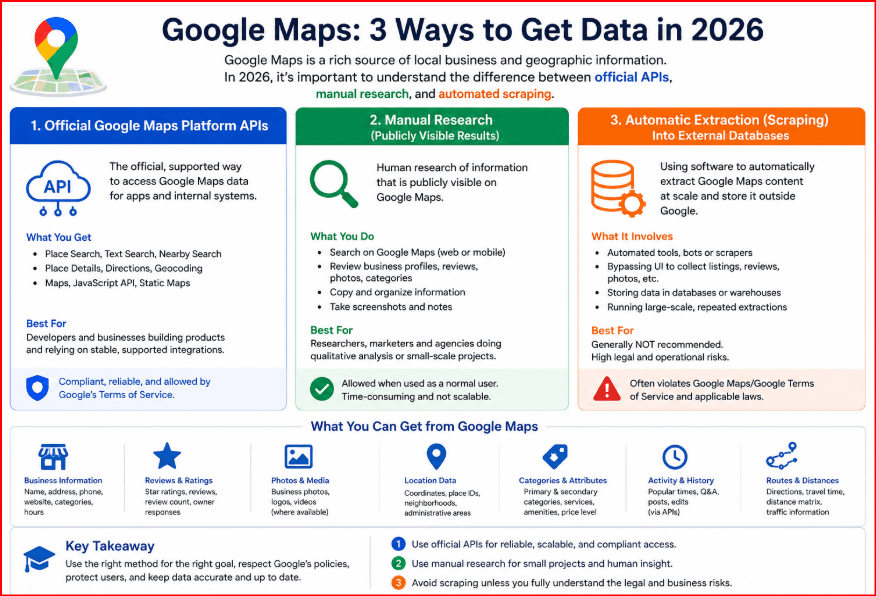
petroGoogle Maps is one of the richest sources of local-business and geographic information on the web. Marketers use it to understand local competitors, developers use Google Maps Platform to add place search to applications, agencies check how businesses appear in different markets, and researchers compare categories, locations and customer-facing information. That demand has made “Google Maps scraping” a popular search term, but in 2026 it is important to separate three very different activities: using official Google Maps Platform APIs, manually researching publicly visible results, and automatically extracting Google Maps content into an external database.
Compliance note: Google Maps Platform currently prohibits scraping Google Maps Content for use outside the Services. This guide focuses on Places API, licensed data, first-party sources and controlled browser QA. Do not use BitBrowser or proxies to bypass CAPTCHA, quotas or enforcement. |
Google’s current Maps Platform terms explicitly prohibit scraping, exporting or extracting Google Maps Content for use outside the Services. The examples include bulk downloading place information and copying or saving business names, addresses or user reviews. A responsible workflow should therefore begin by defining the data you actually need, checking whether the Places API or another licensed source is appropriate, and using browser tools only for legitimate QA, localization and observational research.
Methods Compared
Method | Best for | Storage/rights | Main risk |
|---|---|---|---|
Places API | App features, approved place search | Subject to API policies | Cost, quota, policy scope |
Manual browser QA | Visual/localization checks | Store permitted notes | Small sample, analyst time |
Licensed business dataset | Large persistent analytics | Defined by license | Cost and freshness |
UI scraping bot | Not recommended for Maps Content | Conflicts with no-scraping terms | Blocks, brittleness, rights |
What “Google Maps Scraping” Usually Means
People often use the phrase as shorthand for collecting a business name, category, address, phone number, website, rating, review count, opening hours, coordinates or place identifier. The business objective might be local SEO analysis, market sizing, territory planning, location QA or competitive research. The technical method matters. A spreadsheet of observations created during a small manual audit is very different from a crawler that harvests thousands of listings and stores Google Maps content indefinitely.
Before choosing a tool, write down the output fields and the legal basis for keeping them. If the goal is to build a product or persistent database, rely on a source whose license explicitly permits that use. If the goal is to enrich an application with Google place search, evaluate Places API. If the goal is to check what a user in another city sees, a controlled browser profile can be useful for QA without turning the task into bulk extraction.
Google Maps Terms: The Rule to Design Around
The current Google Maps Platform Terms contain a No Scraping restriction. They say customers must not export, extract or otherwise scrape Google Maps Content for use outside the Services, with examples such as bulk downloads and copying or saving business names, addresses or user reviews. Places API policies also limit caching and storage, while place_id values receive special treatment. Requirements can differ by service and billing region, including the EEA, so production workflows should review the terms that apply to the specific account and product.
This is why the safest architecture is not “more proxies and more browser instances.” A better architecture separates permitted API calls, first-party information, licensed third-party datasets and browser-based QA. It also records provenance: where each field came from, when it was collected, what the retention rule is and whether attribution is required.
The Better Alternative: Places API and Licensed Sources
For many application and research scenarios, the Places API is the Google-supported route. It can return place search and place details through a documented interface with authentication, quotas, billing and policy requirements. The API is easier to test, easier to monitor and more predictable than parsing a consumer interface that can change at any time.
API access is not permission to create an unrestricted permanent Google Maps database. Storage, attribution and permitted-use rules still apply. If your project requires bulk historical datasets, lead lists or unrestricted resale, consider a properly licensed business-data provider or collect first-party information directly from business websites and opt-in sources instead of treating Google Maps as a free data warehouse.
A Practical Data Schema for Local Research
Good data work starts with a schema, not with a scraper. A useful research table might include query, target city, observation date, business name, category, website URL, phone shown, rating, review count, opening status, place_id where permitted, source, and analyst notes. Add a field that indicates whether a value came from an API response, a manual observation or another licensed source.
This structure makes deduplication and auditing easier. It also prevents teams from collecting everything simply because a field is visible. A narrow schema reduces compliance risk, lowers API cost and makes downstream analysis cleaner.
How to Use BitBrowser for Google Maps Research and QA
BitBrowser can be useful as the browser-workspace layer for authorized location testing. Create a dedicated browser profile for each approved market or client workflow, name it clearly, and keep cookies, local storage and session state separated from unrelated work. BitBrowser supports profile-specific proxy settings including HTTP, HTTPS and SOCKS5, plus browser fingerprint and regional configuration options.
A practical workflow is to create a profile, assign the approved proxy or network endpoint, confirm the IP and region, align language and timezone with the test scenario, open Google Maps, and document what is visible for the research query. Keep the profile stable while comparing results so changes in network or session state do not contaminate the test. The objective is repeatable QA, not rotating through identities to bypass Google controls.
Step | BitBrowser action | Purpose |
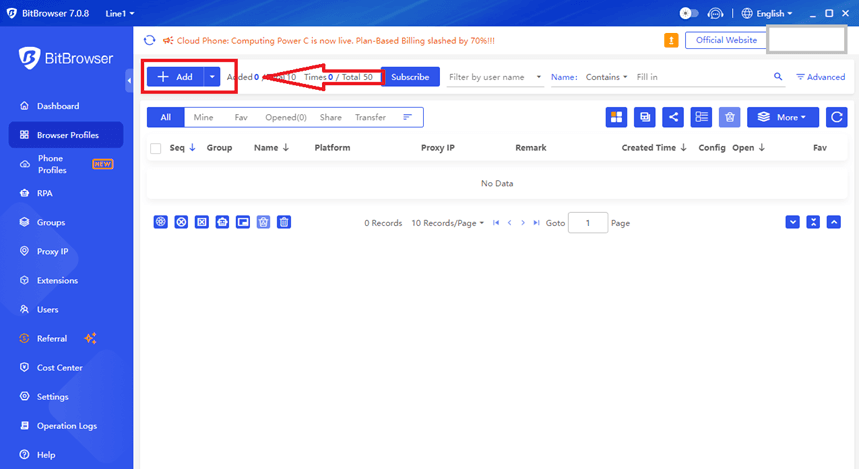
1 | Create a named profile
| Separate client/market session |
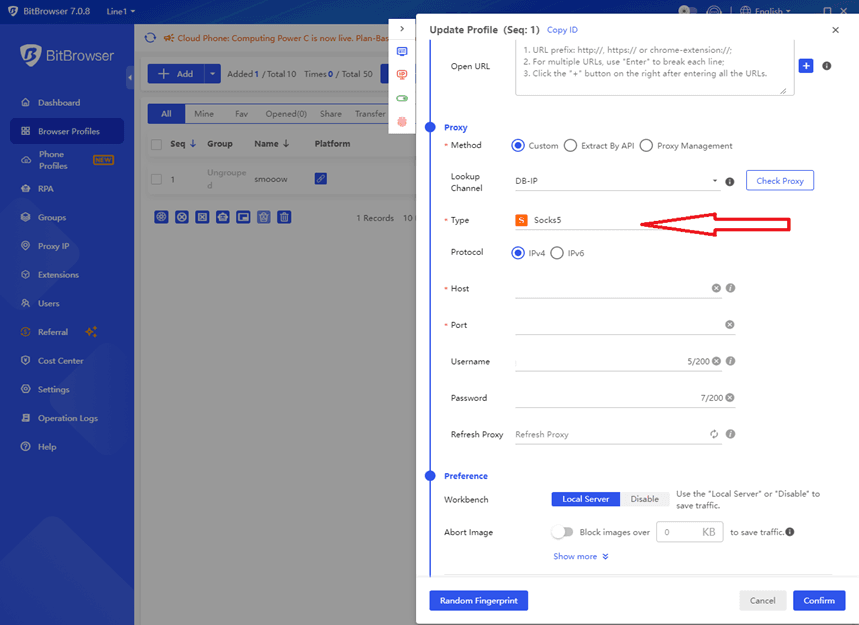
2 | Attach approved HTTP/HTTPS/SOCKS5 proxy | Set documented network region |
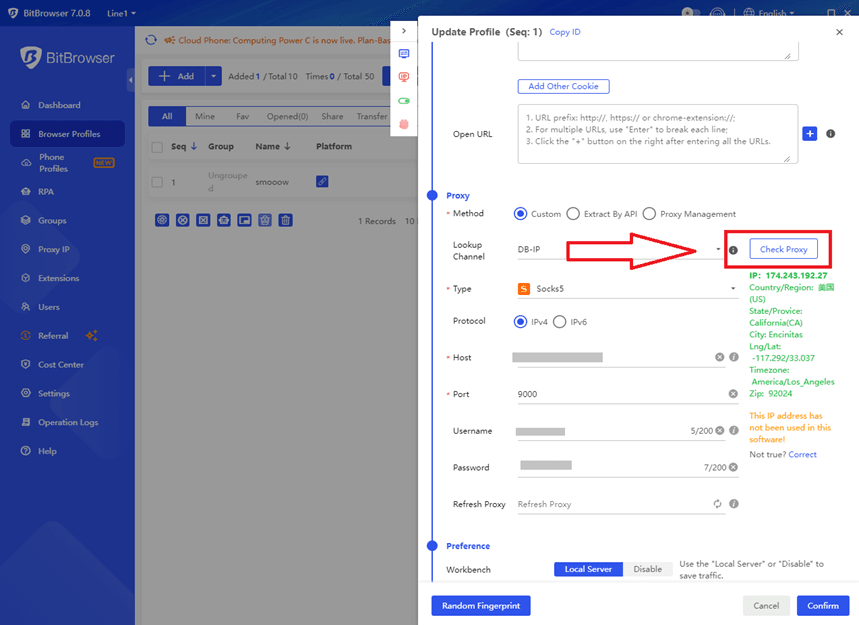
3 | Run proxy check | Confirm IP and availability |
4 | Align language/timezone | Make QA scenario coherent |
5 | Open Maps and run fixed queries | Produce comparable observations |
6 | Keep endpoint stable | Avoid introducing test noise |
7 | Use Places API for programmatic data | Keep browser QA separate from acquisition |
Step-by-Step BitBrowser Workflow
Step 1: create a new browser profile and give it a descriptive name such as “Maps QA - Madrid - Client A.” Step 2: attach an authorized proxy if your project requires location testing. Step 3: use the proxy-check function or an approved IP-check page to confirm the connection before opening Google Maps. Step 4: set browser language and timezone to match the documented scenario rather than choosing random values.
Step 5: open the same research query and record observations manually or through your approved internal QA process. Step 6: keep notes about date, region and query. Step 7: if the project needs programmatic place data, perform that portion through Places API or another licensed source. BitBrowser should organize the browsing environment; it should not be used as a mechanism to defeat CAPTCHA, rate limits or platform restrictions.
Where Proxies Fit - and Where They Do Not
A proxy can change the network exit point used by a browser profile. That is useful when a company legitimately needs to test localization, regional landing pages, advertising presentation or other location-sensitive experiences. A stable endpoint can also help a distributed QA team reproduce the same test environment.
A proxy does not grant new rights to copy Google Maps content. Rotating IPs specifically to avoid request limits, CAPTCHAs or enforcement is not a compliant data strategy. For automated place data, use the official API and its quotas or obtain a commercial license that matches the intended use.
Local SEO Use Cases
Local SEO teams can use a controlled Maps research workflow to compare business-category presentation, naming conventions, visible opening hours, map-pack composition and website/GBP consistency. The goal is often to understand how a client appears to a user in a target market rather than to build a permanent copy of Google’s listings.
A useful audit combines manual Maps observations with first-party Google Business Profile information, Search Console, website analytics, rank-tracking data from a licensed tool and the client’s own CRM. That creates a stronger picture than a raw scraped dataset because it connects visibility with real business outcomes.
Market and Competitor Research
For market research, define a sample rather than attempting to capture an entire city. An agency can review the first set of results for representative queries across a small number of neighborhoods, record category patterns and compare them with business websites. This produces an interpretable sample and keeps the project focused.
If the commercial requirement is truly to analyze thousands or millions of businesses, use a dataset provider that licenses bulk business information for analytics. The cost is usually easier to justify than maintaining brittle crawlers, solving repeated blocks and carrying unclear rights to the data.
Data Quality: Deduplication and Normalization
Local-business records are messy. Names differ by punctuation, phone numbers have multiple formats, websites redirect, branches share branding, and categories change. Normalize phone numbers and domains, store a canonical business key where your source permits it, and keep raw source values separate from normalized analysis fields.
Never assume that a similar name means two listings are the same. Use a combination of address, phone, website domain and place identifier where permitted. Keep an audit trail so an analyst can understand why records were merged.
Automation Architecture for a Compliant Project
A clean architecture can have four layers. First is acquisition: Places API, client-provided data, licensed datasets and limited manual observations. Second is normalization: field mapping, deduplication and validation. Third is storage with retention rules attached to each source. Fourth is analysis and reporting. Browser profiles belong mainly in the QA layer, not as a replacement for an authorized data feed.
This design is easier to maintain because it survives UI changes. It also lets teams scale API usage deliberately, monitor costs and enforce source-specific retention rules rather than treating every field as permanently reusable.
When a Browser Test Is Better Than a Dataset
Some questions are visual and contextual: which categories dominate the first results, whether a profile’s website button is visible, how a map pack looks in a certain language, or whether an international landing page opens correctly. These questions are often better answered through a controlled browser session and screenshots or analyst notes than through a large extracted dataset.
BitBrowser helps repeat that viewing context consistently. A named profile can hold the same region, language, session state and approved proxy for future comparisons. That makes QA reproducible without requiring bulk collection of Google Maps Content.
A Practical Research Checklist
Before every session, confirm the research question, target region, approved source, fields to record, retention period and owner. Then validate the browser profile, network endpoint and query list. After the session, review duplicates, remove unnecessary observations and store only the data the project is allowed to retain.
This simple checklist reduces the tendency to collect information first and ask compliance questions later. It also gives managers a clear record of why the research was performed and which source supported each field in the final report.
Team Governance and Access
For agencies, assign profile ownership and naming conventions. Keep each client or research program in its own group, avoid sharing one profile across unrelated accounts, and review proxy credentials periodically. If automation is used around a permitted API, keep API keys outside browser notes and apply least-privilege access.
Good operational controls are as important as the technical tool. Team members should understand which browser profiles are authorized for which clients, which data can be retained, and when a question should be escalated to legal, privacy or platform-policy review.
Common Mistakes to Avoid
The first mistake is starting with automation before checking the terms. The second is collecting more fields than the project actually uses. The third is mixing API data, browser observations and third-party records without tracking provenance. The fourth is rotating proxies whenever a page blocks instead of treating the block as a signal to stop and reassess the method.
Another mistake is giving every team member the same browser session and credentials. Use separate BitBrowser profiles for distinct authorized projects, use organization-approved access controls, and keep sensitive client sessions isolated. Do not promise that a browser profile or proxy makes a data-collection method undetectable or permitted; those are separate questions.
Scaling Responsibly
Scale the business question before scaling requests. Start with a pilot, verify that the chosen fields answer the question, measure data freshness requirements, and estimate API or licensing costs. Many teams discover that a smaller, higher-quality sample is enough for strategy while only a few fields need continuous refresh.
For recurring work, create a documented SOP that states the approved data sources, retention period, responsible owner, API project, allowed browser profiles and escalation path when a site changes or blocks access. This turns one-off research into a repeatable process that a team can audit.
Final Verdict
In 2026, the phrase “Google Maps scraping” should not automatically mean deploying a crawler against maps.google.com. Google’s current terms explicitly restrict scraping and external reuse of Maps Content. For most professional teams, the stronger approach is to use Places API where it fits, licensed data when persistent bulk datasets are required, first-party sources for customer and business information, and a browser workspace such as BitBrowser for controlled location QA and manual research.
BitBrowser adds value by keeping profiles, proxies and regional browser settings organized. Used this way, it helps teams reproduce local-search scenarios without turning the browser into a tool for bypassing platform controls. The result is a workflow that is easier to explain to clients, easier to maintain and much more durable than a fragile scraping script.
Frequently Asked Questions
Is Google Maps scraping allowed?
Google Maps Platform terms currently include a no-scraping restriction for Google Maps Content used outside the Services. Review the current terms for your product and region before collecting or storing data.
Can I use the Places API instead?
Often yes. Places API is the supported programmatic path for many place-search and place-details scenarios, but its attribution, storage and permitted-use rules still apply.
Can BitBrowser scrape Google Maps automatically?
BitBrowser provides isolated profiles, proxy configuration and automation interfaces, but technical capability does not make extraction permitted. Use it for authorized QA, controlled research and approved automation.
Can I use a proxy to get local Google Maps results?
A proxy can be useful for legitimate location testing. Keep the endpoint stable and align the browser profile with the documented test region. Do not rotate proxies to defeat limits or CAPTCHAs.
What data should a local SEO audit collect?
Collect only the fields needed for the audit: query, location, observation date, business identity, category, visible rating/review count, website and notes. Combine this with first-party analytics and GBP data.
Can I store place IDs?
Google documentation treats place_id differently from most Places content and permits storage under its policies. Check the current Places API policy before implementation.
What is the best tool for large business datasets?
If you need a persistent, redistributable or very large business database, a licensed business-data provider is usually more appropriate than copying Google Maps content.
Why use BitBrowser in this workflow?
It helps separate authorized projects into stable browser profiles, attach approved proxies and preserve consistent regional and session settings for reproducible QA.
Official references

 Multi-Account Management
 Prevent Account Association
 Multi-Employee Management
Recommended
See More 



