How CPUs and GPUs Process Information Differently
 2026.06.28 21:58
 petro
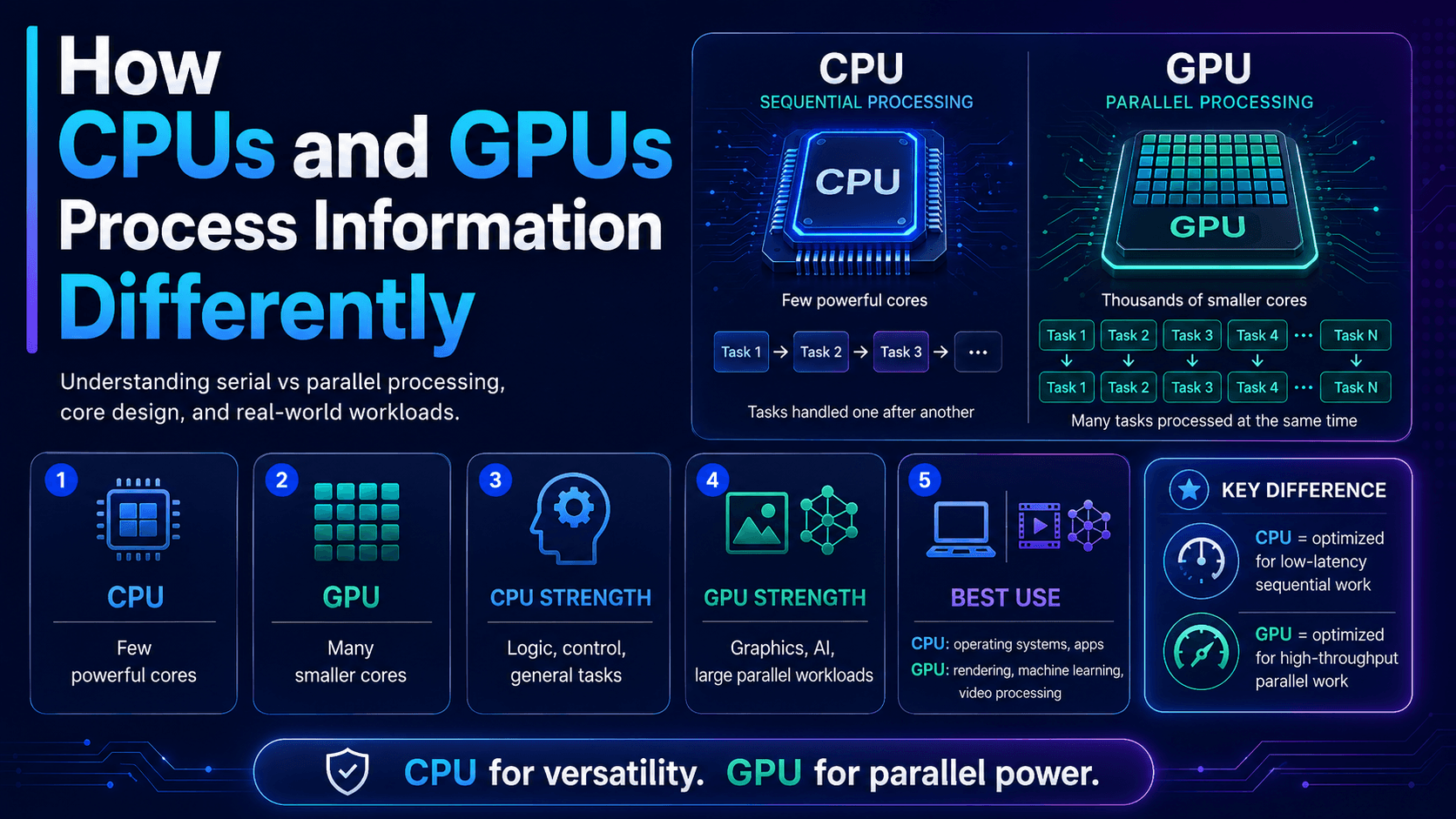
petroCPUs and GPUs are both processors, but they are designed for different types of work. A CPU is built for flexibility, decision-making, and handling many different tasks quickly. A GPU is built for parallel processing, meaning it can handle thousands of similar calculations at the same time.
This difference is why CPUs are essential for general computing, while GPUs are powerful for graphics, AI, video rendering, simulations, and other workloads that require massive parallel computation.
What Is a CPU?
A CPU, or Central Processing Unit, is often called the brain of the computer. It controls the operating system, runs applications, manages files, handles user input, and coordinates communication between hardware components.
A CPU is designed to handle complex instructions quickly. It is very good at tasks that require logic, branching, decision-making, and fast response times.
Common CPU tasks include:
- Running the operating system
- Opening applications
- Managing browser tabs
- Handling keyboard and mouse input
- Running office software
- Processing system commands
- Managing background services
- Coordinating other hardware
A CPU usually has fewer cores than a GPU, but each core is powerful and flexible.
What Is a GPU?
A GPU, or Graphics Processing Unit, was originally designed to render images, videos, animations, and 3D graphics. Today, GPUs are also widely used for artificial intelligence, machine learning, data science, video editing, and scientific computing.
A GPU is designed to perform many simple calculations at the same time. Instead of focusing on one complex task, it divides a large workload into thousands of smaller tasks and processes them in parallel.
Common GPU tasks include:
- Rendering games
- Editing and exporting video
- Processing 3D graphics
- Training AI models
- Running machine learning workloads
- Cryptocurrency mining
- Scientific simulations
- Image processing
- Large-scale mathematical calculations
A GPU may contain hundreds or thousands of smaller cores optimized for parallel work.
The Main Difference Between CPUs and GPUs
The easiest way to understand the difference is this:
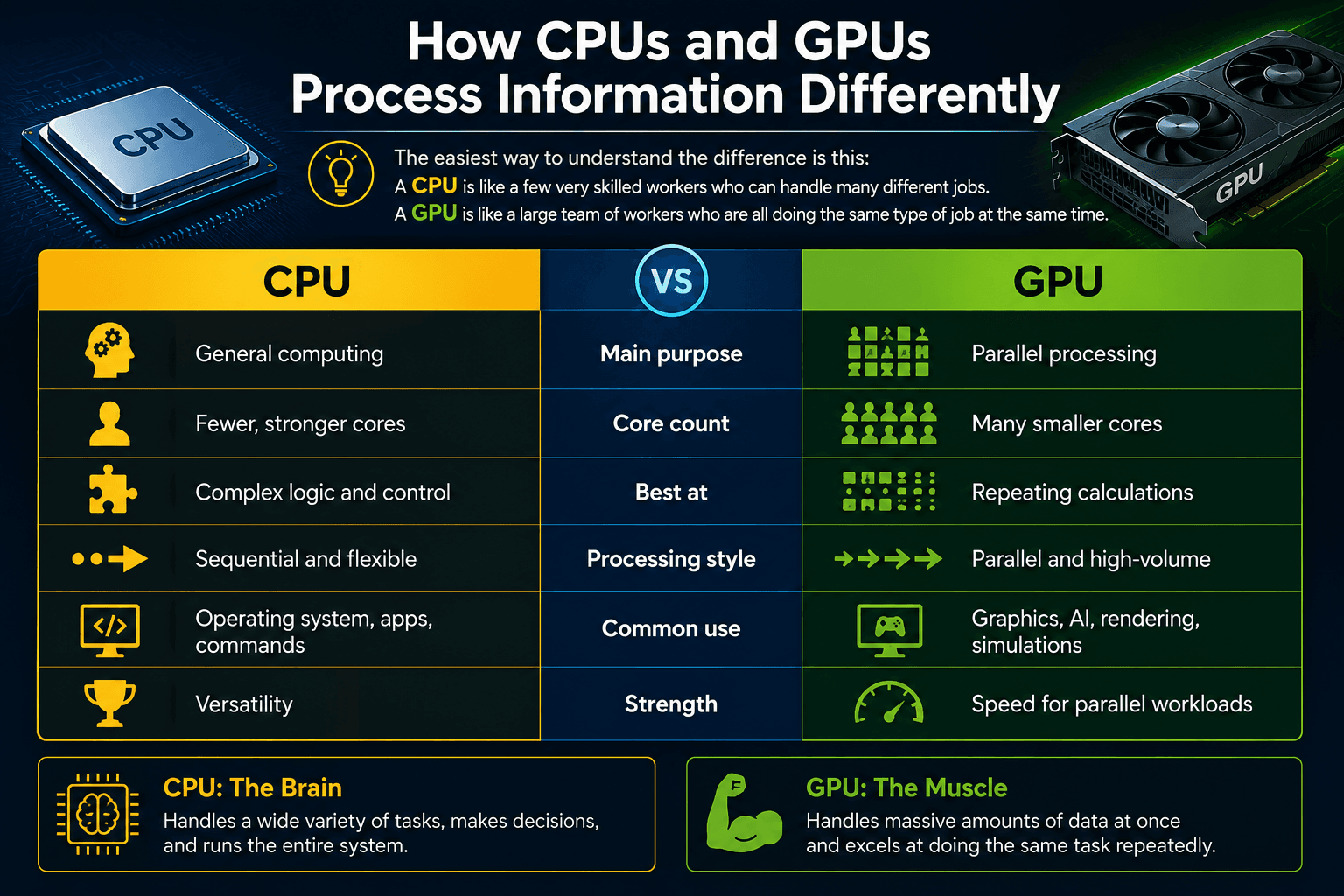
A CPU is like a few very skilled workers who can handle many different jobs. A GPU is like a large team of workers who are all doing the same type of job at the same time.
| Feature | CPU | GPU |
|---|---|---|
| Main purpose | General computing | Parallel processing |
| Core count | Fewer, stronger cores | Many smaller cores |
| Best at | Complex logic and control | Repeating calculations |
| Processing style | Sequential and flexible | Parallel and high-volume |
| Common use | Operating system, apps, commands | Graphics, AI, rendering, simulations |
| Strength | Versatility | Speed for parallel workloads |
How CPUs Process Information
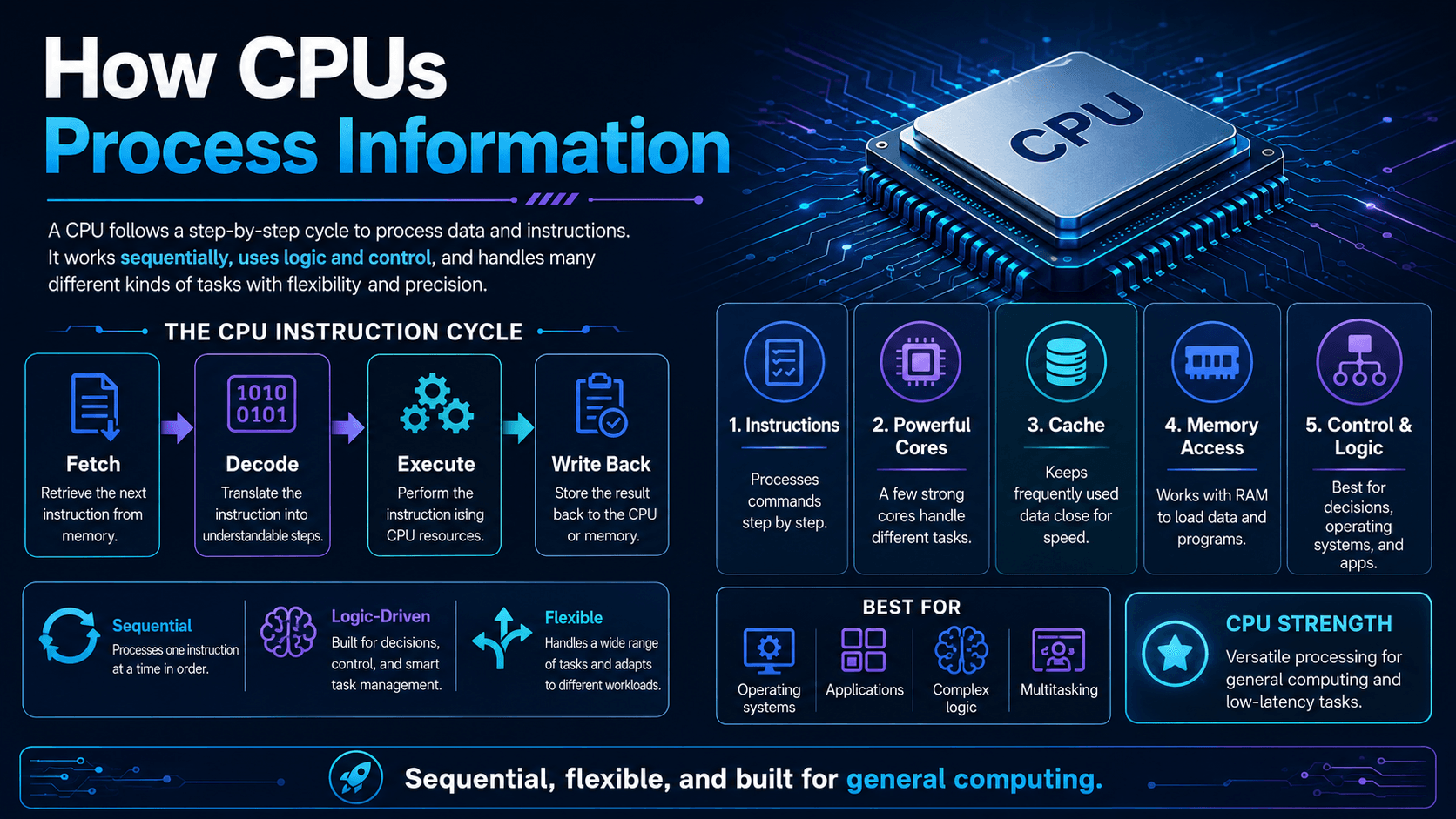
CPUs process information using a cycle often described as:
- Fetch the instruction
- Decode the instruction
- Execute the instruction
- Store the result
This happens billions of times per second.
For example, when you open a web browser, the CPU manages many different tasks at once. It loads the program, communicates with storage, manages memory, processes network requests, handles user input, and keeps the operating system responsive.
The CPU is excellent at handling tasks where every step may be different from the previous one.
Example:
Open browser → Load website → Check login status → Run scripts → Display page → Respond to user clicks
Each action may require a different decision. That is why the CPU is designed for flexibility.
How GPUs Process Information
GPUs process information differently. Instead of focusing on many different decisions, they focus on doing the same type of calculation many times at once.
For example, when a computer renders an image, it may need to calculate the color, lighting, shadow, and position of millions of pixels. A GPU can process many of these pixels at the same time.
Example:
Pixel 1 → calculate color
Pixel 2 → calculate color
Pixel 3 → calculate color
Pixel 4 → calculate color
Thousands of pixels → processed at once
This makes GPUs extremely powerful for workloads where the same operation must be repeated across a large amount of data.
CPU vs GPU: Simple Example
Imagine you need to calculate the total price of one customer’s shopping cart. The CPU is perfect for this because the task may involve different rules, discounts, taxes, shipping methods, and payment checks.
Now imagine you need to apply the same filter to 10 million image pixels. The GPU is better because each pixel can be processed independently at the same time.
| Task | Better Processor | Why |
|---|---|---|
| Opening software | CPU | Requires system control and logic |
| Running Windows or macOS | CPU | General-purpose management |
| Playing modern games | GPU | Requires graphics rendering |
| Video editing | GPU + CPU | GPU renders, CPU manages workflow |
| AI model training | GPU | Massive parallel calculations |
| Web browsing | CPU | Mixed tasks and user interaction |
| 3D rendering | GPU | Many repeated visual calculations |
| Database management | CPU | Logic-heavy and sequential decisions |
Why CPUs Have Fewer Cores
CPU cores are designed to be powerful and flexible. Each core can handle complex instructions, switch between tasks quickly, and make decisions based on changing conditions.
This makes CPUs ideal for tasks that are unpredictable.
For example:
- Opening files
- Running applications
- Managing system security
- Handling errors
- Processing user commands
- Running business software
A CPU does not need thousands of cores because its job is not only to calculate. Its job is to control, manage, and respond.
Why GPUs Have Many Cores
GPU cores are smaller and simpler than CPU cores, but there are many more of them. This allows the GPU to divide a large task into many small pieces.
This is useful when the same operation is repeated many times.
For example:
- Rendering pixels in a game
- Processing video frames
- Training neural networks
- Running physics simulations
- Applying effects to images
- Performing matrix calculations
A GPU is powerful because it can process huge amounts of similar data at the same time.
CPUs and GPUs Work Together
Modern computers do not use only a CPU or only a GPU. They usually use both.
The CPU manages the system and decides what needs to happen. The GPU handles heavy parallel workloads when needed.
For example, in a video game:
- The CPU manages game logic, player input, enemy behavior, physics rules, and system communication.
- The GPU renders the graphics, lighting, textures, shadows, and frames on the screen.
In AI:
- The CPU prepares data, manages files, controls the training process, and handles system operations.
- The GPU performs the large mathematical calculations required to train or run the model.
The best performance often comes from using both processors correctly.
Why GPUs Are Important for AI
Artificial intelligence depends heavily on mathematical operations, especially matrix multiplication. These operations involve large amounts of repeated calculations.
GPUs are ideal for this because they can process many calculations in parallel.
That is why GPUs are commonly used for:
- Training AI models
- Running large language models
- Image generation
- Voice recognition
- Computer vision
- Recommendation systems
- Data analysis
A CPU can run AI workloads, but for large models, it is usually much slower than a GPU.
Integrated GPU vs Dedicated GPU
Not all GPUs are the same.
An integrated GPU is built into the CPU or system chip. It shares memory with the main system and is good for basic graphics, video playback, office work, and light gaming.
A dedicated GPU is a separate graphics card with its own memory. It is much more powerful and is used for gaming, 3D rendering, video editing, AI, and professional workloads.
| GPU Type | Best For |
|---|---|
| Integrated GPU | Basic graphics, browsing, office work, video playback |
| Dedicated GPU | Gaming, AI, rendering, editing, simulations |
Which One Matters More?
It depends on what you do.
Choose a stronger CPU if you mainly use:
- Office apps
- Web browsing
- Programming
- Business software
- Databases
- General productivity
- Multitasking
- Choose a stronger GPU if you mainly use:
- Gaming
- Video editing
- 3D rendering
- AI tools
- Machine learning
- Animation
- Design software
- Scientific simulations
For most modern users, balance matters. A powerful GPU with a weak CPU can create bottlenecks, and a powerful CPU with a weak GPU may struggle with graphics-heavy work.
Final Verdict
CPUs and GPUs process information differently because they are built for different purposes.
A CPU is designed for flexibility, control, and complex decision-making. It handles the operating system, applications, user input, and general computing tasks.
A GPU is designed for parallel processing. It handles thousands of similar calculations at the same time, making it ideal for graphics, AI, rendering, video processing, and large mathematical workloads.
In simple terms:
The CPU controls the computer. The GPU accelerates heavy parallel tasks.
Together, they make modern computing faster, smoother, and more powerful.
Operate Multiple Accounts in Isolated, Secure Browser profiles
Use the BitBrowser to easily bypass platform anti-association detection, giving every profile an independent digital fingerprint.

 Multi-Account Management
 Prevent Account Association
 Multi-Employee Management
Recommended
See More 



