How to Get Verified on TikTok in 2026
 2026.10.31 19:59
 petro
How to Get Verified on TikTok in 2026: Blue Tick Requirements, Steps, and Rejection Fixes
Learn what TikTok looks for when granting a verified badge, how to prepare your account, how to apply when the option is available, and what to improve if your verification request is rejected.
Quick answer
TikTok verification is not based on follower count alone. TikTok has publicly said it considers whether an account is authentic, unique, active, notable, and compliant with its rules. The blue verification badge confirms that TikTok has verified that an account belongs to the person or organization it represents.
What Does the TikTok Blue Tick Mean?
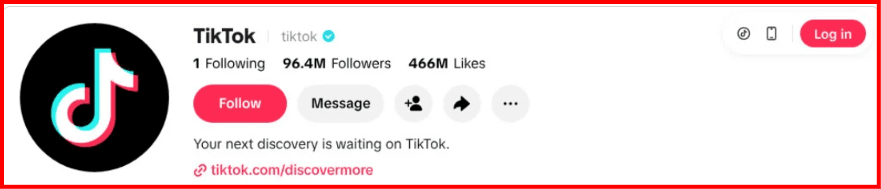
A TikTok verified badge is the blue check mark displayed next to an account name. It is designed to help users distinguish an authentic account from impersonators, fan pages, or fake profiles.
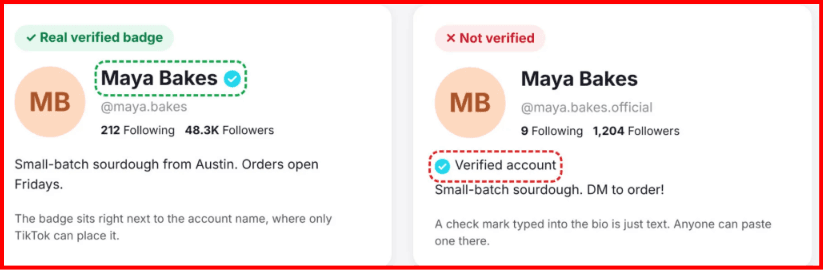
TikTok explains that verified badges are applied by TikTok itself and appear beside the account name in search results and on the profile. A blue check emoji placed manually in a bio or profile image does not mean the account is verified.
Verification is particularly relevant for notable creators, public figures, organizations, brands, and other accounts where identity confusion or impersonation could be a concern.
TikTok Blue Tick Requirements in 2026
1. Authentic
The account should represent a real person, business, organization, or entity.
2. Active
A dormant profile is less likely to demonstrate the active presence expected from a notable account.
3. Unique
The profile should clearly represent the individual or organization it claims to represent.
4. Notable
Public recognition, independent media coverage, professional visibility, or significant public interest can help establish notability.
5. Rule-Compliant
The account should comply with TikTok's Community Guidelines and Terms of Service.
6. Secure
Strong account security is important, especially for creators and brands that may be targets for impersonation or account theft.
Do You Need 10,000 or 100,000 Followers?
TikTok does not publicly state a fixed follower threshold that automatically guarantees a blue tick.
A large following can help demonstrate public interest, but verification is not simply a follower-count reward. A smaller account with strong notability and clear authenticity may have a stronger case than an account with more followers but little independent recognition.
Prepare Your TikTok Account Before Applying
✓ Clear account name
Use the real public name of the creator, brand, or organization.
✓ Professional profile image
Use a recognizable creator image or official brand identity.
✓ Complete biography
Clearly explain who you are and what the account represents.
✓ Consistent activity
Maintain a legitimate and active publishing history.
✓ Public recognition
Build genuine visibility outside your own social profiles.
✓ Clean account history
Avoid repeated policy violations that could weaken account trust.
How to Strengthen Your Notability
Notability is one of the areas creators often misunderstand. Simply publishing content about yourself is not the same as having independent public recognition.
Independent media coverage
Coverage from established publications, industry websites, news organizations, interviews, or reputable professional sources can help establish public recognition.
Consistent identity across platforms
Your website, TikTok, Instagram, YouTube, professional profiles, and press references should clearly point to the same person or organization.
Real-world recognition
Awards, public appearances, recognized professional achievements, events, brand partnerships, or industry visibility may support a broader notability case.
How to Apply for TikTok Verification
Open your TikTok profile
Make sure you are signed into the account you want to verify.
Open Settings and privacy
Navigate to the account-related settings available in your TikTok app.
Look for the verification option
Availability can depend on account type, location, and TikTok's current interface. Follow the in-app verification flow if it is presented to you.
Submit the requested information
Provide accurate identity, organization, or supporting information requested by TikTok.
Wait for the review
TikTok reviews the submission and determines whether the account meets its verification standards.
Blue Tick Verification vs. Business Verification
These are not the same process.
Blue tick verification is the public verified badge associated with notable creators, public figures, organizations, and major brands.
Business verification is a separate process for businesses and may require business registration documents. TikTok's business documentation explicitly states that business verification is different from the blue-checkmark profile indicator.
TikTok Verification Rejected? What to Fix
Where BitBrowser Can Fit Into a TikTok Verification Workflow
BitBrowser can be useful for agencies, creator managers, and brand teams that manage multiple authorized TikTok accounts and need to keep browser sessions clearly separated.
Verification itself is decided by TikTok. BitBrowser does not create a blue tick or bypass TikTok's verification requirements. Its role is operational: helping teams organize legitimate browser sessions and avoid mixing accounts or project resources.
Example profile structure
- TikTok-Creator-A
- TikTok-Brand-US
- TikTok-Brand-UK
- TikTok-Client-Verification
- TikTok-QA-Team
Beware of TikTok Blue Tick Scams
Do not pay unknown people who claim they can “guarantee” TikTok verification.
TikTok has warned creators about phishing campaigns in which scammers impersonate TikTok and send fake blue-badge verification messages.
Security checklist:
- Never share your TikTok password.
- Never share login or verification codes.
- Enable two-step verification.
- Use official TikTok channels for verification requests.
- Review connected devices and security settings regularly.
Frequently Asked Questions
How many followers do I need to get verified on TikTok?
TikTok does not publicly define a fixed follower number that guarantees verification. Authenticity, activity, uniqueness, notability, and compliance matter.
Can a small creator get the blue tick?
A large audience alone is not the only factor. A creator with strong public notability and a clear authentic identity may still have a strong verification case.
Can I buy TikTok verification?
Be extremely cautious of anyone selling guaranteed blue-tick verification. Use official TikTok channels and never provide passwords or login codes to third parties.
What should I do after a rejection?
Review the strength of your public identity, notability, account activity, compliance history, and security before submitting another request when eligible.
Final Checklist for TikTok Verification in 2026
The best strategy is not to chase the blue tick itself. Build an authentic public presence that clearly shows who you are, why people know you, and why impersonation could matter. Verification should become the result of that credibility rather than the only objective.

 Multi-Account Management
 Prevent Account Association
 Multi-Employee Management
Recommended
See More