How to Securely Share a Claude Pro/Max Account with Your Friends
 2026.09.03 06:13
 YT.Shi
Sharing a Claude Pro or Max subscription with a friend sounds simple, but there is a difference between sharing a subscription and sharing your actual Claude account.
If you already have a Claude Pro or Max account and want a friend to use the same account, one practical approach is to use a separate browser environment instead of sending your Claude login credentials through email or messaging apps.
For this, BitBrowser's Browser Profile sharing feature can be useful. You can create a dedicated browser profile for Claude, log in once, and then share that profile with another BitBrowser user. Your friend can access the shared profile from their own BitBrowser client without needing your Claude password.
This guide walks through that method first. After that, we'll look at three other options, including Claude's official gift subscriptions, Claude Team, and traditional account sharing.
How to Share a Claude Pro or Max Account with BitBrowser
If you want to share an existing Claude Pro or Max account with a friend, one practical option is to use BitBrowser’s Browser Profile sharing feature.
Instead of giving your friend the Claude login password, you can keep the Claude account inside a dedicated browser profile and share that profile with another BitBrowser user. The other person can then access the shared profile from their own BitBrowser client.
The basic idea is straightforward:
Create a dedicated profile → configure the appropriate proxy → log in to Claude → share the profile with your friend.
Step 1: Create a Separate Browser Profile
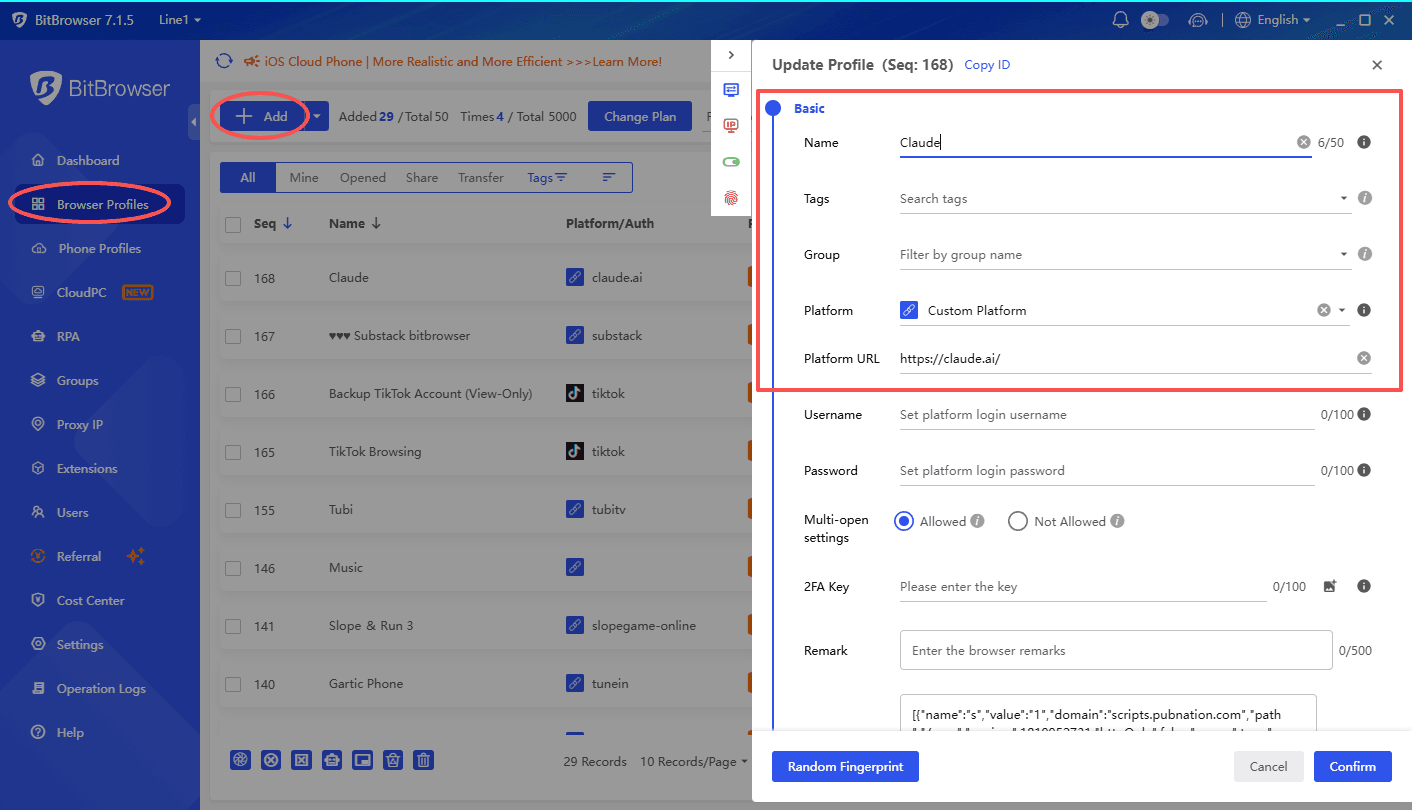
1. Open BitBrowser and go to Browser Profiles.
2. Click Add to create a new browser profile. Give it a recognizable name, such as Claude or Claude Pro Shared, so you can easily identify it later.
3. Using a separate profile is important because it keeps the Claude session isolated from your other browser profiles and accounts.
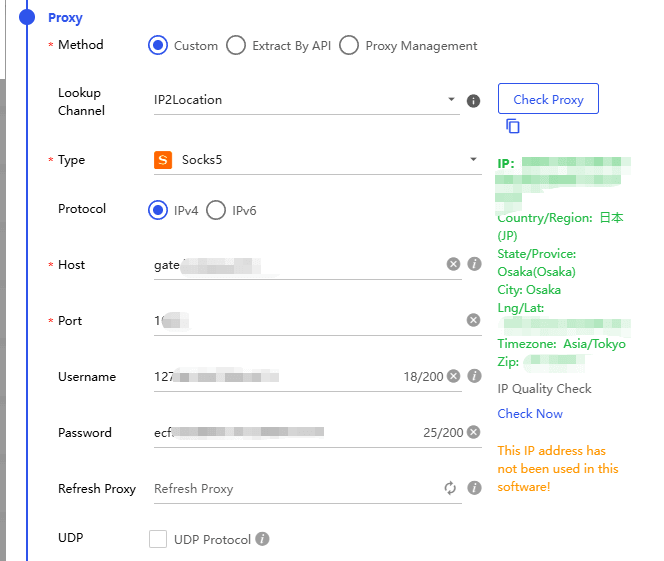
4. When setting up the profile, configure the proxy according to the country or region where the Claude account was originally created.
For example, if the Claude account was created while using an IP address from a particular country, use a proxy from the same country or region for the dedicated profile. This keeps the browsing environment more consistent when the account is accessed later.
Step 2: Log In to Your Claude Account
1. After creating the profile, open it from BitBrowser and visit Claude. Log in to the Claude Pro or Max account that you want to share.
2. Once the login is complete, make sure the account loads normally and that your subscription is active.
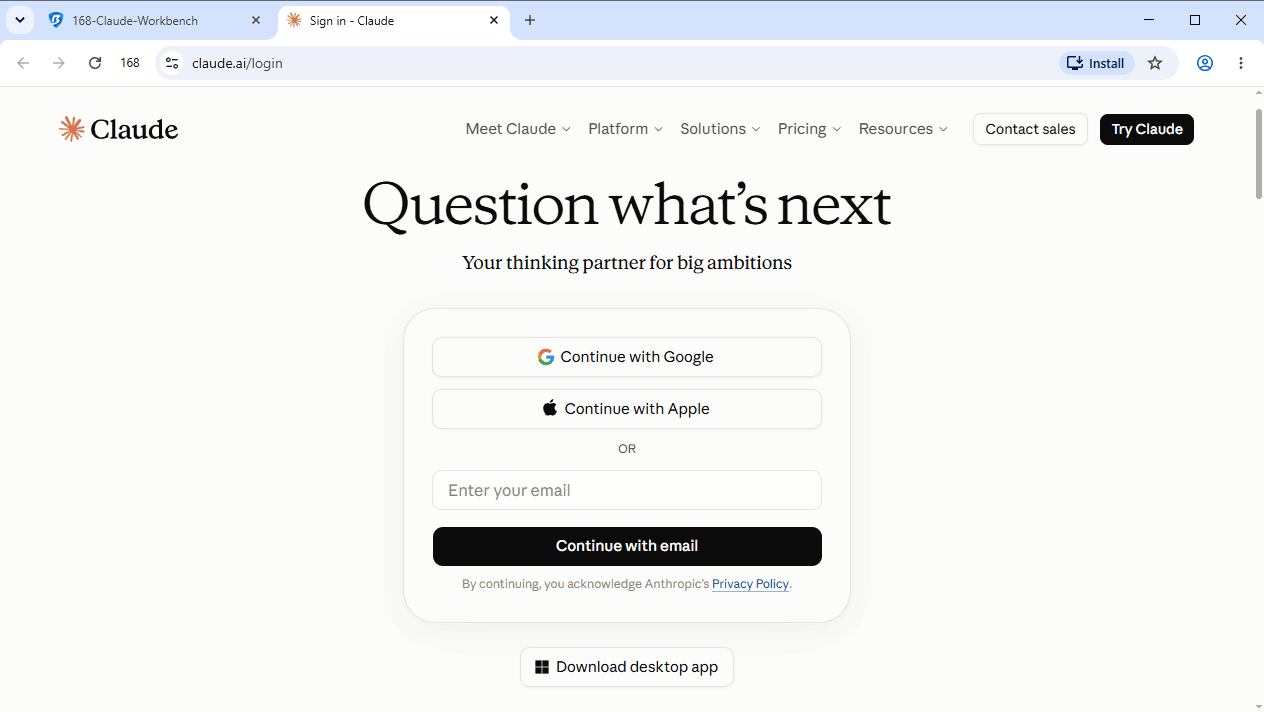
3. The important part here is to keep the Claude login inside this dedicated BitBrowser profile. You don't need to send your Claude email address or password to your friend.
Tip: Before sharing the profile, make sure you are using the correct proxy and that Claude is already logged in successfully.
Step 3: Share the Browser Profile with Your Friend
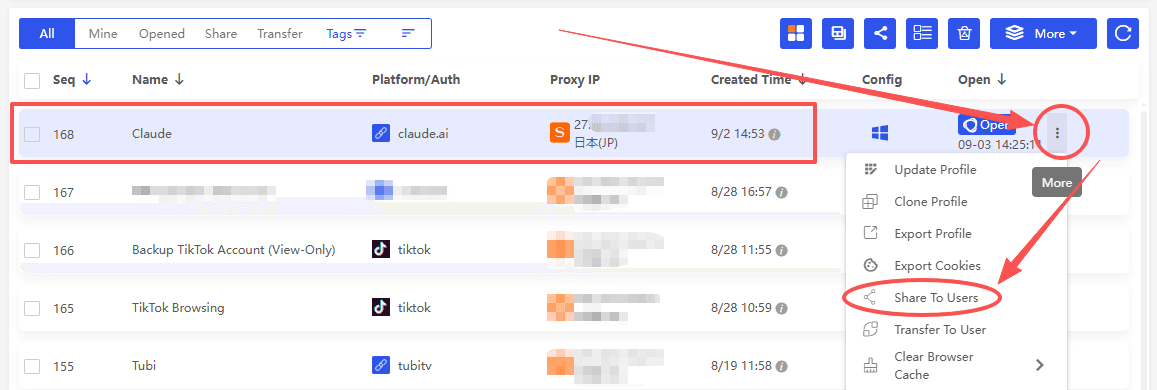
1. Go back to Browser Profiles in BitBrowser and find the Claude profile you just created.
2. Click the More menu on the right side of the profile, then select Share To Users.
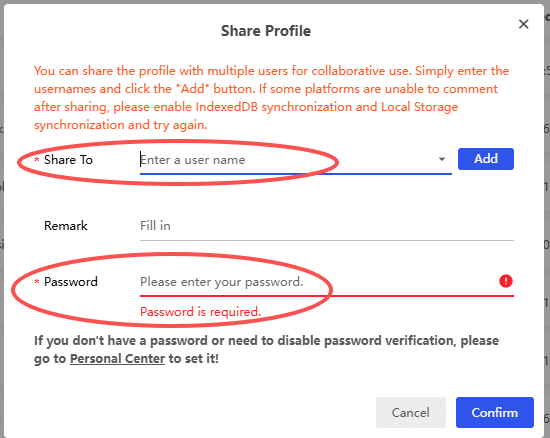
3. A Share Profile window will appear.
4. Under Share To, enter your friend's BitBrowser username.
Be careful when entering the username. Do not accidentally add spaces before or after the username, otherwise BitBrowser may not find the correct user.
5. Click Add after entering the username.
You can also add a remark if you want to leave a note about the shared profile.
Step 4: Confirm the Profile Sharing
Before clicking Confirm, BitBrowser will ask you to enter your password.
This is your BitBrowser account password, not your Claude password.
Enter the password and click Confirm.
The browser profile will then be shared with the BitBrowser user you specified.
Step 5: Your Friend Opens the Shared Claude Profile
Once the sharing process is completed, your friend can log in to their own BitBrowser account.
They should go to Browser Profiles and open the Share section.
The Claude browser profile you shared should appear there.
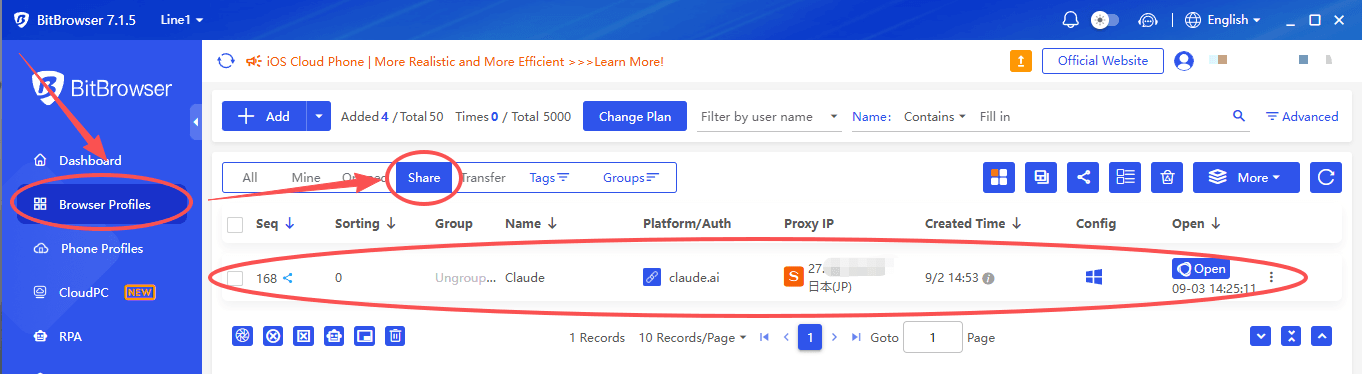
Your friend can then open the shared profile from their BitBrowser client and access the Claude session that you previously logged in to.
This means you don't have to send the Claude account password through messaging apps or email. The Claude session stays inside the browser profile, while access to that profile is managed through BitBrowser's sharing feature.
A Few Things to Check Before Sharing
There are a few details worth checking before you share a Claude browser profile.
· Use a dedicated profile. Don't use a browser profile that contains your personal email, social media accounts, payment information, or other private sessions.
· Check the proxy. Keep the proxy configuration appropriate for the Claude account's existing environment rather than randomly changing the connection location.
· Double check the BitBrowser username. Make sure there are no accidental spaces when entering the recipient's username.
· Keep your passwords private. The person receiving the profile does not need your Claude password. You also shouldn't give them your BitBrowser account password.
· Share only with someone you trust. Profile sharing gives another person access to the logged-in Claude session, so treat it as access to the account itself.
Why Choose BitBrowser for Claude Account Sharing?
If you want to share an existing Claude Pro or Max account, BitBrowser offers more control than simply sharing your login credentials.
No need to share your Claude password.
You can log in to Claude inside a dedicated Browser Profile and share the profile with another BitBrowser user instead of giving them your Claude password.
Keep your Claude environment isolated.
The dedicated profile keeps the Claude session and browser data separate from your other accounts and profiles, reducing the risk of mixing personal browsing data with the shared account.
Use a dedicated proxy.
You can configure a proxy for the Claude profile and keep the IP and location more consistent when the profile is accessed from different locations.
This may help reduce unnecessary login verification caused by frequent IP or location changes, although it cannot bypass Claude's own security checks or restrictions.
Control sharing permissions.
You can choose what the recipient is allowed to do. Basic permissions can allow them to use the profile without changing key settings such as the fingerprint or proxy.
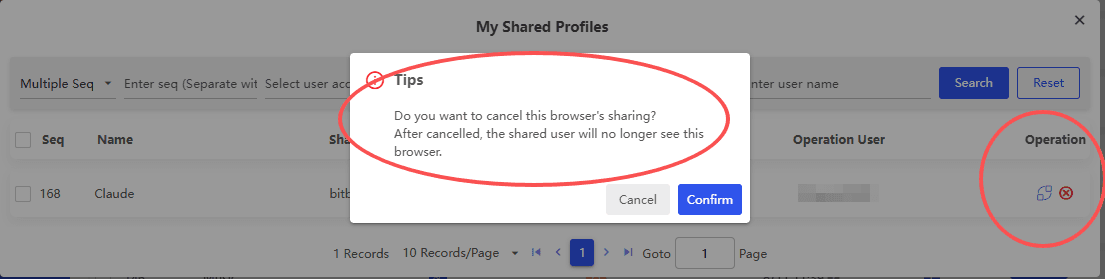
Revoke access when needed.
You can manage shared profiles and remove a user's access later, making it easier to control who can use the Claude profile and for how long.
Overall, BitBrowser lets you share access to a dedicated Claude browser environment instead of simply handing over your account password, while giving you more control over the browser environment and sharing permissions.
Other Ways to Share a Claude Pro or Max Account
1. Send a Claude Gift Subscription
If your friend doesn't need access to your existing Claude account, the cleanest official option is to give them their own Claude subscription.
Anthropic currently allows most Pro and Max users to purchase Claude gift subscriptions. You can choose Pro, Max 5x, or Max 20x and select a duration of 1, 3, 6, or 12 months. The gift can be delivered by email or as a shareable link.
The important difference is that a gift subscription does not give your friend access to your existing Claude account. Instead, they redeem the gift on their own Claude account.
Gift subscriptions expire 365 days after purchase, and the recipient does not need to provide a credit card to redeem one.
2. Use Claude Team
Team plans provide individual seats rather than having everyone use the same personal Pro or Max account. Anthropic currently requires at least two members for a Team plan.
There is an important limitation, though. The person creating the Team organization must use a business email address, and invited members must use an email address from an allowed organizational domain. Public email domains such as Gmail, Yahoo, and Hotmail cannot be used by the account creator.
So Team is more suitable for a company, organization, or group with an appropriate work email setup than for two friends simply splitting the cost of one personal subscription.
3. Share the Claude Login Directly
This requires no additional software, but it also means you're giving another person direct access to the account credentials.
There can also be practical problems with verification, password changes, recovery methods, and account security when multiple people use the same login.
If you choose this approach, at minimum, make sure you understand that you're sharing access to the entire Claude account, not just the subscription.
For privacy and account management, using a dedicated browser profile or choosing an official separate subscription is generally a better approach.
Which Claude Sharing Method Should You Choose?
The best way to share Claude Pro or Max depends on whether you want to share an existing account, give someone their own subscription, or set up access for multiple users.
If your goal is to let a trusted friend use your existing Claude account, BitBrowser offers several practical advantages over simply sharing your login credentials.
| Sharing Method | Best For | Password Sharing | Account & Browser Isolation | Proxy Support | Access Control |
|---|---|---|---|---|---|
| BitBrowser Profile Sharing | Sharing an existing Claude account | Not required | Yes | Yes | Yes |
| Claude Gift Subscription | Giving someone their own subscription | Not required | Separate account | Not applicable | Official |
| Claude Team | Teams and organizations | Not required | Individual accounts | Not the main purpose | Yes |
| Direct Login Sharing | Quick account sharing | Required | No | No dedicated environment | Limited |
Final Thoughts
If you want to let a trusted friend access an existing Claude account, a dedicated BitBrowser profile provides a practical way to keep the Claude session separated from your other browser environments and share the profile without handing over your Claude password.
If you simply want to pay for Claude for someone else, an official Claude Gift Subscription is a better fit. If several people need their own accounts under one organization, Claude Team is the appropriate official option.
The key is to choose the method based on what you're actually trying to share. Sharing a browser profile, gifting a subscription, and creating a Team organization are three very different things.
FAQs
How do I share a Claude subscription?
For an existing Claude Pro or Max account, you can use BitBrowser to share a dedicated browser profile without giving out your Claude password. If you want someone to have their own subscription, Claude Gift Subscription is another option.
How many people can use one Claude subscription?
Claude Pro and Max are designed for individual users. If multiple people need separate access, Claude Team is the official option. For personal account sharing, access should be limited to trusted users.
Can I use one Claude subscription on multiple devices?
Yes. Claude allows you to use the same account across multiple devices. You can also review and terminate active sessions from your account settings.
Can I share Claude without giving out my password?
Yes. With BitBrowser, you can log in to Claude inside a dedicated Browser Profile and share that profile with another BitBrowser user instead of sharing your Claude password.
Is BitBrowser safe for sharing a Claude account?
BitBrowser can isolate the Claude browser environment, support dedicated proxies, and provide sharing permissions. However, it does not override Claude's own security checks, usage limits, or applicable policies.
Can I stop sharing my Claude account later?
Yes. You can remove a user's access to the shared BitBrowser profile when you no longer want them to use it.

 Multi-Account Management
 Prevent Account Association
 Multi-Employee Management
Recommended
See More 



