Best VPNs for Privacy in 2026: Top Picks for Secure & Private Browsing
 2026.09.02 06:41
 YT.Shi
Online privacy is harder to maintain than ever before. Websites track your IP address, internet providers monitor your connection metadata, and apps often collect far more information than users realize. Using a VPN helps reduce this exposure by encrypting your internet traffic and masking your real IP address.
But not every VPN offers the same level of privacy protection.
A VPN provider can potentially see information about your connection, which means choosing a trustworthy service matters just as much as using one. A cheap VPN with aggressive tracking is not necessarily a better privacy tool than a paid service with a strong no-logs policy and independent security audits.
In this guide, we compare the best VPNs for privacy in 2026, focusing on logging policies, independent audits, open-source software, account privacy, security features, and overall ease of private browsing.
Best VPNs for Privacy in 2026: Quick Comparison
| Rank | VPN | Best For | Open Source | Anonymous Signup | Latest Audit | Starting Price |
|---|---|---|---|---|---|---|
| #1 | Mullvad VPN | Maximum Privacy | Yes (Full) | Yes (No email required) | 2024 (Cure53); 2023 raid confirmed no data | €5/month |
| #2 | Proton VPN | Overall Privacy & Usability | Yes (Full) | Partial (Free plan no signup; paid requires email) | 2025 (SEC Consult) | Free / $4.99/month |
| #3 | IVPN | Privacy-Focused Users | Yes (Full) | Yes (No email required) | 2025 (Cure53) | $6/month |
| #4 | NordVPN | Privacy + Speed | Partial (Linux client open-source) | No (Email required) | 2025 (Deloitte) | $3.49/month |
| #5 | ExpressVPN | Easy Private Browsing | Partial (Lightway protocol open-source) | No (Email required) | 2025 (Cure53) | $6.67/month |
| #6 | Surfshark | Budget Privacy | No (Not fully open-source) | No (Email required) | 2025 (Deloitte) | $2.99/month |
How to Chose the Best Privacy VPNs
Privacy is about more than hiding your IP address. When evaluating VPNs, we examined several factors that affect how much information a provider collects and how well the service protects your connection:
· No-logs policy – A clear privacy policy explaining exactly what is and isn't stored.
· Independent audits – Third-party verification rather than simply trusting the provider's word.
· Open-source software – Publicly available code allows the security community to inspect for vulnerabilities.
· Anonymous signup – Whether an email address or personal information is required to create an account.
· Security features – VPN Kill switch, DNS leak protection, IPv6 leak protection, and multi-hop connections.
· Price and usability – The most private VPN isn't necessarily the best for everyone.
6 Best VPNs for Privacy in 2026
Mullvad VPN
Mullvad VPN remains one of the strongest choices for users who prioritize privacy above everything else.
Key Privacy Features
- Anonymous account system – Instead of a traditional username and password tied to an email address, Mullvad generates a random account number. No email is required to create an account.
- Simple pricing – The service costs €5 per month, regardless of subscription length.
- True no-logs policy – Mullvad does not log traffic, DNS requests, connection timestamps, IP addresses, or bandwidth usage associated with individual accounts.
- Payment flexibility – Accepts traditional payment methods, several cryptocurrencies, and even cash payments by mail.
- Full open-source – All applications are open-source and publicly auditable.
Security Features
- WireGuard and OpenVPN support
- Kill switch
- DNS leak protection
- IPv6 leak protection
- Multi-hop connections
Independent Verification
Mullvad's privacy claims have been validated multiple times. In 2023, Swedish police raided Mullvad's data center seeking user information. The raid confirmed that no user data was stored – Mullvad had nothing to hand over.
The service also underwent a Cure53 audit in 2024, which verified its no-logs commitments.
Drawbacks
- Less focused on streaming and entertainment features
- Smaller server network compared to larger providers
Proton VPN
Proton VPN delivers strong privacy without sacrificing everyday usability. It's operated by Proton, the company behind Proton Mail, and is based in Switzerland, one of the world's strongest privacy jurisdictions.
Key Privacy Features
- No-logs policy – Independently verified through multiple audits.
- Full open-source – All VPN applications are open-source, allowing the security community to inspect the code.
- Secure Core – Routes traffic through specially secured Proton VPN servers before reaching the final VPN server, adding an extra layer of protection against network attacks.
- Free plan – Offers a free tier with no data limits, though it has fewer server locations and features than the paid version.
Security Features
- WireGuard and OpenVPN support
- Kill switch
- DNS leak protection
- NetShield (ad and tracker blocker)
- Multi-hop (via Secure Core)
Independent Verification
Proton VPN completed a SEC Consult audit in 2025, verifying its no-logs policy and infrastructure security. The company has a long-standing reputation for privacy protection through its other services.
Paid Plan Benefits
- Access to a larger server network (over 6,500 servers in 110+ countries)
- Higher speeds
- Streaming support
- P2P support
- Additional privacy features
Drawbacks
- Paid plan requires an email address for signup
- Free plan has limited server locations
IVPN
IVPN is a smaller VPN provider, but privacy is at the center of its product rather than being an extra feature.
Key Privacy Features
- Anonymous signup – No email address required to create an account.
- Full open-source – All applications are published as open-source software.
- Transparent approach – Clearly explains what a VPN can and cannot protect against.
Security Features
- WireGuard support
- Multi-hop connections
- Anti-tracker features
- Firewall that functions as a kill switch
Independent Verification
IVPN underwent a Cure53 audit in 2025, which verified its infrastructure security and no-logs claims.
Pricing
The Pro plan adds additional privacy and security features.
Drawbacks
- Smaller server network than major competitors
- Less focus on entertainment features like streaming
NordVPN
NordVPN combines strong privacy features with high performance and a large global network. It's an excellent choice if you want private browsing with fast connections.
Key Privacy Features
- No-logs policy – Verified through multiple independent assessments.
- NordLynx protocol – Based on WireGuard, designed for strong security and high connection speeds.
- Double VPN – Routes traffic through two VPN servers for extra encryption.
- Obfuscated servers – Helps bypass VPN blocking in restrictive regions.
Security Features
- Kill switch
- DNS leak protection
- Threat Protection (blocks malicious websites, trackers, and ads)
- Multi-hop (via Double VPN)
Independent Verification
NordVPN completed a Deloitte audit in 2025, verifying its no-logs policy. The company has also undergone several previous audits confirming its privacy commitments.
Open-Source Status
NordVPN has open-sourced its Linux client, though other applications remain closed-source.
Drawbacks
- Requires an email address for account creation
- Not fully open-source
ExpressVPN
ExpressVPN is ideal for users who want privacy protection without dealing with complicated VPN settings.
Key Privacy Features
- No-logs policy – Verified through multiple independent audits.
- Lightway protocol – A lightweight, high-performance protocol that is partially open-source.
- Automatic protection – Protects connections when joining potentially unsafe networks.
Security Features
- Lightway and OpenVPN support
- Kill switch
- DNS leak protection
- Split tunneling (on supported platforms)
Independent Verification
ExpressVPN underwent a Cure53 audit in 2025, covering various aspects of its service and infrastructure. The company publishes information about these assessments as part of its transparency efforts.
Open-Source Status
ExpressVPN has open-sourced its Lightway protocol, allowing independent security researchers to review the core technology.
Ease of Use
Apps are available across major desktop and mobile platforms, and the interface is clean and intuitive. This makes ExpressVPN particularly suitable for beginners who want to improve their privacy without configuring advanced networking options.
Drawbacks
- Generally more expensive than budget providers
- Requires an email address for signup
Surfshark
Surfshark offers strong privacy features at a lower price point, making it an attractive option for budget-conscious users.
Key Privacy Features
- No-logs policy – Verified through independent audits.
- Unlimited simultaneous connections – Protect all your devices under one subscription.
- Dynamic MultiHop – Multi-hop connections for extra privacy.
Security Features
- Kill switch
- DNS leak protection
- WireGuard support
- Additional security tools (depending on subscription)
Independent Verification
Surfshark completed a Deloitte audit in 2025, verifying its no-logs policy and infrastructure security.
Open-Source Status
Surfshark is not fully open-source. While the company has made some code available, its core applications remain closed-source.
Extra Privacy Services
Depending on the subscription, Surfshark offers additional services designed to:
- Protect personal information
- Detect data leaks
- Reduce exposure to online tracking
Drawbacks
- Requires an email address for signup
- Not open-source
- Less privacy-focused account system than Mullvad or IVPN
What Does a VPN Actually Hide?
A VPN creates an encrypted connection between your device and the VPN server. Here's what it does and doesn't hide:
What a VPN hides:
· Your IP address – Websites see the VPN server's IP instead of your real IP
· Internet traffic content – Your ISP can't see what you're browsing
· Connection metadata – Your ISP can't see which websites you're visiting
What a VPN does NOT hide:
· Your online accounts – If you log into a website, it still knows who you are
· Browser fingerprints – Cookies, tracking scripts, and device identifiers can still identify you
· Voluntary information – Any information you provide to websites
A VPN should be viewed as one part of a broader privacy strategy rather than a magic anonymity tool.
Can a VPN Make You Completely Anonymous?
No VPN can guarantee complete anonymity. A VPN can hide your IP address and encrypt your connection, but it cannot stop every form of online tracking. For stronger privacy:
· Avoid logging into personal accounts when anonymity matters
· Limit unnecessary browser permissions
· Use privacy-friendly browsers
· Keep your software updated
· Be careful about information you voluntarily share online
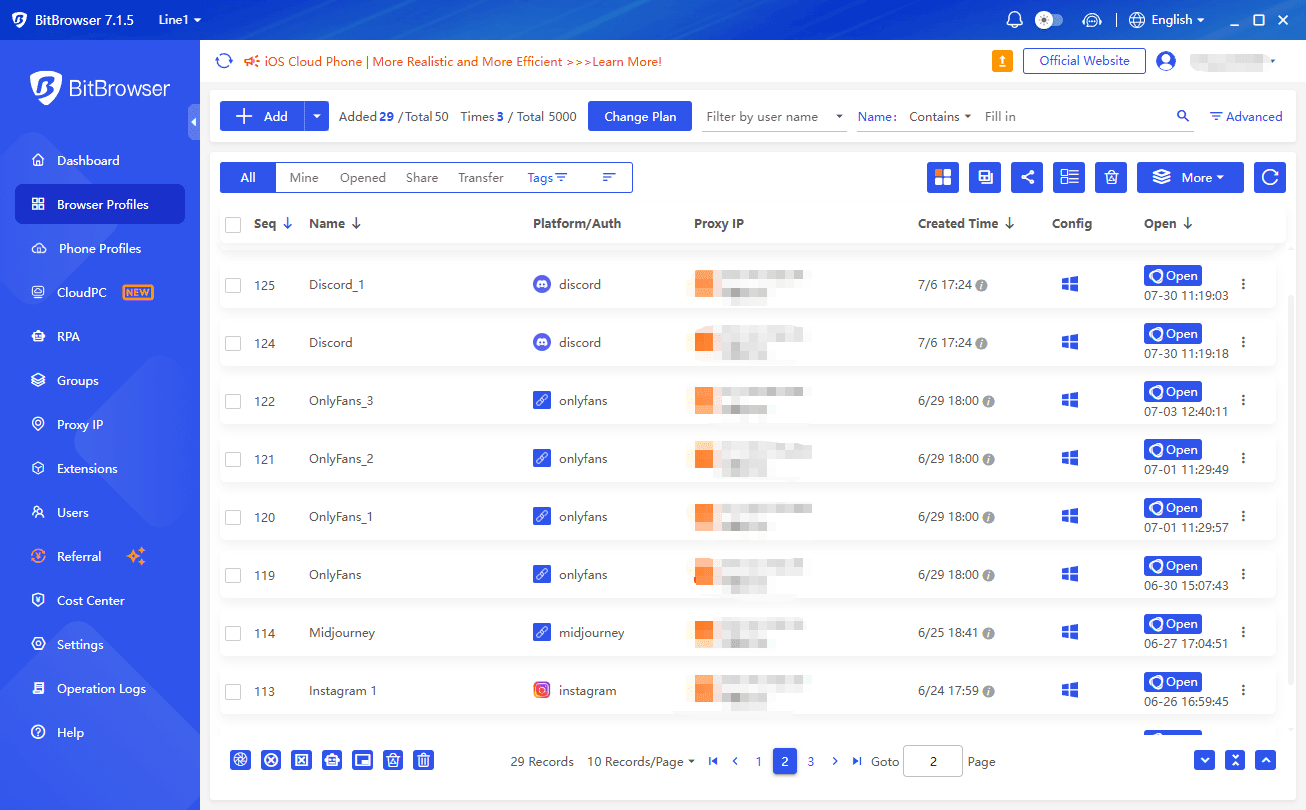
An anti detect browser adds another layer of privacy by isolating browser fingerprints, cookies, and other profile data. For example, BitBrowser can be used alongside a VPN or proxy to keep different browsing environments separate.
The VPN provider also matters. Look for a clear no logs policy and independent security audits.
How to Use a VPN for More Private Browsing
Installing a VPN is only the first step. To truly protect your privacy, you need to combine your VPN with the right browsing tools and follow a few essential best practices.
1. Choose a nearby VPN server for better performance
When speed matters, choose a VPN server close to your physical location. For SEO research or region specific content, select a server in your target location.
2. Enable the kill switch
Turn on your VPN's kill switch to prevent your connection from switching back to your normal internet if the VPN disconnects. This helps prevent accidental IP exposure.
3. Check DNS and IP leak protection
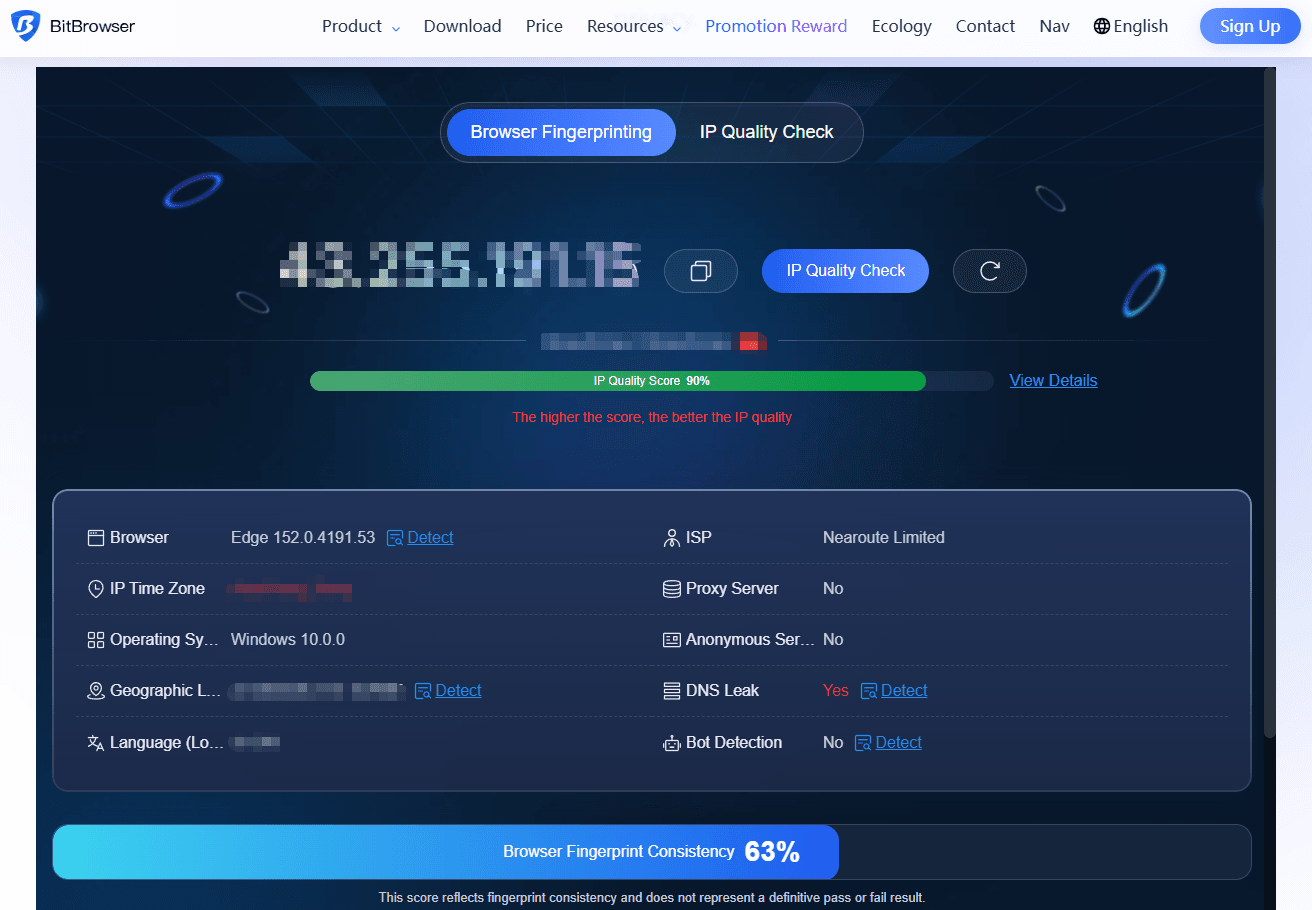
Make sure your VPN is hiding your real IP address. BitBrowser includes a built in IP Detection feature.
4. Use BitBrowser profiles flexibly
BitBrowser does not require a proxy for every profile. You can browse directly through your local network for everyday tasks and use a proxy or VPN when you need to:
· Access region restricted content
· Conduct anonymous SEO research
· Manage accounts from different locations
· Bypass geo and website blocking
Best Unblocked Browsers to Access Any Site
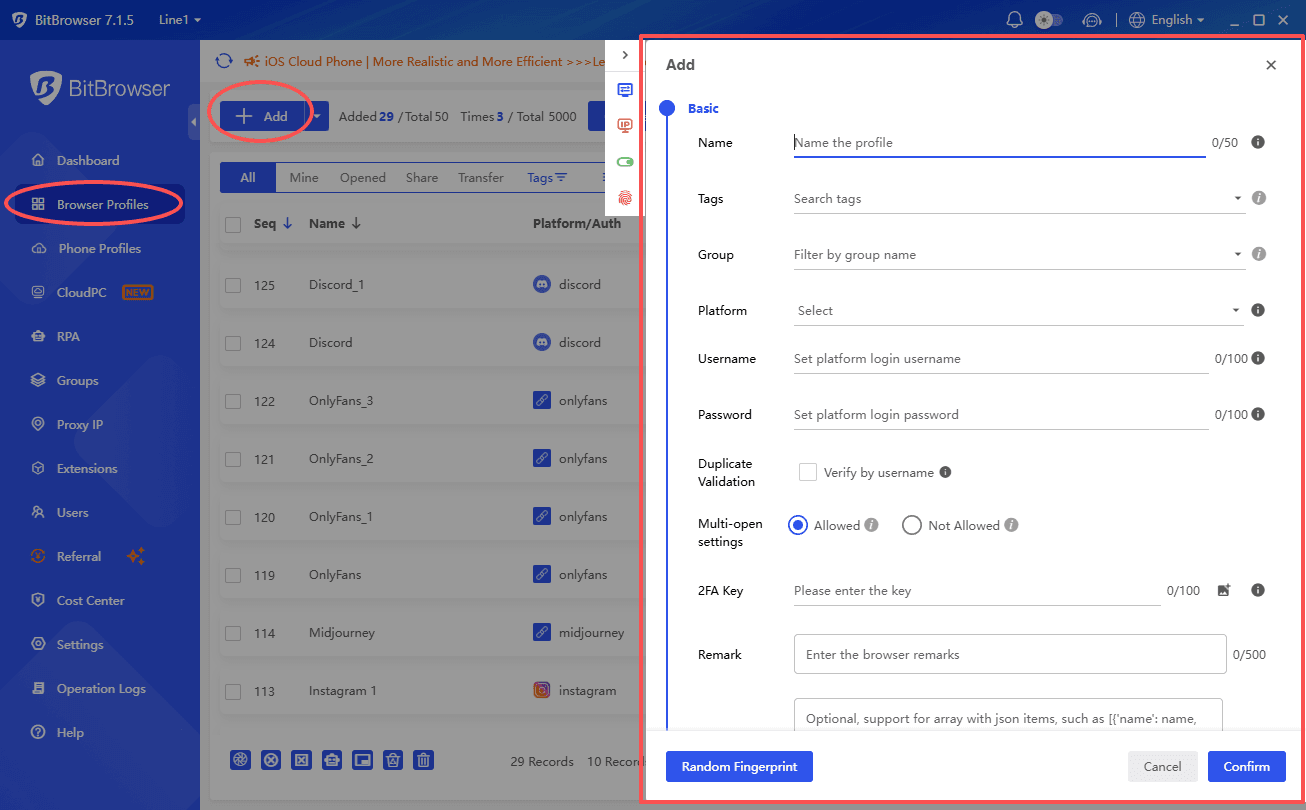
To configure a proxy in BitBrowser:
1. Open BitBrowser and go to Browser Profiles.
2. Click Add to create a profile.
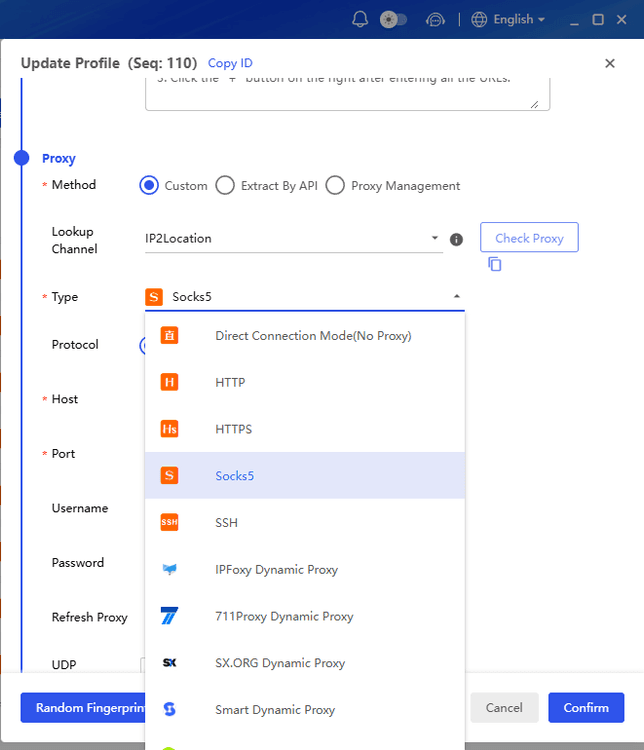
3. Select Custom Proxy under Proxy.
4. Choose HTTP, HTTPS, or SOCKS5.
5. Enter the proxy host, port, username, and password.
6. Click Proxy Detection to test the connection.
7. Save and launch the profile.
5. Enable multi hop when needed
For more sensitive activities, multi hop or double VPN routes your traffic through two servers for an additional layer of protection.
6. Match your browser fingerprint to your proxy location
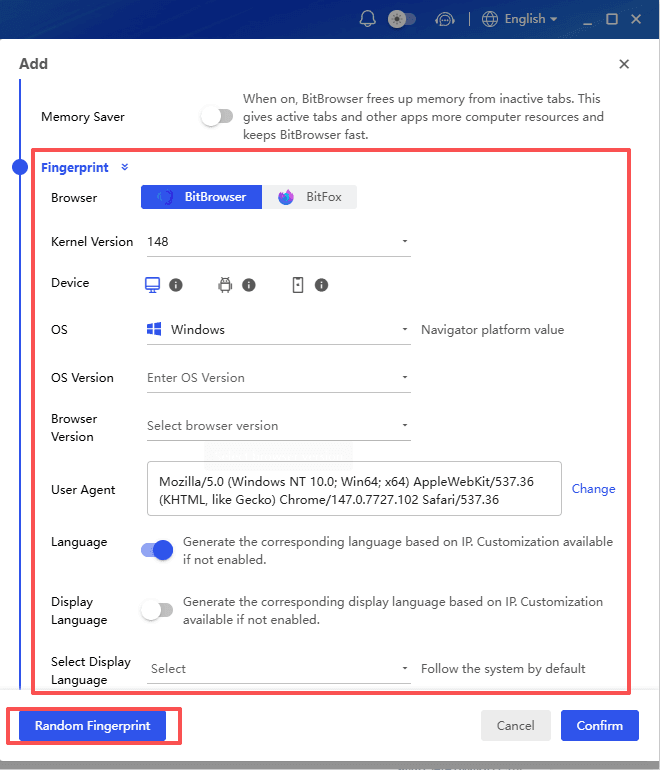
BitBrowser supports more than 30 browser fingerprint parameters, helping each profile appear as a separate device whether you use a proxy or connect directly.
When using BitBrowser with a VPN or proxy, make sure the time zone, language, and other fingerprint settings are consistent with the IP location. This helps maintain a consistent browsing identity.
7. Avoid personal accounts when anonymity matters
If anonymity is important, avoid logging into personal accounts. For multi account management, BitBrowser keeps each profile in an isolated environment, helping prevent accounts from being linked through shared browser data.
Final Verdict
The best VPN for privacy depends on how much anonymity and convenience you want.
| VPN | Best For |
|---|---|
| Mullvad VPN | Maximum privacy – our top choice for privacy-focused users |
| Proton VPN | Best overall – strong privacy with excellent everyday usability |
| IVPN | Privacy-focused users who prefer a smaller provider |
| NordVPN | Privacy + speed + large server network |
| ExpressVPN | Easy private browsing for beginners |
| Surfshark | Budget-friendly privacy with unlimited devices |
Ultimately, choosing a private VPN is less about finding the service with the biggest server count and more about deciding who you trust with your connection data. A clear no-logs policy, independent verification, strong security features, and minimal data collection are much more meaningful indicators of a privacy-focused VPN.

 Multi-Account Management
 Prevent Account Association
 Multi-Employee Management
Recommended
See More 



