How to Manage Multiple Facebook Marketplace Workspaces in 2026
 2026.09.22 17:58
 petro
Facebook Marketplace can be straightforward when one person manages a few listings. The workflow becomes much more demanding when an agency, e-commerce company, virtual assistant team, or Marketplace manager needs to handle multiple authorized projects, product catalogs, messages, employees, and browser sessions.
Platforms such as BitBrowser provide separate browser profiles, team management, bulk operations, automation tools, API access, and cloud-device options that can make these workflows easier to organize.
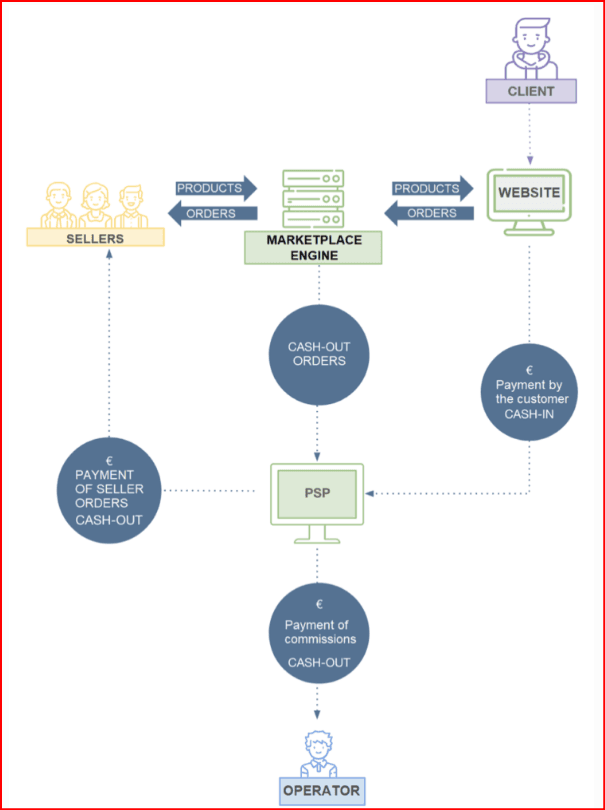
Why Marketplace Teams Use Separate Browser Workspaces
Why Facebook Marketplace Management Gets Difficult at Scale
A professional Marketplace manager faces very different challenges from an occasional seller. An agency may work with several clients, while an e-commerce company may have different brands, product categories, departments, and employees.
The real objective is therefore not simply opening more tabs. It is creating an organized environment where the correct team member can access the correct authorized project without mixing it with another workspace.
What Is a Facebook Marketplace Workspace?
For professional management purposes, a workspace can represent the complete browser environment assigned to one legitimate project, client, brand, or internal team.
| Workspace | Project | Assigned To | Status |
|---|---|---|---|
| Profile 01 | Furniture Store | Marketplace Manager | Active |
| Profile 02 | Electronics Client | Employee B | Active |
| Profile 03 | Automotive Client | Team Leader | Review |
| Profile 04 | Home & Garden | VA Team | Active |
Create a Separate Browser Profile for Each Workspace
Instead of repeatedly logging different projects in and out of the same standard browser, teams can maintain dedicated browser profiles. Each profile can preserve its own cookies, sessions, local storage, extensions, bookmarks, and configuration.
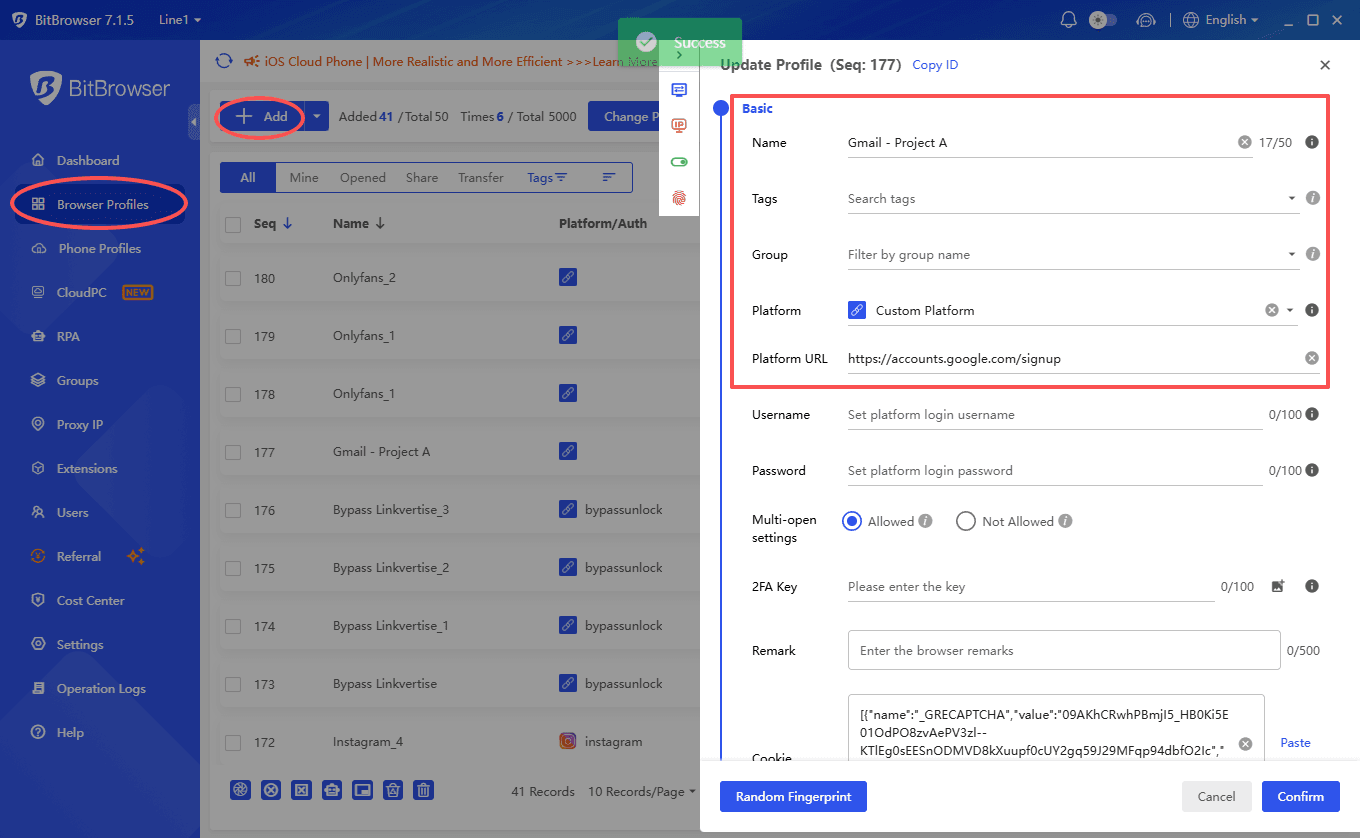
Using BitBrowser for Marketplace Workspace Management
The BitBrowser multi-account browser provides a centralized environment for managing independent browser profiles, teams, proxies, browser data, and automation workflows.
✓ Independent Profiles
Separate browser sessions and project environments.
✓ Groups & Tags
Organize large profile libraries by client, project, or status.
✓ Team Permissions
Assign appropriate access to employees and team members.
✓ RPA & API
Automate appropriate repetitive administrative workflows.
✓ Window Synchronization
Coordinate selected actions across controlled workspaces.
✓ Cloud Ecosystem
Combine browser profiles with cloud-phone and cloud-PC workflows.
3. Organize Profiles With Groups, Tags & Clear Names
Creating browser profiles is only the first step. A Marketplace team also needs a consistent naming system.
FBM-AUTO-CA-01
FBM-ELECTRONICS-UK-01
FBM-HOME-DE-01
A consistent format makes it easier to recognize the platform, client, country, department, and workspace number without opening each profile.
4. Give Employees Only the Access They Need
An employee handling one client should not automatically receive access to every project inside the company.
Administrator
Profile creation, employee management, settings, permissions, and operational oversight.
Team Leader
Access assigned projects, supervise staff, and review operational work.
Marketplace Assistant
Work only with designated profiles and resources required for assigned tasks.
5. Keep Sessions and Cookies Organized
Persistent browser profiles can reduce the need to repeatedly sign out of one project before opening another.
Monday: Employee works in Client A's dedicated profile.
Tuesday: Employee opens Client B's separate workspace.
Wednesday: Employee returns to Client A without intentionally mixing Client B's browser workspace.
6. Configure Network Settings Consistently
Multi-profile browsers commonly allow a network or proxy configuration to be assigned to an individual workspace. This can be useful for authorized remote infrastructure, legitimate testing, distributed teams, and similar business use cases.
7. Automate Repetitive Administrative Tasks
RPA can be valuable when a task is repetitive, predictable, and based on clear rules.
Good Automation Candidates
Tasks involving negotiation, customer complaints, product accuracy, compliance decisions, or unusual situations generally benefit from human review.
8. Consider Cloud Phones for Mobile Marketplace Workflows
Facebook Marketplace is not exclusively a desktop workflow. Some teams may also require legitimate access to mobile applications and mobile-oriented processes.
| Requirement | Browser Profile | Cloud Phone |
|---|---|---|
| Desktop web workflows | Excellent | Possible |
| Android applications | No | Yes |
| Persistent environment | Yes | Yes |
| Team management | Yes | Yes |
| Physical phone required | No | No |
9. Connect Browser Workflows With APIs
Larger teams may eventually want to integrate browser-profile management with their CRM, project-management tools, internal dashboards, or other approved systems.
10. MCP and AI-Assisted Browser Management
Newer browser-management platforms are also beginning to connect with AI-assisted workflows through technologies such as Model Context Protocol (MCP).
AI + Browser Management
MCP integrations can potentially help teams coordinate repetitive browser-management tasks while retaining human review for customer communication, listings, compliance, and business decisions.
11. Maintain an Activity Trail
When several employees work remotely, managers need visibility into important operational changes.
Useful questions for managers:
- Who accessed the workspace?
- Who modified the profile configuration?
- When was a network setting changed?
- Which team member had access?
- Which automation workflow was executed?
Example Facebook Marketplace Agency Workflow
01 — Create the Client
02 — Create the Workspace
03 — Name & Tag the Profile
04 — Assign the Employee
05 — Document Responsibilities
06 — Review & Archive
Common Marketplace Management Mistakes
✕ Sharing One Master Password
Creates unnecessary security and accountability risks.
✕ Mixing Projects
Makes troubleshooting, training, and accountability harder.
✕ Random Profile Names
Names such as Profile 43 provide little operational context.
✕ Giving Everyone Full Access
Employees should receive only the permissions required for their work.
Marketplace Team Security Checklist
Standard Browser vs Multi-Profile Browser
| Feature | Standard Browser | Multi-Profile Browser |
|---|---|---|
| Independent workspaces | Limited | Yes |
| Profile groups & tags | Basic | Advanced |
| Team permissions | Limited | Available |
| Bulk management | No | Yes |
| RPA/API capabilities | External tools | Available on selected platforms |
Is BitBrowser Useful for Facebook Marketplace Managers?
For agencies and teams that need more organization than a standard browser provides, BitBrowser brings several relevant tools into one ecosystem.
The platform is most useful when treated as an organization, access-management, testing, and productivity tool—not as a substitute for complying with Facebook Marketplace requirements.
Frequently Asked Questions
Can I manage multiple Facebook Marketplace workspaces from one computer?
A multi-profile browser can keep separate authorized browser environments on the same computer, allowing each profile to maintain its own cookies, session data, and configuration.
Is BitBrowser suitable for team management?
BitBrowser includes team and sub-account functionality that can help companies organize profile access and employee responsibilities.
Can Marketplace workflows be automated?
Appropriate repetitive administrative tasks can be automated through technologies such as RPA and APIs, provided the resulting activity complies with applicable platform rules.
Do Marketplace managers need cloud phones?
Not always. Desktop profiles may be sufficient for many workflows. Cloud phones become more relevant when legitimate mobile-app access is an important part of the operation.
Can a browser guarantee that a Marketplace account will never be restricted?
No. Browser software cannot guarantee immunity from reviews or restrictions. Businesses remain responsible for complying with Meta's applicable policies and using legitimate authorized accounts.
Final Thoughts
Managing Facebook Marketplace professionally is ultimately an operational-management challenge. As teams grow, they need better ways to separate client environments, preserve sessions, assign responsibilities, manage mobile workflows, and reduce repetitive administrative work.
Teams looking for a centralized environment can explore BitBrowser for browser-profile organization, team collaboration, automation, API access, synchronization, and cloud-device workflows.

 Multi-Account Management
 Prevent Account Association
 Multi-Employee Management
Recommended
See More