n8n Social Media Automation with BitBrowser: 2026 Guide
 2026.08.16 23:38
 emilos
How to Build Multi-Account Social Media Automation with n8n and BitBrowser
by Neura Market
Publishing across multiple social accounts sounds simple until the operation grows beyond a few profiles. A team managing LinkedIn, X, and Reddit accounts must coordinate content generation, brand voices, approvals, credentials, schedules, platform rules, failed posts, and performance data. Adding more accounts without adding structure usually creates more mistakes — not more reach.
A better approach is to separate the system into two layers:
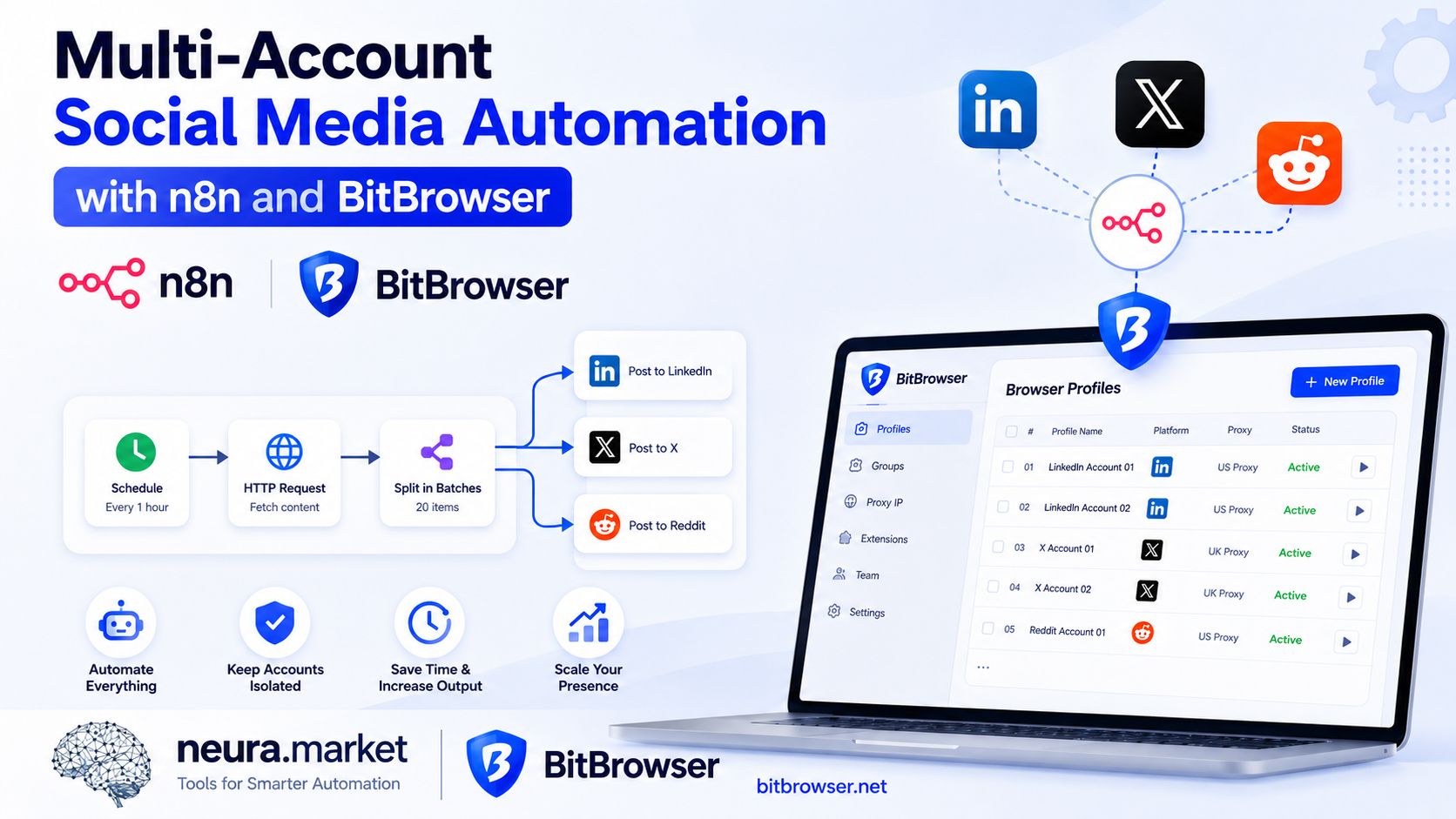
n8n acts as the orchestration layer, controlling data, AI generation, approvals, scheduling, routing, and reporting.
BitBrowser acts as the browser workspace layer, keeping authorized accounts, sessions, cookies, and operator environments organized in isolated profiles.
Together, these tools can support a controlled multi-account social media workflow without reducing the operation to indiscriminate mass posting. This guide explains how to design that system for 20 authorized social accounts distributed across 10 BitBrowser profiles.
Part 1 — Why Multi-Account Automation Usually Breaks
Most automation failures are architecture failures. Teams often begin with a workflow that takes one article, sends it to an LLM, and publishes the resulting caption everywhere. That may work during a test, but it becomes unreliable at scale.
Common problems at scale
• The same caption appearing across unrelated accounts
• LinkedIn copy being reused unchanged on Reddit
• Content publishing under the wrong brand
• Expired credentials stopping the entire workflow
• Duplicate posts after a retry
• LLM-generated claims being published without review
• One platform's rate limit delaying every other platform
• Operators opening the wrong account in the wrong browser session
• No record of which prompt, source, or account produced a post
A scalable system needs to know more than what to post. It must also know which brand owns the content, which account should receive it, which platform format is required, whether approval is mandatory, which credentials and browser workspace belong to the account, when the account is permitted to publish, and what should happen if publishing fails. That requires a structured content pipeline rather than a single oversized automation.
Part 2 — The Recommended Architecture
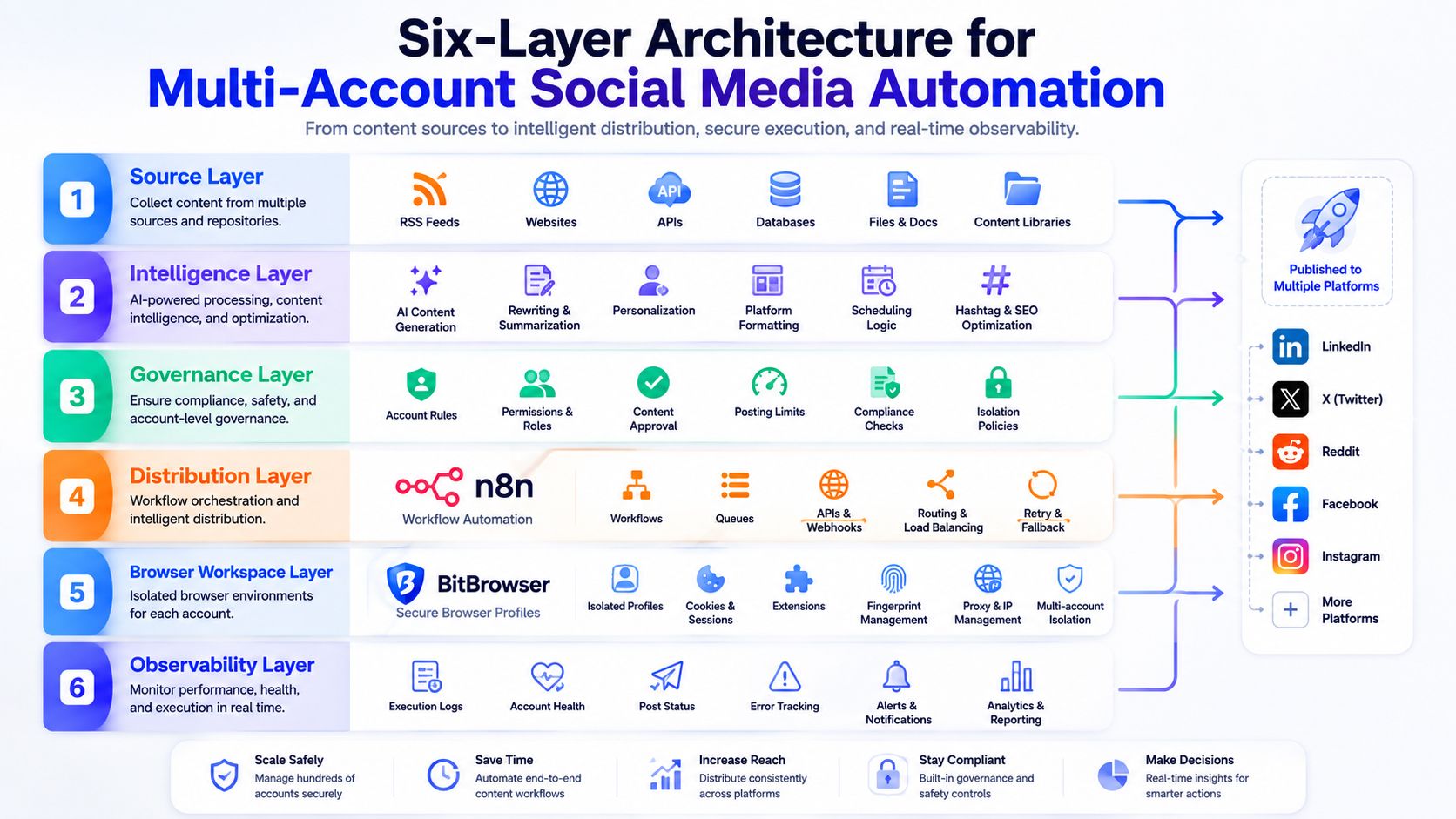
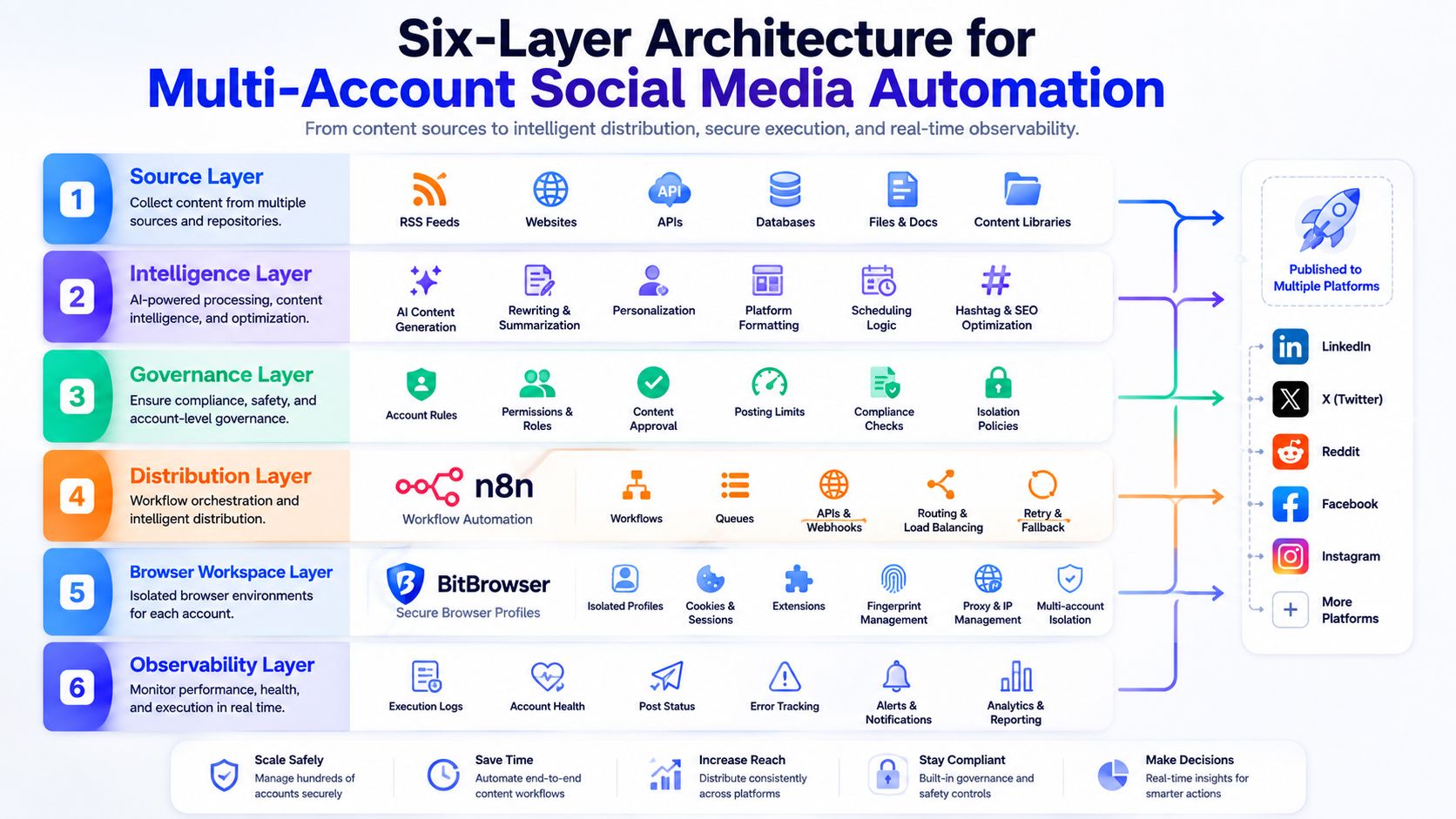
A reliable n8n social media automation system can be divided into six layers.
| Layer | Responsibility | Example |
|---|---|---|
| Source layer | Supplies approved content ideas | Blog posts, RSS feeds, research, product updates |
| Intelligence layer | Classifies and transforms content | LLM summarization, scoring, platform adaptation |
| Governance layer | Applies brand and publishing rules | Approval gates, prohibited claims, duplicate checks |
| Distribution layer | Routes and publishes content | LinkedIn, X, Reddit, scheduling APIs |
| Browser workspace layer | Separates authorized account sessions | BitBrowser profiles, permissions, cookies |
| Observability layer | Records outcomes and errors | Published URLs, status logs, alerts, analytics |
The key design principle is separation of responsibility. n8n should decide what happens and when. The LLM should generate or classify content within defined constraints. Publishing APIs should handle supported posting actions. BitBrowser should provide clean, separated environments for account access, verification, and authorized browser-based tasks.
A note on the intelligence layer: as more of this tier moves from raw API calls to model-context integrations, the connection between your workflow and your internal systems becomes a component rather than custom code. A directory of available MCP servers is a reasonable place to check what already exists before writing your own connector for a CRM, database, or analytics source the classifier needs to read.
Reference Design: 20 Accounts Across 10 BitBrowser Profiles
A practical configuration is to treat each BitBrowser profile as a brand or client workspace rather than automatically creating a different profile for every social network.
| BitBrowser profile | Brand workspace | Connected accounts |
|---|---|---|
| Profile 01 | Brand A | LinkedIn, X |
| Profile 02 | Brand B | LinkedIn, Reddit |
| Profile 03 | Brand C | X, Reddit |
| Profile 04 | Brand D | LinkedIn, X |
| Profile 05 | Brand E | LinkedIn, Reddit |
| Profile 06 | Brand F | X, Reddit |
| Profile 07 | Brand G | LinkedIn, X |
| Profile 08 | Brand H | LinkedIn, Reddit |
| Profile 09 | Brand I | X, Reddit |
| Profile 10 | Brand J | LinkedIn, X |
This produces 20 accounts across 10 separated brand environments. The exact ratio is not important. What matters is maintaining an explicit mapping between every social account and its corresponding brand, credentials, publishing rules, and BitBrowser profile.
A central account registry should contain fields such as:
account_id            brand_voice_id
brand_id              approval_required
platform              posting_window
bitbrowser_profile_id daily_post_limit
credential_alias      account_status
Do not store raw passwords in a spreadsheet. Use n8n's credential system or an appropriate secrets manager and store only the internal credential reference in the account registry.
Step 1 — Create a Controlled Content Intake System
The workflow should begin with approved source material — not an instruction to "find something viral and post it."
Strong content inputs
• Newly published company articles
• Approved research reports
• Product announcements
• Podcast and YouTube transcripts
• RSS feeds from trusted sources
• Manually submitted campaign briefs
• Curated industry trends
Each content item should receive a unique content_id and be stored with its source URL, topic, owner, publication date, and usage rights.
For teams starting with existing articles, Neura Market offers an n8n workflow for converting web articles into platform-specific social posts. A prebuilt workflow can supply the initial structure, while account routing and governance rules can be added for a larger BitBrowser-based operation.
What the source layer should reject
• Previously processed URLs
• Content older than the campaign permits
• Sources outside the approved domain list
• Items missing a clear brand or account assignment
• Material that cannot be attributed or verified
This prevents poor inputs from becoming polished-looking but unreliable AI posts.
Step 2 — Score Content Before Generating Anything
Not every source should become a post for every account. Before copy generation, use deterministic rules or an LLM classification step to score each item against brand relevance, audience relevance, timeliness, originality, commercial intent, platform suitability, evidence quality, and reputational risk.
The classifier should return structured data rather than an open-ended explanation:
{
  "brand_relevance": 0.91,
  "audience_relevance": 0.84,
  "timeliness": 0.77,
  "platform_fit": {
    "linkedin": 0.92,
    "x": 0.80,
    "reddit": 0.54
  },
  "requires_human_review": true,
  "risk_flags": ["unverified_statistic"],
  "recommended_action": "review"
}
A threshold-based router can then determine whether the item should be rejected, held for review, or moved to content generation. This is much safer than allowing the LLM to decide and publish in one step.
Scoring quality depends almost entirely on prompt quality, and a classifier prompt is a different craft from a copywriting prompt. Teams that would rather adapt tested scoring and generation prompts than write ten brand voices from scratch can start from a structured prompt library and modify from there.
Step 3 — Generate Platform-Native Content
A multi-platform workflow should create a distinct output for each network.
LinkedIn content generally benefits from a clear opening insight, professional context, short readable paragraphs, a practical takeaway, and a restrained call to action.
X
X requires a concise hook, one primary idea, minimal formatting, and a clear link or action — with optional thread structure when the subject needs more context.
Reddit requires the most contextual adaptation. A post should match the specific community's subject and rules, provide value before promotion, avoid corporate-sounding boilerplate, disclose relevant affiliations, invite discussion, and be reviewed by a person familiar with the community.
Posting the same promotional caption to multiple subreddits is not a content strategy. Reddit content should be created for a particular community and published only when it belongs there.
At 20 accounts, the routing logic behind "which brand, which platform, which voice" grows past what a fixed set of IF nodes handles cleanly. This is the point where an agent-based step — one that reads the account registry and decides which accounts a given source item should reach and in what form — becomes easier to maintain than the branching alternative. Prebuilt AI agents can supply that decision layer without building the reasoning loop from scratch.
Use a Structured Prompt Contract
The LLM should receive a defined contract containing source material, brand voice, target audience, platform, objective, factual claims that may be used, claims that may not be made, required disclosure, link policy, length range, examples of approved content, and a required output schema.
A useful output format:
{
  "hook": "",
  "body": "",
  "cta": "",
  "link": "",
  "hashtags": [],
  "source_claims": [],
  "risk_flags": [],
  "confidence": 0
}
Structured output makes validation easier and reduces the chance that formatting commentary or invented information reaches the publishing step.
Step 4 — Validate and Deduplicate the Output
AI generation should be followed by a separate validation stage. The validator should check required fields, character limits, missing disclosures, unsupported numerical claims, prohibited terms, unapproved links, excessive similarity to previous posts, repeated hooks across accounts, brand-voice mismatch, and accidental mentions of another client or brand.
Similarity checks are particularly important. Prompting an LLM to "make each caption unique" does not guarantee meaningful variation. Store normalized versions of previous posts and compare new drafts against them. If similarity exceeds the chosen threshold, send the item back for regeneration or human review.
Step 5 — Add Human Approval Where It Matters
Full automation is not always the most efficient form of automation. A short approval step can prevent a much longer cleanup process.
When approval should be required
• A post contains factual or numerical claims
• The source is external
• The brand operates in a sensitive industry
• The content discusses a competitor
• The post is intended for Reddit
• The LLM returns a risk flag
• The account is new or strategically important
• The post includes a direct commercial offer
n8n supports human approval before AI tools perform selected actions. Approval requests can be routed to the responsible editor through an appropriate messaging or collaboration channel.
The approval record should include the approver, timestamp, original draft, final edited draft, source material, destination account, and scheduled publication time. This creates accountability and makes future prompt improvements measurable.
Step 6 — Publish Through the Correct Channel
Use official platform APIs or approved scheduling integrations whenever they support the required action. The publishing router should select the destination based on the account registry:
1. Receive an approved content object.
2. Retrieve its account_id and platform.
3. Load the corresponding credential reference.
4. Check the account's publishing window and limits.
5. Send the post through the designated platform integration.
6. Store the returned post ID and URL.
7. Verify that publication succeeded.
8. Update the content object to PUBLISHED.
A useful workflow state model is:
DRAFT -> VALIDATED -> APPROVED -> QUEUED -> PUBLISHED -> VERIFIED
Failed items should move to RETRY_PENDING, CREDENTIAL_REVIEW, MANUAL_REVIEW, or REJECTED. This prevents an uncertain execution from being treated as a successful post.
Step 7 — Use BitBrowser as the Account Workspace Layer
BitBrowser adds value where multi-account operations become difficult to organize in a normal browser. Each profile can preserve its own cookies, storage, account sessions, extensions, and workspace configuration.
When an operator should open the correct profile
• Reviewing an account before publication
• Renewing an expired login
• Confirming that a post rendered correctly
• Handling a platform action that is not available through the API
• Responding manually to legitimate comments
• Troubleshooting a failed publishing integration
• Giving an approved team member access to a specific client workspace
BitBrowser's Local Service Guide describes how browser functions can be accessed through its Local API. Its RPA usage documentation covers browser-based repetitive task automation.
Bridge design when n8n and BitBrowser run in different environments
Do not expose a local browser API directly to the public internet. Use a controlled local bridge, authenticated internal service, VPN, or job runner that accepts a narrowly defined command and returns the result. The command should identify the exact profile and permitted operation:
{
  "job_id": "job_18427",
  "profile_id": "profile_brand_a",
  "action": "open_for_review",
  "content_id": "content_7281",
  "requested_by": "n8n",
  "expires_at": "2026-08-16T18:30:00Z"
}
The browser layer should not be treated as an unrestricted executor. Limit available actions, authenticate every request, and log which profile was opened, by whom, and why.
Step 8 — Control Rate Limits and Concurrency
Twenty accounts do not need to publish simultaneously. Use separate queues by platform so that a temporary LinkedIn issue does not stop X or Reddit processing. Add account-specific limits and stagger scheduled posts based on each brand's audience and campaign plan.
n8n supports batching and delays for handling external service limits. Its rate-limit documentation explains how requests can be divided into controlled batches.
Reliable retry policy elements
• Exponential backoff
• A maximum retry count
• Idempotency keys
• Platform-specific error handling
• Credential-expiry detection
• A dead-letter queue for unresolved items
Idempotency is essential. If a publishing request times out after the platform accepts it, a blind retry may create a duplicate post. Before retrying, search the execution log or platform response data for the original content ID.
Step 9 — Monitor Outcomes, Not Just Activity
The goal is not to maximize the number of automated posts. It is to increase useful output without losing quality or control.
Operational metrics
Publish success rate, approval rate, average editing time, duplicate rejection rate, failed credential rate, average workflow duration, cost per approved post, manual-intervention rate.
Content metrics
Click-through rate, qualified referral traffic, saves and meaningful comments, conversion-assisted sessions, engagement by content theme, performance by platform and brand voice, unfollow or negative-feedback rate.
The most useful optimization loop
1. Identify which approved content performs well.
2. Find the common source, topic, structure, and audience characteristics.
3. Update scoring rules and prompts.
4. Test the revised process on a limited account group.
5. Expand only after results improve.
This creates compounding operational knowledge rather than merely producing more captions.
What the Economics Actually Look Like
Before committing build time, price the current process. Across 20 accounts, a realistic figure for sourcing, drafting, adapting per platform, reviewing, publishing, and logging is 15 minutes per account per publishing day. Over a five-day week, that is roughly 108 hours per month.
A system built as described here does not remove all of it. Approval gates are deliberately human, and they should stay that way. What it removes is sourcing, first-draft generation, platform adaptation, formatting, scheduling, publishing, verification, and reporting — in practice around 60–65% of the total.
| Item | Monthly |
|---|---|
| Labor recovered (~68 hrs at a $25 blended rate) | +$1,700 |
| Self-hosted n8n on a small VPS | −$20 to −$40 |
| Model API costs (scoring, generation, similarity — roughly 400 posts) | −$30 to −$60 |
| Browser profile and proxy tooling | varies by plan |
| One-time build | 30–50 hours |
Payback lands inside the first two months in most configurations, but the recurring saving is not the real return. The return is that account 21 costs almost nothing to add. Linear labor cost is what caps an operation's size; removing it moves the cap.
Run your own numbers before building — an automation ROI calculator will tell you in a few minutes whether the payback period justifies the build. If it exceeds a quarter, build a smaller piece first: usually the monitoring and reporting layer, which is read-only and cannot damage anything.
Build Versus Buy
Building every workflow from an empty n8n canvas offers complete control, but it also requires time for credential handling, routing, error management, structured outputs, and testing.
Platform choice matters more at this volume than it does in a pilot. An operation running 20 accounts through scoring, generation, validation, and publishing fires tens of thousands of steps a month, and per-task pricing scales directly with that. Self-hosting also puts the orchestrator on the same network as the browser client, which matters for local API access. The n8n vs Zapier comparison covers where each platform stops making sense.
Teams that want a faster starting point can browse production-ready n8n workflow templates and adapt the closest workflow to their account registry, approval process, and BitBrowser profile structure.
Whether the workflow is built or imported, test it in stages: one source, one brand, one account, one platform, one approval route, one publishing action. After it passes, expand to a small account group before enabling the complete operation.
Common Mistakes to Avoid
One prompt for every brand
A single generic prompt gradually erases the differences between brands. Within a few weeks, every account sounds like the same mid-tier marketing consultant. Maintain separate voice instructions, audience definitions, approved examples, and prohibited claims per brand, and version them so you can tell which revision produced which results.
Publishing immediately after generation
Generation and publication should never be the same unreviewed action for content that carries factual claims, commercial offers, or brand risk. The cost of a review step is measured in minutes. The cost of retracting a published claim across a client's audience is measured in trust, and it does not fully recover.
Treating every platform identically
LinkedIn, X, and Reddit differ in format, audience expectation, and tolerance for promotion. Superficially rewriting one caption into three is not adaptation — it produces content that reads as slightly wrong everywhere. Generate from the source material for each platform independently.
Automating engagement
Automated replies, votes, reactions, and manufactured conversations create platform and brand risk out of proportion to any benefit, and they are the fastest route to enforcement action against accounts you have invested in. Automate production and distribution. Keep engagement human-led.
Scaling before measuring
If one workflow produces repetitive or low-performing content, connecting 20 accounts multiplies the problem rather than solving it. Prove the output is worth publishing on one brand before the system is allowed to publish for ten. The same applies to failed executions — a silent failure at one account becomes an invisible failure at twenty.
FAQs (Frequently Asked Questions)
Does BitBrowser replace n8n?
No. They solve different problems. n8n coordinates workflow logic, data, AI services, approvals, APIs, and reporting. BitBrowser manages separated browser profiles and authorized account environments.
Does n8n replace a social media scheduler?
It can perform many scheduling and publishing functions, but the better question is whether the team needs custom logic. n8n is most valuable when content must pass through scoring, transformation, approval, routing, and reporting before publication.
Should every social account have a separate BitBrowser profile?
Not necessarily. A profile can represent a brand or client workspace containing authorized sessions for multiple platforms. The correct structure depends on ownership, team permissions, operational separation, and account risk.
Can the same content be published to every platform?
The underlying idea can be reused, but the final post should be adapted to the platform and audience. Reddit in particular requires community-specific context and review.
Can this architecture support more than 20 accounts?
Yes, provided the workflow uses queues, account-level rules, controlled concurrency, reliable logging, and appropriate platform integrations. Cost per account falls as the system grows, since the build cost is fixed and only model and infrastructure spend scale. Scale should follow successful testing — not precede it.
Final Takeaway
The most effective multi-account social media automation system is not the one that publishes the most content with the fewest clicks. It is the one that reliably sends the right content, in the right format, to the right authorized account — with a clear record of how and why it was published.
n8n provides the orchestration needed to collect, evaluate, generate, approve, distribute, and measure content. BitBrowser provides the separated browser workspaces needed to organize account access, maintain operational clarity, and support human review.
Combine them with structured data, platform-native copy, approval gates, controlled publishing, and transparent logging. The result is not merely an auto-posting workflow. It is a manageable content operations system.
Neura Market is an AI automation marketplace offering ready-to-deploy workflows, workflow packs, prompts, and AI agents for n8n, Make, Zapier, Activepieces, and Pipedream.

 Multi-Account Management
 Prevent Account Association
 Multi-Employee Management
Recommended
See More 



