Seedance AI Video Workflow: How to Scale Content Across Multiple Accounts in 2026
 2026.06.28 00:03
 petro
petroShort-form video has become one of the most important content formats for brands, creators, agencies, and affiliate marketers. Platforms like TikTok, Instagram Reels, YouTube Shorts, Facebook Reels, and X video reward frequent publishing, fast testing, and consistent creative output.
The challenge is that producing video at scale is difficult. Every account needs different hooks, captions, visuals, formats, styles, and posting angles. A single creator may manage one or two pages, but agencies and marketing teams often manage many accounts across different niches, regions, and campaigns.
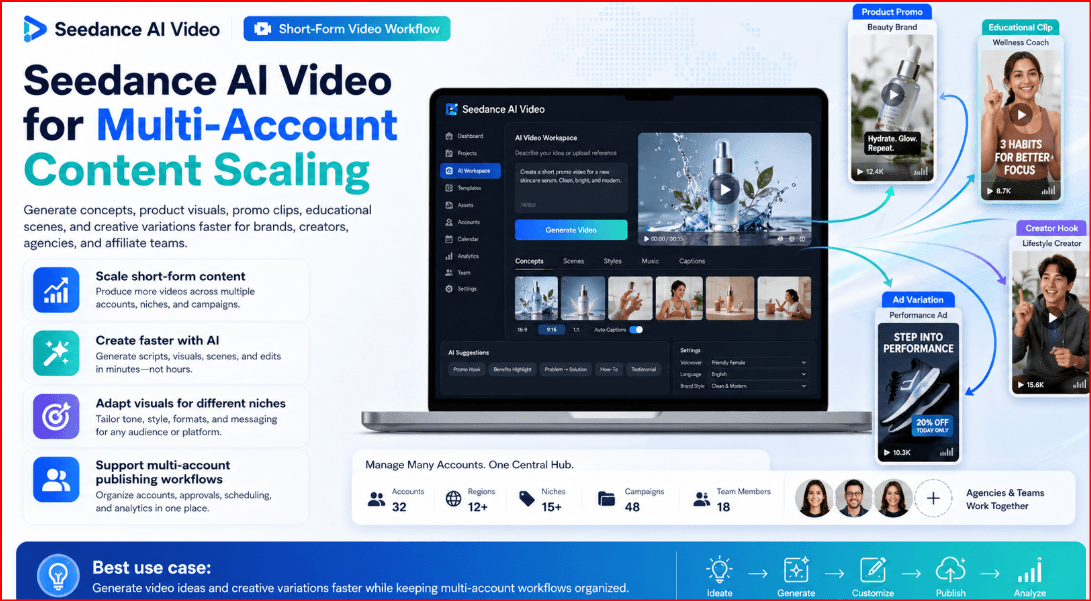
This is where AI video tools such as Seedance AI Video can become useful. Instead of creating every video manually from scratch, teams can use Seedance to generate video concepts, product visuals, short story clips, promotional scenes, educational videos, and creative variations faster.
What Is Seedance AI Video?
Seedance AI Video is an AI video generation model developed by ByteDance’s Seed team. It is designed to generate video content from prompts and creative inputs such as text, images, and other media references depending on the version and platform used.
For content creators, this means Seedance can help turn an idea into a visual video scene faster than traditional editing. Instead of starting with filming, actors, cameras, stock footage, and complex editing timelines, users can begin with a clear prompt and generate video material that matches a specific creative direction.

Seedance can be useful for:
- Short-form social media videos
- Product showcase clips
- Storytelling videos
- Educational explainers
- Ad creative testing
- Brand mood videos
- Visual hooks for reels and shorts
- Niche content experiments
- Multi-language content concepts
- Campaign variations
The main advantage is speed. A creator or agency can test more ideas, create more variations, and prepare content for different accounts without producing every visual manually.
Why Seedance AI Matters for Multi-Account Content Scaling
Multi-account content scaling means managing content production for several accounts at the same time. These may be accounts for different brands, clients, countries, languages, niches, products, or campaigns.
For example, a marketing agency may manage:
- One TikTok account for a fashion brand
- One Instagram account for a fitness coach
- One YouTube Shorts channel for tech content
- One Facebook page for a local business
- One affiliate marketing profile for product reviews
- Several test accounts for different content angles
Each account needs unique content. Reposting the same video everywhere is usually not enough. Different audiences respond to different hooks, visuals, languages, captions, and posting styles.
Seedance AI can help by making it easier to create content variations. A team can generate multiple video styles from the same idea, then adapt each version for a specific account or audience.
For example, one product can become:
- A cinematic product showcase
- A quick tutorial video
- A problem-solution video
- A lifestyle scene
- A comparison clip
- A testimonial-style concept
- A short ad variation
- A localized version for another country
This makes Seedance especially useful for agencies, social media managers, affiliate marketers, e-commerce sellers, and creators who need volume without losing creative direction.
The Right Way to Use AI Video for Multi-Account Workflows
AI video should not be used to spam platforms, copy other creators, impersonate people, or publish misleading content. A professional workflow should focus on useful, original, and platform-compliant content.
The goal is not simply to create hundreds of low-quality videos. The goal is to create more relevant videos faster while maintaining quality, brand identity, and account safety.
A responsible AI video workflow should follow these principles:
- Create original prompts and concepts.
- Avoid using copyrighted characters or protected brand assets without permission.
- Do not impersonate real people or celebrities.
- Review every video before publishing.
- Adapt content to each platform’s rules.
- Avoid misleading claims or fake testimonials.
- Keep brand accounts clearly separated.
- Use AI as a production assistant, not as a replacement for strategy.
This approach makes Seedance AI more valuable because it supports real content operations instead of risky mass posting.
How BitBrowser Fits Into the Workflow
Seedance helps with video generation. BitBrowser helps with browser profile organization.
When managing multiple accounts, teams often need to separate different social media profiles, client dashboards, content calendars, publishing tools, analytics platforms, and login sessions. Using one normal browser for everything can quickly become confusing.
BitBrowser allows users to create separate browser profiles for different accounts, clients, or projects. Each profile can keep its own browsing environment, cookies, sessions, proxy configuration, and workspace setup.
For content teams, this can help create a cleaner workflow:
- One profile for each social media account
- One profile for each client project
- One profile for each region or language campaign
- One profile for research and planning
- One profile for publishing and analytics
- One profile for testing ad creatives
BitBrowser should not be used to violate platform rules. Instead, it should be used as a professional organization tool for managing separated workflows, team access, and account environments more clearly.
Seedance creates the video assets. BitBrowser helps organize where those assets are researched, uploaded, tested, and managed.
Step-by-Step Workflow: Using Seedance AI Video for Multi-Account Content Scaling
Step 1: Define the Account Strategy
Before generating videos, decide what each account is supposed to do.
Each account should have a clear role. For example:
- Brand awareness account
- Product education account
- Affiliate review account
- Local market account
- Short-form entertainment account
- Tutorial account
- Niche community account
- Client publishing account
Do not create content randomly. Multi-account scaling works best when every profile has a purpose, audience, and content style.
Create a simple account map with:
- Account name
- Platform
- Target audience
- Main language
- Content style
- Posting frequency
- Brand tone
- Content goal
- Approved topics
- Restricted topics
This gives the team a clear foundation before using Seedance.
Step 2: Build Content Pillars
Content pillars are the main themes each account will publish about.
For example, an e-commerce brand may use these pillars:
- Product benefits
- How-to tutorials
- Customer problems
- Lifestyle use cases
- Comparisons
- Behind-the-scenes content
- Seasonal promotions
- FAQs
A tech account may use:
- Tool reviews
- Tips and tutorials
- AI news
- Productivity workflows
- Mistakes to avoid
- Short explainers
- Comparisons
- Case studies
Once content pillars are defined, Seedance can be used to generate video ideas for each pillar. This keeps content organized and prevents the team from creating random videos without a strategy.
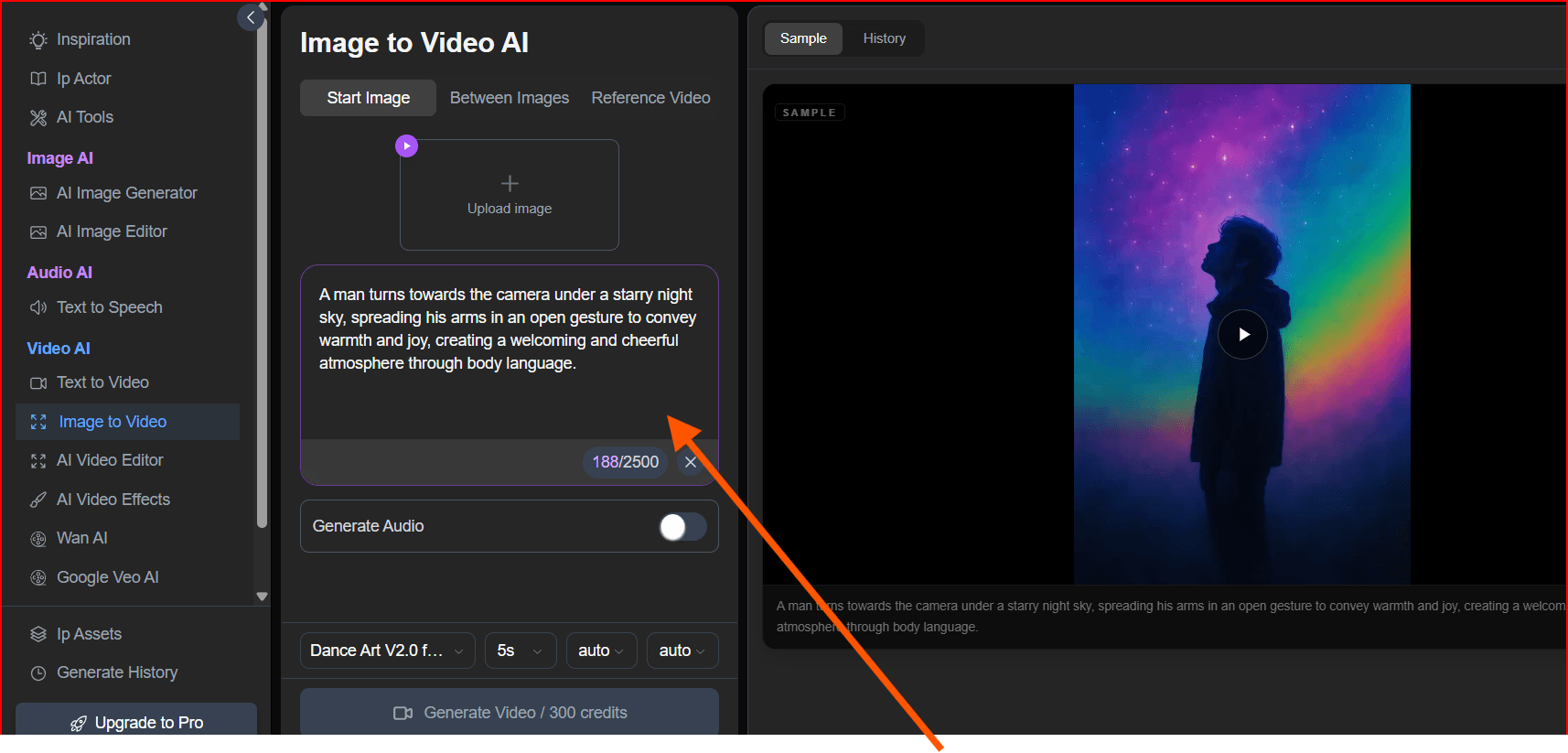
Step 3: Create Prompt Templates for Seedance
Prompt templates help teams generate consistent videos faster.
Instead of writing a new prompt from zero every time, create reusable prompt structures.
Example prompt template:
“Create a short cinematic video showing [product/topic] in a [setting]. The style should be [visual style], with [camera movement], [mood], and [main action]. The video should feel suitable for [platform] and target [audience].”
Example:
“Create a short cinematic video showing a wireless charging desk setup in a modern home office. The style should be clean, premium, and minimal, with slow camera movement, soft lighting, and a productivity-focused mood. The video should feel suitable for Instagram Reels and target remote workers.”
For multi-account workflows, create different templates for different purposes:
- Product showcase prompt
- Problem-solution prompt
- Tutorial prompt
- Lifestyle prompt
- Viral hook prompt
- Comparison prompt
- Educational explainer prompt
- Localized market prompt
- Short ad prompt
This makes content scaling more consistent.
Step 4: Generate Multiple Video Variations
One of the best ways to use Seedance is to create variations from the same core idea.
For example, if the topic is “best productivity app for remote workers,” you can generate:
- A serious business-style version
- A fast TikTok-style version
- A clean minimal version
- A futuristic AI-style version
- A casual lifestyle version
- A tutorial-style version
- A comparison-style version
Each version can be assigned to a different account or tested on the same platform to see what performs best.
This is where AI video becomes powerful for scaling. Instead of producing one video per idea, teams can produce multiple creative angles from the same concept.
Step 5: Organize Assets by Account
After generating videos, do not store everything in one messy folder.
Create a clear folder system:
- Client name
- Platform
- Account name
- Campaign name
- Video status
- Date
- Language
- Final version
Example structure:
Client A / TikTok / Account 01 / Product Tutorials / Approved
Client A / Instagram / Account 02 / Lifestyle Videos / Drafts
Client B / YouTube Shorts / Account 01 / AI Explainers / Final
This makes it easier for writers, editors, designers, and publishers to find the correct assets.
A good content operation should track:
- Prompt used
- Video file
- Caption
- Hashtags
- Thumbnail
- Platform
- Account
- Publish date
- Performance results
- Notes for improvement
This turns Seedance from a simple video generator into part of a professional content system.
Step 6: Use BitBrowser Profiles for Account Separation
If your team manages several social media accounts, use a dedicated BitBrowser profile for each major account or client workflow.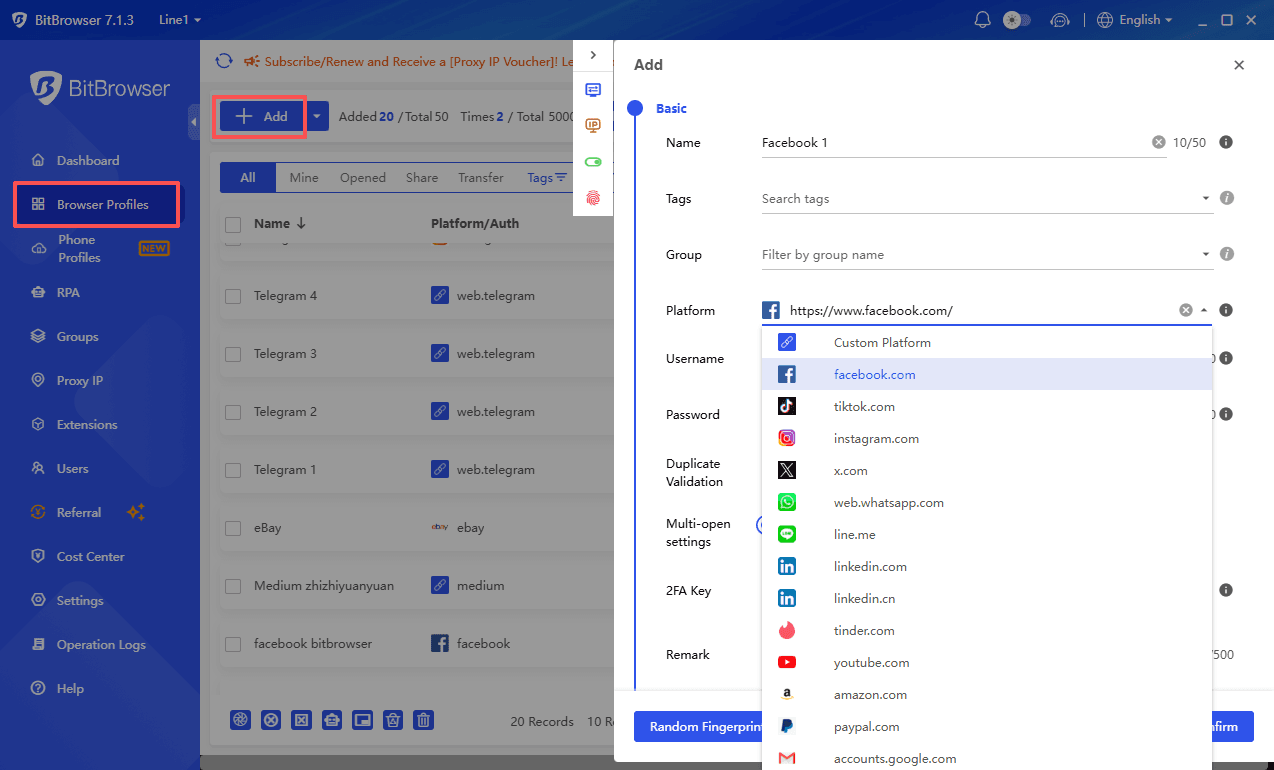
For example:
- BitBrowser Profile 1: TikTok Brand A
- BitBrowser Profile 2: Instagram Brand A
- BitBrowser Profile 3: YouTube Shorts Brand A
- BitBrowser Profile 4: TikTok Brand B
- BitBrowser Profile 5: Instagram Brand B
Each profile can keep its own login session, bookmarks, dashboard links, content calendar, and publishing tools.
This helps reduce confusion between accounts. It also helps team members avoid accidentally uploading the wrong video to the wrong profile.
For agencies, this is especially useful. A client account should not be mixed with another client account in the same browser workspace
Step 7: Adapt Videos for Each Platform
A video generated with Seedance should usually be edited and adapted before publishing.
Each platform has different expectations.
For TikTok:
- Strong first-second hook
- Fast pacing
- Native captions
- Trend-aware style
- Direct opening line
For Instagram Reels:
- Clean visuals
- Strong aesthetic
- Shareable format
- Lifestyle or brand feel
- Good thumbnail frame
For YouTube Shorts:
- Clear topic
- Retention-focused structure
- Strong title and caption
- Educational or entertaining value
- Good loop potential
For Facebook Reels:
- Broader audience
- Clear message
- Simple captions
- Practical value
- Less aggressive editing
Do not publish the same file everywhere without adjustment. Multi-account scaling works best when each video is optimized for the platform and audience.
Step 8: Add Captions, Voiceover, and Branding
AI-generated video visuals are only one part of the final content.
Before publishing, improve the video with:
- Captions
- Voiceover
- Music
- Logo placement
- Brand colors
- Call-to-action
- Short text overlays
- Product labels
- Intro hook
- End screen
For example, a Seedance-generated product video can become much stronger with a simple text hook:
“Still wasting time on manual content creation?”
Or:
“Here is how agencies scale video content faster in 2026.”
Good captions and hooks often determine whether a video performs well.
Step 9: Schedule and Publish Carefully
Publishing should be planned, not random.
Create a content calendar for each account. Track:
- Date
- Platform
- Account
- Video topic
- Caption
- Hashtags
- Status
- Assigned team member
- Performance notes
For multi-account workflows, avoid posting identical content across many profiles at the same time. Instead, adjust the caption, hook, timing, format, and creative angle.
A professional publishing workflow should look natural, useful, and audience-focused.
Step 10: Track Performance and Improve Prompts
After publishing, review performance data.
Track metrics such as:
- Views
- Watch time
- Completion rate
- Likes
- Comments
- Shares
- Saves
- Clicks
- Follows
- Conversions
Use this data to improve your Seedance prompts.
If cinematic product videos perform better than tutorial videos, create more of them. If fast hooks perform better than slow intros, adjust your prompt and editing style. If one account responds better to educational content, focus more on that angle.
The best teams do not just generate more videos. They learn from results and improve the next batch.
Example Workflow for an Agency
A social media agency manages five client accounts.
The agency uses Seedance AI Video to generate short video assets for each client:
- Client A: Fitness videos
- Client B: E-commerce product clips
- Client C: Real estate lifestyle videos
- Client D: AI tool tutorials
- Client E: Local restaurant promotions
For each client, the agency creates a separate BitBrowser profile. Each profile contains the correct social media dashboards, publishing tools, saved logins, bookmarks, and content calendar links.
The workflow looks like this:
- Strategist creates weekly content ideas.
- Prompt writer creates Seedance prompts.
- Video editor reviews and improves generated clips.
- Copywriter creates captions and hashtags.
- Publisher opens the correct BitBrowser profile.
- Content is uploaded to the correct account.
- Analyst tracks performance.
- Team improves the next batch of prompts.
This workflow is faster, cleaner, and more organized than managing everything manually in one browser.
Best Practices for Seedance AI Content Scaling
To get better results from Seedance, follow these best practices:
- Write specific prompts.
- Mention the target platform.
- Define the visual style.
- Describe camera movement.
- Include the mood and setting.
- Keep videos short and focused.
- Generate several variations.
- Review every output manually.
- Edit before publishing.
- Track what works.
- Avoid copyrighted or misleading content.
- Keep each account’s brand identity clear.
AI video works best when it is guided by strategy.
Mistakes to Avoid
Using One Generic Prompt for Every Account
Different accounts need different styles. A fitness account, tech account, and luxury brand account should not use the same video format.
Publishing Without Human Review
AI outputs can contain visual errors, unrealistic scenes, or unclear messaging. Always review before publishing.
Ignoring Platform Rules
Each platform has its own rules for synthetic media, copyright, impersonation, spam, and automation. Follow those rules carefully.
Mixing Client Accounts in One Browser
For agencies, this can lead to mistakes. Use separate profiles and organized workflows.
Focusing Only on Quantity
More videos do not automatically mean better results. Quality, audience fit, and testing matter.
Final Verdict
Seedance AI Video can be a powerful tool for creators, agencies, and marketing teams that need to scale short-form video production in 2026. It helps turn ideas into visual content faster, test multiple creative angles, and create variations for different platforms and audiences.
However, successful multi-account content scaling requires more than AI generation. Teams also need clear account strategy, organized assets, platform-specific editing, performance tracking, and safe browser workflow management.
This is where BitBrowser can support the process. By separating browser profiles for different clients, platforms, and accounts, BitBrowser helps teams manage publishing workflows more professionally.
The best setup is simple:
Use Seedance AI Video to create and test video ideas faster.
Use BitBrowser to organize account workspaces and publishing environments.
Use human review, strategy, and analytics to improve results over time.
When used responsibly, this combination can help teams produce more content without losing control, quality, or organization.

 Multi-Account Management
 Prevent Account Association
 Multi-Employee Management
Recommended
See More 



