What Is an Antidetect Browser? 4 Layers That Give You Away
 2026.11.28 06:20
 BitBrowser
The third ad account got flagged on a Tuesday. Same creative as the other two, different domain and card, a proxy that tested clean. By Thursday all three sat in review, and the rep wanted a video selfie from someone who doesn't exist.
You've run the obvious fixes: fresh cookies, a new proxy, incognito, another laptop. None touched what actually linked the accounts.
Platforms don't need your name to put two accounts in one bucket. They need a dozen values the browser hands over unasked, and a way to cross-check them. Below is what a browser leaks, what an antidetect browser can and cannot patch, and how to test your setup before you pay for two hundred of anything.
What Is an Antidetect Browser?
An antidetect browser is a Chromium- or Firefox-based browser that gives every account its own sealed profile — its own fingerprint, cookies, storage, extensions, and outbound proxy — so several identities can run on one machine without the sites they visit linking them to each other.
Strip the marketing and that's the entire product. Not a proxy reseller, not a headless scraper, not a privacy shield for your browsing. You create a profile, the tool assigns it a device identity, you attach a proxy, and that profile then presents the same laptop in the same city every time you open it. Ten profiles, ten plausible machines, one keyboard.
The word oversells what happens. Nothing becomes undetectable. Your accounts stop looking like each other, and each one keeps looking like itself, through profile isolation on one side and fingerprint stability on the other. Most cheap tools ship one and fudge the other.
What Websites Actually Measure: Four Layers of Fingerprint Signals
One page of JavaScript can ask several hundred questions, and maybe fifteen answers are close to unique. Sorting them by how they're collected beats memorising a parameter list, because each layer fails differently.
The classic layer: UA and Client Hints, timezone, locale, screen
UA strings have been largely frozen for years, with real detail moved into navigator.userAgentData (platform version, CPU architecture, device model, mobile flag). Anything that reads both and compares catches a fake.
Timezone, locale, screen size, colour depth and devicePixelRatio live in the same tier. None is rare on its own, but together they must agree with the geography and device class you claim. Chrome ships a new major roughly every four weeks (Chromium Dash tracks it), so a version string two dozen releases behind is itself a data point.
The rendering layer: Canvas, WebGL, AudioContext, fonts
Canvas fingerprinting draws a gradient and text, then reads the pixels back. Different GPUs, drivers, anti-aliasing paths and font rasterisers produce different pixels, stable on one machine and different on the next. WebGL is blunter. WEBGL_debug_renderer_info returns the renderer string plus a list of capability limits. AudioContext rounds floating-point differently per platform, which is enough to hash.
These values come from hardware and drivers, not from settings. A new IP, a cleared cookie jar, a switched timezone all leave the Canvas hash untouched.
The hardware and network layer: cores, deviceMemory, WebRTC
navigator.hardwareConcurrency, navigator.deviceMemory, maxTouchPoints, screen.availWidth. deviceMemory is capped at 8 by the spec for privacy, so a profile reporting 16GB has modified it, and a modifier is a signal.
WebRTC probes local interfaces for peer-to-peer connectivity, and its ICE candidates can carry LAN addresses and a STUN-reflected public address. Your HTTP traffic goes through the proxy. WebRTC may go around it.
What's new in 2026: WebGPU, JA4 TLS, WASM timing
WebGPU. requestAdapter() returns structured limits and features (dozens of numeric ceilings that describe a device on their own, with far more entropy than the WebGL string). DataDome and Turnstile now treat it as routine collection, and most spoofing tools still don't cover it.
JA4. Cipher suite order, extension order and ALPN from the TLS ClientHello, hashed into something comparable. It comes from the browser's own network stack, so it survives a proxy: claim Firefox, handshake like Chromium, and the contradiction is visible before any JavaScript runs.
WASM timing closes the same door from the other side. A page can time near-native numeric loops, and the results shift with CPU microarchitecture and cache size. Nothing in the JavaScript layer exists to patch.
Combination, not uniqueness
EFF's Cover Your Tracks made this point years ago. Almost every attribute is common, but the combination is close to unique. Add a GPU string, a font list, a timezone offset and an odd extension set, and you're one in a few hundred thousand.
Which is why "I changed my user agent" is the fingerprinting equivalent of wearing a hat.
Antidetect Browser vs Incognito, VPN, and Proxy: Different Layers Entirely
Incognito does one thing. It declines to write session state to disk. It does not change your UA, your Canvas hash or your IP, so inside that window your fingerprint is identical to a normal one. Using it for multi-accounting is changing rooms while keeping the same voice.
A VPN or proxy changes the network exit, which is why it's the fix most people try first. The platform sees you logging in from Dallas while your browser still reports one Canvas hash, one font set, one timezone offset. Quality varies wildly too: datacenter ranges are heavily labelled, and shared proxies put dozens of users behind one address.
A virtual machine is whole-machine isolation, thorough and expensive. One OS and one licence per identity, gigabytes of RAM. Fine for three or four high-value environments, painful at fifty.
| Signal | Incognito | VPN or proxy | Virtual machine | Antidetect browser |
|---|---|---|---|---|
| Cookie & storage isolation | Cleared at session end | None | Yes, per VM | Yes, per profile |
| Browser fingerprint | Unchanged | Unchanged | Changes, but identical across VMs cloned from one image | Spoofed per profile |
| Outbound IP | Unchanged | Changed | Still needs its own proxy | Bound per profile |
| Concurrency cost | Free | Low | High (one OS per identity) | Low (process-level) |
| Practical scale | 1 identity | A few | 3–5 high-value identities | 10–200+ identities |
If several accounts on one laptop keep affecting each other, you need isolation below the IP layer, and no proxy budget fills that gap. If your exit IP is already dirty, clean fingerprints won't save it either. The two jobs are separate, and the proxy is the other half.
How Does an Antidetect Browser Work? Two Layers of Device Identity
Every credible tool does the same three things, but only two are about the device, the identity it presents and the drawer it keeps its state in. The third, the network identity, is a separate decision.
Fingerprint spoofing: consistent, not random
Randomising is a negative optimisation. A tool that generates a fresh parameter set on every launch hands you a new device each login, and "this machine has never been seen before" is a risk signal, not a disguise.
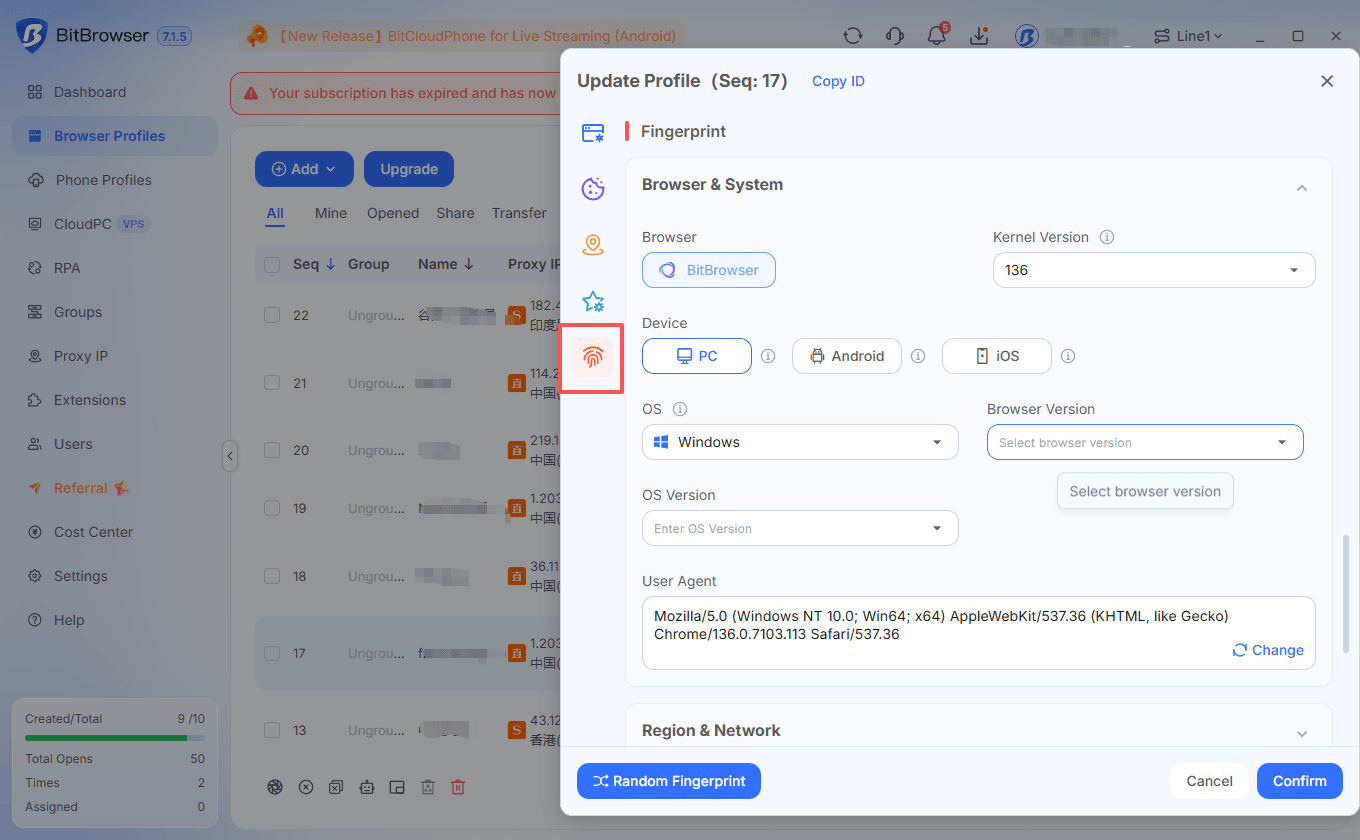
The right model is derive-then-lock: start from a real device model, derive a coherent set of values from it (Windows 11, a specific GPU, the matching font set, a plausible Chrome major, screen metrics that fit), then freeze it. How wide the library is and how tightly the values constrain each other is what to interrogate a vendor about. Fingerprint parameters pages list the supported surface, the constraint logic you have to ask for.
Profile isolation: cookies, storage, cache, extensions
Clearing cookies is not isolation, because cookies are a minority of what persists: localStorage, IndexedDB, Cache Storage, service workers, HSTS entries, font caches, extension state, TLS session tickets. Separate data directory per profile, nothing shared, no common extension defaults, no shared DNS cache.
The classic version of this mistake is the clone button. Duplicate a profile template sixty times to save setup, and the extension set travels with it. Sixty "different devices" running one extension ID and one local store. A platform that logs extension fingerprints sees that immediately, and it can take a team six weeks to work out why a batch of profiles were dying together.
Both layers answer the same question — who does this device claim to be. Neither touches where it appears to sit.
Do I Need a Proxy With an Antidetect Browser?
Yes. A browser without proxies is a set of masks in one room. Two profiles behind one exit address are two accounts on one doorstep, and no amount of fingerprint work changes that. The IP is a shared identifier that survives every other change you make.
So the rule is one proxy per profile, never shared, never rotated across profiles. Each one takes its own HTTP or SOCKS5 endpoint with its own credentials, assigned inside the tool so the profile can't launch without it.
The part people get wrong is alignment. A profile's exit has to agree with everything else that profile claims. A US residential proxy means America/Los_Angeles or America/New_York, en-US, a matching Accept-Language header, and a WebRTC-reflected address in the same country as the proxy. Change the proxy and you have to change the rest with it.
Get it wrong and you rarely get banned outright. You get friction instead. SMS checks at login, manual review at checkout, ad accounts parked in "verification pending" for three days while the campaign burns. That friction usually costs more than a ban, because it eats the calendar you'd already sold to someone else.
Two operational notes. Don't run two profiles concurrently from one exit. Simultaneous sessions from one IP are a stronger link than a shared Canvas hash. Check the ASN type against the job: mobile for social and ads, residential for marketplaces, datacenter only for what doesn't care.
Which provider, which country, what to pay are separate decisions. What the tool has to do is smaller and less negotiable. Per-profile proxy configuration has to bind one endpoint to one profile, validate the exit country before launch, and refuse to open the profile when the proxy is down.
What Detection Engines Look For: Cross-Signal Consistency
Can antidetect browsers be detected? Yes — the moment your environment contradicts itself. The target was never "is this an antidetect browser," but "are these accounts the same operator." A tool isn't a crime; incoherence is evidence.
Six contradiction pairs
| Claimed | Observed | Why it doesn't add up |
|---|---|---|
| Windows platform | WebGL renderer returns an Apple M1/M2 Metal string | Windows machines don't ship Apple GPUs |
| US IP address | Intl.DateTimeFormat().resolvedOptions().timeZone returns Asia/Shanghai | A user in Ohio with a system clock set to Beijing |
deviceMemory = 8 | Canvas and WebGL falling back to SwiftShader software rendering | An 8GB machine with a working GPU rarely drops to software rasterisation |
| UA claims Chrome | Version string a dozen major releases behind stable | Chrome ships every four weeks, so long-stale desktops are rare |
| Consumer laptop model | Renderer is VMware SVGA II or llvmpipe | Datacenter and virtualised GPU identifiers under a laptop label |
maxTouchPoints > 0 | Every other signal says desktop, with no gyroscope, fixed viewport or touch listeners | Either a touch device that never gets touched, or a desktop claiming touch |
Any single row is enough to tag an environment.
From single request to whole session: after Cloudflare Precursor
On 13 July 2026 Cloudflare released Precursor, generally available to all customers. It moves the question from "does this request look automated" to "can this session explain itself". Pointer paths, typing cadence, focus changes and page visibility are collected client-side and cross-checked against each other. Pointer movement while the tab is hidden, or keystrokes with no focused field, are the contradictions it catches. Challenge clearance is recalculated as behaviour changes, so reloading no longer resets the score.
Add WebGPU collection in DataDome and Turnstile, and JA4 at the TLS layer, and the conclusion is unavoidable. Cross-signal consistency beats parameter count. A hundred carefully faked values that contradict each other lose to twenty boring values that agree.
Why randomising everything backfires
Device stability is usually a positive factor in a risk score; churn is negative. Real people don't swap GPUs three times a week, change timezone twice, and rotate through five system languages.
What randomisation produces isn't camouflage, it's drift — and drift is a strong feature. Tools chasing "random" also tend to land you in rare combinations: an obscure UA on an obscure browser at an odd resolution. In risk scoring, rarity is legibility. You're not blending in; you're carrying a flag.
A Five-Step Detection Self-Audit Before You Scale
- Fingerprint consistency. Open two or three fingerprint test pages, and put UA, Client Hints, platform, timezone, locale and GPU renderer in one table. Look for pairs that can't coexist.
- WebRTC leak. With the proxy attached, compare the reflected public address with the proxy exit. Different means leak.
- DNS leak. Confirm resolution happens on the proxy side. DNS answered by your local ISP tells the platform which city you're in.
- IP reputation. ASN type, blacklist status, and the history of neighbouring addresses in the same /24.
- Timezone and locale alignment. System timezone, browser timezone,
Accept-Language, page locale, proxy country: five values, one story.
Run those five and you'll know which problem you have. An environment problem and a traffic problem are solved with entirely different budgets.
What Is an Antidetect Browser Used For, and Who Shouldn't Use One
E-commerce, social matrix, ad buying, affiliate, QA
E-commerce sellers keep storefronts separate: one profile per shop with an in-country residential IP, so stores don't get grouped under one operating entity.
Social matrix operators running dozens of TikTok or Instagram accounts need profiles that don't touch each other, and datacenter ranges die fast on social.
Media buyers across many ad accounts use it for attribution as much as bans: isolated profiles keep each account's learning phase clean, and one review doesn't drag the rest into the same bracket.
Affiliate marketers testing offers across geos need to see what a real user in Manila or Warsaw sees.
QA teams simulate devices and regions without buying hardware.
Cloud phones: a new layer or a distraction?
A different product, not a better one. An antidetect browser manages the browser environment, while cloud phones are real Android devices billed by time, managing the mobile one. Cloud phones vs antidetect browsers comes down to which surface your platform lives on. Seller central and ads managers are web, so profiles are enough, and in-app TikTok work and mobile-only placements belong on a cloud phone. Running both "for safety" doubles the bill.
If you need two accounts to compare prices, or one each for work and personal, normal browser profiles are enough. Value here starts at scale and long-lived identity. Below five profiles, proxy selection and auditing cost more than the tool saves.
Antidetect Browser Price Per Profile: The Real Cost at 10, 50, and 200
The "$9/month" on a pricing page is the least informative number in this category. Software, proxies and the people who run it all stack.
Software is billed by concurrent profile. BitBrowser gives 10 profiles free permanently; 50 windows with two seats is $10/month ($7 on annual billing), 200 windows with eight seats $25/month ($17.50 annual), and pricing and profile limits has the breakdown.
The table covers the first two lines only. Software figures are the published list and annual rates, and proxies are converted at $1 ≈ ¥7.15, mobile at $5–15 per profile per month, residential at $2–5.
| Profiles | Software (list / annual) | Proxies ($/mo) |
|---|---|---|
| 10 (social/ads, mobile proxy) | $0 | 50–150 |
| 50 (social/ads, mobile proxy) | $10 / $7 | 250–750 |
| 200 (e-commerce, residential) | $25 / $17.50 | 400–1,000 |
The 200 row is a residential figure at roughly a third of the mobile unit price, so its total landing near the 50 row is arithmetic, not a typo.
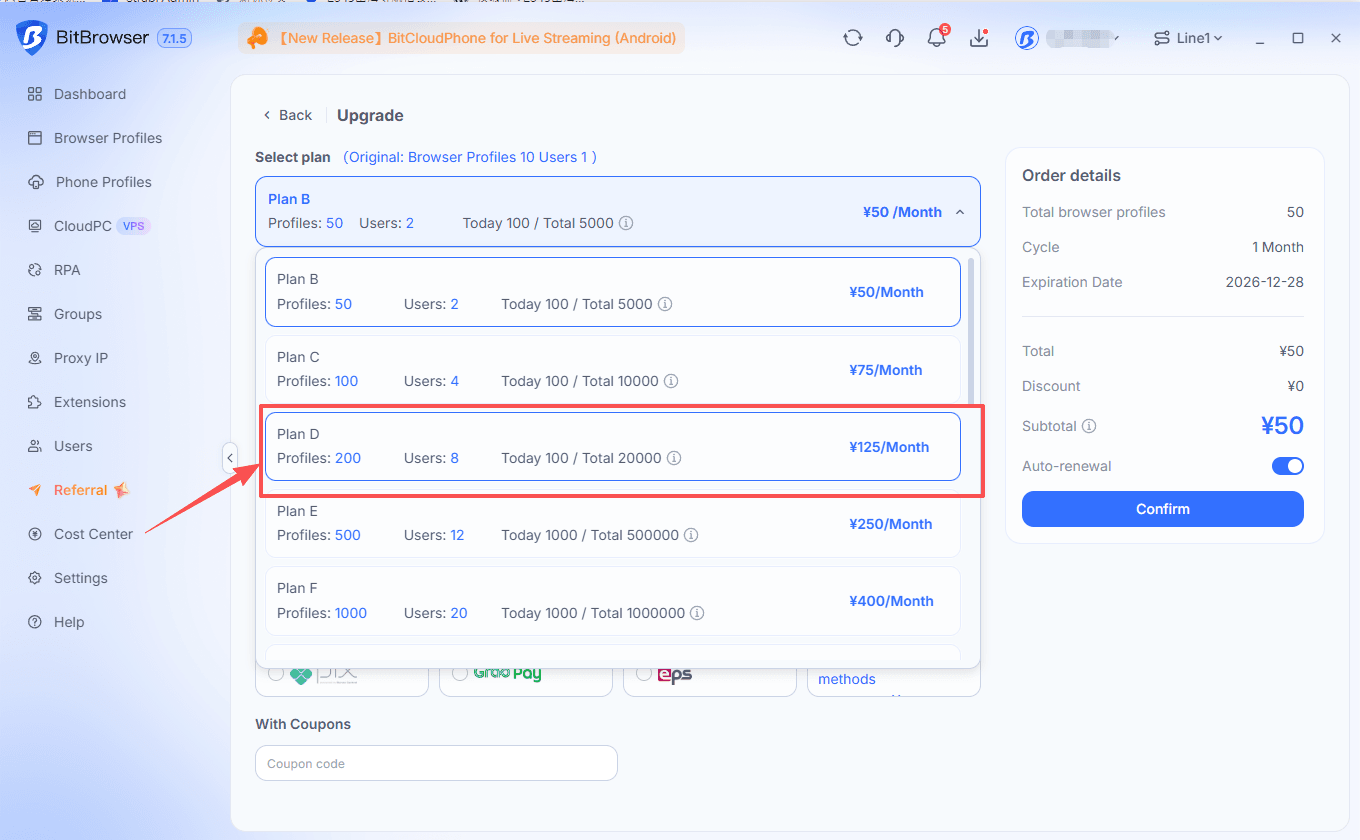
Proxies usually cost more than the browser. At 50 profiles they run 25–75× the software cost, which makes "who has the cheapest subscription" not a top-two question.
That is infrastructure only. Fifty profiles usually want 0.5–1 FTE on proxy rotation and environment upkeep, and that line dwarfs both of the others.
The common version: someone optimises down to a $9 plan, then spends over $600 a month on mobile proxies and another chunk on a VA to rotate them. The browser was a rounding error.
With a free tier, run three to five profiles for one to two weeks and log every extra verification, slow review and unexpected SMS code. BitBrowser's 10 free profiles cover that test, and the free tier already includes the synchronizer, RPA and local API.
Is an Antidetect Browser Legal, Compliant, or Neither?
Legal in most jurisdictions, which is the less interesting half. These are general-purpose tools built on open-source browser engines, and privacy researchers, QA teams and security vendors use the same techniques.
The tool itself is lawful to sell and use in most places. That says nothing about your situation.
The platform. Every marketplace and ad network has terms of service, and many explicitly restrict multi-accounting or geo-circumvention. A profile tool lowers technical linkage risk, but it does not change whether you are permitted. Breaching terms gets you suspended, funds withheld, listings removed — contractual, not criminal, and by far the most likely thing to happen to you.
The business. Platforms link accounts through four channels a browser can't touch: same phone number, same payout account, same shipping address, and a recognisable behavioural rhythm. Profiles do nothing about any of these.
Which means tool effectiveness ≠ behavioural compliance. A coherent environment attached to one payout account is one entity with two shopfronts.
Uses I won't defend: fake signups to farm promos, engagement farming, payment fraud, circumventing KYC. Beyond the ethics, they fail on their own terms. Payment and identity linkage is harder than fingerprint linkage, and it's the layer those schemes die on.
Six Things to Check Before You Buy
- Fingerprint coverage and coherence. Not "how many parameters," but whether the derived set holds together. Whether WebGPU and JA4 are addressed tells you more than any feature table.
- Profile stability across restarts. Open the same profile ten times and diff the values. Any drift is a disqualifier.
- Proxy handling. HTTP and SOCKS5, per-profile credentials and assignment, and a geo check inside the app.
- Seats, roles and audit logs. Two people and it's nice-to-have; eight and it's the difference between a team and a shared password.
- Automation surface. Local API, RPA and RPA and window synchronizer for bulk operations, which is where marginal labour cost gets decided.
- What the free tier includes. Not whether a free plan exists, but what's been stripped from it. Many vendors remove API and sync, forcing you to pay before you can test what you need.
BitBrowser's trade-offs are unusually explicit: 10 profiles free forever with the synchronizer, RPA and local API included, dual Chromium/Firefox engine, but team roles and audit logs sit on paid plans, and cloud phones are billed separately, so the mobile half of your stack is a second budget rather than a free upgrade. If mobile surfaces matter too, work through the antidetect browser comparison with desktop and mobile costs separate.
FAQ
Is an antidetect browser legal?
In most countries, yes. It's general-purpose software for managing isolated browser environments. What gets regulated is the conduct around it and the platform terms you agreed to.
Is it safe to use?
As software, yes. It's a browser built on Chromium or Firefox source. The real risk is custody: every account's cookies live in one place, so check how profiles are encrypted at rest and who can reach them.
Does it work with proxies?
Yes, it's designed around them. Each profile takes its own HTTP or SOCKS5 proxy with its own credentials, and the good ones validate exit country against the profile's timezone before launch.
Can I just use incognito instead?
No. Incognito discards local state at session end and changes nothing else. Same Canvas hash, same fonts, same IP, same linkage.
How many profiles can one computer run?
It's a RAM question, not a licence one. Each open profile is a process tree with its own cache, so do the arithmetic per profile against your machine rather than trusting a headline number. Profile count matters less than what's loaded inside them.
How do websites detect antidetect browsers?
Through contradiction rather than signatures. Vendor leftovers show up occasionally, but the dependable signal is a value that can't coexist with another on the same profile.
Where to Start
The three flagged accounts weren't the problem. They were never three devices: one Canvas hash, one font list, one timezone, three exit addresses. Fix the device identity layer and the sequence stops repeating.
I'd start with three profiles, not two hundred: one account each, proxies matched to the right country, timezone and locale aligned, then two weeks of watching for verification prompts that shouldn't be there. Whatever survives is worth scaling.