Best Anti Detect Browser with Free Profiles in 2026: Top 10 Compared
 2026.08.31 06:07
 YT.Shi
If you need to manage multiple social accounts, test different account workflows, separate sessions, or work with several online projects, an anti detect browser can be a practical alternative to using multiple regular browsers.
The biggest question is usually the price.
Many anti detect browsers charge based on the number of profiles you need, so a free plan can be a good way to test the software before committing to a subscription.
In this guide, we compare 10 anti detect browsers with free plans in 2026, including their free profile allowances, basic features, pricing, and limitations.
Best Anti Detect Browsers with Free Profiles at a Glance
| Browser | Free Plan | Starting Paid Price | Best For |
|---|---|---|---|
| BitBrowser | 10 profiles permanently | $10/month | Best overall value |
| Incogniton | 10 profiles for 2 months, then 3 | $19.99/month | Testing multi profile workflows |
| GoLogin | 3 profiles | $9/month | Simplicity |
| Dolphin Anty | 5 profiles | $10/month | Everyday multi account management |
| MoreLogin | 2 profiles | $9/month | Budget users |
| Kameleo | 2 concurrent browsers | €59/month | Technical and mobile workflows |
| Undetectable.io | 5 cloud profiles + 10 browser configurations | $49/month | Cloud profile management |
| Nstbrowser | Large free profile allowance | $29.9/month | Large scale browser workflows |
| ixBrowser | Unlimited profiles | $3.99/month | High profile capacity |
| Roxy Browser | 3 profiles | Varies | Small scale multi account workflows |
A note about the free plans
Free plans and pricing may change, so always check the provider's current pricing page before purchasing.
Some providers limit the number of profiles, while others limit concurrent browsers, profile launches, profile creation, or cloud storage. For example, Kameleo's free plan is based on 2 concurrent browsers, while ixBrowser offers unlimited profiles but limits users to 10 profile creations and 100 profile openings per day.
That distinction is important when comparing free anti detect browsers.
Best Anti Detect Browser with Free Profiles in 2026: Top 10 Compared
#1
BitBrowser
Best Overall Value
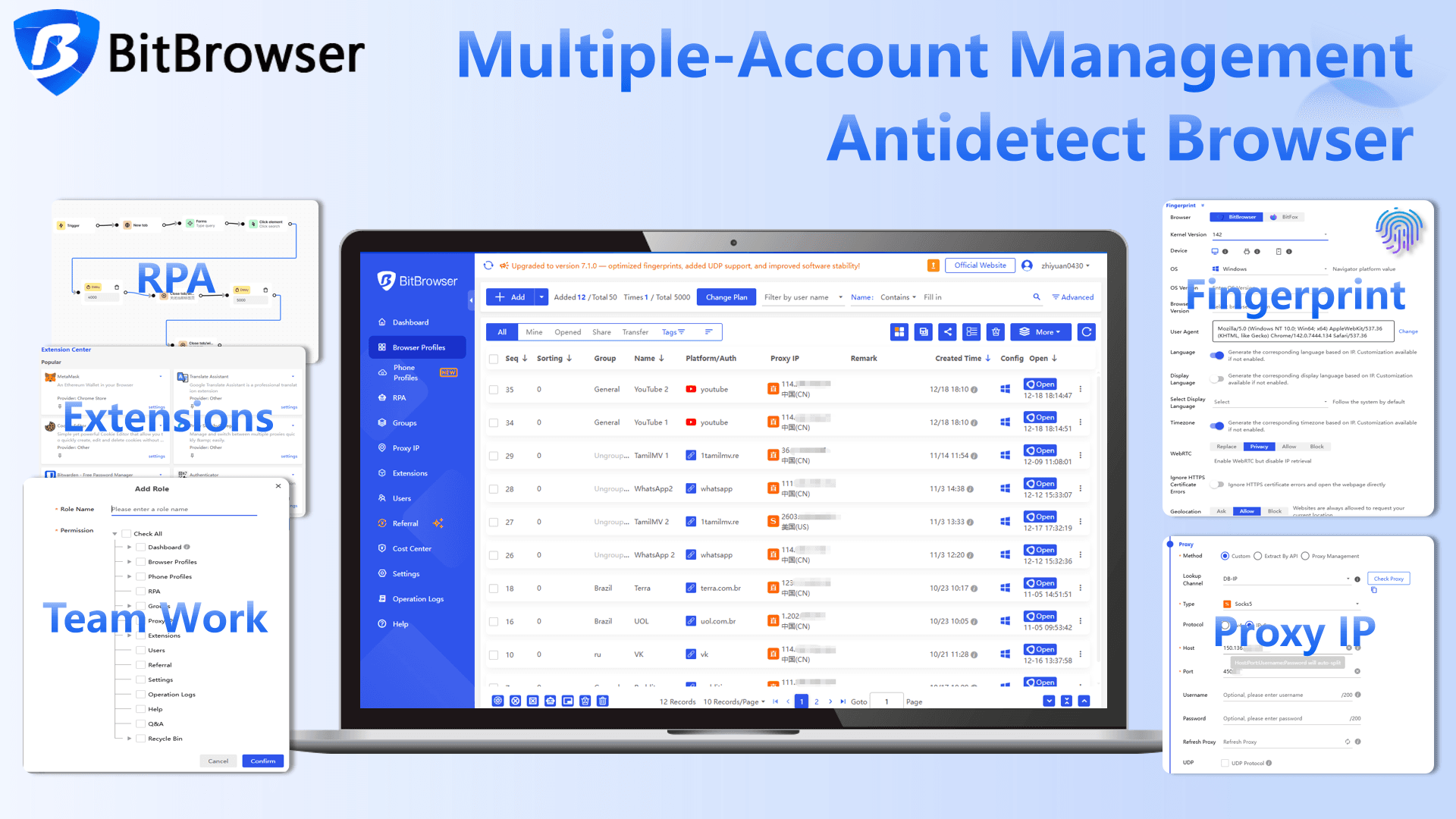
BitBrowser is a practical choice for users who want to manage multiple browser profiles without starting with an expensive subscription. Its free plan provides enough profiles to test a real multi-account workflow, while the paid plans remain affordable as your profile requirements grow.
Pricing
| Plan | Price | Browser Profiles | Users | Best For |
|---|---|---|---|---|
| Free | $0/month | 10 | 1 | Individual users |
| 50 Profiles | $10/month | 50 | 2 | Small teams |
| 100 Profiles | $15/month | 100 | 4 | Growing teams |
| 200 Profiles | $25/month | 200 | 8 | Larger operations |
| Custom | Custom | 300,000+ | Custom | Enterprise requirements |
Basic Features
- Profile-level fingerprint settings
- Proxy configuration and management
- Built-in RPA and automation tools
- Profile organization and team features
- Browser API for profile creation and modification
- MCP support for compatible AI tools
- Virtual Desktop
- Improved fingerprint protection
- Local port detection blocking
- Sub-account and extension controls
Pros
- 10 free profiles permanently
- Competitive pricing as profile numbers grow
- Flexible fingerprint and proxy management
- Useful automation and API features
- Team management for growing workflows
Cons
- The interface may take some time to learn
- BitCloudPhone is a separate service for mobile workflows
#2
Incogniton
Best Free Trial
Incogniton is worth considering if you want enough free profiles to properly test multi-account browsing before paying for a subscription. Its Starter Package gives users 10 profiles during the first two months, after which the free allowance drops to 3 profiles.
Pricing
| Plan | Price | Browser Profiles | Team Access |
|---|---|---|---|
| Free Starter | $0/month | 10 → 3 | Solo use |
| Starter Plus | $19.99/month | 10 | Solo use |
| Entrepreneur | $29.99/month | 50 | Optional team seats |
| Professional | $79.99/month | 150 | 3 seats |
| Custom Package | $149.99+/month | 500+ | Custom |
Basic Features
- Browser profile isolation
- Fingerprint management
- Proxy support
- Selenium automation
- Multi-profile workflow management
Pros
- 10 free profiles during the first two months
- No immediate paid subscription required
- Fingerprint management and proxy support
- Selenium automation
Cons
- Free allowance drops from 10 profiles to 3 after two months
- Paid plans are more expensive than BitBrowser at similar profile levels
#3
GoLogin
Best for Simplicity
GoLogin keeps the basic multi-account workflow fairly simple. It is a good fit for users who would rather get profiles up and running than spend time configuring dozens of advanced settings.
Pricing
| Plan | Price | Browser Profiles | Team Access |
|---|---|---|---|
| Free | $0/month | 3 | Solo use |
| Professional | $9/month | 10 | Solo use |
| Professional | $49/month | 50 | Solo use |
| Business | $119/month | 300 | 1 seat + $10/month per additional member |
| Enterprise | $299/month | 1,000 | 1 seat + $10/month per additional member |
Basic Features
- Simple profile management
- Proxy integration
- Mobile fingerprint options
- Profile sharing for teams
- Cloud-based profile management
- REST API and automation
Pros
- Easy to learn
- Cloud-based workflow
- Flexible proxy options
- Built-in proxy marketplace
Cons
- Advanced users may want deeper fingerprint controls
- Higher profile counts can become expensive
- Chromium-based environment
#4
Dolphin Anty
Best for Everyday Multi-Account Use
Dolphin Anty focuses on the everyday tasks involved in managing multiple accounts. Profile creation, proxy setup, synchronization, and automation are built around this workflow.
Pricing
| Plan | Price | Browser Profiles | Team Access |
|---|---|---|---|
| Free | $0/month | 5 | Solo use |
| Starter | $10/month | 20 | Solo use |
| Base | $89/month | 100 | Multiple users + $10/month per additional member |
| Team | $159/month | 300 | Multiple users + $20/month per additional member |
| Enterprise | $299/month | 1,000 | Multiple users + $25/month per additional member |
Basic Features
- Profile creation and cloning
- Per-profile proxy configuration
- Profile synchronization
- Selenium and Playwright support
- Team collaboration
- Profile organization
Pros
- Fast profile management
- Free plan available
- Useful Synchronizer
- Good entry-level paid plan
Cons
- Chromium-based
- Large workspaces may require more resources
- Team features are less extensive than some enterprise platforms
#5
MoreLogin
Best Value Alternative
MoreLogin is a value-focused option for users who want flexible browser profiles without a high entry price. Its Chrome and Firefox support, proxy purchasing, and team features make it a practical middle ground.
Pricing
| Plan | Price | Browser Profiles | Users | Best For |
|---|---|---|---|---|
| Free | $0/month | 2 | 2 | Testing |
| Pro | $9/month | 10 | 2 | Individual users |
| Pro | $25/month | 50 | 2 | Growing teams |
| Custom | Custom | Custom | Custom | Larger operations |
Basic Features
- Chrome and Firefox profiles
- Real Canvas fingerprint
- Built-in proxy purchasing
- Profile transfer
- Team collaboration
- Synchronizer and Local API
- Selenium and Puppeteer automation
Pros
- Free plan available
- Chrome and Firefox support
- Competitive pricing
- Built-in proxy purchasing
- Useful team and automation features
Cons
- Advanced fingerprint controls are more limited
- Additional team members cost extra
- Proxy costs are separate
#6
Kameleo
Best for Mobile & Technical Users
Kameleo takes a more specialized approach, focusing on advanced fingerprint customization and mobile browser environments. It is better suited to technical users with specific browser or mobile testing requirements.
Pricing
| Plan | Price | Concurrent Browsers | Cloud Profiles | Team Access |
|---|---|---|---|---|
| Free | €0/month | 2 | 100 | 3 members |
| Startup | €59/month | 10 | 5,000 | Unlimited |
| Business | €299/month | 100 | 5,000 | Unlimited |
| Enterprise | €1,499/month | 1,000 | 5,000 | Unlimited |
Basic Features
- Advanced fingerprint customization
- iOS and Android fingerprint support
- Flexible environment configuration
- Selenium and Puppeteer integration
- Cloud browser profiles
- Technical automation options
Pros
- Advanced fingerprint customization
- Strong mobile support
- Flexible environment configuration
- Good automation options
- Free plan available
Cons
- Steeper learning curve
- More specialized than mainstream options
- No built-in cloud phone service for running actual mobile apps
#7
Undetectable.io
Best for Cloud Profile Management
Undetectable.io separates cloud profiles, local profiles, and browser configurations. This makes it a useful option for users who specifically want cloud-based profiles and flexible browser configuration.
Pricing
| Plan | Price | Users | Cloud Profiles | Local Profiles | Browser Configurations |
|---|---|---|---|---|---|
| Free | $0/month | 1 session | 5 | — | 10 |
| Base | $49/month | 1 | Fixed | 25 | $1 each |
| Professional | $99/month | 2 | 100 | 50 | $1 each |
| Custom | $199/month | 5 | 200* | 100 | $1 each |
The free plan also allows users to add extra profiles for $10 per 10 profiles, up to 45 additional profiles. These additional profiles have no monthly creation limit.
Basic Features
- Local API
- Proxy import
- Import local profiles
- Export cookies
- Mass profile creation
- Cookies Bot
- Extension support
- Browser configurations
- Cloud profiles
- Local profiles
Pros
- 5 cloud profiles available on the free plan
- 10 browser configurations
- 50 free profile creations per month
- Local API
- Cloud and local profile options
Cons
- Free cloud profiles are limited to 5 active profiles
- Free profile creation is limited to 50 per month
- Paid plans start at $49/month
#8
Nstbrowser
Best for Large-Scale Browser Profiles
Nstbrowser stands out because its free plan provides a much larger profile allowance than most traditional anti-detect browsers. The free plan includes 500 browser profiles, but daily profile launches are limited.
Pricing
| Plan | Price | Browser Profiles | Standard Profile Launch | Team Members |
|---|---|---|---|---|
| Free | $0/month | 500 | 30/day | 3 |
| Starter | $29.90/month | 20,000 | 3,000/day | 20 |
| Growth | $49.90/month | 100,000 | 20,000/day | 50 |
| Scale | $89.90/month | 500,000 | 50,000/day | 100 |
Basic Features
- Browser profiles
- Standard profile launching
- API
- AI Agent
- RPA
- Custom extensions
- Container management
- Authority management
- Window management
- Cookie management
- Batch profile creation
Pros
- 500 free browser profiles
- API support
- AI Agent
- Automation features
- Large-scale profile capacity
- Free plan includes 3 team members
Cons
- Only 30 standard profile launches per day on the free plan
- The large profile number can be misleading if you need frequent daily usage
- More focused on large-scale and technical workflows
#9
ixBrowser
Best for Unlimited Free Profiles
ixBrowser has one of the most eye-catching free profile offers in this comparison. Its free plan provides unlimited browser profiles, but daily limits apply to profile creation and profile openings.
Pricing
| Plan | Price | Browser Profiles | Team Seats | Profile Creation / Day | Profile Opening / Day |
|---|---|---|---|---|---|
| Free | $0/month | Unlimited | 2 | 10 | 100 |
| Professional | $3.99/month | Unlimited | 20 | 100 | 1,000 |
| Business | $9.99/month | Unlimited | 50 | 500 | 5,000 |
| Enterprise | $19.99/month | Unlimited | 150 | 1,500 | 15,000 |
Paid plans also increase monthly additional profile creation and opening allowances. Professional includes 300 additional profile creations and 3,000 additional openings per month, Business includes 1,500 and 15,000, and Enterprise includes 4,500 and 45,000.
Basic Features
- Unlimited browser profiles
- Fingerprint management
- Profile management
- Proxy support
- Team seats
- Browser automation
- API and workflow features
Pros
- Unlimited profiles on the free plan
- Very low paid starting price
- 2 free team seats
- 100 profile openings per day
- Higher limits available on inexpensive paid plans
Cons
- Only 10 new profiles can be created per day for free
- Only 100 profile openings per day
- Unlimited profile storage does not mean unlimited usage
#10
Roxy Browser
Best for Small Multi-Account Workflows
Roxy Browser is another option for users who need separate browser environments for multiple accounts and projects. Its free plan provides 3 permanent browser profiles, while paid pricing is based on the number of profiles.
Pricing
| Plan | Profile Range | Price per Profile |
|---|---|---|
| Free | 3 profiles | $0 |
| Basic | 1–10 | $0.80/profile |
| Basic | 11–50 | $0.25/profile |
| Basic | 51–100 | $0.20/profile |
| Pro | 101–500 | $0.15/profile |
| Pro | 501–1,000 | $0.12/profile |
| Business | 1,001–5,000 | $0.10/profile |
| Business | 5,001–10,000 | $0.08/profile |
| Enterprise | 10,001–50,000 | $0.05/profile |
Roxy Browser also offers a one-time 5-day trial with access to premium features.
Basic Features
- Fingerprint parameter management
- Fingerprint simulation
- Data synchronization
- Proxy configuration
- Profile management
- Window synchronization
- API access
- Workspace and team features
- Chromium-based browser environments
Pros
- 3 permanent free profiles
- Core fingerprint management included
- Proxy configuration
- API access
- Windows, macOS, and Linux support
- Low per-profile pricing at larger volumes
Cons
- Only 3 permanent free profiles
- Basic plan uses per-profile pricing
- Chromium-based
BitBrowser vs Other Anti Detect Browsers with Free Profiles
Free profile count is useful, but it should not be the only factor when choosing an anti detect browser.
A better comparison looks at three things:
Free profile capacity + features + upgrade cost
Here is where BitBrowser performs particularly well.
1. More Permanent Free Profiles
BitBrowser gives you 10 browser profiles permanently.
That is more than:
· Dolphin Anty: 5
· GoLogin: 3
· MoreLogin: 2
Incogniton also starts with 10 profiles, but that allowance drops to 3 after two months.
2. Useful Features on the Free Plan
BitBrowser does not simply give you empty browser profiles.
Its ecosystem includes fingerprint settings, proxy configuration, profile organization, RPA automation, and API functionality.
That means the free plan can be used for an actual workflow rather than just a short trial.
3. Affordable Upgrade Path
When 10 profiles are no longer enough, BitBrowser's 50 profile plan starts at $10/month.
That makes the transition from free to paid relatively simple:
10 free profiles → 50 profiles for $10/month → 100 profiles for $15/month → 200 profiles for $25/month
For individuals and small teams, this provides a relatively low cost way to scale.
Final Verdict
The best anti detect browser with free profiles in 2026 depends on what you mean by "free."
Some providers offer a small number of profiles permanently. Others give you more profiles temporarily. Some advertise hundreds or unlimited profiles but apply daily creation or opening limits. Kameleo takes a different approach by focusing on concurrent browser sessions.
For most individuals and small teams, BitBrowser offers the best overall balance.
Its 10 permanent free browser profiles give users enough room to build a real multi profile workflow without immediately paying for a subscription. At the same time, it provides fingerprint management, proxy support, profile organization, automation, and API features.
The paid upgrade is also relatively affordable, starting at $10/month for 50 profiles.
So if your main search is "best anti detect browser with free profiles," BitBrowser is a strong first option to try.
Start with the free plan, see whether 10 profiles are enough for your workflow, and only upgrade when you actually need more capacity.

 Multi-Account Management
 Prevent Account Association
 Multi-Employee Management
Recommended
See More 



