Telegram Account Management in 2026: How to Avoid Bans and Scale with BitBrowser
 2026.08.28 07:52
 YT.Shi
Telegram has become one of the most powerful platforms for community building, marketing, and business communication. But as more users and businesses rely on it, Telegram's anti‑spam systems have become significantly stricter. Account bans, restrictions, and shadowbans have become a daily reality. Managing multiple Telegram accounts without triggering these systems is one of the biggest challenges in 2026.
Whether you're running a community, managing client accounts, or scaling an outreach operation, understanding Telegram's account trust system is the first step to keeping your accounts alive.
Understanding Telegram's Account Trust System
Telegram evaluates each account based on specific behavioral triggers.
An account with no history (zero messages, zero activity, empty profile) has a null level of trust. Any non‑standard action from such an account is perceived as a threat. A few spam reports from unfamiliar users are enough to send your account to moderators for verification.
This means that account trust is everything. A fresh account is immediately suspicious. A warmed‑up account with a history of normal activity is treated like a real user.
Telegram Account Trust System in 2026
Telegram has not publicly disclosed its complete anti spam algorithm. However, account behavior can affect how the platform evaluates activity and applies restrictions.
Common spam triggers include:
· Starting activity too aggressively
· Mass messaging a new contact list
· Sending many identical messages
· Receiving a large number of complaints
· Frequent device, IP, VPN, or location changes
· Poor quality proxies
· Using multiple accounts with identical behavior
· Skipping account warm up
· Performing actions too frequently without pauses
Telegram Bans: 5 Types in 2026
Telegram bans and spam restrictions can take several forms. In 2026, Telegram uses behavioral signals to detect spam and suspicious activity, so different accounts may face different restrictions.
Here are the 5 main types of Telegram bans and restrictions, along with their causes and recovery options.
1. Geo Spamblock
A Telegram geo spamblock can be applied during registration when a phone number comes from a region with high spam activity, including Nigeria, Iran, India, and other regions.
With a geo spamblock, you may be unable to:
· Message unfamiliar users
· Invite people to groups or chats
· Appear in searches from blocked countries
You can usually reply to users who message you first and join channels.
A geo spamblock commonly lasts 3 to 7 days, but restrictions for heavily blacklisted regions can last up to 6 months.
How to Remove a Geo Spamblock
A Telegram Premium subscription may remove a geo spamblock immediately. However, Premium does not provide permanent protection. Sending mass messages can still trigger new restrictions.
2. Temporary Spam Block
A temporary Telegram spam block is commonly triggered by mass messaging, user complaints, or suspicious behavior.
During the restriction, you may be unable to:
· Message new contacts who have not saved your number
· Invite users to groups or channels
· Post in public groups
You can still reply in existing chats when the other person contacts you first.
Temporary blocks usually last 24 hours to 7 days. Repeated violations can result in longer restrictions.
3. Telegram Shadowban
A Telegram shadowban is a hidden restriction. Your account may appear normal, but other users may not see your messages in certain groups or channels.
How to Check for a Telegram Shadowban
You can try several checks:
· Ask another account whether your messages are visible
· Search for your username while logged out
· Use the official @SpamBot to check your account status
· Use third party tools for additional checks
The @SpamBot check is the most useful starting point because it can indicate whether Telegram has placed a restriction on your account.
4. Telegram Account Freeze
Telegram introduced account freezing in March 2025. A frozen account enters read only mode.
You may be unable to:
· Send messages
· Create groups or channels
· Log in from a new device
A snowflake icon can appear on the profile to indicate the frozen status.
Unlike a permanent ban, a freeze provides an opportunity to appeal. If you do not appeal through @SpamBot, Telegram may delete the account after a few days. The associated phone number may also be blocked from registering again.
Common Telegram Freeze Triggers in 2026
Possible triggers include:
· Sudden profile changes after purchasing or connecting an account to automation tools
· Large numbers of identical comments, reactions, or views
· Links in a profile combined with aggressive posting
· Low quality proxies or major IP and location mismatches
· The same fingerprint or behavior across many accounts
· Performing large numbers of actions too quickly without gradual activity
5. Permanent Telegram Ban
A permanent Telegram ban can result in account deletion and may be difficult or impossible to reverse.
It can occur after serious violations, large scale spam campaigns, coordinated complaints, or a high volume of reports.
How to Appeal a Permanent Telegram Ban
If your Telegram account is permanently banned, you can try:
1. @SpamBot: Submit an appeal through the official Telegram bot.
2. Email: Contact spam@telegram.org and provide evidence if you believe the ban was incorrect.
3. Recovery email: If an appeal is rejected for insufficient evidence, you can send additional evidence to recover@telegram.org.
4. Support form: Submit an appeal through the official Telegram support form.
A permanent ban may also affect the phone number, preventing you from registering another Telegram account with it.
Telegram Ban Types Compared
| Restriction | Main Effect | Typical Recovery |
|---|---|---|
| Geo Spamblock | Limited contact with unfamiliar users | Wait or try Premium |
| Temporary Spam Block | Messaging and group restrictions | Wait or appeal |
| Shadowban | Messages may have limited visibility | Check status and reduce suspicious activity |
| Account Freeze | Read only account | Appeal through @SpamBot |
| Permanent Ban | Account deleted or disabled | Submit an appeal with evidence |
The best way to reduce Telegram ban risk is to avoid sudden mass activity, repeated identical actions, excessive messaging, and suspicious account behavior. New accounts should build normal activity gradually before performing high volume actions.
How to Verify a Warmed‑Up Account Before Buying
If you're purchasing accounts from a seller, verify these points:
1. Registration date – Check through third‑party services or ask for a screenshot.
2. Presence of dialogues – At least several chat conversations.
3. Avatar and completed profile – Basic minimum information.
4. Participation in groups and channels – Must be a member somewhere.
5. Check through SpamBot – Ask the seller for a screenshot confirming no restrictions.
6. Seller's reputation – Reviews, replacement guarantee, payment guarantee.
Why Anti‑Detect Browsers Are Essential for Telegram Multi‑Account Management
Telegram detects multi‑account activity through a combination of browser fingerprints, IP addresses, and device information. If you run multiple accounts from the same device with the same fingerprint, they will be linked. If one account gets banned, the others will likely be swept away in the same ban wave.
This is where anti‑detect browsers come in.
BitBrowser has become the tool of choice for many Telegram power users. Its core advantage is creating completely independent browser environments for each account, including separate fingerprints, cookies, cache, and IP addresses. This makes Telegram think each account is coming from a different device, different location, and different person.
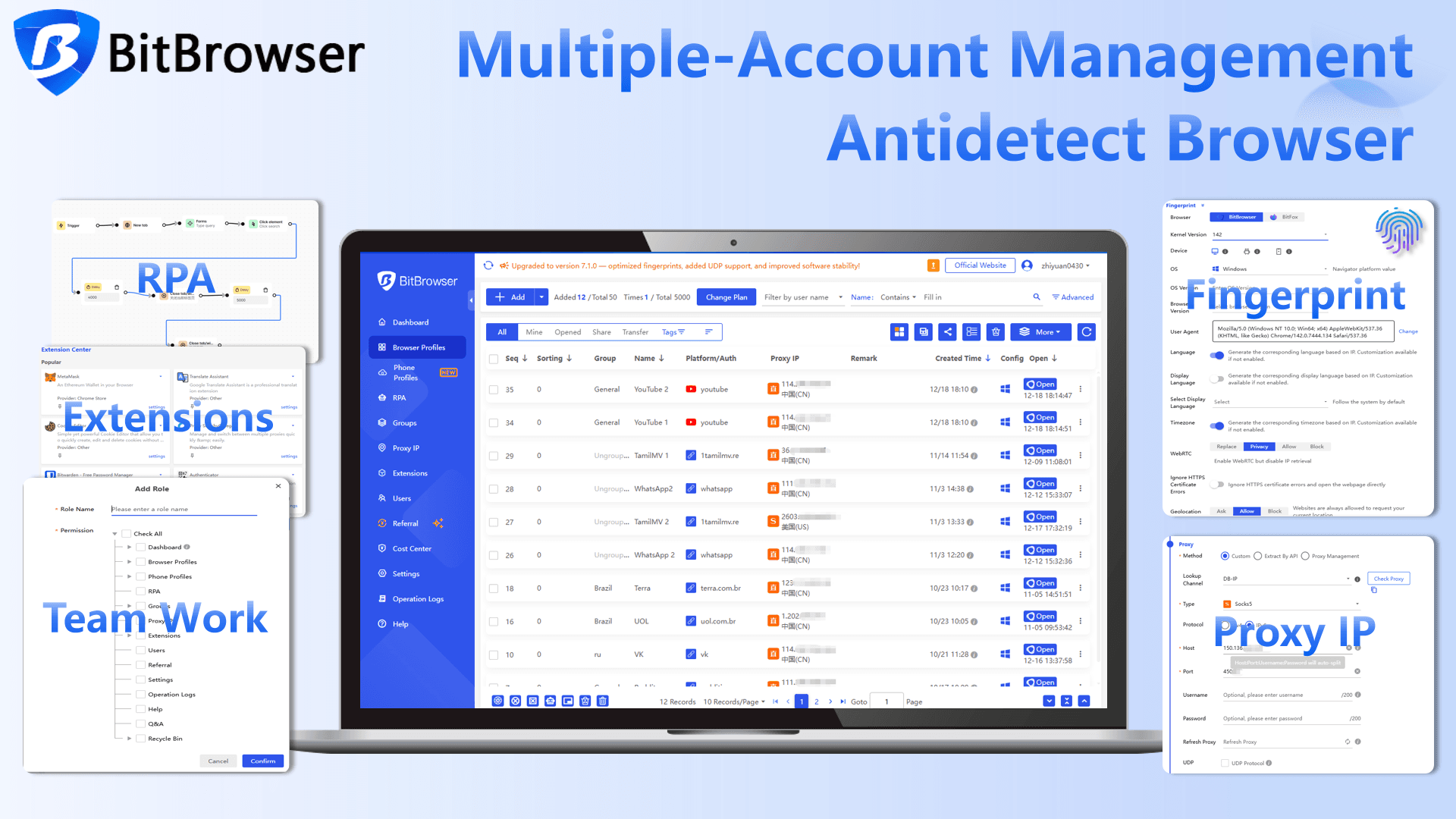
BitBrowser Key Features for Telegram Account Management
| BitBrowser Feature | How It Helps with Telegram Account Management |
|---|---|
| Isolated Browser Profiles | Create independent browser profiles with separate fingerprints, including Canvas, WebGL, fonts, timezone, and other parameters. This helps keep multiple Telegram accounts separated by browser environment. |
| Proxy Integration | Assign a separate Socks5 or HTTP residential proxy to each profile. One click import simplifies proxy setup and helps avoid multiple accounts sharing the same IP. |
| Cookie Import & Session Management | Import cookies to maintain existing login sessions and reduce repeated logins. Each browser profile can retain its own Telegram session. |
| Bulk Cookie Management | Import previously exported or custom cookie data into multiple browser profiles at once, reducing manual work when managing multiple accounts. |
| RPA Automation | Automate tasks such as account warm up, content scheduling, and community interactions with configurable delays to streamline repetitive Telegram workflows. |
| Real Time Synchronization | Synchronize channel posts, group announcements, or notifications across multiple accounts with a single click. |
| Team Collaboration | Assign account access through permission levels without sharing phone numbers or verification codes. Access can be removed for individual team members without affecting other accounts. |
| Free Starter Plan | Get 10 browser environments and 1 sub account permanently free. The free plan also includes Google and Firefox kernels, window synchronization, mouse and keyboard mirroring, RPA scripts, and local API access. |
How to Set Up Telegram Accounts with BitBrowser
Here's the practical step‑by‑step process:
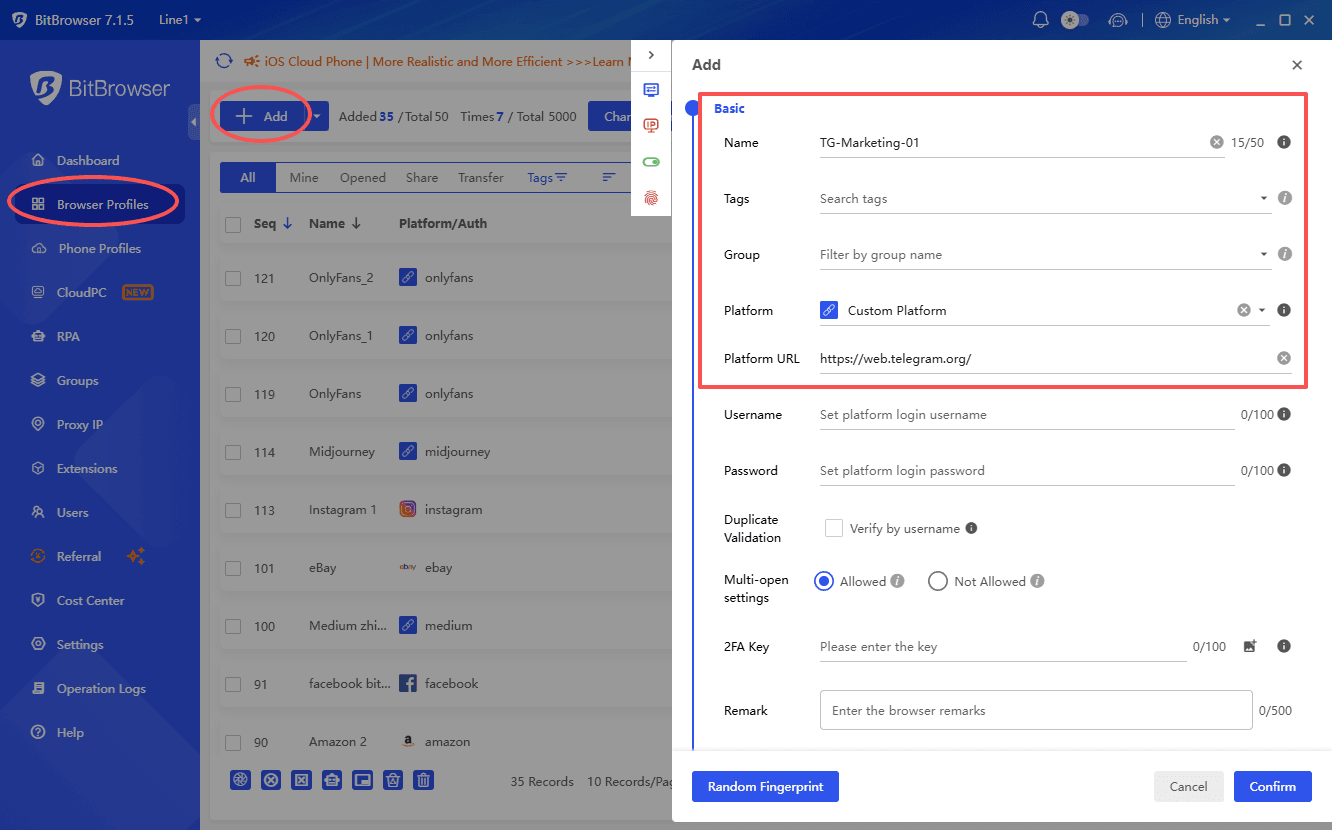
Step 1: Create an Isolated Profile
Log in to BitBrowser and click "Create New Profile." Give each profile a recognizable name, such as "TG‑Marketing‑01" or "TG‑Client‑Group‑01".
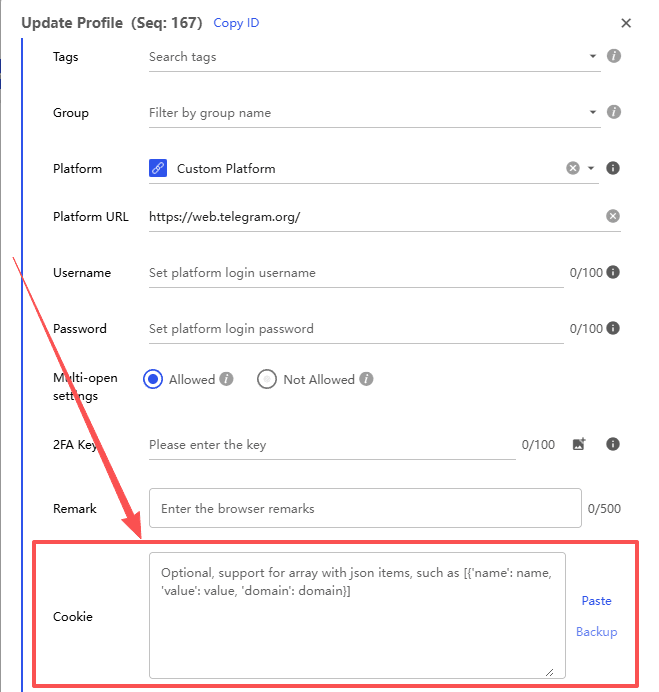
If you are using a purchased or transferred Telegram account, you can also import its cookies into the new profile to restore the existing login session.
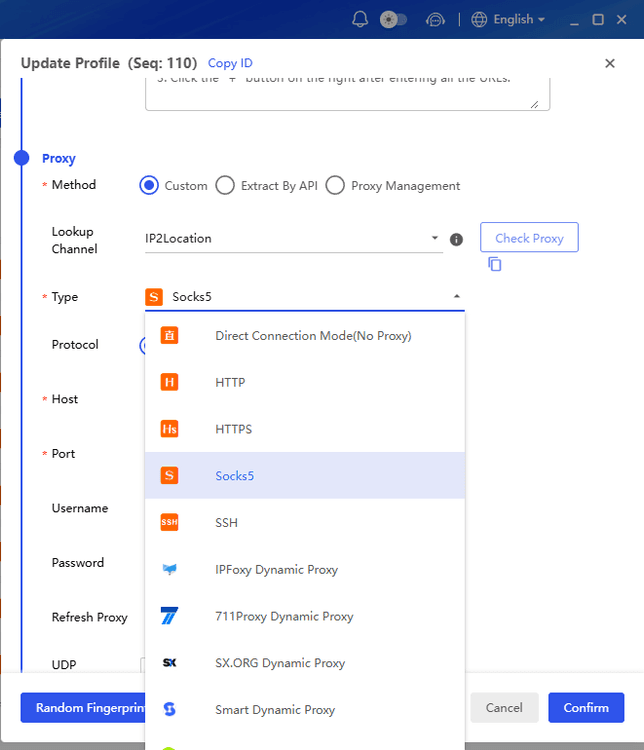
Step 2: Configure Proxy
In the proxy settings, enter your residential proxy information (IP, port, username, password). Use a different residential IP for each profile.
Step 3: Launch and Log In
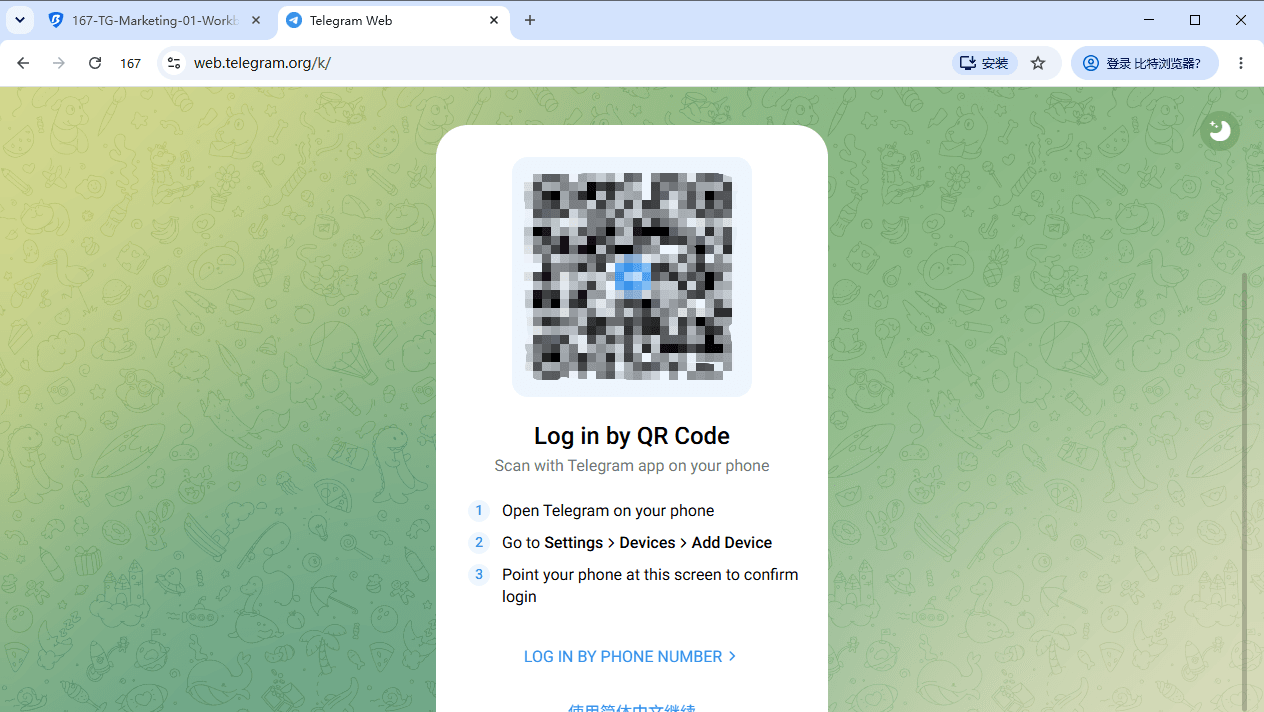
Save the profile and click "Launch." The browser window will open, and you can access web.telegram.org. Scan the QR code or enter your phone number to log in.
Step 4: Manage Your Accounts
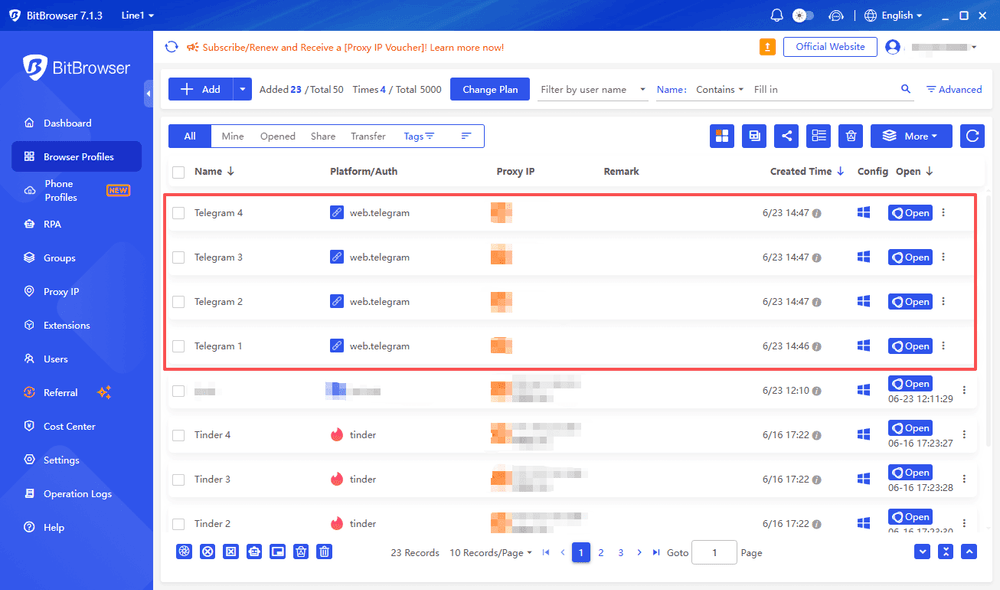
Repeat the process for each Telegram account, using a separate BitBrowser profile and proxy. Clear profile names make it easier to organize and manage multiple accounts from one dashboard.
How to Manage Multiple Telegram Accounts
Critical Best Practices for Long‑Term Telegram Account Survival
The right tools can help, but account behavior and consistency matter just as much. These practices can help reduce unnecessary Telegram restrictions.
1. Keep Each Account Isolated
Use a separate BitBrowser profile, fingerprint, and proxy for each Telegram account. Residential proxies are generally preferable to datacenter proxies for maintaining a consistent network environment.
ISP Proxies vs Residential Proxies
2. Warm Up Accounts Gradually
Avoid starting with high volume activity on a new account. Build activity gradually over the first 7 to 15 days.
During the first week, complete the profile, read messages, join a limited number of groups, and keep messaging activity low. During the following week, gradually add normal interactions such as replies, reactions, and group conversations.
After the warm up period, increase activity gradually rather than performing large numbers of actions at once.
3. Keep Login Sessions Consistent
Avoid frequently switching devices, IP addresses, or browser environments for the same account. If you are managing an existing account, cookie login can help maintain its current session when supported.
The goal is to keep the account's login environment stable and avoid unnecessary changes.
4. Monitor Account Health
Regularly check your account status through @SpamBot and watch for warning signs such as messaging restrictions or messages not appearing in group chats.
If unusual activity or restrictions appear, reduce activity and investigate the cause before continuing.
Conclusion
Managing multiple Telegram accounts in 2026 requires consistent behavior, proper warm up, and a reliable account setup.
The key points are:
1. Build trust gradually. Warmed up accounts with normal activity are less likely to trigger restrictions.
2 Keep accounts isolated. Use separate BitBrowser profiles, fingerprints, and proxies to keep account environments separate.
3. Stay consistent. Avoid sudden changes and high volume activity.
4. Know your recovery options. Geo spamblocks and temporary restrictions can often be resolved, while frozen accounts may be appealed.
5. Start for free. BitBrowser provides 10 free browser profiles permanently, giving you an easy way to test your workflow.
With the right setup and consistent behavior, managing multiple Telegram accounts can be more organized and efficient.

 Multi-Account Management
 Prevent Account Association
 Multi-Employee Management
Recommended
See More 



