Best Free Antidetect Browsers in 2026: Reviews, Free Plans, and Alternatives
 2026.08.24 10:26
 YT.Shi
Looking for the best free antidetect browser in 2026? The right choice depends on how many browser profiles you need, whether you work alone or with a team, and how much control you want over browser fingerprints.
Free plans are useful for testing multi account workflows, separating browser sessions, managing social media profiles, and evaluating fingerprint settings before paying for a larger plan.
Among the options we reviewed, BitBrowser stands out for its permanent free profile allowance, while Incogniton offers a straightforward free starting point. GoLogin, Kameleo, and Dolphin Anty are also worth considering depending on your workflow.
We compared these browsers based on free profile limits, fingerprint management, proxy support, automation, team features, ease of use, and paid upgrade costs.
What Is an Antidetect Browser?
Antidetect browsers create isolated browser profiles with separate fingerprints and session data. They are useful for managing multiple legitimate online identities, testing localized environments, and separating account workflows.
A proxy changes your network route, while an antidetect browser focuses primarily on the browser environment.
The main advantage is profile isolation. Each browser profile can behave as an independent environment instead of sharing the same local browser data.
What is the difference between an antidetect browser, a VPN, a proxy, and incognito mode?
These tools solve different problems.
| Tool | Changes IP? | Changes Fingerprint? | Isolates Sessions? | Best For |
|---|---|---|---|---|
| VPN | Yes | No | No | General network privacy |
| Proxy | Yes | No | No | IP routing and localization |
| Incognito Mode | No | No | Limited | Temporary local sessions |
| Antidetect Browser | With proxy | Yes | Yes | Separate persistent browser profiles |
| Standard Browser | No | No | No | Everyday browsing |
An antidetect browser should therefore not be treated as a replacement for a proxy. If a workflow requires a different network location for each profile, proxy configuration is still necessary.
Are antidetect browsers legal?
Antidetect browsers are generally legitimate software. Their legality depends on how they are used and which platform rules apply.
Businesses can use isolated browser environments for privacy research, advertising verification, QA testing, localization testing, client account management, and other legitimate workflows.
However, using browser fingerprinting tools to impersonate other people, commit fraud, evade platform enforcement, or violate a service's terms can create legal and account risks. Always check the rules of the platform you are using.
Best Free Antidetect Browsers at a Glance
There is no single best antidetect browser for everyone. Free profile limits, automation support, mobile environments, and team features can make one product much more suitable than another.
#1
BitBrowser
Best overall free option
10 free browser profiles, permanently.
Why it stands out: You get fingerprint management, proxy support, profile organization, and built in RPA without needing to upgrade just to get started.
#2
Incogniton
Best for a free trial
10 free browser profiles for the first 2 months.
Why it stands out: It lets you test its full starter setup with 10 profiles for two months. After that, the free package drops to 3 profiles unless you upgrade.
#3
GoLogin
Best for simplicity
A straightforward way to get started.
Why it stands out: The interface is easy to get into, with simple profile management, proxy integration, and 3 free profiles for testing.
#4
Kameleo
Best for technical workflows
More control over browser and mobile environments.
Why it stands out: Kameleo is a better fit when mobile environments, advanced fingerprint settings, or automation matter more than having the simplest interface.
#5
Dolphin Anty
Best for everyday multi account use
Simple profile management with 5 free profiles.
Why it stands out: It keeps things fairly straightforward, with proxy support, profile synchronization, and automation through Selenium and Playwright.
In Depth Reviews of the Best Free Antidetect Browsers
#1
BitBrowser
BitBrowser is a practical choice for users who want to manage multiple browser profiles without starting with an expensive subscription. The free plan also gives you enough room to test a real multi-account workflow before deciding whether you need more profiles or team features.
Free plan
Best for
| Plan | Price | Browser Profiles | Team Access |
|---|---|---|---|
| Free | $0/month | 10 | 1 user |
| 50 Profiles | $10/month | 50 | 2 users |
| 100 Profiles | $15/month | 100 | 4 users |
| 200 Profiles | $25/month | 200 | 8 users |
| Custom | Custom | 300,000+ | Custom |
#2
Incogniton
Incogniton is worth considering if you want enough free profiles to properly test multi-account browsing before paying for a subscription. Its Starter Package gives you 10 profiles for the first two months.
Free plan
Best for
| Plan | Price | Browser Profiles | Team Access |
|---|---|---|---|
| Free Starter | $0/month | 10 → 3 | Solo use |
| Starter Plus | $19.99/month | 10 | Solo use |
| Entrepreneur | $29.99/month | 50 | Optional team seats |
| Professional | $79.99/month | 150 | 3 seats |
| Custom Package | $149.99+/month | 500+ | Custom |
#3
GoLogin
GoLogin keeps the basic multi-account workflow fairly simple. It is a good fit for users who would rather get profiles up and running than spend time configuring dozens of settings.
Free plan
Best for
| Plan | Price | Browser Profiles | Team Access |
|---|---|---|---|
| Free | $0/month | 3 | Solo use |
| Professional | $9/month | 10 | Solo use |
| Professional | $49/month | 50 | Solo use |
| Business | $119/month | 300 | 1 seat + $10/month per additional member |
| Enterprise | $299/month | 1,000 | 1 seat + $10/month per additional member |
#4
Kameleo
Kameleo takes a more specialized approach. It makes more sense for users who need detailed browser and mobile environment configuration rather than a basic multi-account browser.
Free plan
Best for
| Plan | Price | Concurrent Browsers | Team Access |
|---|---|---|---|
| Free | €0/month | 2 | Up to 3 members |
| Startup | €59/month | 10 | Unlimited |
| Business | €299/month | 100 | Unlimited |
| Enterprise | €1,499/month | 1,000 | Unlimited |
#5
Dolphin Anty
Dolphin Anty focuses on the everyday tasks involved in managing multiple accounts. Profile creation, proxy setup, synchronization, and automation are all built around that workflow.
Free plan
Best for
| Plan | Price | Browser Profiles | Team Access |
|---|---|---|---|
| Free | $0/month | 5 | Solo use |
| Starter | $10/month | 20 | Solo use |
| Base | $89/month | 100 | Multiple users + $10/month per additional member |
| Team | $159/month | 300 | Multiple users + $20/month per additional member |
| Enterprise | $299/month | 1,000 | Multiple users + $25/month per additional member |
Which Free Antidetect Browser Is Actually Best?
The answer depends on what you need from the free plan.
Best free antidetect browser for most users: BitBrowser
BitBrowser is the strongest overall option if free profile capacity is your main consideration.
The permanent allowance of 10 profiles gives users considerably more room to test real workflows than a typical short trial.
It also includes practical features such as fingerprint configuration, proxy management, profile groups, automation, and collaboration.
Best free option for testing: Incogniton
Incogniton is worth considering if you want another browser with a relatively generous free profile allowance.
Its 10 free profiles make it easy to test whether isolated browser environments fit your workflow.
Best for beginners: GoLogin
GoLogin is a good choice when ease of use matters more than having the largest free plan.
Three profiles are enough for a basic evaluation, and the interface is relatively approachable.
Best for technical mobile workflows: Kameleo
Kameleo is the more specialized option.
If your work involves mobile browser environments, device configuration, QA, or automation development, its additional controls can be more useful than a simple multi login interface.
Best for straightforward profile management: Dolphin Anty
Dolphin Anty offers a practical middle ground with five free profiles and a focus on everyday profile management.
Do Free Antidetect Browsers Really Work?
Yes, but "free" does not mean unlimited.
A free antidetect browser can be perfectly adequate for:
· Testing browser fingerprints
· Creating a few isolated profiles
· Separating personal and work sessions
· Testing localized websites
· Evaluating proxy configurations
· Learning how profile management works
· Running small legitimate multi account workflows
The limitations usually appear when you need more profiles, additional team members, automation, or larger scale infrastructure.
Free plans are therefore best viewed as evaluation environments and entry points, not automatically as production infrastructure for large operations.
Do Antidetect Browsers Need Proxies?
Usually, yes, if separate network locations are part of your workflow.
An antidetect browser primarily changes or isolates the browser environment. It does not automatically give every profile a unique external IP address.
A typical setup might look like this:
Browser Profile → Fingerprint → Cookies → Proxy → Target Website
The important part is consistency.
For example, if a profile is configured for a particular region but its proxy comes from another location, the mismatch may create an unusual environment.
A proxy also has its own reputation and technical characteristics. Using an antidetect browser does not automatically make a low quality proxy reliable.
Why Can Accounts Still Get Flagged?
An antidetect browser can help keep browser profiles separate, but it is not a magic shield against every type of detection.
Platforms can look at much more than your browser fingerprint. Things like IP reputation, location, login patterns, account history, and overall activity can all affect how an account is evaluated.
That is also why a clean result on tools like PixelScan or BrowserLeaks does not mean an account is guaranteed to stay safe. These tools are useful for finding obvious fingerprint issues, but they cannot see every signal a platform may use behind the scenes.
How to Test a Free Antidetect Browser
Before committing to a paid plan, use the free version to test your actual workflow.
1. Create a new browser profile.
2. Configure the fingerprint settings.
3. Add your intended proxy if your workflow requires one.
4. Check the browser language and timezone.
5. Visit fingerprint testing websites such as BrowserLeaks or CreepJS.
6. Test several independent profiles.
7. Check whether cookies and local storage remain isolated.
8. Test the browser again after major updates.
9. Evaluate how easily profiles can be organized and restored.
10. Only upgrade when the free version meets your actual requirements.
The goal is to determine whether the browser gives you a stable, repeatable, and manageable environment for your particular workflow.
How Much Does an Antidetect Browser Really Cost?
The monthly subscription is only part of the cost. You also need to think about profiles, team members, proxies, automation tools, and any extra infrastructure you may need.
A $10/month browser is not always cheaper than a $20/month option if you end up paying more for proxies or spending extra time managing everything manually.
For larger teams, these costs can add up quickly. So instead of looking only at the advertised price, compare the total cost of running your actual workflow.
Antidetect Browser for Mobile Workflows
Desktop antidetect browsers are not the same thing as real mobile devices.
Some platforms support mobile browser fingerprints or mobile environment emulation. This can be useful when your target is a mobile website.
However, native Android and iOS applications can expose additional device and application level signals.
Use desktop antidetect browsers when you need isolated browser environments for web based workflows.
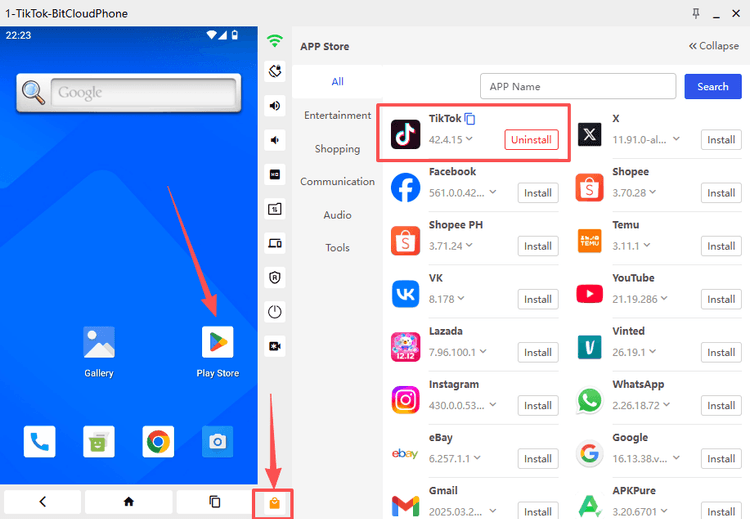
If you need to operate actual mobile applications, a cloud phone or real device infrastructure may be more appropriate.
Final Verdict: Best Free Antidetect Browser in 2026
There is no reason to pay for an antidetect browser before testing whether the workflow actually works for you.
For most users, BitBrowser is the best free antidetect browser in 2026 because its free plan provides 10 browser profiles permanently, while still offering the core features needed for practical multi account management.
Incogniton is another strong free option with 10 profiles.
GoLogin is better for users who value simplicity, while Kameleo is more appropriate for technical and mobile environment workflows. Dolphin Anty is a practical choice for straightforward multi profile management.
The simplest way to choose is to start with the free plan that matches your requirements, test several real workflows, and only pay when you actually need additional profiles, automation, or team features.
For users who want the largest permanent free starting point in this comparison, BitBrowser is the easiest place to start with 10 free profiles.

 Multi-Account Management
 Prevent Account Association
 Multi-Employee Management
Recommended
See More 



