BitBrowser × Proxy001: Optimize Multi‑Account Security & Scale Cross‑Border Business in 2026
 2026.08.24 02:53
 YT.Shi
Anti‑detect browser fingerprint isolation cannot eliminate account correlation risks alone. Real‑world cross‑border operations require high‑quality proxy infrastructure as the network‑layer safeguard.
This article introduces how to pair BitBrowser anti‑detect browser with Proxy001 global residential & mobile proxies, covering core advantages, applicable scenarios, step‑by‑step configuration workflow, and best practices to lower account‑flagging rate for social media, affiliate marketing, e‑commerce store management and ad‑verification projects.
Why you need both anti‑detect browser and premium proxies
Modern platform anti‑fraud systems judge account risk from hundreds of dimensions, divided into two core layers:
1. Browser fingerprint layer: Canvas, WebGL, WebRTC, fonts, audio context, time zone, geolocation, hardware parameters. BitBrowser builds fully isolated browser profiles, each generating unique, authentic fingerprints, independent cookies, cache and storage, simulating access from completely separate physical devices.
2. Network IP layer: IP origin, ISP reputation, IP historical behaviour, geographic consistency. Even with perfect fingerprints, multiple profiles sharing IP or using high‑risk datacenter‑marked IPs will still trigger account correlation warnings, restrictions or permanent bans.
Complete secure multi‑account formula = BitBrowser isolated fingerprint environment + Independent high‑purity Proxy001 proxy for each profile
Fingerprint and IP must match geographically: proxy country/city needs consistent with profile time‑zone, language and simulated geolocation parameters, this is the most easily‑ignored key point for many operators.
About Proxy001
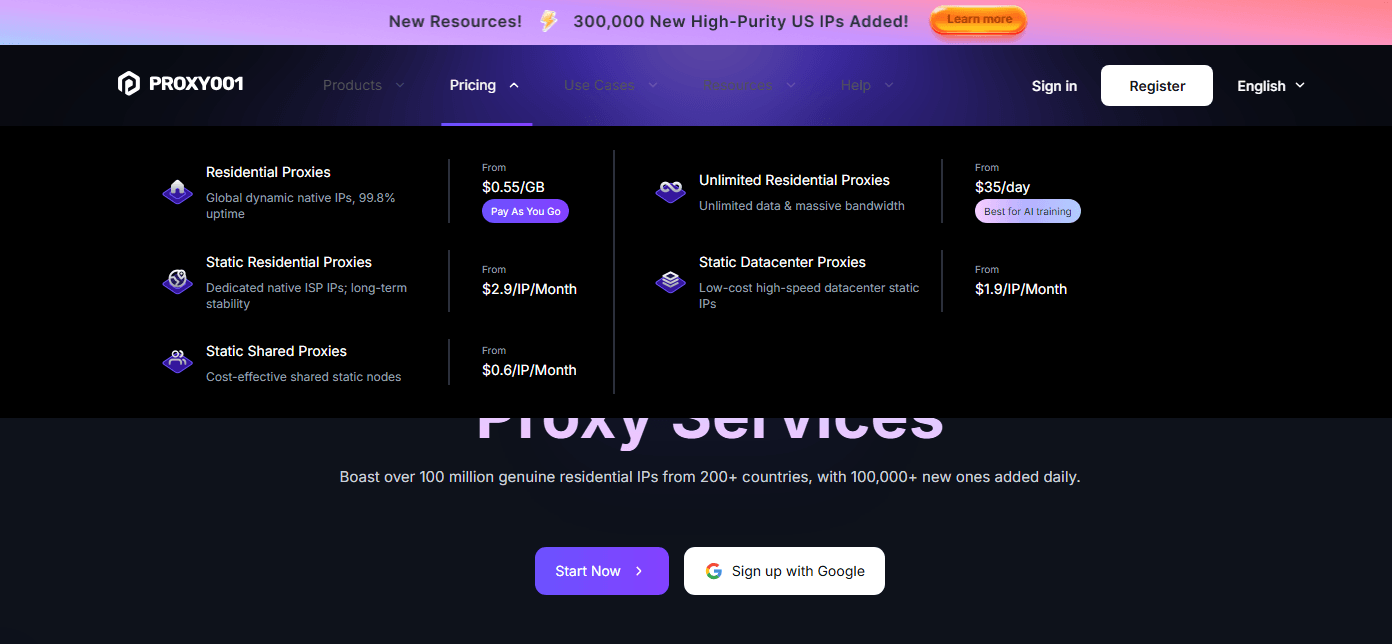
Proxy001 is a global‑scale premium proxy provider, widely adopted by cross‑border marketers, e‑commerce operators and data‑collection teams. It maintains 100M+ genuine residential IPs, covering 200+ countries, supplying Rotating residential, static‑ISP residential, Unlimited residential Proxies and datacenter proxy resources.
Core strengths
Massive clean IP pool: Daily replenishment of over 100,000 fresh IPs, IPs sourced from authorized real‑end‑user devices, compliant with GDPR & CCPA, low baseline risk score for social, e‑commerce and ad platforms.
High‑performance stability: 99.8%‑99.9% network uptime, average latency under 0.3s; AI‑driven intelligent IP rotation reduces 403 /429 blocking responses; supports sticky sessions up to 180 minutes for long‑duration login workflows.
Full‑protocol compatibility: Native support for HTTP, HTTPS, SOCKS5 protocols, perfectly compatible with BitBrowser proxy input modes; supports country‑level, city‑level and ISP‑level precise location filtering.
Flexible commercial model: Pay‑per‑traffic billing, free trial quota available for new users without credit card requirement; 7×24 multi‑language technical support and complete integration documentation for troubleshooting deployment issues.
Suitable business scenarios when working with BitBrowser
Step‑by‑step: Configure Proxy001 within BitBrowser
Pre‑requisite: Finish registration and purchase plan on Proxy001 dashboard, obtain proxy connection credentials (host, port, username, password). BitBrowser latest version installed on local machine.
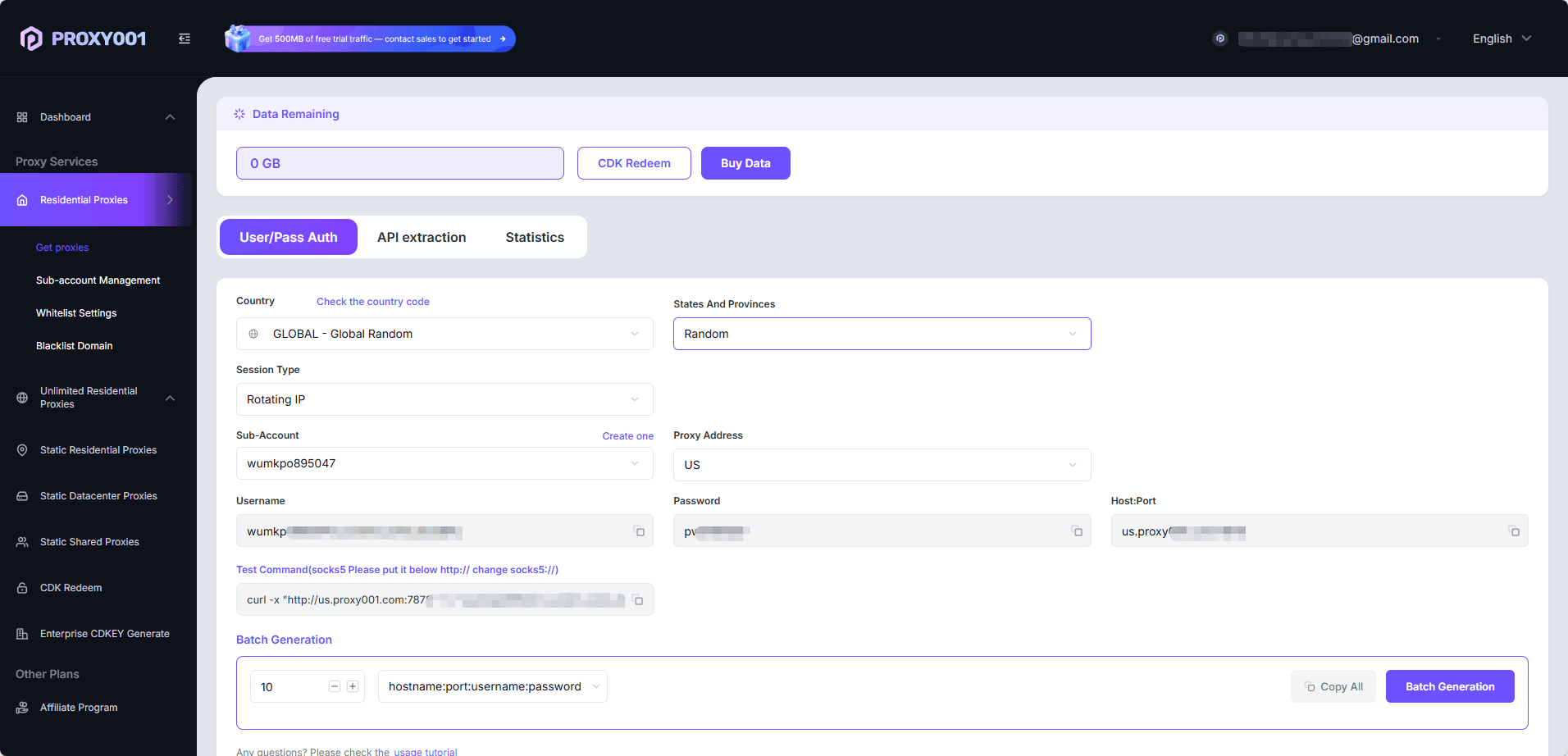
1. Get your Proxy001 proxy credentials Log in to Proxy001 backend, create proxy endpoint, pick target country/city, select rotating or sticky session mode. Copy connection parameters: proxy host, port, authentication username and password. Supports both user‑password auth and endpoint extraction via official API.

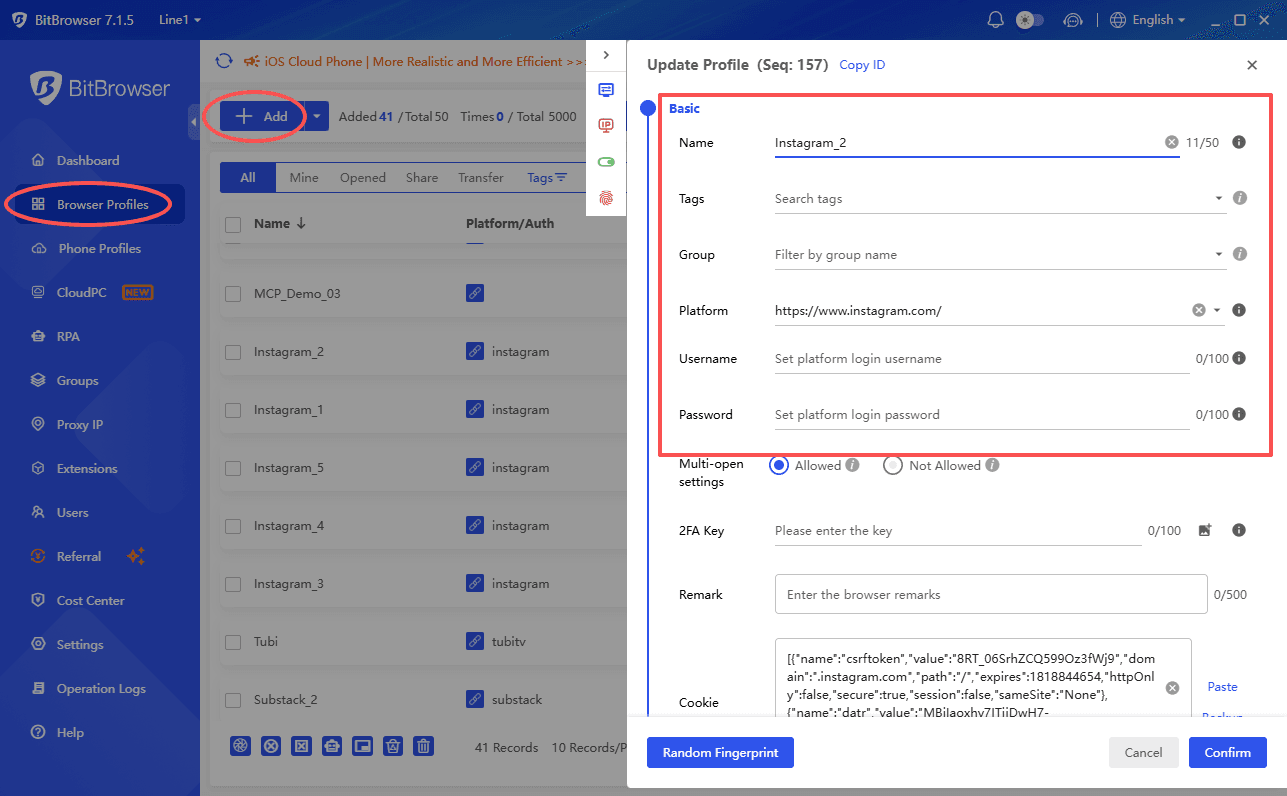
2. Create new BitBrowser browser profile Open BitBrowser, navigate to Browser Profiles, click +Add to create a brand‑new independent profile. Each production account should bind one exclusive proxy; do not reuse one proxy across multiple business profiles.
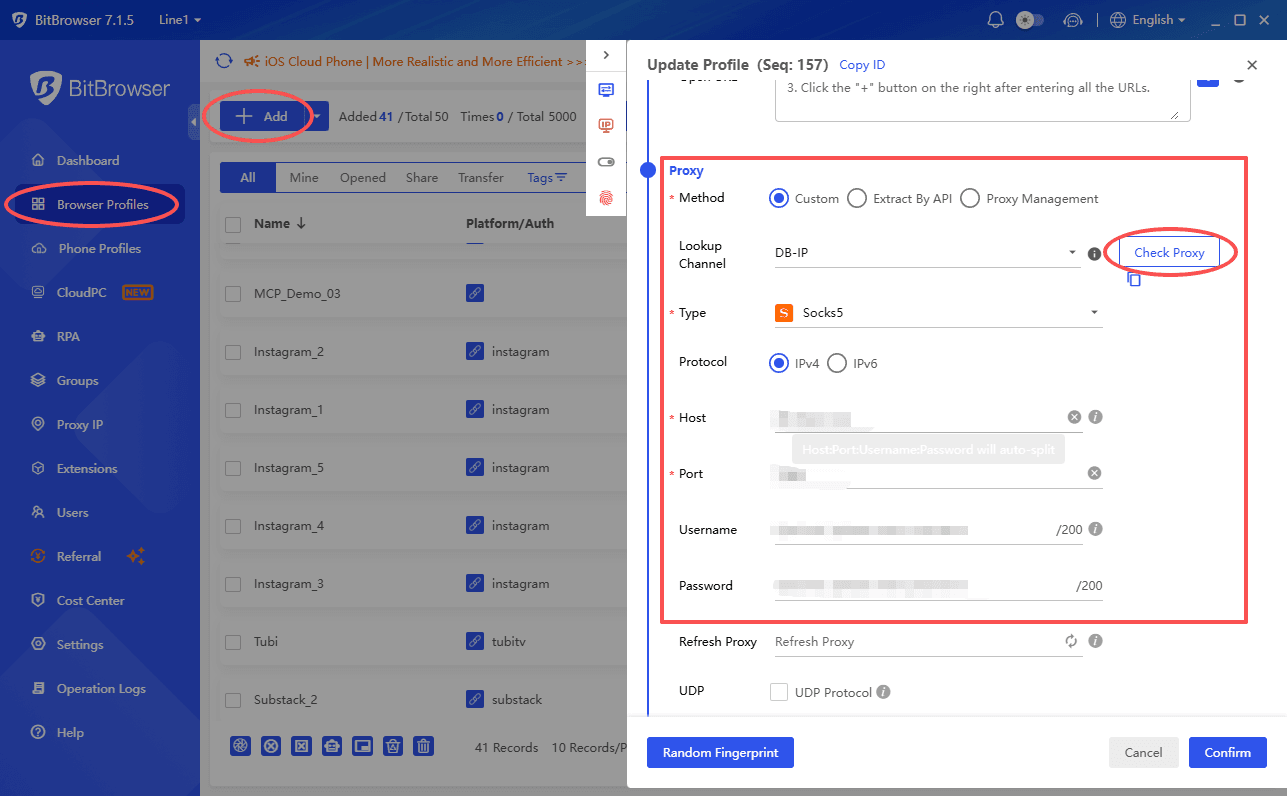
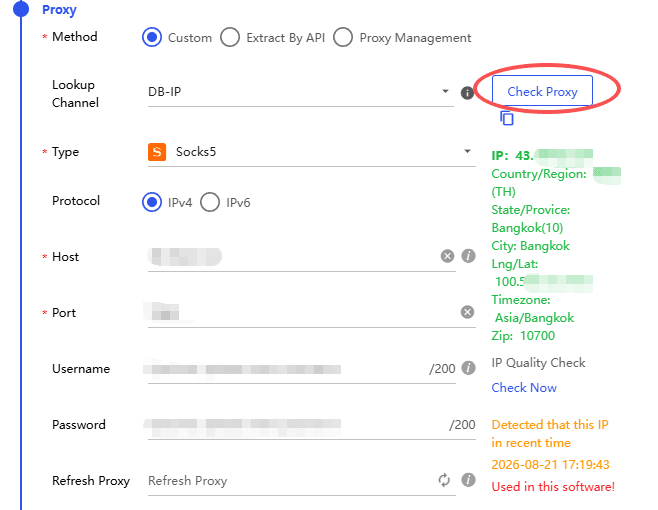
3. Fill Proxy001 proxy information Scroll down to the Proxy module inside Add‑Profile panel:
· Proxy Type: Select HTTP or SOCKS5 according to your Proxy001 plan (SOCKS5 recommended for social‑media scenarios)
· Input Host, Port, Username, Password copied from Proxy001 console
· Important tip: Configure profile’s Time zone, Language, Geolocation to match the geographic location of your Proxy001 IP to avoid fingerprint‑IP geographic mismatch risk. Enable BitBrowser built‑in WebRTC leak protection feature to prevent real‑IP leakage through WebRTC protocol.
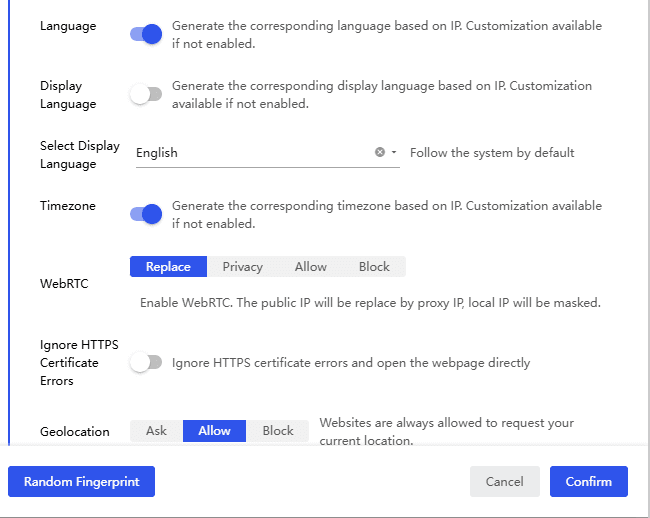
4. Test proxy connectivity Click Check Proxy button. If configuration works, the panel will return displayed IP, country and ISP information. Verify that displayed location matches your expected Proxy001 target region.
5. Save profile and start work After successful test, click confirm to save profile. Launch the profile; all network traffic of this environment will go through Proxy001 proxy, paired with BitBrowser unique isolated fingerprint.
Critical best practices for BitBrowser + Proxy001 deployment
1. One profile — one independent proxy: Never share one proxy for multiple business accounts, which directly causes correlation cluster detection even with distinct fingerprints.
2. Choose proxy type for your workflow: Static residential proxies for long‑term maintained accounts; rotating proxies are fit for scraping and short‑term tasks, not advised for logged‑in store/social main‑accounts.
3. Avoid over‑frequent IP switching: Frequent IP rotation for logged‑in accounts will lower account trust score; set reasonable sticky‑session time on Proxy001 side.
4. Tool cannot replace operational compliance: Even with BitBrowser anti‑detect fingerprint + high‑quality Proxy001 IP, human‑like browsing behaviour is essential. Platform risk detection also analyses click rhythm, dwell‑time, interaction sequences; abnormal robotic‑like behaviour still triggers restrictions. No tool guarantees zero‑ban 100% of the time.
5. Debug workflow: When facing access failure, first run BitBrowser built‑in proxy test tool, confirm IP location consistency, then check Proxy001 dashboard for node status and traffic consumption, contact respective support teams accordingly.
Final thoughts
In 2026, cross‑border multi‑account business competition lies not only in anti‑detect browser fingerprint simulation, but also on stable, low‑risk network infrastructure. BitBrowser delivers device‑level fingerprint isolation, Proxy001 provides global high‑purity residential & mobile IP resources.
When combined, this stack significantly reduces account‑flag probability and supports safe horizontal scaling for affiliate, social matrix, e‑commerce and ad‑verification projects.
If you want to test this solution, grab Proxy001 free trial quota first, test connectivity inside BitBrowser, and validate IP performance under your actual business workflow before formal volume deployment.