Best 7 Sneaker Proxy Providers in 2026: Top Picks Compared
 2026.08.12 06:23
 YT.Shi
Buying limited sneakers online is often a race against time. Popular releases can attract huge traffic, strict traffic controls, and automated security checks within seconds.
That is where sneaker proxies can help. A reliable proxy gives your connection a separate IP address and can make it easier to manage different sessions or locations when working with sneaker websites. However, not every proxy service is a good fit for sneaker releases. Speed, IP quality, location coverage, session stability, and pricing all matter.
Here are the best 7 sneaker proxy providers in 2026, plus how to pick proxy types, platform specific strategies, and a clean BitBrowser setup so you do not burn your IPs in 20 minutes.
Quick comparison table (2026)
| Provider | Best For | Proxy Types | Starting Price | Key Strength | Main Drawback |
|---|---|---|---|---|---|
| Decodo | Best Overall | Residential, ISP, Mobile | Varies | Balanced quality, stability and price | Premium pools can get expensive |
| Oxylabs | Best for Scale | Residential, ISP, Mobile | Premium | Large pool and strong global coverage | Expensive for individual users |
| Bright Data | Best for Control | Residential, ISP, Mobile | From $4/GB* | Granular targeting and flexible rules | Complex setup and higher cost |
| SOAX | Best for Stability | Residential, Mobile | From $90/month | Strong session controls and consistent traffic | May not suit very large scale |
| Webshare | Best Budget | Datacenter, Residential, ISP* | From $6/month | Simple setup and low entry cost | Datacenter IPs can be risky for sneaker platforms |
| IPRoyal | Best Value | Residential, ISP | From $1.75/GB | Flexible plans and competitive pricing | Performance can vary by location |
| HighProxies | Best for US ISP | ISP / Static Residential, Residential | From $2.50/IP/month | Fast sticky ISP proxies | Smaller pool and limited global coverage |
*Pricing and proxy availability may vary by plan, location and promotional offers.
7 Best Sneaker Proxy Providers Compared (Reviews)
1. Decodo
Decodo has become one of those “default” picks for sneaker proxy buyers who want quality without turning it into a full time job. The dashboard is clean, the documentation is not painful, and the performance is usually what you hope for: stable, low drama, and easy to scale when you need more sessions.
What it’s best for
· Shopify drops where you need lots of clean sessions and not too many weird bans.
· Footsites when you want to rotate safely and keep tasks separated.
· People who want to mix proxy types, like residential for browsing and ISP for checkout.
Proxy types
· Residential proxies (rotating and sticky depending on config)
· ISP proxies (when available on your plan)
· Mobile proxies (availability varies)
What I like Decodo tends to hit that sweet spot where IP quality is good enough that you are not constantly babysitting tasks. Sticky session controls are usually straightforward. And pricing is often more reasonable than the absolute top enterprise players.
What I don’t like If you are trying to compete at the highest volume, you might still end up comparing it against Oxylabs or Bright Data. Also, the best pools cost money. There’s no “secret cheap plan” that performs like a premium pool.
Who should pick Decodo Most sneaker people. If you are not sure where to start, start here.
2. Oxylabs
Oxylabs is what you buy when you want scale and consistency, and you are okay paying for it.
For sneaker botting, Oxylabs offers a premium residential network with high success rates on protected sites. The provider supports HTTP, HTTPS, and SOCKS5 protocols, making it compatible with virtually every sneaker bot on the market. While the pricing sits at the higher end, the reliability and success rates justify the cost for serious botters running large-scale operations.
What it’s best for
· High volume Shopify and Footsites tasking
· Multi region drops, especially when you need specific geo coverage
· Teams that care about uptime and consistency more than saving money
Proxy types
· Residential
· ISP
· Mobile
What I like The pool size and routing quality. When you scale, smaller providers start feeling “samey”. You see repeats, you see more flagged subnets, you feel it. Oxylabs usually holds up better.
What I don’t like Price. For a lot of individual sneaker buyers, it’s simply more than they want to spend.
Who should pick Oxylabs If you are already hitting volume limits with mid tier providers, or you need global targeting and steady performance under load.
3. Bright Data
Bright Data is the “control panel” option. If you want granular targeting, advanced rules, and tooling that feels like it was built for power users, it’s here.
But I’ll say this plainly. Bright Data is not always the most beginner friendly. It’s insanely capable, yet that capability comes with complexity. The pricing structure leans toward enterprise commitments, with residential proxies starting at $4.00/GB on promotional pricing and ISP proxies at $1.30/GB.
What it’s best for
· Very specific targeting setups, like city level rules or ASN based targeting when needed
· Advanced automation stacks where proxy logic is part of the workflow
· Users who want visibility into what is happening, not just “it works”
Proxy types
· Residential
· ISP
· Mobile
What I like The flexibility. You can build rules around rotation behavior, sticky sessions, and targeting parameters that other providers simply do not expose as cleanly.
What I don’t like Overkill risk. If you just want to run a few tasks on SNKRS or Shopify, you can waste time configuring stuff you don’t need. Also, it can get expensive.
Who should pick Bright Data Advanced users and teams who want fine control and are willing to learn the platform.
4. SOAX
SOAX is known for “clean” residential and mobile proxy traffic with good session controls. In sneaker terms, that usually translates to fewer random bans when you keep your task count reasonable and do not abuse the pool.
SOAX is also a good choice when you care about sticky sessions that actually stick. Which matters a lot for Shopify and Footsites where your session and cookies need to stay stable.
SOAX residential proxies are offered via monthly subscription plans from $90 to $1,600, with effective per‑GB costs decreasing as data volume increases, and enterprise custom plans starting at $0.32/GB.
What it’s best for
· Sticky residential sessions for Shopify
· Mobile proxies for apps or flows that are sensitive to IP reputation
· People who want quality over maximum pool size
Proxy types
· Residential
· Mobile
What I like Session controls and stability. Also, SOAX tends to feel “consistent”. Not always the fastest. But consistent.
What I don’t like If you need huge scale across many geos, you may outgrow it. And pricing is not budget level.
Who should pick SOAX If you want stable sticky sessions and clean traffic, and you are not trying to brute force insane task counts.
5. Webshare
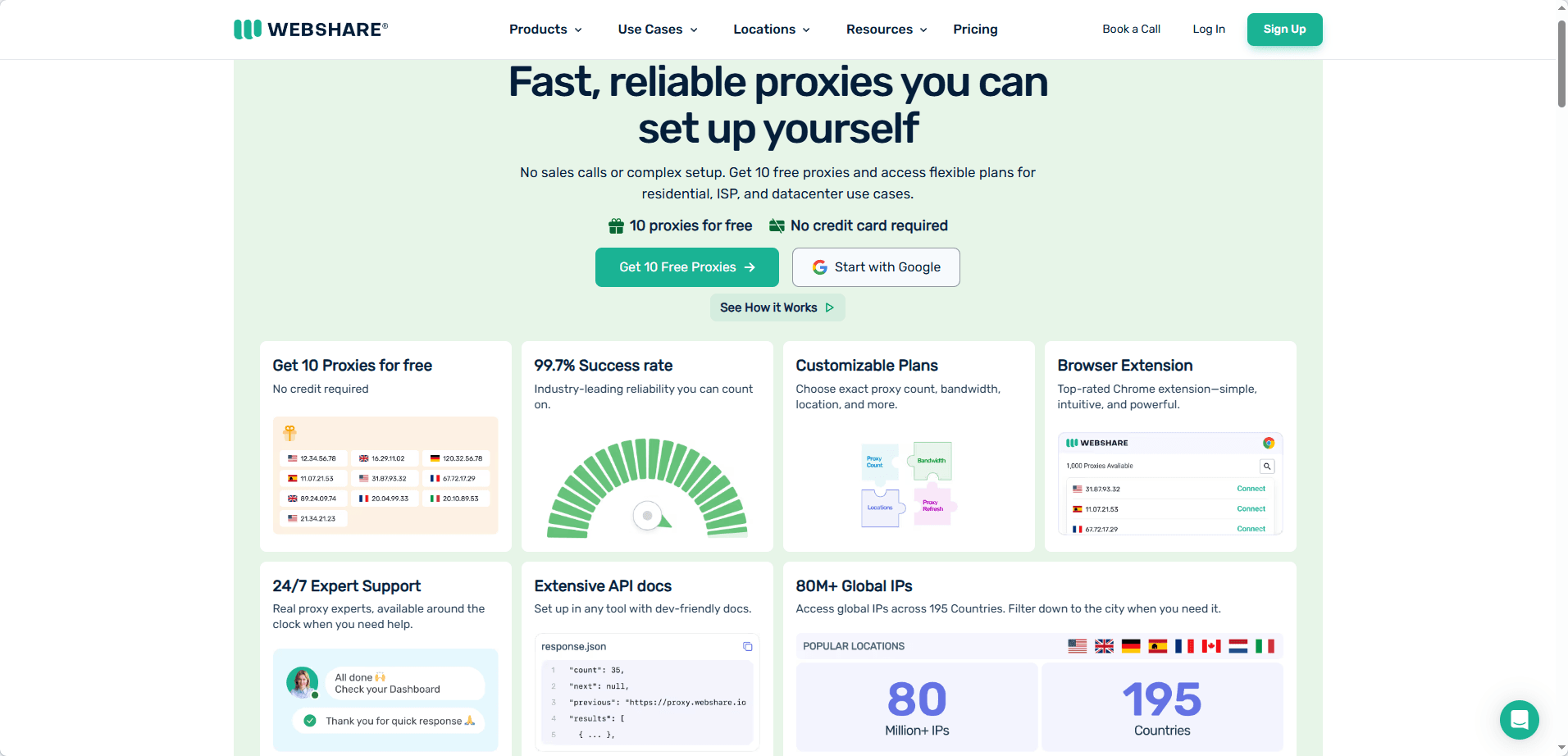
Webshare is a practical option if you want something affordable and simple, especially if you are newer or you are running lighter setups. It’s also popular outside the sneaker world, so you get a provider that’s more general purpose.
The provider offers a free tier with 10 datacenter proxies for testing, plus paid plans starting from $6 per month for 20 static residential proxies.
That can be a pro and a con. Pro: it’s stable and straightforward. Con: it’s not always optimized around sneaker specific needs, like recommended rotation rules per platform.
What it’s best for
· Budget setups
· Testing bots and tools without burning premium bandwidth
· Light Shopify tasks, monitoring, and low risk browsing
Proxy types
· Typically includes datacenter and residential, and sometimes ISP options depending on current lineup
What I like Pricing and simplicity. You can get started quickly without a lot of sales calls or complicated setup.
What I don’t like Datacenter proxies are risky for most sneaker platforms. So you need to be careful what you buy and where you use it. Also, support is not “sneaker bot culture” support.
Who should pick Webshare Beginners, testers, and people who want a budget friendly provider for non critical tasks.
6. IPRoyal
IPRoyal is one of the better value picks in this list, mainly because they offer flexible packages and competitive pricing while still giving you usable residential and ISP options.
For sneaker use, it can work well when you match expectations. Do not treat it like an unlimited premium pool. Use it smart, rotate when needed, and keep your tasks within what your plan can handle.
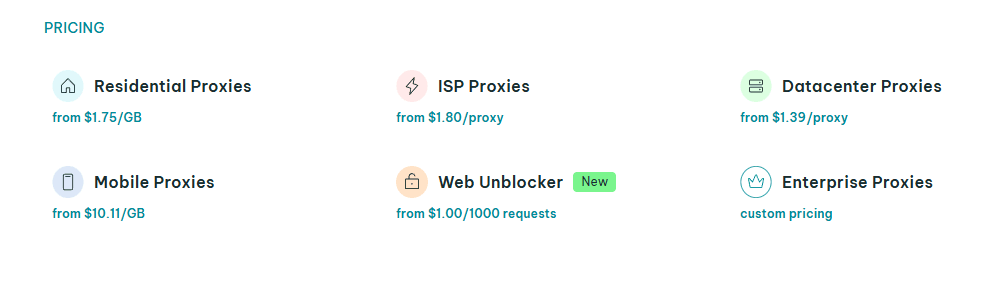
IPRoyal's residential proxies start at $1.75 per GB, ISP proxies start at $1.80 per proxy, and mobile proxies start at $10.11 per GB.
What it’s best for
· People who want decent quality without premium pricing
· Shopify sessions, smaller footsite runs
· Building a mixed stack: a bit of ISP for checkout, residential for browsing
Proxy types
· Residential
· ISP
What I like Value. It’s often easier to justify IPRoyal for casual to mid level sneaker use.
What I don’t like Like most value providers, consistency can vary by location and time. You might test one geo and love it, and another geo feels noticeably weaker.
Who should pick IPRoyal If budget matters but you still want something more serious than random cheap proxies.
7. HighProxies
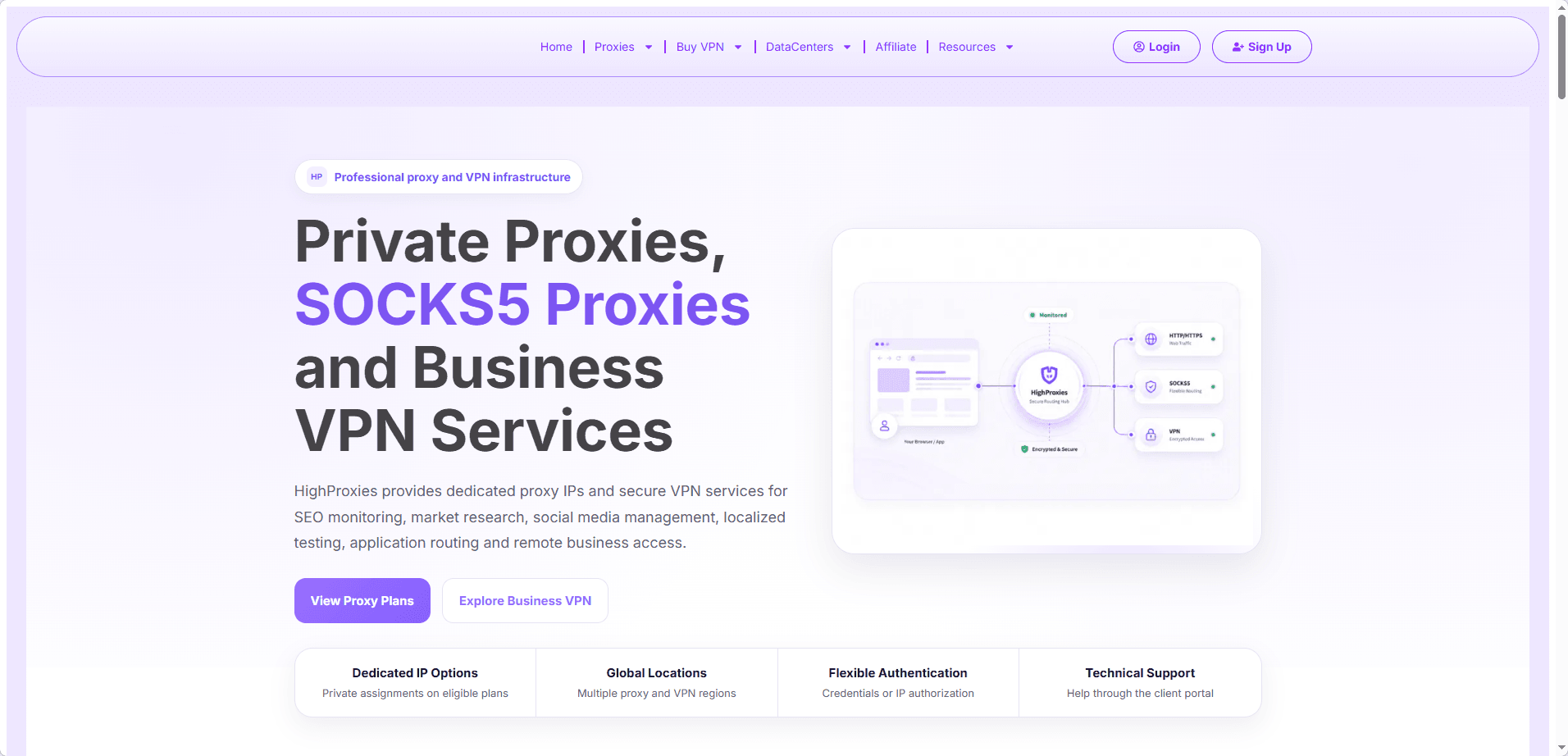
HighProxies is a longtime favorite in the sneaker community, offering fast ISP proxies from major US carriers like AT&T, Verizon, and Spectrum. Its sneaker focused product line includes dedicated ISP proxies with sticky sessions that hold your IP from cart to checkout, which is critical for Shopify and Footsites. US nodes deliver under 100 ms response times, and IPs are recycled only after long cooldowns to avoid burns.
What it's best for
· Fast ISP proxies for Footsites and Shopify checkouts
· Sticky sessions that keep your IP consistent throughout the whole process
· US centric sneaker releases
Proxy types
· ISP / Static Residential (US carriers, from $2.50 per IP per month)
· Residential (pay per GB, around $3 per GB)
What I like Speed, sticky sessions, and responsive support during busy drops.
What I don't like Smaller IP pool compared to giants, and limited coverage outside the US.
Who should pick HighProxies If you need fast, dedicated US ISP proxies and you value session stability over having the largest IP pool.
How to Choose the Right Sneaker Proxy Type? (ISP vs Residential vs Mobile)
Most people pick proxies backwards. They ask “what’s best?” instead of “what is this for?”
Here’s the practical breakdown.
1. ISP proxies (often the checkout workhorse)
ISP proxies are hosted, but they look more like real consumer ISP traffic. In many sneaker setups, ISP is the sweet spot for checkout because it can be faster and more stable than residential while still having better reputation than plain datacenter IPs.
Use ISP when
· You want stable sessions and lower latency.
· You are running Shopify checkout tasks.
· You want something you can keep sticky for longer.
Watch out for: If you reuse the same ISP IPs too aggressively across many accounts, you can burn them fast.
2. Residential proxies (the safest “general use” pool)
Residential proxies are real device IPs (sourced from peer to peer networks or similar systems depending on provider). They tend to blend in better, which is why they are popular for sneaker browsing, queue entry, and session generation.
Use residential when
· You need rotation and scale.
· You are managing many sessions across different accounts.
· You are dealing with platforms that hate datacenter traffic.
Watch out for
· Cost, especially if you spam retries and chew bandwidth.
· “Quality variance” depending on provider and geo.
3. Mobile proxies (highest trust, slowest and priciest)
Mobile proxies route through carrier networks. They can be extremely trustworthy from an anti bot perspective because tons of real users share mobile carrier IP ranges.
Use mobile when
· You keep getting blocked even with good residential.
· You are doing flows that are sensitive to reputation.
· You can afford slower, pricier traffic for higher trust.
Watch out for
· Speed and cost.
· Limited concurrency. Mobile is not where you run 500 tasks unless you are rich or reckless.
If you want a simple rule that works. Residential for farming and browsing. ISP for checkout. Mobile for stubborn targets and high trust needs.
ISP Proxies vs Residential Proxies
How to Set Up Sneaker Proxies with BitBrowser (Anti-Detect Guide)
BitBrowser, like other anti-detect browsers, helps you separate identities. That means separate cookies, fingerprints, IPs, and accounts.
Here’s a clean setup flow that helps avoid common mistakes.
Step 1: Create a profile per account
Do not reuse one profile for multiple accounts.
In BitBrowser:
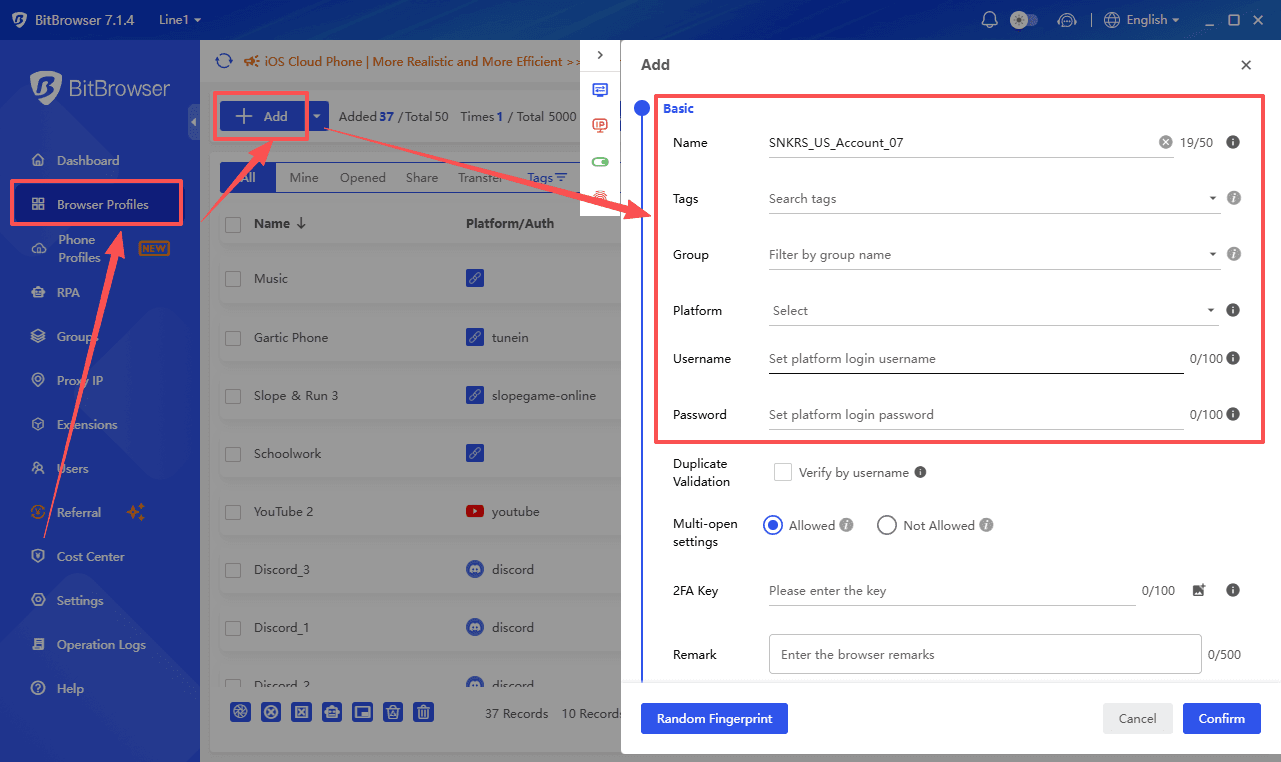
1. Create a new browser profile.
2. Give it a clear name like SNKRS_US_Account_07 or Shopify_Kith_Acc3.
3. Set the OS, timezone, language, and WebRTC behavior consistently.
Consistency matters more than “randomness”. Random settings can look suspicious.
Step 2: Add your proxy to the profile
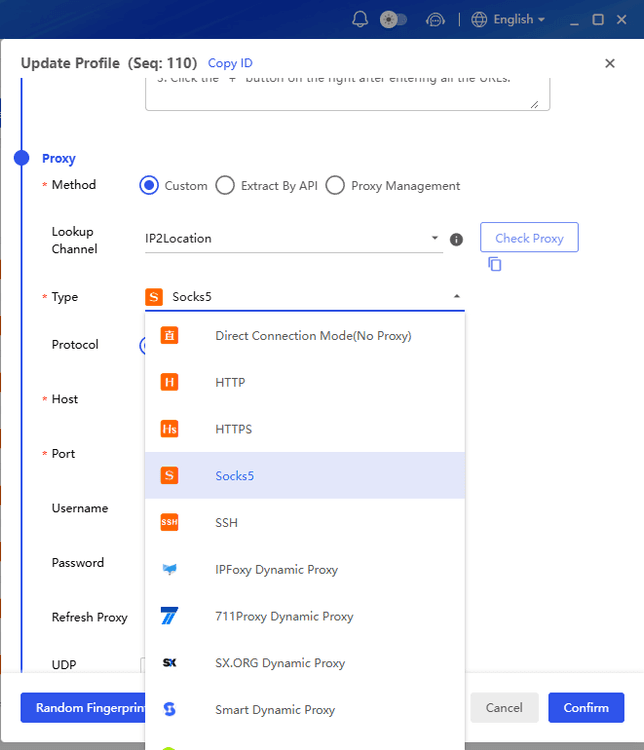
Add the proxy inside the profile settings rather than system-wide.
1. Choose the protocol your provider supports, such as HTTP(S) or SOCKS5.
2. Enter the IP, port, username, and password, then test the connection.
3. If your provider supports sticky residential sessions with a session ID, set one up and keep it stable for that profile.
Sticky sessions can help maintain a more consistent IP connection, which can be useful when working with residential proxies.
Step 3: Match geo signals
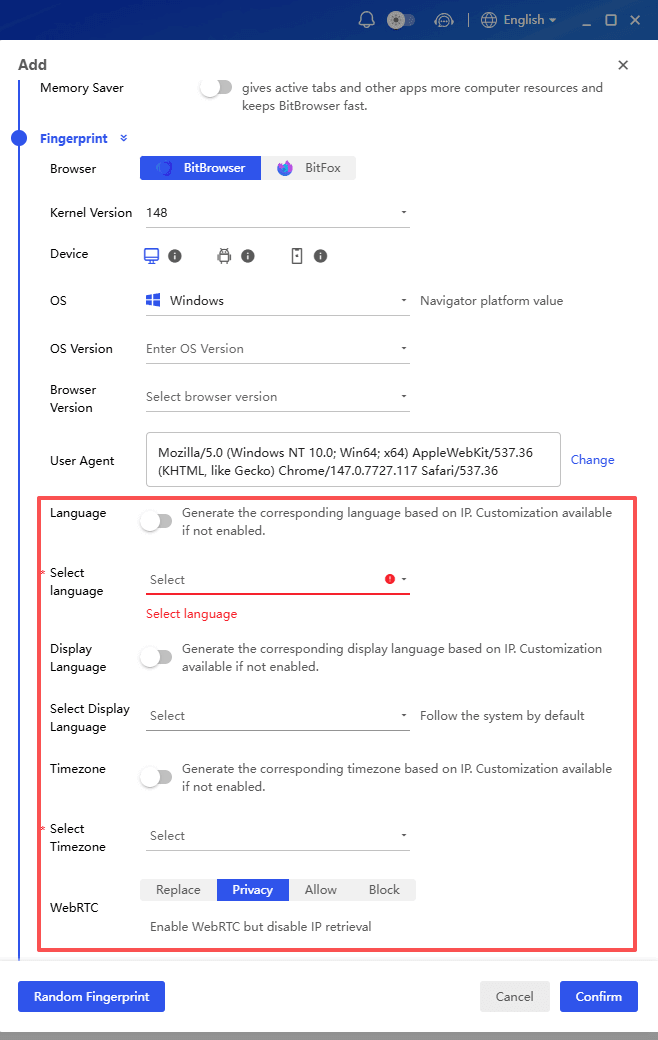
If your proxy is in the US, try to keep the other location signals consistent:
· Use a US timezone.
· Set the browser language to English (US).
· Keep location permissions aligned, or disable them consistently.
A US IP with a timezone on the other side of the world is not always fatal, but there is little reason to create unnecessary inconsistencies.
Then test the profile on an IP check site and make sure it shows the proxy IP instead of your home IP.
Step 4: Keep one profile tied to one task identity
If you use a bot or automation tool that can connect to browser profiles, keep the mapping clean.
For example:
· Profile A → Proxy A → Account A
· Profile B → Proxy B → Account B
No mixing. No “just this once”. Keeping each profile, proxy, and account separated makes the setup much easier to manage.
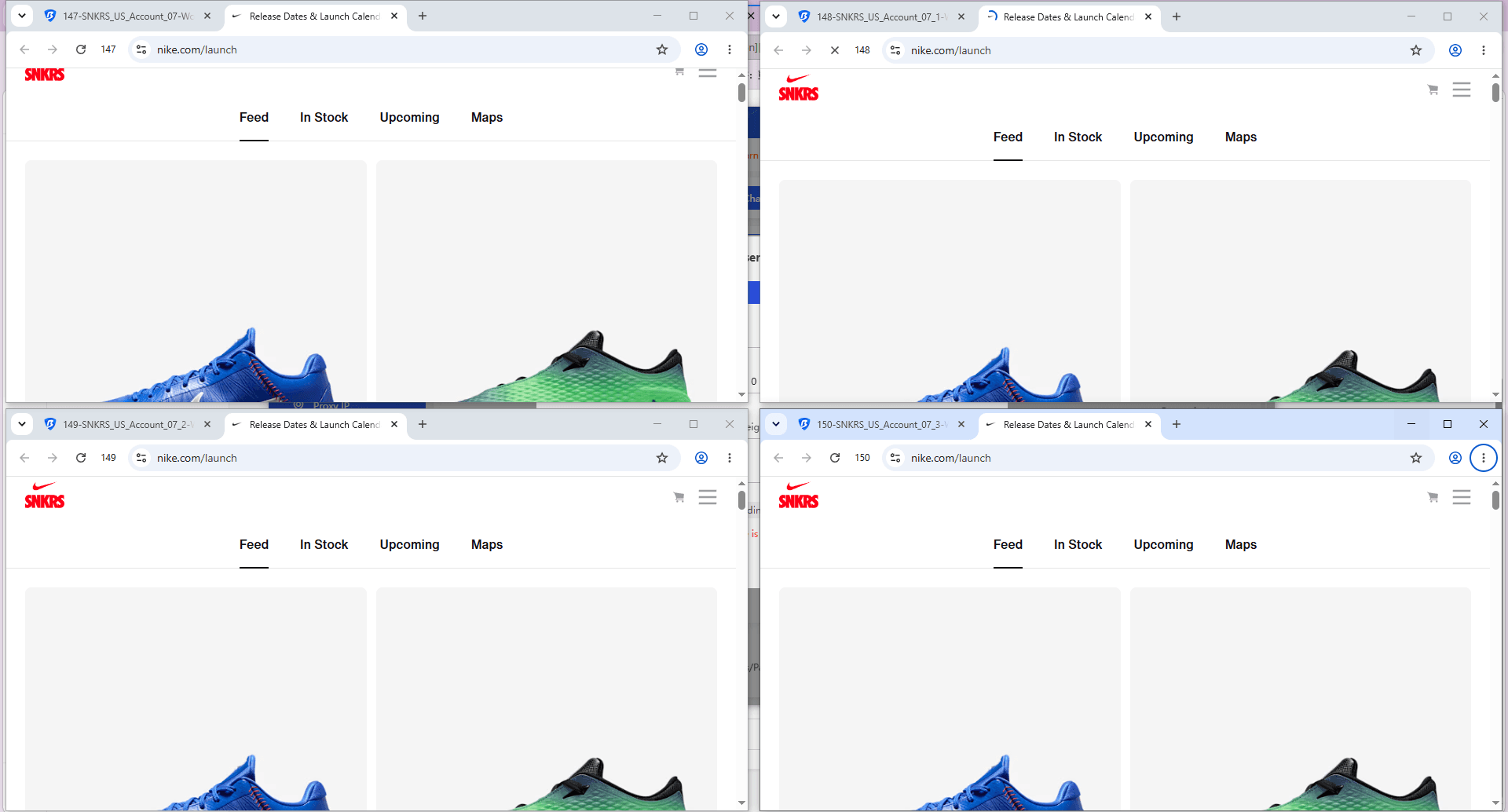
Step 5: Use the Multi Account Synchronizer
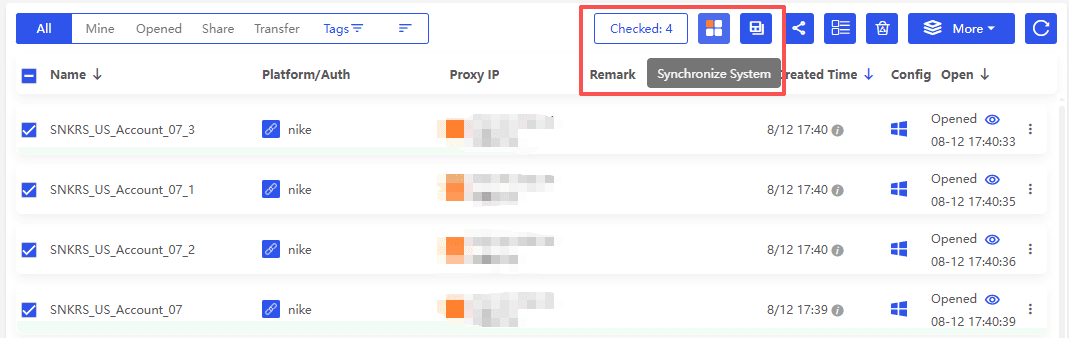
During a limited sneaker drop, managing several accounts manually can be slow. BitBrowser’s Multi Account Synchronizer lets you run the same browser actions across multiple selected profiles at once.
For example, you can:
· Select multiple sneaker accounts.
· Sync actions like opening product pages and navigating checkout.
· Keep each account linked to its own proxy and browser profile.
This can save time during busy drops while keeping your accounts, proxies, and sessions separate.
Platform-Specific Strategies (SNKRS, Shopify, Footsites)
This is where people waste the most money. They buy good proxies, then use the same strategy everywhere. And get cooked anyway.
1. SNKRS strategy (Nike SNKRS)
SNKRS looks beyond the IP. Account history, device setup, activity patterns, and region consistency can all matter. Keep your account region, payment details, shipping address, and proxy location aligned.
Avoid putting too many tasks on one proxy. Residential or mobile proxies are generally a better fit than datacenter IPs for SNKRS.
A simple setup is 1 account + 1 browser profile + 1 sticky proxy. Avoid logging into many accounts from the same browser setup, even when the IPs are different.
Do not spam refreshes or repeat actions aggressively. Keep your activity as normal and consistent as possible during a drop.
2. Shopify Strategy
Shopify stores can use rate limits, bot checks, and queue systems, so proxy quality and session stability matter during busy sneaker drops.
ISP proxies are often a better fit for checkout, while residential proxies work well for browsing, monitoring, and warming up sessions.
For a simple setup, warm the session with a residential proxy, then use an ISP proxy for checkout while keeping the same browser profile. Sticky sessions are also useful throughout the run. Avoid putting too many tasks on one IP, as heavy activity can trigger restrictions.
3. Footsites strategy (Foot Locker, Champs, etc.)
Footsites can be very sensitive to IP reputation, request speed, and repeated activity, especially during busy sneaker drops.
Residential proxies with rotation are useful for running more tasks, while clean ISP proxies are better suited to fewer, higher value tasks. Keep concurrency under control and avoid sending too many similar requests at once.
A simple setup is to spread tasks across different locations, keep retries limited, and use a separate browser profile for each account. Keeping cookies and sessions separate is also important.
Final Verdict: Which One to Pick?
If you want the simplest answer that works for most people in 2026:
· Best overall balance: Decodo
· Best for scale and global coverage: Oxylabs
· Best for advanced control and targeting: Bright Data
· Best for clean sticky residential and mobile sessions: SOAX
· Best budget friendly starting point: Webshare
· Best value option with flexible packages: IPRoyal
· Best for stability focused setups: HighProxies
If you are building a practical sneaker setup with BitBrowser, not just picking one proxy provider, this combination is common for a reason:
· Residential for session building, queue entry, and browsing
· ISP for checkout attempts
· Mobile only when you keep getting blocked and you need higher trust

 Multi-Account Management
 Prevent Account Association
 Multi-Employee Management
Recommended
See More 



