Best TikTok Story Viewers in 2026: 7 Tools I Tested & Reviewed
 2026.09.22 08:26
 YT.Shi
TikTok Stories only stay available for 24 hours, so finding a reliable TikTok Story Viewer can be useful if you want to check a public Story without opening it from your main TikTok account.
I tested 7 TikTok Story Viewer tools to see what actually works. Some are faster than others, some have fewer ads, and a few can find recently active Stories using only a TikTok username instead of a full profile or Story URL.
The differences are worth knowing. Some tools mainly work as profile viewers, while others are better for Stories or downloads. A few also come with redirects, pop-ups, or other limitations that can make them frustrating to use.
In this guide, I’ll compare the 7 tools based on speed, ads, search options, Story availability, and overall usability, so you can see which ones are worth trying.
View Stories in a Separate Browser
What is a TikTok Story Viewer?
A TikTok Story Viewer is usually a website that lets you search for public TikTok Stories without opening them through your normal TikTok session.
Depending on the service, you may be able to:
▸ Search for a public TikTok username
▸ View active TikTok Stories
▸ Watch Stories without logging into TikTok
▸ Download available Story photos or videos
▸ Browse a TikTok profile and its public posts
The important word here is public. These services cannot legitimately give you access to a private TikTok account or a Story that the account owner has restricted.
TikTok says Stories are available for 24 hours, so a viewer can only retrieve a Story while it is still available.
TikTok Story Viewer Quick Comparison
7 TikTok Story Viewers I Tested & Reviewed
1. ViewTikStories
ViewTikStories lets you search by TikTok username or profile URL. In my test, results appeared in around two seconds and included basic profile information, Videos, Reposts, Stories, Followers, Following, and Playlists. It can also show recently active Stories.
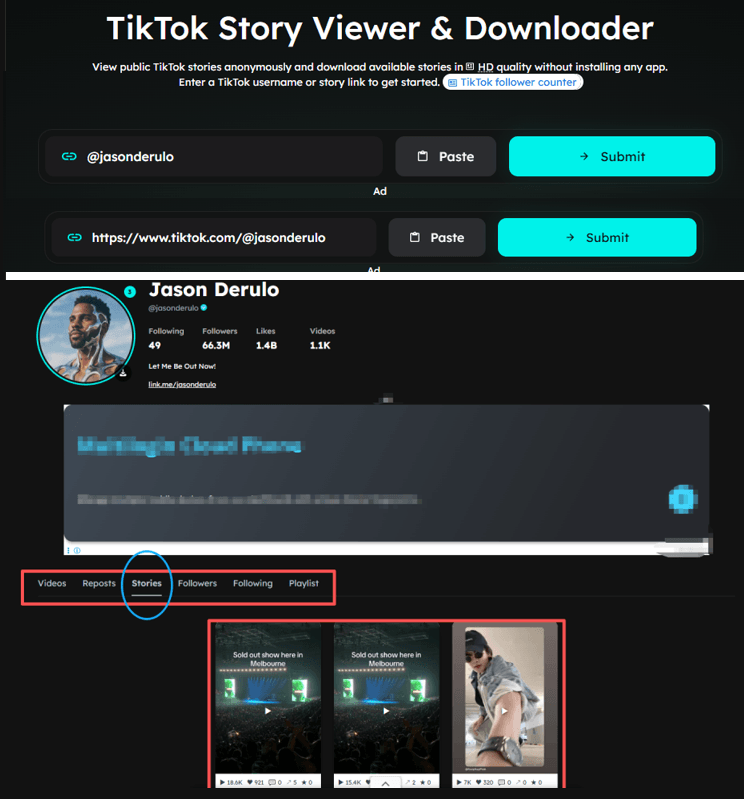
What I liked
▸ Fast search, usually around two seconds
▸ Supports username and profile URL searches
▸ Recently active Stories are easy to find
▸ No forced pop-up ads
If you paste a TikTok video URL directly, the tool also lets you watch the video online or choose between watermarked download, watermark-free download, and audio-only download.

What could be better
There are a moderate number of ads, and some can cover part of the page. After opening the results, you also need to go back manually before searching for another account. VPN users may occasionally see a short verification step.
Overall: A fast and practical option if you mainly want to find recent TikTok Stories by username.
2. TikVib
TikVib supports searches by TikTok username or profile URL. The results load almost instantly after you press Enter and take you directly to the user's profile. Its Stories section displayed more than a dozen Stories in my test, more than the first tool.
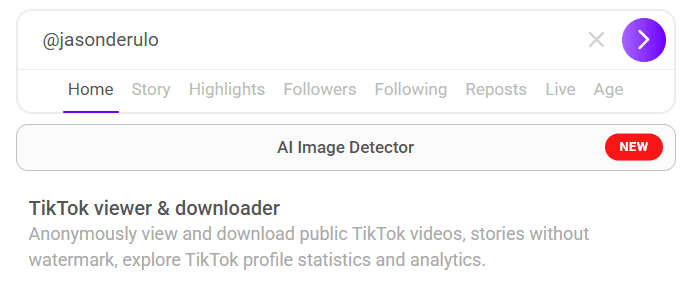

What I liked
▸ Almost instant search results
▸ Supports username and profile URL searches
▸ Shows more active Stories
▸ No login required
What could be better
The page has around 3–4 ads, although they can be closed manually. If you paste a TikTok video URL, you can also download without a watermark, download the audio, or share the content.
3. Tik.Ninja
Tik.Ninja TikTok Story Viewer was one of the fastest tools I tested. You can search by username or profile URL, and the results appear almost instantly. Unlike the first two tools, you can search for another account on the same page without going back.

What I liked
▸ Extremely fast search
▸ Supports username and profile URL searches
▸ Lets you switch between Videos, Reposts, Stories, and other profile information
▸ Clean interface with only one or two light ads
▸ No ads blocking the main content
▸ Video URLs can be used to download videos or audio
The tool showed three active Stories in my test. Interestingly, the Stories were different from those shown by the first tool, while matching the first three Stories returned by the second tool.
Overall: It doesn't show the most Stories, but the fast search and smooth browsing experience make it one of the easier tools to use.
4. FinTok
FinTok TikTok Story Viewer didn't work in my test. I tried three different TikTok profiles, using both usernames and profile URLs, but every search returned an error:
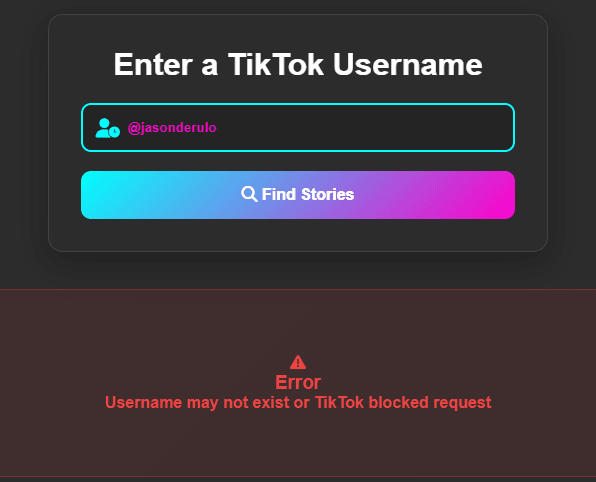
The page itself is clean and ad-free, but that doesn't make much difference when the Story search doesn't return results.
Overall: I couldn't get it to retrieve Stories from any of the three profiles I tested.
5. SpyBroski
SpyBroski TikTok Story Viewer has a relatively simple interface and supports searches by username or profile URL. Results appeared in around two seconds in my test.
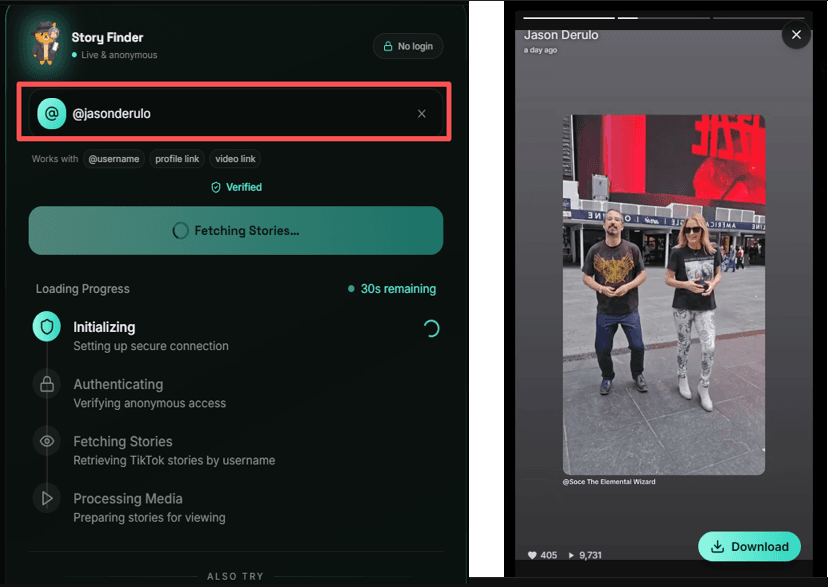
What I liked
▸ Fast search
▸ Supports username and profile URL searches
▸ After closing the initial ad, no more ads appeared
▸ Saves your search history, making it easy to check the same accounts again
What could be better
The tool only returns one recent Story and doesn't show other profile information such as followers or videos. After closing the Story, you're taken back to the search page to enter another account.
It also only supports Story viewing. You can't paste a TikTok video URL here. For video-related tools, you'll need to use other options on the site.
Overall: A simple option if you only need to check the latest Story from a TikTok account.
6. Comment Picker
Comment Picker TikTok Story Viewer didn't work in my test. I tried both usernames and profile URLs, but every search returned:

The site also requires a calculation verification before searching and shows a 3–4 second forced ad, which adds extra friction.
Overall: I couldn't retrieve any Stories from the accounts I tested, so there isn't much reason to use it if you need a quick Story search.
7. SnapTikID
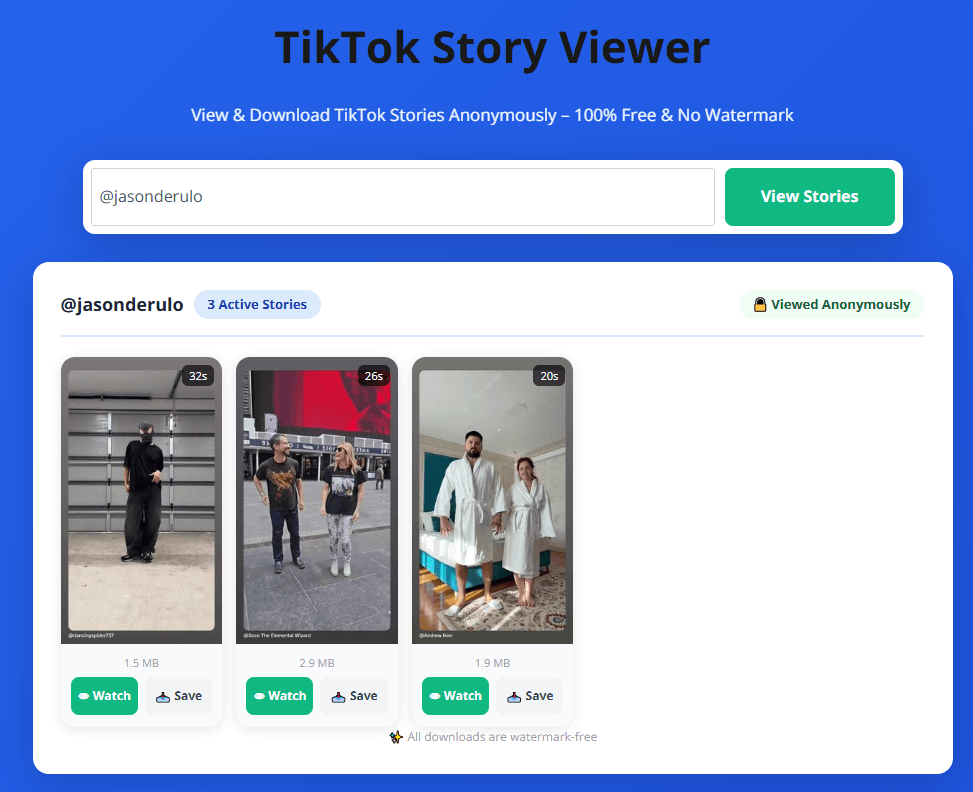
SnapTikID TikTok Story Viewer has a clean, ad-free interface and supports searches by username or profile URL. Results appeared in around two seconds in my test.
What I liked
▸ Clean, ad-free page
▸ Fast search
▸ Supports username and profile URL searches
▸ Returned three Stories in my test
▸ Stories can be viewed online or downloaded
What could be better
The tool is focused entirely on Stories. It doesn't show other profile information such as videos, followers, or reposts, and it doesn't support TikTok video URLs or video viewing.
Overall: A simple choice if you want a clean, fast, and ad-free Story viewer without extra profile information.
Can You View TikTok Stories Anonymously?
Yes, public TikTok Stories can be viewed without opening them through your main TikTok account by using a third-party Story Viewer.
However, this does not mean complete online anonymity. Third-party websites may still use cookies, analytics, ads, or other tracking technologies.
In simple terms, your TikTok account is not used to view the Story, but the third-party site may still collect technical data.
For a broader guide, see our article on anonymous TikTok browsing.
Can You See Who Views Your TikToks?
TikTok treats profile views, post views, and Story views differently.
▸ For Stories, TikTok provides the Story creator with information about who has viewed the Story. Turning off Profile View History does not turn Story viewing into anonymous viewing.
▸ For regular posts, TikTok has a separate Post View History feature with its own settings and eligibility requirements.
So there is no single setting that controls every type of TikTok view.
How to Turn Off Profile Views on TikTok
1. Open TikTok and go to Profile.
2. Tap the Menu ☰.
3. Open Settings and privacy.
4. Tap Privacy.
5. Find Profile views.
6. Turn Profile view history off.
Keep in mind that this setting is specifically about profile views. It should not be confused with Story views or Post View History.
Why Use BitBrowser to View TikTok Stories Anonymously?
Third-party TikTok Story Viewers can be useful, but some come with ads, pop-ups, redirects, or other unwanted site activity.
Using a dedicated BitBrowser profile keeps the viewer site's cookies, cache, and browsing data separate from your regular browser. This is especially useful if you test multiple TikTok Story Viewers or check different profiles regularly.
You can also create separate browser profiles for different TikTok-related tasks, making it easier to switch between them without mixing browsing sessions.
How to View TikTok Stories Anonymously With BitBrowser
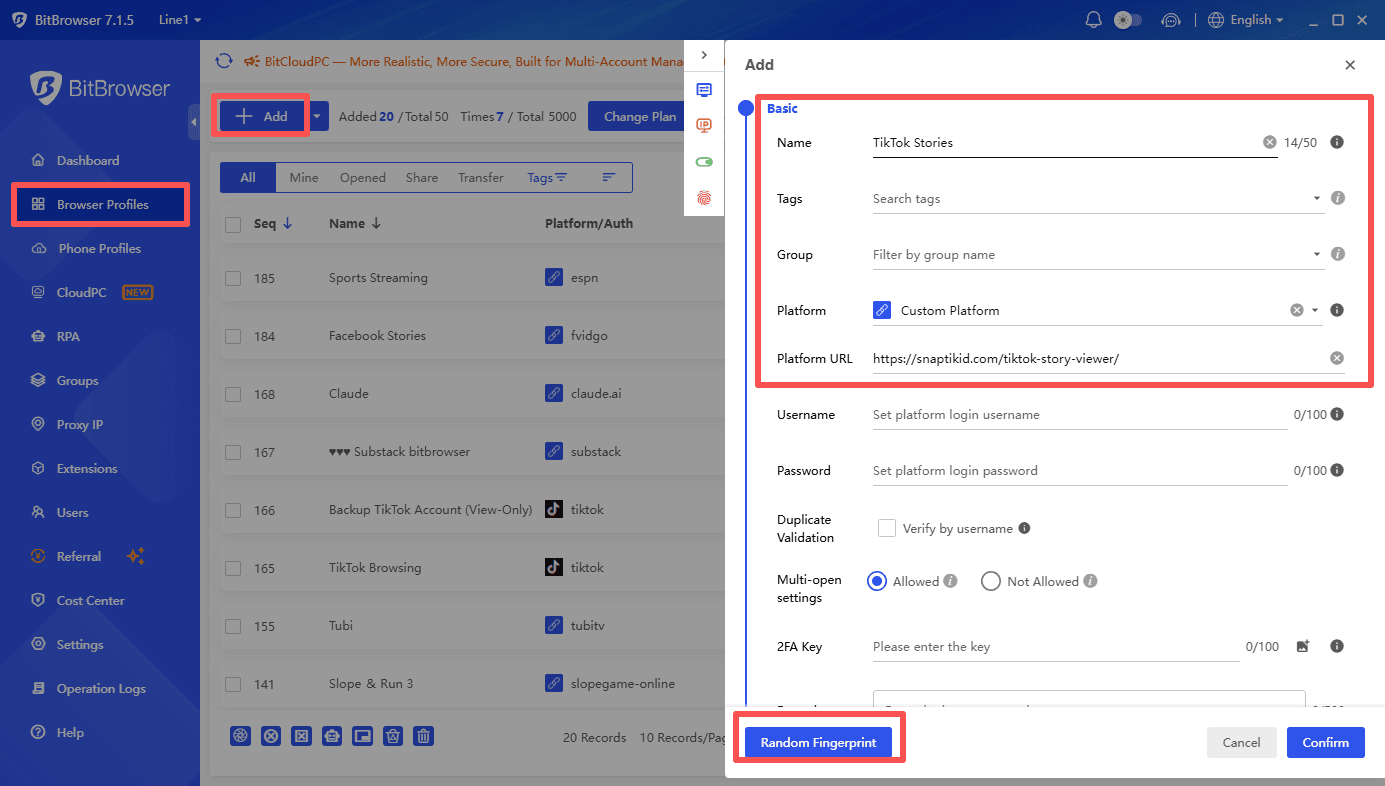
1. Open BitBrowser and create a new browser profile.
2. Give the profile a clear name, such as TikTok Stories.
3. Configure the browser environment as needed.
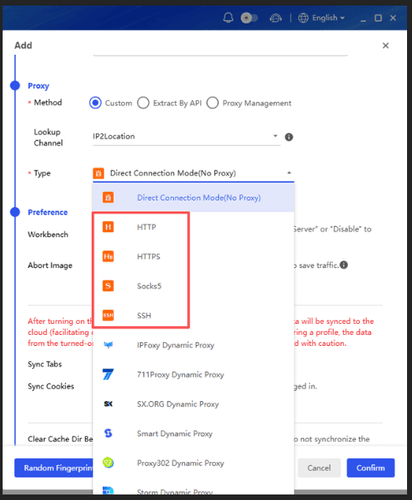
4. (Optional) Add a proxy if your browsing workflow requires one.
5. Open a TikTok Story Viewer from the dedicated profile. You can open multiple browser windows at the same time to use different viewing tools.
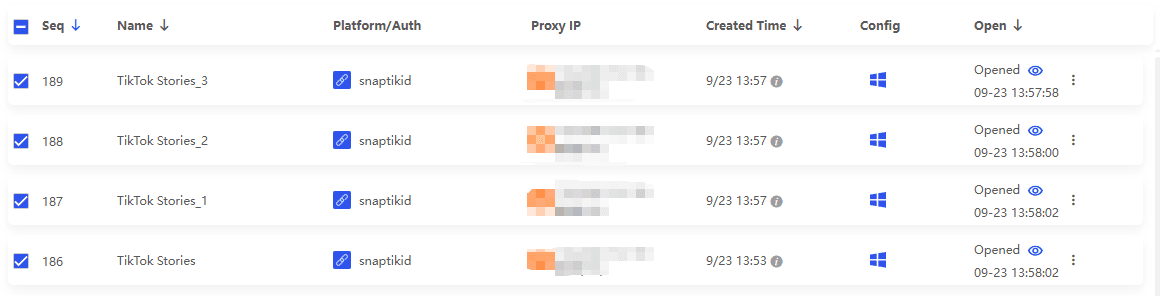
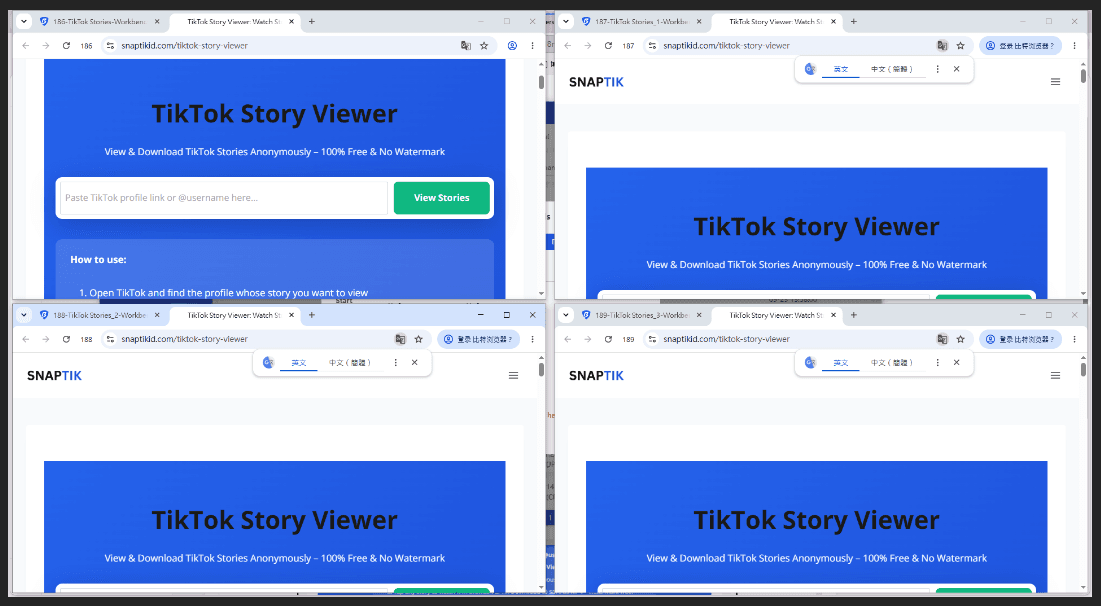
6. Search for public TikTok Stories without mixing the site's browsing data with your everyday browser session.
If your daily work involves managing multiple TikTok accounts, BitBrowser also lets you keep each account in a separate browser profile, helping isolate account environments and reduce unwanted account association.
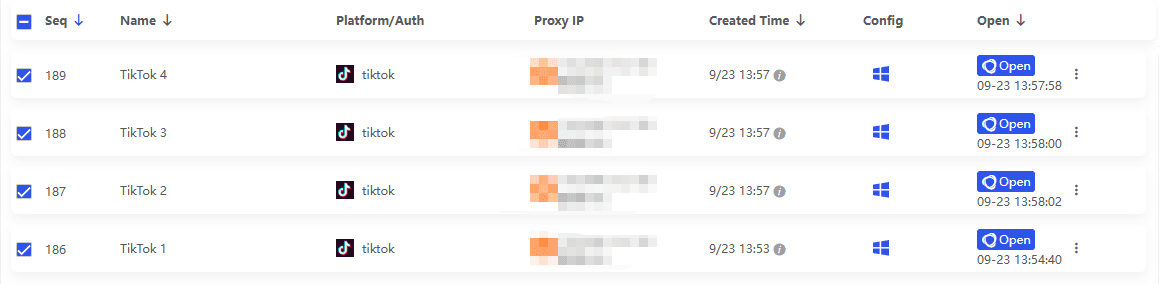
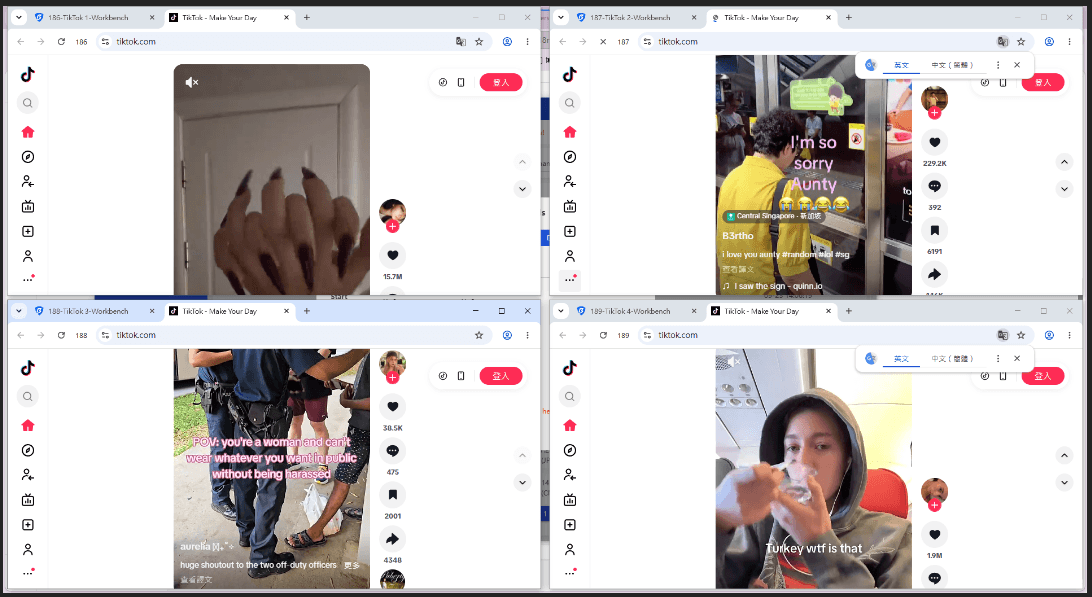
BitBrowser also provides 10 browser profiles permanently free, which is enough for many basic separated browsing workflows.
Are TikTok Story Viewer Websites Safe?
Third-party TikTok Story Viewers are not equally trustworthy. Avoid entering your TikTok password, connecting your account unnecessarily, or downloading unknown files and extensions. Be especially careful with fake download buttons and aggressive pop-ups.
For safer browsing, you can use a dedicated BitBrowser profile to isolate cookies, cache, and browsing data from your everyday browser environment. This does not guarantee complete security, so you should still avoid suspicious links and downloads.
Frequently Asked Questions
What Is a TikTok Story Viewer?
A TikTok Story Viewer is a third-party tool for finding and viewing publicly available TikTok Stories, usually by username or profile URL. Some tools also support profile browsing or video downloads.
Can You View TikTok Stories Anonymously?
Yes. Public Stories can be viewed through some third-party viewers without opening them from your main TikTok account. However, this does not guarantee complete online anonymity because the third-party website may still collect technical data.
What Is the Difference Between a TikTok Viewer and a TikTok Profile Viewer?
A TikTok Viewer is a broader term for tools that browse public TikTok content. A TikTok Profile Viewer focuses on profiles, videos, and profile information, while a Story Viewer focuses on active Stories.
Can a TikTok Story Viewer Access Private Accounts?
No. These tools can only retrieve publicly available content. They cannot legitimately provide access to private accounts or restricted Stories.
Are TikTok Story Viewer Websites Safe to Use?
Use caution with third-party viewers. Do not enter your TikTok password or download unknown files and extensions. A dedicated BitBrowser profile can also isolate cookies, cache, and browsing data from your everyday browser environment.

 Multi-Account Management
 Prevent Account Association
 Multi-Employee Management
Recommended
See More 



