TikTok Viewer: How to View TikTok Profiles, Videos & Stories Anonymously
 2026.08.27 10:17
 YT.Shi
Sometimes you want to check a TikTok profile, watch a video, or look at a Story without using your main TikTok account.
Maybe you do not want to install the app. Maybe you want to keep casual browsing separate from your normal TikTok activity. Or perhaps you simply want to understand whether someone can see that you viewed their profile or content.
A TikTok viewer can be one option for viewing public content. You can also browse TikTok without logging in, use a private browser window, or create a separate browser profile.
However, these methods are not identical. In particular, TikTok treats profile views, post views, and Story views differently.
This guide explains six practical ways to view public TikTok content more privately and what you should know about each method.
What is a TikTok Viewer?
A “TikTok viewer” is usually one of these:
· A website that lets you paste a TikTok username or link and view public videos
· A “TikTok profile viewer” that shows profile info and posts without login
· A “TikTok Story viewer” that tries to fetch public Stories
· A browser extension that claims to do this (be careful)
· An app that claims to do this (be even more careful)
The idea is: if you view TikTok content outside the TikTok app while not logged in, you reduce the chance of your identity being tied to views.
How to Use a TikTok Viewer
The exact interface varies between services, but the basic process is usually simple:
1. Open a reputable TikTok viewer in your browser.
2. Enter the TikTok username or link you want to find.

3. Select the matching profile.
4. Browse the public content available through the service.

5. Avoid entering your TikTok password or other unnecessary account credentials.
A third party viewer should not be treated as a guarantee of complete anonymity. It is better to think of it as a way to access public TikTok content without using your normal TikTok session.
6 Safest Ways to View TikTok Anonymously in 2026 (Ranked)
1. Use an Anti Detect Browser
If you want to browse TikTok in a separate browser environment, BitBrowser provides a simple way to create and manage dedicated browser profiles instead of relying on a standard private browsing window.
Each BitBrowser profile can have its own cookies, cache, settings, browser fingerprint, and other browsing data. This keeps your TikTok browsing environment separate from your regular browser session.
This can be especially useful if you regularly switch between different browsing environments or want to keep TikTok activity organized separately.
How to Browse TikTok With BitBrowser
With BitBrowser, you can create a dedicated browser profile specifically for TikTok and keep it separate from your regular browsing environment.
The process is simple:
1. Open BitBrowser and create a new browser profile.
2. Name the profile clearly, such as TikTok Browsing.
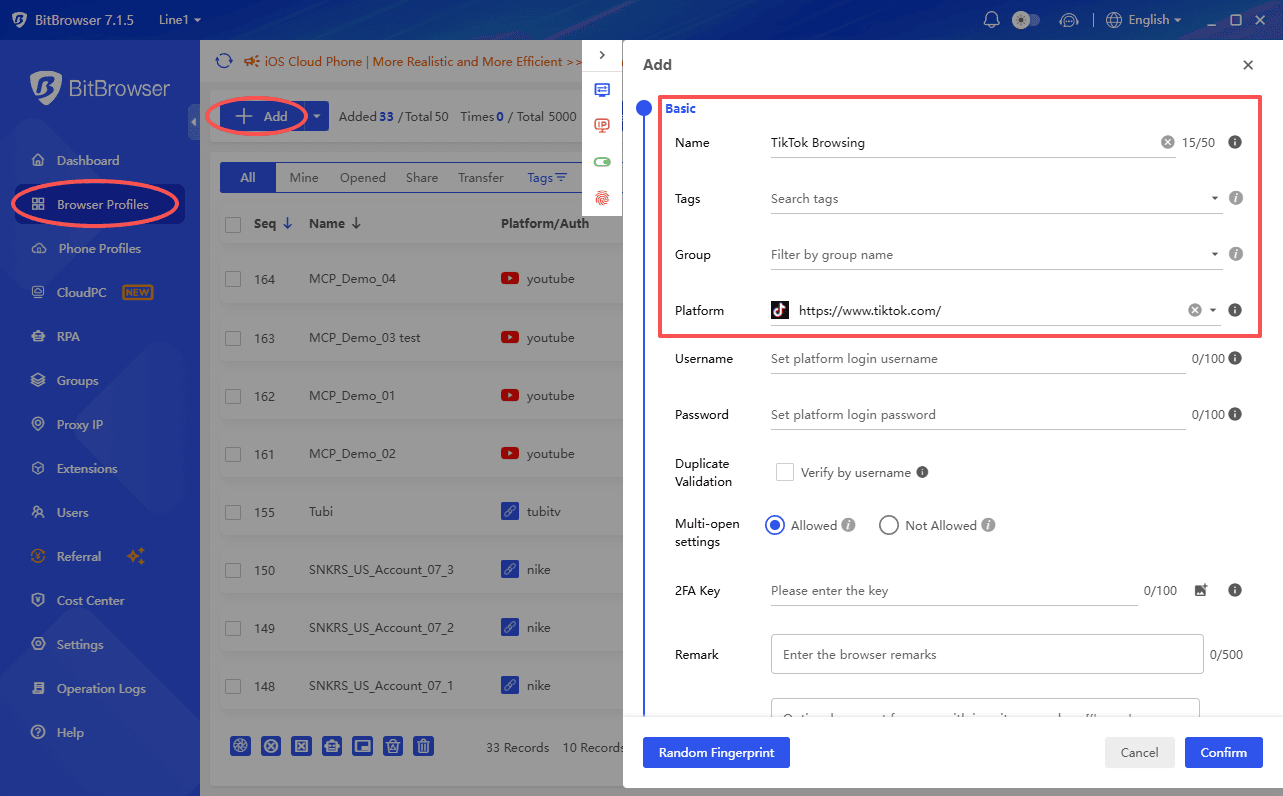
3. Configure the browser fingerprint and other environment settings for the profile.
4. (Optional but recommended) Set up a proxy for the profile if your workflow requires one.
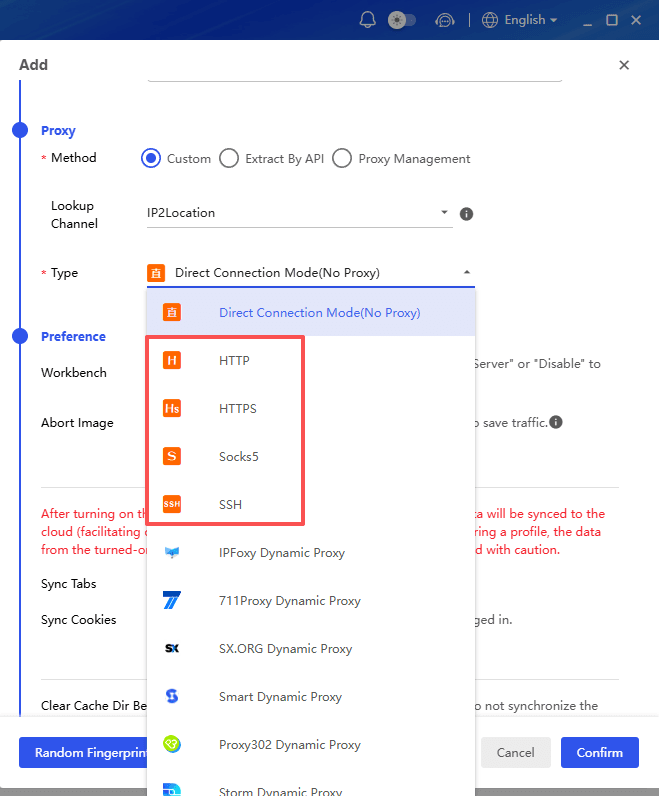
5. Launch TikTok directly from the BitBrowser profile.
6. Browse public TikTok content within this dedicated environment without mixing its cookies, cache, and session data with your everyday browser.
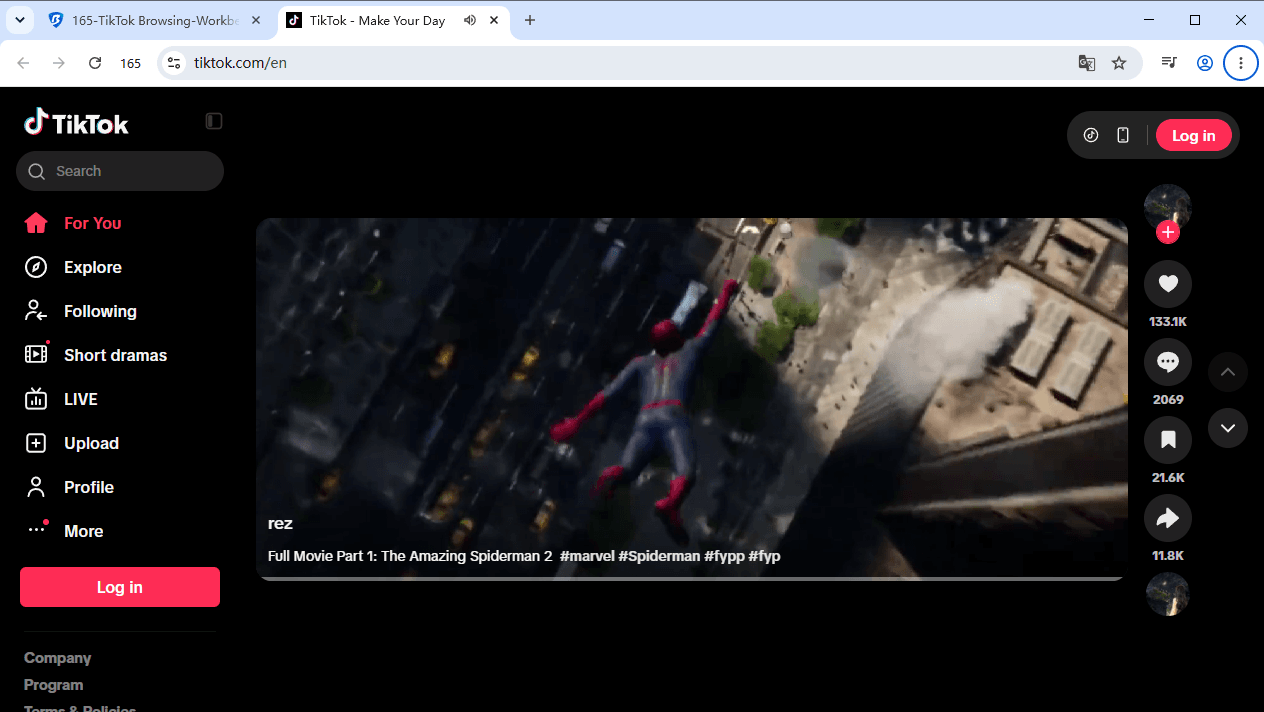
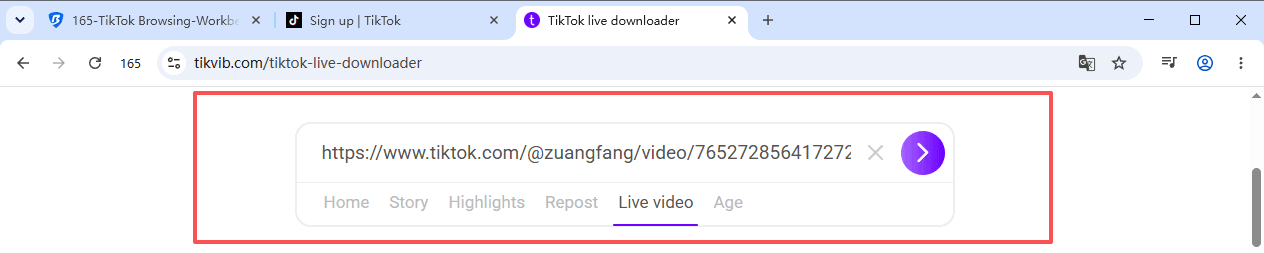
Using a TikTok Viewer inside an isolated BitBrowser profile adds an extra layer of separation. Your viewer activity stays within the dedicated environment rather than being mixed with your regular browser cookies, cache, and browsing data.

In my experience, BitBrowser is also a great option for trying this out without spending anything. It gives users 10 browser profiles for free, permanently, which is more than enough for most people to browse anonymously online at no cost.
If you also want to browse Facebook, Instagram, or Reddit more privately, you can follow a similar approach by using separate browser profiles for each platform.
2. Use a TikTok Viewer
For users who simply want to view public TikTok profiles, videos, or Stories, a TikTok viewer is usually the most direct option.
It can be useful when you want to:
· Check a public TikTok profile
· Watch publicly available videos
· Look for public Stories when the service supports them
· Browse without using your main TikTok account
A TikTok anonymous viewer can be convenient, but always check what the service actually supports. Some viewers only handle profiles and videos, while others may also support Stories or downloads.
You should also be careful with third party services. TikTok provides controls for connected third party apps and recommends reviewing what information an app requests before connecting it to your account.
3. Browse TikTok Without Logging In
If you only need to view public content, you may not need to use your TikTok account at all.
TikTok's own documentation explains that public account content can be visible to people on or off TikTok, including people who do not have a TikTok account, depending on the creator's privacy settings. Public content may also appear in search engines and other websites.
How to Browse TikTok Without Logging In
1. Open a web browser.
2. Go to TikTok's website.
3. Search for the public username or profile you want to view.
4. Open the profile or public post.
5. Browse the content that is available without signing in.
Remember that this method is mainly useful for public content. Private accounts are designed to restrict access to people approved by the account owner.
4. Use Incognito Mode
Incognito or Private Browsing mode is another simple option.
It is useful when your main concern is keeping TikTok browsing history off the local device. It does not make you completely anonymous to websites or your network provider.
How to Use Incognito Mode
The important distinction is that Incognito mode is primarily about local browser privacy. It should not be presented as a way to hide all activity from TikTok or other online services.
5. Use a Secondary TikTok Account
A separate TikTok account can keep your main account separate from other TikTok activity. This can be useful if you regularly manage multiple social accounts, projects, or browsing environments. However, a secondary account is not the same as anonymous browsing. TikTok still knows that the activity belongs to that account.
How to Use a Secondary Account
1. Create or sign in to a separate TikTok account in a separated BitBrowser profile.
2. Set up a separate browser environment and proxy if needed.
3. Use TikTok only within that profile.
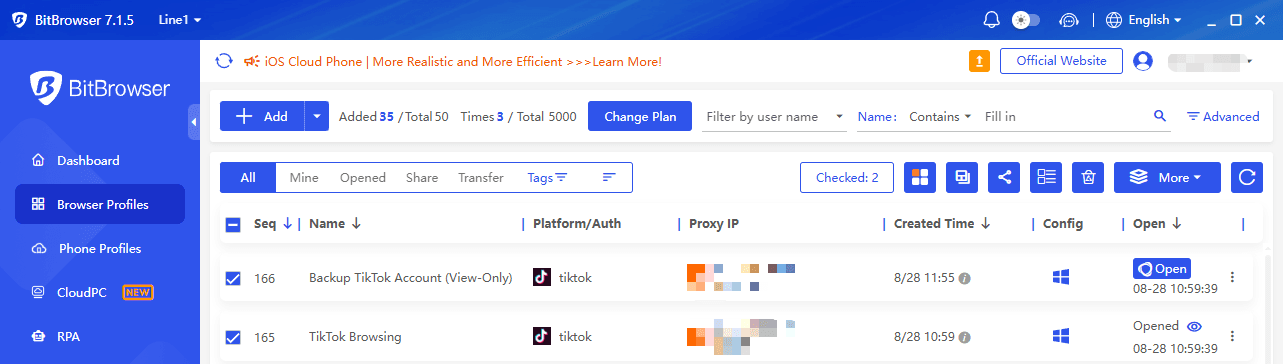
4. Use that account for the TikTok activity you want to separate from your main account.
5. Review TikTok's privacy settings before browsing.
If your goal is simply to view public content without using an account, browsing without logging in is generally a cleaner option.
6. Use Search Engines to Find Public TikTok Content
Search engines can be useful when you only need to find a public TikTok profile or post.
For example, you can search for:
site:tiktok.com/@username
You can also search for a creator's username together with a topic or video title.
This works because TikTok says public content may appear in search engines and other sites, depending on the creator's settings.
How to Find a TikTok Profile Through Google
1. Open Google or another search engine.
2. Enter site:tiktok.com/@username.
3. Replace username with the TikTok username you are looking for.
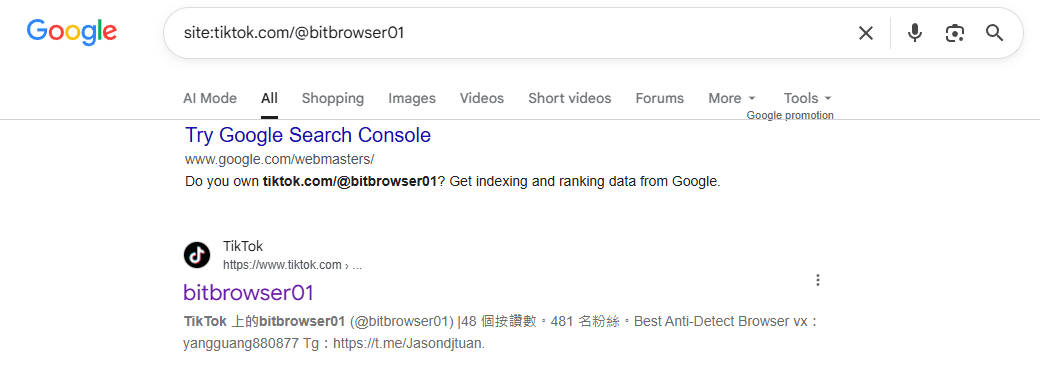
4. Open a relevant public TikTok result.
5. View the content that is publicly accessible.
This method is particularly useful when you want to find a profile without first opening the TikTok app.
Can You Watch TikTok Without the App?
Yes. You can access public TikTok content without installing the app by using a web browser, including on PC or mobile, although available features may vary.
If you do not want to install the TikTok app, you can try:
· TikTok through a web browser
· A TikTok viewer
· A search engine to find public TikTok pages
· A separate browser profile
For simple viewing, using TikTok through a browser without logging in is often the easiest option.
TikTok Web Version Login Guide
Can people see if you viewed their TikTok profile?
This is the big one. TikTok has a feature called Profile View History.
If it’s turned on for both you and the other person, then yes, they can see you visited their profile. Usually within the last 30 days.
But the good part is: this feature is optional.
How Profile View works (the simple version)
· If you have Profile View ON, TikTok may show your profile visits to others who also have it ON.
· If you turn Profile View OFF, you won’t show up in other people’s profile view lists.
· Usually, turning it off also means you can’t see who viewed your profile either. It’s a trade.
So if you want to browse profiles anonymously, this is the first setting you should check.
How to turn off Profile View History
1. Open TikTok and go to Profile
2. Tap the Menu ☰
3. Go to Settings and privacy
4. Tap Privacy and find Profile views
5. Toggle Profile view history OFF
One note though. Turning off Profile View History does not affect Story view visibility. TikTok specifically states that Story viewers can still be seen by the Story owner.
Can people see if you viewed their TikTok Posts & Stories?
There is no single answer because TikTok has separate systems for profile views, post views, and Story views.
Post Views
TikTok also has a separate Post View History feature. According to TikTok, it can show certain post views and covers posts published within the previous seven days. The feature is available to eligible users who are at least 16 years old and have fewer than 5,000 followers.
Story Views
TikTok explicitly states that people can see that you viewed their Story even if your account is private or your Profile View History is turned off.
So if your goal is to view a TikTok Story without the creator knowing, simply turning off Profile View History is not enough.
How to Choose the Right Method
The best option depends on what you are actually trying to achieve.
If you only want to view a public profile:
Try a TikTok viewer or browse the TikTok website without logging in.
If you want to keep browsing data separate from your normal browser:
Use a separate browser profile or an anti detect browser.
If you are using a shared computer:
Incognito mode can help prevent your local browsing history from being saved.
If you want to separate TikTok activity from your main account:
A secondary account can help, although it is not truly anonymous.
If you only need to find a public TikTok page:
A search engine may be enough.
Final Thoughts
A TikTok viewer can be a convenient way to access public TikTok profiles, videos, and other available content without relying on your main TikTok session.
For casual browsing, you can also use TikTok through a browser without logging in, search engines, or Incognito mode. If you regularly need separate browsing environments, an anti detect browser can provide more control over browser profiles and session data.
Frequently Asked Questions
Can I View TikTok Profiles Anonymously?
You can view public TikTok profiles without using your main account. A TikTok viewer or browsing without logging in can reduce the connection to your normal TikTok account. However, no method should be considered guaranteed anonymous.
Can I Watch TikTok Stories Without Being Seen?
Be careful with this claim. TikTok officially says that people can see you viewed their Story even when your account is private or your Profile View History is turned off. A third party Story viewer may work differently if it can access public Story content, but its capabilities depend on the service.
Can You View TikTok Without an Account?
Public TikTok content may be visible to people who are not logged in, depending on the account and post privacy settings. TikTok says public content can be visible to people on or off TikTok, including people without a TikTok account.
Does Turning Off Profile Views Make Me Anonymous?
No. Turning off Profile View History addresses profile view history. It does not automatically hide other forms of activity, such as Story views. TikTok explicitly separates Story views from Profile View History.
Is a TikTok Viewer Safe to Use?
Use caution with third party TikTok viewers. Avoid services that ask for your TikTok password when that information is not necessary. Also be careful about downloading unknown files or installing browser extensions from unfamiliar websites. TikTok provides controls for connecting third party apps, so review permissions carefully before giving an external service access to your account.

 Multi-Account Management
 Prevent Account Association
 Multi-Employee Management
Recommended
See More 



