Can You Create Multiple Google Accounts Safely in 2026 (Without Getting Flagged)
 2026.06.03 06:09
 YT.Shi
Whether you run multiple businesses, manage client projects, operate several YouTube channels, or simply want separate accounts for work and personal use, having more than one Google account is completely normal in 2026. However, many users still ask the same question: How many Google accounts can you actually have?
Some people believe Google only allows one account. Others claim you can create unlimited accounts without restrictions. The truth is somewhere in between.
Google does allow users to own and use multiple Google accounts, but there are practical limits related to phone verification, account creation behavior, device reputation, and account security. Understanding these factors can help you avoid unnecessary verification issues or account suspensions.
In this guide, we'll explain the latest Google account rules, discuss how many Gmail accounts you can create, and show you the safest way to manage multiple accounts in 2026.
Can You Have Multiple Google Accounts?
The short answer is yes.
Google allows users to create and use multiple accounts for different purposes, including personal use, work, business management, YouTube channels, and Google Ads campaigns. Google even provides built in account switching features that make it easy to manage several accounts on the same device.
If you want to add another account, simply click your profile picture in the top right corner of any Google service, select Add Account, and sign in with the account you want to use. Once multiple accounts are added, you can switch between them at any time without signing out and back in again.
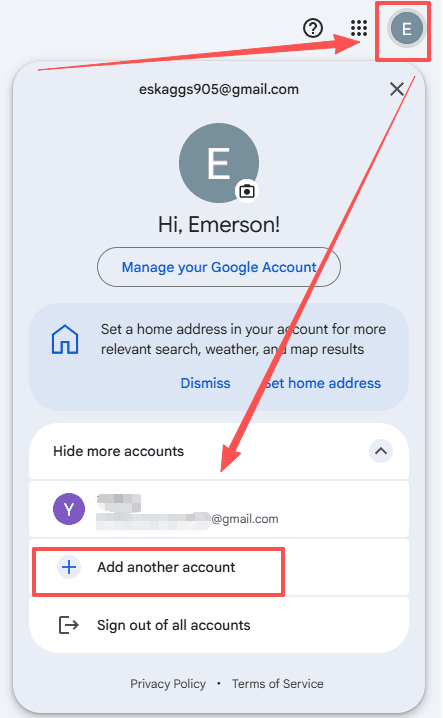
For users managing only a few Gmail accounts, this built in feature is often the simplest solution.
Having multiple Google accounts is not against Google's policies. The issue is not the number of accounts you own. The issue is how those accounts are created and used. As long as your accounts are used for legitimate purposes and comply with Google's policies, owning multiple Google accounts is generally allowed.
How Many Google Accounts Can You Have?
Google does not publish an official maximum number of accounts that one person can own. There is currently no public rule that says: "You may only have 5 Google accounts." Or: "You may only have 10 Gmail accounts." Many users successfully manage several accounts for years without any issues.
The problem isn't the number. It's the behavior. Google's systems are tuned to spot patterns that look like spam, fraud, or automated abuse. If your activity looks like a real person doing real things, you are fine. If it looks like someone setting up fake accounts at scale, you will get flagged fast.
This is a crucial distinction. You are not trying to hide from Google. You are simply making sure each account looks like a genuine, independent user.
What are the Real Limits in 2026?
Google will not hand you a list of creation limits, but the community has mapped them out clearly over years of trial and error. Here is what you are actually up against in 2026.
1. The phone number ceiling
Many people want to create a Gmail account without phone number, yet most users face restrictions at this step. Google requires phone verification for new account registration. User feedback shows one phone number can verify about four to five Google accounts before limits activate.
Google does not publish its official verification cap. The real usable count changes based on account age phone reputation location device trust and past verification records.
Using one number to make numerous accounts triggers specific alerts. Common notifications include invalid verification number excessive linked accounts and prompts to use another phone number. Phone verification thus becomes a major barrier to large scale account creation.
2. The daily creation rhythm
Speed is a red flag. Creating more than two accounts in a single day from the same environment will often trigger an immediate verification block. You don't need to wait months between each one, but spacing things out by a day or two makes a huge difference.
3. The environment connection
This is the one that catches most people off guard. Every device and browser leaves a unique fingerprint made up of dozens of tiny technical details. When you log into multiple accounts from the same fingerprint, Google knows they belong to the same person. If one account later gets suspended, the rest can go down with it, even if they did nothing wrong.
How to Create Multiple Google Accounts Safely
If you need several Google accounts, follow these best practices to reduce the risk of verification issues or account suspensions.
1. Keep Account Information Organized
Before creating new accounts, record important details such as account names, recovery emails, and phone numbers. This makes long term account management much easier.
2. Use Unique Recovery Information
Each Google account needs a unique recovery address. You can use a new Gmail for this or pull in an address from another provider like Outlook or Yahoo. Do not reuse the same recovery email across accounts. That single point of contact creates an instant connection that Google picks up immediately.
3. Verify Accounts with Valid Phone Numbers
Google may require phone verification during signup. While there is no officially published limit, many users report restrictions after verifying several accounts with the same number. If needed, use additional legitimate phone numbers.
4. Separate Your Account Environments
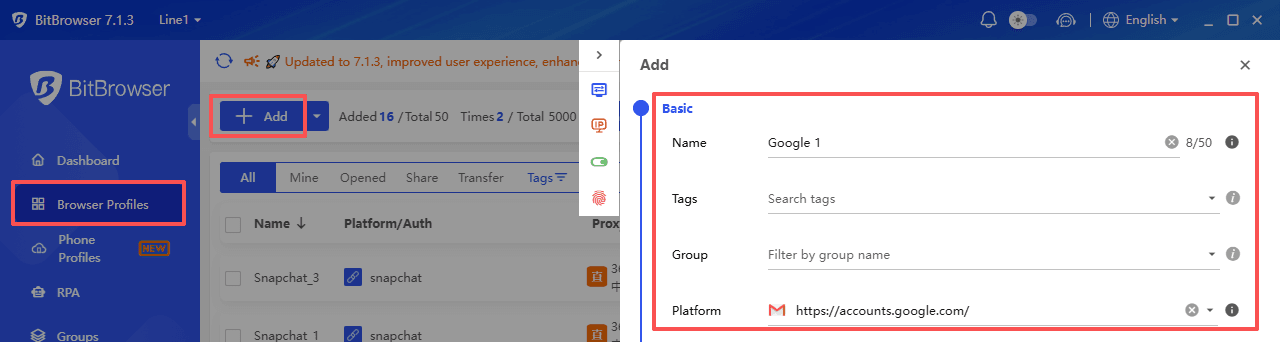
If you manage multiple accounts, avoid mixing them in the same browser environment. Tools like BitBrowser allow you to create isolated browser profiles with separate cookies, storage, fingerprints, and proxy settings, making account management more organized and efficient.
Sign Up
5. Use New Accounts Naturally
A brand new account that immediately sends 50 emails or uploads 10 YouTube videos will get flagged in hours. Instead, spend the first week just using the account normally. Search for a few things. Watch a couple of YouTube videos. Open and read an email. Save a bookmark. Let the account build a small history of natural, human behavior before you start using it for anything serious.
6. Keep Recovery Settings Updated
Beyond the phone number and recovery email, make sure every account has distinct security details. Different security questions, different answers, even slightly different profile information. If an account ever gets challenged and you need to recover it, having accurate and unique recovery information is the difference between getting back in and losing the account forever. Keep all of this recorded in that spreadsheet you built in step one.
Common Mistakes That Cause Account Suspensions
Even careful people slip up on these. Watch out for every one of them.
● Creating accounts too fast: Two or three in one sitting might seem reasonable, but Google's systems see velocity as a major warning sign. Spread things out.
● Reusing a phone number past the account limit: There is no workaround for this. Accept the limit and get another SIM.
● Logging into multiple accounts from the same device without isolation: This is the number one reason people lose entire account groups at once. Each account needs its own clean environment.
● Skipping the warm up period: A cold account acting busy is an obvious flag. Let each one breathe for a week before putting it to work.
● Using identical recovery information: Same recovery email, same phone, same security question answers. Google's cross account detection will connect them in seconds.
● Rushing into high volume actions: Sending bulk emails, posting many comments, or making rapid playlist changes on a new account screams automation. Build up activity slowly.
How BitBrowser Helps You Manage Multiple Accounts
Most multi account setups fail because of one weak link, a shared environment. You can have separate emails, separate phone numbers, and a careful warm up schedule, but if every account checks in from the same browser fingerprint, none of that matters.
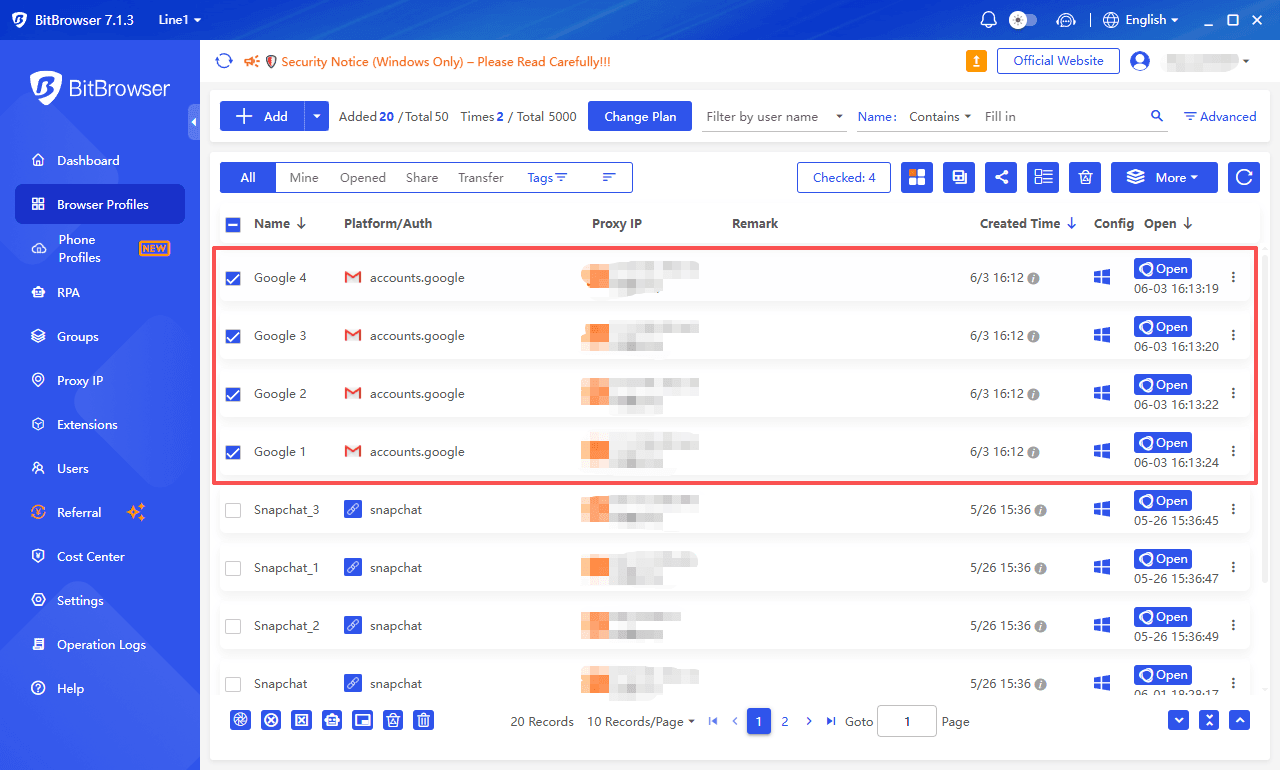
BitBrowser solves this at the foundation level. It creates a dedicated browsing environment for each account that carries its own unique fingerprint, cookies, cache, and settings. Every environment acts like a completely separate device. There is no digital trail connecting one account to another.
Sign Up
The difference shows up in how accounts behave over time. With a normal browser, accounts share subtle background details that Google can read and link. With BitBrowser, those connections never exist. When you need to manage five or ten or twenty Google accounts, each one sits safely in its own space, isolated from the rest.
It also simplifies your workflow. Instead of juggling multiple devices or constantly clearing your browser, you can switch between account environments in one click. Everything stays clean, organized, and completely separate.
Staying Safe Long Term
Account creation is just the start. Long term account security needs regular proper operation. Skip sudden activity surges to avoid account flags from abrupt behavior shifts. Secure independent environments to prevent irreversible cross-browser linkage. Plan ahead for number replacement as expired or recycled SIMs often block account recovery.
Successful multi account users isolate profiles strictly, warm up accounts slowly and watch for platform monitored details. Proper setup minimizes future bans and suspensions. BitBrowser simplifies environment isolation to secure your accounts efficiently.
Frequently Asked Questions

 Multi-Account Management
 Prevent Account Association
 Multi-Employee Management
Recommended
See More 



