Google Ads Account Suspended in 2026: Reasons, Fixes, and Recovery Guide
 2026.07.14 07:11
 YT.Shi
Getting that message that your Google Ads account is suspended is one of those moments where your stomach drops a little. Because it is not just a warning. It is usually an immediate stop to your traffic, your leads, and your sales.
And in 2026, Google is not getting looser with enforcement. If anything, the system is faster, more automated, and less patient with accounts that look risky.
This guide walks you through the most common reasons a Google Ads account gets suspended, what to check first, how to fix it, and how to submit a strong appeal that actually has a chance of getting you back online.
If your personal Google account has been suspended, please refer to the relevant Google account recovery guide.
What a Google Ads suspension really means
A suspension usually means your ads stop serving right away. In some cases, you cannot create new campaigns or edit billing settings until the issue is resolved.
A couple of important clarifications:
· A suspension is different from a disapproved ad. Disapprovals are usually per ad or per keyword. Suspensions affect the whole account.
· A suspension is not always permanent. Many are recoverable if you fix the root issue and appeal correctly.
· Google rarely tells you everything in the notification email. You often have to investigate.
If you are searching for “Google Ads account suspended fix” right now, the good news is most suspensions fall into a handful of buckets.
The fastest first steps (before you change anything)
Before you start clicking around and making random edits, do these first. It saves time and prevents you from breaking evidence you may need.
1. Open the suspension notice inside Google Ads Go to Tools, then Policy manager, then look for the exact suspension reason.
2. Check the email tied to your Google Ads account Sometimes the email includes a little more context, like billing related wording or policy wording.
3. Take screenshots Screenshot the suspension banner, the policy manager screen, and any billing warnings.
4. List what changed in the last 30 days New payment method, new domain, new offers, new tracking templates, new agency access, a spike in spend, even a new business name. Suspensions often follow a change.
5. Do not create a new Google Ads account to bypass it That can make things worse. Google treats bypass attempts seriously, and you can end up with repeated suspensions.
Now let’s talk about the reasons.
Common reasons your Google Ads account was suspended in 2026
1. Suspicious payments (most common)
Common reasons include using a card linked to multiple Google Ads accounts, frequent failed payments or chargebacks, sudden changes in billing country or business location, adding and removing multiple cards in a short time, mismatched payment names, or using funding sources that appear high risk.
To fix this, remove old or unused payment methods and add one reliable payment method that you control. Keep your billing information stable and make sure the payment profile name matches your business identity as closely as possible. Clear any unpaid balances and avoid chargebacks. If a chargeback happened, prepare an explanation and supporting documents.
In this situation, submitting an appeal without fixing the billing issues usually has a low chance of success.
2. Circumventing systems
Common triggers include redirecting users to a different page than the one reviewed, using cloaking or showing different content to users and crawlers, repeatedly creating similar ads after policy violations, managing multiple accounts to promote the same business in a way that violates policies, hiding important business information, or using tracking tools that change landing page behavior.
To fix this issue, make sure your final URL and landing page match exactly what your ad promises. Remove any redirects that could look suspicious, even if they were added for normal tracking purposes. If you use aggressive tracking scripts, temporarily disable them and check whether they affect page behavior.
For advertisers managing multiple Google Ads accounts, review your account structure and make sure each account has a clear purpose with transparent business information.
When submitting an appeal, focus on the changes you made and how your account now follows Google Ads policies instead of simply arguing against the suspension.
3. Unacceptable business practices
This type of suspension is usually related to Google believing that a business or offer may be misleading, unclear, or potentially harmful to users.
Common reasons include making unrealistic promises such as guaranteed income, guaranteed weight loss, or instant approvals, hiding important details like pricing, subscriptions, fees, or refund policies, using misleading testimonials or before and after claims, creating false urgency, or making landing pages that do not match what the ad originally promises.
To fix this issue, make your website more transparent. Clearly display pricing, terms, refund policies, and any subscription details. Add reliable business information such as a real address, contact email, and phone number when available.
Review your marketing claims and make sure they are realistic and supported by evidence. Pay special attention to the relationship between your ads and landing pages. If the ad promises one thing but the landing page presents something different, fix that mismatch before submitting an appeal.
4. Misrepresentation
This suspension usually happens when Google cannot clearly verify who is behind the website or believes users may be confused.
Common triggers include missing or inconsistent business information, different business names across the website, missing privacy policies when collecting user data, no clear contact information, using a domain that does not match the advertised brand, or affiliates presenting themselves as the official company.
To fix this, improve your website transparency. Add important pages such as About, Contact, Privacy Policy, Terms of Service, and Refund Policy if you sell products or services. Make sure your logo, company name, website information, ads, and billing details are consistent.
If you are running affiliate campaigns, clearly disclose your relationship and avoid making users believe you are the official brand.
Many Google Ads misrepresentation suspensions are resolved by improving website trust signals and business transparency rather than only changing the ads.
5. Policy violations in restricted verticals
Some industries receive much stricter reviews because they involve higher risks for users. In 2026, Google continues to apply tighter controls to areas such as health and supplements, financial products and loans, crypto and trading offers, gambling and gaming, adult content, and certain legal services.
Even if your business is legitimate, you may still need additional certifications, clear disclaimers, or specific targeting settings to meet Google’s requirements.
To fix this type of suspension, first check whether your industry requires certification in your country or region. Remove exaggerated or sensitive claims and add any required disclaimers. Make sure your age and location targeting follow Google’s rules.
When reviewing the issue, focus on the exact policy section mentioned in the suspension notice instead of only reading general Google Ads policies.
6. Compromised site or malicious software
If your website is infected or contains suspicious code, Google may suspend your account to protect users from potential security risks.
Common signs include browser security warnings, redirects that only happen on mobile devices, unknown scripts loaded from suspicious domains, or popups that appear after users stay on the page for a few seconds.
To fix this issue, scan your website with a reliable security tool and check Google Search Console security reports if you have access. Remove any suspicious plugins, scripts, or custom code. If you use a landing page builder, review all added scripts and integrations to make sure they are safe.
Do not submit an appeal before cleaning the website completely. Google will review your site again, and any remaining security issues can cause the suspension to continue.
7. Verification problems (advertiser identity, business operations, or documents)
Google’s verification flow is more common now. Sometimes accounts get limited or suspended if verification fails or does not match reality.
What to do
· Ensure your documents match the billing profile and business info.
· Use consistent spelling, address format, and legal name.
· If you are using an agency, clarify who owns the account and who is advertising.
Verification issues are usually fixable, but you need patience and clean documentation.
How to fix a suspended Google Ads account, step by step
Here is a practical workflow that works for most cases.
Step 1: Identify the exact suspension type
In Google Ads, navigate to Tools, then Policy manager, then Account issues. Write down the exact phrase Google uses. Do not paraphrase it. That phrase matters for your appeal.
Step 2: Fix the landing page first (even if you think it is billing)
Even billing suspensions can be influenced by trust signals. Clean landing pages reduce the chance that your appeal gets flagged again later.
Quick landing page checklist: contact page with real details, privacy policy (required for lead forms), terms of service, refund policy if you sell anything, clear pricing, no misleading claims, no forced redirects, and site loads fast on mobile.
Step 3: Clean up your Google Ads account basics
Remove disapproved ads that repeat the same policy issue. Pause campaigns that point to questionable URLs.
Check your tracking template and final URL suffix for redirects. If you use third party tracking, simplify it while you recover.
Sometimes the fastest recovery involves temporarily running a simpler setup. You can rebuild later.
Step 4: Fix billing and payment method issues (for suspicious payments)
Ensure there is no outstanding balance. Use one payment method, stable, and in your control. Avoid switching cards repeatedly.
Confirm your billing country and time zone are correct and consistent. If your team shares cards across many accounts, stop. That is a classic trigger.
For teams that need multiple people to manage the account, the correct setup is to grant individual user access rather than sharing login credentials. We have a full guide on how to share a Google Ads account safely, covering user roles, permissions, and best practices.
Step 5: Document what you changed
When you appeal, Google wants to see evidence. So make a simple list like:
· updated footer with Contact, Privacy, Terms;
· removed redirect from /go to final landing page;
· added clear pricing section;
· updated refund policy and subscription disclosure;
· replaced payment method and cleared overdue balance.
It sounds basic, but it makes your appeal read like a real compliance effort, not a complaint.
Writing an appeal that actually helps
When you submit the Google Ads suspension appeal, keep it short, specific, and calm.
What to include:
· The suspension reason as shown in Policy manager
· A plain statement that you reviewed the policy
· The exact fixes you made, in bullets
· Links to the fixed pages
· If billing, mention you verified payment ownership and removed old methods
· Ask for a review
Example appeal wording you can adapt
Subject: Appeal for Google Ads account suspension review
Hello Google Ads Policy Team,
My account was suspended for: [paste exact reason].
I reviewed the relevant Google Ads policies and made the following changes to ensure compliance:
[Change 1]
[Change 2]
[Change 3]
Relevant links:
Landing page: [URL]
Privacy policy: [URL]
Contact page: [URL]
Terms and refund policy: [URL]
Please review the account again. Thank you.
That is it. Clean, direct, and reviewable.
How long does Google Ads suspension recovery take in 2026
It varies. A lot.
· Simple issues can be reviewed in a couple of days.
· Verification or payment risk cases can take longer.
· Some appeals come back fast but still denied, meaning Google did not see the fix or the fix did not address the root issue.
If your appeal is denied, do not spam appeals back to back. Fix more things, document them, then appeal again. Repeated low effort appeals can slow you down.
Prevention tips
If you just recovered, or you are trying to avoid a suspension, these habits help.
1. Keep your billing stable. One payment method, no constant changes.
2. Build trust pages once and keep them updated.
3. Avoid exaggerated claims. Be clear, not dramatic.
4. Monitor your site for malware and broken scripts.
5. Use consistent branding everywhere. Ads, domain, site footer, invoices.
6. If you scale spend fast, do it gradually. Sudden spikes can trigger reviews.
Suspensions are often about patterns. When your account looks predictable and legitimate, you tend to get fewer surprises.
Final note on managing multiple ad accounts safely (and where BitBrowser fits)
A lot of suspensions start when advertisers juggle multiple clients, multiple stores, or multiple logins on the same machine and browser profile. Cookies mix, sessions collide, and suddenly Google sees behavior that looks off. Even if your intentions are fine.
If you are creating multiple Google accounts or operating more than one Google Ads login for work, it is worth using a proper multi profile setup so each account stays separated and clean. Tools like BitBrowser are built for that, giving you isolated browser profiles and better control when you manage multiple advertising accounts.
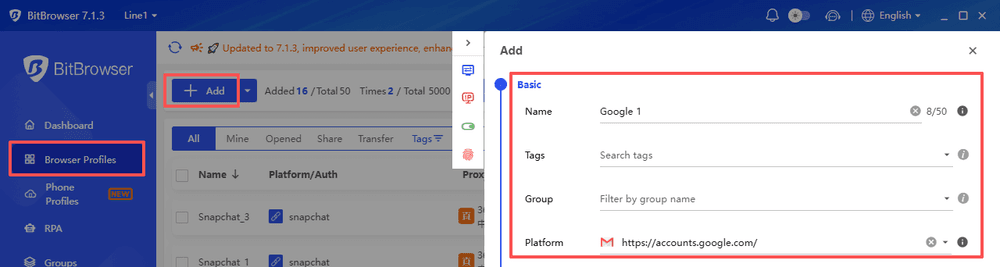
BitBrowser also supports fingerprint management, proxy configuration, team collaboration, and profile sharing features, which can help agencies and marketers maintain cleaner workflows when handling multiple online accounts.
The goal is not to bypass Google Ads policies, but to build a more organized account management process. Keeping accounts properly separated, maintaining consistent business information, and following Google’s advertising policies are still the most important steps to avoid unnecessary suspensions.
Beyond isolated browser profiles, the IP layer matters equally for account safety. Google Ads flags accounts sharing the same IP address as high-risk, and datacenter or VPN IPs are among the most common IP-side triggers for suspicions across the "Suspicious payments" and "Circumventing systems" categories above. For advertisers managing multiple ad accounts, pairing browser isolation with clean IP infrastructure is the working setup. Dedicated mobile proxies from real carrier networks provide carrier ASN IPs that Google treats as legitimate mobile user traffic, which pairs with browser profile isolation for complete account separation across both the browser and network layers.
FAQs (Frequently Asked Questions)
What does a Google Ads account suspension mean and how is it different from ad disapproval?
A suspension stops all ads on the account, while ad disapproval only affects specific ads or keywords. Suspensions can often be recovered by fixing the issue and submitting an appeal.
What are the first steps I should take if my Google Ads account gets suspended?
Check the suspension reason in Google Ads Policy Manager, review the email notice, save relevant screenshots, identify recent account changes, and avoid creating new accounts to bypass the suspension.
What are common reasons for a Google Ads account suspension in 2026?
Common causes include suspicious payments, circumventing systems, unacceptable business practices, misrepresentation, restricted industry violations, security issues, and verification problems.
How can I fix a “Suspicious payments” Google Ads suspension?
Remove risky payment methods, use a stable payment method, match billing information with your business details, clear unpaid balances, and provide supporting documents if needed.
What should I do if my account was suspended for “Circumventing systems”?
Make sure your ads, landing pages, URLs, and tracking methods are consistent. Remove redirects or scripts that may affect page behavior and explain your fixes clearly in the appeal.
How can I avoid suspensions due to unacceptable business practices?
Keep your website transparent with clear pricing, terms, refund policies, contact details, and realistic claims that match your ads and landing pages.

 Multi-Account Management
 Prevent Account Association
 Multi-Employee Management
Recommended
See More 



