How to Create a Second Gmail Account Safely With BitBrowser
 2026.05.28 00:25
 petro
petroManaging multiple Gmail accounts has become increasingly common for freelancers, marketers, agencies, developers, remote workers, and e-commerce businesses. One Gmail account is often not enough when users need separate identities for work, social media management, automation tools, testing environments, or personal activities.
However, creating and managing multiple Gmail accounts safely can become challenging. Google actively monitors suspicious login behavior, browser fingerprints, IP addresses, and unusual account activity patterns.
This is why many professionals use anti-detect browsers like BitBrowser to isolate browser environments and reduce account conflicts.
In this guide, you’ll learn:
- How to create a second Gmail account
- Whether you can create Gmail accounts without a phone number
- Common multi-account management problems
- How BitBrowser helps isolate browser sessions
- Best practices for long-term Gmail account stability
Why Users Need Multiple Gmail Accounts
There are many legitimate reasons to create additional Gmail accounts.
Business and Personal Separation
Many professionals prefer separating personal communication from work-related communication.
Examples:
- Personal Gmail → Family and friends
- Business Gmail → Clients and work
- Marketing Gmail → Advertising platforms
- Support Gmail → Customer service
This organization improves productivity and reduces confusion.
Social Media Management
Social media managers often require dedicated Gmail accounts for:
- Facebook pages
- TikTok accounts
- Instagram profiles
- YouTube channels
- X (Twitter) accounts
Dedicated email accounts simplify account management and recovery.
E-Commerce and Marketplace Operations
E-commerce businesses frequently use multiple Gmail accounts for:
- Shopify stores
- Amazon seller accounts
- Staff members
- Supplier communication
- Advertising platforms
- Payment systems
Testing and Development
Developers and QA teams use extra Gmail accounts for:
- Software testing
- Email verification
- Automation workflows
- App development
How to Create a Second Gmail Account
Creating another Gmail account is relatively simple.
Step 1: Visit Google Signup
Open:
https://accounts.google.com/signup
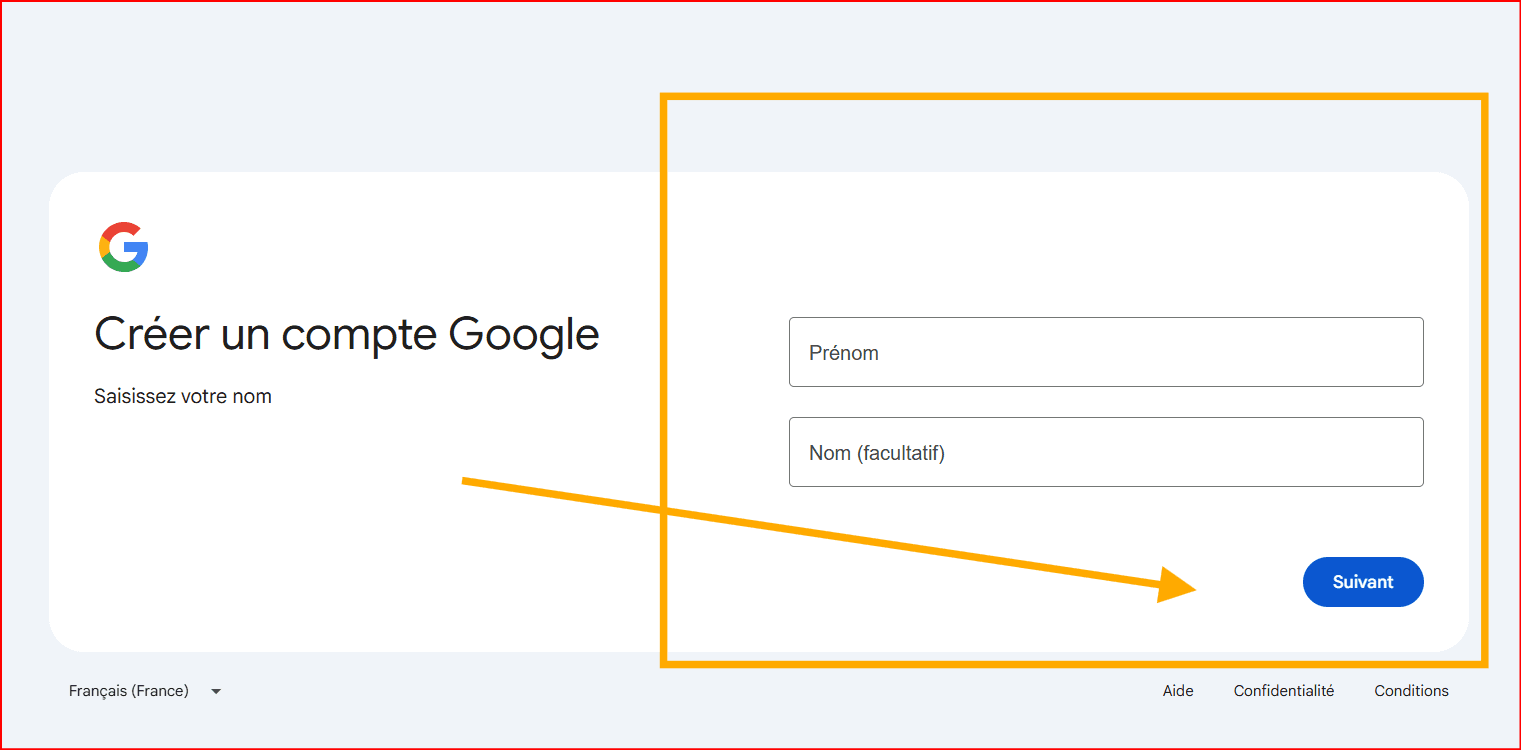
Step 2: Enter Your Information
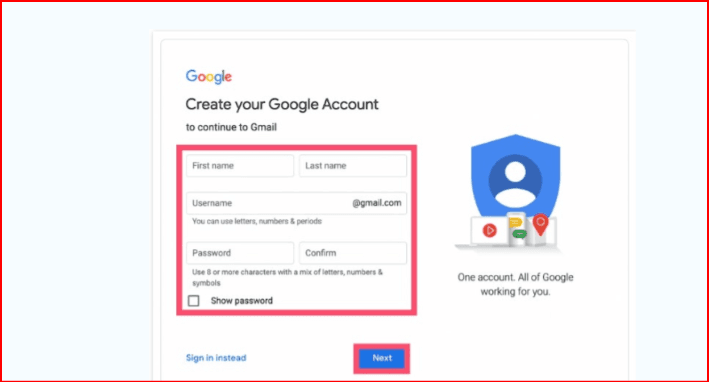
Fill in:
- First name
- Last name
- Username
- Password
Use a strong password for better security.
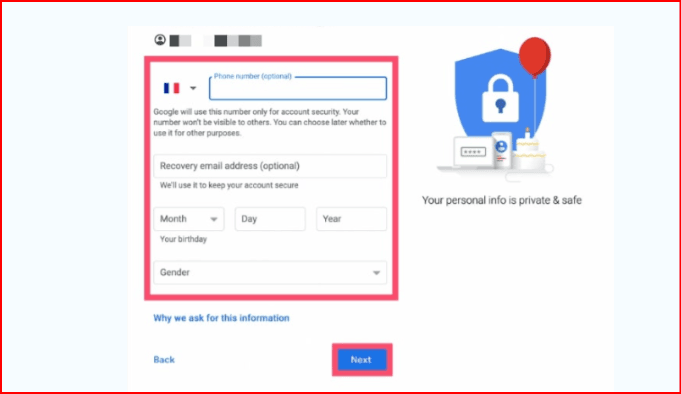
Step 3: Add Recovery Information
Google may request:
- Phone number
- Recovery email
- Date of birth
Adding recovery details improves account protection.
Step 4: Complete Verification
Depending on your browser environment, IP reputation, and device trust, Google may request phone verification.
Step 5: Finish Setup
Accept Google’s terms and complete account creation.
Can You Create Gmail Without a Phone Number?
Sometimes yes — but not always.
Google dynamically adjusts verification requirements based on several factors:
- IP quality
- Browser fingerprint
- Device trust level
- Previous activity
- Geographic location
- Network behavior
Some users can create Gmail accounts without phone verification, while others consistently receive verification requests.
Tips That May Reduce Verification Requests
Although there is no guaranteed bypass method, the following practices may reduce verification triggers:
- Use a clean browser profile
- Avoid public Wi-Fi networks
- Use trusted residential proxies
- Avoid creating many accounts rapidly
- Add a recovery email
- Maintain consistent browsing behavior
Google continuously updates its security systems, so verification requirements may vary over time.
Problems With Managing Multiple Gmail Accounts
Managing several Gmail accounts inside a standar
Cookie Conflicts
Sessions can overlap between accounts.
Frequent Logouts
Google may repeatedly disconnect sessions.
Browser Fingerprint Detection
Google tracks browser environments and device fingerprints.
Account Linking
Accounts used within the same browser environment may become behaviorally connected.
For professionals managing many accounts, these problems can negatively affect workflow efficiency.
What Is BitBrowser
BitBrowser is an anti-detect browser designed for multi-account management.
It allows users to create isolated browser profiles where each profile behaves like a separate device.
This helps users manage multiple accounts more safely and efficiently.
Key Features of BitBrowser
- Browser fingerprint isolation
- Separate cookies for each profile
- Proxy integration
- Multi-account management
- Session separation
- Cloud synchronization
- Team collaboration tools
BitBrowser is commonly used by:
- Affiliate marketers
- Media buyers
- Agencies
- E-commerce businesses
- Social media managers
- Automation teams
How to Create Multiple Gmail Accounts Using BitBrowser
Step 1: Install BitBrowser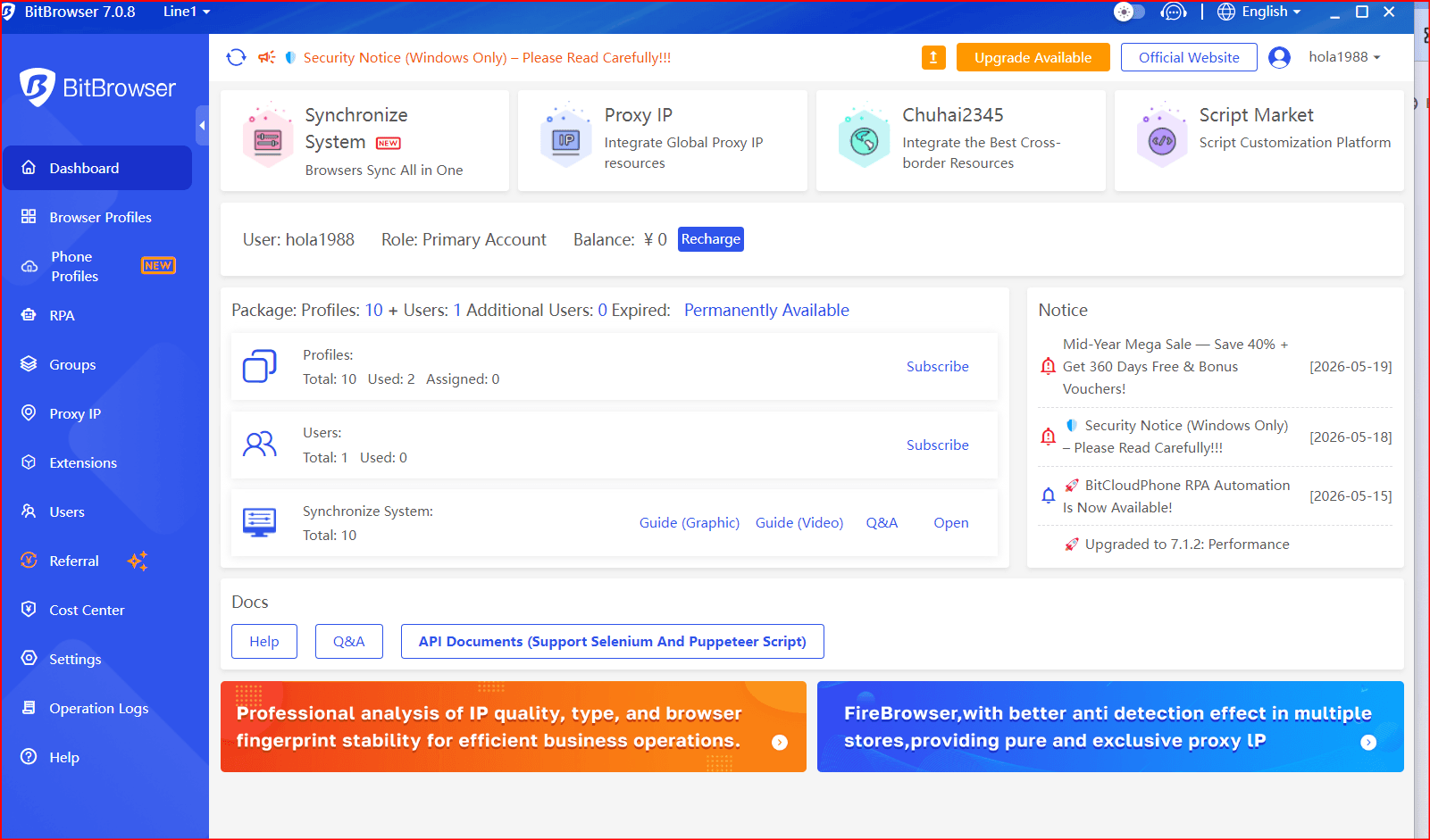
Download and install BitBrowser from the official website.
After installation, log into your dashboard.
Step 2: Create a New Browser Profile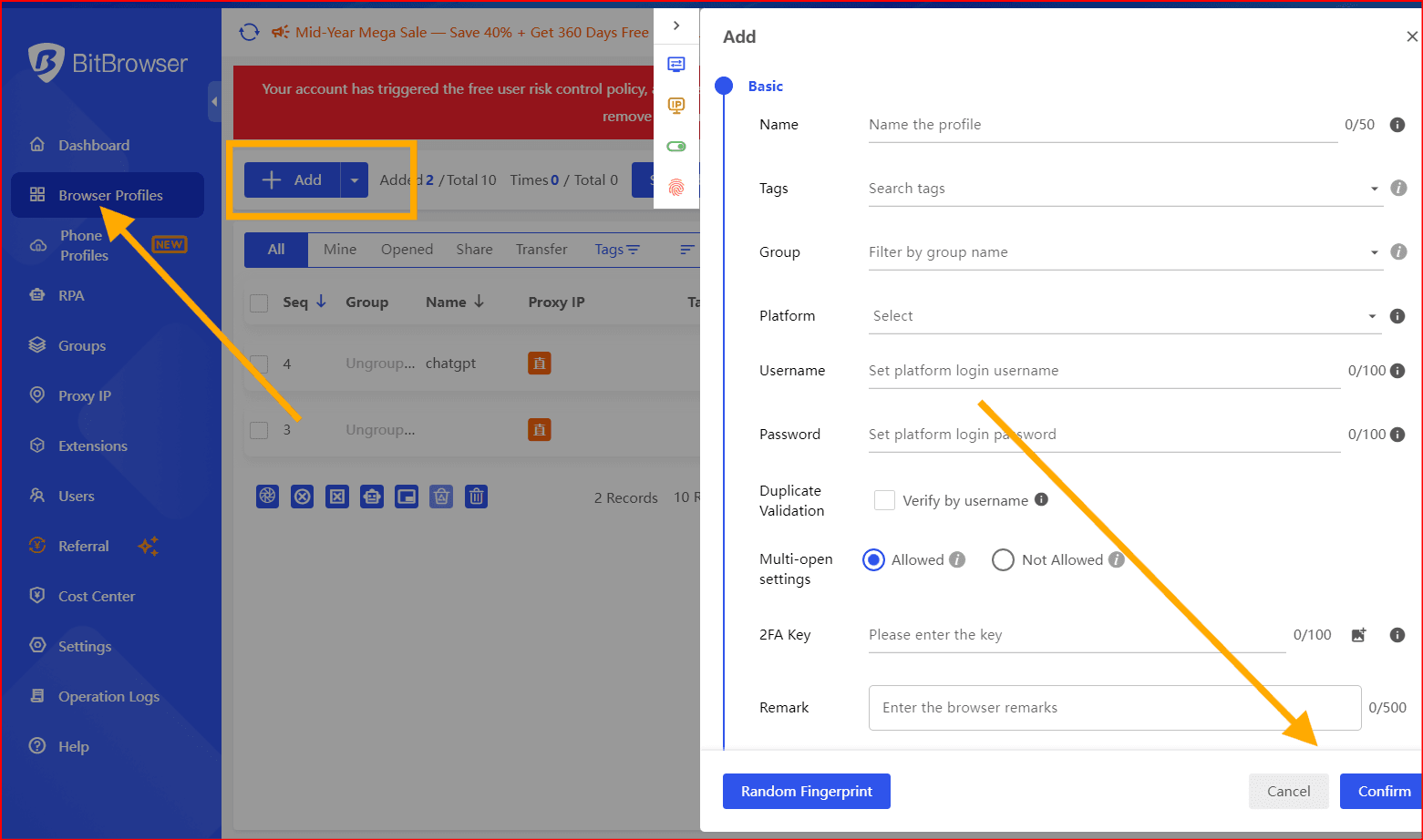
Inside BitBrowser:
- Click “New Browser Profile”
- Assign a profile name
- Configure fingerprint settings
- Add a proxy if necessary
- Save the profile
Each profile functions as an isolated browser environment.
Step 3: Configure Proxy Settings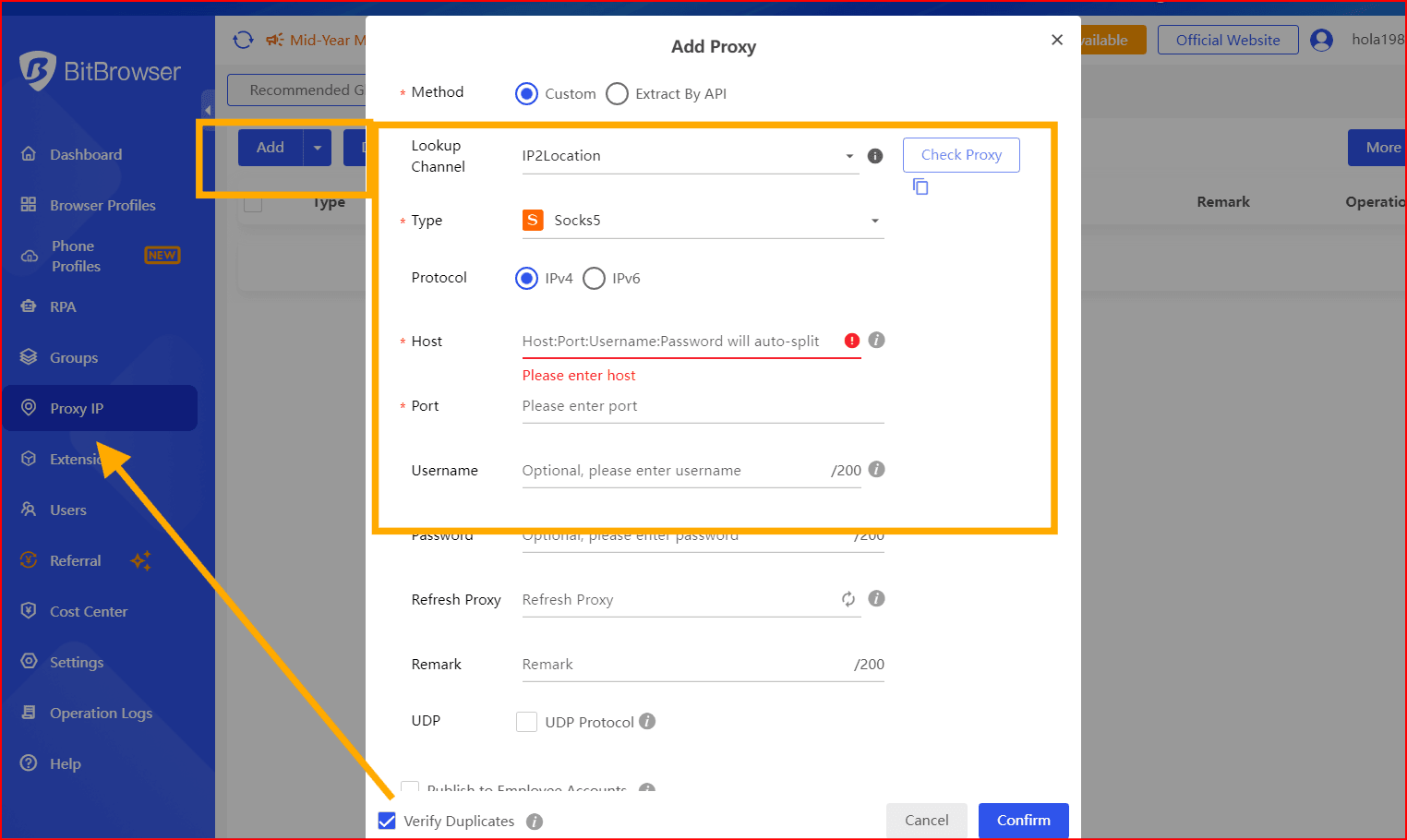
Using proxies improves account separation.
Common proxy types include:
Avoid low-quality public proxies because they frequently trigger verification systems.
Step 4: Launch the Browser Profile
Open the newly created profile.
Inside the profile:
- Open Gmail
- Visit the Google signup page
- Create the account normally
Because the profile is isolated, Google sees it as a separate browser environment.
Step 5: Organize Profiles Properly
Professional users often manage dozens or even hundreds of accounts.
Recommended naming examples:
- Client A Gmail
- TikTok Farm 1
- Facebook BM Support
- Store 2 Operations
Proper organization improves workflow efficiency
Why BitBrowser Helps With Gmail Management
Browser Fingerprint Isolation
Every browser exposes identifiable information such as:
- Operating system
- Fonts
- Screen resolution
- WebGL data
- Canvas fingerprints
- Hardware details
BitBrowser helps isolate these fingerprints between profiles.
Cookie Separation
Each browser profile stores cookies independently.
This reduces:
- Session conflicts
- Forced logouts
- Cross-account contamination
Proxy Support
Different profiles can use different IP addresses.
This improves account separation and reduces suspicious behavior patterns.
Workflow Efficiency
Users can manage multiple accounts simultaneously without repeatedly logging in and out.
Best Practices for Safe Gmail Multi-Accounting
Use High-Quality Proxies
Residential proxies generally appear more trustworthy than datacenter proxies.
Avoid Mass Account Creation
Creating too many Gmail accounts too quickly increases verification risks.
Warm Up Accounts Slowly
New accounts should:
- Send small amounts of email
- Complete profile details
- Behave naturally over time
Enable Recovery Options
Always add:
- Recovery emails
- Recovery phone numbers when possible
- Two-factor authentication
Keep Browser Profiles Consistent
Avoid changing:
- IP addresses frequently
- Browser fingerprints aggressively
- Geographic locations rapidly
Consistency improves account trust and stability.
Who Benefits Most From BitBrowser?
Social Media Agencies
Agencies manage multiple platform accounts daily.
Affiliate Marketers
Affiliate teams often separate campaigns across profiles.
E-Commerce Businesses
Store operators frequently manage several Gmail accounts for operations.
Freelancers
Freelancers use separate accounts for different clients.
Automation Teams
Automation workflows often require isolated browser sessions.
Common Mistakes to Avoid
Using One Browser for Everything
This creates account overlap and tracking issues.
Using Low-Quality Proxies
Cheap proxies are often abused and flagged.
Aggressive Automation
Unnatural behavior patterns increase account risk.
Ignoring Account Security
Weak passwords and missing recovery methods can lead to account loss.
Final Thoughts
Creating a second Gmail account is easy, but managing multiple accounts professionally requires better organization and safer browser environments.
BitBrowser helps users isolate browser fingerprints, separate sessions, and improve multi-account workflows.
For marketers, agencies, freelancers, and e-commerce businesses managing several Gmail accounts daily, isolated browser environments can significantly reduce account conflicts and improve operational efficiency.

 Multi-Account Management
 Prevent Account Association
 Multi-Employee Management
Recommended
See More 



